Hunter vs Mail Merge for Gmail (2026): Which Should You Use?
Hunter finds and verifies addresses. Mail merge for Gmail sends to them. Here is the honest breakdown of where each one wins, what they cost, and why most teams end up running both.
TL;DR
- Hunter and mail merge for Gmail are not really competitors — one builds the list, the other sends to it. Comparing them head-to-head only makes sense because small teams try to make one tool do both jobs.
- Pick Hunter if your bottleneck is finding and verifying contacts. Pick a Gmail mail merge tool (Mailmeteor, GMass, YAMM, or Google's native mail merge) if your bottleneck is sending personalised email at volume from your own inbox.
- Gmail's hard sending caps — 500 recipients/day on a personal account, 2,000/day on Workspace — are the ceiling no mail merge add-on can lift. Hunter's Campaigns feature runs on the same Gmail rails.
- Cost-wise they barely overlap: Hunter starts around $34/mo for 500 searches, Mailmeteor and YAMM sit in the $10–$25/user/mo band, GMass runs $25–$55/user/mo.
- The cheapest working stack for most teams in 2026 is a dedicated data provider (Hunter, Tomba, or similar) plus a light Gmail merge tool — not one bloated all-in-one.
What are you actually comparing when you search "hunter vs mail merge for gmail"?#
You are comparing two halves of the same workflow. The hunter vs mail merge for gmail question comes up because both categories advertise "cold email from Gmail," and it is genuinely unclear from the marketing pages where one stops and the other starts.
Here is the clean split:
- Hunter is a data company first. Its job is to answer "what is the email address of the VP of Engineering at Acme?" and then "is that address real?"
- Mail merge for Gmail is a sending layer. Its job is to take a Google Sheet of 300 rows and fire 300 individually personalised messages out of your inbox, then track opens and replies.
If you buy only Hunter, you will have a clean list and no scalable way to mail it beyond Hunter's own basic Campaigns module. If you buy only a merge tool, you will have a beautiful sending engine pointed at a spreadsheet you had to fill by hand. Neither is wrong. They solve different bottlenecks.
The mistake we see most often: a founder buys a $25/mo merge add-on, scrapes 400 addresses off LinkedIn with a guessed pattern, sends the campaign, and burns 18% of it on hard bounces. The sending tool worked perfectly. The data layer never existed.

What is Hunter and what does it actually do well?#
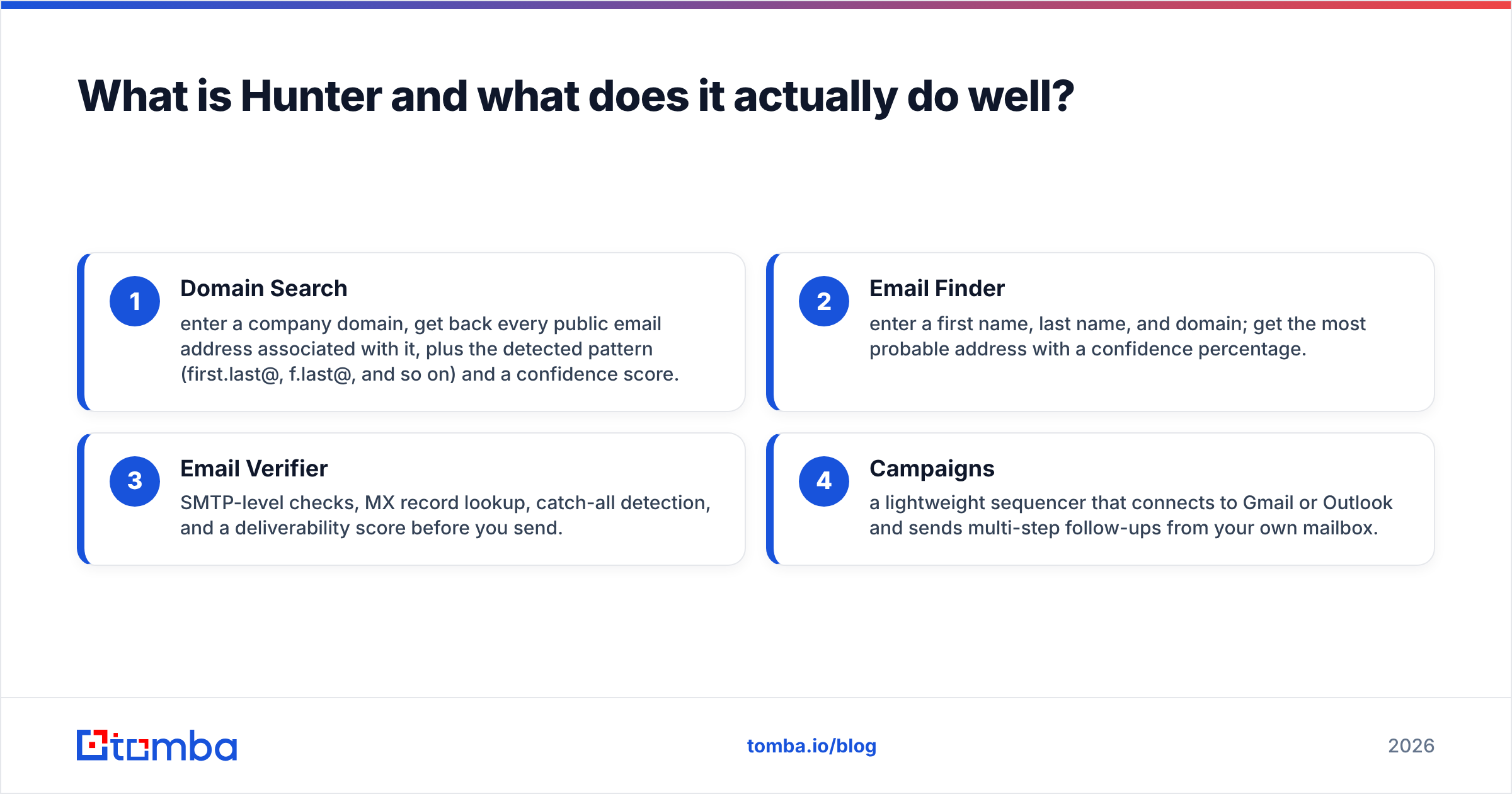
Hunter has been in the email-finding market since 2015 and is probably the most recognised brand in the category. The product breaks into four parts:
- Domain Search — enter a company domain, get back every public email address associated with it, plus the detected pattern (first.last@, f.last@, and so on) and a confidence score.
- Email Finder — enter a first name, last name, and domain; get the most probable address with a confidence percentage.
- Email Verifier — SMTP-level checks, MX record lookup, catch-all detection, and a deliverability score before you send.
- Campaigns — a lightweight sequencer that connects to Gmail or Outlook and sends multi-step follow-ups from your own mailbox.
That fourth item is why the comparison exists at all. Hunter Campaigns is, functionally, a mail merge for Gmail. It merges variables into a template, sends through your connected mailbox, stops on reply, and reports opens and clicks. It is competent. It is also deliberately basic compared to purpose-built merge tools — no conditional logic branches, limited spintax, thinner Sheets integration, and no deep template design.
Where Hunter genuinely wins: coverage and confidence scoring on the data itself. The confidence score is honest — a 92% result is usually deliverable, a 55% result usually is not, and the tool tells you which one you have before you spend a credit on it.
Where Hunter is weaker: catch-all domains. Like almost every verifier, Hunter will mark a catch-all domain as "accept-all" and hand the risk back to you. If a big chunk of your ICP sits on Microsoft 365 tenants configured to accept everything, you need a dedicated catch-all verifier layered on top, whatever finder you use.
What does "mail merge for Gmail" actually mean in 2026?#
The phrase covers four distinct things, and conflating them is why comparison articles get confusing.
- Google's native mail merge — built into Gmail on Workspace Business Standard and above. You pull recipients from Contacts or a CSV, use
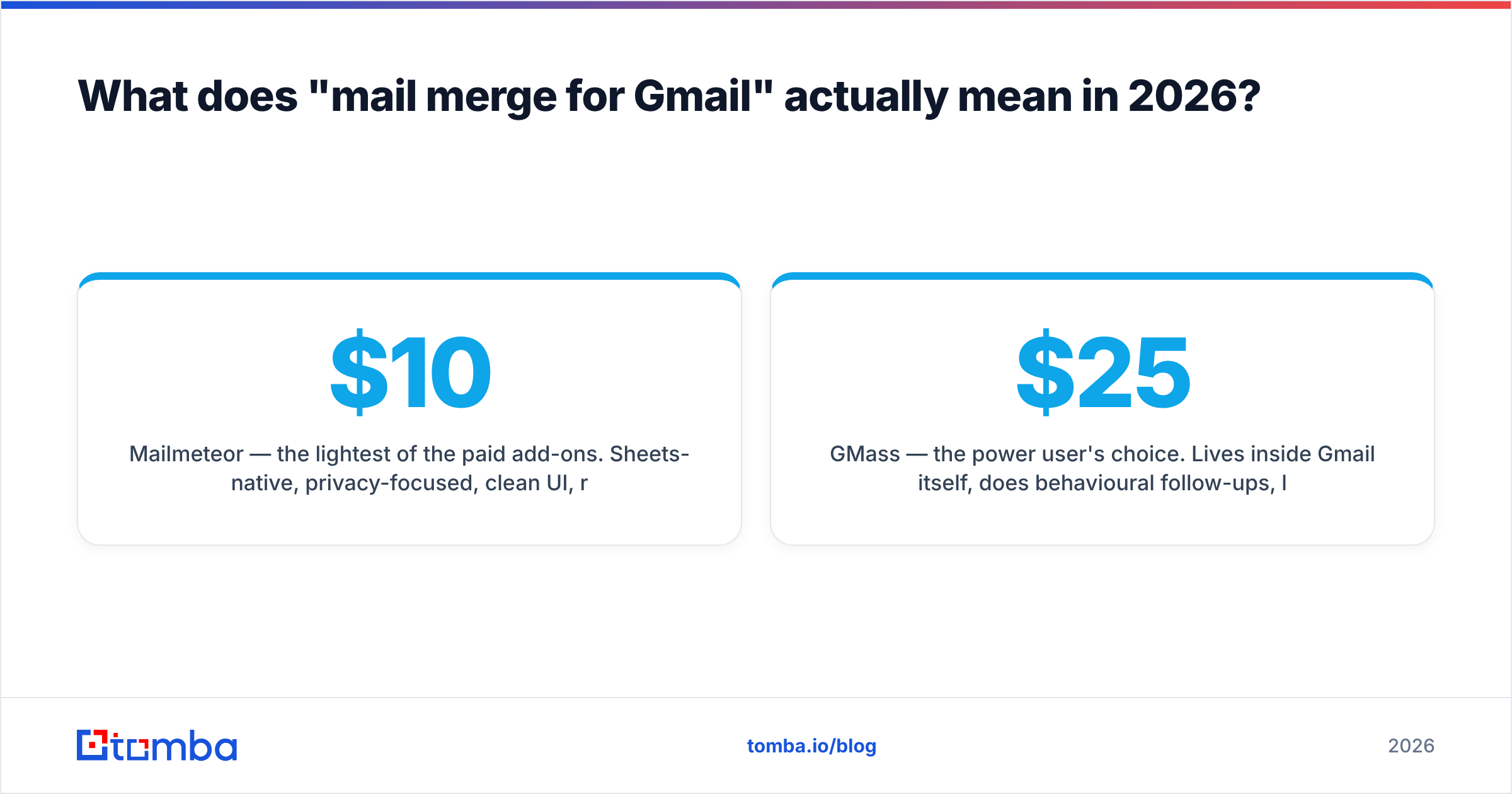
@firstnamestyle merge tags, and send. It is free with your plan, has zero tracking, and no follow-ups. Fine for event invites, useless for outbound sequences. Details live in the Google Workspace documentation. - Mailmeteor — the lightest of the paid add-ons. Sheets-native, privacy-focused, clean UI, roughly $10–$25/user/mo. Great for non-technical operators.
- GMass — the power user's choice. Lives inside Gmail itself, does behavioural follow-ups, list-building from search results, its own SMTP relay to push past some Gmail limits, and A/B testing. $25–$55/user/mo.
- YAMM (Yet Another Mail Merge) — the long-running Sheets add-on. Simple, reliable, tracks opens and clicks, popular in education and nonprofits.
All of them share one immovable constraint: they send through Gmail, so they inherit Gmail's sending limits and Gmail's reputation system. Google publishes the caps clearly in its sending limits documentation — 2,000 external recipients per day on most Workspace tiers, 500 on free Gmail, with rolling 24-hour windows rather than midnight resets.
No add-on removes that ceiling. GMass's SMTP relay routes around parts of it, but if you are sending 10,000 cold emails a day, you have outgrown the entire "mail merge for Gmail" category and belong on a dedicated infrastructure like Instantly, Smartlead, or Amazon SES with rotating domains.
Hunter vs mail merge for Gmail: how do they compare feature by feature?#
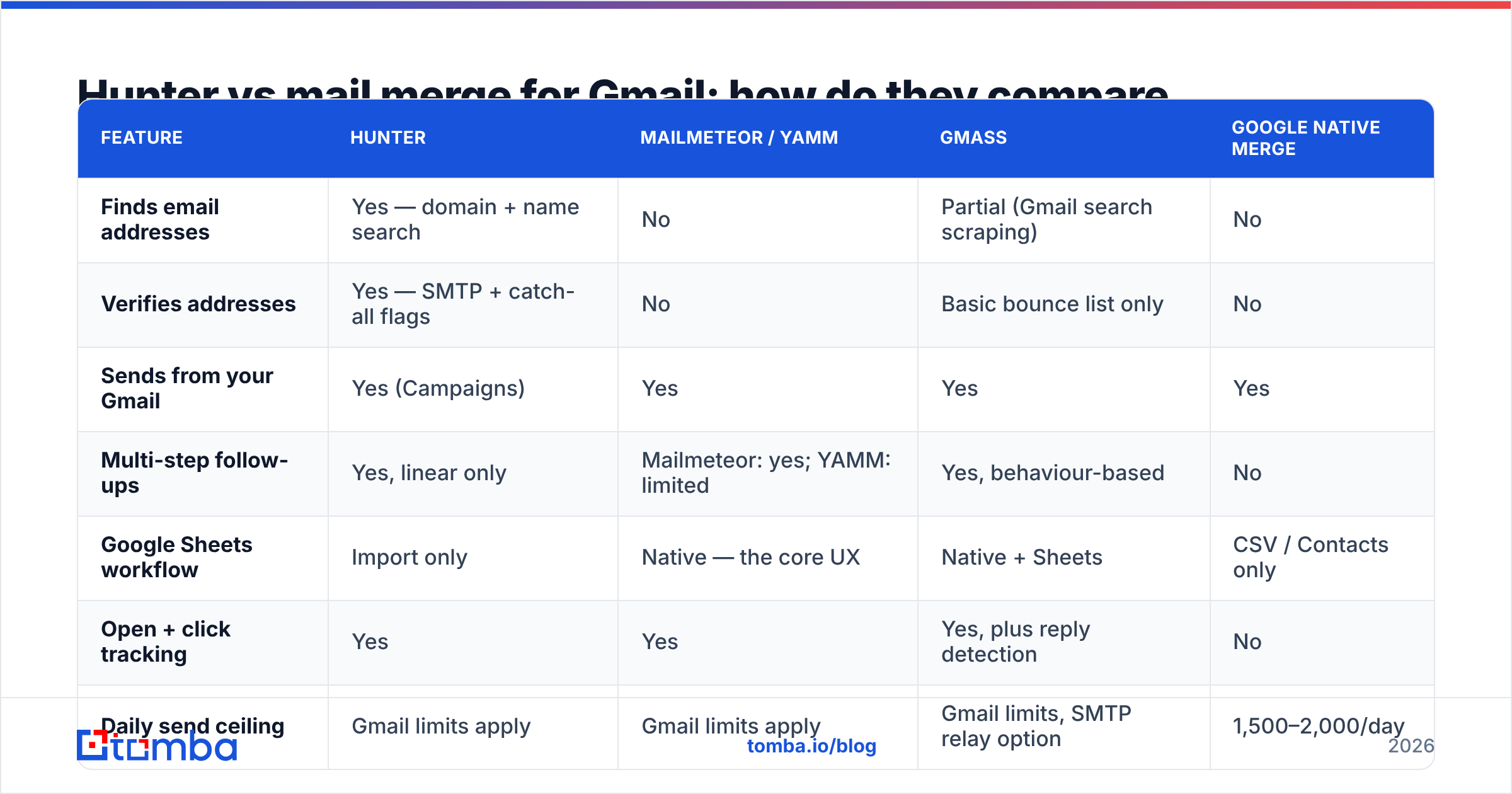
| Feature | Hunter | Mailmeteor / YAMM | GMass | Google native merge |
|---|---|---|---|---|
| Finds email addresses | Yes — domain + name search | No | Partial (Gmail search scraping) | No |
| Verifies addresses | Yes — SMTP + catch-all flags | No | Basic bounce list only | No |
| Sends from your Gmail | Yes (Campaigns) | Yes | Yes | Yes |
| Multi-step follow-ups | Yes, linear only | Mailmeteor: yes; YAMM: limited | Yes, behaviour-based | No |
| Google Sheets workflow | Import only | Native — the core UX | Native + Sheets | CSV / Contacts only |
| Open + click tracking | Yes | Yes | Yes, plus reply detection | No |
| Daily send ceiling | Gmail limits apply | Gmail limits apply | Gmail limits, SMTP relay option | 1,500–2,000/day |
| Entry price | ~$34/mo, 500 searches | ~$10–25/user/mo | ~$25/user/mo | Included in Workspace |
| Free tier | 25–50 searches/mo | 50–75 emails/day | 50 emails/day | N/A |
| Best for | Building and cleaning the list | Simple personalised blasts | High-volume Gmail outbound | Internal comms, invites |
Read that table as a division of labour, not a scoreboard. The only row where they genuinely overlap is "sends from your Gmail," and on that row Hunter Campaigns is mid-tier: better than Google native, thinner than GMass.
How should you choose between them for your specific situation?#
Match the tool to the bottleneck you actually have, not the one that sounds more strategic.
- You have a list, you need to send it. Buy a merge tool. Mailmeteor if your team is non-technical, GMass if you want behavioural follow-ups and are comfortable in a denser UI. Skip Hunter entirely for now.
- You have a target account list, no contacts. Buy a finder. Hunter, Tomba, Findymail — whichever gives you the best hit rate on your specific vertical. Trial two of them against the same 50 domains and count verified hits, not raw results.
- You are sending fewer than 100 emails a week. Use Google's native mail merge plus a finder's free tier. You do not need a paid sending tool at this volume, and the tracking you would gain is not worth $25/mo.
- You are sending 500+ per week from multiple inboxes. You have outgrown both categories. Move sending to dedicated cold-email infrastructure with domain rotation and warmup, and keep the finder as a pure data source via API.
- Your bounce rate is above 5%. Neither category is your problem — your verification step is. Run the entire list through a standalone email verifier before it touches any sender, regardless of which finder produced it.
- You need enrichment beyond email. Job titles, company size, phone numbers, tech stack. Merge tools do none of this. Compare finders on their enrichment depth, not their sending features.
Where does each option break down?#
Hunter breaks down at scale of sending. Campaigns is capped by your mailbox, offers no inbox rotation, and has no built-in warmup. If your plan involves five sending domains and 3,000 emails a day, Hunter is a data source in that architecture, not the delivery layer.
Mail merge tools break down at data quality. Every one of them assumes the spreadsheet is correct. Paste in guessed addresses and the tool will faithfully deliver your bounces to Google's spam filters, which will faithfully lower your domain reputation. There is no verification step inside Mailmeteor, YAMM, or Google's native merge worth relying on.
Both break down on catch-all domains. An accept-all server says "yes" to every address you test. Your verifier returns "unknown," your merge tool sends anyway, and you find out three weeks later that half your enterprise segment never existed. A dedicated catch-all finder that cross-references pattern data with real observed sends is the only reliable answer here.
Both break down on personalisation depth. Merge tags fill in {{first_name}} and {{company}}. They do not write the one line that makes a cold email land. If your open rates are fine and your reply rates are 0.4%, the tool is not the variable — the copy is.
Can you run Hunter and a Gmail mail merge tool together?#
Yes, and for most teams under 20 people that is the right stack. The workflow looks like this:
- Build the account list. Export target domains from your CRM, a funding database, or a scraped source.
- Find contacts. Run domain search across those domains, filtering by department and seniority. Export to CSV.
- Verify before anything else. Push the full list through verification. Drop everything marked invalid; quarantine everything marked accept-all into a separate low-priority segment.
- Enrich in the sheet. Add job title, company size, and one personalisation variable per row. This is where a Google Sheets add-on earns its keep — you find, verify, and enrich in the same tab your merge tool reads from.
- Send with the merge tool. Point Mailmeteor or GMass at the cleaned sheet, cap daily volume at 60–80% of your Gmail limit, and stagger sends across hours.
- Feed replies back. Positive replies go to the CRM, bounces go into a suppression list you reuse on every future campaign.
Step 3 is the one people skip, and it is the one that determines whether steps 5 and 6 work at all. Reviews on G2 are full of teams blaming their sending tool for deliverability problems that started in a spreadsheet.
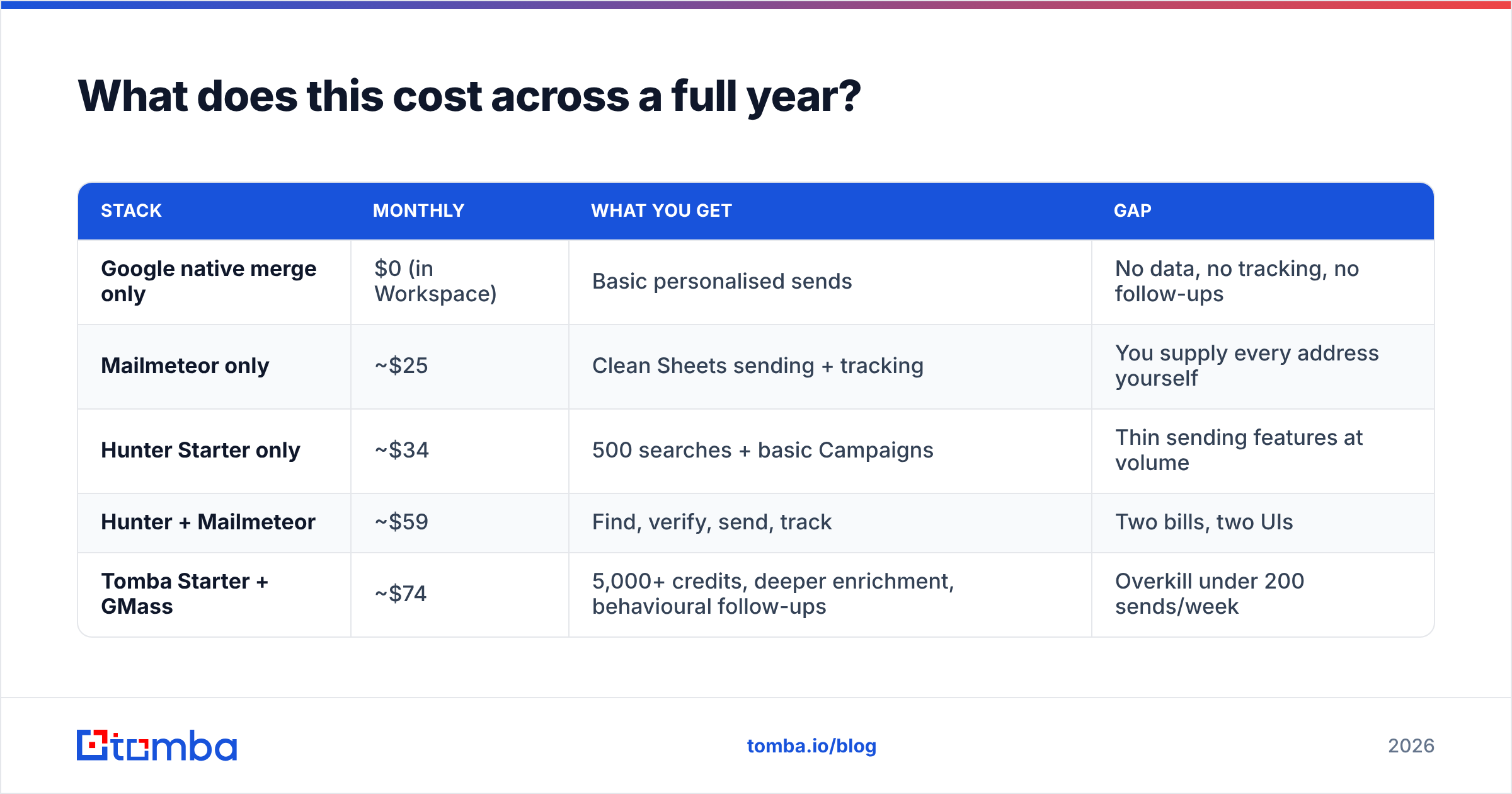
What does this cost across a full year?#
| Stack | Monthly | What you get | Gap |
|---|---|---|---|
| Google native merge only | $0 (in Workspace) | Basic personalised sends | No data, no tracking, no follow-ups |
| Mailmeteor only | ~$25 | Clean Sheets sending + tracking | You supply every address yourself |
| Hunter Starter only | ~$34 | 500 searches + basic Campaigns | Thin sending features at volume |
| Hunter + Mailmeteor | ~$59 | Find, verify, send, track | Two bills, two UIs |
| Tomba Starter + GMass | ~$74 | 5,000+ credits, deeper enrichment, behavioural follow-ups | Overkill under 200 sends/week |
On raw cost per verified contact, the finder side is where the money actually goes — sending tools are commodity-priced and rarely the line item worth optimising. If you are comparing data providers on price, check the Tomba pricing tiers against Hunter's: free at 25 searches/mo, Starter at $49/mo, Growth at $99/mo, and Pro at $249/mo, with API access on every paid tier rather than gated to the top.
Which one wins?#
Neither, and that is the honest answer. Hunter wins the data half. A dedicated Gmail merge tool wins the sending half. If someone forces you to buy exactly one, buy the one that solves the bottleneck you can measure this week: no list means buy the finder, no sending capacity means buy the merge tool.
What we would push back on is the idea that Hunter Campaigns replaces a merge tool, or that a merge tool with a "find emails" checkbox replaces a real data provider. Both claims are marketing. In practice, teams that treat finding and sending as separate purchases end up with better bounce rates, cleaner reputation, and lower total spend than teams that chase an all-in-one.
Ready to fix the data half of your stack?#
If your Gmail merge tool is working fine and your problem is that the spreadsheet keeps producing bounces, start there. The Tomba Email Finder returns verified professional addresses by name, domain, or company, with SMTP verification and catch-all handling built into the same call — so what lands in your sheet is already safe to send. The free tier gives you 25 searches a month to test it against your own target list before you pay anything. Run it on the same 50 domains you tried with Hunter, count the verified hits, and let the numbers pick your finder.
Related guides#
// get started
Find, verify and enrich your first contacts today
Start on the free plan with 25 searches a month, then scale when your team is ready.
Free plan · No credit card required · GDPR & CCPA
// about the author