Hunter vs Mailfloss (2026): Email Finder vs List Cleaner
Hunter finds new email addresses. Mailfloss quietly cleans the ones already sitting in your ESP. Here is the honest 2026 breakdown of pricing, accuracy, overlap, and which one earns a spot in your stack first.
TL;DR
- Hunter and Mailfloss solve different problems. Hunter finds email addresses that are not in your database yet. Mailfloss removes bad addresses from lists you already own.
- If your bounce rate is climbing on an existing Mailchimp or HubSpot list, Mailfloss is the faster fix. If you have no list at all, Mailfloss has nothing to clean.
- Hunter's entry paid tier sits near $49/mo and scales into the $149-$499/mo range as search volume grows. Mailfloss is priced per verification volume and starts far lower because it does less.
- Neither tool covers the full job alone: finding, verifying, catch-all handling, and enrichment. Stacking two subscriptions is common and usually more expensive than a single platform that does all four.
- Buying order matters more than brand: verify first, then find at volume, then automate hygiene.
What do Hunter and Mailfloss actually do?#
They are not competitors in the strict sense. They sit at opposite ends of the same pipeline.
Hunter is an email finder. You give it a domain, a first and last name, or a company, and it returns a professional email address with a confidence score and the public sources it was seen on. It also ships a verifier, a domain search, a Chrome extension, and a light cold-email sender. Hunter's centre of gravity is discovery: getting an address that did not exist in your CRM ten seconds ago.
Mailfloss is an email hygiene automation tool. You connect it to your email service provider (Mailchimp, ActiveCampaign, Klaviyo, HubSpot, Drip, and others), and it runs in the background, verifying new subscribers as they arrive and periodically re-verifying your existing list. Bad addresses get unsubscribed, archived, or tagged according to rules you set. It also does typo correction, catching gmial.com and rewriting it to gmail.com. Mailfloss's centre of gravity is maintenance: keeping a list you already built from rotting.
Put simply: Hunter fills the bucket, Mailfloss patches the holes.
That distinction decides most of this comparison. Asking which tool is "better" is like asking whether a tap is better than a filter. The real question is which one your pipeline is missing right now.
How do Hunter and Mailfloss compare feature by feature?#
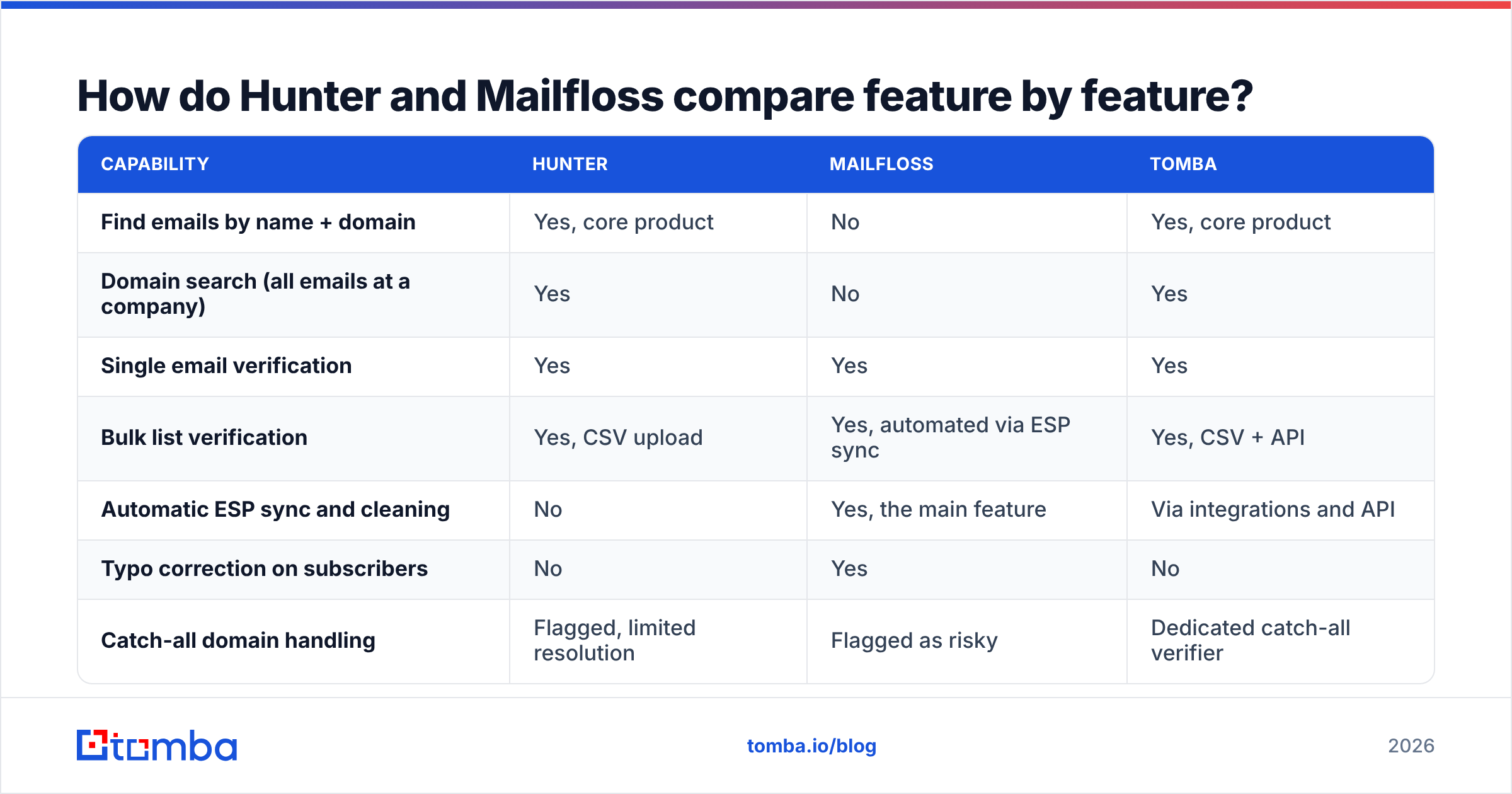
| Capability | Hunter | Mailfloss | Tomba |
|---|---|---|---|
| Find emails by name + domain | Yes, core product | No | Yes, core product |
| Domain search (all emails at a company) | Yes | No | Yes |
| Single email verification | Yes | Yes | Yes |
| Bulk list verification | Yes, CSV upload | Yes, automated via ESP sync | Yes, CSV + API |
| Automatic ESP sync and cleaning | No | Yes, the main feature | Via integrations and API |
| Typo correction on subscribers | No | Yes | No |
| Catch-all domain handling | Flagged, limited resolution | Flagged as risky | Dedicated catch-all verifier |
| Phone numbers | No | No | Yes |
| Data enrichment (company, role, social) | Limited | No | Yes |
| Chrome extension | Yes | No | Yes |
| API access | Yes | Yes | Yes, on all paid plans |
| Free tier | 25 searches/mo | Trial-based | 25 searches/mo |
The table makes the overlap obvious: verification is the only column where both tools genuinely compete. Everything else is a straight split.

Is Hunter or Mailfloss more accurate at verification?#
Neither publishes an audited accuracy figure you should take at face value, and you should be suspicious of any vendor that claims 99% on every list. Accuracy depends far more on the type of address you feed the system than on the vendor's logo.
Here is what actually drives your results:
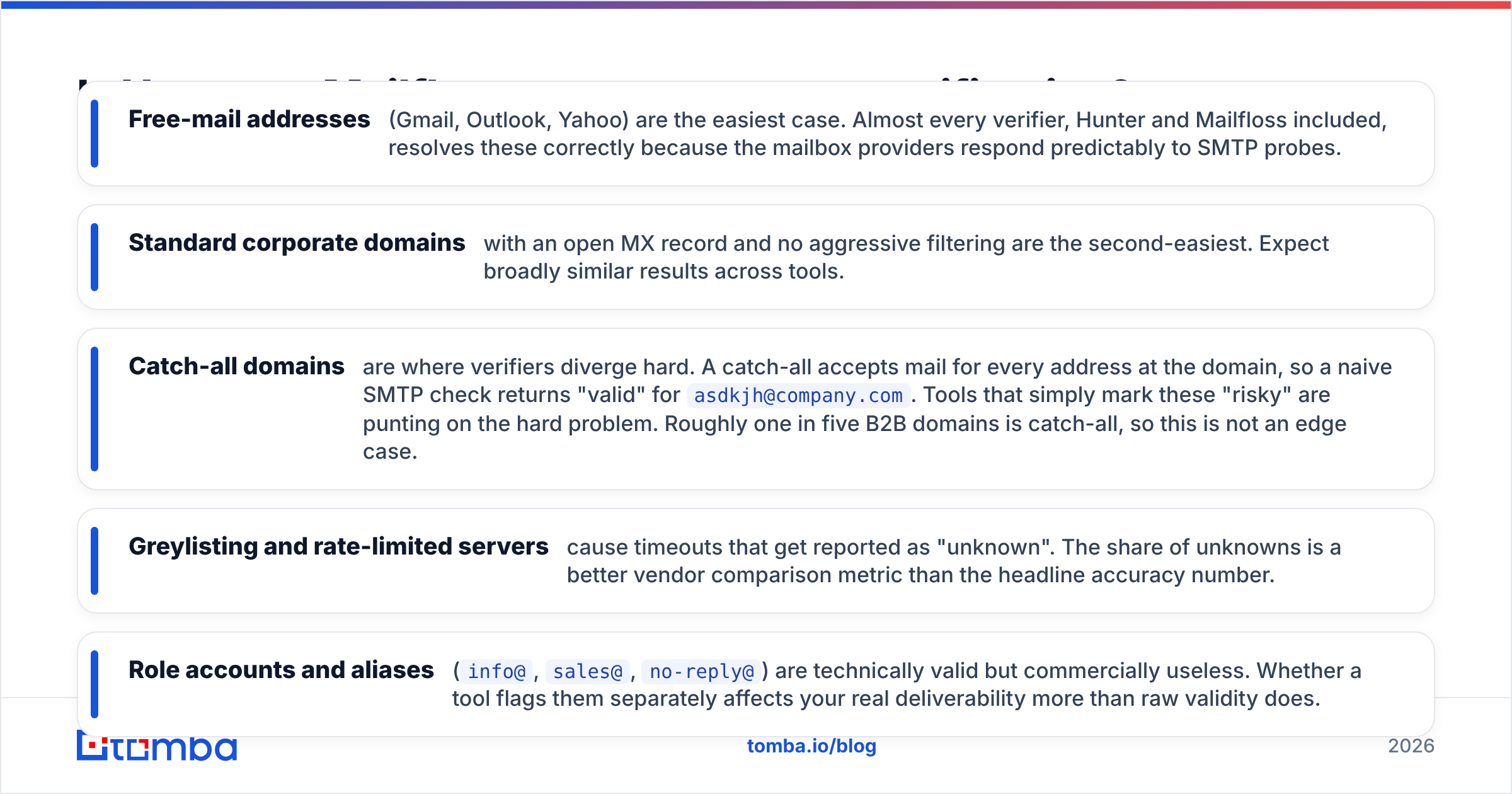
- Free-mail addresses (Gmail, Outlook, Yahoo) are the easiest case. Almost every verifier, Hunter and Mailfloss included, resolves these correctly because the mailbox providers respond predictably to SMTP probes.
- Standard corporate domains with an open MX record and no aggressive filtering are the second-easiest. Expect broadly similar results across tools.
- Catch-all domains are where verifiers diverge hard. A catch-all accepts mail for every address at the domain, so a naive SMTP check returns "valid" for
asdkjh@company.com. Tools that simply mark these "risky" are punting on the hard problem. Roughly one in five B2B domains is catch-all, so this is not an edge case. - Greylisting and rate-limited servers cause timeouts that get reported as "unknown". The share of unknowns is a better vendor comparison metric than the headline accuracy number.
- Role accounts and aliases (
info@,sales@,no-reply@) are technically valid but commercially useless. Whether a tool flags them separately affects your real deliverability more than raw validity does.

Hunter is strong on the discovery-plus-confidence-score model: it tells you why it believes an address is right, listing the public pages where it was found. Mailfloss is strong on the always-on model: it re-verifies continuously, so decay never accumulates. If you want a dedicated pass at the hardest bucket, a purpose-built catch-all verifier will resolve more of those addresses than a general-purpose check bolted onto a finder or a sync tool.
Independent review aggregation on G2 is worth ten minutes before you commit, mostly to read the one-star reviews. Complaints cluster around credit expiry and support responsiveness far more often than around raw accuracy.
How much do Hunter and Mailfloss cost in 2026?#
Pricing shifts, so treat these as shape rather than gospel and check both vendors' pages before you buy.
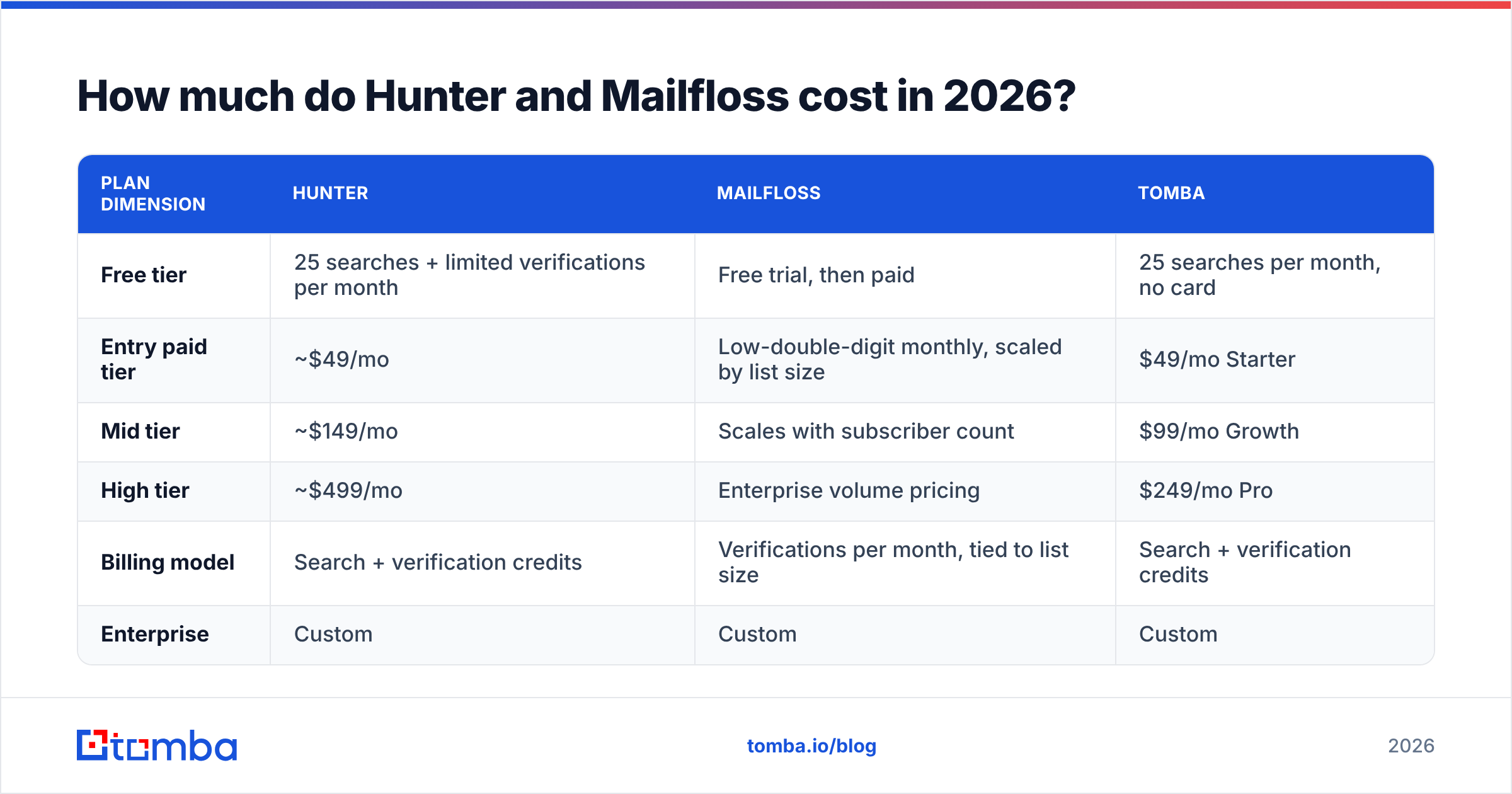
| Plan dimension | Hunter | Mailfloss | Tomba |
|---|---|---|---|
| Free tier | 25 searches + limited verifications per month | Free trial, then paid | 25 searches per month, no card |
| Entry paid tier | ~$49/mo | Low-double-digit monthly, scaled by list size | $49/mo Starter |
| Mid tier | ~$149/mo | Scales with subscriber count | $99/mo Growth |
| High tier | ~$499/mo | Enterprise volume pricing | $249/mo Pro |
| Billing model | Search + verification credits | Verifications per month, tied to list size | Search + verification credits |
| Enterprise | Custom | Custom | Custom |
The important structural difference: Mailfloss's price is a function of how big your list is, and Hunter's is a function of how much prospecting you do. A 200,000-contact newsletter with zero outbound will pay Mailfloss a lot and Hunter almost nothing. A three-person outbound team building lists from scratch will pay Hunter a lot and Mailfloss almost nothing.
Stack both and you are paying two subscriptions with an overlapping verification feature. That is the specific inefficiency worth auditing. Compare the combined figure against Tomba pricing, where finding, verification, catch-all resolution, and enrichment share one credit pool.

When should you choose Hunter?#
Pick Hunter when discovery is the bottleneck.
Concretely, that means you are in one of these situations. You have a target account list but no contacts at those accounts. You are running founder-led outbound and need twenty good addresses a day, not twenty thousand. You want a lightweight all-in-one where finding, verifying, and a basic sequence sender live behind a single login. Or your team already lives in the Chrome extension workflow and switching costs are real.
Hunter's weaknesses are equally concrete. Coverage outside North America and Western Europe thins out. Credit consumption on domain searches surprises people on the entry tier. And the built-in sender is fine for low volume but not a replacement for a real sequencer if you are sending at scale.
When should you choose Mailfloss?#
Pick Mailfloss when decay is the bottleneck.
You have an existing list of 10,000+ subscribers in an ESP. Your bounce rate has crept past 2% and your provider has started sending warning emails. You do not want to remember to export a CSV, upload it somewhere, and re-import the clean version every quarter. You want typo correction on signup so @gmial.com never enters the database in the first place.
Mailfloss is genuinely good at this narrow job, and the automation is the product. Set the rules once and stop thinking about hygiene. What it will never do is give you a new contact. If your problem is an empty pipeline, Mailfloss is the wrong purchase, no matter how good the reviews are.

Do you actually need both tools?#
Usually not both, and rarely in that order. Work through these five questions before adding a second subscription:
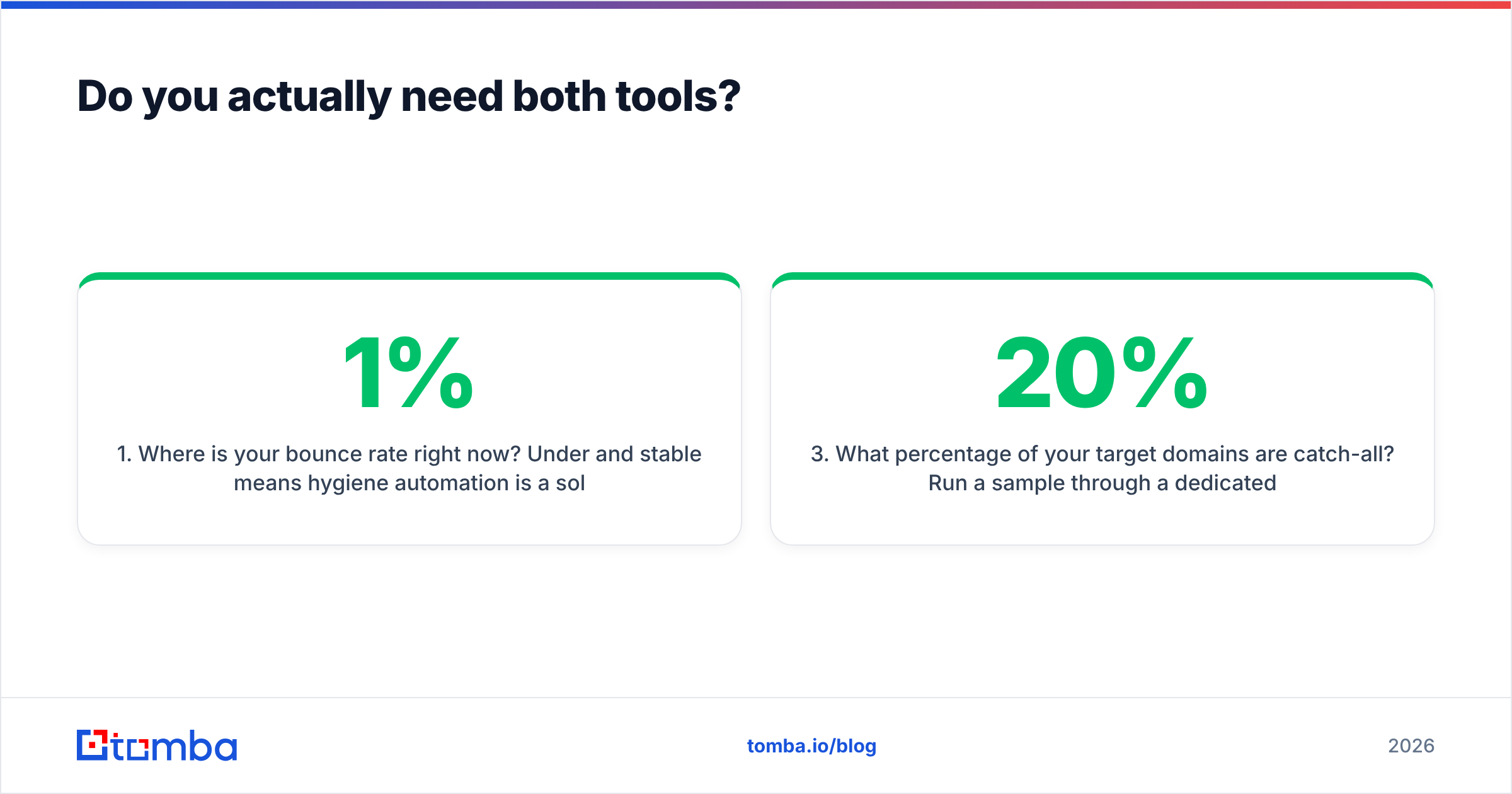
- Where is your bounce rate right now? Under 1% and stable means hygiene automation is a solution to a problem you do not have. Over 3% means fix that before you send another campaign, because sender reputation damage compounds.
- How many net-new contacts do you add per month? Under a few hundred and manual verification at the point of capture is cheaper than an always-on sync. Over a few thousand and automation pays for itself immediately.
- What percentage of your target domains are catch-all? Run a sample through a dedicated checker. If it is above 20%, a general verifier will leave real revenue in the "risky" bucket and you need a tool that resolves them.
- Is your data one channel or several? If you also need phone numbers, LinkedIn URLs, or firmographics, you are looking at a third subscription. Consolidation math changes fast at that point.
- Who maintains the integration? Two vendors means two API keys, two rate limits, two billing cycles, and two support queues. That overhead is invisible on the pricing page and very visible in week six.
Where does Tomba fit in this comparison?#
Tomba overlaps with Hunter on discovery and with Mailfloss on verification, and it covers a couple of things neither one touches.
On the finding side, the email finder and domain search do the same job as Hunter's core: name plus domain in, verified professional address out, with sources attached. On the hygiene side, the email verifier handles single and bulk checks, and the catch-all verifier goes after the bucket most tools give up on. Beyond both: phone numbers, reverse email lookup, and contact enrichment sit in the same credit pool.
The practical argument is not "Tomba is better at everything." It is that one vendor at $49/mo Starter or $99/mo Growth frequently replaces a finder subscription plus a verification subscription plus a partial enrichment subscription, and you stop reconciling three credit balances. If you already love Hunter's extension or Mailfloss's ESP automation, keep them. If you are assembling the stack now, start consolidated and add specialists later when a specific gap shows up.
For teams pushing volume, the Tomba API and bulk email finder handle list-level work without the CSV round trip, and native connectors cover the usual CRM destinations documented in the HubSpot developer docs style of workflow.
What does a clean 2026 stack look like end to end?#
Order of operations, assuming you are starting from a target account list:
Find the contacts at your accounts. Verify every address before it enters the CRM, not after the campaign bounces. Resolve catch-all domains separately rather than dumping them into a "risky" pile you never touch. Enrich with role, seniority, and company data so your segmentation is not guesswork. Then automate re-verification on a quarterly cycle, because roughly a quarter of B2B contact data goes stale every year through job changes alone.
Hunter covers step one and part of step two. Mailfloss covers step five and part of step two. Whether you buy both, one, or a platform that spans the whole sequence depends entirely on which steps are currently broken in your process.
Audit that first. Buy second.
Start with the step that unblocks everything else. If your list is empty, hygiene automation has nothing to work on. Try the Tomba Email Finder free with 25 searches a month, no card required, and see how many verified addresses you get on your own target accounts before you commit to any subscription. If the coverage holds up on your real domains, the $49/mo Starter plan replaces most of what a finder-plus-verifier stack was costing you.
Related guides#
// get started
Find, verify and enrich your first contacts today
Start on the free plan with 25 searches a month, then scale when your team is ready.
Free plan · No credit card required · GDPR & CCPA
// about the author