Hunter vs Mailtag: Which Email Tool Wins in 2026?
Hunter finds and verifies email addresses. Mailtag tracks whether the emails you send get opened. Here's the honest breakdown of which one your pipeline actually needs — and where both fall short.
TL;DR
- Hunter and Mailtag are not competitors. Hunter finds and verifies email addresses before you send; Mailtag tracks opens, clicks, and link activity after you send.
- If your bottleneck is "I don't have the right addresses," Hunter (or a cheaper, higher-coverage finder) solves it. If your bottleneck is "I sent 200 emails and have no idea what happened," Mailtag solves it.
- Mailtag is a Gmail/Chrome-native tracker at roughly $10–$13/user/month. Hunter starts free (25–50 searches) and climbs to $34–$104+/month depending on tier and billing cycle.
- Open tracking has aged badly. Apple Mail Privacy Protection and Gmail image proxying inflate open rates to the point where many teams now optimize for replies, not opens.
- Most outbound teams end up running a finder + verifier for data quality and a sequencer with built-in tracking — which makes the standalone tracker the first line item to cut.
Search "Hunter vs Mailtag" and you'll find a lot of pages that pretend these two tools compete. They don't. Comparing them is like comparing a flashlight to a smoke detector — both live in the same house, neither replaces the other. But the question keeps getting asked for a good reason: both show up in the same Gmail sidebar, both charge a monthly fee, and a small sales team with a $200 tooling budget genuinely has to choose.
This post breaks down what each tool actually does, where each one's pricing bites, why open tracking is worth less in 2026 than it was in 2019, and how to build a stack that covers both jobs without paying twice.
What is Hunter, and what problem does it solve?#
Hunter is an email-finding and verification platform. You give it a domain (or a name plus a domain) and it returns professional email addresses along with a confidence score and the public sources where the address appeared.
Its core surface area:
- Domain Search — enter
stripe.com, get a list of published addresses at that company plus the dominant email pattern (first.last@,f.last@, etc.). - Email Finder — enter a person's name and their company domain, get their most probable address with a confidence percentage.
- Email Verifier — run an existing address through syntax, MX, and SMTP checks to see whether it will bounce.
- Campaigns — a lightweight cold email sequencer bolted on top of the data layer, with basic open and reply tracking.
- Chrome extension and API — lookups from LinkedIn and company sites, plus programmatic access for enrichment jobs.
Hunter's real product is coverage plus provenance. The "sources" panel — showing the actual page where an address was scraped — is why a lot of researchers trust it for one-off lookups. Its weakness is the same as every finder built primarily on public web crawling: coverage thins out fast for companies with no press coverage, no team page, and no engineers posting on GitHub.
What is Mailtag, and who is it for?#
Mailtag is an email tracking extension for Gmail. Install the Chrome plugin, and every message you send gets a tracking pixel and wrapped links. You then get:
- Open tracking — a notification when (and how often) a recipient opens your message.
- Click tracking — which links inside the email got clicked.
- Ping sequences — scheduled automatic follow-ups if a recipient doesn't reply.
- Email scheduling — send later, at the recipient's local morning.
- Desktop and push notifications — real-time alerts when activity happens.
- Basic analytics — aggregate open and click rates over time.
That's the whole product, and there's nothing wrong with that. Mailtag is aimed at individual reps, recruiters, founders, and consultants who live in Gmail, send 20–60 personal emails a day, and want to know which ones landed. It's not a data provider. It has no idea whether the address you typed is real until the bounce comes back.
The distinction matters more than any feature table: Hunter operates before send, Mailtag operates after send. If you buy Mailtag hoping it will help you find prospects, you've bought the wrong tool. If you buy Hunter hoping it will tell you who opened your Tuesday follow-up, same problem.
How do Hunter and Mailtag compare head to head?#
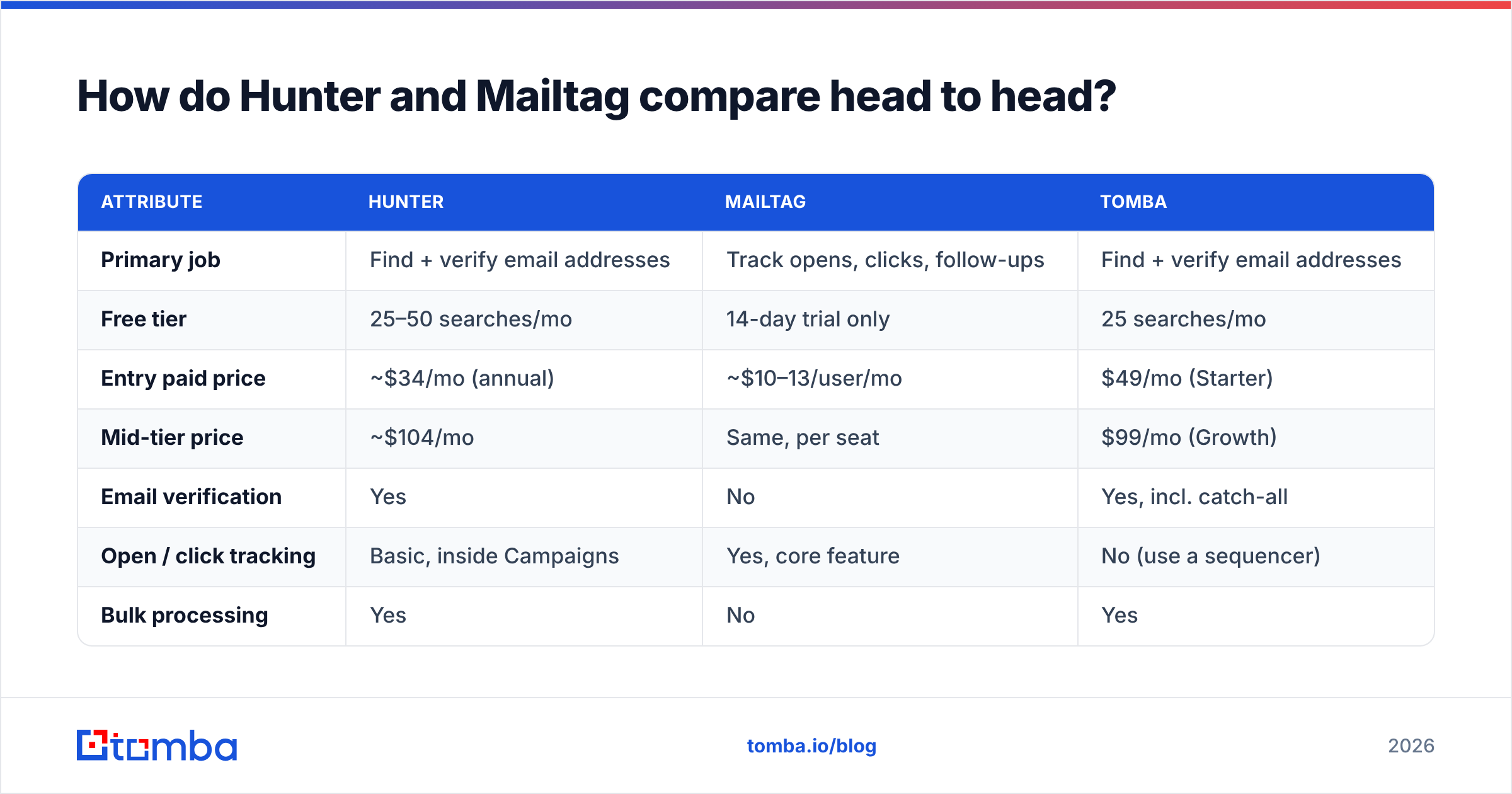
Here's the honest side-by-side, with a third column for a dedicated finder alternative so you can see where the money goes.
| Attribute | Hunter | Mailtag | Tomba |
|---|---|---|---|
| Primary job | Find + verify email addresses | Track opens, clicks, follow-ups | Find + verify email addresses |
| Free tier | 25–50 searches/mo | 14-day trial only | 25 searches/mo |
| Entry paid price | ~$34/mo (annual) | ~$10–13/user/mo | $49/mo (Starter) |
| Mid-tier price | ~$104/mo | Same, per seat | $99/mo (Growth) |
| Email verification | Yes | No | Yes, incl. catch-all |
| Open / click tracking | Basic, inside Campaigns | Yes, core feature | No (use a sequencer) |
| Bulk processing | Yes | No | Yes |
| API access | Yes | No public API | Yes, full REST API |
| Chrome extension | Yes | Yes | Yes |
| Phone number lookup | No | No | Yes |
| Data enrichment | Limited | No | Yes |
| Best for | Building verified lists | Solo Gmail senders | Teams needing volume + API |
Two things jump out. First, Hunter and Tomba occupy the same row of your stack — they're substitutes, and you should pick one on coverage and cost per verified contact, not on brand recognition. Second, Mailtag occupies a row that most modern sequencers already cover for free, which is the crux of the buying decision below.

Is open tracking still worth paying for in 2026?#
Short answer: much less than it used to be, and you should price Mailtag accordingly.
Apple's Mail Privacy Protection, introduced in 2021 and now the default behavior for a large share of consumer and mixed-use inboxes, pre-fetches remote images through a proxy. That means the tracking pixel fires whether or not a human ever looked at the message. Gmail has proxied images through Google's servers since 2013, which caches the pixel and blurs open timing. The practical result: your open rate is a blend of real human opens, automated pre-fetches, and security scanners clicking every link in the message before it reaches the inbox.
What still works reasonably well:
- Relative comparison within a single campaign. If variant A shows 41% opens and variant B shows 22% against the same list on the same day, that delta still means something even if both absolute numbers are inflated.
- Click tracking on non-security-scanned domains. Clicks are a stronger signal than opens, though link-scanning gateways at enterprise accounts generate false positives too.
- Reply rate. The only metric nobody can fake on your behalf.
What no longer works:
- Treating an "open" as intent. Calling a prospect because the pixel fired three times is, increasingly, calling someone whose mail client fetched an image three times.
- Benchmarking your open rate year over year. The measurement changed underneath you.
If you're building a follow-up cadence around open signals, read up on email deliverability fundamentals first — inbox placement determines whether the pixel ever had a chance to fire, and no tracker can distinguish "not opened" from "landed in spam."
Which one should you actually buy?#
Work backward from your bottleneck.
Buy a finder (Hunter, Tomba, or similar) if:
- You're spending more than an hour a week guessing at email formats or manually checking LinkedIn.
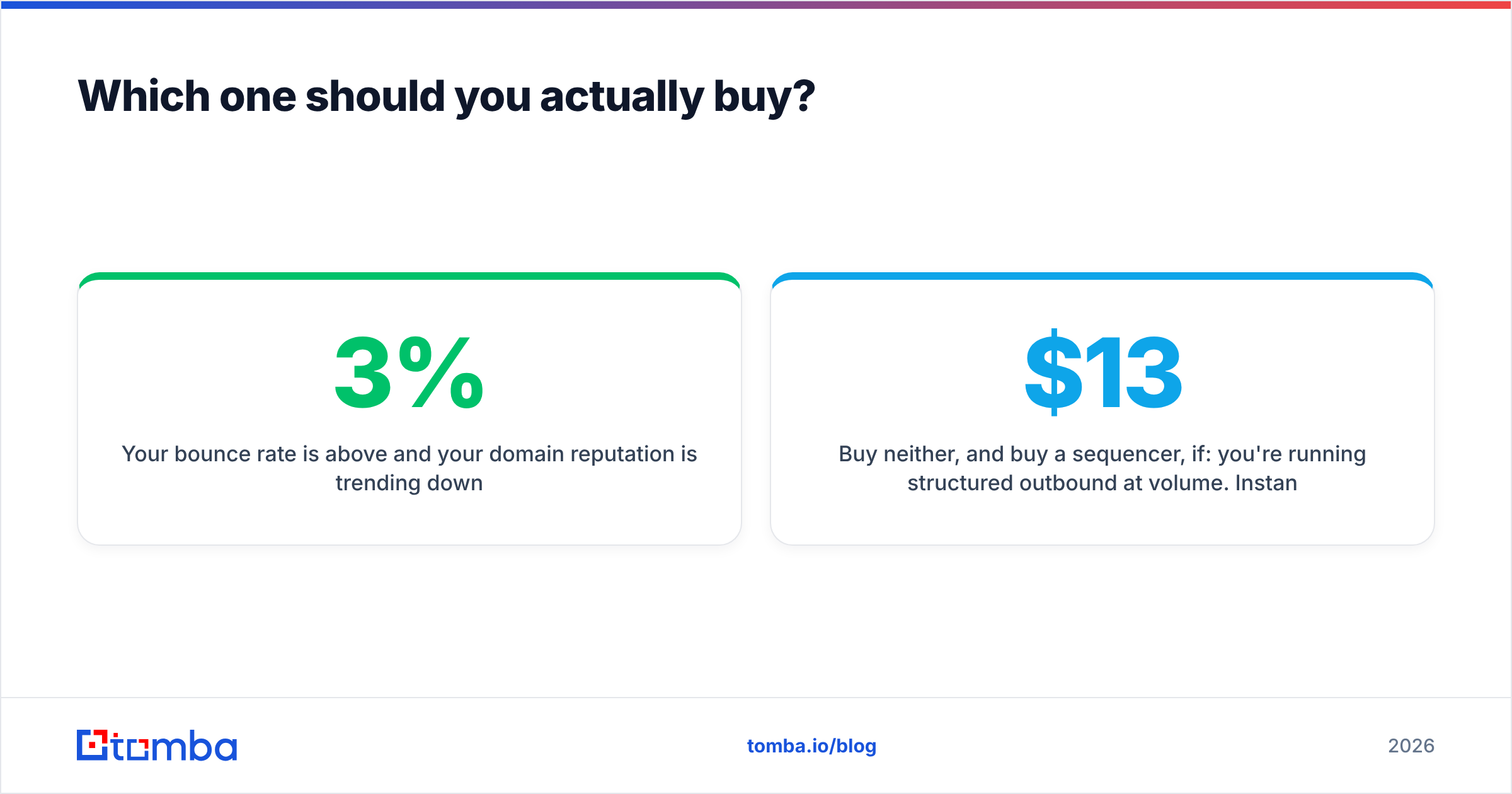
- Your bounce rate is above 3% and your domain reputation is trending down.
- You need to build lists in bulk — 500+ contacts per campaign — rather than one address at a time.
- You want programmatic enrichment inside a CRM, a Sheet, or your own app.
Buy Mailtag (or a tracker) if:
- You send a low volume of high-value, individually written emails.
- You live in Gmail and refuse to move to a sequencer.
- Your follow-up timing genuinely depends on knowing when someone engaged — recruiting, fundraising, and partnership outreach are the honest use cases.
- You need automatic ping sequences without adopting a full outbound platform.
Buy neither, and buy a sequencer, if: you're running structured outbound at volume. Instantly, Smartlead, Saleshandy, Reply.io, and Lemlist all include open and click tracking in their base plans. Paying $13/seat for a standalone tracker on top of a $37/month sequencer is a duplicated line item. See Instantly alternative and Saleshandy alternative breakdowns if you're evaluating that layer.

Where does Hunter's pricing actually hurt?#
Hunter's free tier is genuinely useful for occasional lookups, and its pricing pages are clear. The pain shows up in two places.
Credit consumption on failures. Most finders — Hunter included — spend a credit on the attempt, not the result. When you're prospecting into small companies, mid-market manufacturers, or non-English-language markets where public web coverage is thin, your effective cost per usable address can be double or triple the sticker rate. Always evaluate a finder on cost per verified, deliverable contact, not cost per search.
The step between tiers. Going from the entry plan to the next tier is a large jump for a two-person team that just needs a few thousand more lookups a month. If you're near a ceiling, compare against Tomba pricing — the Starter plan runs $49/month, Growth $99/month, and Pro $249/month, with the free tier at 25 searches/month for testing coverage before you commit.
The practical test is boring and takes twenty minutes: take 100 real prospects from your ICP, run them through both tools' free tiers, then run every returned address through an email verifier and count how many come back deliverable. Whichever tool returns more verified addresses per dollar wins for your specific market. Coverage is not universal — a tool that's excellent for US SaaS may be mediocre for European industrials, and vice versa.
What about the tools nobody mentions in this comparison?#
The Hunter-vs-Mailtag framing is narrow. A realistic 2026 stack has four layers, and you should know what fills each one:
- Data / finding — Hunter, Tomba, Apollo, Findymail, BookYourData. This is where address coverage and verification live. BookYourData is worth a look if you'd rather buy a pre-verified list outright than run lookups; Apollo bundles data with sequencing at the cost of per-contact freshness.
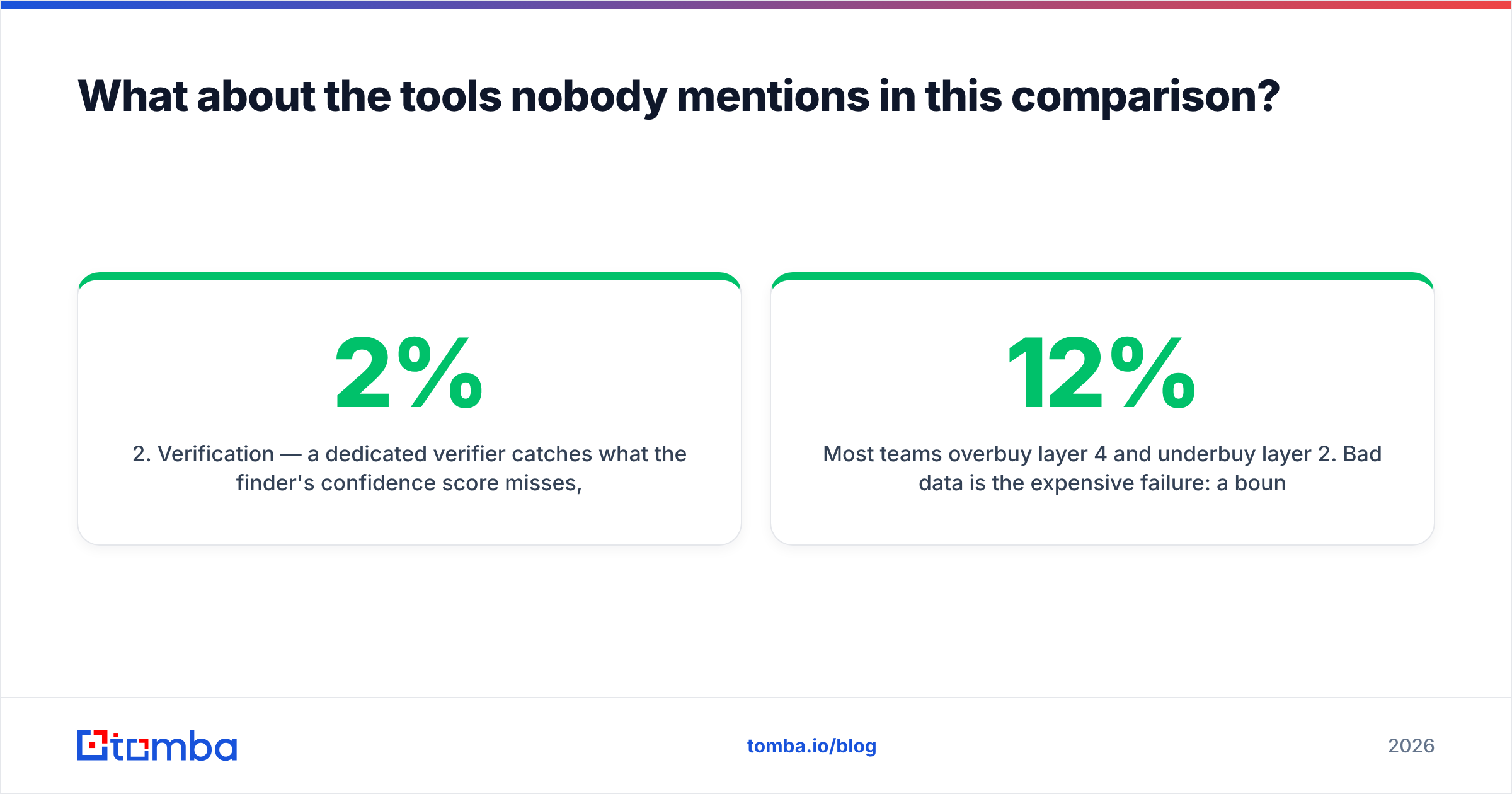
- Verification — a dedicated verifier catches what the finder's confidence score misses, especially on catch-all domains where SMTP gives you no useful answer. A catch-all verifier is the difference between a 2% and a 9% bounce rate on enterprise domains.
- Sending / sequencing — Instantly, Smartlead, Saleshandy, Lemlist, Reply.io. Tracking is included here.
- Tracking / analytics — Mailtag, Streak, Mailtrack, or whatever your sequencer ships. Only worth a separate line item if you're staying in raw Gmail.
Most teams overbuy layer 4 and underbuy layer 2. Bad data is the expensive failure: a 12% bounce rate doesn't just waste sends, it damages sender reputation in a way that takes weeks to repair and makes every subsequent campaign underperform — including the ones with perfect copy.
For a deeper read on how the finder market shakes out on raw accuracy, G2's email-finder category and vendor documentation at hunter.io and mailtag.io are worth checking directly rather than trusting any comparison post — including this one — as the final word.
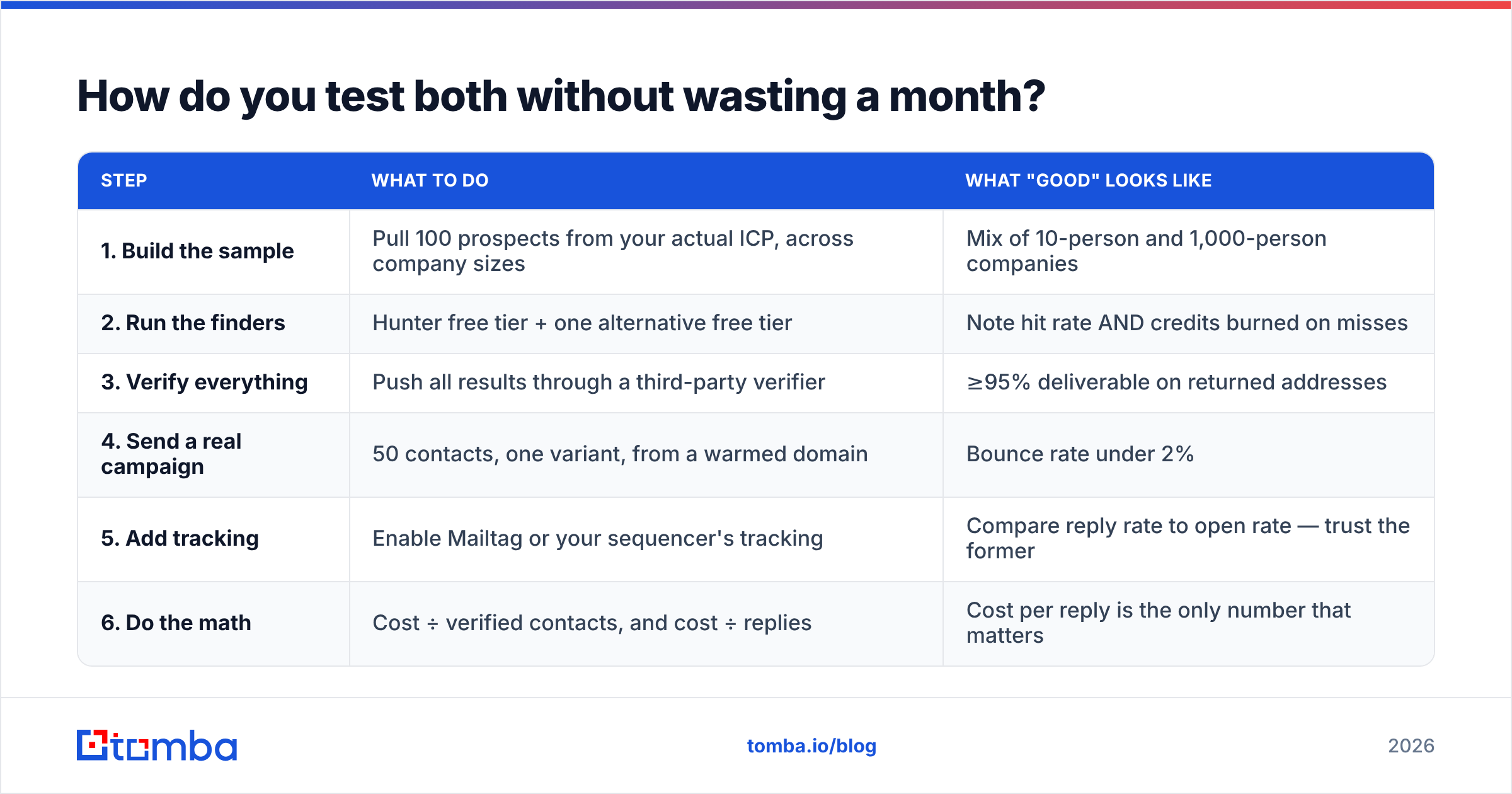
How do you test both without wasting a month?#
Run a two-week bake-off with a real list, not a demo list.
| Step | What to do | What "good" looks like |
|---|---|---|
| 1. Build the sample | Pull 100 prospects from your actual ICP, across company sizes | Mix of 10-person and 1,000-person companies |
| 2. Run the finders | Hunter free tier + one alternative free tier | Note hit rate AND credits burned on misses |
| 3. Verify everything | Push all results through a third-party verifier | ≥95% deliverable on returned addresses |
| 4. Send a real campaign | 50 contacts, one variant, from a warmed domain | Bounce rate under 2% |
| 5. Add tracking | Enable Mailtag or your sequencer's tracking | Compare reply rate to open rate — trust the former |
| 6. Do the math | Cost ÷ verified contacts, and cost ÷ replies | Cost per reply is the only number that matters |
Step 6 is the one people skip. A tool that's 30% cheaper per search but returns 40% fewer verified addresses is more expensive, and no feature comparison table will tell you that — only your own list will.
What's the verdict?#
If you can only buy one, buy the finder. You cannot track an email you never sent, and you cannot send an email to an address you don't have. Data is upstream of everything; tracking is downstream of everything. When budget is tight, spend it upstream.
Hunter is a solid, well-documented finder with an honest free tier and good provenance data. Mailtag is a competent Gmail tracker for people who send personal emails one at a time. Neither is a mistake — they're just answers to different questions, and the "vs" in the headline is mostly an artifact of how people search.
The real decision is whether you're paying for tracking twice, and whether your finder's coverage actually holds up in your specific market. Test both against 100 real prospects, count the verified addresses, and let the bounce rate settle the argument.
Ready to fix the upstream problem? If your bottleneck is finding addresses that don't bounce, start with the Tomba Email Finder — search by name, domain, or company, get a confidence score plus verification on every result, and pull the same data through the Tomba API when you're ready to automate. The free tier includes 25 searches a month, which is enough to run the 100-prospect bake-off above and see whether the coverage holds for your market before you spend anything.
Related guides#
// get started
Find, verify and enrich your first contacts today
Start on the free plan with 25 searches a month, then scale when your team is ready.
Free plan · No credit card required · GDPR & CCPA
// about the author