Hunter vs Manyreach 2026: Which Cold Email Tool Wins?
Hunter finds and verifies addresses. Manyreach sends at volume with unlimited mailboxes. They solve different halves of the same problem — here's how to pick, and when you need both.
TL;DR
- Hunter and Manyreach are not really competitors. Hunter is a data tool (find and verify addresses); Manyreach is a sending platform (mailboxes, sequences, inbox rotation). Comparing them head-to-head is comparing a drill to a hammer.
- Pick Hunter if your bottleneck is who to email and you want a lightweight built-in campaign feature for low volume.
- Pick Manyreach if your bottleneck is sending volume — unlimited mailboxes and per-email pricing beat per-seat sequencers once you run more than a couple of inboxes.
- Most teams that run serious outbound end up with two line items anyway: a data layer and a sending layer. Budget for that from day one instead of forcing one tool to do both badly.
- If you go the two-tool route, the data layer is where accuracy compounds. A 12% bounce rate kills a warmed domain faster than any subject line saves it.
What are Hunter and Manyreach, actually?#
Hunter (hunter.io) started as a domain-based email finder and grew into a small suite: Domain Search, Email Finder, Email Verifier, a Chrome extension, a Google Sheets add-on, and a lightweight campaign sender called Campaigns. Its center of gravity is still data. People buy Hunter because they need addresses, then discover it can also send.
Manyreach (manyreach.com) came at the problem from the other end. It is a cold outreach platform built around sending economics: connect as many mailboxes as you want, rotate sends across them, run sequences, and pay based on emails sent rather than per user seat. Its center of gravity is deliverability infrastructure and volume — not building your list.
That distinction explains almost every difference below. When you see "Hunter vs Manyreach" framed as a straight duel, you are usually reading a page that ignores what each tool is optimized for.
Here is the split in plain terms:
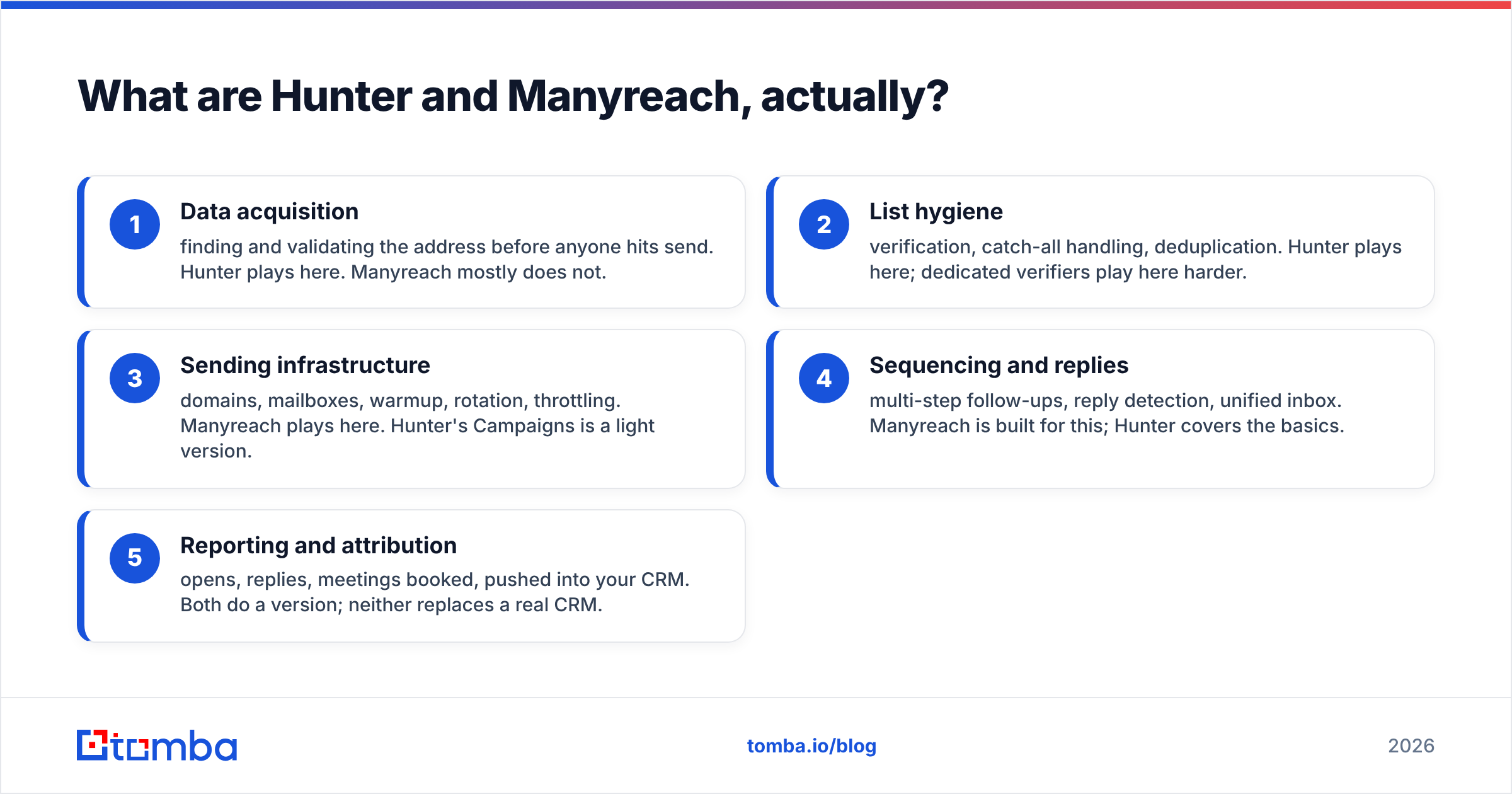
- Data acquisition — finding and validating the address before anyone hits send. Hunter plays here. Manyreach mostly does not.
- List hygiene — verification, catch-all handling, deduplication. Hunter plays here; dedicated verifiers play here harder.
- Sending infrastructure — domains, mailboxes, warmup, rotation, throttling. Manyreach plays here. Hunter's Campaigns is a light version.
- Sequencing and replies — multi-step follow-ups, reply detection, unified inbox. Manyreach is built for this; Hunter covers the basics.
- Reporting and attribution — opens, replies, meetings booked, pushed into your CRM. Both do a version; neither replaces a real CRM.
Map your actual bottleneck to one of those five rows before you compare price tags. Teams routinely buy a sending platform when their problem is a 40% invalid list, then blame the platform when reply rates stay flat.

How do Hunter and Manyreach compare feature by feature?#
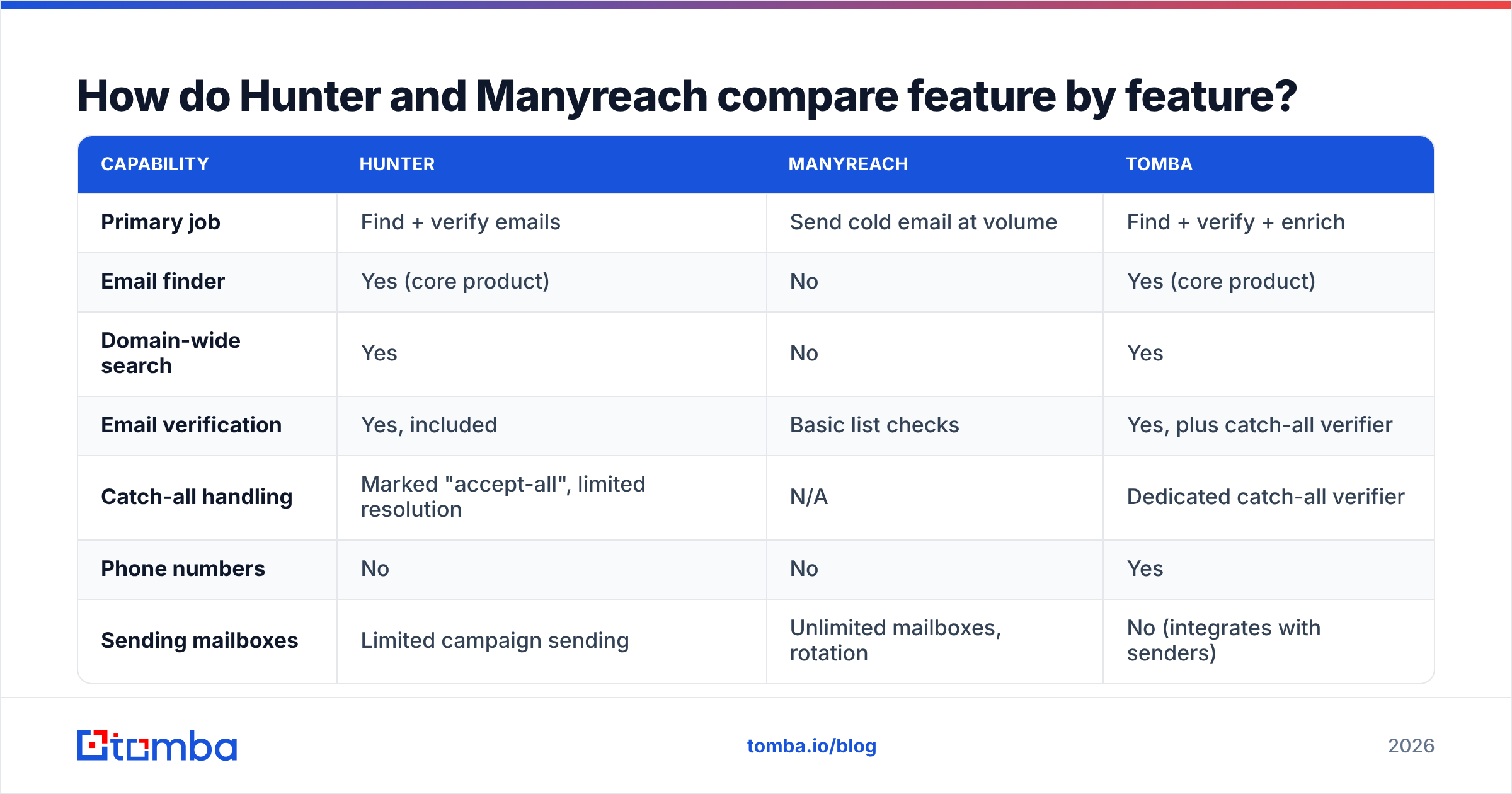
The table below adds Tomba as a third column, because in practice most "Hunter vs Manyreach" decisions are really "which data tool feeds which sender."
| Capability | Hunter | Manyreach | Tomba |
|---|---|---|---|
| Primary job | Find + verify emails | Send cold email at volume | Find + verify + enrich |
| Email finder | Yes (core product) | No | Yes (core product) |
| Domain-wide search | Yes | No | Yes |
| Email verification | Yes, included | Basic list checks | Yes, plus catch-all verifier |
| Catch-all handling | Marked "accept-all", limited resolution | N/A | Dedicated catch-all verifier |
| Phone numbers | No | No | Yes |
| Sending mailboxes | Limited campaign sending | Unlimited mailboxes, rotation | No (integrates with senders) |
| Sequences / follow-ups | Basic multi-step | Full sequencing + reply detection | No |
| Pricing model | Per-seat tiers with search credits | Pay per email sent, unlimited users | Per-plan credits, from $49/mo |
| Free tier | 25 searches/mo | Free trial credits | 25 searches/mo |
| API | Yes | Yes | Yes, plus CLI and MCP |
| Best for | List building, small campaigns | High-volume outbound teams | Data layer for any sender |
Two things stand out. First, the overlap between Hunter and Manyreach is a thin sliver — sequences — and both are weaker there than a dedicated sequencer like Instantly or Smartlead. Second, neither tool covers the full outbound chain on its own. That is not a knock. It is how the category has evolved since sequencers stopped bundling mediocre data and data vendors stopped bundling mediocre senders.
Which one is better for finding email addresses?#
Hunter, without qualification. Manyreach does not compete here.
The real question is whether Hunter is the best data layer for you, and that depends on three things: coverage in your target geography, how it handles catch-all domains, and what a credit costs at your volume.
Hunter's coverage is strongest for well-indexed Western B2B domains — SaaS, agencies, tech-adjacent companies with public web footprints. Its confidence score is honest, and its verifier is genuinely useful rather than decorative. Where users hit friction is catch-all domains. Roughly 20–25% of B2B domains accept every address at the SMTP layer, which means a simple verifier returns "accept-all" and hands the risk back to you. Hunter flags them; it does not resolve them.
That single behavior drives a lot of the tool-switching in this category. If half your ICP sits behind Microsoft 365 tenants configured to accept all mail, an "accept-all" verdict is not an answer — it is a shrug. This is why a catch-all verifier exists as a separate product class, and why serious senders run their list through one before loading it into any platform.
The other lever is pattern intelligence. Most corporate addresses follow one of about eight formats. A tool that knows a company's dominant pattern, then validates the specific mailbox, beats one that guesses and hopes. You can sanity-check any domain's format with a free company email pattern lookup before you spend credits at scale.
If you want a broader data layer than Hunter's — one that returns phone numbers and firmographics alongside the address — the email finder category has moved well past pure address lookup. Tomba, Findymail, Prospeo and Datagma all bundle enrichment into the same call.
Which one is better for sending cold email?#
Manyreach, and it is not close.
Hunter Campaigns is a competent add-on for someone sending a few hundred emails a month from one or two mailboxes. It handles scheduling, basic follow-ups, and reply detection. It is not built for the modern volume playbook: ten domains, thirty mailboxes, warmup running continuously, sends rotated so no single inbox exceeds a safe daily ceiling.
Manyreach is built exactly for that. Unlimited mailbox connections, unlimited team seats, and pricing tied to emails sent rather than headcount. For an agency running campaigns on behalf of eight clients, per-seat pricing on a traditional sequencer becomes the single largest line item on the outbound budget. Per-email pricing scales with output instead of org chart.
The tradeoff is that a sending platform is only as good as the list you load into it. Google and Yahoo's bulk sender requirements — documented publicly since 2024 — put a hard spam-complaint ceiling on senders and expect authenticated domains. Bounce rates above roughly 3% start dragging sender reputation down regardless of which platform sends the mail. Manyreach can rotate your sends beautifully across forty inboxes and still burn every one of them if 15% of your addresses are invalid.
That is the whole argument for treating data and sending as separate purchases with separate quality bars.

What do Hunter and Manyreach cost in 2026?#
Pricing on both moves, so treat the figures below as a shape rather than a quote — check each vendor's page before you commit.
Hunter uses classic SaaS tiering: a free plan with 25 monthly searches and 50 verifications, then paid tiers that scale search and verification credits together, with per-seat limits on lower plans. Annual billing knocks a meaningful chunk off. The practical gotcha is that searches and verifications draw from separate buckets, so a heavy verification month can leave you credit-starved on finding.
Manyreach prices on emails sent. No per-seat charge, no cap on connected mailboxes. For a two-person team sending 5,000 emails a month, that is usually cheaper than a seat-priced sequencer. For a ten-person team sending 200,000, the math flips harder in Manyreach's favor because you are not paying eight seats that never log in.
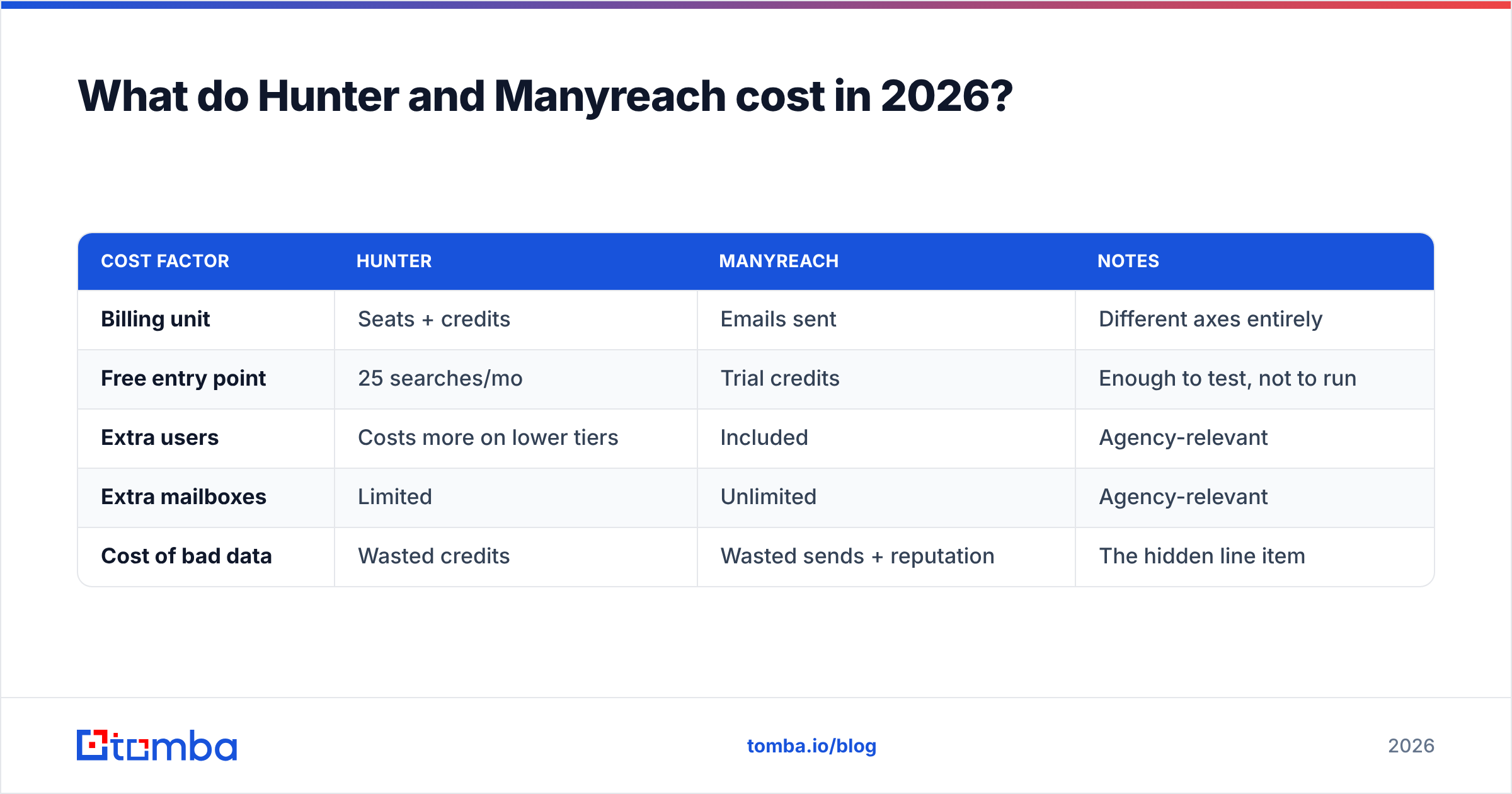
| Cost factor | Hunter | Manyreach | Notes |
|---|---|---|---|
| Billing unit | Seats + credits | Emails sent | Different axes entirely |
| Free entry point | 25 searches/mo | Trial credits | Enough to test, not to run |
| Extra users | Costs more on lower tiers | Included | Agency-relevant |
| Extra mailboxes | Limited | Unlimited | Agency-relevant |
| Cost of bad data | Wasted credits | Wasted sends + reputation | The hidden line item |
That last row is the one nobody budgets for. A 10,000-contact list with a 12% invalid rate wastes 1,200 sends, adds 1,200 bounces to your domain's record, and costs you the recovery time on however many mailboxes you burned. The credits were the cheap part.
For reference, Tomba pricing runs Free (25 searches/mo), Starter $49/mo, Growth $99/mo, Pro $249/mo, and custom Enterprise — priced on the data side only, because sending is deliberately left to whichever platform you prefer.
Should you use them together — or pick a different stack?#
Together works, but it is rarely the optimal pairing.
The clean architecture for 2026 outbound has three layers:
- Source — where contacts come from. Scraped lists, LinkedIn exports, website visitors, CRM records that went stale.
- Resolve and verify — turn a name plus company into a validated, deliverable address, with catch-all domains actually resolved rather than flagged. Enrich with role, seniority, and phone if you run multichannel.
- Send — authenticated domains, warmed mailboxes, rotation, sequencing, reply routing.
Hunter can cover layer 2 and a thin slice of layer 3. Manyreach owns layer 3 and none of layer 2. Bolting them together gives you a functioning stack with a soft spot exactly where accuracy matters most: catch-all resolution and enrichment depth.
The alternative most teams land on is a dedicated data provider feeding Manyreach (or Instantly, Smartlead, or Lemlist) via API or CSV. That gives you one negotiating lever on data quality and another on sending cost, and lets you swap either without rebuilding the other. If you are auditing options in this category, G2's lead intelligence grid is a reasonable starting point for filtering by company size and region rather than by marketing budget.
A few pairings that actually make sense:
- Solo founder, under 1,000 sends/month — Hunter alone. The bundled Campaigns feature is genuinely enough, and one bill is worth something.
- Agency running 5+ client campaigns — dedicated data layer plus Manyreach. Per-email pricing and unlimited mailboxes are the point; do not pay seats.
- Sales team with an existing sequencer (Outreach, Salesloft) — you already have layer 3. You need layer 2 only. Buy data, not another sender.
- Multichannel outbound (email plus calls) — you need phone data too, which neither Hunter nor Manyreach provides. A phone finder or an enrichment API fills that gap.
- Developer-led, API-first workflow — skip the UI comparison and evaluate on rate limits, response schema, and docs. Check the Tomba API and Hunter's API side by side on a live sample of your own domains.
How do you actually test this before committing?#
Run the same 100 contacts through every option. Not their sample data, yours.
Pull 100 real target accounts from your ICP — a mix of company sizes and, if you sell internationally, at least three countries. Then measure four things:
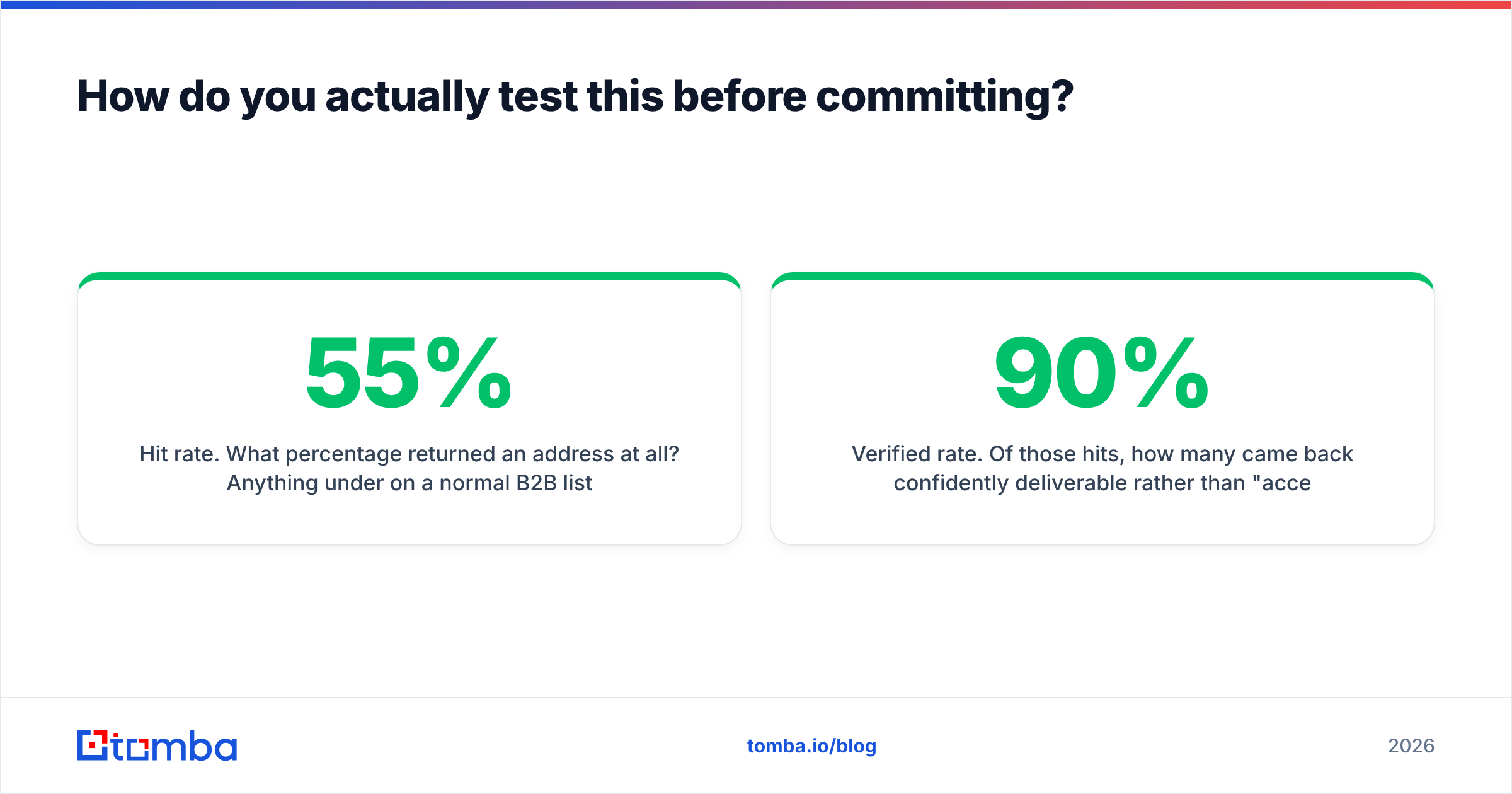
Hit rate. What percentage returned an address at all? Anything under 55% on a normal B2B list means the coverage does not match your market.
Verified rate. Of those hits, how many came back confidently deliverable rather than "accept-all" or "unknown"? This is where tools separate. A 90% hit rate with 40% unknowns is worse than a 65% hit rate with 95% confident.
Real bounce rate. Send to 50 of them from a throwaway domain and count hard bounces. Vendor-reported accuracy is a marketing number; your bounce log is a fact.
Cost per usable contact. Total spend divided by contacts that were found, verified, and did not bounce. This is the only pricing number that matters, and it frequently reorders the leaderboard versus sticker price.
Do the same on the sending side: connect two mailboxes to Manyreach, run a 200-email sequence, and check inbox placement with a seed test rather than trusting the platform's own open rate. Open tracking has been unreliable since Apple Mail Privacy Protection started prefetching images, so weight replies over opens in every conclusion you draw.
If you want a fast pre-flight on the list itself, run it through a bulk verify pass and drop anything that comes back risky before it touches a warmed domain. Twenty minutes of hygiene protects months of reputation building.
The verdict#
Hunter and Manyreach are both good at the thing they were built for, and neither is a full outbound stack. Hunter is the better buy if your problem is finding and validating addresses and your sending volume is modest. Manyreach is the better buy if your problem is sending at scale across many mailboxes without paying per seat. If you have both problems — and most teams past their first ten customers do — buy both layers deliberately rather than hoping one tool stretches to cover the other.
Whichever sender you land on, the data feeding it is the variable you control most directly and the one with the most compounding downside. Start there.
Ready to fix the data layer? Tomba's Email Finder resolves addresses by domain, name, or company, verifies them against real SMTP responses, and handles catch-all domains instead of flagging them and walking away — then hands clean, deliverable contacts to Manyreach, Instantly, or whatever you send with. Start free with 25 searches a month, no card required, and run the 100-contact test above against your own list before you decide.
Related guides#
// get started
Find, verify and enrich your first contacts today
Start on the free plan with 25 searches a month, then scale when your team is ready.
Free plan · No credit card required · GDPR & CCPA
// about the author