Hunter vs Noparam 2026: Email Finder Comparison and Verdict
Hunter is the incumbent email finder with the biggest brand; Noparam is the lean challenger. We compare coverage, verification, API limits and real cost per usable contact — and name the case where neither is the right pick.
Short on time? Here is the Hunter vs Noparam verdict in one line: Hunter wins on trust and integrations, Noparam wins on price per API call, and neither one solves catch-all domains. The rest of this guide shows the numbers behind that call.
TL;DR
- Hunter is the big name. Clean domain search, public pricing, and a verification layer most teams already trust. It gets expensive per usable contact once you pass a few thousand lookups a month.
- Noparam is the lean challenger. API-first, credit-efficient, aimed at builders and agencies who script enrichment instead of clicking a dashboard. It has fewer integrations, thinner docs, and a small review base on sites like G2.
- Accuracy is not the real split. Hit rates are close on well-indexed SaaS and tech domains. The gap shows up on long-tail domains, non-English markets, and catch-all servers.
- Cost per verified email is the number that matters. Finding 60% of a list at $0.02 a credit beats 70% at $0.09. Then add the bounces you pay for twice.
- Price a third option too. Tools like Tomba sit between them: pricing published from $49/mo, a real API, and catch-all verification included rather than bolted on.
What are Hunter and Noparam?#
Hunter is one of the oldest email finders on the market. It started as a simple domain scraper. Today it is a full prospecting suite: domain search, email finder, email verifier, a light campaign sender, and a Chrome extension.
Its data comes mostly from public web crawling. Hunter finds addresses where they appear online. It then works out the company email pattern and applies that pattern to names it has never seen directly.
Noparam is newer and sells a different angle: API-first enrichment and cheap credits. Skip the heavy prospecting UI, call a fast endpoint, pay less per resolved contact. That suits one buyer in particular. Think of the RevOps engineer or agency operator who already has a data pipeline and needs one resolver step inside it.
One caveat before we go on. Hunter posts its plan tiers in public and has a decade of third-party reviews behind it. Noparam is smaller, and its pricing and limits have moved more than once. Treat every number below as directional. Confirm it on the vendor page before you sign anything. That gap in transparency is itself a data point.

Hunter vs Noparam: how do they compare head to head?#
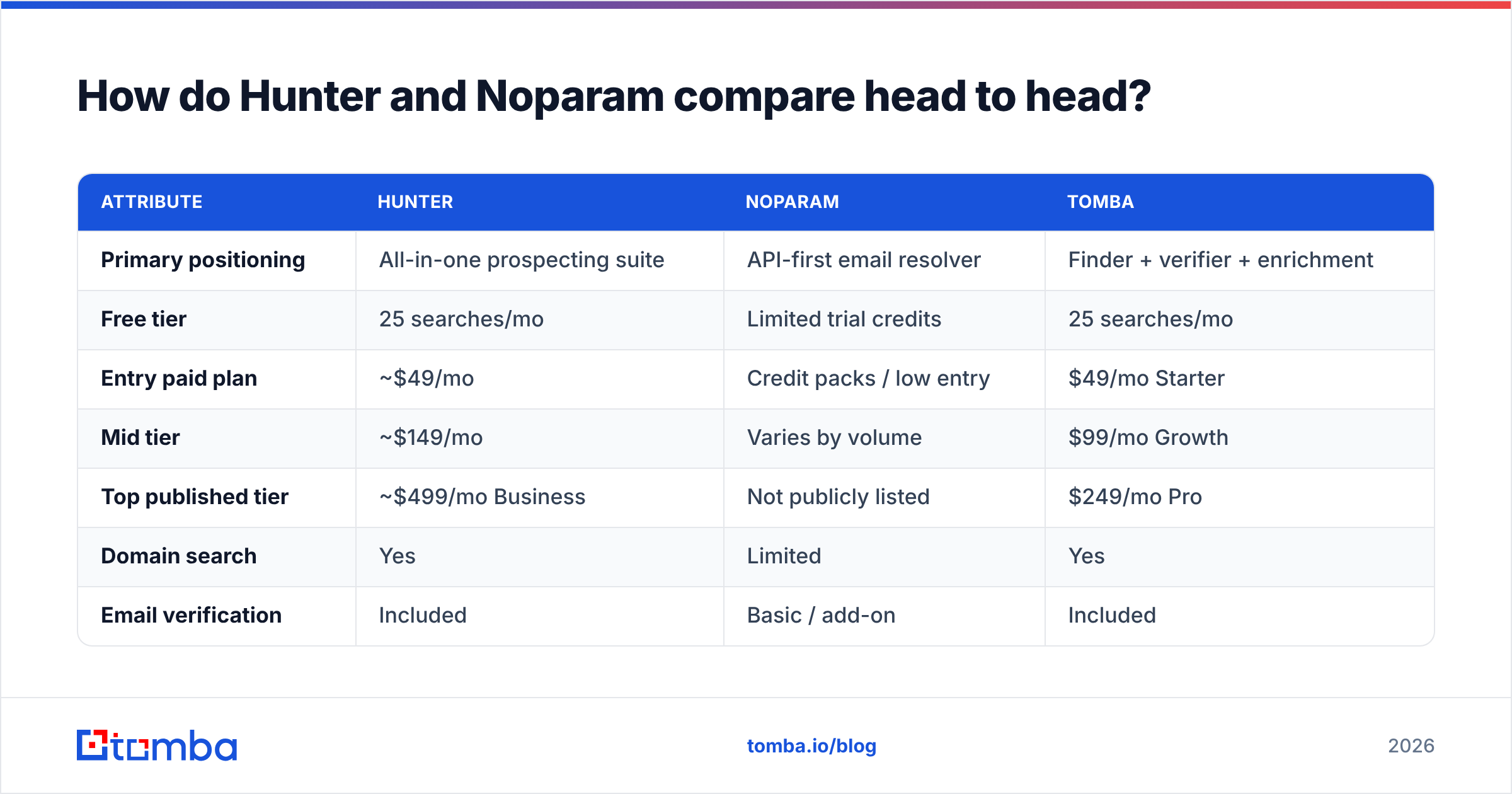
Here is the structural comparison. Not marketing claims, but the traits that change your workflow.
| Attribute | Hunter | Noparam | Tomba |
|---|---|---|---|
| Primary positioning | All-in-one prospecting suite | API-first email resolver | Finder + verifier + enrichment |
| Free tier | 25 searches/mo | Limited trial credits | 25 searches/mo |
| Entry paid plan | ~$49/mo | Credit packs / low entry | $49/mo Starter |
| Mid tier | ~$149/mo | Varies by volume | $99/mo Growth |
| Top published tier | ~$499/mo Business | Not publicly listed | $249/mo Pro |
| Domain search | Yes | Limited | Yes |
| Email verification | Included | Basic / add-on | Included |
| Catch-all handling | Flagged, not resolved | Flagged | Dedicated catch-all verifier |
| Phone numbers | No | No | Yes |
| Public API | Yes, mature docs | Yes, core product | Yes |
| Native CRM integrations | Extensive | Minimal | HubSpot, Salesforce, Pipedrive, Zapier |
| Spreadsheet add-ons | Sheets | No | Sheets, Excel, Airtable |
| Best for | Teams wanting one UI | Engineers scripting enrichment | Teams needing find + verify in one bill |
The pattern is clear. Hunter sells breadth and familiarity. Noparam sells efficiency at the API layer. Neither is wrong. They aim at different buyers. Most "which is better" arguments are really arguments about which buyer you are.
Which one is more accurate?#
Accuracy is a slippery word here, and vendors use that. Three separate numbers hide behind it.
- Coverage (hit rate) — you submit 1,000 name-and-domain pairs. How many come back with any address at all? Database size and crawl depth drive this one.
- Precision (deliverability) — of the addresses returned, how many actually accept mail? A tool can inflate coverage by guessing patterns. You eat the bounces.
- Confidence calibration — when a tool says "95% confident," is it right 95% of the time? Badly calibrated scores are worse than no scores. They make you trust bad rows.
Hunter is well calibrated. Its confidence score tracks real deliverability fairly closely.
It is also careful. It holds back pattern guesses it cannot back up with at least one observed source. That caution costs coverage on smaller and non-Western domains, where there is less public evidence to crawl.
Noparam leans the other way. It returns more pattern-derived addresses. Headline coverage goes up, and the verification work shifts to you. That trade is fine if you already run every result through a separate verifier. It is expensive if you mail straight from the finder output.

The takeaway: run your own 200-row benchmark first. Pull a sample that matches your real ICP. Same industries, same company sizes, same countries. Score all three numbers.
Public accuracy claims come from lists that look nothing like yours. Want to see how a provider builds its dataset before you test? Most solid vendors publish their data sources. The ones that do not are worth a harder look.
How does the pricing math actually work out?#
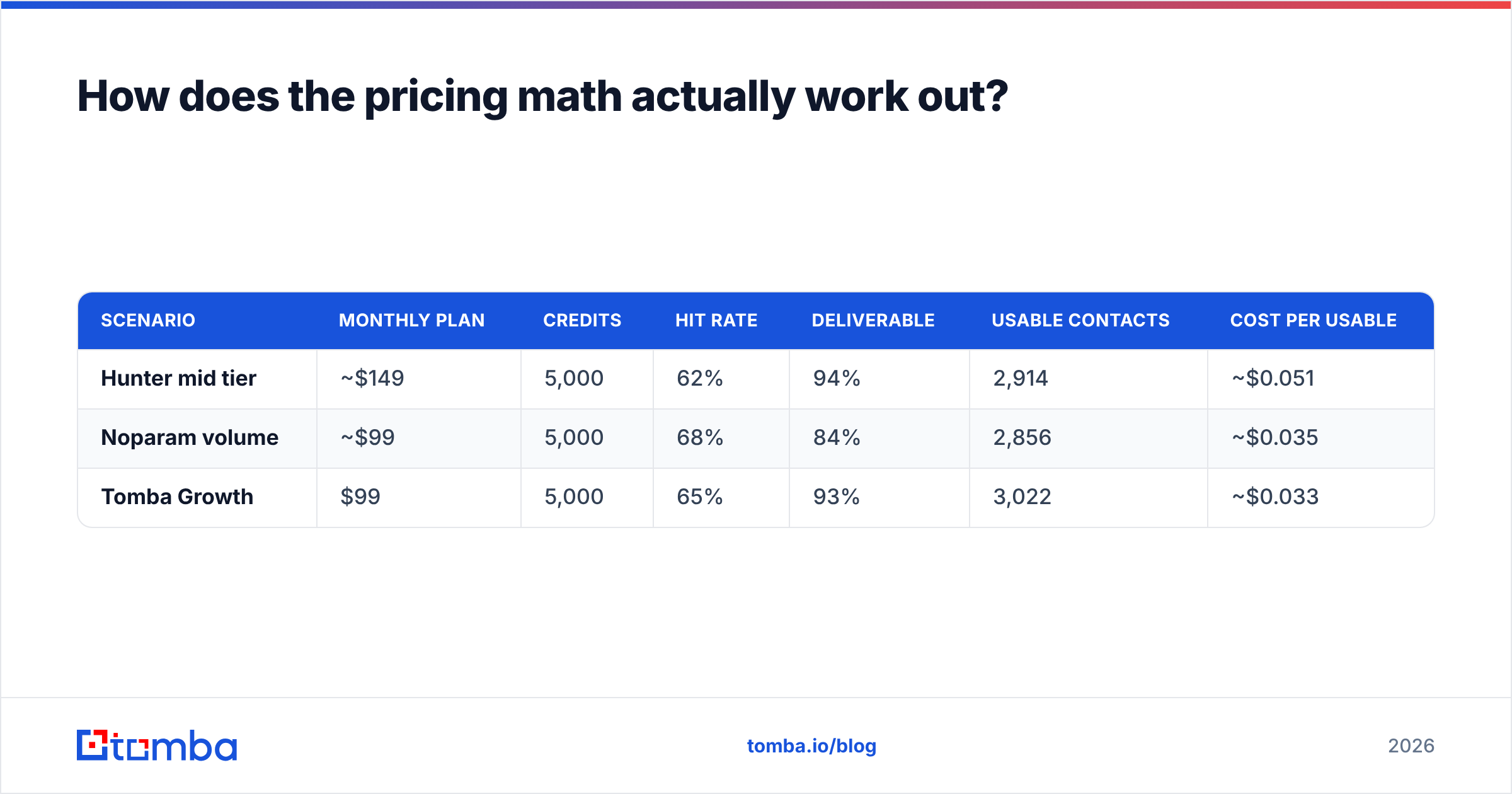
Sticker price is the wrong test. Cost per usable contact is the right one. Here is the formula:
Plan cost ÷ (credits × hit rate × deliverability rate) = true cost per usable email.
Work a concrete example. Say you need 5,000 resolved contacts a month.
| Scenario | Monthly plan | Credits | Hit rate | Deliverable | Usable contacts | Cost per usable |
|---|---|---|---|---|---|---|
| Hunter mid tier | ~$149 | 5,000 | 62% | 94% | 2,914 | ~$0.051 |
| Noparam volume | ~$99 | 5,000 | 68% | 84% | 2,856 | ~$0.035 |
| Tomba Growth | $99 | 5,000 | 65% | 93% | 3,022 | ~$0.033 |
Those hit rates are illustrative, not measured. Plug in your own benchmark numbers. The shape of the math still holds. A cheap credit with a poor delivery rate closes the gap with an expensive credit fast. The rest gets eaten by bounce damage to your sender reputation, which never shows up on the invoice.
One more billing detail. Hunter charges per search whether or not it finds anything, with some credit returns depending on plan. Noparam's credit rules have changed across pricing revisions. Ask in writing whether null results are billed. On a 50,000-row job with a 60% hit rate, that one policy line is 20,000 credits.
Which tool fits which team?#
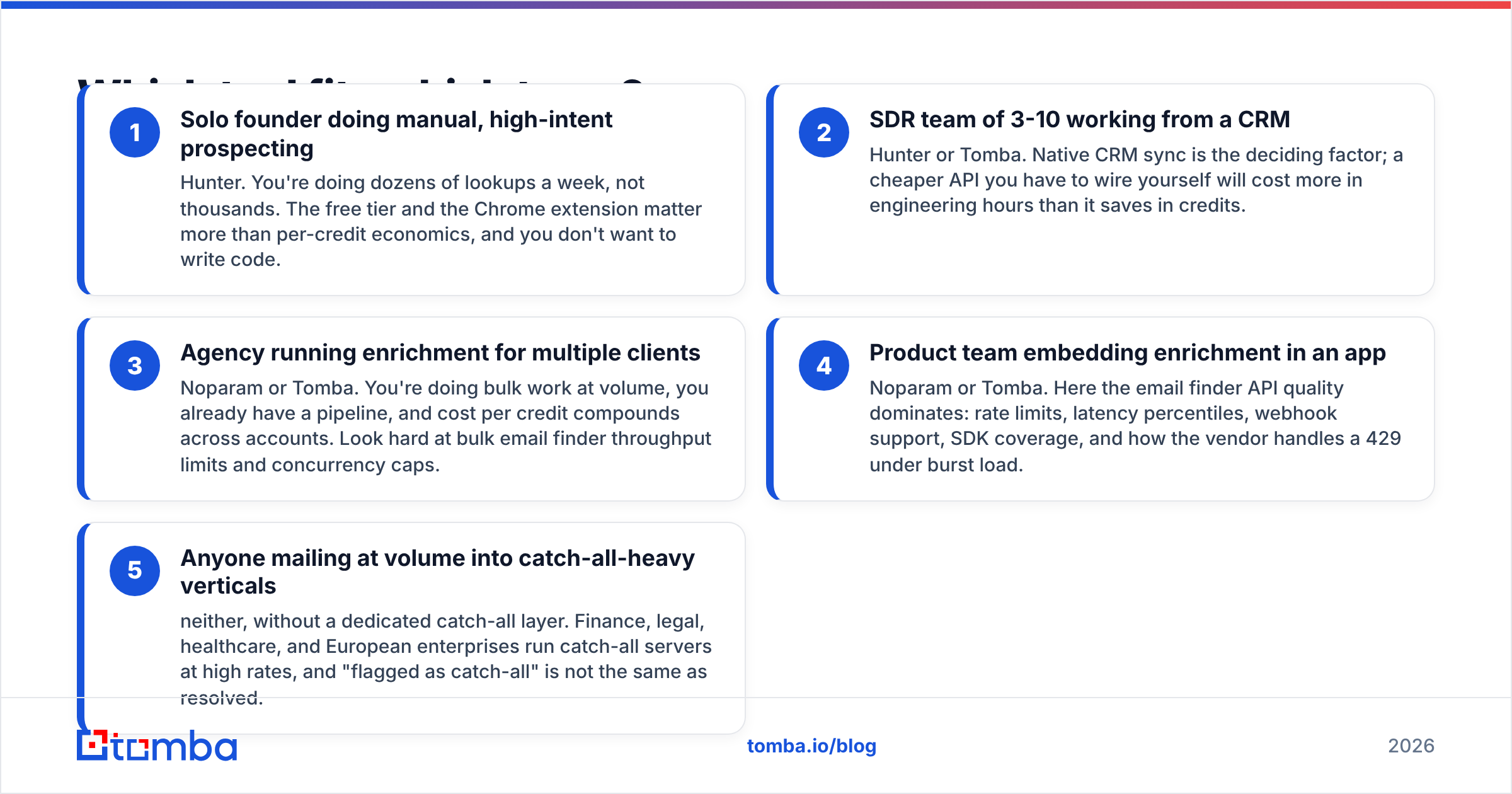
Skip the generic verdict. Match the tool to how you work.
- Solo founder doing manual prospecting — Hunter. You run dozens of lookups a week, not thousands. The free tier and the Chrome extension matter more than credit math, and you do not want to write code.
- SDR team of 3-10 working from a CRM — Hunter or Tomba. Native CRM sync decides it. A cheaper API you have to wire yourself costs more in engineering hours than it saves in credits.
- Agency enriching for many clients — Noparam or Tomba. You work in bulk, you already have a pipeline, and credit cost compounds across accounts. Check bulk email finder throughput and concurrency caps.
- Product team embedding enrichment in an app — Noparam or Tomba. Here the email finder API rules the choice: rate limits, latency, webhooks, SDK coverage, and 429 handling under burst load.
- Anyone mailing into catch-all-heavy verticals — neither, on its own. Finance, legal, healthcare, and European enterprises run catch-all servers a lot. Flagged as catch-all is not the same as resolved.
What about verification and catch-all domains?#
Most head-to-head posts get lazy here. This is where the money leaks.
A catch-all domain accepts mail sent to any local part. anything@company.com returns a positive SMTP response whether or not the mailbox exists. Plain verification is blind here. Every serious verifier labels the domain catch-all and hands the risk back to you.
Hunter flags catch-alls and gives you a confidence score, but does not resolve them. Noparam does much the same. In enterprise B2B, catch-all domains often cover 20-30% of a list. Both tools leave that same chunk in limbo.
A dedicated catch-all verifier fills that gap. It uses pattern corroboration and multi-source cross-checks instead of one SMTP handshake. Whichever finder you pick, add a real email verifier step before you send. The order that works: find, verify, split risky rows into a small warm-up list, then send.

Address syntax alone tells you almost nothing about deliverability. The email address specification is a useful primer. A perfect-looking address can still be a spam trap.
Where does each tool fall short?#
Hunter's weak points:
- Cost scales badly. The jump from the mid tier to Business is steep, and heavy users hit it fast.
- Coverage thins on non-English domains and companies with a small web footprint.
- No phone data, so you cannot run multichannel from one vendor.
- Credits burn on null results, which frustrates bulk users.
Noparam's weak points:
- Thin public docs and few third-party reviews make diligence harder.
- Fewer native integrations means more glue code, which is a real cost.
- Pricing has shifted between revisions, so annual budgeting is harder.
- Verification is lighter, so you will likely pay a second vendor for it.
Shared weak points:
- Neither resolves catch-all domains properly.
- Neither gives you finder, verifier, phone data, and enrichment on one predictable bill.
- Both need your own benchmark, because published accuracy figures come from other people's lists.
Is there a better option than either?#
Sometimes the honest answer to an A-vs-B question is C. Not because the incumbent is bad, but because the problem changed shape. Most teams weighing Hunter vs Noparam in 2026 are not buying an email finder. They are buying a contact-resolution layer: find, verify, handle catch-alls, add phone where possible, and push it all into the CRM on one bill.

One more note. Not every job is a finder job. Need a static, pre-built list for a defined segment instead of lookup by name? A curated database provider like BookYourData solves a different problem and is often the cheaper path. Match the tool to the motion.
Run the same test on every candidate. Same 200 rows, same rubric, same week. Score coverage, deliverability, calibration, latency, and cost per usable contact. Then decide. The result often flips what the review sites told you.
The bottom line#
Pick Hunter if you want the familiar option with the widest integration surface and you stay below a few thousand lookups a month. Pick Noparam if you are API-native, price-sensitive at volume, and happy to run your own verification layer. Pick neither if your list is catch-all heavy and you need one vendor for find, verify, and phone on a single invoice.
That is the short Hunter vs Noparam answer. Ready to benchmark a third option? The Tomba Email Finder gives you 25 free searches a month with no card. Verification and catch-all handling come in the same plan. Paid plans start at $49/mo, and full Tomba pricing is published up front, so you can work out cost per usable contact before you buy.
Related guides#
// get started
Find, verify and enrich your first contacts today
Start on the free plan with 25 searches a month, then scale when your team is ready.
Free plan · No credit card required · GDPR & CCPA
// about the author