Hunter vs Power Almanac: Which B2B Data Tool Wins in 2026?
Hunter finds work emails at any company. Power Almanac sells verified US local-government contacts. They look like rivals but solve different problems — here is which one your pipeline actually needs, and what each really costs.
TL;DR
- Hunter vs Power Almanac is not a fair fight. The two tools solve different problems. Hunter finds emails at any company domain. Power Almanac sells a hand-checked list of US local-government staff — cities, counties, townships.
- Pick Power Almanac if your buyer is "the city manager of every town over 25,000 people." Nothing else maps government roles that well.
- Pick Hunter if you sell to private firms and need emails on demand, tied to a domain you already know.
- The money works differently. Hunter is a monthly plan with credits. Power Almanac is a data purchase. You buy records, then you own them.
- Both leave the same gap: freshness. Every export goes stale. Every pattern-based finder needs a check. Budget for an email verifier either way.
Hunter vs Power Almanac: what are these tools?#
Think of it like food shopping. Hunter is the grocery store. You walk in with a list ("emails at stripe.com"). It hands you what is in stock today, with a confidence label on each item. Power Almanac is a subscription box. Someone picked one narrow category — US local government. They checked it by hand. Then they ship you the whole crate.
Hunter made its name with domain search. Give it a company domain. It returns the addresses it has indexed there, plus the pattern it inferred (first.last@, finitial+last@). Around that core sit an email verifier, a Chrome extension, a Google Sheets add-on, a small campaign sender, and an API. It is domain-first. You must know which company before Hunter helps.
Power Almanac solved another problem. US local government is split across tens of thousands of towns, counties, and districts. Each one has its own site and its own naming rules. There is no central directory. Power Almanac builds and re-checks that data by hand: names, titles, direct emails, phone numbers, population, form of government. It sells the result as filtered exports. Do you sell fleet software, public-safety gear, ERP, or grant tools? This is the list you cannot scrape.
So the honest way to frame Hunter vs Power Almanac is not "which tool is better." Ask this instead. Is my buyer in a .gov office, or in a private company? The rest follows from that answer.

Hunter vs Power Almanac: the head-to-head table#
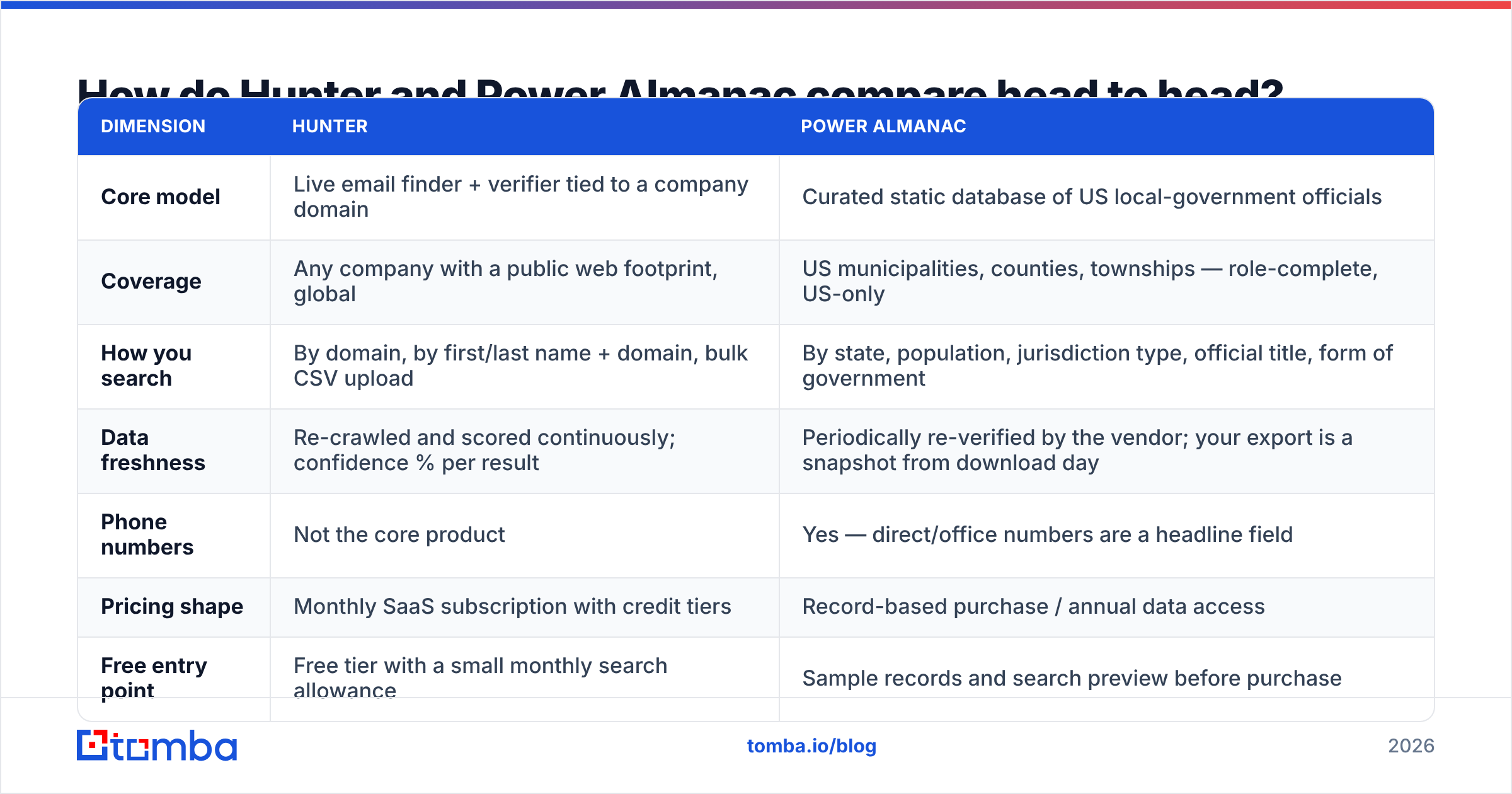
| Dimension | Hunter | Power Almanac |
|---|---|---|
| Core model | Live email finder + verifier tied to a company domain | Curated static database of US local-government officials |
| Coverage | Any company with a public web footprint, global | US municipalities, counties, townships — role-complete, US-only |
| How you search | By domain, by first/last name + domain, bulk CSV upload | By state, population, jurisdiction type, official title, form of government |
| Data freshness | Re-crawled and scored continuously; confidence % per result | Periodically re-verified by the vendor; your export is a snapshot from download day |
| Phone numbers | Not the core product | Yes — direct/office numbers are a headline field |
| Pricing shape | Monthly SaaS subscription with credit tiers | Record-based purchase / annual data access |
| Free entry point | Free tier with a small monthly search allowance | Sample records and search preview before purchase |
| API | Yes, mature and well documented | Limited — the product is built around exports |
| Best for | SDRs, agencies, recruiters, anyone selling B2B software | GovTech, public-safety, civil engineering, municipal services vendors |
| Weakness | Thin on non-corporate and small-jurisdiction domains | Useless outside US local government; snapshot decays after purchase |
Two rows in the Hunter vs Power Almanac table deserve a closer look.
Freshness is the row that costs you money. Local officials change with election cycles. A clerk who was right in January may be gone by December. Your CSV does not update itself. Power Almanac re-checks on its own schedule. That only helps records you download again.
Hunter has the mirror problem. A confidence score is a chance, not a promise. A 92% address is still a coin flip in the tail. Both failures end in the same place: bounces, and a hurt sender reputation.
The API row decides whether this scales. Say you want to enrich a lead the moment it hits your CRM. An export-only vendor forces a manual loop. You download, dedupe, import, then repeat next quarter. A finder with a real API lets you enrich on write.
Which one fits your go-to-market motion?#
Run your plan through these five filters first.
- Buyer type. Selling to a city public works director? Pick Power Almanac. No broad finder maps town org charts well. Selling to a startup VP of Engineering? Power Almanac has nothing for you.
- Do you know the account? Hunter needs a domain as input. A target list is fine. Need discovery instead, like "every town over 50,000"? Hunter cannot build that list. Power Almanac can.
- Volume and cadence. A one-time 8,000-record campaign is a purchase. Six reps burning 3,000 lookups a month is a plan. Match price shape to usage shape.
- Channel mix. Does your team dial as much as it emails? Power Almanac treats phone as a core field. Hunter does not. For private firms, add a phone finder.
- Compliance. Government data is public record, so consent is simple. Private B2B data sits under GDPR and CCPA. Have legal read the rules.
Did you answer "private companies" to filter 1? Stop looking at Power Almanac. It is a good product built for someone else.
Did you answer "towns and counties"? Then ask one more question. Do you also need a finder for the vendors and consultants around those offices? Usually you do.
Hunter vs Power Almanac: what does each one cost?#
Neither vendor is easy to compare. They do not sell the same unit.
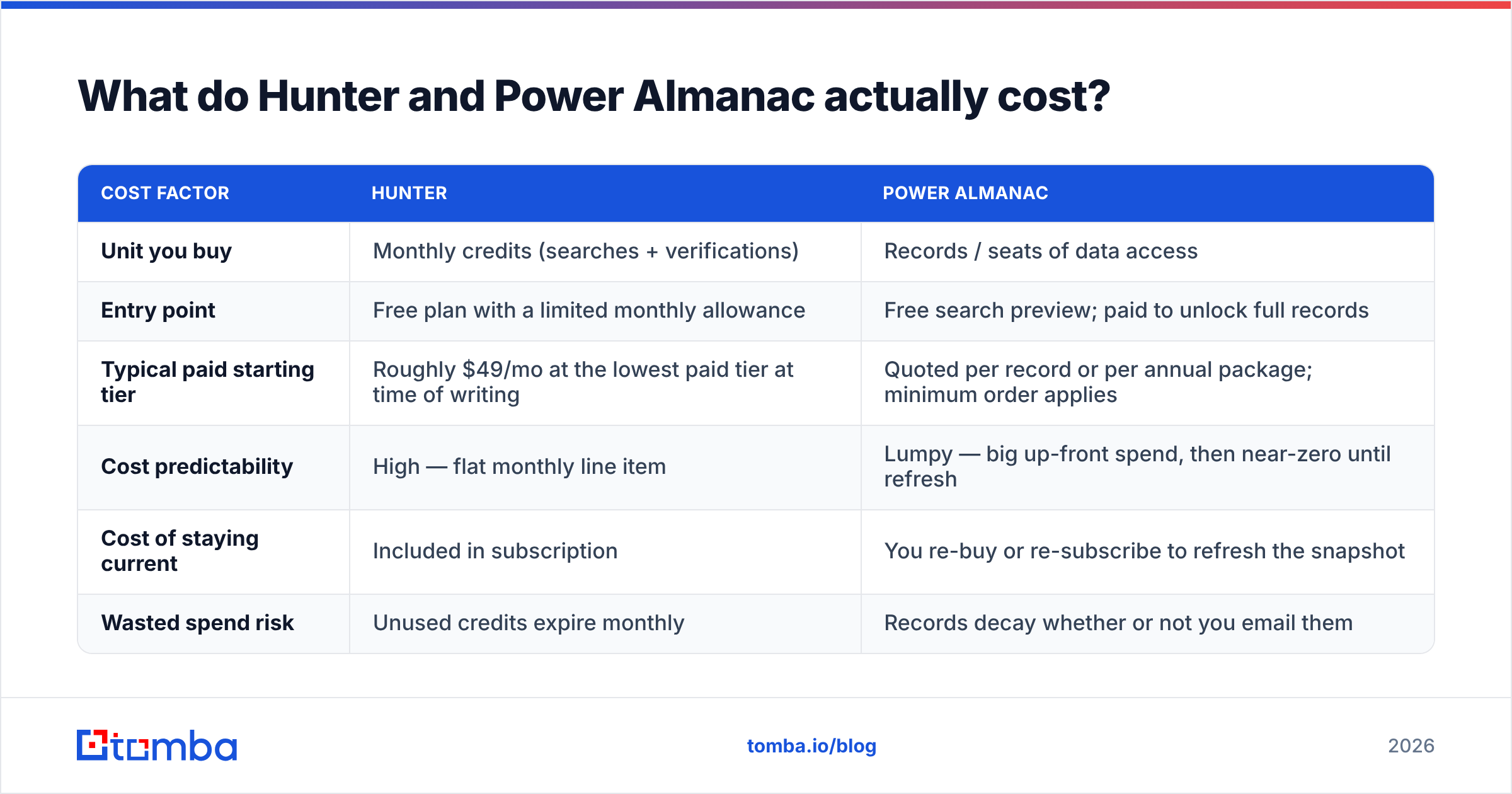
| Cost factor | Hunter | Power Almanac |
|---|---|---|
| Unit you buy | Monthly credits (searches + verifications) | Records / seats of data access |
| Entry point | Free plan with a limited monthly allowance | Free search preview; paid to unlock full records |
| Typical paid starting tier | Roughly $49/mo at the lowest paid tier at time of writing | Quoted per record or per annual package; minimum order applies |
| Cost predictability | High — flat monthly line item | Lumpy — big up-front spend, then near-zero until refresh |
| Cost of staying current | Included in subscription | You re-buy or re-subscribe to refresh the snapshot |
| Wasted spend risk | Unused credits expire monthly | Records decay whether or not you email them |
Both vendors change prices. Check hunter.io and poweralmanac.com before you set a budget. Peer reviews on G2 help with the soft stuff: support speed, export caps, credit rollover. That is where buyers get surprised.
The number that matters is cost per usable contact. Not cost per credit. A $49 plan returns 500 results at 70% deliverability. That is 350 usable contacts. A $0.30 record export where 15% of officials have left since the last check gives you 850 usable contacts per 1,000. Do that math with your own bounce data first.
Is Hunter accurate enough for cold outreach?#
Mostly. One caveat applies to every pattern-based finder.
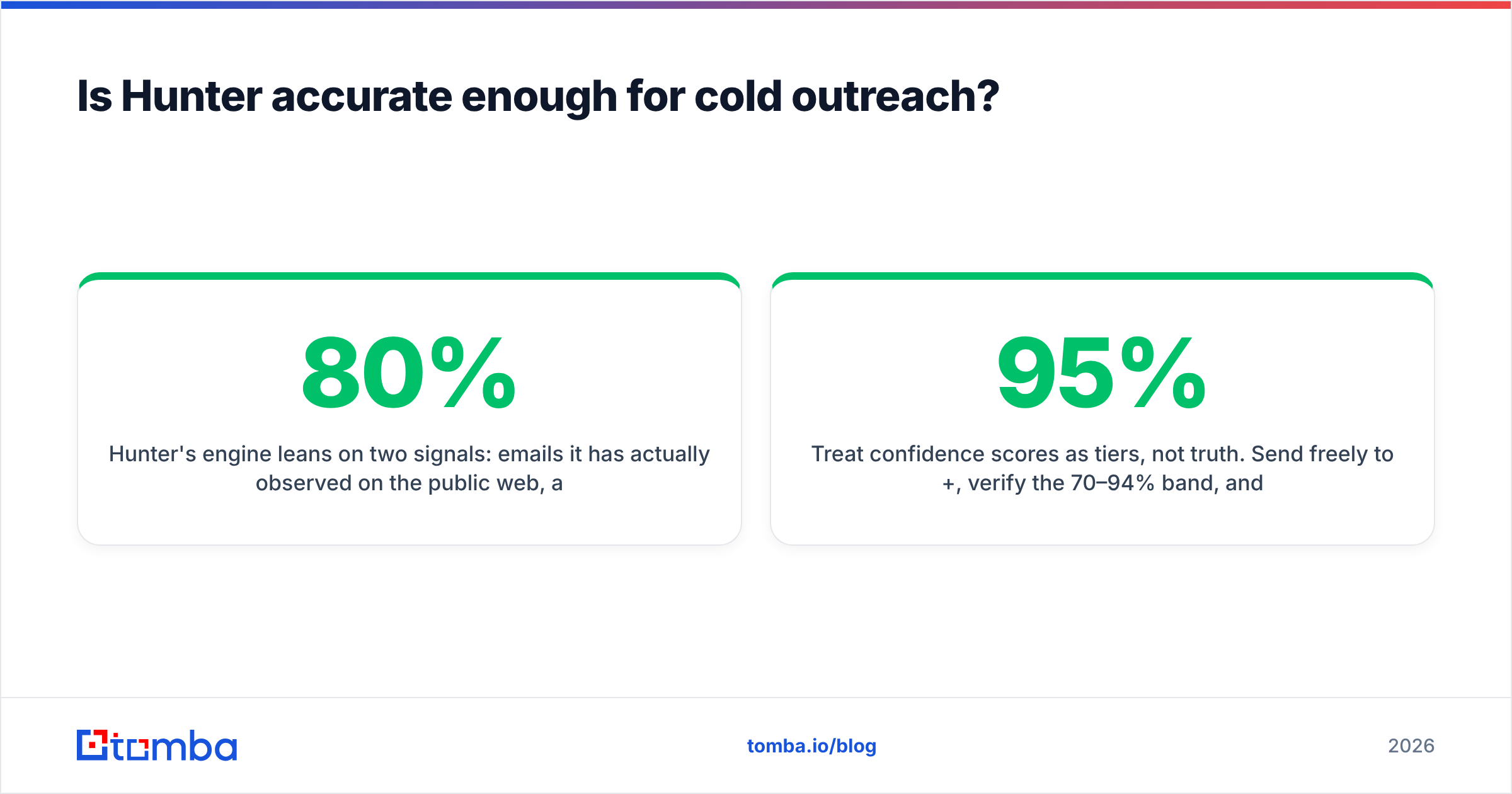
Hunter leans on two signals. First, emails it has seen on the public web. Second, the main pattern for that domain. Seen addresses are strong. Pattern guesses are still guesses. sarah.chen@acme.com is a fair bet when 80% of known Acme emails use first.last@. But guesses break on nicknames, shared surnames, merged domains, and old aliases.
Three rules help:
- Treat confidence scores as tiers, not truth. Send freely above 95%. Verify the 70–94% band. Drop the rest.
- Never skip verification on a fresh list. SMTP checks catch the bad guesses. If a domain is catch-all, a normal verifier shrugs. That is what a catch-all verifier is for.
- Watch small-domain coverage. Finders learn from the public web. A 12-person roofing firm with a one-page site leaves little signal.
Power Almanac skips the guessing problem in its niche. Hand checks beat pattern matching every time. But it can only do that because the niche is small. No vendor hand-checks every private firm on earth. That is why finders exist.
That is the core Hunter vs Power Almanac trade-off. Broad guesses on one side, a narrow hand-checked list on the other.
Where does Power Almanac win outright?#
Give credit where it is due. This part is hard to copy.
- Role coverage. You get the seat, not just whoever got indexed. Mayor, clerk, finance director, public works director, police chief. Small towns included.
- Jurisdiction data. Population band, form of government, county, and state. You can build territory plans and TAM models. A domain-first tool cannot.
- Phone first. Government buyers still pick up desk phones. Most software buyers do not.
- Ownership. Once you buy the file, it is yours. No credit meter. No per-lookup worry.
If your whole pipeline is public sector, a broad finder is the wrong main tool. Use one on the side, for the vendors and consultants around those offices.
What about workflow and integrations?#
The Hunter vs Power Almanac split is widest here. Teams also underrate this cost.
Hunter plugs into the places reps already work: a browser extension, a sheet add-on, CRM syncs, and an API. Power Almanac is export-first by design. You filter, download, then import. That is fine for a quarterly push. It hurts as an ongoing process.
If the work never stops, the integrations matter more than raw database size. Enrich from Google Sheets, fire lookups from a workflow tool, or call an endpoint from your own app. That is how "we bought data" turns into "our pipeline stays current." Anything you cannot automate becomes a Friday chore. That chore costs more than the software.
Do you run both motions? Here is the setup that works. Buy the government snapshot from the specialist. Run everything else through a finder with an API. Send both through one check before you hit send. One gate, two sources.
Hunter vs Power Almanac: which should you choose in 2026?#
Choose Power Almanac when US local government is your market. It does something no broad vendor does well. Its model suits campaign work: buy the data, own the data.
Choose Hunter when you sell to private firms and know your target accounts. It is mature, well documented, and the free tier is enough to test coverage against your own ICP.
Choose neither alone if you run outbound at volume. Most teams end up with three layers: a data source, an enrichment step, and a check before send. You save money by making those three easy to connect.
Shortlist your options, then run the same 100-contact test on each. Same names, same domains, same day. Measure hit rate, bounce rate after checks, and minutes of manual work per 100 contacts. The test costs one afternoon. It often flips the answer the pricing page implied.
Where does Tomba fit in?#
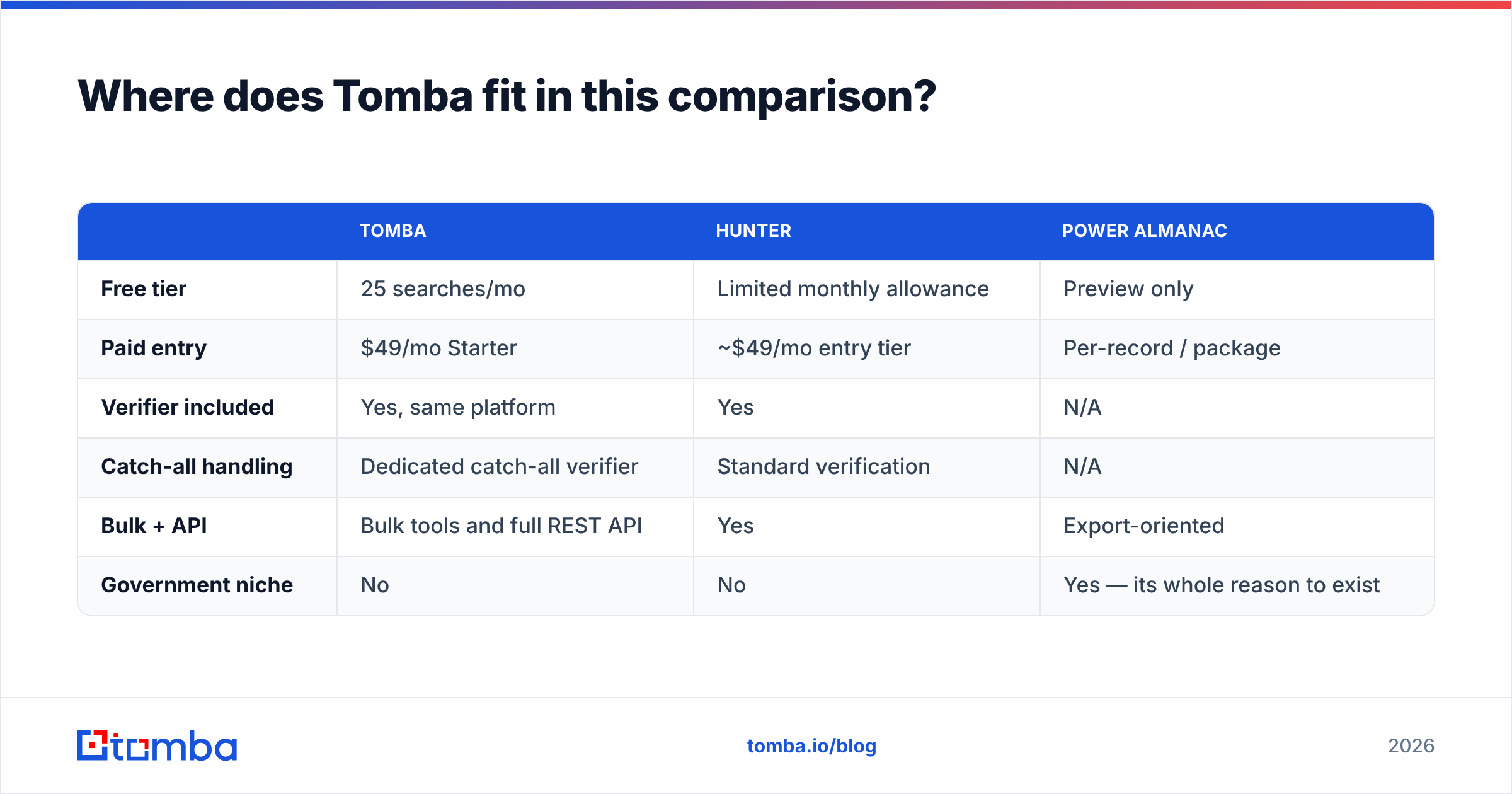
Tomba sits on the finder side of the line. Same job as Hunter. Two things stand out for buyers weighing Hunter vs Power Almanac: a lower entry price, and verification built into the same platform.
| Tomba | Hunter | Power Almanac | |
|---|---|---|---|
| Free tier | 25 searches/mo | Limited monthly allowance | Preview only |
| Paid entry | $49/mo Starter | ~$49/mo entry tier | Per-record / package |
| Verifier included | Yes, same platform | Yes | N/A |
| Catch-all handling | Dedicated catch-all verifier | Standard verification | N/A |
| Bulk + API | Bulk tools and full REST API | Yes | Export-oriented |
| Government niche | No | No | Yes — its whole reason to exist |
Tomba's Growth plan runs $99/mo and Pro $249/mo. Enterprise is quoted. Most teams land on the same flow. Run domain search to map an account's email pattern. Find the people you need. Verify before you send. Push the result to your CRM through the API.
If your buyers are city managers, buy the specialist database. Tomba will not replace it. If your buyers sit anywhere else, start with the Tomba Email Finder free tier. Run your own 100-contact test against Hunter. Let the bounce rate pick the winner.
Related guides#
// get started
Find, verify and enrich your first contacts today
Start on the free plan with 25 searches a month, then scale when your team is ready.
Free plan · No credit card required · GDPR & CCPA
// about the author