Hunter vs QuickenRich (2026): Which Email Finder Wins?
Hunter is the established email finder with a decade of pattern data. QuickenRich is the newer waterfall-style challenger. Here is how they compare on accuracy, credits, verification and real cost per usable contact in 2026.
TL;DR
- Hunter is the safe, mature choice: a decade of crawled email-pattern data, a clean API, and the best free tier for someone testing an outbound motion for the first time.
- QuickenRich is the newer, enrichment-first challenger. It leans on multi-source ("waterfall") lookups and sells credits rather than a rigid search-count ladder. Its public pricing and docs move more often than Hunter's, so verify current numbers before you commit budget.
- Neither tool is priced for volume. Hunter's mid and upper tiers climb fast ($149/mo and $499/mo at monthly billing), and credit-based enrichment gets expensive once you factor in the credits burned on misses.
- The metric that actually matters is cost per verified, deliverable contact — not cost per search. A cheaper tool with a 60% hit rate loses to a pricier one at 92%.
- If you want the same core capability with catch-all handling and verification bundled in, Tomba pricing starts at $49/mo with a free tier for 25 searches — worth benchmarking against both before you sign anything annual.
What are Hunter and QuickenRich?#
They solve the same problem from opposite directions.
Hunter launched in 2015 (as Emailhunter) and built its index by crawling the public web for email addresses attached to domains. When you ask Hunter for jane.doe@acme.com, it is answering from a corpus of addresses it has already seen in the wild, plus a pattern model that infers the format Acme uses. That heritage explains both its strength — deep coverage of companies with public web footprints — and its weakness — thinner results for private, small, or non-English-web companies.
QuickenRich comes from the enrichment side of the market. Rather than owning one large crawled index, enrichment-first tools route each lookup through multiple upstream data sources in sequence, stopping when one returns a hit. That is the "waterfall" model: you pay per successful enrichment, and the vendor absorbs the cost of the misses in its margin. In theory it produces higher hit rates than any single-source provider. In practice, the quality varies with which providers are in the waterfall and how aggressively the vendor validates what comes back.
So the real question in a hunter vs quickenrich decision is not "which has more emails." It is: do you want a stable, predictable, single-index tool with a great API, or a newer aggregator that may find contacts Hunter misses but gives you less certainty about where the data came from?
How do Hunter and QuickenRich actually find emails?#
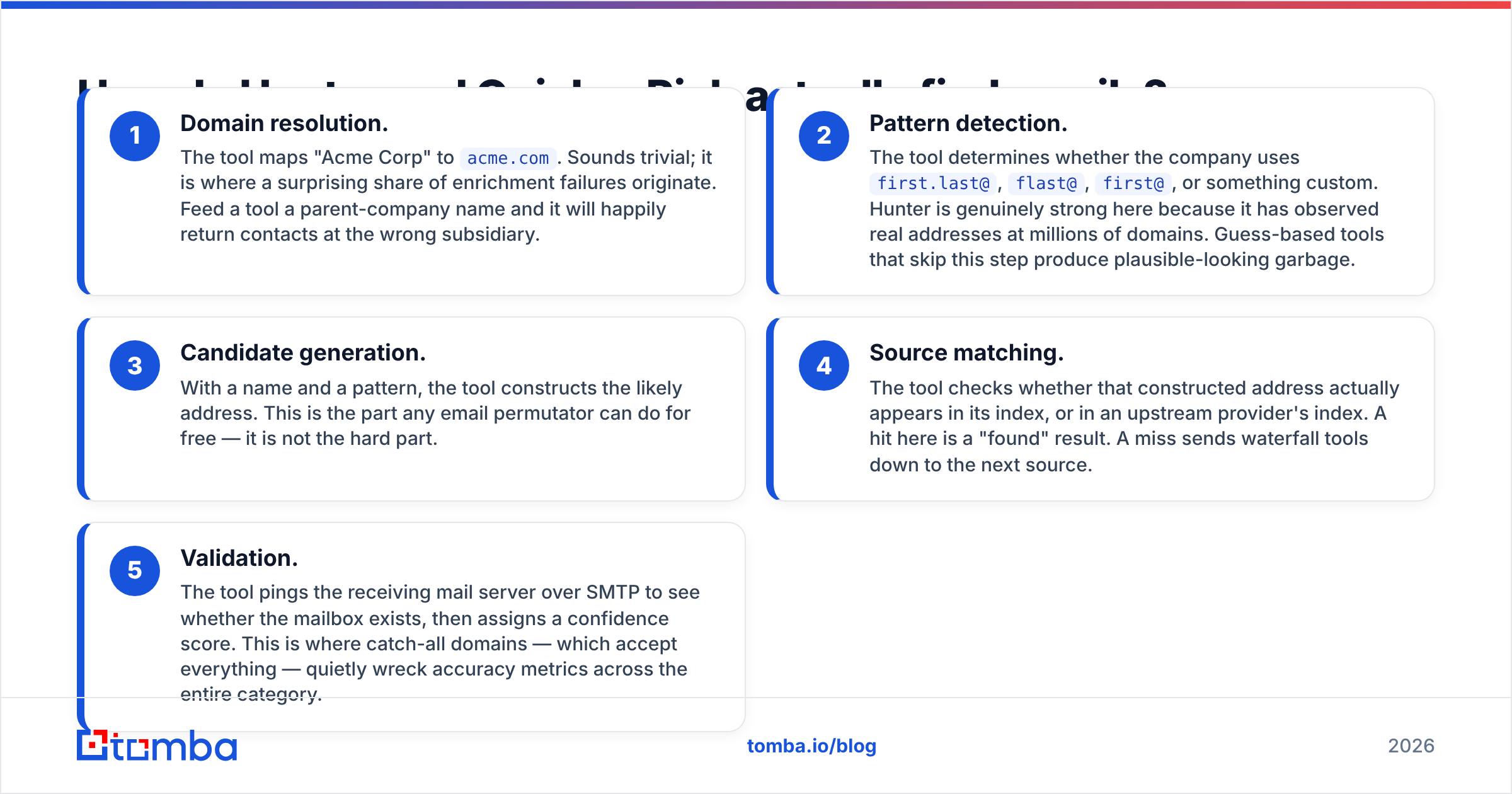
Both tools run some version of the same five-step chain. Knowing the steps tells you where each one breaks.
- Domain resolution. The tool maps "Acme Corp" to
acme.com. Sounds trivial; it is where a surprising share of enrichment failures originate. Feed a tool a parent-company name and it will happily return contacts at the wrong subsidiary. - Pattern detection. The tool determines whether the company uses
first.last@,flast@,first@, or something custom. Hunter is genuinely strong here because it has observed real addresses at millions of domains. Guess-based tools that skip this step produce plausible-looking garbage. - Candidate generation. With a name and a pattern, the tool constructs the likely address. This is the part any email permutator can do for free — it is not the hard part.
- Source matching. The tool checks whether that constructed address actually appears in its index, or in an upstream provider's index. A hit here is a "found" result. A miss sends waterfall tools down to the next source.
- Validation. The tool pings the receiving mail server over SMTP to see whether the mailbox exists, then assigns a confidence score. This is where catch-all domains — which accept everything — quietly wreck accuracy metrics across the entire category.
Step 5 is the one buyers skip when they evaluate. Both Hunter and QuickenRich return a confidence figure, but a confidence score on a catch-all domain is a guess wearing a lab coat. If a meaningful slice of your ICP sits behind Microsoft 365 tenants configured as catch-all, you need a dedicated catch-all verifier regardless of which finder you pick.

Which one is more accurate?#
Hunter is the more predictable of the two; QuickenRich has a higher theoretical ceiling and a wider variance.
Here is why. Hunter's accuracy is a function of one index and one pattern model, so it behaves consistently: strong on mid-market and enterprise companies with public web presence, weaker on sub-20-person firms and on regions where the company's web footprint is not in English. You learn its shape after a few hundred lookups and you can plan around it.
A waterfall tool's accuracy is a function of whichever upstream provider happened to answer. Run 1,000 lookups and you may see an excellent overall hit rate — but the composition of that rate shifts as vendors rotate their source mix. That is not a criticism unique to QuickenRich; it is structural to every aggregator, including several much larger ones.

The honest way to settle it: build a 200-row test list from accounts you already have verified emails for — closed-won customers are perfect — strip the emails, and run the list through both tools. Score three things:
- Hit rate: what percentage returned any address at all.
- Precision: of those returned, what percentage matched the address you already knew was correct.
- Bounce rate: send a small, warm, low-volume campaign to the rest and count hard bounces.
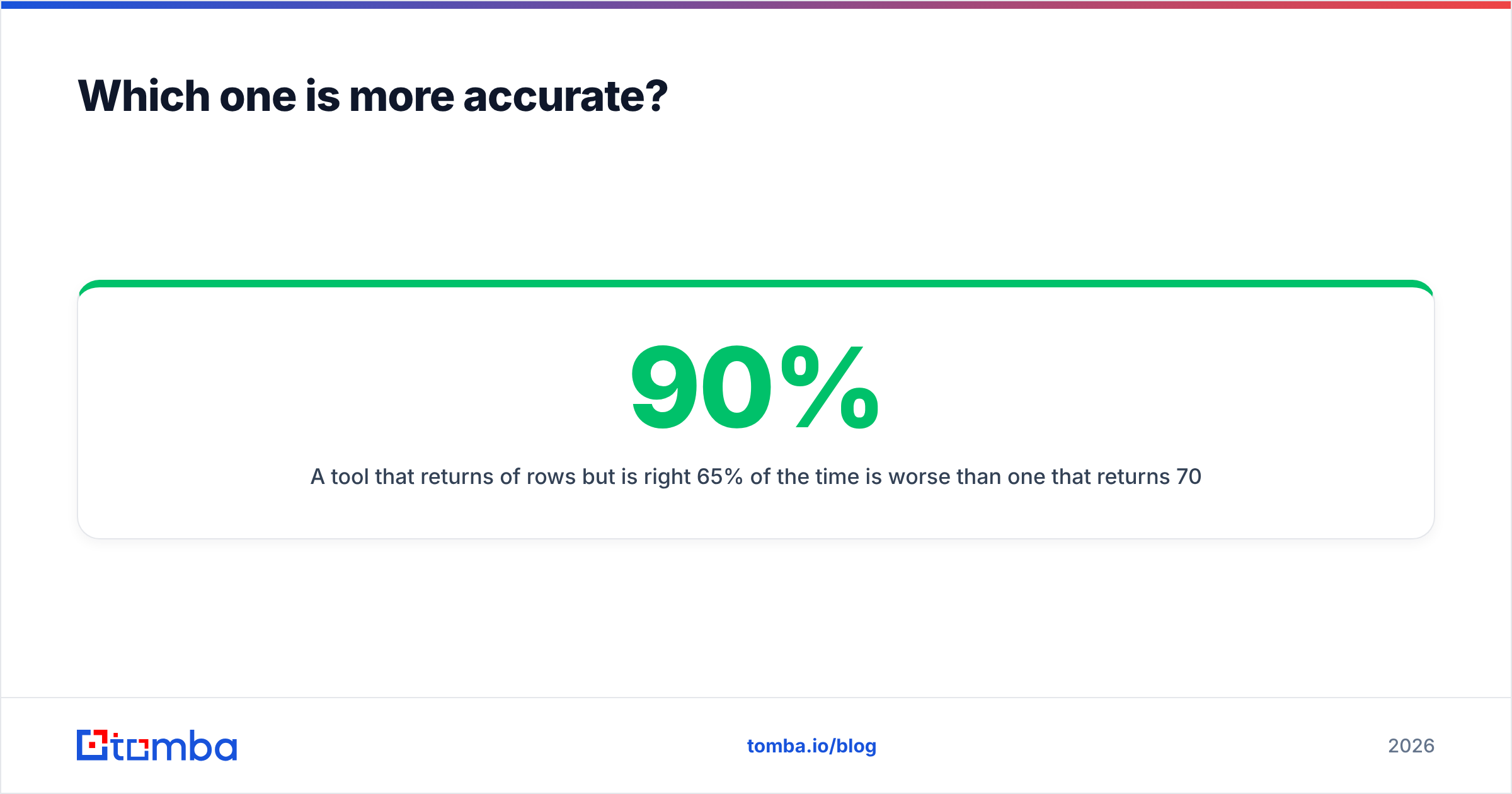
A tool that returns 90% of rows but is right 65% of the time is worse than one that returns 70% and is right 95% of the time, because every wrong address costs you sender reputation, not just a credit.
How do Hunter and QuickenRich compare on price and features?#
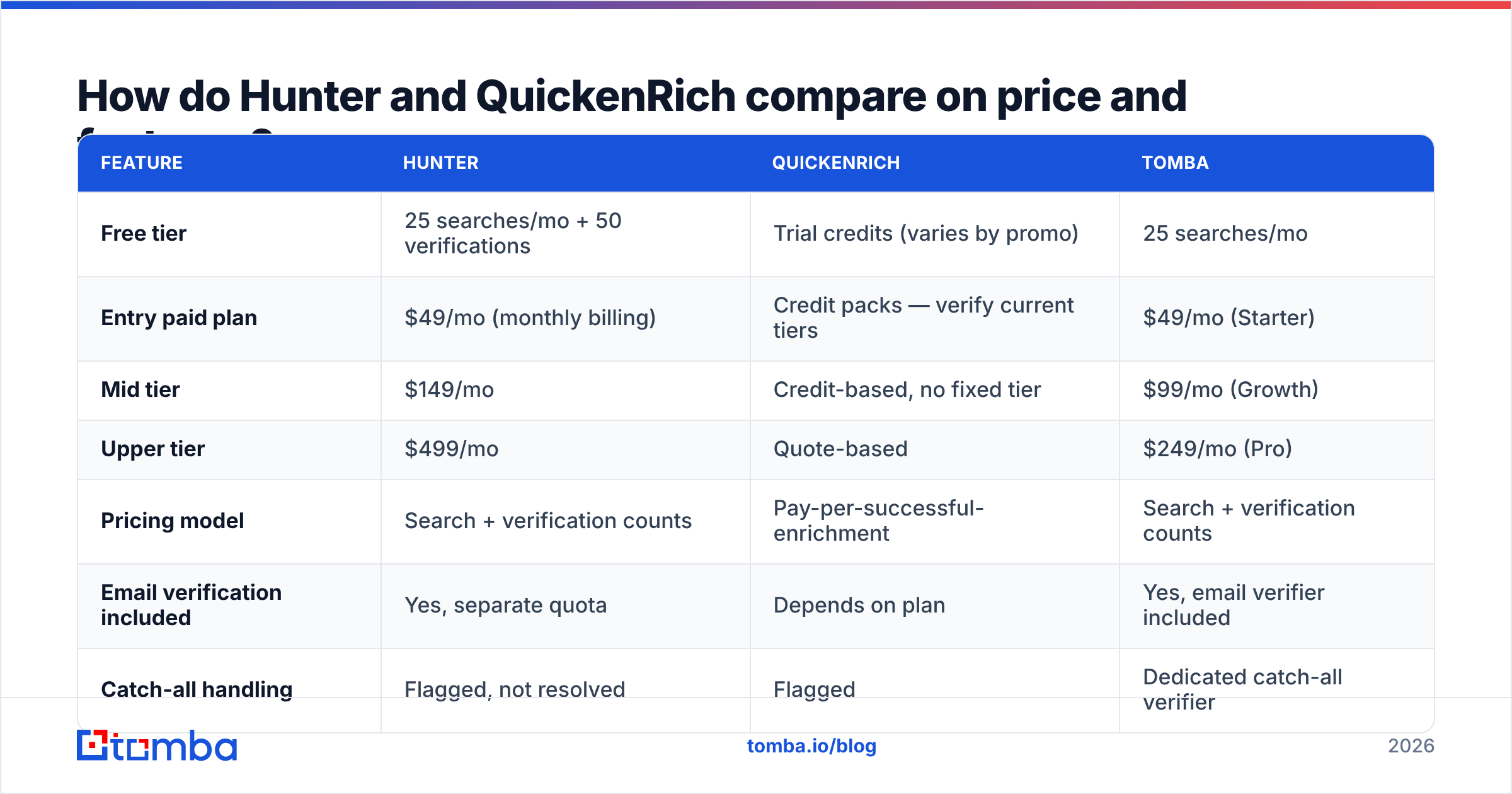
Hunter publishes a clean, stable price ladder. QuickenRich, like most credit-based enrichment vendors, prices by consumption and adjusts more frequently — check its current page before budgeting.
| Feature | Hunter | QuickenRich | Tomba |
|---|---|---|---|
| Free tier | 25 searches/mo + 50 verifications | Trial credits (varies by promo) | 25 searches/mo |
| Entry paid plan | $49/mo (monthly billing) | Credit packs — verify current tiers | $49/mo (Starter) |
| Mid tier | $149/mo | Credit-based, no fixed tier | $99/mo (Growth) |
| Upper tier | $499/mo | Quote-based | $249/mo (Pro) |
| Pricing model | Search + verification counts | Pay-per-successful-enrichment | Search + verification counts |
| Email verification included | Yes, separate quota | Depends on plan | Yes, email verifier included |
| Catch-all handling | Flagged, not resolved | Flagged | Dedicated catch-all verifier |
| Domain-wide search | Yes | Limited | Yes, domain search |
| Phone numbers | No | Yes, on higher tiers | Yes, phone finder |
| Public API | Mature, well documented | Yes, newer | Tomba API + CLI + MCP |
| Chrome extension | Yes | Yes | Yes |
| Bulk CSV processing | Yes | Yes | Yes, bulk email finder |
| Native CRM sync | HubSpot, Salesforce, Pipedrive | Zapier-first | HubSpot, Salesforce, Pipedrive, Zapier, Make |

Two things jump out of that table.
First, Hunter's jump from $149 to $499 is the decision point for most teams. Plenty of buyers sit uncomfortably at the top of the $149 tier, rationing searches at the end of the month. That is exactly the moment when evaluating alternatives pays for itself — the delta between $499/mo and a $249/mo plan is $3,000 a year, which is a real line item.
Second, credit-based pricing hides its true cost until month two. A "$X per enrichment" figure only means something once you know the hit rate. If you buy 5,000 credits and 30% of your list returns nothing usable after verification, your effective cost per usable contact is 43% higher than the sticker.
What does each option actually cost per usable contact?#
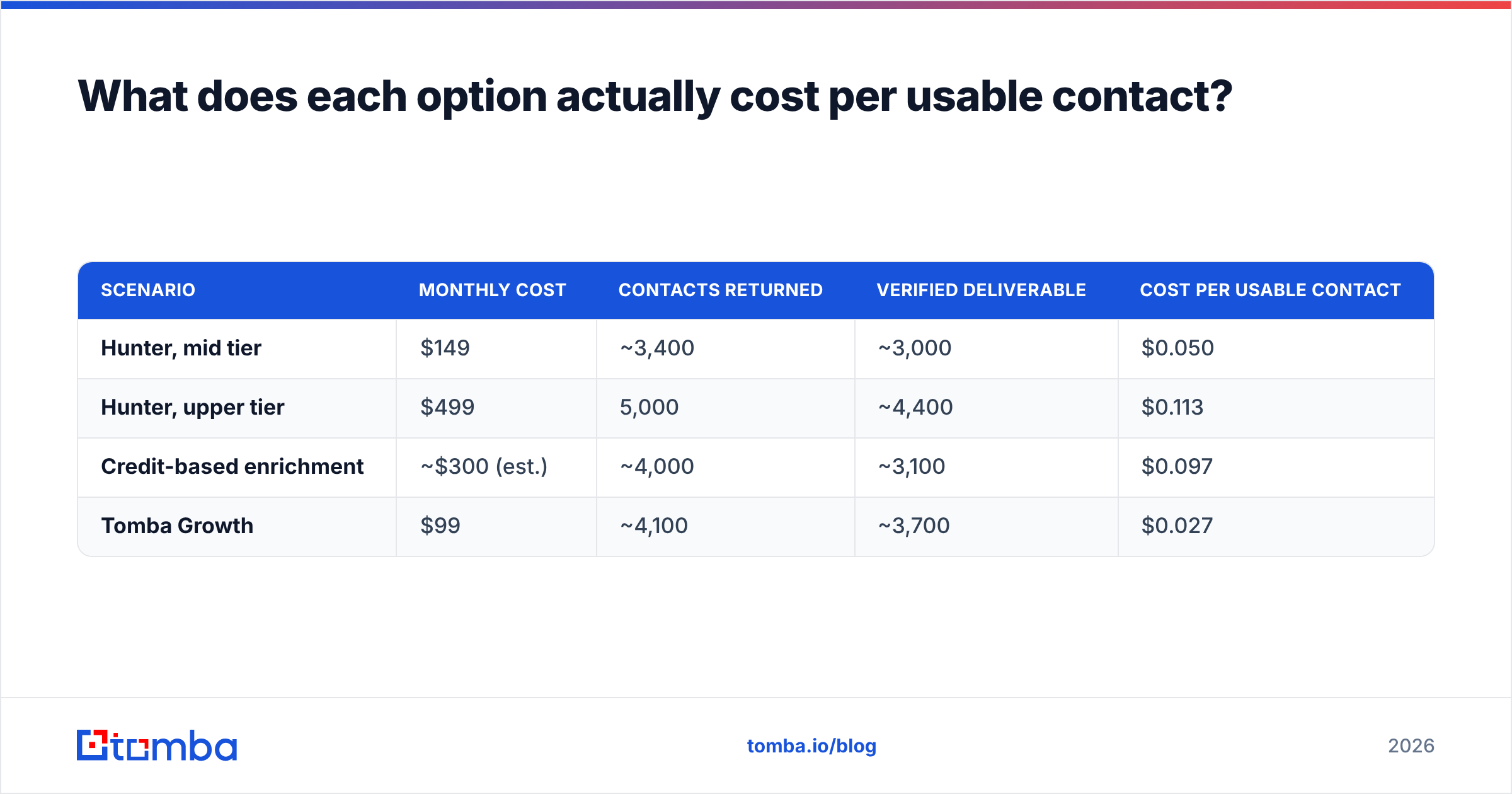
Run the arithmetic before the demo, not after. Here is the model, using a 5,000-contact month and conservative assumptions:
| Scenario | Monthly cost | Contacts returned | Verified deliverable | Cost per usable contact |
|---|---|---|---|---|
| Hunter, mid tier | $149 | ~3,400 | ~3,000 | $0.050 |
| Hunter, upper tier | $499 | 5,000 | ~4,400 | $0.113 |
| Credit-based enrichment | ~$300 (est.) | ~4,000 | ~3,100 | $0.097 |
| Tomba Growth | $99 | ~4,100 | ~3,700 | $0.027 |
Treat these as a worked example of the method, not vendor-published benchmarks — plug in your own hit rates from the 200-row test above. The point is the shape of the answer: the cheapest sticker price and the cheapest usable contact are rarely the same product, and the gap widens as your list gets harder.

Where does Hunter genuinely win?#
Give Hunter credit where it is due:
- API maturity. Hunter's API has been stable for years, has excellent docs, and is the one every integration engineer already knows. If you are building an internal enrichment service, that matters more than a 3-point hit-rate difference.
- Deliverability tooling. Hunter ships more than a finder — it includes email verification and a campaign tool, so a solo founder can run an entire small outbound motion inside one login.
- Brand trust. Hunter carries strong review coverage on G2 and is an easy internal sell. Nobody gets fired for buying Hunter.
- Free tier that actually works. 25 searches plus 50 verifications a month is enough to validate a niche before spending anything.
Where does QuickenRich have an edge?#
- Harder-to-find contacts. Waterfall lookups genuinely do surface addresses that a single index misses — particularly at small companies and at firms with minimal web presence.
- Phone data. Hunter does not do phone numbers at all. If your motion is multi-channel, that is a hard gap. (Tomba's phone finder covers the same need.)
- Consumption pricing. If your volume is spiky — three heavy months a year, nine quiet ones — buying credits beats renting a subscription tier you underuse.
- Newer, faster-moving product. Younger vendors ship features quickly and are more willing to negotiate.
The trade is transparency. With an aggregator you generally cannot tell which source produced a given record, which matters if you operate under GDPR and need to answer a data-subject request about provenance. Ask any waterfall vendor for their source documentation before you buy, and compare it against how a single-source provider documents where its data comes from.
What are the alternatives worth testing alongside them?#
Do not run a two-horse race when the category has a dozen credible options. A sensible shortlist:
- Tomba — email finder plus verifier, catch-all verifier, domain search, phone finder and enrichment in one plan, starting at $49/mo with an API, CLI and MCP server. Best fit if you want Hunter's shape at a lower cost per contact.
- BookYourData — a strong option when you would rather buy a pre-built, filtered contact list than run lookups one at a time; its per-record accuracy guarantee is unusually explicit for the category. Different buying model, same end goal.
- Apollo — bundles a database with sequencing; heavier and pricier, but replaces several tools. See our notes on choosing an Apollo alternative if the bundle is more than you need.
- A dedicated verifier — whatever finder you choose, running the output through separate verification before sending is non-negotiable. A free email checker is enough to spot-check a sample.
How should you actually choose between Hunter and QuickenRich?#
Answer four questions in order.
- What is your monthly contact volume? Under 500, take Hunter's free or entry tier and stop reading. Over 5,000, the per-contact math dominates and you should benchmark at least three tools.
- Do you need phone numbers? If yes, Hunter is out on its own — you would need a second vendor anyway, which changes the cost comparison entirely.
- How odd is your ICP? Public-web-visible mid-market companies favor Hunter. Small, private, regional, or non-English-web companies favor a multi-source approach.
- Who consumes the data? If it flows into a CRM through a native integration, Hunter's mature connectors save engineering time. If it flows into a custom pipeline, API quality and rate limits matter more than the UI.
Then run the 200-row test. Every vendor in this category will tell you their accuracy is 95%+. Only your own list settles it — and the test costs you an afternoon against a contract that costs you thousands.
One last operational note: whichever tool wins, budget for verification as a separate step. Finders optimize for coverage; verifiers optimize for deliverability. Treating a finder's confidence score as verification is the single most common reason a well-researched list still bounces at 8% and drags email deliverability down for the whole domain.
The bottom line#
Hunter is the low-risk default and still the best free tier in the category. QuickenRich is worth testing if your hit rate on Hunter is disappointing or you need phone data — just go in knowing that credit pricing rewards vendors with a low hit rate and that you should audit source provenance before signing.
If both feel like a compromise — Hunter too expensive at the tier you actually need, QuickenRich too new to bet a quarter on — benchmark the Tomba Email Finder against your own 200-row control list. Free tier, 25 searches, no card. Verification, catch-all resolution and domain search are in the same plan rather than sold as a separate quota, which is usually where the per-contact cost quietly diverges. Run the test, compare the three numbers that matter, and let your own data pick the winner.
Related guides#
// get started
Find, verify and enrich your first contacts today
Start on the free plan with 25 searches a month, then scale when your team is ready.
Free plan · No credit card required · GDPR & CCPA
// about the author