Hunter vs Rebump: Which Cold Email Tool Do You Need?
Hunter finds the email addresses. Rebump chases the replies. They are not really competitors, and buying them in the wrong order is why most cold outbound stalls. Here is how the two compare and which one you need first.
TL;DR
- Hunter and Rebump are not competitors. Hunter is a database and email-finding tool that tells you who to email. Rebump is a Gmail add-on that automatically follows up on messages you already sent.
- If your list is small and your open rates are fine but nobody replies, Rebump is the cheaper fix. If your bounce rate is above 5% or you are manually hunting addresses on LinkedIn, you have a data problem and Rebump will not touch it.
- Rebump is priced in single-digit dollars per user per month. Hunter starts free (25 searches) and jumps to roughly $49/mo for a real working plan. Different budgets, different jobs.
- Most teams end up running one data tool plus one follow-up tool. The data layer is the one worth benchmarking hardest, because bad addresses poison everything downstream.
- Tomba competes with Hunter on the data side (free tier at 25 searches, Starter at $49/mo, verification bundled) and pairs cleanly with Rebump-style follow-up automation.
What do Hunter and Rebump actually do?#
Start here, because the comparison only makes sense once you stop treating these as two options on the same shelf.
Hunter is an email-finding platform. You give it a company domain or a person's name plus a company, and it returns the likely professional email address with a confidence score and the public sources it found. It also does bulk lookups, domain-wide searches, verification, and a lightweight campaign sender bolted on top. Its center of gravity is contact discovery.
Rebump is a browser extension that sits inside Gmail. You compose an email, click the Rebump checkbox, and it automatically sends follow-up messages on a schedule you define until the recipient replies. If they reply, the sequence stops. That is essentially the entire product, and the narrowness is deliberate. Its center of gravity is persistence.
The analogy: Hunter is the phone book. Rebump is the friend who keeps calling back because you never picked up. Arguing about which is better is like arguing whether a phone book beats redial.
So why do people search "Hunter vs Rebump"? Usually because they have a budget for exactly one tool, they know cold email is underperforming, and they are trying to work out which half of the funnel is broken.
Which half of your funnel is actually broken?#
Run this diagnostic before you spend anything. It takes ten minutes and it decides the answer for you.
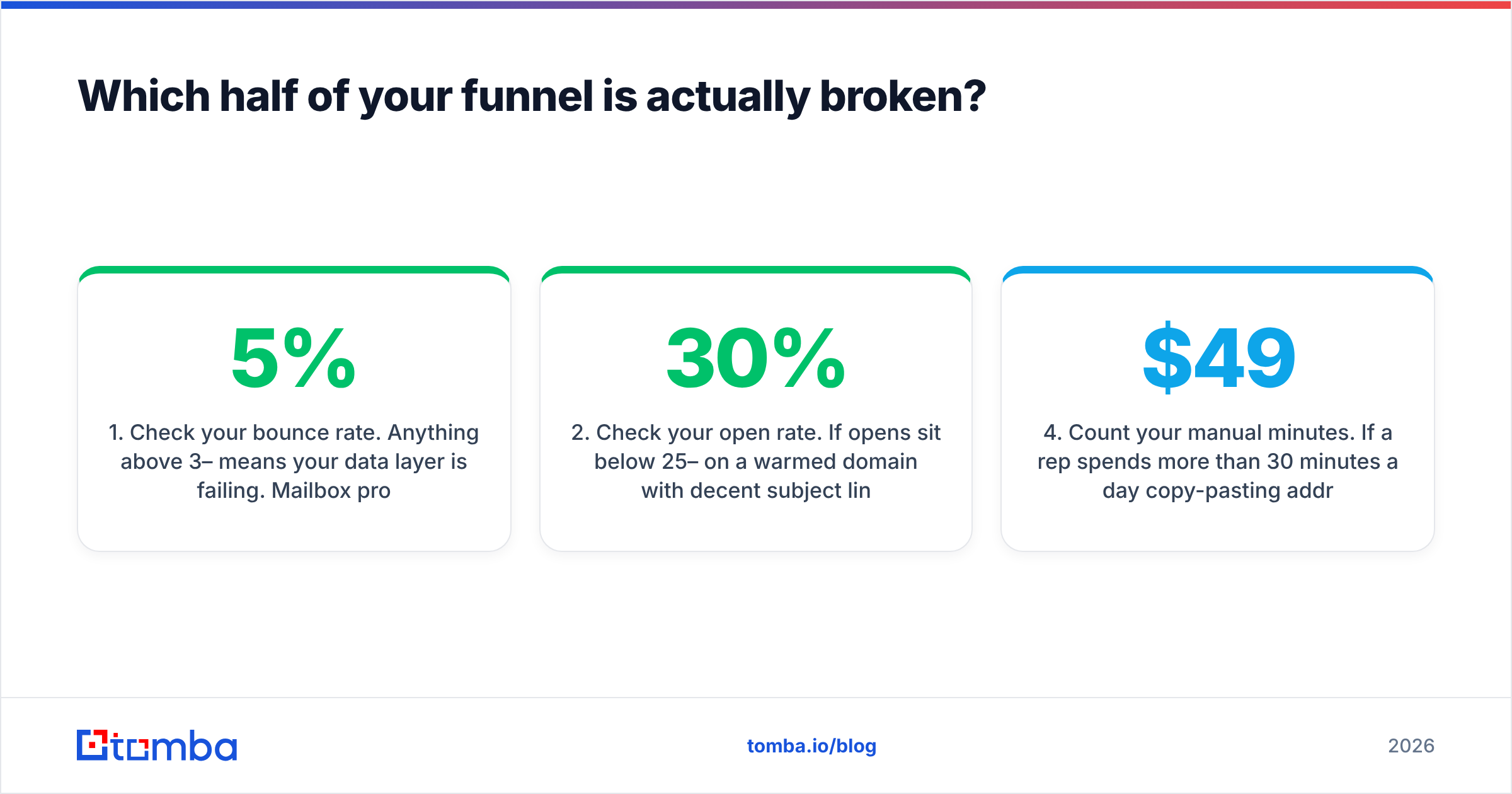
- Check your bounce rate. Anything above 3–5% means your data layer is failing. Mailbox providers read hard bounces as a spam signal, and no amount of follow-up automation survives a damaged sending domain. This is a Hunter/Tomba problem, not a Rebump problem.
- Check your open rate. If opens sit below 25–30% on a warmed domain with decent subject lines, you likely have a mix of deliverability and relevance issues. Follow-ups amplify whatever is already there — including the bad parts.
- Check your reply rate against opens. If people open but never respond, your copy and your cadence are the constraint. This is where an automatic follow-up tool earns its keep.
- Count your manual minutes. If a rep spends more than 30 minutes a day copy-pasting addresses off LinkedIn or guessing
firstname.lastname@patterns, you are paying salary for something a $49/mo tool does in seconds. - Count your abandoned threads. Most reps send one email and move on. If your CRM shows single-touch threads with no follow-up, you are leaving the majority of your potential replies on the table before the conversation ever starts.
Items 1 and 4 point at Hunter. Items 2, 3, and 5 point at Rebump. Most teams that run this honestly discover both are broken — which is exactly why the two tools coexist rather than compete.

How do Hunter and Rebump compare feature by feature?#
Here is the head-to-head, with Tomba included because it is the tool most often benchmarked against Hunter on the data side.
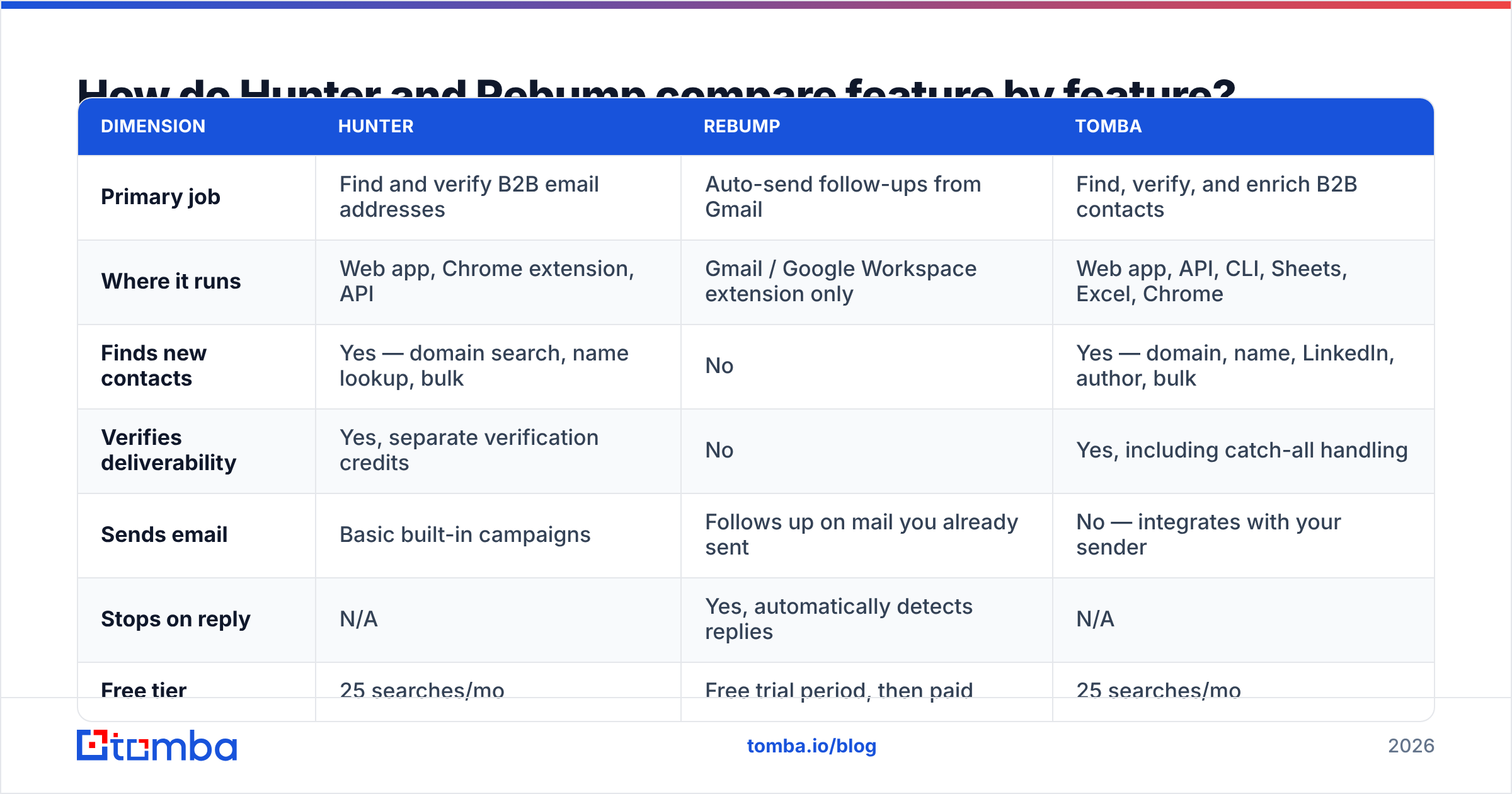
| Dimension | Hunter | Rebump | Tomba |
|---|---|---|---|
| Primary job | Find and verify B2B email addresses | Auto-send follow-ups from Gmail | Find, verify, and enrich B2B contacts |
| Where it runs | Web app, Chrome extension, API | Gmail / Google Workspace extension only | Web app, API, CLI, Sheets, Excel, Chrome |
| Finds new contacts | Yes — domain search, name lookup, bulk | No | Yes — domain, name, LinkedIn, author, bulk |
| Verifies deliverability | Yes, separate verification credits | No | Yes, including catch-all handling |
| Sends email | Basic built-in campaigns | Follows up on mail you already sent | No — integrates with your sender |
| Stops on reply | N/A | Yes, automatically detects replies | N/A |
| Free tier | 25 searches/mo | Free trial period, then paid | 25 searches/mo |
| Entry paid price | ~$49/mo (verify current rates) | Single-digit $/user/mo | $49/mo Starter |
| Best for | Building the list | Working the list | Building and enriching the list at scale |
| Weak spot | No real cadence engine | Zero data capability | No native sending engine |
Two things fall out of that table.
First, there is no overlap worth arguing about. Hunter's built-in campaign feature is not a serious alternative to a dedicated follow-up tool, and Rebump has no data layer whatsoever. If someone tells you they replaced one with the other, they changed their process, not their tooling.
Second, the price gap is enormous and it is not a value judgment. Rebump costs roughly the price of a coffee per user per month because it does one small thing with no data costs behind it. Data platforms charge more because they are maintaining and re-verifying hundreds of millions of records, running SMTP checks, and eating infrastructure costs on every lookup. Comparing the sticker prices directly tells you nothing useful.
What does each one actually cost in 2026?#
Prices move, so treat these as directional and confirm on the vendor pages before you buy.
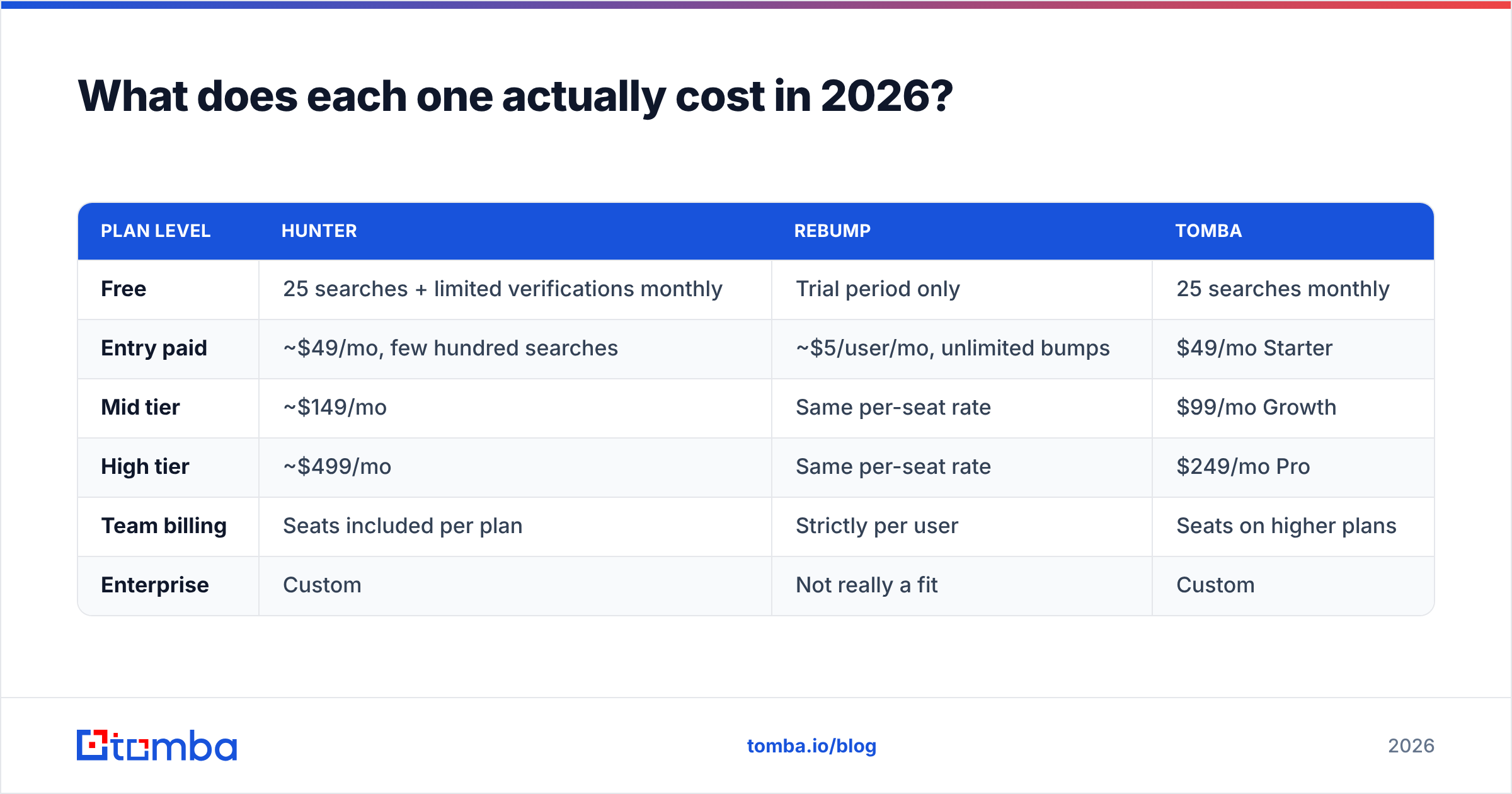
| Plan level | Hunter | Rebump | Tomba |
|---|---|---|---|
| Free | 25 searches + limited verifications monthly | Trial period only | 25 searches monthly |
| Entry paid | ~$49/mo, few hundred searches | ~$5/user/mo, unlimited bumps | $49/mo Starter |
| Mid tier | ~$149/mo | Same per-seat rate | $99/mo Growth |
| High tier | ~$499/mo | Same per-seat rate | $249/mo Pro |
| Team billing | Seats included per plan | Strictly per user | Seats on higher plans |
| Enterprise | Custom | Not really a fit | Custom |
The structural difference matters more than the numbers. Rebump scales with headcount: ten reps means ten seats, forever, regardless of volume. Data tools scale with usage: one ops person with an API key can enrich lists for a twenty-person team on a single plan. If you are a small team doing high volume, the data tool is the better per-dollar buy. If you are a large team doing low, high-touch volume, the follow-up tool is trivially cheap and the data tool may be overkill.
Check current Tomba pricing and Hunter's published rates side by side rather than trusting any comparison post, including this one. Vendors change credit definitions more often than they change headline prices, and a "search" is not the same unit everywhere.
Is Hunter better than Rebump for cold outreach?#
For the first half of cold outreach, yes — and it is not close, because Rebump does not participate in that half at all.
Cold outreach has a strict dependency chain. You cannot follow up on an email you never sent, and you cannot send an email to an address you do not have. Data comes first. If your address is wrong, the follow-up automation faithfully re-sends to a dead mailbox three more times, which is actively worse than doing nothing: you have now generated four hard bounces from a single bad record and taught your mailbox provider that you send to nonexistent people.
This is the single most common failure mode we see in teams that buy follow-up automation first. They plug an unverified list into an aggressive four-touch sequence, quadruple their bounce volume in a week, and land in spam. The tool did what it promised. The input was garbage.
So the honest ordering is:
- Get the addresses right. Use an email finder or Hunter to source them, then run everything through an email verifier before it touches a sender. Aim for a bounce rate under 2%.
- Warm and monitor the sending domain. Verified data plus a cold domain still fails. SPF, DKIM, DMARC, and a gradual ramp are non-negotiable.
- Then automate persistence. Once the first two are solid, a tool like Rebump reliably adds replies, because most positive responses arrive on touch two through four rather than touch one.

Where does Tomba fit against Hunter?#
If you have decided the data layer is your bottleneck, Hunter is not the only option — and it is worth checking a second source before committing, because coverage varies by region and company size more than any vendor likes to admit.
Tomba occupies the same slot as Hunter: domain search to pull every published address at a company, name-based lookup, LinkedIn-based finding, bulk processing, and verification including catch-all domains. The practical differences that matter when you are choosing:
- Verification is treated as core, not an upsell. Catch-all domains are the hardest case in this category and the place where most tools quietly return "accept-all" and leave you to guess.
- Access surfaces are broad. Beyond the web app there is an API, a CLI, Google Sheets and Excel add-ins, and a Chrome extension, which matters if your workflow lives in a spreadsheet rather than a dashboard.
- Pricing steps are gentler in the middle. The jump from Starter to Growth is $49 to $99 rather than a triple-digit leap, which is the tier most small teams actually need.
- Bulk work is first-class. Bulk email finder runs let you process a whole account list in one pass instead of one lookup at a time.
None of that makes Hunter a bad tool — it is a well-built, widely used product with a strong reputation, and you can read unfiltered user comparisons on G2 rather than taking any vendor's word for it. The point is that on the data side you have genuine choices, and the differences between them will affect your bounce rate far more than which follow-up extension you pick.
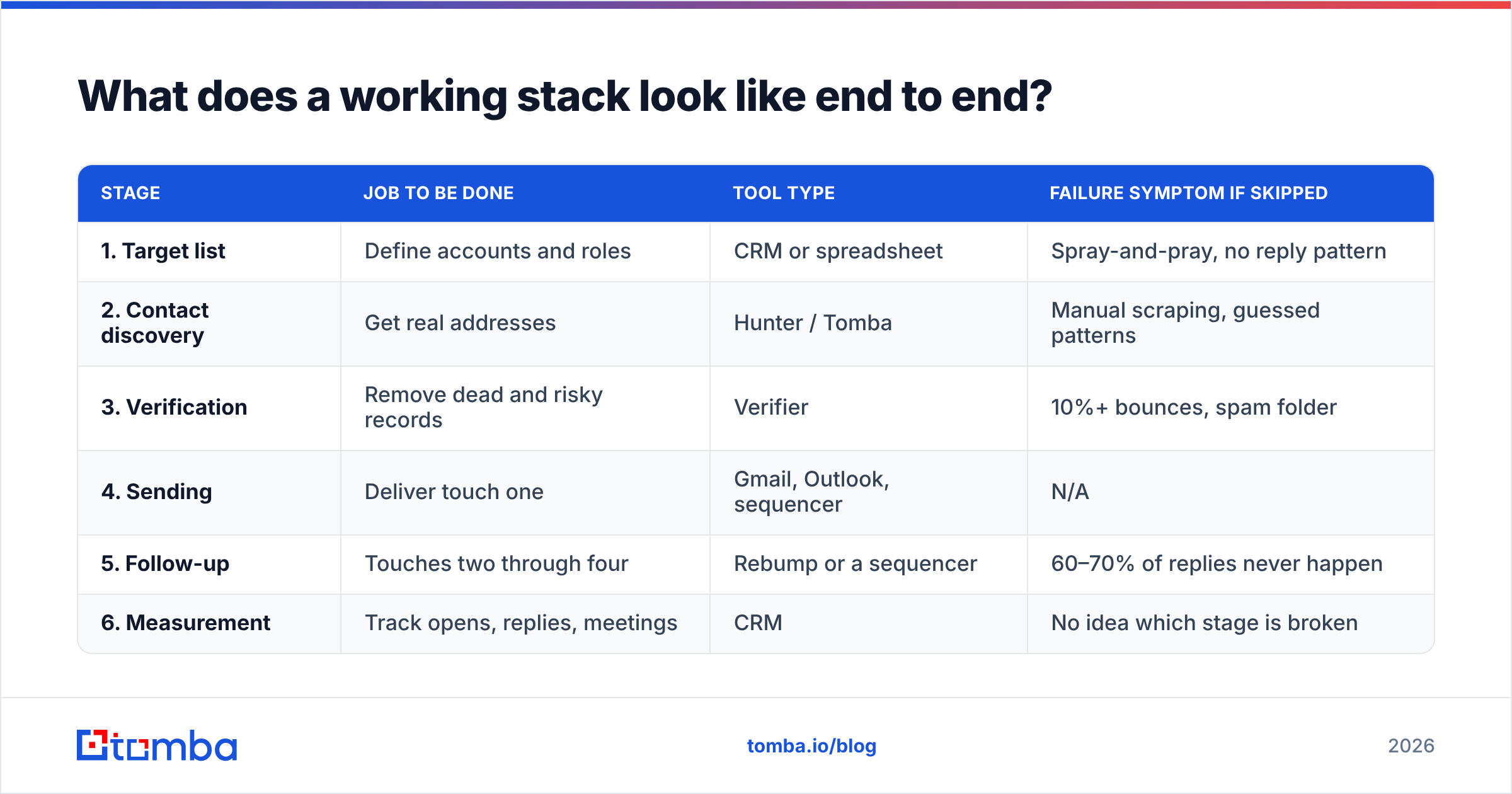
What does a working stack look like end to end?#
Here is the sequence most functional outbound teams converge on, regardless of which specific vendors they use.
| Stage | Job to be done | Tool type | Failure symptom if skipped |
|---|---|---|---|
| 1. Target list | Define accounts and roles | CRM or spreadsheet | Spray-and-pray, no reply pattern |
| 2. Contact discovery | Get real addresses | Hunter / Tomba | Manual scraping, guessed patterns |
| 3. Verification | Remove dead and risky records | Verifier | 10%+ bounces, spam folder |
| 4. Sending | Deliver touch one | Gmail, Outlook, sequencer | N/A |
| 5. Follow-up | Touches two through four | Rebump or a sequencer | 60–70% of replies never happen |
| 6. Measurement | Track opens, replies, meetings | CRM | No idea which stage is broken |
Rebump covers stage 5 elegantly and cheaply if you live in Gmail and send genuinely personal one-to-one mail. It does not do stages 1, 2, 3, or 6. Hunter covers stages 2 and 3 well and touches 4 lightly. If you are running high volume with heavy personalization at scale, you will eventually outgrow Rebump and move stage 5 into a full sequencer — but plenty of founder-led sales motions never need to.
A quick reality check on stage 5's importance: research consistently shows that a meaningful majority of replies to cold outreach arrive after the first message. HubSpot and most major sales-methodology publishers put the same idea differently, but the conclusion is stable — single-touch outbound underperforms multi-touch outbound by a wide margin. That is the entire case for Rebump, and it is a good case, provided the addresses underneath it are real. If you want the underlying definitions, our B2B glossary covers response rate and deliverability terminology.
So which should you buy first?#
Buy the data tool first if: your bounce rate is above 3%, you do not have a repeatable way to source addresses, you are building lists from scratch each month, or reps are doing manual lookup work. Fixing data raises the ceiling on everything else.
Buy Rebump first if: your addresses already come from a CRM or an existing verified source, your bounces are low, you send genuinely personal Gmail messages, and your honest problem is that you send once and give up. At single-digit dollars per seat it is one of the cheapest reply-rate improvements available.
Buy both if you are running real outbound volume. Combined, they cost less than one lost deal, and they solve non-overlapping problems.
The mistake worth avoiding is treating this as an either/or. "Hunter vs Rebump" is a question people ask when they have not yet diagnosed which stage is leaking. Run the five-point diagnostic above, find the leak, and buy for the leak.
Ready to fix the data layer? Start with the Tomba Email Finder — free for your first 25 searches per month, $49/mo on Starter when you need volume, with verification and catch-all handling built in rather than sold separately. Get the addresses right first, and every follow-up tool you layer on top suddenly starts working the way its marketing page promised.
Related guides#
// get started
Find, verify and enrich your first contacts today
Start on the free plan with 25 searches a month, then scale when your team is ready.
Free plan · No credit card required · GDPR & CCPA
// about the author