Hunter vs Right Inbox: Which Cold Email Tool Do You Need?
Hunter finds and verifies email addresses. Right Inbox schedules, tracks, and automates follow-ups inside Gmail. They solve different halves of the same problem — here's how to pick, and when you need both.
TL;DR
- Hunter and Right Inbox are not competitors. Hunter is a data tool that finds and verifies work email addresses. Right Inbox is a Gmail extension that schedules, tracks, and automates follow-ups on emails you already have.
- If your problem is "I don't know who to email or what their address is," you need an email finder — Hunter, Tomba, or similar.
- If your problem is "I send emails and never hear back, and I forget to follow up," you need Right Inbox (or a sequencer).
- Most solo founders and small sales teams end up running one of each: a finder/verifier for the list, a Gmail layer for the sending.
- Cost check: a finder plus Right Inbox typically lands around $55–$65/month for one seat — cheaper than most all-in-one sales engagement platforms.
What exactly do Hunter and Right Inbox each do?#
Think of cold outreach as a restaurant. Hunter is the supplier who sources ingredients — it tells you which addresses exist and whether they're fresh. Right Inbox is the kitchen timer and service staff — it decides when each plate goes out, notices whether anyone touched it, and reminds you to check back on table six.
You can't run the restaurant with only one of them.
Hunter is an email-finding and verification platform. You give it a company domain and it returns the addresses it has on file, the pattern that company uses (first.last@, finitial+last@), and a confidence score. It also verifies individual addresses and runs a lightweight campaign tool on top.
Right Inbox is a Chrome/Firefox extension that lives inside Gmail. It adds send-later scheduling, open and link tracking, automatic follow-up sequences that stop when someone replies, private notes on threads, recurring emails, email templates, and a signature manager. It never tells you an address. It assumes you already have one.
So "hunter vs right inbox" is really a question about which half of your outbound process is broken.
Which half of your outbound process is actually broken?#
Run this diagnostic before you buy anything. Four questions, in order:
- Can you name 100 people worth emailing this month? If no, your problem is targeting, not tooling. Fix the ICP first — neither product solves this.
- Do you have valid addresses for those 100 people? If no, you need a finder and verifier. This is Hunter's lane (and Tomba's).
- Do your emails land in the inbox? If your bounce rate is above 3–5%, your list is the culprit, not your copy. Verification comes before sending, always.
- Do you follow up at least three times, on schedule, without babysitting a spreadsheet? If no, you need a sending layer. This is Right Inbox's lane.
Most teams I've watched skip step 2 and jump straight to step 4 — they install a tracking extension, watch their opens, and conclude the copy is bad. It usually isn't. A list with 12% invalid addresses will torpedo the sender reputation that step 4 depends on.
How do Hunter and Right Inbox compare feature by feature?#
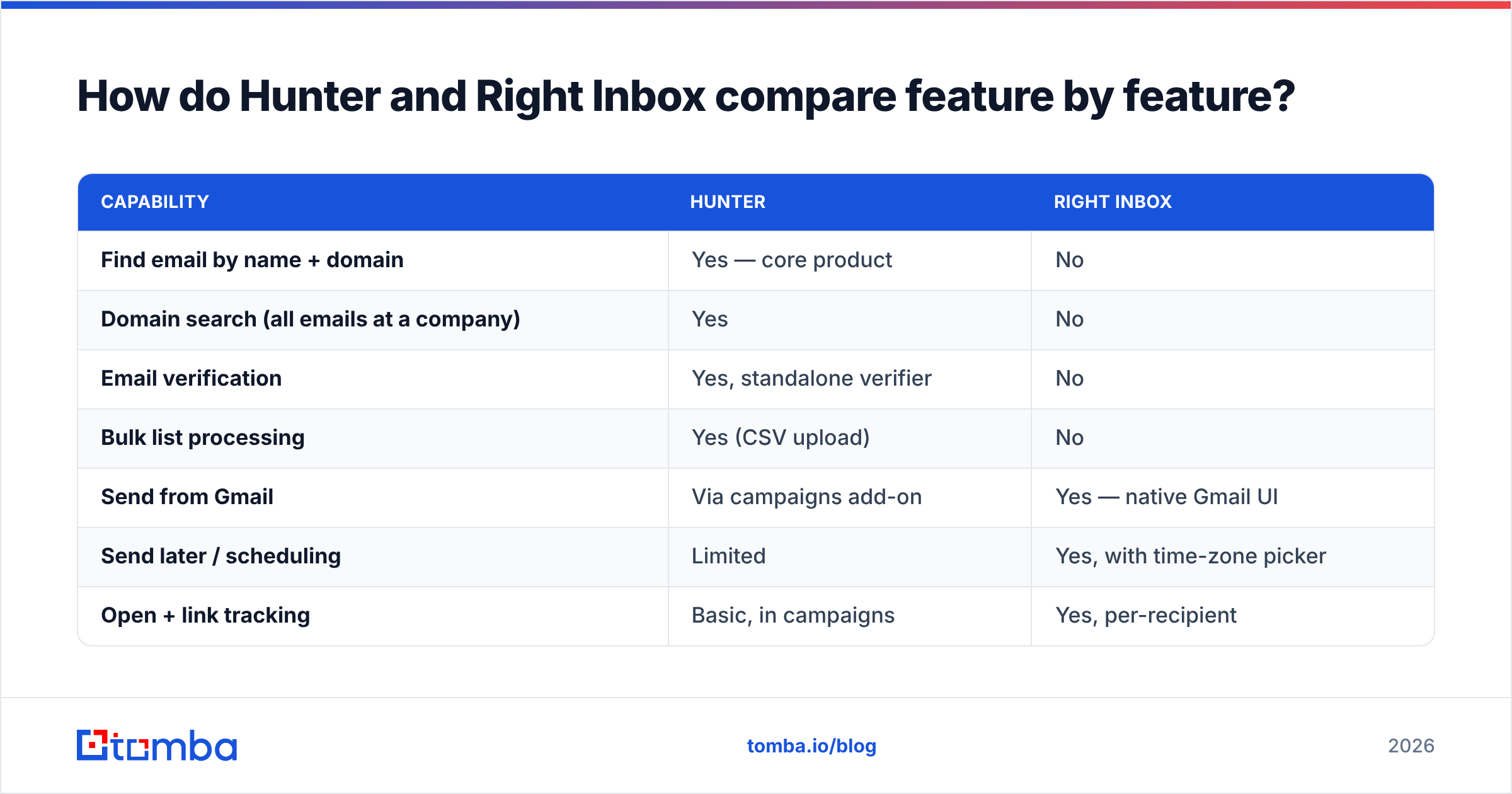
| Capability | Hunter | Right Inbox |
|---|---|---|
| Find email by name + domain | Yes — core product | No |
| Domain search (all emails at a company) | Yes | No |
| Email verification | Yes, standalone verifier | No |
| Bulk list processing | Yes (CSV upload) | No |
| Send from Gmail | Via campaigns add-on | Yes — native Gmail UI |
| Send later / scheduling | Limited | Yes, with time-zone picker |
| Open + link tracking | Basic, in campaigns | Yes, per-recipient |
| Auto-stop follow-ups on reply | Yes, in campaigns | Yes |
| Private notes on threads | No | Yes |
| Recurring emails | No | Yes |
| Templates + signatures | Basic | Yes, with variables |
| API access | Yes | No public API |
| Free tier | 25 searches/month | Limited free plan |
| Typical paid entry price | ~$49/user/month | ~$8–$15/user/month |
Prices shift — verify both on the vendors' own pricing pages before you budget. The shape of the difference is what matters: Hunter is priced per data volume, Right Inbox is priced per seat. That has a real consequence. If you're a two-person team emailing 500 new contacts a month, your data cost scales with the list and your sending cost doesn't. If you're a ten-person team emailing the same 500 contacts, the reverse.
Is Hunter better than Right Inbox?#
Wrong question, but here's the honest answer to the question underneath it: Hunter is the one you can't fake, Right Inbox is the one you can.
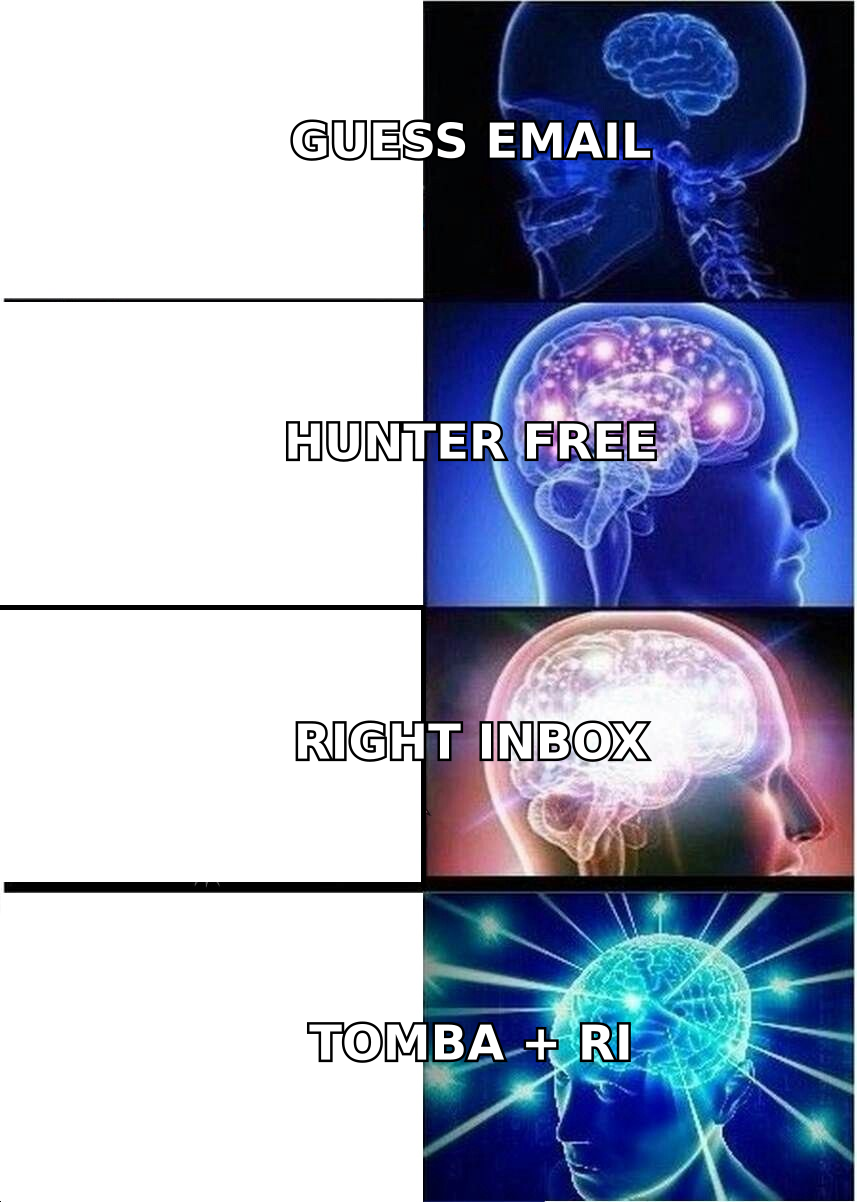
You cannot manually reconstruct what a finder does at any useful scale. Guessing firstname.lastname@company.com works maybe 40–60% of the time depending on the industry, and the misses cost you bounces, which cost you deliverability, which costs you every campaign afterward. That's a compounding problem.
You can fake most of Right Inbox. Gmail has native scheduled send. Google Tasks or a calendar reminder covers follow-up nudges. Templates exist as Gmail canned responses. It's clumsy and it breaks past about 20 open threads, but it works. Right Inbox buys you back time and consistency; a finder buys you something you literally cannot produce yourself.
That's why, if you only get one budget line, spend it on data.
Where does Tomba fit in this comparison?#
Tomba sits on the same side of the line as Hunter — it's a data platform, not a Gmail layer. If you're evaluating "hunter vs right inbox" you're likely also evaluating which finder to buy, so here's the neutral version.
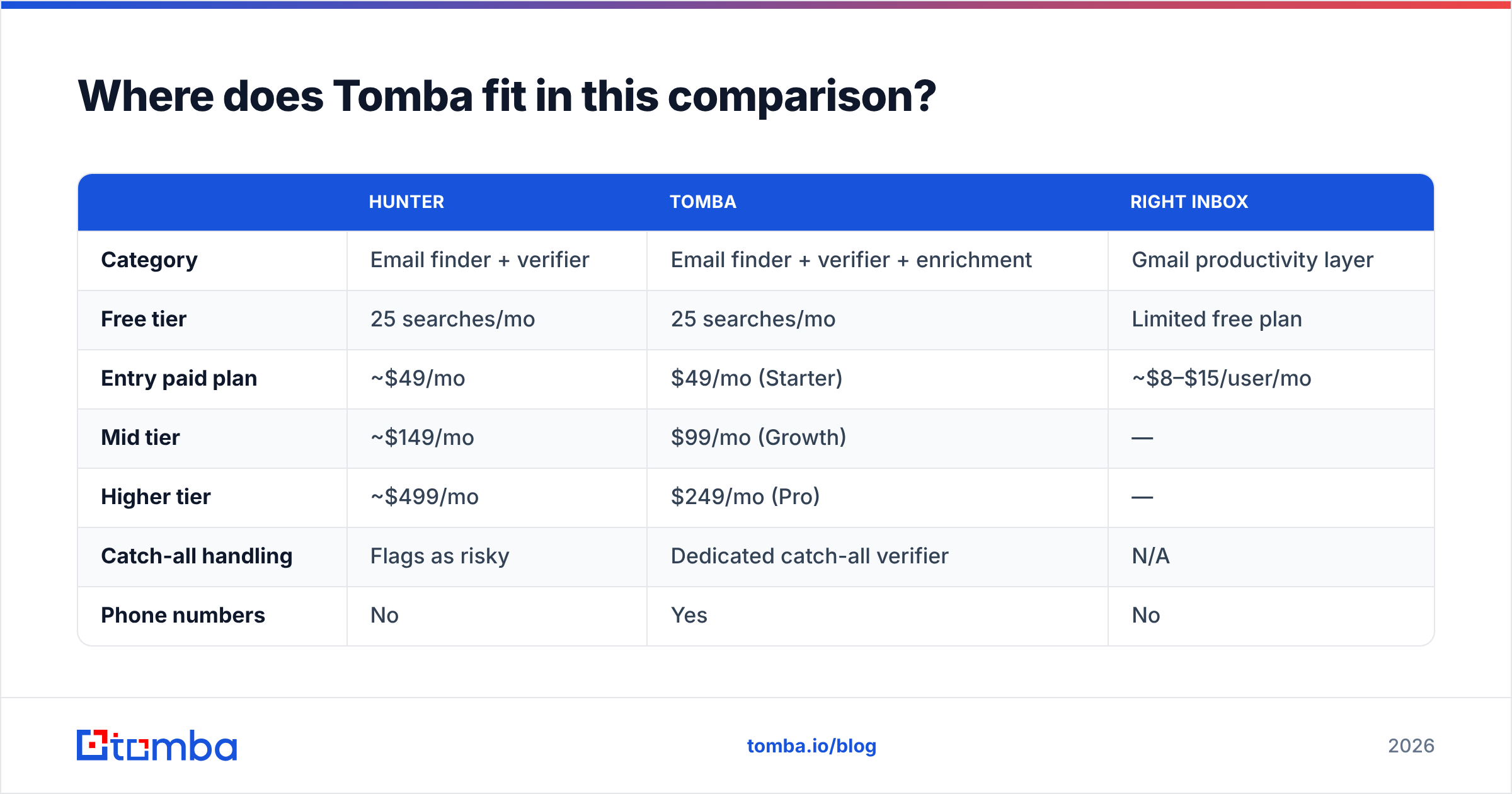
| Hunter | Tomba | Right Inbox | |
|---|---|---|---|
| Category | Email finder + verifier | Email finder + verifier + enrichment | Gmail productivity layer |
| Free tier | 25 searches/mo | 25 searches/mo | Limited free plan |
| Entry paid plan | ~$49/mo | $49/mo (Starter) | ~$8–$15/user/mo |
| Mid tier | ~$149/mo | $99/mo (Growth) | — |
| Higher tier | ~$499/mo | $249/mo (Pro) | — |
| Catch-all handling | Flags as risky | Dedicated catch-all verifier | N/A |
| Phone numbers | No | Yes | No |
| Website visitor reveal | No | Yes | No |
| API + CLI + MCP | API | API, CLI, MCP server | No |
| Sends email | Campaigns add-on | No | Yes — that's the point |
Two things worth flagging honestly. First, Hunter has a longer track record and a large public dataset that many teams already trust; its confidence scoring is well understood. Second, Tomba's advantage shows up mostly in the middle of the pricing curve and in the edge cases — catch-all verification, phone numbers, and a broader automation surface (API, CLI, and an MCP server) if you're wiring outreach into scripts or AI agents rather than clicking through a UI.
Neither replaces Right Inbox. Neither wants to.
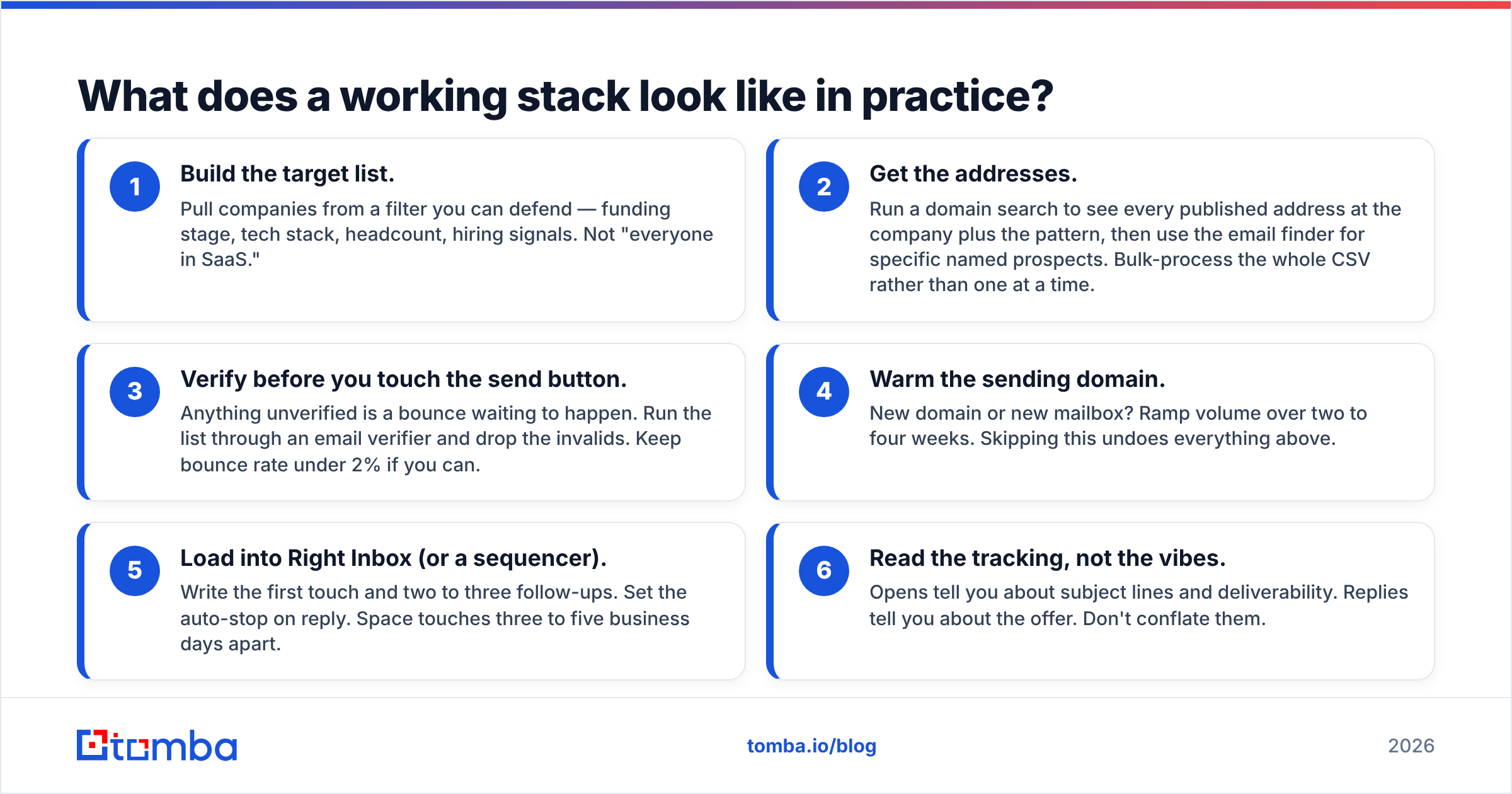
What does a working stack look like in practice?#
Here's the assembly order that actually produces replies:
- Build the target list. Pull companies from a filter you can defend — funding stage, tech stack, headcount, hiring signals. Not "everyone in SaaS."
- Get the addresses. Run a domain search to see every published address at the company plus the pattern, then use the email finder for specific named prospects. Bulk-process the whole CSV rather than one at a time.
- Verify before you touch the send button. Anything unverified is a bounce waiting to happen. Run the list through an email verifier and drop the invalids. Keep bounce rate under 2% if you can.
- Warm the sending domain. New domain or new mailbox? Ramp volume over two to four weeks. Skipping this undoes everything above.
- Load into Right Inbox (or a sequencer). Write the first touch and two to three follow-ups. Set the auto-stop on reply. Space touches three to five business days apart.
- Read the tracking, not the vibes. Opens tell you about subject lines and deliverability. Replies tell you about the offer. Don't conflate them.
Step 3 is the one people skip and the one that determines whether steps 4–6 matter at all.
When should you skip Right Inbox entirely?#
Right Inbox is excellent at what it does and badly matched to a few situations:
- You send more than ~150 cold emails a day. At that volume you want a purpose-built sequencer with mailbox rotation and inbox rotation, not a Gmail extension. Right Inbox is built for human-scale sending from one mailbox.
- Your team needs shared visibility. Right Inbox notes and tracking live per-user. If a manager needs pipeline-level reporting, that belongs in a CRM or a sales engagement platform.
- You're not on Gmail. It's a Gmail-first product. Outlook shops need a different answer.
- You already pay for Outreach, Salesloft, or Instantly. You'd be buying overlap.
Conversely, skip the finder if — and only if — your entire pipeline is inbound. If every contact arrives with an address attached via a form fill, you don't need discovery; you need enrichment and speed-to-lead.
Does open tracking still work in 2026?#
Partially, and you should adjust your expectations. Apple's Mail Privacy Protection pre-loads tracking pixels, which inflates open counts for anyone reading on Apple Mail. Gmail's image proxy has cached images for years. Corporate security scanners trip pixels and click-trackers on delivery.
What this means practically:
- Treat open rate as a directional signal across a large sample, not proof that one specific person read your email.
- Link clicks are more reliable than opens, but still noisy from scanners.
- Replies are the only metric that can't be faked by a scanner. Optimize for response rate.
Right Inbox's tracking is solid engineering; the underlying signal is just weaker than it was five years ago. That's an industry-wide condition, not a product flaw. Check current user sentiment on G2 before assuming any tracking tool has solved it — nobody has.
What's the total cost of running both?#
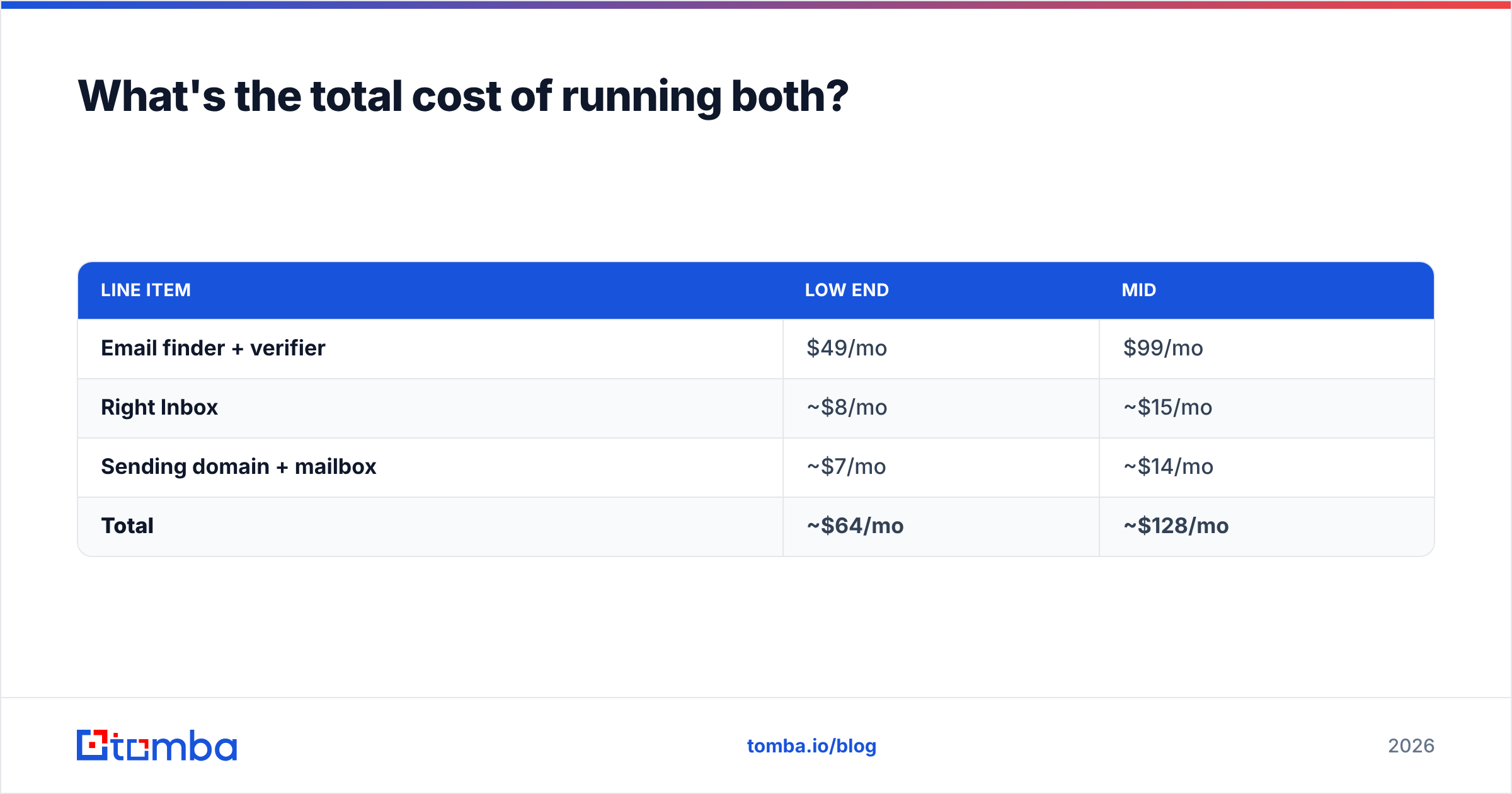
For a single seat doing genuine outbound:
| Line item | Low end | Mid |
|---|---|---|
| Email finder + verifier | $49/mo | $99/mo |
| Right Inbox | ~$8/mo | ~$15/mo |
| Sending domain + mailbox | ~$7/mo | ~$14/mo |
| Total | ~$64/mo | ~$128/mo |
Compare that to an all-in-one sales engagement platform, which typically starts north of $100 per seat before data credits. The assembled stack is cheaper and each piece is independently replaceable — if your finder disappoints, you swap it without rebuilding your sequences. That modularity is worth more than most teams realize until they've been locked into a suite.
If you're weighing specific vendors, the Tomba pricing page and Hunter's own pricing page are the only sources worth trusting for current numbers. Third-party comparison posts — including this one — go stale.
The short verdict#
Buy the finder first. Buy the Gmail layer second. If you have to choose one for the next 90 days, choose data, because bad addresses poison every downstream tool you'll ever install, and no amount of send-later scheduling rescues a list where one in eight rows bounces.
Hunter and Tomba both do the data job well; the differences show up in catch-all handling, phone coverage, and how far each stretches at the $99–$249 tier. Right Inbox does the Gmail job well and has no real overlap with either.
Start free on both sides, run 200 real prospects through the full pipeline, and let your bounce rate and reply rate decide.
Ready to fix the data half? Start with the Tomba Email Finder — 25 free searches a month, no card, with verification built into the same lookup so you're not paying two vendors to answer one question. Feed the verified output into Right Inbox and let your follow-ups run themselves.
Related guides#
// get started
Find, verify and enrich your first contacts today
Start on the free plan with 25 searches a month, then scale when your team is ready.
Free plan · No credit card required · GDPR & CCPA
// about the author