Hunter vs Scrubby (2026): Which Email Tool Should You Use?
Hunter finds email addresses. Scrubby verifies the catch-all ones most tools refuse to touch. Here is how the two compare on accuracy, pricing and workflow — and when you honestly need both.
TL;DR
- Hunter and Scrubby are not really competitors. Hunter's core job is finding professional email addresses; Scrubby's core job is verifying the risky, catch-all addresses that most validators return as "unknown".
- If your bottleneck is "I don't have enough contacts", Hunter (or another email finder) is the right purchase. If your bottleneck is "half my list comes back unknown and my bounce rate is scary", Scrubby is the right purchase.
- Pricing models differ structurally: Hunter sells monthly seats with search + verification credits from roughly $49/mo list price; Scrubby sells verification credits priced per email, with volume discounts.
- Running both means two subscriptions, two dashboards and two CSV round-trips per campaign.
- If you want finding and catch-all verification under one login, Tomba covers both from $49/mo on Starter, with a free tier for testing.
What Are Hunter and Scrubby, Actually?#
The single most common mistake in the hunter vs scrubby search is assuming the two tools overlap. They barely do. Think of it like buying a car: Hunter is the dealership that sells you the vehicle, Scrubby is the mechanic who tells you whether the engine will actually start. Both matter. Neither replaces the other.
Here is the honest breakdown of what each one does:
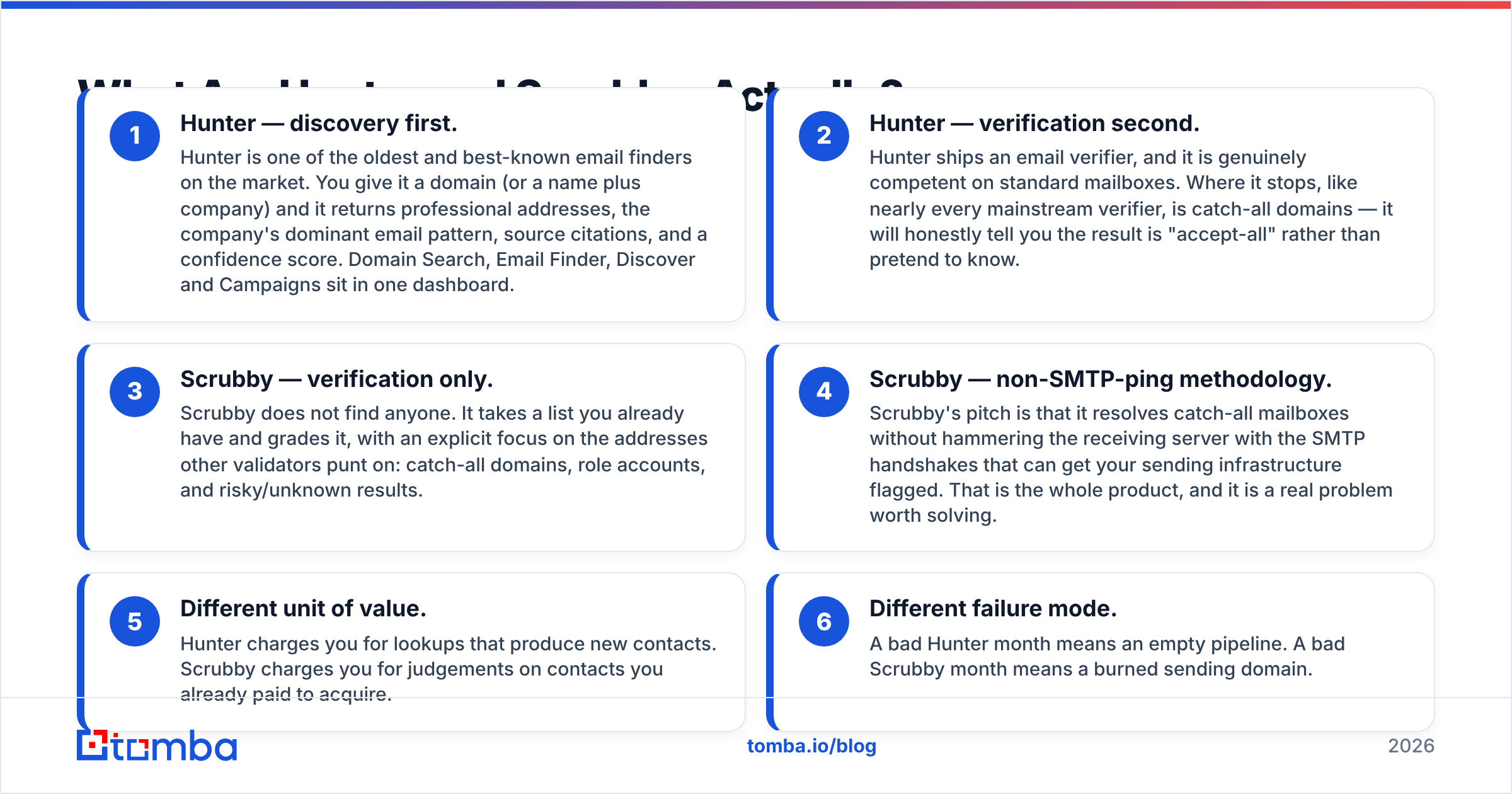
- Hunter — discovery first. Hunter is one of the oldest and best-known email finders on the market. You give it a domain (or a name plus company) and it returns professional addresses, the company's dominant email pattern, source citations, and a confidence score. Domain Search, Email Finder, Discover and Campaigns sit in one dashboard.
- Hunter — verification second. Hunter ships an email verifier, and it is genuinely competent on standard mailboxes. Where it stops, like nearly every mainstream verifier, is catch-all domains — it will honestly tell you the result is "accept-all" rather than pretend to know.
- Scrubby — verification only. Scrubby does not find anyone. It takes a list you already have and grades it, with an explicit focus on the addresses other validators punt on: catch-all domains, role accounts, and risky/unknown results.
- Scrubby — non-SMTP-ping methodology. Scrubby's pitch is that it resolves catch-all mailboxes without hammering the receiving server with the SMTP handshakes that can get your sending infrastructure flagged. That is the whole product, and it is a real problem worth solving.
- Different unit of value. Hunter charges you for lookups that produce new contacts. Scrubby charges you for judgements on contacts you already paid to acquire.
- Different failure mode. A bad Hunter month means an empty pipeline. A bad Scrubby month means a burned sending domain.
Once you frame it that way, "which one wins" is the wrong question. The right question is which gap is currently costing you more money.

How Do Hunter and Scrubby Compare Head to Head?#
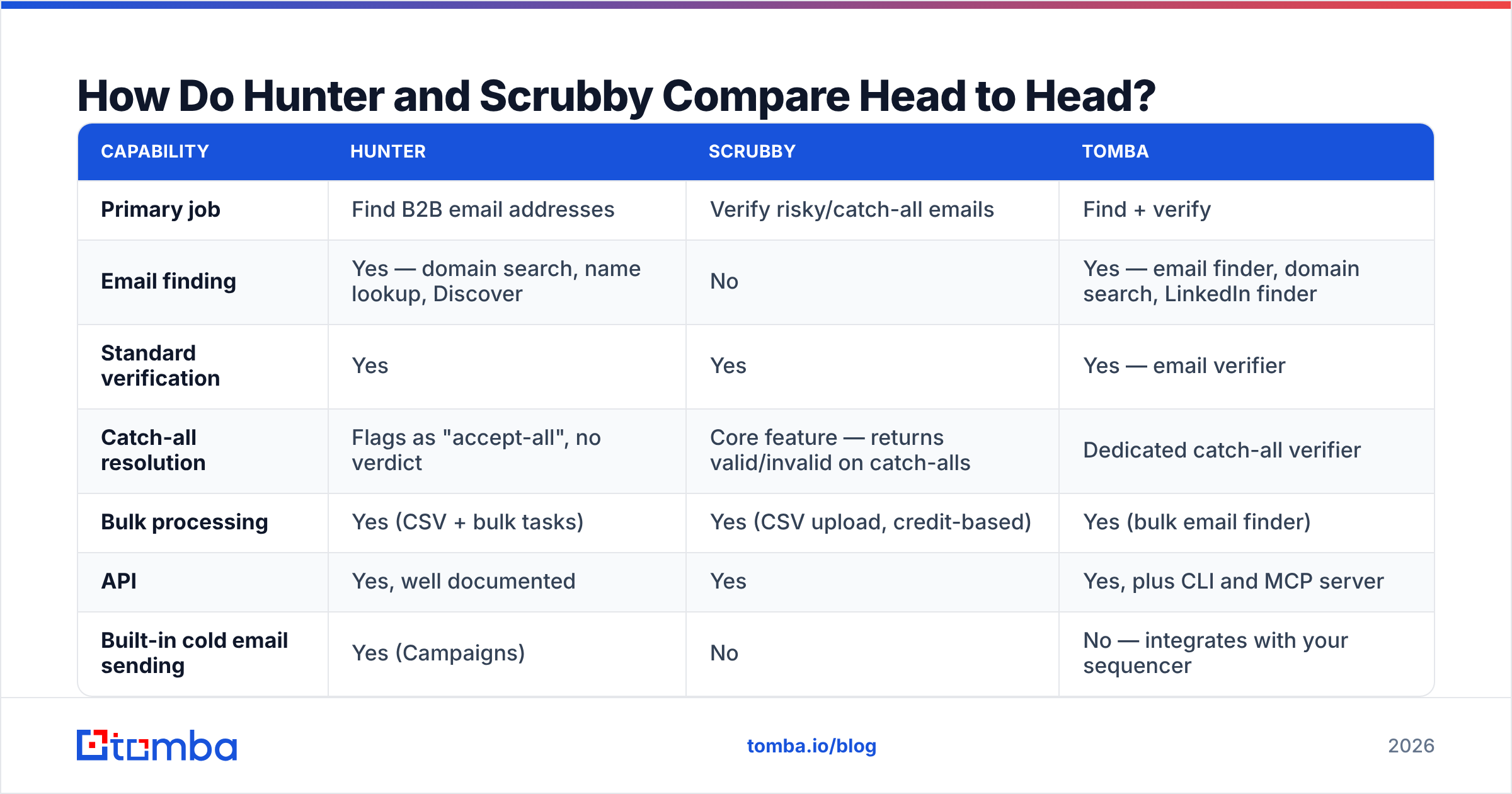
The table below assumes list pricing at the time of writing. Both vendors change tiers regularly — check their pricing pages before you commit budget. Tomba is included as the third column because it is the option most readers of this comparison end up evaluating: a single platform that does both jobs.

| Capability | Hunter | Scrubby | Tomba |
|---|---|---|---|
| Primary job | Find B2B email addresses | Verify risky/catch-all emails | Find + verify |
| Email finding | Yes — domain search, name lookup, Discover | No | Yes — email finder, domain search, LinkedIn finder |
| Standard verification | Yes | Yes | Yes — email verifier |
| Catch-all resolution | Flags as "accept-all", no verdict | Core feature — returns valid/invalid on catch-alls | Dedicated catch-all verifier |
| Bulk processing | Yes (CSV + bulk tasks) | Yes (CSV upload, credit-based) | Yes (bulk email finder) |
| API | Yes, well documented | Yes | Yes, plus CLI and MCP server |
| Built-in cold email sending | Yes (Campaigns) | No | No — integrates with your sequencer |
| Free tier | Yes — limited monthly searches + verifications | Trial credits, not a standing free plan | Yes — 25 searches/mo |
| Entry paid price | ~$49/mo (Starter, list) | Credit packs, priced per email | $49/mo (Starter) |
| Pricing unit | Seats + monthly credits | Per verified email | Monthly credits |
| Best for | Teams that need net-new contacts | Teams sitting on large unverified lists | Teams that need both without two vendors |
Two things stand out. First, Scrubby has no row in the "finding" half of the table at all — that is by design, not an oversight. Second, Hunter's honest "accept-all" answer is exactly the gap Scrubby was built to fill. That is why plenty of outbound teams genuinely run both, and why the hunter vs scrubby framing collapses under scrutiny.
Why Does Catch-All Verification Matter So Much?#
A catch-all domain accepts mail to every address at that domain, whether the mailbox exists or not. noreply@, jsmith@, asdfgh@ — all accepted at the SMTP layer, then quietly discarded or routed to a black-hole inbox. From outside, you cannot tell a real employee from a typo.
This is not a rare edge case. Depending on the segment you sell into, catch-all configuration shows up on a meaningful slice of mid-market and enterprise domains — and it skews toward exactly the companies with security-conscious IT teams and budget. Microsoft 365 tenants with aggressive filtering are especially common offenders.
Three practical consequences:
- Your verifier's "unknown" bucket is not junk. It is disproportionately full of the accounts you most want to reach. Deleting it is throwing away qualified pipeline.
- Sending to it blind is expensive. Invalid addresses at a catch-all domain often do not hard-bounce immediately; they generate silence, spam-trap risk, and slow-burn damage to your sender reputation.
- Naive SMTP probing is its own risk. Repeatedly opening handshakes against the same mail server to guess mailbox existence is a pattern receiving servers notice. Any tool claiming catch-all verification should be able to explain how it avoids this.
That third point is Scrubby's entire reason to exist, and it is a legitimate one. It is also why "just use a cheap bulk verifier" is bad advice for catch-all-heavy lists — most cheap verifiers either return "unknown" (useless) or guess (dangerous).
How Accurate Is Each Tool in Practice?#
Accuracy claims in this category deserve skepticism, including from vendors we like. Nobody, Tomba included, can validate every mailbox on the internet, and any tool quoting a single headline percentage is compressing wildly different scenarios into one number.

Here is how to read accuracy honestly for each tool:
For Hunter, the number that matters is the confidence score plus the sources shown alongside each result. A 98% address backed by three public citations is a very different asset from a 72% pattern-guessed address with none. Hunter is transparent about this, which is to its credit — you can filter by confidence before exporting. Where finders as a category degrade is small companies with no web footprint and generic corporate domains with no discoverable pattern.
For Scrubby, the number that matters is the share of previously-unknown addresses it converts into a definite verdict, and how often those verdicts survive a real send. Do not accept the marketing figure. Take 500 addresses your current verifier called "unknown", run them through, mail the ones marked valid from a warmed secondary domain, and compare the actual bounce rate to the promised one. That test costs you an afternoon and tells you more than any review site.
Whatever you buy, run the same protocol on both vendors with your own data. Segment matters more than brand: a tool that is excellent on US SaaS domains can be mediocre on European manufacturing, and vice versa. Independent review aggregation on G2 is a reasonable sanity check on support quality and billing behaviour, but it is not a substitute for testing your own ICP.

What Does Each One Actually Cost?#
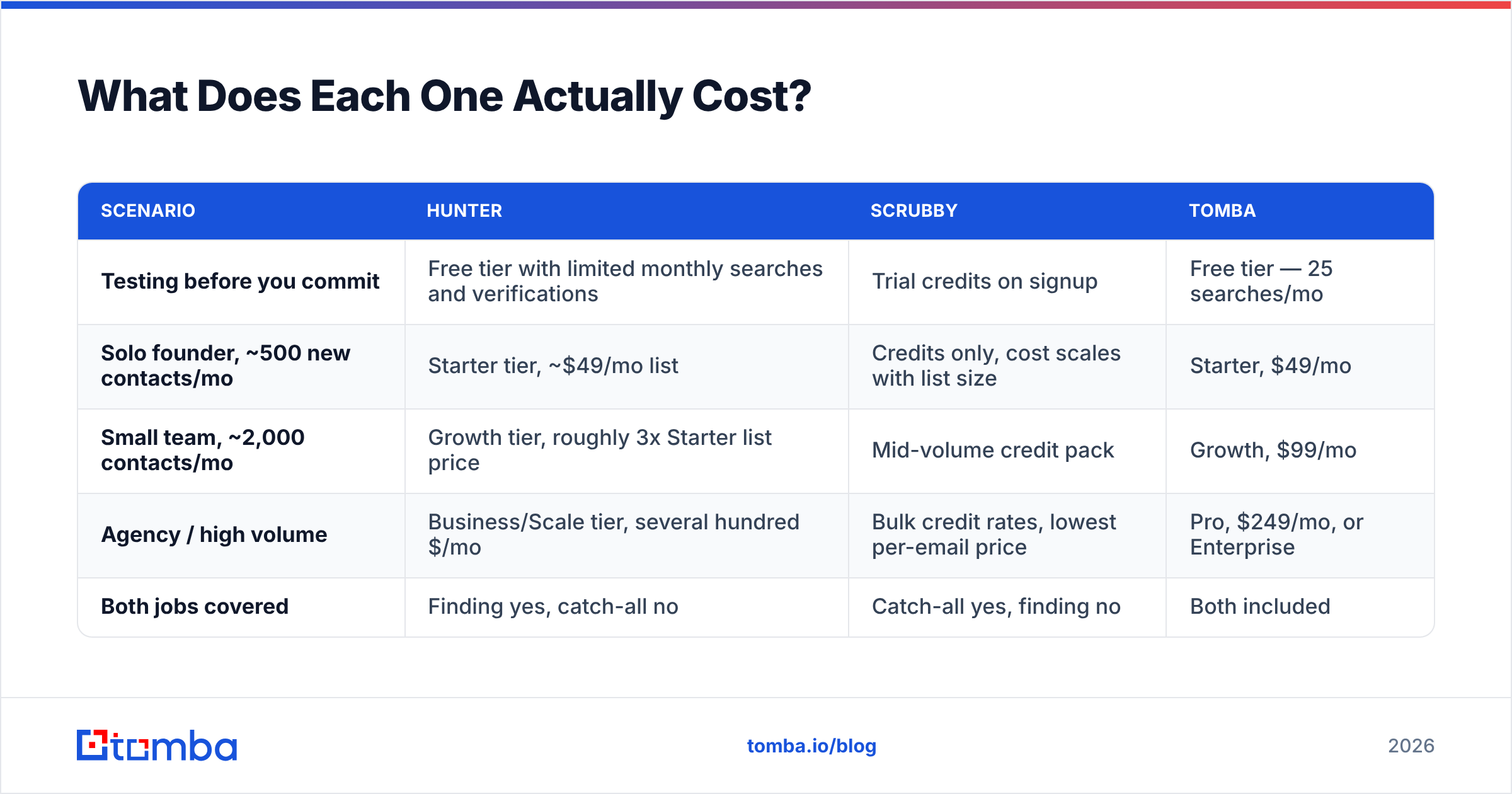
The pricing comparison is awkward because the two vendors sell different units. Hunter sells a monthly subscription with a credit allowance attached; Scrubby sells verification credits you consume as needed. A fair comparison has to normalise to "what does one month of real outbound cost me".
| Scenario | Hunter | Scrubby | Tomba |
|---|---|---|---|
| Testing before you commit | Free tier with limited monthly searches and verifications | Trial credits on signup | Free tier — 25 searches/mo |
| Solo founder, ~500 new contacts/mo | Starter tier, ~$49/mo list | Credits only, cost scales with list size | Starter, $49/mo |
| Small team, ~2,000 contacts/mo | Growth tier, roughly 3x Starter list price | Mid-volume credit pack | Growth, $99/mo |
| Agency / high volume | Business/Scale tier, several hundred $/mo | Bulk credit rates, lowest per-email price | Pro, $249/mo, or Enterprise |
| Both jobs covered | Finding yes, catch-all no | Catch-all yes, finding no | Both included |
Two structural notes. Hunter's credit allowances reset monthly and generally do not roll over, so under-using a big plan is pure waste — size down and upgrade mid-cycle rather than the reverse. Scrubby's credit model is the opposite: it rewards bursty usage, which suits agencies that clean a large client list once a quarter far better than a rep verifying twenty addresses a day.
If you are stacking both, budget for the sum, not the cheaper of the two. That combined figure is the one to compare against a single platform — see Tomba pricing for the like-for-like version, where the finder, standard verification and catch-all handling sit on one bill.
Which One Should You Choose?#
Pick by bottleneck, not by feature count.
Choose Hunter if your list is thin. You have twelve target accounts and no contacts at eight of them. You need domain patterns, decision-maker addresses and a sequencer in the same tab, and you are comfortable treating catch-all domains as a separate problem to solve later. Hunter's Campaigns feature also means one fewer tool if you are early and running low volume.
Choose Scrubby if your list is fat and untrusted. You bought or scraped 40,000 rows, your current verifier returned a large "unknown" bucket, and you cannot risk your sending domain finding out the hard way which of those are real. Scrubby has no discovery ambitions and does not pretend otherwise — that focus is the product.
Choose both if you are running meaningful outbound volume with a dedicated ops person and the tooling budget to match. This is a completely defensible stack. It costs two subscriptions and a CSV hop between them, but it works.
Choose a combined platform if the CSV hop is the part that annoys you. Tomba's angle here is not "better than everyone at everything" — it is that finding, standard verification and catch-all checking run against one credit pool, one API key and one set of integrations, which removes an entire class of "which export is current?" mistakes. For lists you plan to buy rather than build, vendors like BookYourData are a solid complementary source of pre-built B2B records, and their output still benefits from a verification pass before you send.
Do You Actually Need Both Tools?#
Probably not on day one. Here is the sequencing most teams should follow:
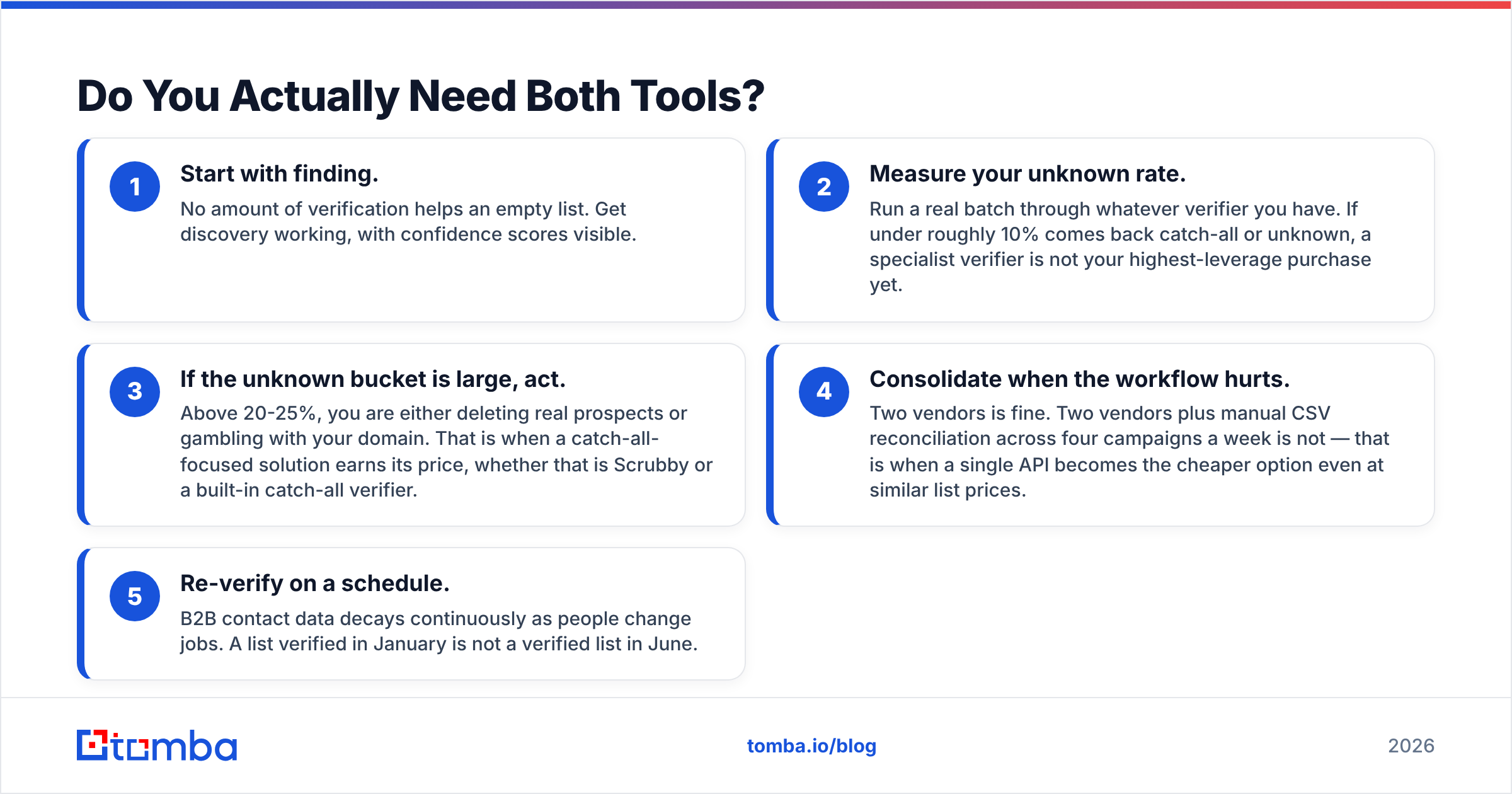
- Start with finding. No amount of verification helps an empty list. Get discovery working, with confidence scores visible.
- Measure your unknown rate. Run a real batch through whatever verifier you have. If under roughly 10% comes back catch-all or unknown, a specialist verifier is not your highest-leverage purchase yet.
- If the unknown bucket is large, act. Above 20-25%, you are either deleting real prospects or gambling with your domain. That is when a catch-all-focused solution earns its price, whether that is Scrubby or a built-in catch-all verifier.
- Consolidate when the workflow hurts. Two vendors is fine. Two vendors plus manual CSV reconciliation across four campaigns a week is not — that is when a single API becomes the cheaper option even at similar list prices.
- Re-verify on a schedule. B2B contact data decays continuously as people change jobs. A list verified in January is not a verified list in June.
The teams that get burned are the ones that skip step two and buy on vibes. Measure first.
Ready to Cover Both Jobs From One Dashboard?#
If you have read this far, you are probably weighing two subscriptions against one. Start with the Tomba Email Finder — free tier, 25 searches a month, no card — and run it against fifty accounts you already know well. Check the confidence scores, then push the catch-all results through the built-in verifier and compare the verdicts to whatever you use today. If it holds up on your own ICP, Starter is $49/mo and covers finding, verification and catch-all handling on one credit pool. If it doesn't, you have lost an afternoon and learned exactly which vendor deserves your budget.
Related guides#
// get started
Find, verify and enrich your first contacts today
Start on the free plan with 25 searches a month, then scale when your team is ready.
Free plan · No credit card required · GDPR & CCPA
// about the author