Hunter vs Sendigram (2026): Which One Should You Actually Use?
Hunter finds and verifies emails. Sendigram sends them at volume. Here's an honest breakdown of what each tool actually does well, what it costs, and which half of your outbound stack it belongs in.
TL;DR
- These are not the same category of tool. Hunter is a data company — it finds and verifies email addresses. Sendigram is a sending platform — it delivers campaigns from multiple inboxes at volume. Comparing them head-to-head only makes sense once you know which half of the funnel is broken.
- If your problem is "I don't have enough good contacts," you need a finder and verifier, not a sender. Hunter, Tomba, and similar data tools solve that.
- If your problem is "my emails land in spam or my sending tool caps me," a dedicated sending platform like Sendigram is the fix — and no amount of better data will save a burned domain.
- Hunter's pricing scales hard. Free is 25 searches/month; paid tiers run roughly $49 to $499/month depending on volume. Sendigram sits in the sending-tool price band and is a far younger product — check its current limits directly before committing.
- Most teams end up running one of each. The practical question is which finder pairs with which sender at a total cost you can defend.
What are Hunter and Sendigram, exactly?#
Hunter (hunter.io) is one of the oldest and best-known email-finding products on the market. Its core loop is simple: give it a company domain and it returns the email addresses it has associated with that domain, plus the pattern it inferred (first.last@, finitial+last@, and so on). Around that sit a verifier, a Chrome extension, a bulk uploader, a small campaign tool, and a public API. It is a data-first product with a light sending layer bolted on.
Sendigram sits on the other side of the workflow. It is a cold email sending platform in the same category as Instantly, Smartlead, and Saleshandy — built around connecting many sending inboxes, rotating sends across them, warming them up, and running sequences at volume without tripping provider limits. It is a newer, thinner-documented product than Hunter, so treat any spec you read (including in this post) as a starting point and confirm the current numbers on sendigram.com before you buy.
That difference matters more than any feature checklist. Asking "Hunter or Sendigram?" is like asking whether you need a water source or plumbing. The honest answer is that you need both, and the interesting question is what each one should cost you.

How do Hunter and Sendigram compare feature by feature?#
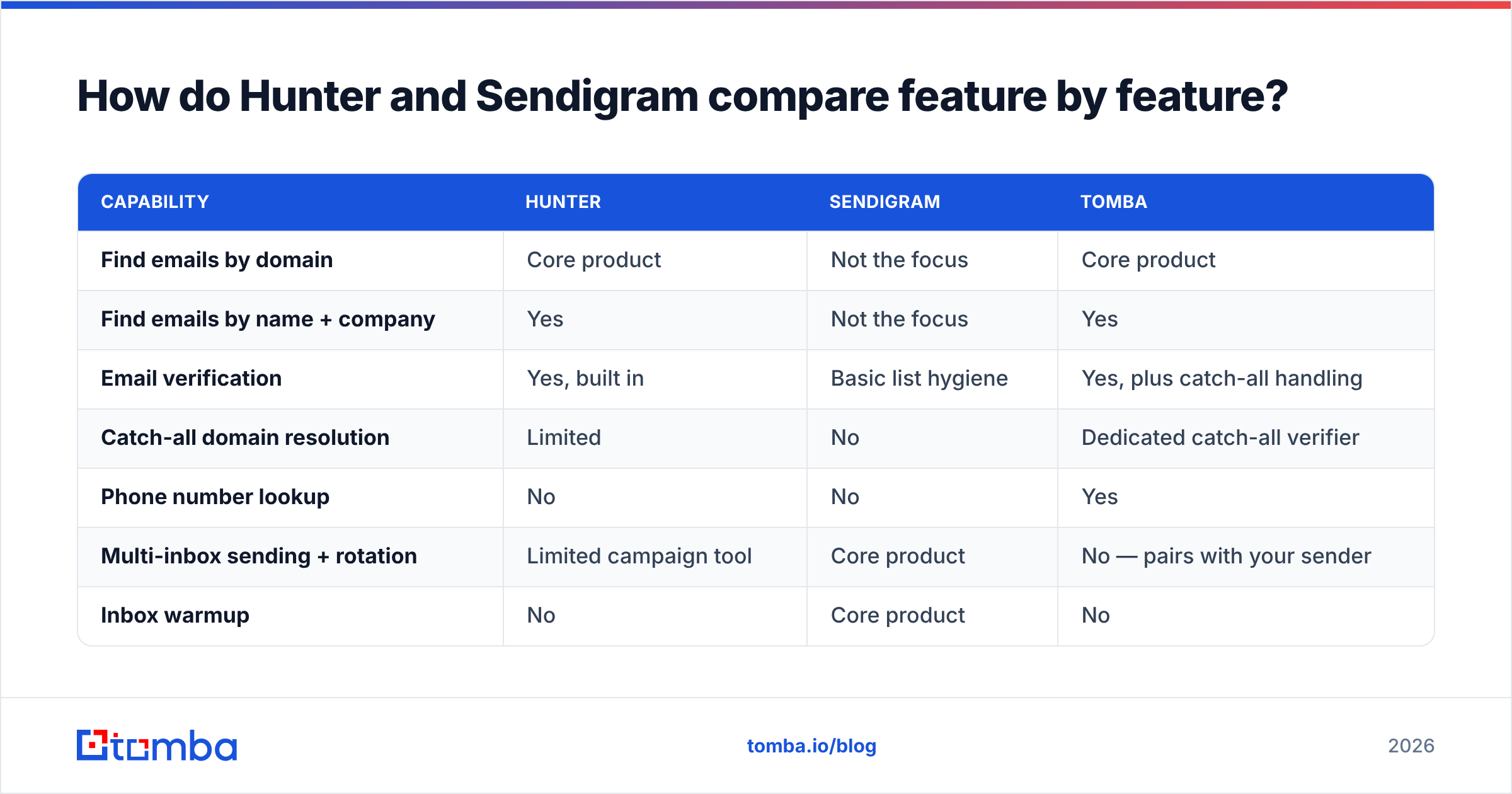
Here is the split laid out plainly. Cells marked "Not the focus" mean the product may technically offer something in that area, but it is not what the tool is built to do well.
| Capability | Hunter | Sendigram | Tomba |
|---|---|---|---|
| Find emails by domain | Core product | Not the focus | Core product |
| Find emails by name + company | Yes | Not the focus | Yes |
| Email verification | Yes, built in | Basic list hygiene | Yes, plus catch-all handling |
| Catch-all domain resolution | Limited | No | Dedicated catch-all verifier |
| Phone number lookup | No | No | Yes |
| Multi-inbox sending + rotation | Limited campaign tool | Core product | No — pairs with your sender |
| Inbox warmup | No | Core product | No |
| Sequences and follow-ups | Basic | Core product | No |
| Public API | Yes | Limited / newer | Yes, plus CLI and MCP |
| Spreadsheet add-ons | Sheets | No | Sheets, Excel, Airtable |
| Entry paid price | ~$49/mo | Sending-tier pricing, verify current | $49/mo |
| Free tier | 25 searches/mo | Trial-based | 25 searches/mo |
Two things jump out. First, the overlap between Hunter and Sendigram is genuinely small — roughly one row, and it's the row where each product is weakest. Second, if you strip out sending, Hunter's real competition is other data vendors, and that is where price sensitivity actually bites.
Which one finds better email addresses?#
Hunter, without argument — because Sendigram is not really trying to compete there. The more useful comparison is Hunter against other data tools, and there the picture is more contested than Hunter's brand suggests.
Hunter's strength is domain coverage on well-indexed Western companies with public web footprints. If you search a 200-person SaaS company in Berlin or Austin, you will usually get a pattern and a decent list. Its weakness shows up in three predictable places:
- Small and mid-market companies with thin web presence. Hunter's index leans on public sources. Companies that never publish staff emails return a pattern guess and little else.
- Catch-all domains. A large share of B2B domains accept mail to any address, which makes standard SMTP verification useless. Hunter marks these "accept-all" and moves on. If half your ICP sits behind catch-all servers, half your list is unusable. A dedicated catch-all verifier is the difference between discarding those accounts and mailing them.
- Volume economics. Hunter's per-credit cost rises steeply as you climb tiers. Teams doing serious volume routinely hit the point where the finder costs more than the sender.
On accuracy claims generally: ignore the marketing percentages on every vendor's homepage, including this one's. The only number that matters is your bounce rate on your ICP. Run the same 200 target companies through two or three tools, send to both lists through the same inbox, and compare bounces. That test takes an afternoon and beats every G2 grid ever published — though G2's category page is a reasonable place to shortlist candidates first.
If you want a second data source to run that test against, Tomba's email finder and domain search cover the same job at a flatter price curve, and the data sources page explains where the records come from rather than asking you to trust a number.
Which one sends better cold email?#
Sendigram, and it is not close. Hunter's campaign feature exists so that a solo founder can send a small sequence without buying a second tool. It is not built for the multi-inbox, multi-domain, rotation-heavy sending that modern outbound requires.
Sendigram's category — unlimited or high-count inbox connections, automatic rotation, built-in warmup, sequence logic — exists because Google and Microsoft tightened bulk sender requirements and single-inbox blasting stopped working. If you are sending 500+ cold emails a day, you need infrastructure of that shape, whether it comes from Sendigram, Instantly, or a competitor.
What no sending platform can do is fix bad data. Bounces are a sender-reputation event, not a data event, which is why the order of operations matters so much:

Verify before you send, every time. A 6% bounce rate will torch a warmed domain in under a week regardless of which platform you send from, and no warmup schedule recovers it fast. If you want the mechanics, our glossary entry on email deliverability covers the reputation signals mailbox providers actually weigh, and a quick email verifier pass before import is the cheapest insurance in outbound.
What does each one actually cost?#
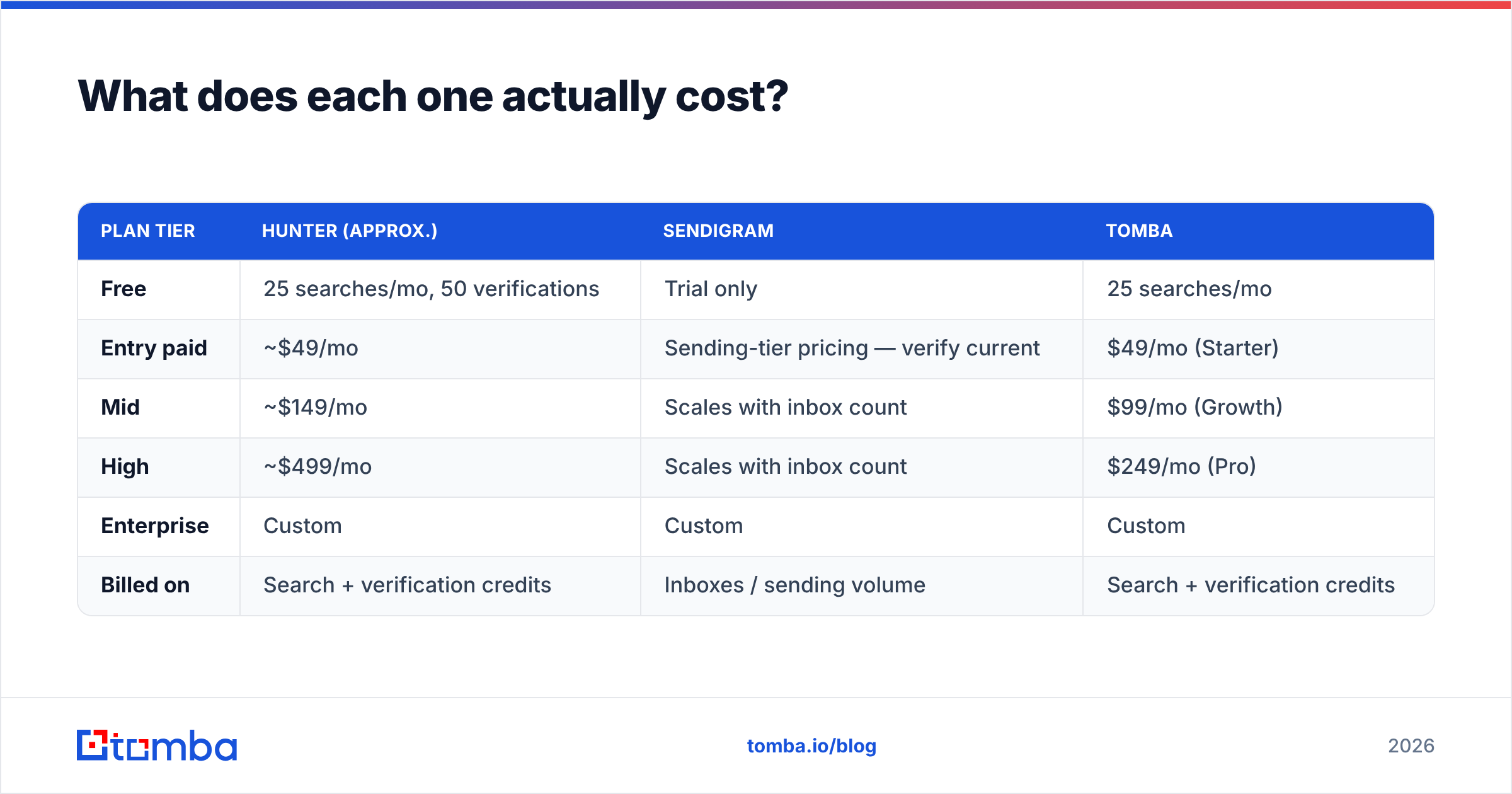
Pricing is where the "which one?" question becomes real, because most teams have one budget line for outbound tooling and have to split it.
| Plan tier | Hunter (approx.) | Sendigram | Tomba |
|---|---|---|---|
| Free | 25 searches/mo, 50 verifications | Trial only | 25 searches/mo |
| Entry paid | ~$49/mo | Sending-tier pricing — verify current | $49/mo (Starter) |
| Mid | ~$149/mo | Scales with inbox count | $99/mo (Growth) |
| High | ~$499/mo | Scales with inbox count | $249/mo (Pro) |
| Enterprise | Custom | Custom | Custom |
| Billed on | Search + verification credits | Inboxes / sending volume | Search + verification credits |
Two caveats. Hunter's figures move with annual-vs-monthly billing and periodic repricing — check hunter.io for today's numbers. Sendigram's model is volume- and inbox-based rather than credit-based, so a direct row-to-row comparison against a data vendor is apples to oranges by design.
The pattern worth noticing: a data tool and a sending tool at mid-tier will typically run you $200–$400/month combined. If your finder alone is eating $499 of that, you are paying enterprise data prices for mid-market volume. That is the specific scenario where switching the data half — not the sending half — frees the most budget. Full Tomba pricing sits at the lower end of that band with the same credit model, which is why it shows up on shortlists as a Hunter replacement rather than a Sendigram one.
How do you decide which one to buy first?#
Work through these in order. The answer usually falls out by step three.
- Diagnose the actual bottleneck. Pull your last 1,000 sends. High bounce rate and low open rate? That's a data problem — buy the finder. Good delivery but you physically cannot send more volume without inbox limits? That's infrastructure — buy the sender.
- Check your ICP against the finder's coverage. Run 50 real target companies through a free tier before paying anything. If a tool returns nothing on your specific market, its overall coverage stat is irrelevant to you.
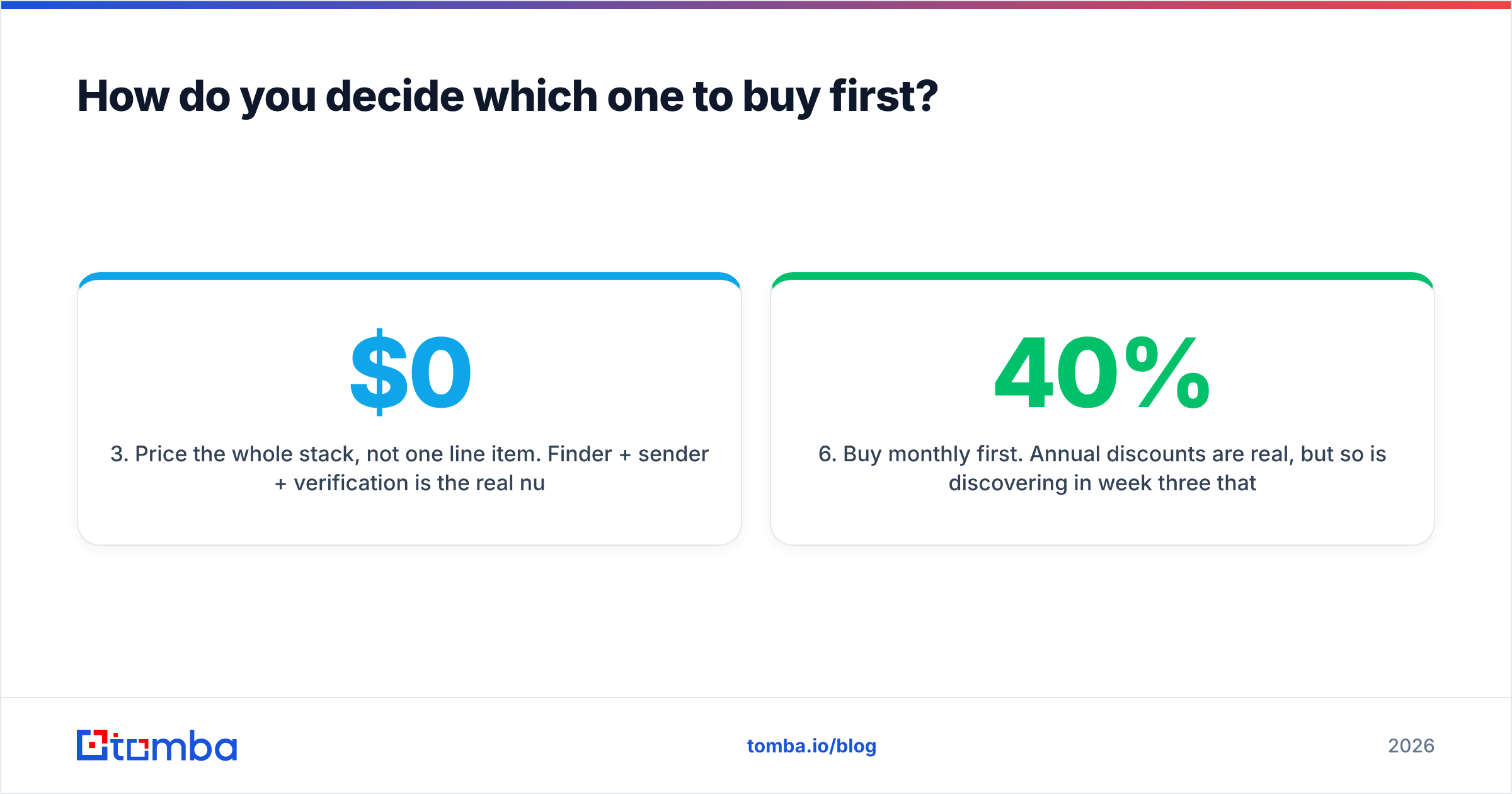
- Price the whole stack, not one line item. Finder + sender + verification is the real number. Optimising one to $0 while the other costs $499 is a false saving.
- Test catch-all handling explicitly. Count how many of your 50 test domains come back "accept-all." If it's more than about a quarter, catch-all resolution is a hard requirement, not a nice-to-have.
- Confirm the API and integrations you need exist. If your workflow lives in HubSpot, Sheets, or a custom pipeline, a tool without a usable API or a native integration becomes manual CSV work within a month.
- Buy monthly first. Annual discounts are real, but so is discovering in week three that coverage on your segment is 40%. Take the discount on renewal, not on signup.
Is there a setup that beats picking one?#
Yes, and it's the one most experienced outbound teams land on: a dedicated data layer feeding a dedicated sending layer, with verification sitting between them as a hard gate.
In practice that looks like — build the target account list, run domain search to get contacts, verify every address including catch-alls, push the clean list into your sending platform, and let the sender do rotation, warmup, and sequencing. Each tool does the one thing it's genuinely good at, and you can swap either half without rebuilding the other.
Where Hunter fits in that setup is the data layer. Where Sendigram fits is the sending layer. They are complements, and any post framing them as direct rivals is optimising for a search query rather than for your funnel.
The real decision, then, is not "Hunter or Sendigram." It is "which data vendor gives me the coverage I need at a price that leaves budget for the sending infrastructure I also need." Answer that and the stack builds itself.
Ready to fix the data half of your stack?#
If your bounce rate is the thing holding back your outbound — not your sending volume — start where the problem is. Tomba's Email Finder covers domain search, name-based lookup, verification, and catch-all resolution in one place, with a free tier of 25 searches a month so you can run the 50-company coverage test above before spending anything. Paid plans start at $49/month, and there's a bulk finder and a full API when you're ready to wire it into whichever sending platform you land on. Run your own numbers, keep the tool that wins on your ICP, and put the savings into deliverability.
Related guides#
// get started
Find, verify and enrich your first contacts today
Start on the free plan with 25 searches a month, then scale when your team is ready.
Free plan · No credit card required · GDPR & CCPA
// about the author