Hunter vs SignalHire (2026): Which Finds More Emails?
Hunter is built around domains and email patterns. SignalHire is built around people and phone numbers. Here is how the two actually compare on accuracy, credits, and cost per usable contact in 2026.
Hunter vs SignalHire comes down to one question: do you start from a company or from a person? Hunter maps domains. SignalHire maps people. Both meter you in credits. Here is how the two compare on accuracy, price, and cost per usable contact in 2026.
TL;DR
- Hunter is domain-first. Give it a company domain and it returns the email pattern, plus every address it has seen there. Best for account-based prospecting, where you start from a company list.
- SignalHire is person-first. Give it a LinkedIn profile, usually through the extension, and it returns emails and mobile numbers. Best for recruiters and anyone who needs to call, not just email.
- Neither one is "more accurate" across the board. Hunter wins on corporate domains with clear patterns. SignalHire wins on candidate-style profiles, where the work email is not on any public page.
On cost:
- Credit math beats sticker price. SignalHire spends a credit on every reveal, phones included. Hunter spends a credit per search, and most plans count verifications on top. Model your real monthly volume before you compare headline prices.
- If you only need email, both are overbuilt. A focused email finder plus a verifier usually costs less per usable address. Tomba's Starter tier is $49/mo, and the free plan gives you 25 searches to test with.
What are Hunter and SignalHire, actually?#
They get lumped together as "email finders," but they were built from opposite directions. It shows on every screen.
- Hunter's unit is the domain. Its index is built around company websites — crawled pages, published addresses, and the inferred format (
first.last@,finitial+last@, and so on). Type instripe.comand you get a roster. Add a name to that domain and you get one address plus a confidence score. - SignalHire's unit is the person. Its index is built around professional profiles, mostly sourced through its browser extension and contributor network. You find a person first, then reveal the contact details. That is why phone coverage is a headline feature here rather than an add-on.
- Hunter sells to marketers and SDRs. The product ships with Campaigns (a light sequencer), a bulk verifier, a Sheets add-on, and a well-documented API. It sits comfortably inside a demand-gen stack.
The money side splits along the same line.
- SignalHire sells to recruiters and sourcers. People search, ATS-style lists, and multi-channel contact data (email, mobile, social) are the pitch. Sales teams use it too, but the DNA is talent acquisition.
- Both are credit-metered. Neither offers real unlimited usage at the low tiers, and both add seat costs on higher plans. This is where the true price gap lives.
- Both verify — differently. Hunter treats verification as its own product, with its own credit pool. SignalHire folds validation into the reveal. That is convenient, but it gives you less control over catch-all domains.
Keep that split in mind for the rest of this comparison: "which is better" is almost always downstream of "do you start from a company or from a person?"
Hunter vs SignalHire: how do the features compare?#
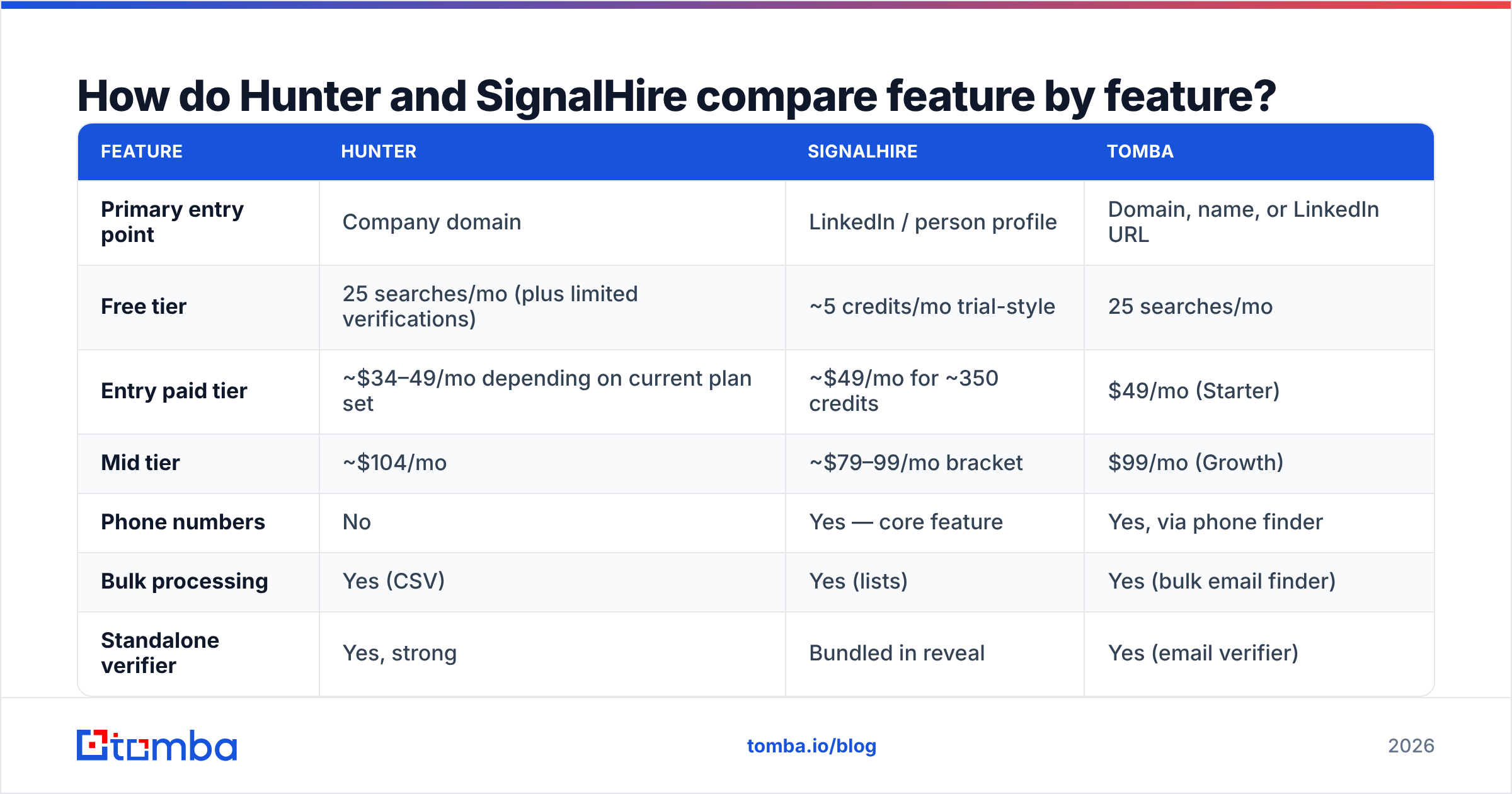
Here is the head-to-head. Tomba is in the table as a third reference point, since it competes directly on the email-finding half of both products.
| Feature | Hunter | SignalHire | Tomba |
|---|---|---|---|
| Primary entry point | Company domain | LinkedIn / person profile | Domain, name, or LinkedIn URL |
| Free tier | 25 searches/mo (plus limited verifications) | ~5 credits/mo trial-style | 25 searches/mo |
| Entry paid tier | ~$34–49/mo depending on current plan set | ~$49/mo for ~350 credits | $49/mo (Starter) |
| Mid tier | ~$104/mo | ~$79–99/mo bracket | $99/mo (Growth) |
| Phone numbers | No | Yes — core feature | Yes, via phone finder |
| Bulk processing | Yes (CSV) | Yes (lists) | Yes (bulk email finder) |
| Standalone verifier | Yes, strong | Bundled in reveal | Yes (email verifier) |
| Catch-all handling | Flags catch-all, limited resolution | Limited | Dedicated catch-all verifier |
| API | Mature, well documented | Available, thinner docs | Tomba API, CLI, MCP server |
| Built-in sending | Yes (Campaigns) | No | No |
| Best fit | Domain-driven outbound | Recruiting, multi-channel | Email-first prospecting at scale |

Two things stand out. First, only one of these three has no phone data at all. If dialing is part of your motion, Hunter is out before the accuracy debate starts. Second, only Hunter sends email, which matters if you want one vendor instead of a finder plus a sequencer.
Which one actually finds more valid emails?#
That depends on the list you feed it. Anyone quoting a single accuracy percentage is selling something.
Run the same 500-row list through both tools and you tend to see this pattern:
- Mid-size and enterprise companies with a public web presence: Hunter's hit rate is excellent, because the pattern is easy to discover and often confirmed by several sources. Confidence scores above 90 are usually safe to send.
- Small companies, agencies, and freelancers: both degrade, but Hunter degrades harder. There is less crawlable surface to infer a pattern from.
- Individuals you found on LinkedIn without knowing their employer's domain: SignalHire wins, because its record starts at the person. Hunter needs the domain first.
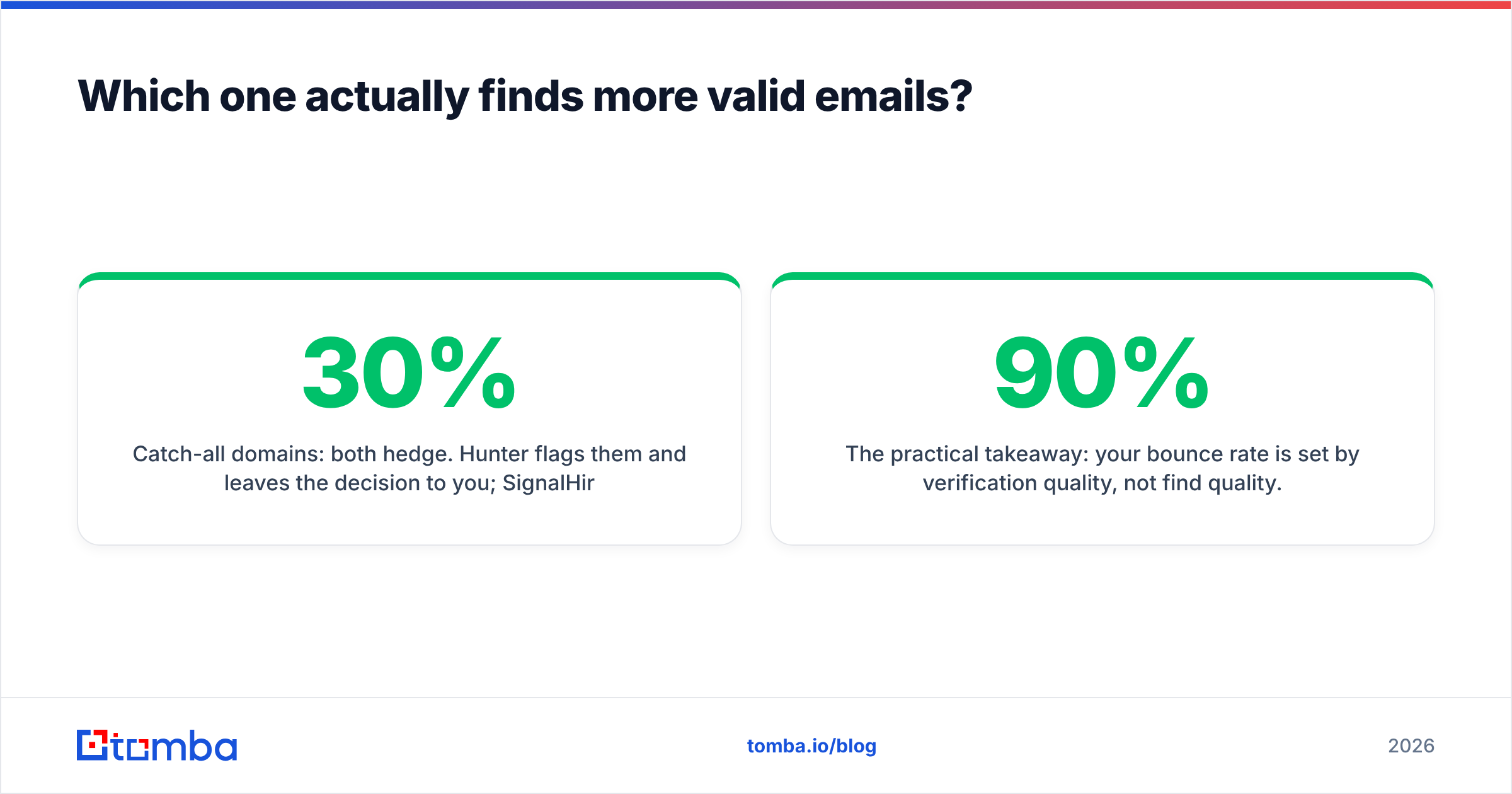
- Catch-all domains: both hedge. Hunter flags them and leaves the call to you. SignalHire's bundled validation is less clear about it. This is a real accuracy tax: on many B2B lists, 20–30% of domains accept everything at the SMTP layer, so "valid" tells you almost nothing on its own.

The practical takeaway: your bounce rate is set by verification quality, not by find quality. A tool that returns 90% coverage with sloppy checks will damage your sender reputation faster than a tool that returns 70% and tells you the truth about the rest. Take one habit from this article: re-verify every list right before you send it, whatever tool found it.

Hunter vs SignalHire pricing: what does a contact really cost?#
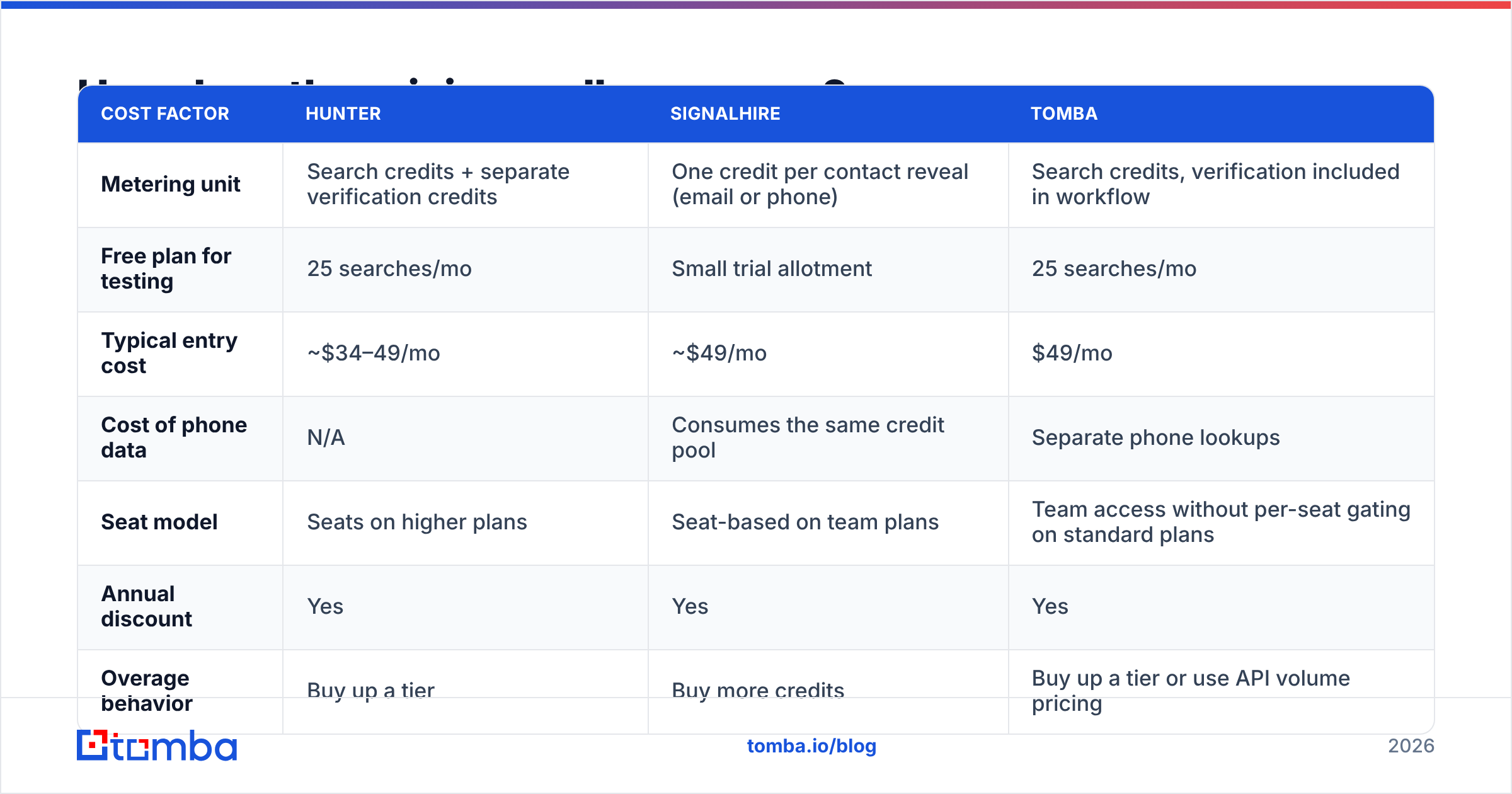
Sticker prices are close. Cost per usable contact usually is not.
| Cost factor | Hunter | SignalHire | Tomba |
|---|---|---|---|
| Metering unit | Search credits + separate verification credits | One credit per contact reveal (email or phone) | Search credits, verification included in workflow |
| Free plan for testing | 25 searches/mo | Small trial allotment | 25 searches/mo |
| Typical entry cost | ~$34–49/mo | ~$49/mo | $49/mo |
| Cost of phone data | N/A | Consumes the same credit pool | Separate phone lookups |
| Seat model | Seats on higher plans | Seat-based on team plans | Team access without per-seat gating on standard plans |
| Annual discount | Yes | Yes | Yes |
| Overage behavior | Buy up a tier | Buy more credits | Buy up a tier or use API volume pricing |
Published list prices move. Check Hunter and SignalHire directly before you commit, and read recent buyer reviews on G2 for the parts vendors leave off the pricing page.
The number that matters is cost per verified, deliverable, in-ICP contact. Work it out in three steps. Take your monthly target volume and divide it by your real hit rate on your list type. Add the verification credits you will burn on top. Then divide the plan price by what is left. Teams who run this math often find the "cheaper" plan costs 40% more per usable row, because half its credits went to catch-alls and role accounts.
One more trap: SignalHire charges the same credit for a phone reveal as for an email. That is great value when you need both. It is quietly expensive when you only wanted the email, because you pay for a dataset you never use. Compare that with Tomba pricing, where email finding, verification, and phone lookups scale as separate line items.
Is SignalHire better if you need phone numbers?#
Yes, and it is not close. Hunter does not compete here at all.
If your motion is call-first, or call plus email, SignalHire's combined reveal is a real workflow win: one action, one credit, two channels. Recruiters gain the most, since candidate mobiles are the hardest data to source and the most valuable to hold.
Caveats worth knowing before you buy for phone data:
- Mobile coverage is uneven by region. North American coverage beats EMEA and APAC on every vendor in this category, SignalHire included.
- Numbers decay fast. Direct dials go stale at roughly 2–3% per month as people change roles. Validate before dialing. A phone validator pass costs less than the rep time wasted on dead numbers.
- Compliance is on you. GDPR, ePrivacy, and US state rules all apply to sourced mobile numbers. Vendor terms do not transfer that liability.
If you need phones but also want cleaner email economics, a two-tool stack often beats a single bundled reveal. Pair a dedicated finder with a dedicated phone source. You then stop paying phone-grade credits for plain email lookups.
Which fits your workflow: SDR, recruiter, or engineer?#
The buying decision usually turns on integration surface, not data.
Choose Hunter if: you work from account lists, you want find-verify-send in one subscription, and your team lives in Google Sheets and a CRM. Hunter's API documentation is the best of the three, and its Sheets add-on is genuinely good.
Choose SignalHire if: you work from LinkedIn profiles, you need mobiles, and your team sources candidates or sells into people rather than companies. The extension-driven workflow is fast when your daily surface is a profile page.
Choose a focused email-finding stack if: you are automating. Once you enrich thousands of rows in code, what matters is API rate limits, data enrichment depth, and whether you can wire it into your pipeline without a UI in the loop. Tomba covers that surface with an API, a CLI, an MCP server for AI agents, and a HubSpot integration — plus domain search for the account-first workflow Hunter owns.

What does a third option change?#
It changes the credit math, mostly.
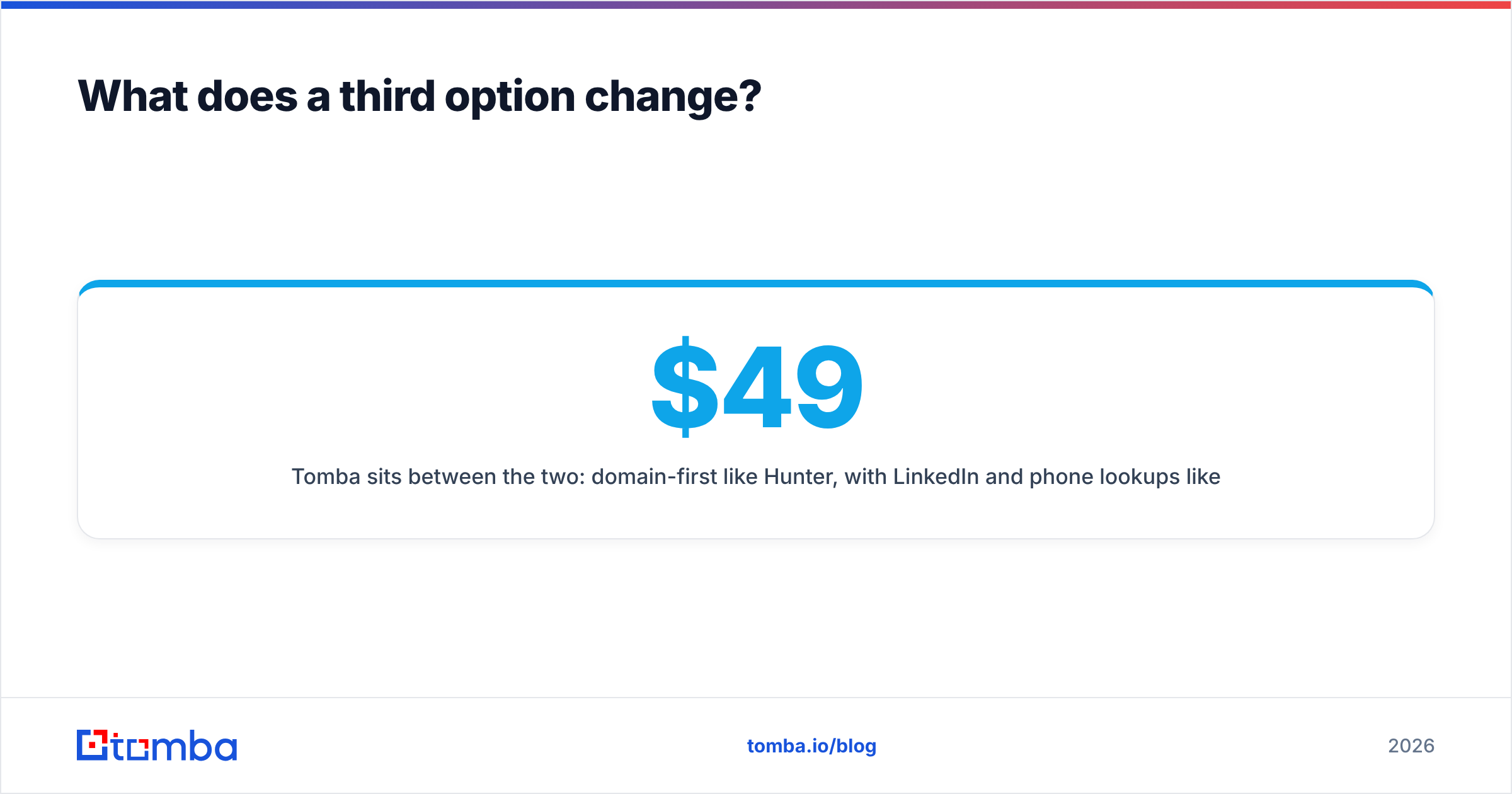
Tomba sits between the two: domain-first like Hunter, with LinkedIn and phone lookups like SignalHire, on a flat plan ladder — Free (25 searches/mo), Starter $49/mo, Growth $99/mo, Pro $249/mo, Enterprise custom. The differentiators that matter in practice:
- Catch-all resolution as a separate product. Most tools flag a catch-all and stop. A dedicated catch-all finder recovers addresses on domains where rivals return "unknown," and that is a real chunk of any B2B list.
- Verification in the same workflow. No second vendor, no second credit currency, no CSV round-trip between find and verify.
- Automation-native. API, CLI, MCP, Sheets, Excel, and Airtable — the same lookups wherever your data already lives.
That is not a claim of universal superiority. If you want a sequencer in the box, Hunter is the more complete single purchase. If mobiles are non-negotiable and recruiting is your use case, SignalHire's dataset is built for you. Buyers looking across the whole category should also weigh BookYourData. It sells pre-built, verified lists instead of per-lookup credits — a better fit when you want volume upfront rather than a metered API.
Which should you pick in 2026?#
Short version of Hunter vs SignalHire: Hunter for domain-driven email outbound, SignalHire for people-driven multi-channel sourcing, and a focused finder-plus-verifier stack when cost per verified contact is the metric you are judged on.
Use this decision path:
- Do you need phone numbers? If yes, Hunter is eliminated. Compare SignalHire against a dedicated phone source.
- Do you start from companies or from people? Companies → Hunter or Tomba's domain search. People → SignalHire or a LinkedIn finder.
- Do you want sending bundled? Only Hunter offers it. If you already run Instantly, Smartlead, or Outreach, that bundle is dead weight you are paying for.
- Are you automating or clicking? Automating → judge on API quality and rate limits. Clicking → judge on extension speed.
- Run the free tiers on the same 25 rows. Not a demo list — your list. Coverage on a vendor's sample data tells you nothing about coverage on your ICP.
Whatever you pick, put a verification step between the finder and the sequencer. The gap between a 2% bounce rate and an 8% one is not the tool you chose. It is whether you checked the list on the day you sent it.
Ready to run the test? Start with the Tomba Email Finder free tier — 25 searches a month, no card, same input you would give Hunter or SignalHire. Run your real 25 rows through all three, count the verified hits, and let the numbers pick the winner instead of the pricing page.
Related guides#
// get started
Find, verify and enrich your first contacts today
Start on the free plan with 25 searches a month, then scale when your team is ready.
Free plan · No credit card required · GDPR & CCPA
// about the author