Hunter vs Snappy Leads (2026): Which Email Finder Wins?
Hunter is the incumbent with public data and a mature API. Snappy Leads is the cheaper LinkedIn-first challenger. Here's how they actually compare on accuracy, catch-all handling, pricing, and where each one quietly costs you money.
TL;DR
- Hunter is the incumbent: public web crawling, transparent confidence scores, a mature API, and a free tier that's genuinely usable for testing. It gets expensive fast once you cross ~1,000 lookups a month.
- Snappy Leads is the LinkedIn-first challenger: browser-extension workflow, work emails plus mobile numbers, cheaper entry pricing, and less public documentation about where its data comes from.
- Neither is the "accuracy winner" in the abstract. Hunter tends to win on crawled, publicly-visible corporate domains. LinkedIn-sourced tools tend to win on people whose email never appears on the open web.
- Catch-all domains are where both lose money for you. If a tool bills you for a "found" address on a catch-all domain without telling you it can't confirm it, your bounce rate eats the savings.
- The honest recommendation: benchmark both on 200 of your accounts, count verified-deliverable addresses (not "found" addresses), and divide by what you paid. That number is the only comparison that matters.
What are Hunter and Snappy Leads?#
Both tools answer the same question — "what is this person's work email?" — but they arrive at the answer from different directions.
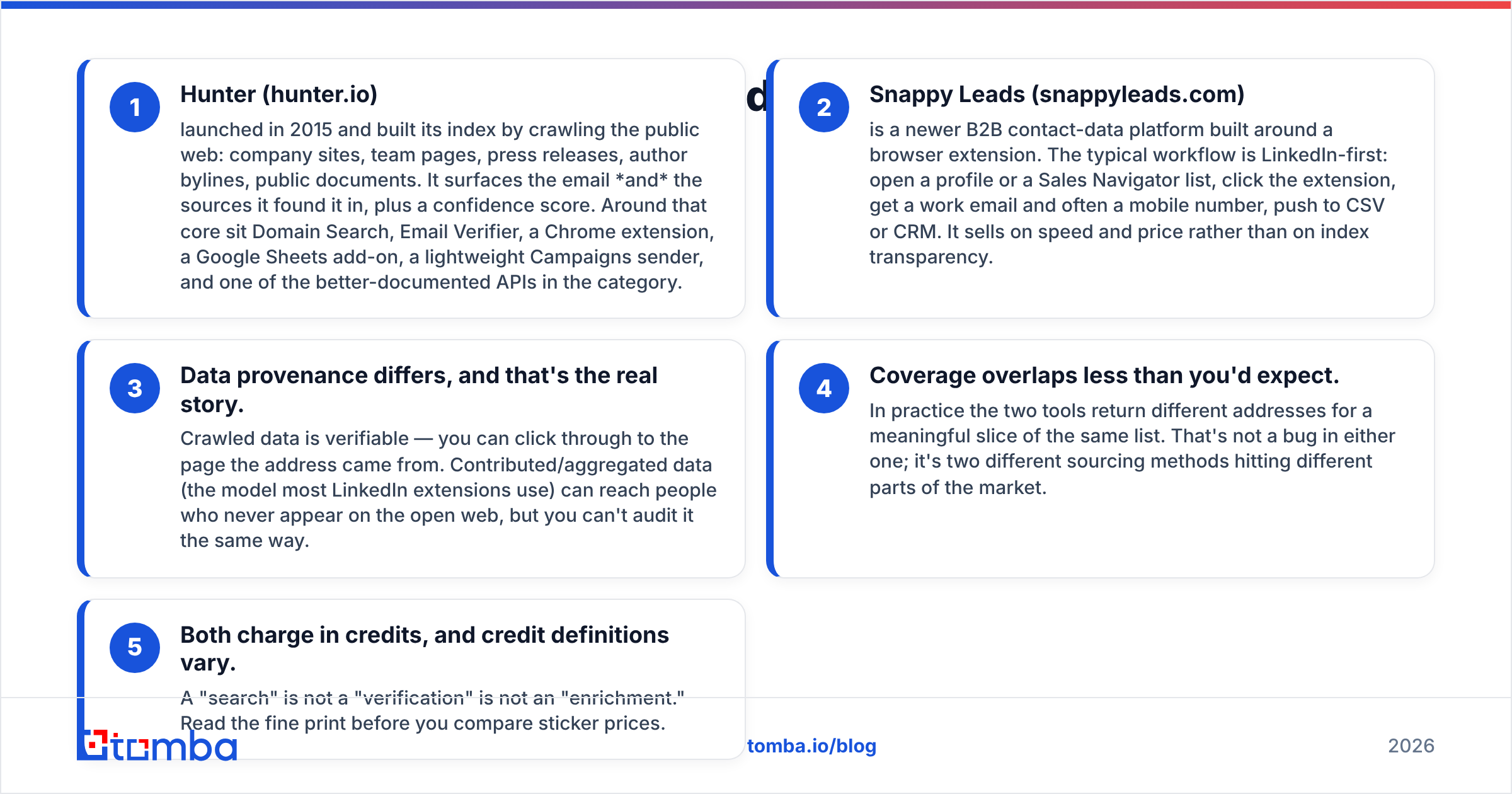
- Hunter (hunter.io) launched in 2015 and built its index by crawling the public web: company sites, team pages, press releases, author bylines, public documents. It surfaces the email and the sources it found it in, plus a confidence score. Around that core sit Domain Search, Email Verifier, a Chrome extension, a Google Sheets add-on, a lightweight Campaigns sender, and one of the better-documented APIs in the category.
- Snappy Leads (snappyleads.com) is a newer B2B contact-data platform built around a browser extension. The typical workflow is LinkedIn-first: open a profile or a Sales Navigator list, click the extension, get a work email and often a mobile number, push to CSV or CRM. It sells on speed and price rather than on index transparency.
- Data provenance differs, and that's the real story. Crawled data is verifiable — you can click through to the page the address came from. Contributed/aggregated data (the model most LinkedIn extensions use) can reach people who never appear on the open web, but you can't audit it the same way.
- Coverage overlaps less than you'd expect. In practice the two tools return different addresses for a meaningful slice of the same list. That's not a bug in either one; it's two different sourcing methods hitting different parts of the market.
- Both charge in credits, and credit definitions vary. A "search" is not a "verification" is not an "enrichment." Read the fine print before you compare sticker prices.
If you want the vocabulary straight, Tomba's B2B glossary defines the terms most vendors use loosely.

How do Hunter and Snappy Leads compare feature by feature?#
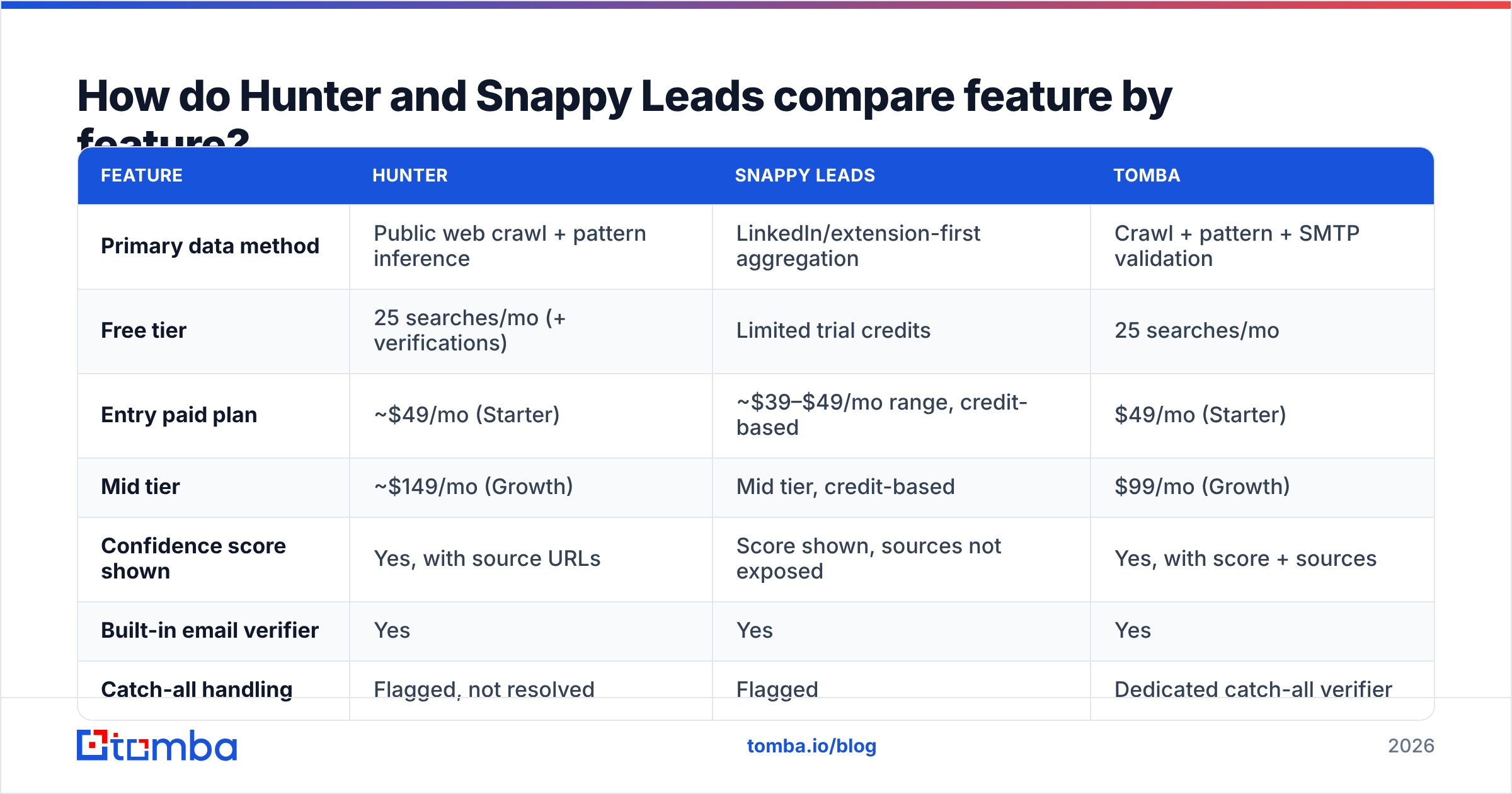
Here's the side-by-side. Where a vendor doesn't publish a number, I've said so rather than invented one.
| Feature | Hunter | Snappy Leads | Tomba |
|---|---|---|---|
| Primary data method | Public web crawl + pattern inference | LinkedIn/extension-first aggregation | Crawl + pattern + SMTP validation |
| Free tier | 25 searches/mo (+ verifications) | Limited trial credits | 25 searches/mo |
| Entry paid plan | ~$49/mo (Starter) | ~$39–$49/mo range, credit-based | $49/mo (Starter) |
| Mid tier | ~$149/mo (Growth) | Mid tier, credit-based | $99/mo (Growth) |
| Confidence score shown | Yes, with source URLs | Score shown, sources not exposed | Yes, with score + sources |
| Built-in email verifier | Yes | Yes | Yes |
| Catch-all handling | Flagged, not resolved | Flagged | Dedicated catch-all verifier |
| Phone numbers | No | Yes (mobile, where available) | Yes (phone finder) |
| Cold email sending | Yes (Campaigns) | No / limited | No — integrates instead |
| API | Mature, well documented | Available, thinner docs | Full REST API + CLI + MCP |
| Bulk upload | Yes | Yes | Yes |
| Chrome extension | Yes | Yes (core workflow) | Yes |
Two things jump out. First, Hunter is the more complete platform — it will also send your sequences, which matters if you want one vendor instead of three. Second, Snappy Leads gives you phone numbers, which Hunter simply does not, and for teams running a call-plus-email motion that's not a small gap.
Verify current tiers directly on hunter.io and snappyleads.com before you commit — pricing in this category moves every couple of quarters, and both vendors have repackaged plans in the last 18 months.
Which one is actually more accurate?#
Accuracy is the question everyone asks and almost nobody measures correctly.
The mistake is comparing hit rate (percentage of your list where the tool returned something) instead of verified-deliverable rate (percentage where the address actually accepts mail). A tool that returns a guessed firstname.lastname@ pattern for every row will show a spectacular hit rate and a catastrophic bounce rate. Those are the same number viewed from opposite ends.

What the pattern looks like in practice across most benchmarks in this category:
- Hunter wins on visible companies. SaaS firms, agencies, media, anything with a public team page or a blog with bylined authors. The crawl has something to grab, and the confidence score is honest about how much.
- LinkedIn-first tools like Snappy Leads win on invisible people. Mid-market ops managers, regional sales leads, anyone at a company whose website lists exactly one
info@address. Crawling finds nothing there; profile-based sourcing does. - Both degrade on the same accounts: small businesses on shared hosting, EU companies with aggressive GDPR posture, and any domain that's catch-all.
- Confidence scores are not comparable across vendors. Hunter's 95% and another tool's 95% are computed differently. Treat a score as an ordering signal within one tool, never as a cross-vendor equivalence.
The fix is boring and effective: take 200 rows from your actual ICP, run both tools, then push every returned address through an independent email verifier — one that isn't the tool that found the address. Grade on deliverable-confirmed only. You'll usually find the "worse" tool on hit rate is the better tool on cost per usable contact.
What about catch-all domains?#
This is the section most comparison posts skip, and it's where the money leaks.
A catch-all domain accepts mail to every address at that domain, valid or not. The SMTP server says yes to ceo@company.com and to asdkjh@company.com identically. Roughly a fifth of B2B domains are configured this way, and the share is higher in enterprise and in certain European markets.
Here's what that means for a head-to-head:
- Both Hunter and Snappy Leads will flag a catch-all rather than resolve it. That's the honest behaviour and you should want it.
- But you're often billed anyway. A credit spent on "accept-all — cannot verify" is a credit spent on a coin flip.
- The bounce lands on your domain, not the vendor's. Consistently mailing unverifiable addresses is one of the fastest ways to wreck sender reputation, and no refund policy gives that back.
The workaround that actually works is a layered approach: run pattern inference, then check the pattern against known-good addresses at the same domain, then apply behavioural signals before you decide to send. A dedicated catch-all verifier does exactly this instead of shrugging. If your target list skews enterprise, weight this capability heavily — it will matter more than a $30/month price difference.

How does the pricing really compare?#
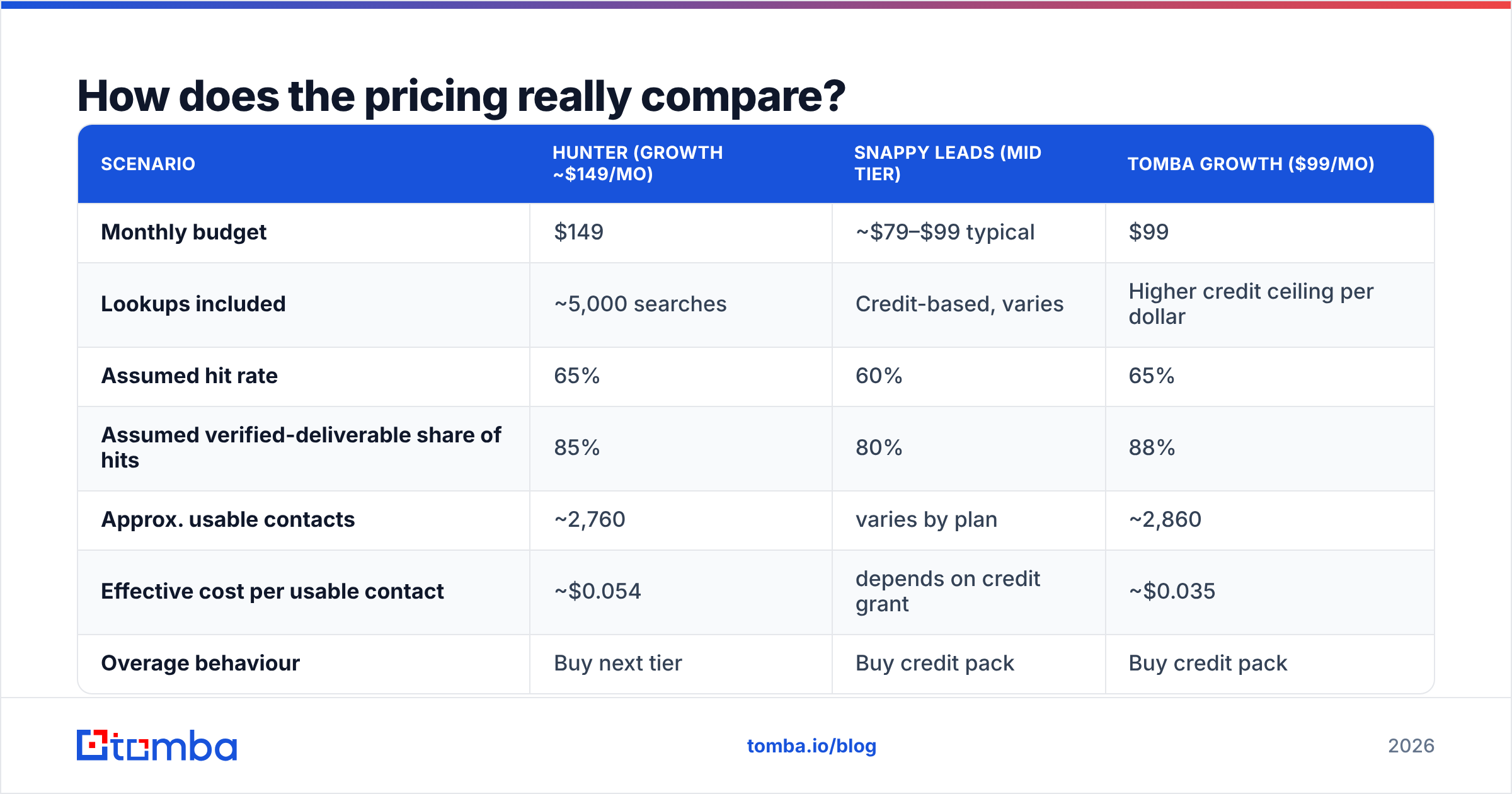
Sticker price is the wrong unit. Cost per verified deliverable contact is the right one. Run the arithmetic:
| Scenario | Hunter (Growth ~$149/mo) | Snappy Leads (mid tier) | Tomba Growth ($99/mo) |
|---|---|---|---|
| Monthly budget | $149 | ~$79–$99 typical | $99 |
| Lookups included | ~5,000 searches | Credit-based, varies | Higher credit ceiling per dollar |
| Assumed hit rate | 65% | 60% | 65% |
| Assumed verified-deliverable share of hits | 85% | 80% | 88% |
| Approx. usable contacts | ~2,760 | varies by plan | ~2,860 |
| Effective cost per usable contact | ~$0.054 | depends on credit grant | ~$0.035 |
| Overage behaviour | Buy next tier | Buy credit pack | Buy credit pack |
Treat those hit rates as illustrative, not measured — plug in your own numbers from the 200-row test above. The structural point stands regardless of what you plug in: the tool with the lower monthly fee is not automatically the cheaper tool, and the tool with the higher hit rate is not automatically the better one. The product of the two is what you pay per contact you can actually mail.

Two pricing traps specific to this matchup:
Hunter's tier jumps are steep. Going from Starter to Growth is a large step for a team that only needs a bit more volume. If you're consistently 20% over your Starter allowance, compare the annualised cost against Tomba pricing before you upgrade — the mid tiers are not priced the same way.
Credit-based plans hide the real rate. When a vendor grants "credits" rather than searches, confirm whether a verification, an enrichment, and a phone lookup each cost one credit or several. A plan advertising 10,000 credits can deliver fewer usable contacts than one advertising 5,000 searches.
Which one fits your workflow?#
Feature parity matters less than where you actually work.
- You live in LinkedIn Sales Navigator. Snappy Leads' extension-first model is built for this. Hunter's extension works but is domain-oriented rather than profile-oriented — you'll feel the friction on high-volume prospecting days.
- You start from a company list, not a people list. Hunter's Domain Search is the stronger tool here: paste a domain, get the team with roles and confidence scores. If you're building account-based lists, this is the faster path.
- You want one vendor for finding and sending. Hunter's Campaigns is the only one of the two with a built-in sender. It's not going to displace a dedicated sequencer, but it's enough for a founder-led motion.
- You need phones alongside emails. Snappy Leads has them; Hunter doesn't. If your team calls, that's decisive — or pair an email-first tool with a dedicated phone finder.
- You're building this into a product or an internal pipeline. Hunter's API documentation is the better of the two by a wide margin. Compare it against the Tomba API if you also want CLI and MCP access for agent-driven workflows.
- You process lists in batches, not one profile at a time. Check the bulk email finder throughput and rate limits on each plan — this is where trials tend to disappoint after purchase.
Who should pick Hunter, and who should pick Snappy Leads?#
Pick Hunter if: your ICP is companies with real web presence, you value auditable sources over raw volume, you want a documented API you won't fight, and you can absorb the mid-tier price. The confidence-score-plus-sources model is genuinely the most transparent in the category, and that transparency is worth paying something for.
Pick Snappy Leads if: your prospecting starts on LinkedIn, you need mobile numbers in the same click as the email, and your budget is tight at the entry tier. Run a harder-than-usual verification pass on what it returns, since you can't audit sources the way you can with a crawl-based index.
Pick neither — or pick a third — if: your list is catch-all-heavy, you need per-contact economics below about four cents, or you want find-and-verify in one pipeline without stitching two vendors together. That's the gap Tomba is built for: find email addresses by domain, name, or company, verify them in the same pass, and resolve catch-all domains instead of flagging them and moving on. Free tier is 25 searches a month, Starter is $49, Growth is $99, Pro is $249 — and the credits mean the same thing on every tier.
Independent reviews on G2 are worth skimming for both tools before you buy, though weight recent reviews far more heavily than old ones; data quality in this category changes with every index refresh.
What's the fastest way to decide?#
Stop reading comparisons — including this one — and run the test. Export 200 accounts that look like your best customers. Run them through both free tiers. Verify every returned address with a neutral verifier. Count deliverable-confirmed contacts. Divide by price. Whichever number is lower wins, for you, this quarter.
Then re-run it in six months, because the answer changes.
Want a third data point in that test? Tomba's Email Finder gives you 25 free searches a month with no card — enough to run the same 200-row benchmark and see where a crawl-plus-SMTP-validation approach lands against both Hunter and Snappy Leads on your actual list. Verification, domain search, and catch-all resolution are included in the same workflow, so the address you export is one you can send to.
Related guides#
// get started
Find, verify and enrich your first contacts today
Start on the free plan with 25 searches a month, then scale when your team is ready.
Free plan · No credit card required · GDPR & CCPA
// about the author