Hunter vs Tailormails: Which Email Tool Wins in 2026?
Hunter is a data-first email finder. Tailormails is an AI-first outreach layer. Here is how they actually differ on coverage, verification, pricing, and who should pick which — plus where a third option beats both.
TL;DR
- Hunter and Tailormails solve different halves of the same problem. Hunter is a data layer (find and verify addresses at scale). Tailormails is an AI outreach layer (research a prospect, write the email, send the sequence).
- If your bounce rate is the problem, buy data. If your reply rate is the problem, buy copy and sequencing. Buying the wrong one is the most common outbound mistake we see.
- Hunter's strength is a large, well-documented email database with a public API and a mature free tier. Its weakness is thin personalization and per-seat pricing that gets expensive fast.
- Tailormails' strength is per-prospect AI research and message generation. Its weakness is that AI copy sent to unverified addresses still bounces, and the data layer under an AI writer is usually thinner than a dedicated finder's.
- Most teams under 10 reps end up running a dedicated finder plus a cheap sender. That combination — a high-accuracy email finder feeding a sequencer — beats an all-in-one at both jobs for less money.
What is Hunter and what is Tailormails?#
Start with the honest framing, because the "vs" here is not apples to apples.
Hunter (hunter.io) is one of the oldest email-finding products on the market. Its core loop is: give it a domain, get back the email addresses associated with that domain, plus a confidence score and the public sources where the pattern was observed. Around that sit a verifier, a bulk uploader, a Chrome extension, a Google Sheets add-on, and a well-documented REST API. Hunter later bolted on Campaigns, a lightweight cold email sender. Campaigns is competent, not category-leading — it exists so you do not have to leave the product to send.
Tailormails is a newer, AI-first entrant. The pitch is inverted: instead of "here is a list, now go write to it," it is "here is a prospect, let the model read their site, their LinkedIn, their recent activity, and draft an email that sounds like a human wrote it." Personalization at volume is the selling point, with lead sourcing and sending wrapped around it.
One caveat before the tables: AI-first tools iterate fast and re-price often. Treat every Tailormails number below as directional and confirm it on their site before you buy. Hunter's plan structure is more stable, but it has changed twice in three years, so check that too.
The practical question is not "which product is better." It is which layer is your bottleneck:
- Bounce rate above 4% — your data layer is broken. A better AI writer will not help. Fix verification first.
- Deliverability collapsing after week two — your sending infrastructure and warmup are broken. Neither tool fixes this; your DNS records and send volume do.
- Opens fine, replies near zero — your copy and targeting are broken. This is where an AI personalization layer earns its price.
- Cannot build a list at all — your sourcing is broken. You need a finder with real database depth plus bulk email finder throughput.
- Reps spending 3+ hours/day on manual research — you need automation, and the AI-first tool is the honest answer.
Diagnose before you shop. Most teams skip this step and then blame the tool.

How do Hunter and Tailormails compare feature by feature?#
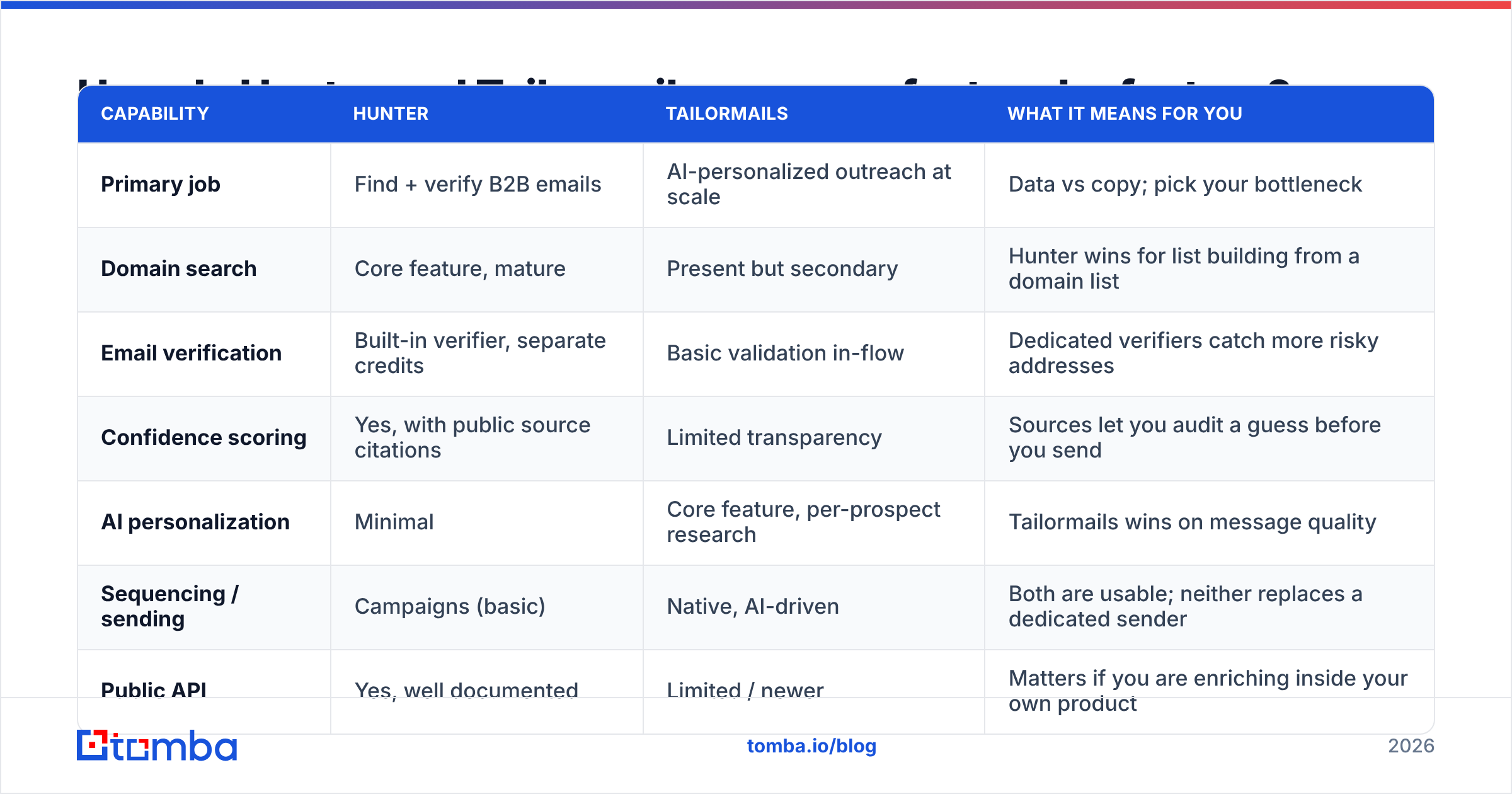
| Capability | Hunter | Tailormails | What it means for you |
|---|---|---|---|
| Primary job | Find + verify B2B emails | AI-personalized outreach at scale | Data vs copy; pick your bottleneck |
| Domain search | Core feature, mature | Present but secondary | Hunter wins for list building from a domain list |
| Email verification | Built-in verifier, separate credits | Basic validation in-flow | Dedicated verifiers catch more risky addresses |
| Confidence scoring | Yes, with public source citations | Limited transparency | Sources let you audit a guess before you send |
| AI personalization | Minimal | Core feature, per-prospect research | Tailormails wins on message quality |
| Sequencing / sending | Campaigns (basic) | Native, AI-driven | Both are usable; neither replaces a dedicated sender |
| Public API | Yes, well documented | Limited / newer | Matters if you are enriching inside your own product |
| Free tier | Yes (searches + verifications monthly) | Trial-based | Hunter is easier to evaluate for free |
| Best for | RevOps, data teams, list builders | SDRs who hate writing | Different buyers entirely |
Read that table as a division of labour, not a scoreboard. Hunter is infrastructure. Tailormails is a productivity layer that sits on top of infrastructure. If you buy Tailormails and its sourcing is thinner than you expected, you will end up buying a finder anyway — which is exactly how the "AI tool plus data tool" stack becomes the default.
Which one actually finds more valid emails?#
This is where most comparison posts go vague, so let's be specific about how to test it rather than trusting anyone's marketing number.

Accuracy claims in this category are close to meaningless out of context, because vendors measure different things:
- Hit rate — of 100 prospects you searched, how many returned any address? A tool can win here by guessing aggressively.
- Accuracy — of the addresses returned, how many are real, deliverable, and monitored? This is the number that governs your bounce rate.
- Bounce rate in production — the only number your inbox provider cares about.
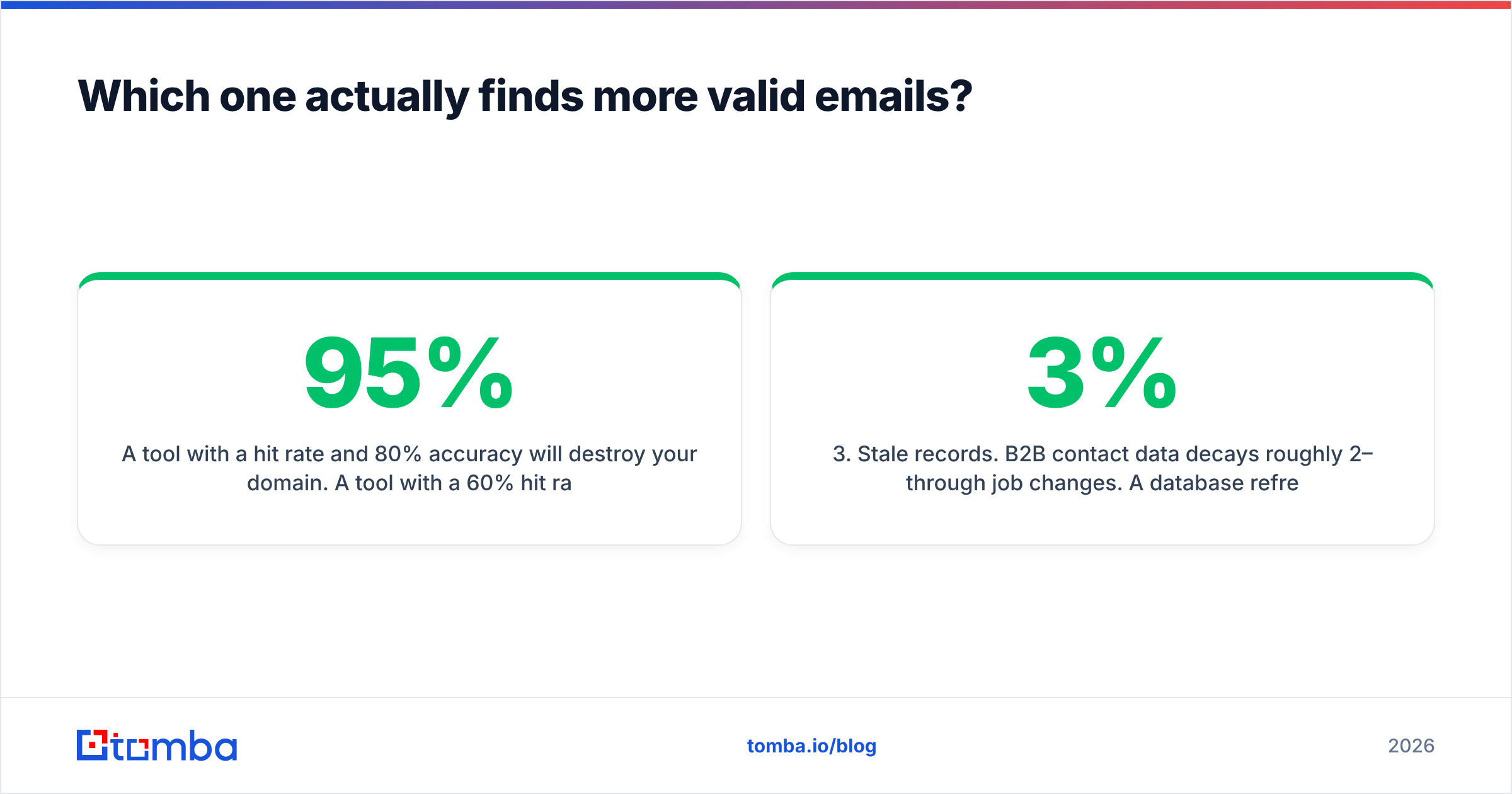
A tool with a 95% hit rate and 80% accuracy will destroy your domain. A tool with a 60% hit rate and 98% accuracy will not. When you evaluate, build a 200-contact control list you already know the answers to — colleagues, customers, partners — and run it through both products. Compare returned addresses against ground truth, then push the survivors through an independent email verifier as a referee.
Three failure modes to watch for in that test:
- Catch-all domains. Roughly a quarter of B2B domains accept everything at the SMTP layer, so a naive verifier marks the address "valid" whether or not a human reads it. Ask specifically how each tool handles catch-alls; if the answer is "we mark them accepted," you are carrying hidden bounce risk. A dedicated catch-all verifier is a different technology from a standard SMTP ping.
- Pattern guessing with no source.
first.last@domain.comis right often enough to look good in a demo and wrong often enough to burn a domain. Insist on either a source citation or a real-time verification result. - Stale records. B2B contact data decays roughly 2–3% per month through job changes. A database refreshed quarterly is a bounce generator by month five. Ask when records were last re-verified, not how many records exist.
Google's own sender guidelines put spam-complaint and invalid-recipient thresholds in writing. Bulk senders who exceed them get throttled or filtered, which is why the data question outranks the copy question when both are broken.
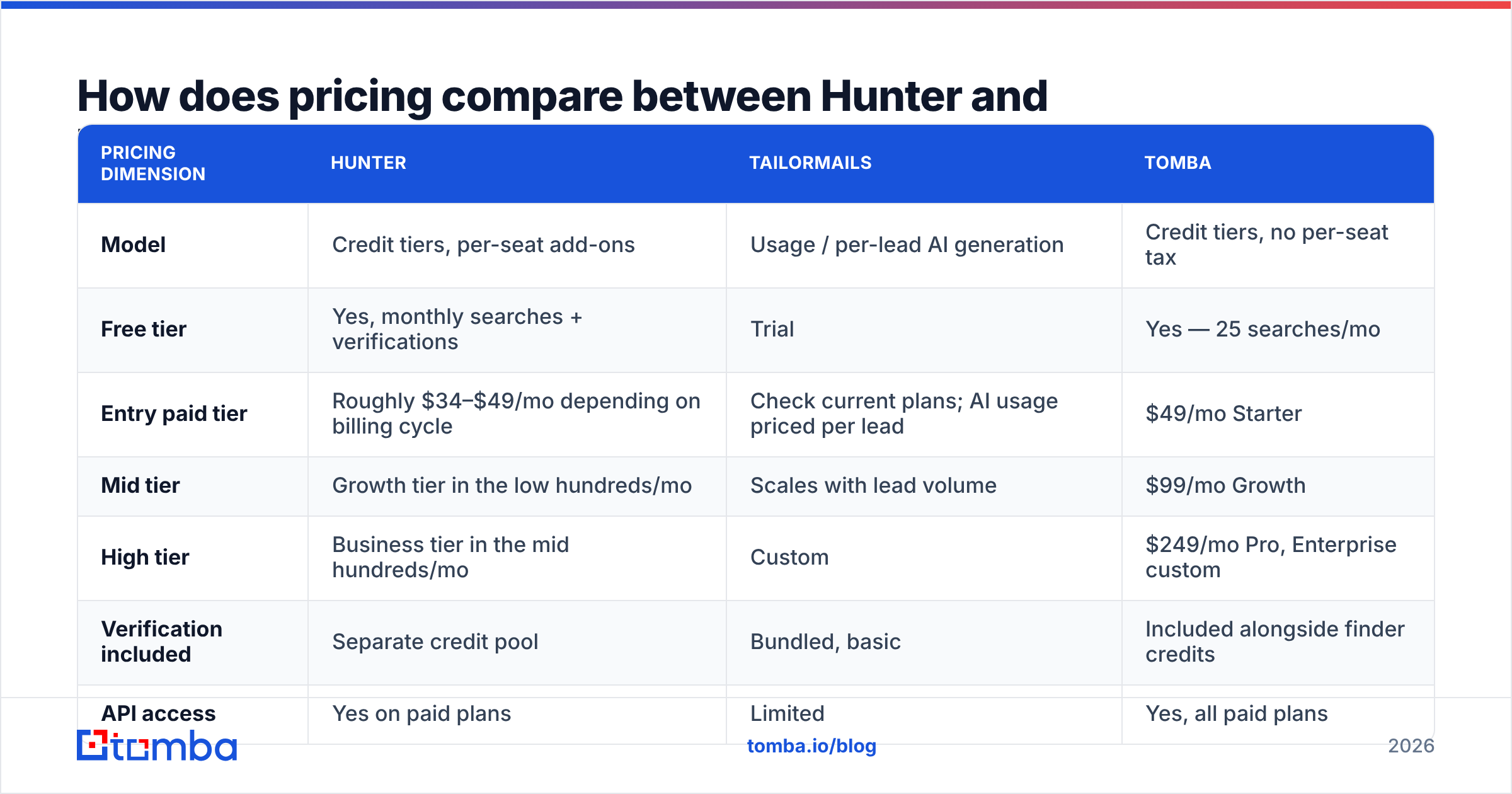
How does pricing compare between Hunter and Tailormails?#

Pricing across this category converges on three models, and knowing which one you are buying matters more than the sticker price.
| Pricing dimension | Hunter | Tailormails | Tomba |
|---|---|---|---|
| Model | Credit tiers, per-seat add-ons | Usage / per-lead AI generation | Credit tiers, no per-seat tax |
| Free tier | Yes, monthly searches + verifications | Trial | Yes — 25 searches/mo |
| Entry paid tier | Roughly $34–$49/mo depending on billing cycle | Check current plans; AI usage priced per lead | $49/mo Starter |
| Mid tier | Growth tier in the low hundreds/mo | Scales with lead volume | $99/mo Growth |
| High tier | Business tier in the mid hundreds/mo | Custom | $249/mo Pro, Enterprise custom |
| Verification included | Separate credit pool | Bundled, basic | Included alongside finder credits |
| API access | Yes on paid plans | Limited | Yes, all paid plans |
| Extra seats | Charged per seat on lower tiers | Varies | Included |
Two traps to price out before you sign anything.
The seat tax. Credit-based tools that also charge per seat punish exactly the team shape that needs them: five SDRs sharing one modest credit pool. Model your real headcount, not your credit usage, and you will often find the "cheaper" plan costs more.
Double-charging for the same contact. In many stacks a contact consumes a search credit, then a verification credit, then an enrichment credit. Confirm whether verification comes out of the same pool as finding. If it doesn't, your effective cost per usable contact is higher than the tier page suggests — sometimes by 40% or more. Compare against transparent Tomba pricing where finder and verifier credits share one pool, and do the arithmetic on cost-per-verified-contact rather than cost-per-credit.
For AI-first tools specifically, ask what happens on regeneration. If the model drafts three variants and you keep one, are you billed for one lead or three generations? At 2,000 prospects/month that distinction is the entire budget line.
Is an AI email writer worth more than better data?#
Depends entirely on which number is embarrassing you.
AI personalization has a real, measurable ceiling effect. When your list is tight and your addresses are verified, moving from templated copy to genuinely researched copy is worth a meaningful lift in reply rate — the kind of change that turns a 1.5% reply rate into 4%. That is a serious business outcome and it justifies paying for a tool like Tailormails.
But that lift is multiplicative, not additive. Personalization applied to a list where 15% of addresses bounce does not produce 4% replies; it produces a damaged sending domain and a Gmail folder you never escape. Sequence order matters:
- Fix data first. Verified addresses, catch-alls handled explicitly, role accounts stripped.
- Fix infrastructure second. SPF, DKIM, DMARC, warmed domains, sane daily volume.
- Fix targeting third. A perfectly written email to the wrong persona is still a no.
- Fix copy fourth. This is where AI personalization pays, and it pays well.
There is also a quality distinction worth naming. AI research tools are excellent at surface personalization — "I saw you launched X," "noticed you're hiring for Y." They are weaker at the insight that actually earns a reply: a specific, credible hypothesis about a problem the prospect has. Reviews on G2's sales intelligence category show the same pattern across every vendor in this space: buyers rate AI copy highly for time saved and moderately for reply lift. Time saved is real value. Just do not model it as a reply-rate silver bullet.
Which tool should you pick for your team?#
- You are a solo founder doing 50 emails/week. Hunter's free tier plus manual writing. You do not have enough volume to justify AI generation, and your own words outperform a model's when you know the space.
- You are an agency building lists for clients. Data depth and API access matter most. Hunter or a dedicated finder with a real email finder API; skip the AI layer and use your own proven templates per vertical.
- You are a 5-person SDR team drowning in research. This is Tailormails' actual sweet spot. Pair it with a separate verification step and you get both halves.
- You are RevOps enriching a CRM. Neither AI copy nor a campaign tool matters. You need credits, an API, deduping, and predictable per-record cost.
- You are scaling past 10k contacts/month. Unbundle. Buy data from a data vendor, sending from a sending vendor, and copy from whatever your reps write best in. All-in-one economics stop working at that volume.
Where does Tomba fit in this comparison?#
Honestly: as the data layer, not the AI layer. That is the part of this problem worth solving well.
Tomba's core product is the email finder, with the email verifier, domain search, catch-all verification, phone finder, and enrichment built around it on shared credits. Free tier is 25 searches/month, Starter $49/mo, Growth $99/mo, Pro $249/mo, Enterprise custom — with API access on every paid plan and no per-seat surcharge, which is the specific line item that makes Hunter expensive for small teams.
What Tomba does not do is write your emails. If per-prospect AI research is your bottleneck, a tool built for that will beat a finder's bolted-on generator, and the sane stack is a finder feeding your sequencer of choice. Peers in the data space — including partners like BookYourData, which sells verified list data on a different model — are worth pricing alongside, because "database subscription" and "search credits" suit different buying patterns. A team that needs 20,000 contacts once is not the same buyer as a team enriching 500 records a week forever.
The test that settles it: run the same 200-contact control list through each candidate, verify the output independently, and compare cost per deliverable address. That single number decides more outbound outcomes than any feature matrix.
Start with the data layer. Put your next 25 prospects through the Tomba Email Finder free — no card, no seat fee — and check the results against whatever you are using now. If the deliverable-address count comes out higher, you have found the cheaper half of your outbound stack, and you can spend the savings on the AI writer that actually earns it.
Related guides#
// get started
Find, verify and enrich your first contacts today
Start on the free plan with 25 searches a month, then scale when your team is ready.
Free plan · No credit card required · GDPR & CCPA
// about the author