Hunter vs Techsalerator: Which B2B Data Tool Wins in 2026?
Hunter finds and verifies emails one domain at a time. Techsalerator licenses bulk datasets by the file. They solve different problems — here's which one your pipeline actually needs, and what each really costs.
TL;DR
- They are not the same category. Hunter is a self-serve email finder and verifier you query domain by domain. Techsalerator is a data licensing company that sells you bulk B2B and consumer datasets, usually under a custom quote.
- Hunter wins on speed-to-first-email. Free tier, credit card optional, results in seconds, a Chrome extension, and a clean API. You can test it in ten minutes.
- Techsalerator wins on breadth and ownership. Country-level, industry-level, and consumer datasets you buy once and keep — useful if you need volume that no per-credit tool can economically supply.
- Pricing models clash. Hunter charges per search credit on public tiers. Techsalerator quotes per dataset, and quotes for licensed data typically start in the thousands, not at $49.
- Most SMB outbound teams need neither extreme. A verified, API-first email finder with real bulk support usually beats both a credit-metered lookup tool and a static licensed file.
What are Hunter and Techsalerator, exactly?#
They sit at opposite ends of the B2B data market, and confusing them is the single most expensive mistake buyers make in this comparison.
Hunter is a search product. You give it a domain — say stripe.com — and it returns the email addresses it has indexed for that domain, the company's dominant email pattern, confidence scores, and the public sources where each address was seen. It also verifies addresses, runs bulk CSV jobs, and exposes everything through an API. The mental model is a search engine for work emails: you ask, it answers, you pay per question.
Techsalerator is a data supplier. You tell them the audience you want — "manufacturing decision-makers in Germany with 50–500 employees," or a consumer segment by geography — and they scope, price, and deliver a dataset. Delivery is typically a file (CSV, JSON) or an API feed. The mental model is a wholesaler: you describe the shipment, they quote it, you take ownership of what arrives.
That difference drives everything else. One is metered access to a live index. The other is a bulk transfer of records you then own and maintain yourself.
How do Hunter and Techsalerator compare head to head?#
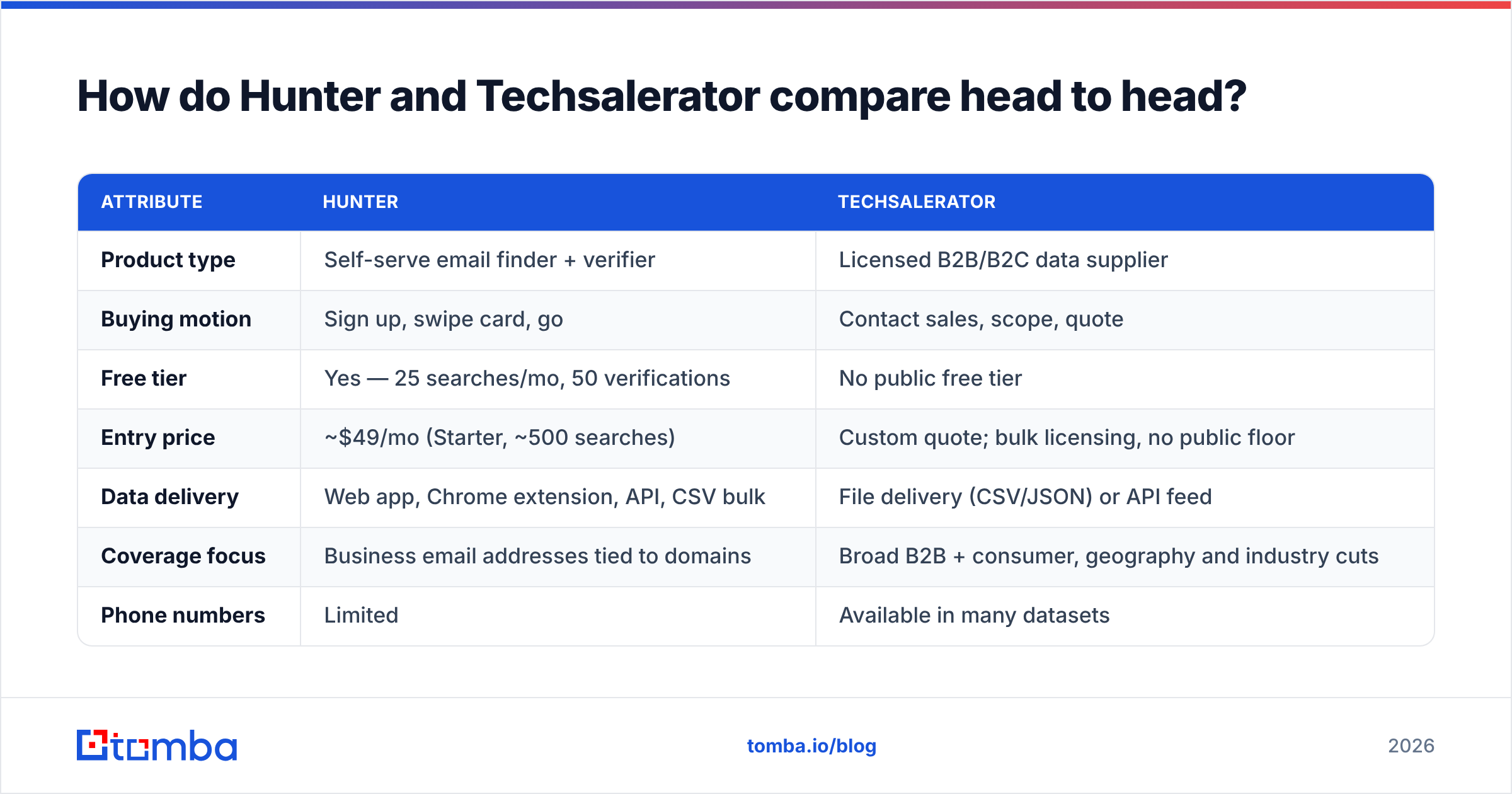
Here is the practical comparison, stripped of marketing language. Verify current numbers on each vendor's own pricing page before you buy — public tiers move.
| Attribute | Hunter | Techsalerator |
|---|---|---|
| Product type | Self-serve email finder + verifier | Licensed B2B/B2C data supplier |
| Buying motion | Sign up, swipe card, go | Contact sales, scope, quote |
| Free tier | Yes — 25 searches/mo, 50 verifications | No public free tier |
| Entry price | ~$49/mo (Starter, ~500 searches) | Custom quote; bulk licensing, no public floor |
| Data delivery | Web app, Chrome extension, API, CSV bulk | File delivery (CSV/JSON) or API feed |
| Coverage focus | Business email addresses tied to domains | Broad B2B + consumer, geography and industry cuts |
| Phone numbers | Limited | Available in many datasets |
| Verification built in | Yes, native verifier | Varies by dataset and agreement |
| Data freshness | Live index, re-crawled continuously | Snapshot at delivery; refresh is a new order |
| Best for | SMB outbound, agencies, recruiters, devs | Enterprise data teams, ad platforms, list builders |
| Worst for | Six-figure record volumes | Anyone who needs one email right now |

Read that table twice before you shortlist. If your buying committee is one person and your budget is a company card, the right-hand column is probably not for you. If you are feeding a data warehouse and need 400,000 records in a defined geography, the left-hand column will bankrupt you on credits long before it finishes.
Which one is more accurate?#
Neither vendor's headline accuracy number should decide this for you, because they measure different things.
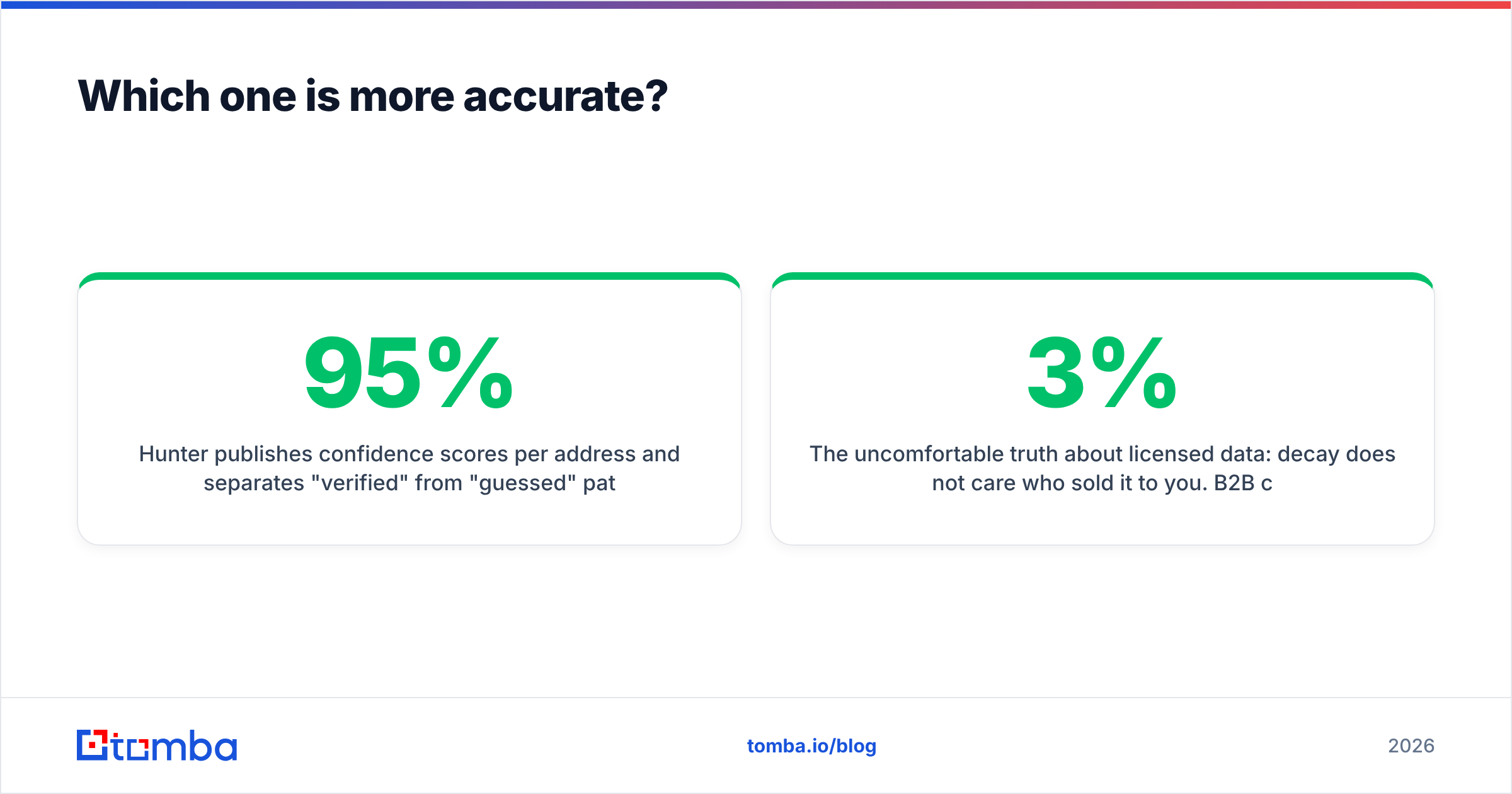
Hunter publishes confidence scores per address and separates "verified" from "guessed" patterns. That transparency is genuinely useful: a 95%-confidence result backed by three public sources behaves very differently in a send than a pattern-inferred guess with no sources. Where Hunter gets weaker is catch-all domains — as with every SMTP-based verifier, a catch-all server accepts everything, so "valid" means "the server didn't say no." Anyone selling you certainty on catch-alls is overselling. A dedicated catch-all verifier that scores risk rather than pretending to binary truth is the honest answer.
Techsalerator's accuracy is a supplier question, not a scoring question. You are buying a file. What matters is when the records were collected, how they were sourced, what the refresh cadence is, and whether the vendor will run a validation pass before delivery. Ask for those answers in writing, and ask for a sample of 500–1,000 records you can run through your own verifier. If a data vendor will not sample, that is the answer.

The uncomfortable truth about licensed data: decay does not care who sold it to you. B2B contact data degrades at roughly 2–3% per month as people change jobs — a widely cited figure across the industry, and one you can sanity-check yourself by re-verifying a six-month-old list. A dataset that was 92% accurate on delivery day is materially worse by the time your SDRs work through it. That is not a knock on Techsalerator specifically; it is the physics of the category. It is also the strongest argument for pairing any purchased file with a live email verifier before every campaign, not just on import day.
What does each one actually cost?#
This is where the comparison stops being academic.
Hunter's public tiers are straightforward: a free plan with 25 monthly searches and 50 verifications, a Starter plan around $49/mo for roughly 500 searches, and higher tiers scaling into the hundreds per month for thousands of searches. Credits reset monthly and unused ones generally do not roll over indefinitely. The cost model is predictable and small — and it becomes painful exactly when you succeed, because doubling your outbound doubles your credit burn.
Techsalerator does not publish list prices, which is normal for data licensing. Expect a scoping call, a record count, a per-record or per-dataset quote, and terms covering how you may use the data. Licensed B2B datasets in this market commonly land in the low-to-mid four figures for a serious geography or vertical cut, and climb from there with volume, enrichment depth, and refresh rights. Treat any specific number you read online — including here — as an estimate, not a quote. Get it from them.
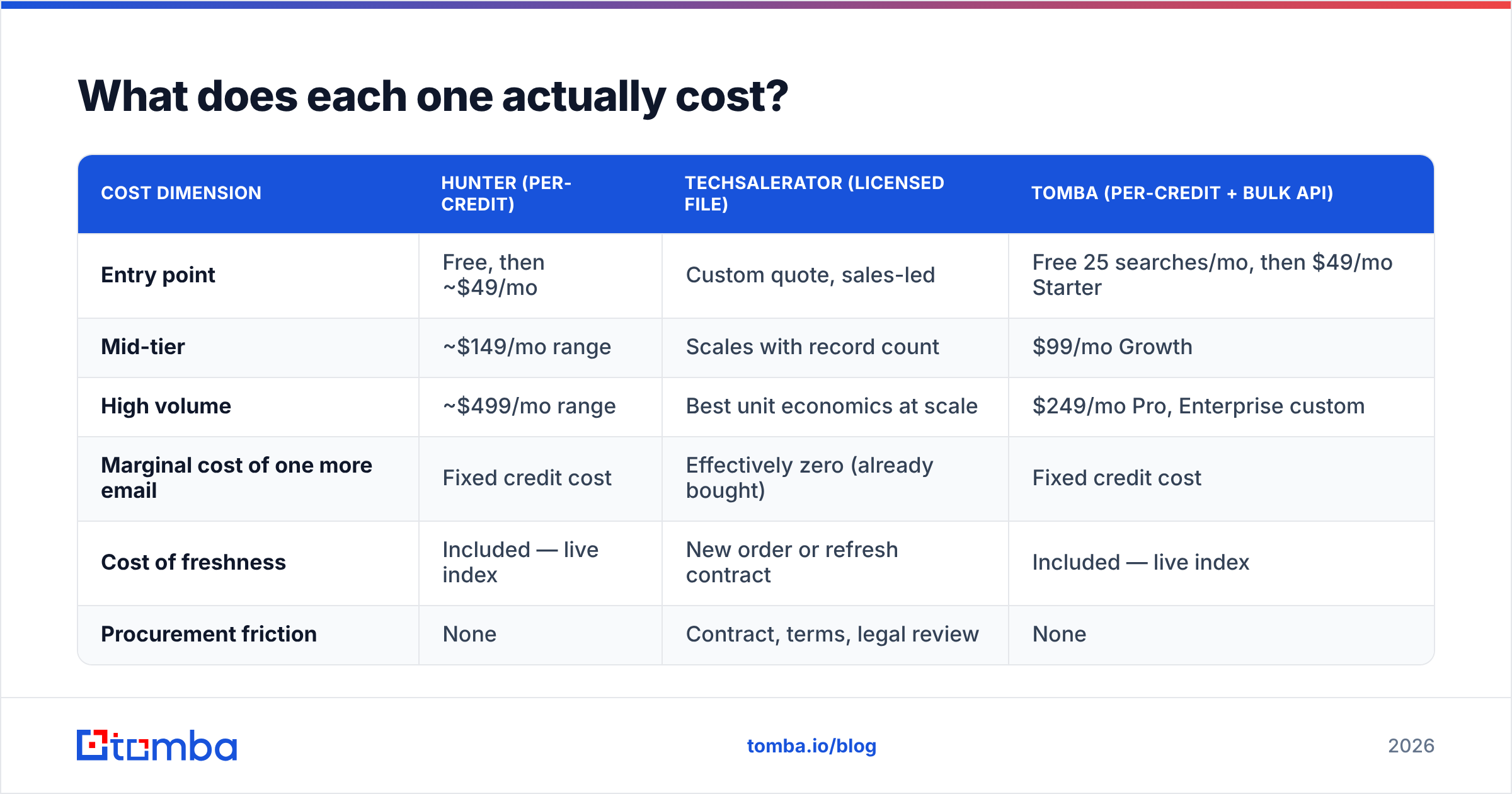
Here is how the three common approaches actually compare on cost shape:
| Cost dimension | Hunter (per-credit) | Techsalerator (licensed file) | Tomba (per-credit + bulk API) |
|---|---|---|---|
| Entry point | Free, then ~$49/mo | Custom quote, sales-led | Free 25 searches/mo, then $49/mo Starter |
| Mid-tier | ~$149/mo range | Scales with record count | $99/mo Growth |
| High volume | ~$499/mo range | Best unit economics at scale | $249/mo Pro, Enterprise custom |
| Marginal cost of one more email | Fixed credit cost | Effectively zero (already bought) | Fixed credit cost |
| Cost of freshness | Included — live index | New order or refresh contract | Included — live index |
| Procurement friction | None | Contract, terms, legal review | None |
The pattern is clear. Per-credit tools have a low floor and a rising ceiling. Licensed data has a high floor and a flat ceiling. Your volume determines which curve is cheaper, and the crossover point is usually somewhere north of 50,000 records per year. Below that, licensing is overpaying for capacity you will not use. Above it, credits quietly become your largest data line item. Compare the real numbers against Tomba pricing before you assume either extreme is your answer.
When should you choose Hunter?#
Pick Hunter when your workflow is person-by-person or domain-by-domain, and you value getting started today over getting the best unit price.
- You run SMB or mid-market outbound. A few hundred to a few thousand targeted contacts a month is squarely in Hunter's sweet spot.
- You need a browser workflow. The Chrome extension surfaces emails while you are already on a company site or LinkedIn profile — no context switch, no CSV round trip.
- You are a developer prototyping. The API is well documented and the free tier is enough to build against before you commit budget.
- You are a recruiter or agency. Ad-hoc lookups across many unrelated domains is precisely the shape Hunter is built for, and precisely the shape licensed datasets handle badly.
- You care about auditability. Source URLs per address are a real differentiator when someone asks "where did this contact come from?"
Skip Hunter when you need phone numbers at scale, deep firmographic enrichment, or six-figure record volumes. The credit math turns hostile fast.
When should you choose Techsalerator?#
Pick Techsalerator when you need volume you own, not queries you rent.
- You are building an internal database. If records land in your warehouse and get joined against product or CRM data, buying in bulk beats querying one at a time.
- You need consumer or non-standard datasets. Hunter does business emails. Techsalerator's catalogue spans far wider — geography, industry, consumer segments, and specialty cuts.
- You are feeding ad platforms or lookalike models. These are volume games where a per-credit tool makes no economic sense.
- You have procurement and legal capacity. Data licensing means terms, usage rights, and compliance review. If that process would take three months you cannot spare, it is not a fit right now.
Skip Techsalerator if you need three emails this afternoon, or if nobody on your team owns list hygiene after delivery. Bought data without an ongoing verification process becomes a bounce liability within two quarters.
Is there a middle option between the two?#
Yes — and for most teams reading this, the middle is where the answer lives.
The gap between "25 free searches" and "sign a data license" is enormous, and several vendors now occupy it. Tomba sits there deliberately: per-credit pricing that starts free and scales to $49, $99, and $249 tiers, plus a bulk email finder and a proper email finder API so the same product covers both the one-off lookup and the ten-thousand-row job. Domain search, catch-all handling, data enrichment, and phone lookup sit in the same account rather than in three separate contracts.
BookYourData is another credible option in this middle band, particularly if you want purchased, pre-verified lists with an accuracy guarantee but without a full enterprise licensing process — a reasonable halfway house between Hunter's metered lookups and Techsalerator's bulk licensing model.
The point is not that any one of these is universally best. It is that "email finder or data license" is a false binary, and buyers who accept it usually overpay on one side or run dry on the other.
How do you test either one before you commit?#
Run the same evaluation on both. It takes an afternoon and saves quarters.
- Build a 100-contact truth set. Use accounts you already have verified contacts for — closed-won customers, partners, your own team's known contacts. This is your answer key.
- Run the identical list through each vendor. Match rate and accuracy rate are different numbers. Track both. A tool that returns 90 of 100 with 60% correctness is worse than one returning 70 with 95%.
- Verify the winners independently. Do not grade a vendor with its own verifier. Use a neutral free email checker or a second provider.
- Test your actual geography and vertical. Aggregate accuracy is meaningless if your ICP is Nordic industrial firms and the sample was US SaaS.
- Price the real annual volume. Take your true monthly contact need, multiply by twelve, and run it through each pricing model. The winner at 500/month is rarely the winner at 5,000/month.
- Read the reviews with dates attached. G2 is useful here, but weight anything older than twelve months lightly — data products change fast.
What is the verdict on Hunter vs Techsalerator?#
Hunter for reach, Techsalerator for volume — and neither if your needs sit in the middle.
If you are a small team that needs verified business emails on demand, with a free tier to prove it works and an API when you outgrow the UI, Hunter is a defensible default and Techsalerator is over-engineered for your problem. If you are a data or growth team that needs to own hundreds of thousands of records across geographies and channels, Techsalerator is a serious supplier and Hunter's credit model will break before you finish.
Most readers of this comparison are neither. You need more than a few hundred lookups a month, you do not want a procurement cycle, and you want verification, bulk processing, and enrichment in one place.
That is exactly the slot the Tomba Email Finder is built for. Start on the free tier with 25 searches a month, run your own 100-contact truth set against it, and see how the match and accuracy rates compare to whatever you are paying for now. If it wins, Starter is $49/mo and the same API scales to Pro at $249/mo without a single sales call. If it loses, you have lost an afternoon and gained a benchmark — which is more than most buyers of either tool on this page ever bother to collect.
Related guides#
// get started
Find, verify and enrich your first contacts today
Start on the free plan with 25 searches a month, then scale when your team is ready.
Free plan · No credit card required · GDPR & CCPA
// about the author