Hunter vs The Data City (2026): Which B2B Data Tool Wins?
One tool finds the inbox. The other tells you which companies are worth emailing. Here's an honest breakdown of Hunter vs The Data City — coverage, pricing, real use cases, and when you actually need both.
TL;DR
- Hunter and The Data City are not really competitors. Hunter answers "what is this person's email address?" The Data City answers "which companies in the UK actually do this thing?"
- The Data City is a UK-focused company intelligence platform built on machine-learned industry classifications (RTICs) scraped from company websites — strong for market mapping, economic research, and investor/ecosystem work.
- Hunter is a global email finder and verifier with a free tier, published pricing, and a fast API — strong for turning a target list into deliverable contacts.
- If you are doing UK market research or building a sector map, The Data City wins. If you are running outbound and need inboxes, an email finder wins.
- Most teams that seriously evaluate both end up using a targeting layer for accounts and a contact layer for people. Tomba's Email Finder and verifier cover the second half at $49/mo with published pricing and 25 free searches to test first.
What are Hunter and The Data City, actually?#
They solve different halves of the same funnel, and that is the entire story.
Hunter is one of the oldest and best-known email discovery tools on the market. You give it a domain and it returns the email addresses it has associated with that domain, plus the company's email pattern (first.last@, finitial.last@, and so on). Add a first and last name and it will construct and score a likely address. It also ships a verifier, a Chrome extension, a lightweight cold-email sender, and a well-documented API. Its data is public-web-sourced, global, and person-centric.
The Data City is a very different animal. It is a UK company intelligence platform, founded in Leeds, that classifies businesses using what it calls Real-Time Industrial Classifications — RTICs. Instead of relying on SIC codes filed with Companies House a decade ago (which is how most UK company databases still work), The Data City crawls company websites and uses machine learning to work out what a company actually does today. You can then build custom sectors — "UK companies working on green hydrogen", "AI-enabled medtech in the North West" — and get a live list of firms with firmographics, growth signals, and Companies House linkage.
So the honest framing of "Hunter vs The Data City" is not which is better, it is which layer of your data stack are you shopping for.
Is Hunter vs The Data City even a fair fight?#
No — and pretending otherwise is how teams waste a budget cycle.
Here is the split that matters:
- Account discovery — "Which 400 companies should I care about?" This is The Data City's home turf. Sector definitions, emerging-industry tagging, geography down to local authority level, and UK-specific registry data are things a global email finder simply does not attempt.
- Contact discovery — "Who at those 400 companies do I email, and at what address?" This is Hunter's home turf, and the home turf of every dedicated email finder, including Tomba.
- Contact validation — "Will this address bounce?" Both Hunter and Tomba ship verification. The Data City does not, because it does not sell you person-level emails in the first place.
- Enrichment and sync — "Push this into HubSpot / Salesforce / a warehouse." Both play here, but with different payloads: firmographic rows versus contact rows.
- Research and reporting — "Show me how this sector grew year over year." The Data City is built for this. An email finder is not, and should not pretend to be.
If someone on your team is arguing for one over the other, the first question is which of those five bullets is actually the bottleneck. Nine times out of ten in a sales org, it is contact discovery. Nine times out of ten in a policy, VC, or economic development team, it is account discovery.
How do Hunter and The Data City compare head-to-head?#
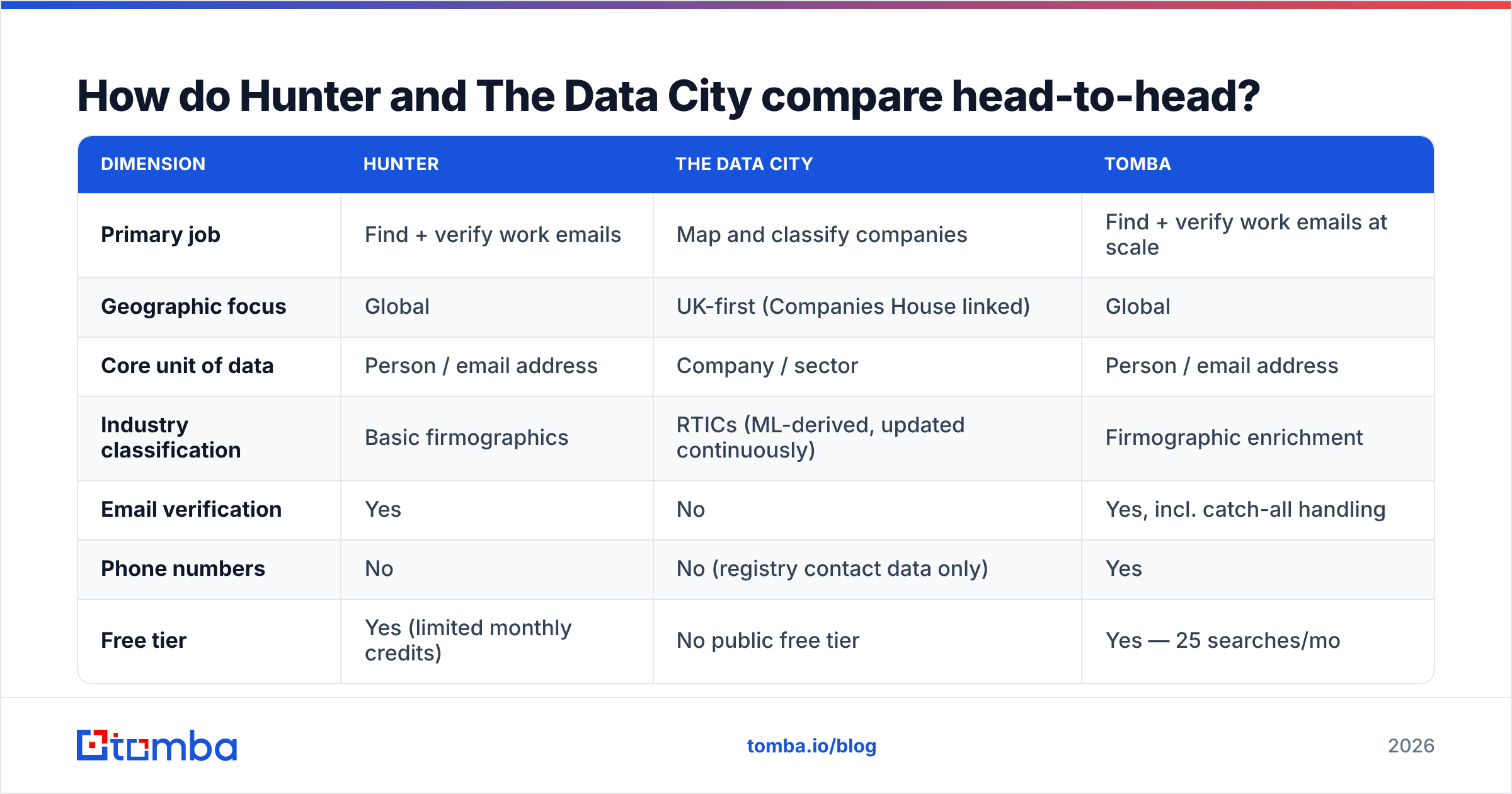
| Dimension | Hunter | The Data City | Tomba |
|---|---|---|---|
| Primary job | Find + verify work emails | Map and classify companies | Find + verify work emails at scale |
| Geographic focus | Global | UK-first (Companies House linked) | Global |
| Core unit of data | Person / email address | Company / sector | Person / email address |
| Industry classification | Basic firmographics | RTICs (ML-derived, updated continuously) | Firmographic enrichment |
| Email verification | Yes | No | Yes, incl. catch-all handling |
| Phone numbers | No | No (registry contact data only) | Yes |
| Free tier | Yes (limited monthly credits) | No public free tier | Yes — 25 searches/mo |
| Published pricing | Yes | Quote-based / annual licence | Yes — $49 to $249/mo |
| API | Yes, mature | Yes, on higher tiers | Yes, plus CLI and MCP server |
| Typical buyer | SDR teams, founders, agencies | Analysts, investors, gov, universities | SDR teams, RevOps, developers |
Two rows do most of the work in that table. Geographic focus: if your ICP is not primarily UK-registered, The Data City's core advantage evaporates. Published pricing: Hunter and Tomba both list prices you can read on a Tuesday afternoon without booking a call. The Data City sells annual licences with quote-based pricing, which is normal for research platforms but is a real friction point if you are a five-person startup trying to test something this quarter.
What does each one cost?#
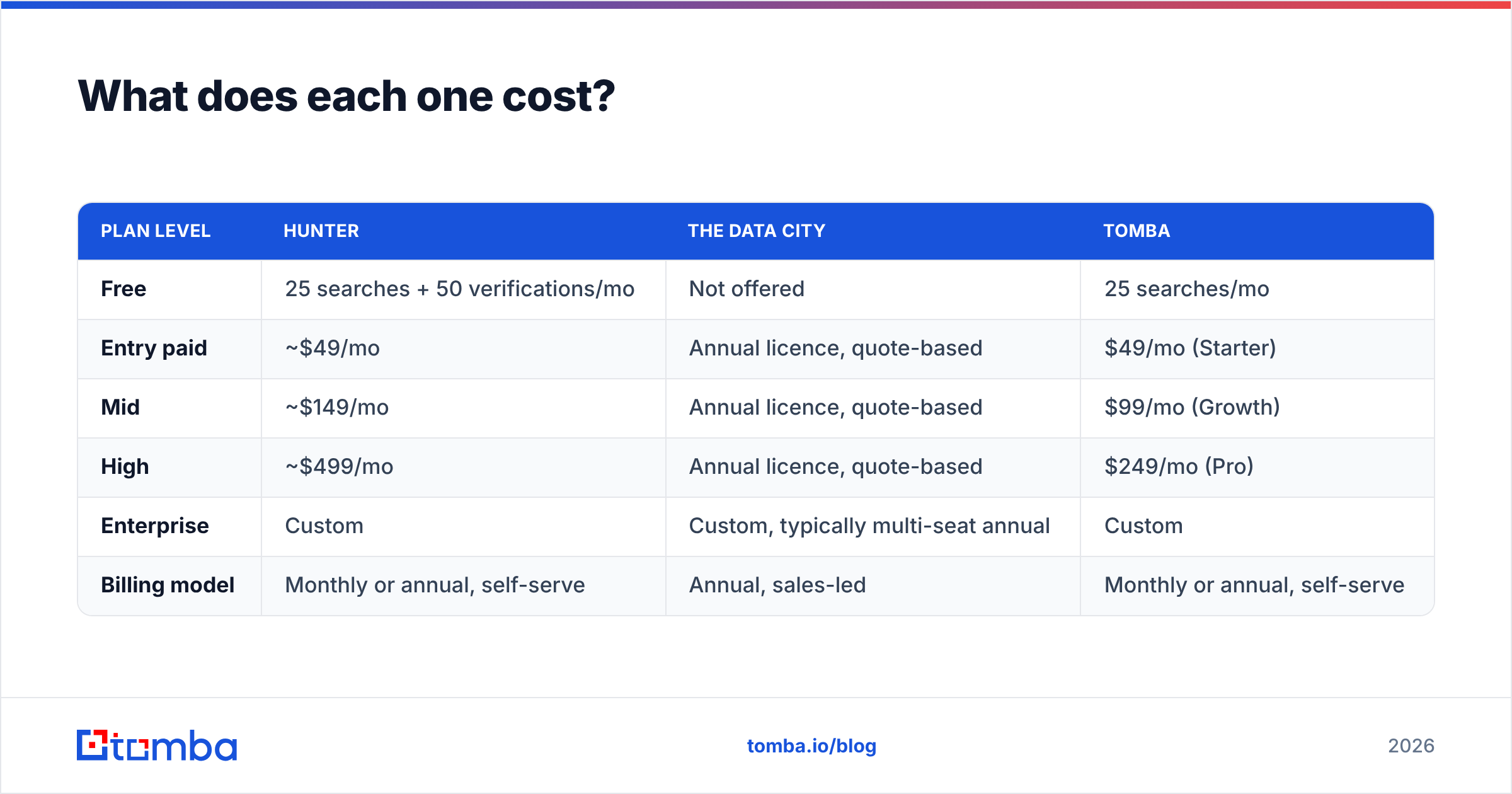
Pricing changes, so check the vendor pages before you commit. As listed at the time of writing:
| Plan level | Hunter | The Data City | Tomba |
|---|---|---|---|
| Free | 25 searches + 50 verifications/mo | Not offered | 25 searches/mo |
| Entry paid | ~$49/mo | Annual licence, quote-based | $49/mo (Starter) |
| Mid | ~$149/mo | Annual licence, quote-based | $99/mo (Growth) |
| High | ~$499/mo | Annual licence, quote-based | $249/mo (Pro) |
| Enterprise | Custom | Custom, typically multi-seat annual | Custom |
| Billing model | Monthly or annual, self-serve | Annual, sales-led | Monthly or annual, self-serve |
The pattern is clear. Email finders are commodity-priced, self-serve, and easy to churn out of. Company intelligence platforms are relationship-priced and sold on an annual cycle. Neither model is wrong — but they mean very different things for how fast you can run a pilot. You can trial an email finder before your coffee gets cold; a research platform trial usually starts with a scoping call.
For the full breakdown of what each credit tier includes on the Tomba side, see Tomba pricing.
Who should choose The Data City?#
Choose The Data City when your problem is definition, not contact.
Concrete cases where it earns its licence fee:
- Sector mapping for economic development. You need to know how many firms in a region work in advanced manufacturing — where "advanced manufacturing" is defined by what they build, not by a SIC code someone ticked in 2014.
- Investment screening. A VC or PE team scanning UK companies in an emerging category that has no official classification yet. RTICs exist precisely because official taxonomies lag the economy by years.
- Policy and academic research. Government bodies, universities, and think tanks that need defensible, reproducible sector definitions with methodology they can cite.
- Market sizing before a launch. You want a credible count of addressable UK firms in a niche, plus headcount and turnover bands, before committing GTM budget.
- Supply chain and cluster analysis. Finding who else operates near a given company, in a given specialism, at a given scale.
What it will not do is hand you 3,000 verified inboxes to email on Monday. That is not a flaw. It is a product boundary.
Who should choose Hunter — or another email finder?#
Choose the contact layer when your list of target companies already exists and the gap is people.
That is the majority of B2B sales situations. You already know you sell to Shopify Plus agencies, or Series-B fintechs, or NHS trusts. What you don't have is the head of growth's address, and whether it bounces.
Hunter is a solid, honest tool for this. It has been around since 2015, the interface is clean, the API docs are good, and the G2 reviews reflect a product people generally like. Its weaknesses are the ones every public-web-sourced finder shares: patchy coverage at small companies with thin web footprints, and confidence scores that can read higher than reality on catch-all domains.
That last point deserves attention, because it is where most cold-email programmes quietly bleed. A catch-all server accepts every address at the SMTP handshake, so a naive verifier marks the guess "valid" and you send. The bounce arrives days later, after your sender reputation has already taken the hit. A dedicated catch-all verifier that resolves those domains separately is not a luxury feature at volume — it is the difference between a 2% bounce rate and a 9% one.

Where does Tomba fit in this comparison?#
Tomba competes with Hunter, not with The Data City. Being clear about that is more useful than a fake three-way shootout.
Against Hunter specifically, Tomba's arguments are:
- Surface area. Beyond finding and verifying, Tomba ships domain search, reverse email lookup, phone finder, author finder, LinkedIn email lookup, and data enrichment under one credit pool. Hunter keeps a tighter product scope.
- Catch-all handling. Explicit catch-all detection and verification rather than a single blended confidence score.
- Developer ergonomics. A REST API, a CLI, an MCP server for LLM agents, plus Sheets, Excel, and Airtable add-ins. If your workflow is "enrich in the warehouse, not in a dashboard", that matters.
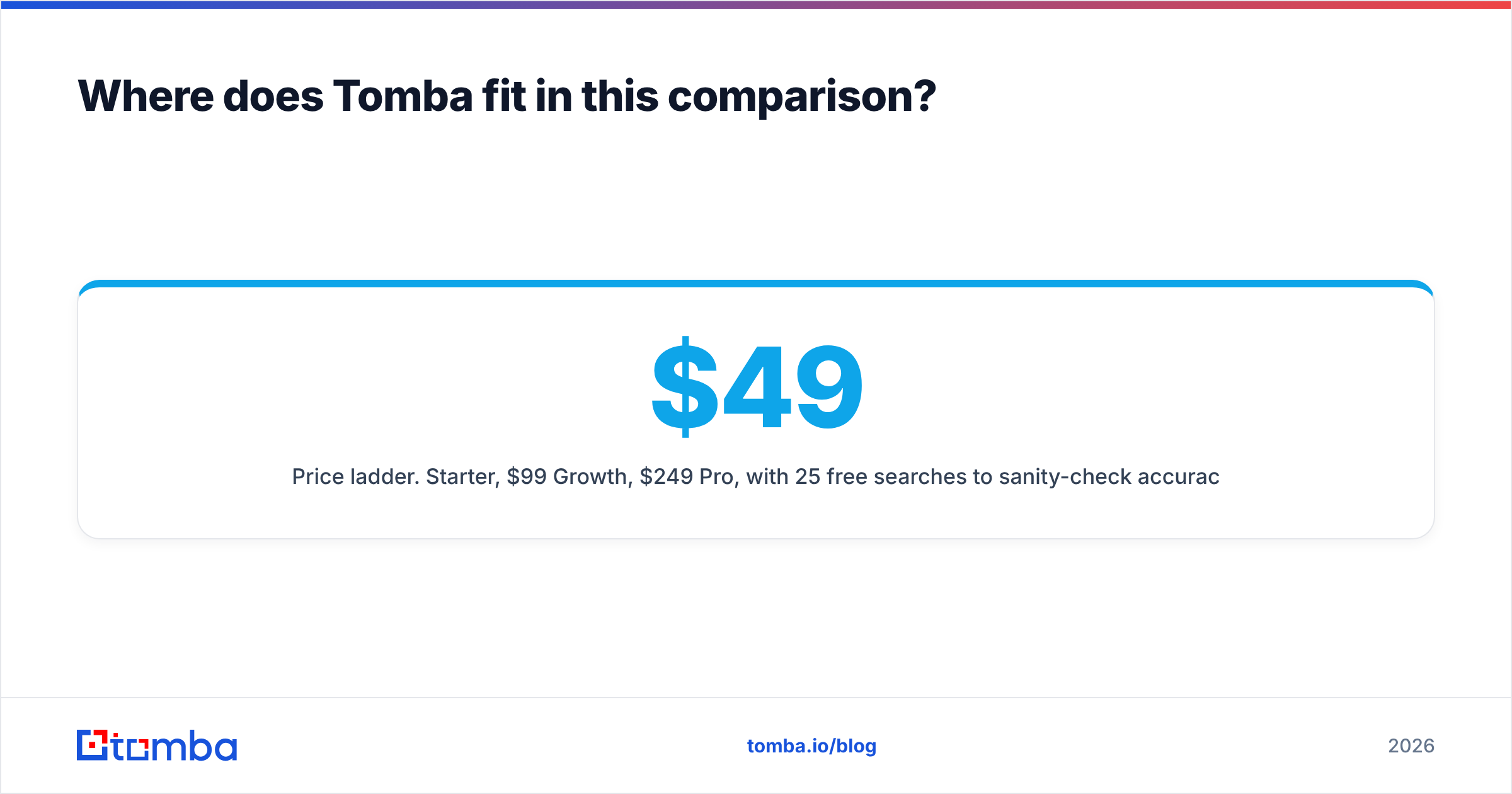
- Price ladder. $49 Starter, $99 Growth, $249 Pro, with 25 free searches to sanity-check accuracy on your own domains before paying anything.
Where Hunter still wins: brand recognition, a longer track record, and a built-in campaign sender that some small teams prefer over stitching a separate sequencer in.
And if your requirement is genuinely a static, pre-built list rather than an on-demand lookup — say you want 5,000 verified contacts in a defined niche delivered as a file — a list vendor like BookYourData is a legitimate and well-regarded option in that lane. Different purchase model, different job, worth knowing about.
What does a combined stack actually look like?#
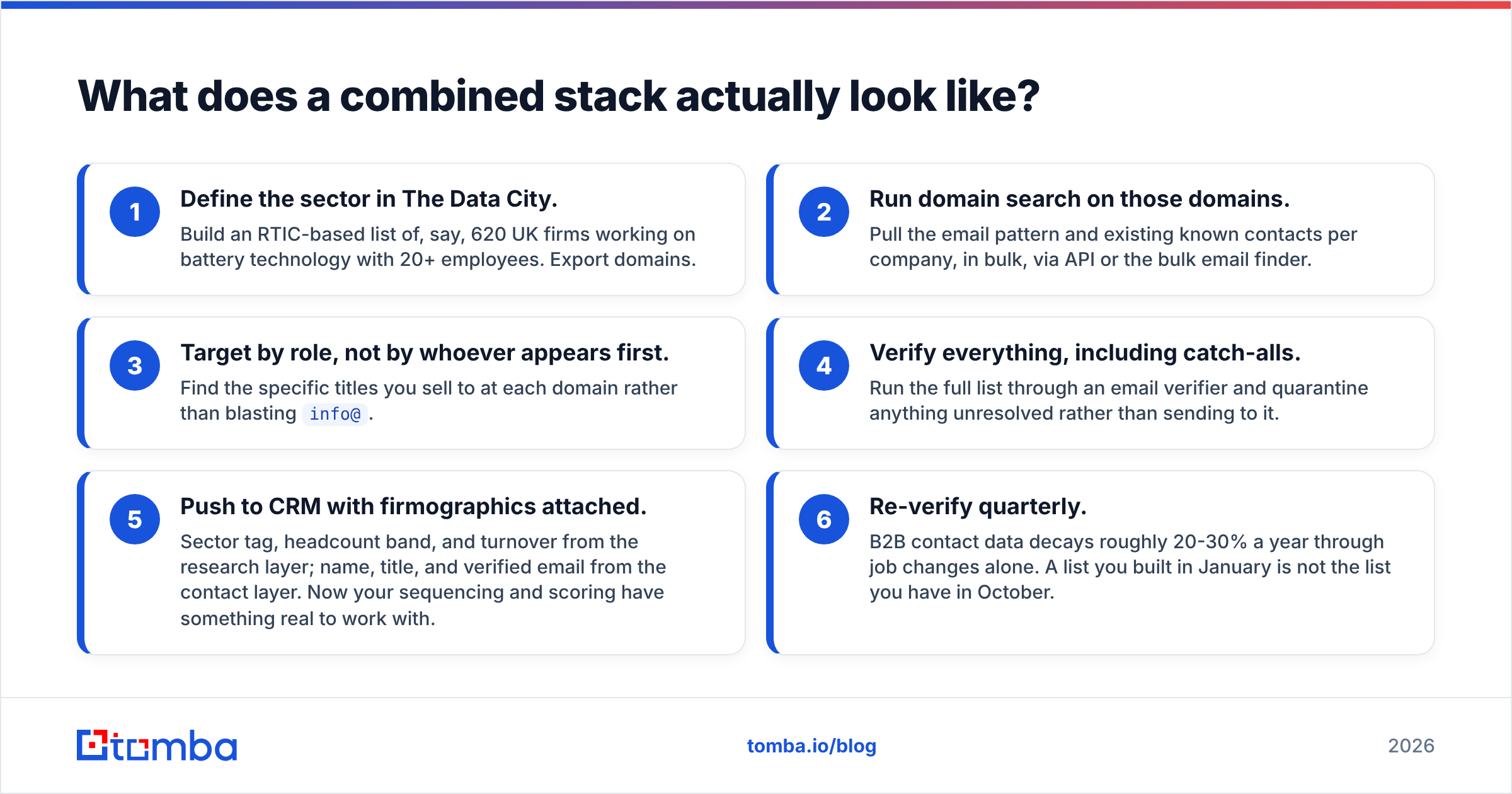
The teams that get this right stop treating it as a versus question. A realistic UK-focused outbound stack looks like this:
- Define the sector in The Data City. Build an RTIC-based list of, say, 620 UK firms working on battery technology with 20+ employees. Export domains.
- Run domain search on those domains. Pull the email pattern and existing known contacts per company, in bulk, via API or the bulk email finder.
- Target by role, not by whoever appears first. Find the specific titles you sell to at each domain rather than blasting
info@. - Verify everything, including catch-alls. Run the full list through an email verifier and quarantine anything unresolved rather than sending to it.
- Push to CRM with firmographics attached. Sector tag, headcount band, and turnover from the research layer; name, title, and verified email from the contact layer. Now your sequencing and scoring have something real to work with.
- Re-verify quarterly. B2B contact data decays roughly 20-30% a year through job changes alone. A list you built in January is not the list you have in October.
Step 1 costs an annual licence. Steps 2 through 6 cost about a hundred dollars a month. That asymmetry is worth internalising before you decide which line item to cut.
Which one should you buy first?#
If you only have budget for one, buy the layer that unblocks revenue this quarter.
For a sales team with a defined ICP: contact data first. You cannot email a market map. Get inboxes, get them verified, get sequences running, then invest in better targeting once you have reply-rate data telling you which segments respond.
For a research, investment, or policy function: The Data City first, obviously. Contact discovery is a downstream concern, and often a small one.
For a founder doing both jobs at once with UK targets: start with a free email-finder tier to prove the motion works on a hand-built list of 50 accounts. If replies come in, then pay for a targeting platform to scale the account list. Doing it in the other order — buying an annual research licence before you know your message converts — is the most common and most expensive sequencing mistake in early GTM.
Ready to fill in the contact layer? Start with the Tomba Email Finder — 25 free searches a month, no card, so you can test accuracy against domains you already know before spending anything. Paid plans start at $49/mo with verification, catch-all detection, and API access included. Find the inbox, verify it, then go sell.
Related guides#
// get started
Find, verify and enrich your first contacts today
Start on the free plan with 25 searches a month, then scale when your team is ready.
Free plan · No credit card required · GDPR & CCPA
// about the author