Hunter vs Unwrapemail 2026: Accuracy, Pricing, and Verdict
Hunter is the household name; Unwrapemail is the cheaper challenger. We break down credits, accuracy, catch-all handling, and real monthly cost — plus where each one quietly falls short.
TL;DR
- Hunter is the incumbent: massive domain index, clean UI, well-documented API, and the strongest brand recognition in the email-finder category. It is also the more expensive option once you scale past a few thousand lookups a month.
- Unwrapemail is the lean challenger: cheaper per lookup, simpler product surface, and built around a "find and verify in one pass" workflow. It has far less public track record and a thinner integration ecosystem.
- Accuracy is closer than the marketing suggests. Both tools rely on the same core signals — crawled public sources, pattern inference, and SMTP validation — so the real differentiator is catch-all handling and how each vendor charges for failed lookups.
- Credit accounting matters more than sticker price. A $49 plan that burns a credit on every miss can cost more than a $99 plan that only charges for verified hits.
- If you want a middle path — Hunter-class coverage with challenger pricing and a full API/CLI/MCP toolchain — Tomba sits between them at $49/mo for Starter and $99/mo for Growth.
What are Hunter and Unwrapemail?#
Think of the email-finder market like map apps. Hunter is Google Maps: it has been crawling the territory for a decade, everyone recognizes it, and it works fine even when you do not think hard about it. Unwrapemail is the newer routing app that promises the same destination for less money and with fewer menus — but you are trusting a smaller dataset behind the scenes.
Hunter (hunter.io) launched in 2015 and built its index by crawling public web pages and mapping which email patterns each domain uses. Its flagship features are Domain Search (every public address on a company domain), Email Finder (first name + last name + domain → address), Email Verifier, and Campaigns, a lightweight cold-email sender bolted on top. It is one of the most-reviewed products in its G2 category, which matters when you are buying on trust.
Unwrapemail is a newer, lighter-weight finder built around the same primitive: give it a name and a company, get back a deliverable address. It positions on price and simplicity rather than on breadth of features. Because it is a smaller vendor, published benchmark data is thin — you should verify current plan limits on the vendor's own pricing page before you commit, since challenger tools change their credit models more often than incumbents do.
That asymmetry is the honest framing for this comparison: Hunter is a known quantity you pay a premium for; Unwrapemail is a cheaper bet with less public evidence behind it.
How do Hunter and Unwrapemail actually find an email?#
Neither tool has a magic database of every professional inbox. Both run a pipeline, and understanding it explains every accuracy difference you will ever see:
- Pattern inference. The engine determines the company's dominant format —
first.last@,flast@,first@— from addresses it has already observed on that domain. This is the single biggest driver of hit rate. More observed domains = better patterns. - Public source crawling. Team pages, press releases, GitHub commits, conference speaker bios, PDF documents, and academic listings. Hunter's decade-long head start is mostly a head start here.
- Candidate generation. The tool permutes the target's name against the inferred pattern to produce a shortlist of likely addresses.
- SMTP validation. The verifier opens a conversation with the receiving mail server and asks whether the mailbox exists, without sending anything. This is where most "verified" labels come from — see Simple Mail Transfer Protocol for the underlying mechanics.
- Catch-all triage. If the domain accepts every address, SMTP cannot confirm anything. Vendors then either return "accept-all" honestly, or quietly mark the guess as valid. This is the number one source of inflated accuracy claims in the whole category.
- Confidence scoring. The final percentage you see is a blend of pattern strength, source count, and verification outcome — not a measured deliverability rate.

Once you see the pipeline, "Hunter vs Unwrapemail" stops being a question about secret databases and becomes a question about crawl breadth, catch-all honesty, and billing policy.
How do Hunter and Unwrapemail pricing plans compare?#
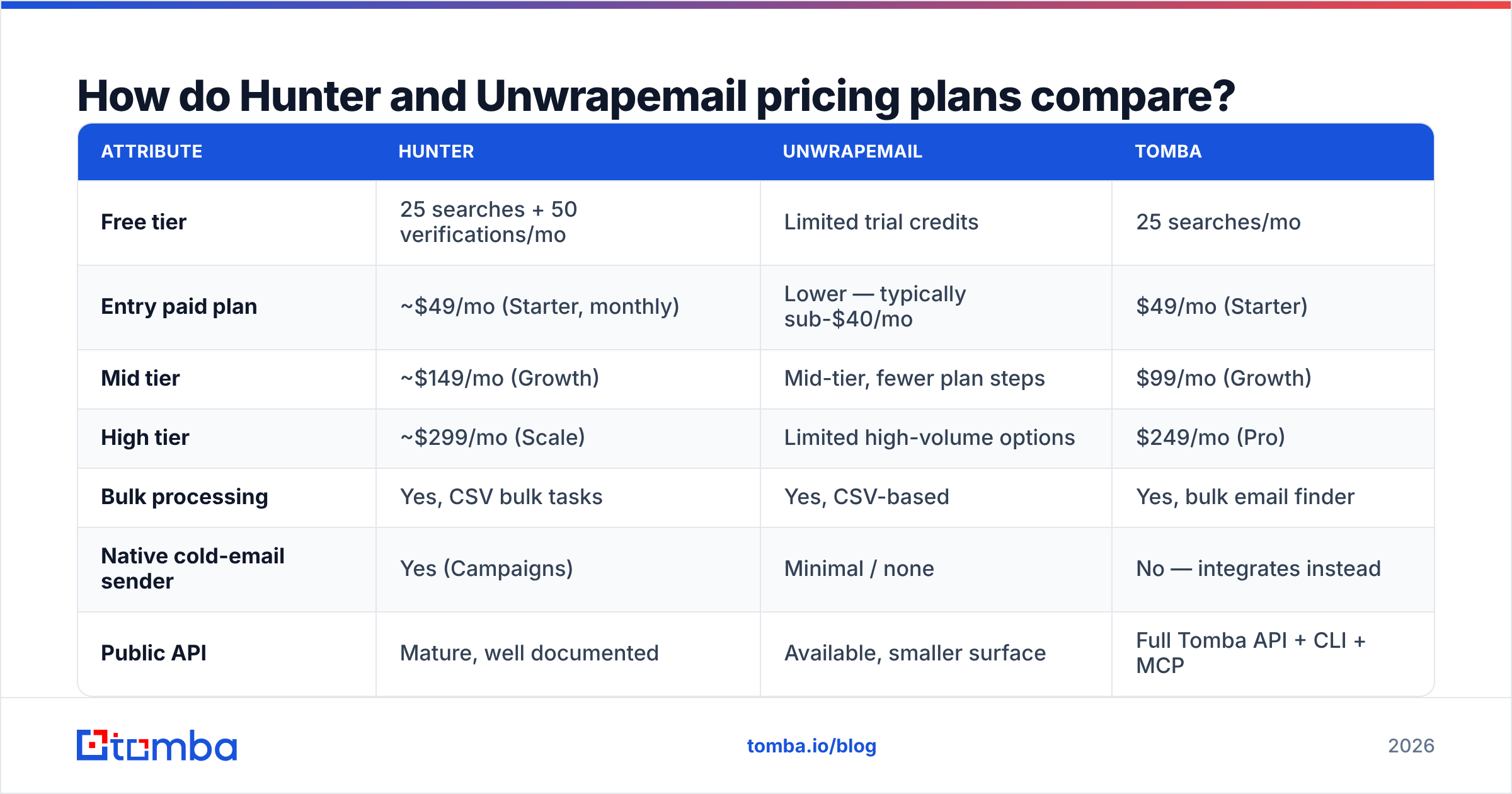
Hunter's public pricing has been stable for years: a free tier, then Starter, Growth, and Scale, with roughly 30% off for annual billing. Unwrapemail undercuts it on entry price — that is its whole positioning. Because challenger pricing moves, treat the Unwrapemail column as directional and confirm on the vendor's site.
| Attribute | Hunter | Unwrapemail | Tomba |
|---|---|---|---|
| Free tier | 25 searches + 50 verifications/mo | Limited trial credits | 25 searches/mo |
| Entry paid plan | ~$49/mo (Starter, monthly) | Lower — typically sub-$40/mo | $49/mo (Starter) |
| Mid tier | ~$149/mo (Growth) | Mid-tier, fewer plan steps | $99/mo (Growth) |
| High tier | ~$299/mo (Scale) | Limited high-volume options | $249/mo (Pro) |
| Bulk processing | Yes, CSV bulk tasks | Yes, CSV-based | Yes, bulk email finder |
| Native cold-email sender | Yes (Campaigns) | Minimal / none | No — integrates instead |
| Public API | Mature, well documented | Available, smaller surface | Full Tomba API + CLI + MCP |
| Chrome extension | Yes | Yes | Yes |
| Enterprise / custom | Yes | Limited | Custom |
Three things to read out of that table:
Hunter's jump from Starter to Growth is steep. Going from $49 to $149 for the next volume band is the moment most teams start shopping for alternatives. If your monthly lookup volume sits awkwardly at 1,500–3,000, you are paying Growth prices for Starter-plus usage.
Unwrapemail wins the entry price but not the ceiling. Cheap first plans are easy; sustaining accuracy and support at 50,000 lookups a month is the hard part. If you are a solo founder or a two-person SDR team, the challenger's economics are genuinely better. If you are running enrichment for a 30-rep org, the incumbent's infrastructure and SLA story matter more than $60 a month.
Bundled sending is a real Hunter advantage — with a caveat. Campaigns is convenient, but it is not a serious replacement for a dedicated sequencer. Most teams that start on Hunter Campaigns migrate out within a year, which means you paid for a feature you abandoned. Check Tomba pricing if you would rather unbundle finding from sending and keep your sequencer of choice.
Which one is more accurate?#
Accuracy claims in this category are close to meaningless without a definition, so here is the one that matters: of the addresses a tool returns and labels as valid, what percentage actually accept mail? That is different from hit rate (how many of your inputs produced any answer at all), and vendors love to blur the two.

In practice, across the mainstream finders:
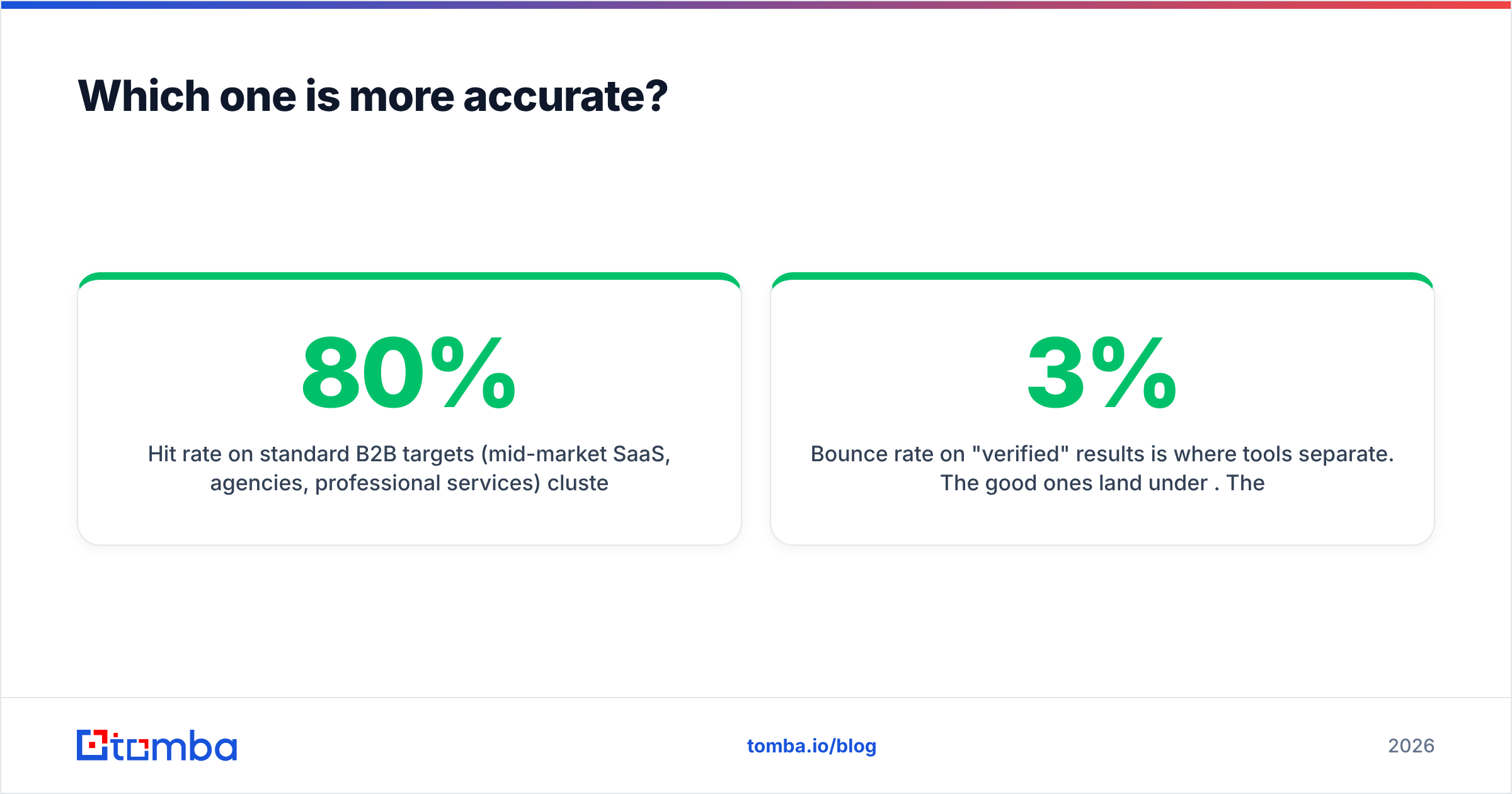
- Hit rate on standard B2B targets (mid-market SaaS, agencies, professional services) clusters in the 60–80% range for every serious vendor. Nobody has a 95% hit rate on a random cold list; anyone claiming it is measuring a friendly sample.
- Bounce rate on "verified" results is where tools separate. The good ones land under 3%. The ones that guess on catch-all domains and label the guess "valid" can push you past 8%, which is enough to damage sender reputation inside two weeks.
- Hunter is conservative. It will more often tell you it does not know rather than hand you a low-confidence guess. Good for deliverability, occasionally frustrating when you needed something.
- Unwrapemail leans toward returning a result. For a challenger competing on value, that is a rational product choice — you feel like you got more per dollar. It also means you carry more of the verification burden yourself.
The practical rule: whichever tool you choose, run its output through an independent email verifier before it touches a sequencer. Single-vendor find-and-verify is a conflict of interest — the same engine that guessed the address is grading its own guess.
How do they handle catch-all domains?#
Catch-all domains — those that accept mail to any address at the domain — are the hardest problem in the category and the fastest way to tell a mature tool from a young one.
A mature tool does three things: labels the domain as accept-all rather than valid, applies pattern confidence to estimate likelihood, and lets you decide the risk threshold. Hunter does the first two well and exposes an explicit "accept-all" status. Smaller vendors more often collapse accept-all into a generic "valid" bucket, because a screen full of yellow warnings looks worse in a trial than a screen full of green checkmarks.
If a meaningful share of your ICP sits on catch-all infrastructure — common in enterprise, finance, and anything running Microsoft 365 with a permissive policy — this single behavior should decide your purchase. A dedicated catch-all verifier that probes beyond a basic SMTP handshake will save you more bounced sends than a 5% better hit rate ever will.

Hunter vs Unwrapemail: which should you pick?#

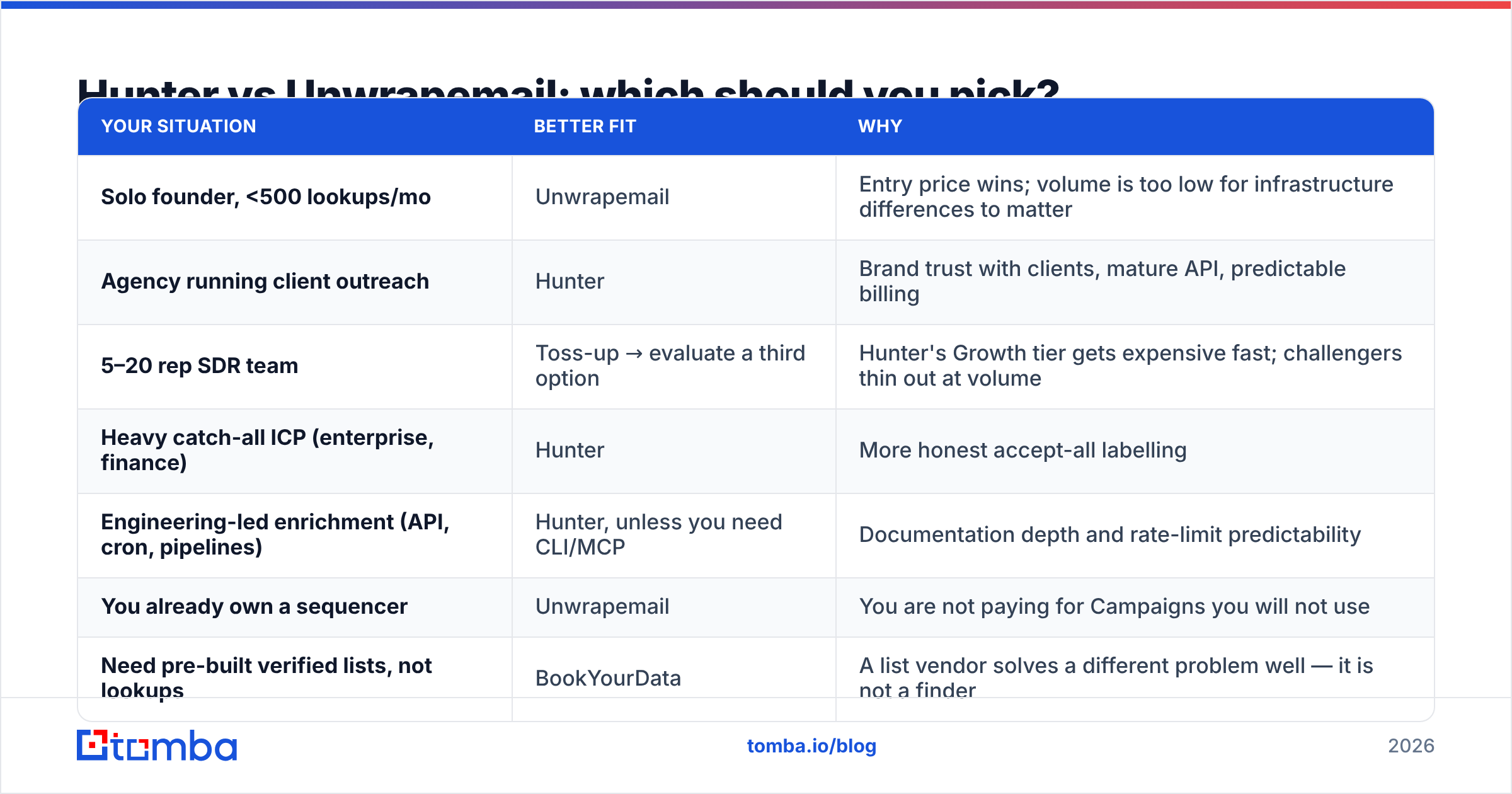
| Your situation | Better fit | Why |
|---|---|---|
| Solo founder, <500 lookups/mo | Unwrapemail | Entry price wins; volume is too low for infrastructure differences to matter |
| Agency running client outreach | Hunter | Brand trust with clients, mature API, predictable billing |
| 5–20 rep SDR team | Toss-up → evaluate a third option | Hunter's Growth tier gets expensive fast; challengers thin out at volume |
| Heavy catch-all ICP (enterprise, finance) | Hunter | More honest accept-all labelling |
| Engineering-led enrichment (API, cron, pipelines) | Hunter, unless you need CLI/MCP | Documentation depth and rate-limit predictability |
| You already own a sequencer | Unwrapemail | You are not paying for Campaigns you will not use |
| Need pre-built verified lists, not lookups | BookYourData | A list vendor solves a different problem well — it is not a finder |
Note that last row. If your motion is "buy 5,000 verified contacts in this ICP" rather than "resolve these 5,000 names I already have," a list provider like BookYourData is the correct tool and neither finder is competing for that job. Finders resolve known targets; list vendors supply unknown ones. Buying the wrong category is a more expensive mistake than picking the wrong vendor inside the right one.
Where does Tomba fit in this comparison?#
Honest disclosure: this is the Tomba blog, so read the following with appropriate skepticism and go test the free tiers yourself.
Tomba occupies the gap the table above exposes — the 5–20 rep team that finds Hunter's Growth tier overpriced and challenger tools underpowered. Concretely:
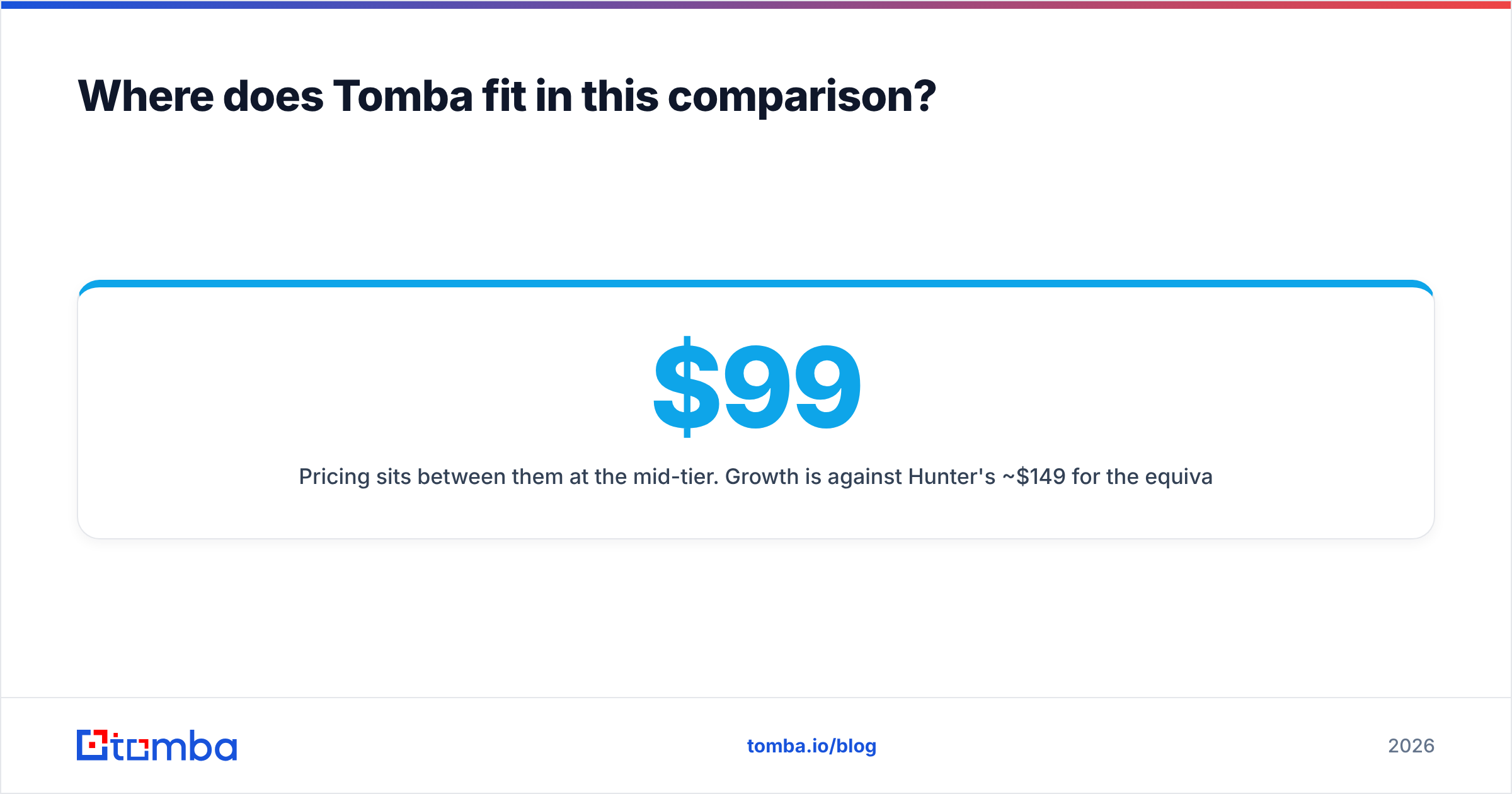
- Pricing sits between them at the mid-tier. Growth is $99/mo against Hunter's ~$149 for the equivalent band, and Pro is $249 against ~$299.
- The toolchain is broader than either. Beyond find email addresses and domain search, there is a phone finder, reverse email lookup, author finder, enrichment, a CLI, and an MCP server — which matters if you are wiring enrichment into an agent or a data pipeline rather than clicking through a dashboard.
- Catch-all is treated as its own product, not a footnote in the verifier.
- No bundled sequencer. Tomba does not try to be your cold-email platform; it integrates with the one you already pay for.
Where Tomba does not win: brand recognition. Hunter has ten years of reviews and a name your CFO already knows. If procurement friction is your bottleneck, that is a legitimate reason to pay the incumbent premium.
What should you actually test before buying?#
Do not buy on a feature grid — including this one. Run a 100-row bake-off:
- Build a 100-contact ground-truth list from your real ICP, including at least 20 catch-all domains and 20 sub-50-employee companies. Generic Fortune 500 samples flatter every vendor.
- Run the same list through every free tier. Hunter gives 25 searches monthly; Tomba gives 25; most challengers give trial credits. That is enough for a directional read.
- Measure three numbers separately: hit rate, share labelled accept-all, and actual bounce rate after a real send.
- Check credit-burn policy. Ask support directly: do you charge a credit for a lookup that returns nothing? The answer changes effective cost by 20–40%.
- Test the API, not just the UI, if any part of your workflow is automated. Rate limits and error semantics only surface under load.
- Re-run in 90 days. Data freshness decays; a vendor that wins today on a stale index will lose by Q2.
Start with a free bake-off#
Both Hunter and Unwrapemail are defensible choices — the incumbent for trust and catch-all honesty, the challenger for entry-level economics. The mistake is picking either one from a comparison post instead of from your own 100-row test on your own ICP.
If you want a third data point in that test, the Tomba Email Finder free tier gives you 25 searches a month with no card required, plus catch-all verification and API access on the same key. Run it alongside the other two, compare bounce rates after a real send, and let the numbers pick your vendor.
Related guides#
// get started
Find, verify and enrich your first contacts today
Start on the free plan with 25 searches a month, then scale when your team is ready.
Free plan · No credit card required · GDPR & CCPA
// about the author