Hunter vs Verifyemail.io: Which Email Tool Wins in 2026?
Hunter finds and verifies emails. Verifyemail.io only verifies them. Here is the honest cost, accuracy, and catch-all breakdown, plus who each tool actually fits in 2026.
Hunter vs Verifyemail.io comes down to one question. Do you need to find email addresses, or only clean the ones you already have? Hunter does both jobs. Verifyemail.io does the second one, and does it cheaply.
TL;DR
- Hunter and Verifyemail.io are not the same class of product. Hunter is a full prospecting suite: domain search, email finder, verifier, campaigns. Verifyemail.io is a focused verification API. It cleans a list you already have.
- If you have no list yet, Verifyemail.io cannot help you. If you already have 200k addresses and just need them scrubbed cheaply, Hunter's per-credit pricing is the wrong shape.
- Hunter's free tier gives you 25 searches a month. That is generous for testing. The per-search credit model still gets expensive fast at scale.
- Verification-only vendors usually win on raw cost per email. Find-and-verify platforms win on workflow. You stop paying two invoices and gluing two APIs together.
- Want both jobs on one credit balance, with catch-all handling included? Tomba starts at $49/mo, with a free 25-search tier to test against your own domains.
What are Hunter and Verifyemail.io, exactly?#
Read this before you open either pricing page. The two tools sit at different points in the same pipeline.
Hunter launched in 2015. It is one of the oldest names in B2B email discovery. Its core product is domain search. You give it stripe.com, and it returns the addresses it has for that domain. It also returns the company's dominant email pattern, such as {first}@ or {f}{last}@. Around that sit an email finder (name + domain in, address out), a verifier, a Chrome extension, a Google Sheets add-on, a lightweight cold-email campaigns module, and a REST API.
Verifyemail.io does one job. It takes an address you already have — from your CRM, a webform, or a scraped list — and tells you whether sending to it is safe. The checks are familiar: syntax, domain and MX records, disposable addresses, and role accounts like info@ and sales@. It also runs an SMTP-level mailbox probe where the receiving server allows one. There is no discovery layer. It will never hand you a new prospect.
That gap drives everything below. Hunter vs Verifyemail.io is a bit like a fishing rod versus a fish scaler. You will probably need both jobs done. The real question is whether you buy them from one vendor or two.
What are the jobs in an email pipeline?#
Map any tool you evaluate onto these stages before you look at price:
- Discovery — turning a company or a person into a candidate address. Domain search, pattern inference, LinkedIn lookups, author finder style extraction. Hunter does this. Verifyemail.io does not.
- Verification — proving that candidate address will accept mail. MX checks, SMTP handshake, disposable and role filtering. Both tools do this, at different depths and different unit costs.
- Catch-all resolution — deciding what to do with domains that accept every address by design. Most tools quietly return "unknown" here and hand the risk back to you.
- Enrichment — attaching job title, seniority, company size, phone, and social profiles so your sequence can actually personalise. Hunter has a light version of this. Pure verifiers have none.
- Delivery hygiene — keeping bounce rate under roughly 2% so your sender reputation survives. Every stage above feeds this one.
A tool that only covers stage 2 is not worse than one covering 1–4. It is cheaper and narrower. Buy accordingly.

Hunter vs Verifyemail.io: how do they compare feature by feature?#
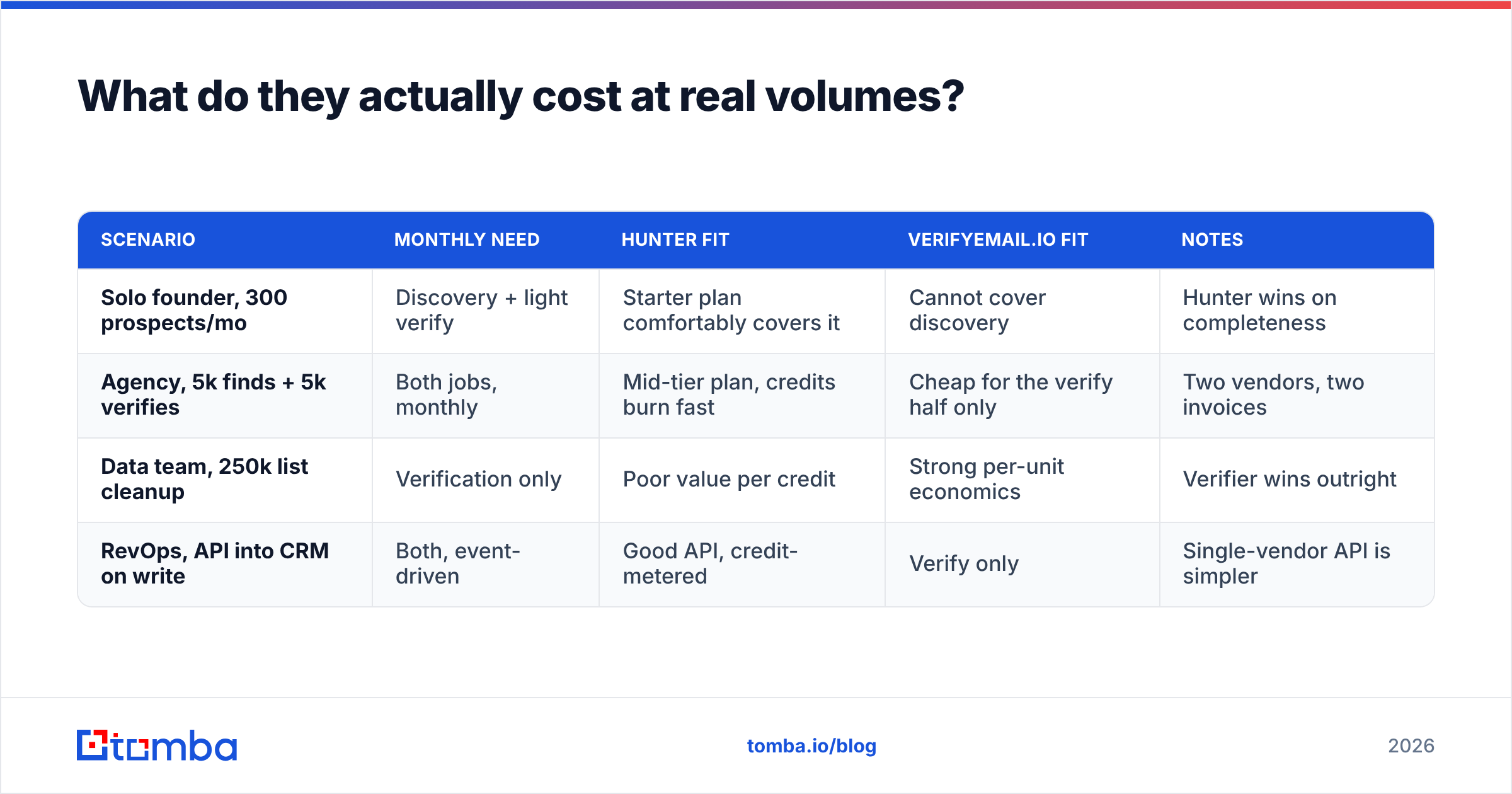
| Capability | Hunter | Verifyemail.io | Tomba |
|---|---|---|---|
| Find emails by domain | Yes (domain search) | No | Yes |
| Find emails by name + company | Yes | No | Yes |
| Bulk verification | Yes | Yes (core product) | Yes |
| Verification API | Yes | Yes | Yes |
| Catch-all handling | Returns "accept-all", limited resolution | Flags catch-all, no resolution | Dedicated catch-all verifier |
| Disposable/role detection | Yes | Yes | Yes |
| Phone numbers | No | No | Yes (phone finder) |
| Built-in cold email campaigns | Yes (basic) | No | No (integrations instead) |
| Chrome extension | Yes | No | Yes |
| Free tier | 25 searches/mo | Trial credits | 25 searches/mo |
| Entry paid plan | ~$34/mo | Pay-as-you-go credit packs | $49/mo |
A note on that pricing row. Vendor pricing changes often. Verifyemail.io sells credit packs rather than fixed seats, so your effective cost per email depends entirely on your volume tier. Treat the numbers above as a starting point. Confirm them on the vendor pages before you commit budget. I would rather show you the shape of each pricing model than quote a figure that is stale by the time you read it.
The structural takeaway is simple. Hunter fills rows that Verifyemail.io leaves blank at the top of the funnel. Verifyemail.io competes purely on the economics of the one row they share.
Which one is more accurate?#
"Accuracy" is the wrong single word. There are two different questions here, and vendors love to blur them.
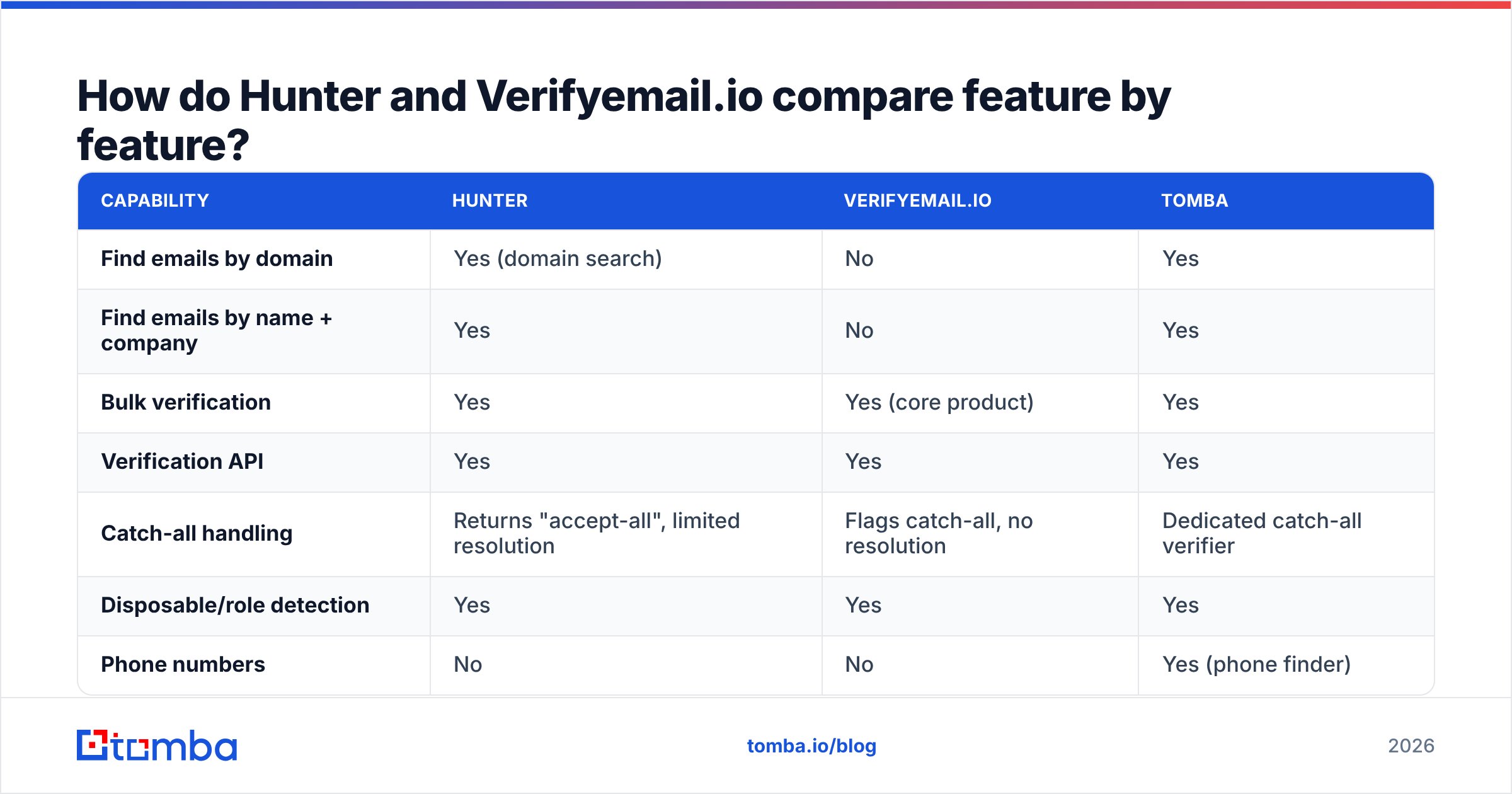
Discovery accuracy asks: of the addresses this tool hands me, how many are real, deliverable mailboxes for the person I asked about? Only Hunter is in this contest, because Verifyemail.io discovers nothing. Hunter publishes a confidence score with every result, which genuinely helps. A 97% hit on a pattern-heavy domain, like a 2,000-person SaaS company, is a very different thing from a 61% guess at a five-person agency with no public email footprint.
Verification accuracy asks: how often does the verdict match what happens when I actually send? Both tools compete here. The honest answer is that all reputable verifiers cluster within a few points of each other on ordinary domains. The gaps show up in the ugly cases. Microsoft 365 tenants throttle SMTP probes. Google Workspace domains get configured to accept-all. Some providers return misleading SMTP codes on purpose, to defeat verification.

One practical test beats any vendor benchmark. Take 200 addresses whose outcome you already know — ones you have mailed in the last 90 days, with the bounce data to prove it. Run them through each tool's free tier. Then count four numbers.
- True valid rate — marked valid, actually delivered.
- False valid rate — marked valid, hard bounced. This is the number that costs you money.
- Unknown rate — the share the tool refuses to call. High unknown rates are how vendors keep their false-valid stats pretty.
- Cost per resolved address — total spend divided by the addresses that came back with a usable verdict. Not the addresses you submitted.
That last metric reshuffles rankings constantly. Say a verifier charges $0.001 per check but returns "unknown" on 22% of your list. It costs more per usable answer than one charging $0.003 with a 4% unknown rate.
What do they actually cost at real volumes?#
Model three scenarios instead of reading the pricing page top to bottom.
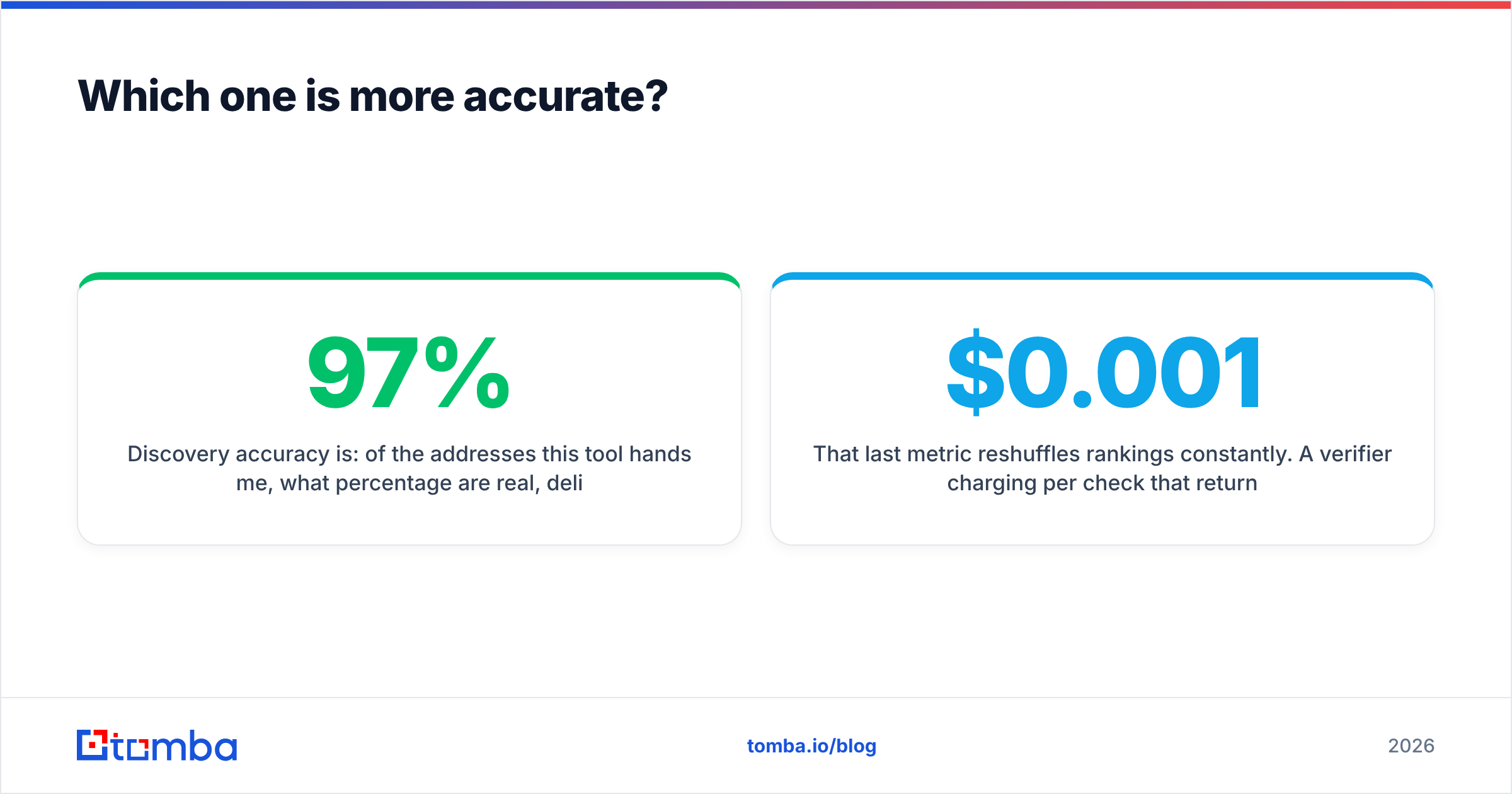
| Scenario | Monthly need | Hunter fit | Verifyemail.io fit | Notes |
|---|---|---|---|---|
| Solo founder, 300 prospects/mo | Discovery + light verify | Starter plan comfortably covers it | Cannot cover discovery | Hunter wins on completeness |
| Agency, 5k finds + 5k verifies | Both jobs, monthly | Mid-tier plan, credits burn fast | Cheap for the verify half only | Two vendors, two invoices |
| Data team, 250k list cleanup | Verification only | Poor value per credit | Strong per-unit economics | Verifier wins outright |
| RevOps, API into CRM on write | Both, event-driven | Good API, credit-metered | Verify only | Single-vendor API is simpler |
This pattern repeats across the B2B tooling category, and it shows up in buyer reviews on G2 too. Teams start with a suite, because it is one login. Then they split out a cheap bulk verifier once list-cleaning volume passes roughly 50,000 addresses a month. At that point the suite's per-credit price stops making sense.
There is a real counter-argument. Every split you add is an integration you maintain. Two API keys, two rate limits, two sets of retry logic. Two vendors to chase when something returns a 500 at 2am. Under that 50k threshold, staying on one vendor is usually the cheaper call once you price engineering time honestly.
How do they handle catch-all domains?#
This is the biggest split between verification tools. Almost nobody tests for it during a trial.
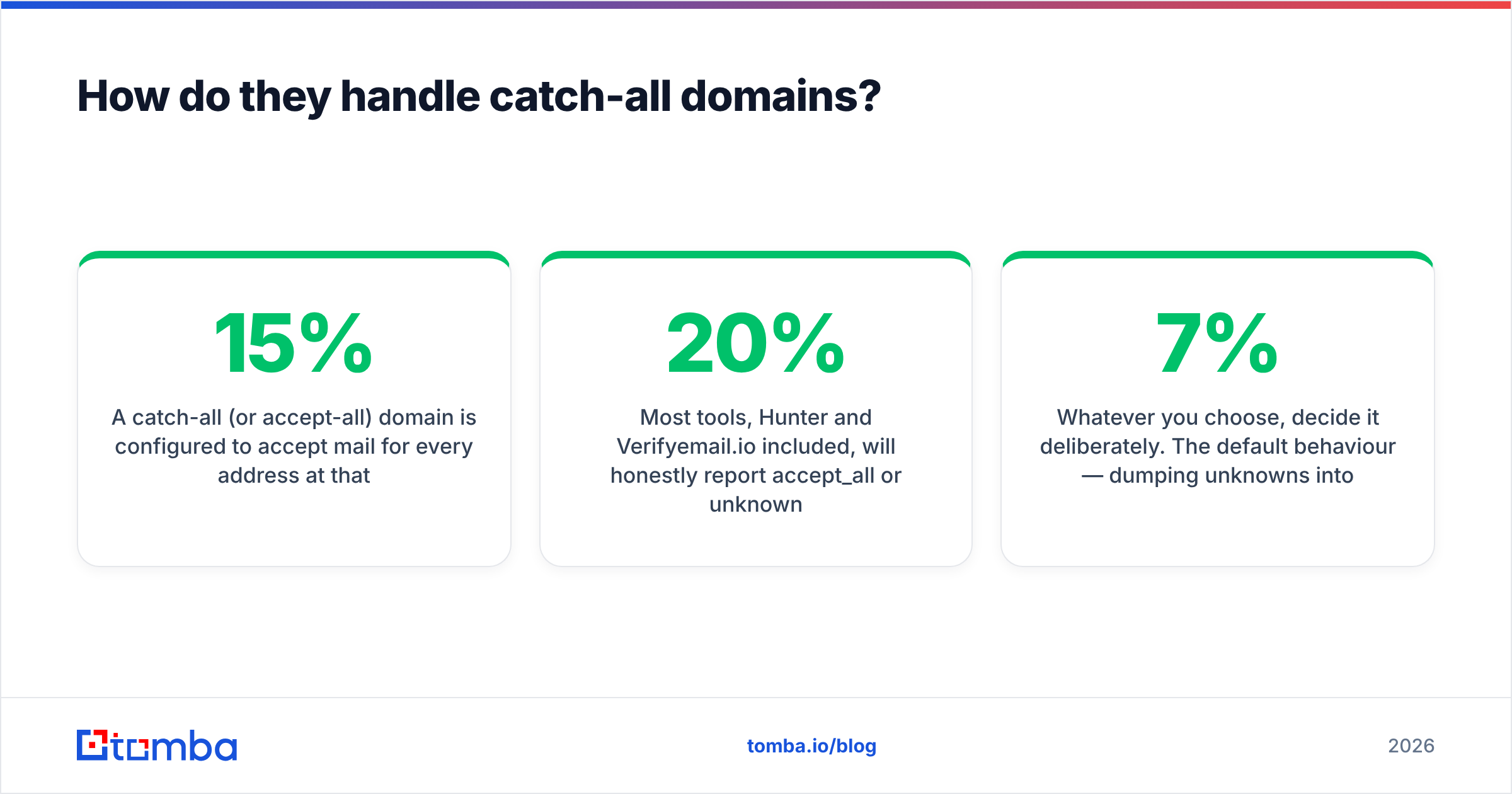
A catch-all (or accept-all) domain accepts mail for every address at that domain, including asdkjhasd@company.com. The SMTP server says yes to everything, so a standard probe learns nothing. Between 15% and 30% of B2B domains are set up this way, depending on the industry. The share runs higher in enterprise, and higher again where Microsoft 365 dominates.

Most tools report accept_all or unknown and stop there. Hunter and Verifyemail.io both do. That is defensible engineering. It is also a problem you now own. Do you mail those contacts and risk the bounces? Or drop a fifth of your addressable market?
You have three options. Mail them from a separate warmed domain, so bounces do not contaminate your main sender reputation. Drop them and accept a smaller TAM. Or use a tool that resolves catch-alls with pattern confidence, historical send data, and secondary signals instead of a single SMTP handshake. Tomba's catch-all verifier is built for that third path. That is why it is a separate module, not a checkbox inside the standard email verifier.
Whatever you pick, pick it on purpose. The default — dumping unknowns into the main sequence and hoping — is how a domain ends up at a 7% bounce rate. The drop in inbox placement is quiet, and it takes two months to notice.
Who should choose Hunter?#
Choose Hunter if:
- You need discovery and verification, on one login and one invoice.
- Your team lives in the browser, and the Chrome extension changes how they work.
- Your monthly volume is modest. Hundreds to low thousands of lookups, not hundreds of thousands.
- You want a basic campaign sender bundled, so you can skip a separate sequencer on day one.
Skip Hunter if your dominant need is bulk list hygiene. Paying suite prices to scrub a 200,000-row export is a bad trade.
Who should choose Verifyemail.io?#
Choose Verifyemail.io if:
- You already have a source of addresses — a scraper, a data partner, inbound signups, an old CRM — and the only gap is trust.
- You want a pay-as-you-go API you can call on form submit, with no monthly seat.
- Your volume is high enough that unit price beats every other factor.
- You are happy running discovery through a separate tool or process.
Skip it if you are starting from a company list with no contacts. It is a scaler, not a rod.
Is there an option that covers both without paying twice?#
Here is my bias, stated plainly. You are reading this on Tomba's blog, and Tomba competes in this space. This comparison exists because the "find here, verify there" split is the top reason people go looking for a third option.

Tomba runs discovery and verification on one credit balance. It adds catch-all resolution and phone numbers, which neither Hunter nor a pure verifier offers. Plans are $49/mo (Starter), $99/mo (Growth), and $249/mo (Pro). The free tier is 25 searches a month, for testing. Full Tomba pricing is public, with no demo call required.
Where Tomba is not the answer: if you only ever verify, and you clean six-figure lists every month, a dedicated verification vendor will beat any suite on unit price. This one included. And if the bundled campaign sender is what you want, Hunter ships one. Tomba does not, preferring to integrate with the sequencer you already run.
One more name worth knowing. BookYourData sells verified contact data outright, rather than lookups. That is a genuinely different purchase model. It fits if you would rather buy a list than build one.
What should you actually do next?#
Run the 200-address test above against all three free tiers, in the same afternoon. Track true valid rate, false valid rate, unknown rate, and cost per resolved address. Then pick on your real bottleneck: discovery, verification, or catch-alls. Not on which pricing page looks cheapest.
Hunter vs Verifyemail.io only settles once you know which stage is costing you. If discovery is the gap, or you are tired of stitching a finder and a verifier together with two API keys and two invoices, start with the Tomba Email Finder. The free tier gives you 25 searches a month. That is enough to benchmark against your own known-good domains before you spend anything. The same credits cover verification and catch-all checks through the Tomba API when you are ready to wire it into your CRM.
Related guides#
// get started
Find, verify and enrich your first contacts today
Start on the free plan with 25 searches a month, then scale when your team is ready.
Free plan · No credit card required · GDPR & CCPA
// about the author