Hunter vs Webbula 2026: Email Finder vs Email Hygiene
Hunter finds new email addresses. Webbula cleans the ones you already have. Here's the honest head-to-head on accuracy, pricing, contracts, and which one your team should buy first in 2026.
TL;DR
- Hunter and Webbula solve opposite halves of the same problem. Hunter acquires email addresses you do not have yet. Webbula cleans and enriches the addresses you already collected.
- If your list is empty, Webbula cannot help you. If your list is 400,000 old signups and your bounce rate is 12%, Hunter is the wrong tool.
- Hunter is self-serve and transparent: free tier, then roughly $49/mo to $499/mo. Webbula is enterprise, quote-only, contract-based, and priced by volume.
- Webbula's differentiator is multi-method hygiene — spam traps, bots, complainers, fraud signals — not just syntax and SMTP pings.
- Most B2B teams under 50 seats need a finder plus a verifier in one place, at self-serve pricing. That is the gap Tomba fills at $49/mo with a real free tier.
What are Hunter and Webbula, actually?#
They are not competitors in the way "Hunter vs Webbula" makes them sound. They sit at different points in the same pipeline.
Hunter is a B2B email finder. You give it a company domain or a first name, last name, and domain, and it returns the most likely work email address plus a confidence score and the public sources it saw that address on. It also ships a verifier, a domain search, a Chrome extension, a Google Sheets add-on, and a light cold-email sending tool called Campaigns. It is the default answer when a salesperson types "email finder" into Google.
Webbula is an email hygiene and data intelligence vendor. You give it a list you already own — CRM exports, form fills, purchased files, decade-old newsletter subscribers — and it grades every record. It flags hard bounces, spam traps, honeypots, known complainers, bots, disposable addresses, and fraud-linked records, then optionally appends demographic, firmographic, or contact data on top. Its buyers are usually email service providers, agencies, retailers, and enterprise marketing teams sending at real volume.
The difference in one sentence: Hunter grows your list, Webbula protects your sender reputation.

Here is the core distinction laid out by job:
- Acquisition — finding an address that does not exist in your database yet. Hunter: yes. Webbula: no.
- Validation — confirming a mailbox can receive mail. Hunter: yes, standard SMTP-level checks. Webbula: yes, plus threat-level classification.
- Threat detection — identifying spam traps, honeypots, bots, and serial complainers. Hunter: limited. Webbula: this is the core product.
- Enrichment — appending demographics, firmographics, or postal data. Hunter: minimal. Webbula: extensive, including consumer data.
- Outreach — actually sending the emails. Hunter: basic Campaigns module. Webbula: no, it feeds your ESP.
How do Hunter and Webbula compare head-to-head?#
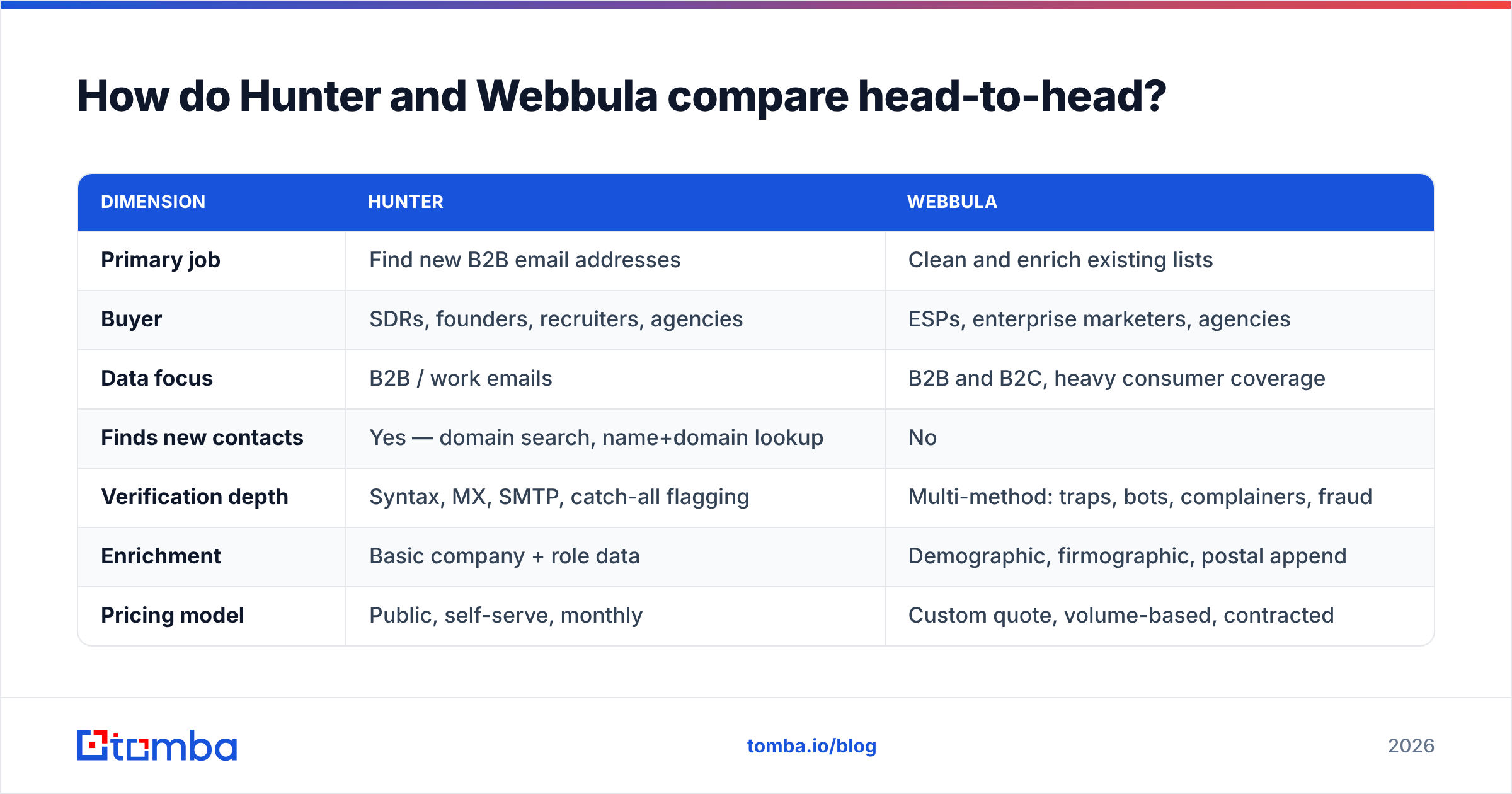
| Dimension | Hunter | Webbula |
|---|---|---|
| Primary job | Find new B2B email addresses | Clean and enrich existing lists |
| Buyer | SDRs, founders, recruiters, agencies | ESPs, enterprise marketers, agencies |
| Data focus | B2B / work emails | B2B and B2C, heavy consumer coverage |
| Finds new contacts | Yes — domain search, name+domain lookup | No |
| Verification depth | Syntax, MX, SMTP, catch-all flagging | Multi-method: traps, bots, complainers, fraud |
| Enrichment | Basic company + role data | Demographic, firmographic, postal append |
| Pricing model | Public, self-serve, monthly | Custom quote, volume-based, contracted |
| Free tier | Yes — 25 searches/mo | No public free tier |
| API | Yes, well documented | Yes, enterprise onboarding |
| Time to first value | Minutes | Days to weeks (sales cycle) |
| Best for | Building outbound lists from scratch | Rescuing a large, aged, risky list |
The row that decides most evaluations is "time to first value." Hunter is a credit card and five minutes. Webbula is a discovery call, a sample file, a scoring report, and a contract. That is not a criticism — enterprise hygiene is a genuinely different sale, with genuinely different stakes. Sending 2 million emails into a list seeded with spam traps can get a sending domain blocklisted for months. That risk justifies a procurement process.
What does Hunter do best?#
Hunter's advantage is coverage on the public web plus a workflow that a non-technical rep can actually use.
Domain search. Drop in stripe.com and Hunter returns the addresses it has indexed for that domain, grouped by department, with the dominant email pattern (first.last@, first@, flast@). For account-based prospecting this is the fastest way to map a buying committee.
Confidence scoring with sources. Hunter shows you why it believes an address is real — the pages it was scraped from, and when. That auditability matters when a rep is deciding whether to burn a touch on a guess.
Ecosystem. The Chrome extension, Sheets add-on, and a clean REST API mean Hunter shows up wherever the work happens. Most competitors copied this layout for a reason.
Honest limits. Hunter is weaker on catch-all domains, where SMTP verification cannot confirm a specific mailbox because the server accepts everything. It is also weaker on companies with little public web footprint — small regional firms, stealth startups, and organizations that scrub staff directories. And it does almost nothing for consumer email or list-hygiene threat detection. If your problem is "my 900,000-record file bounces," Hunter's verifier will catch invalid syntax and dead mailboxes but will not tell you a record is a recycled spam trap.
What does Webbula do best?#
Webbula's pitch is that standard verification is not enough, and on the deliverability side they are right.
A conventional verifier answers one question: will this mailbox accept mail? A spam trap answers "yes" to that question. So does a bot that clicks every link in every email. So does a serial complainer who hits "report spam" on everything. All three pass a basic SMTP check and all three hurt you.
Webbula classifies records into threat categories rather than a binary valid/invalid. That includes trap and honeypot detection, bot and non-human-interaction flags, complainer history, disposable and role-based addresses, and fraud-associated records. On top of that sits a data append layer — demographics, lifestyle attributes, firmographics, and postal data — that is deeper on the consumer side than most B2B-native tools attempt.
Two honest caveats. First, there is no public pricing, no free plan, and no instant sign-up, so a two-person startup will not evaluate it in an afternoon. Second, the value curve is steep: hygiene ROI scales with list size and send volume. At 5,000 contacts a month, enterprise hygiene is overkill. At 5 million, it is cheap insurance. You can sanity-check how buyers in each segment talk about these tools on G2's email verification category before you book a call.
How accurate is each tool in practice?#
Accuracy claims in this category are slippery because vendors measure different things. A finder's accuracy means "of the addresses returned, how many are deliverable and belong to the right person." A hygiene vendor's accuracy means "of the records flagged risky, how many really were risky" — which is much harder to audit, because you only find out by sending.

Three rules survive every benchmark I have run:
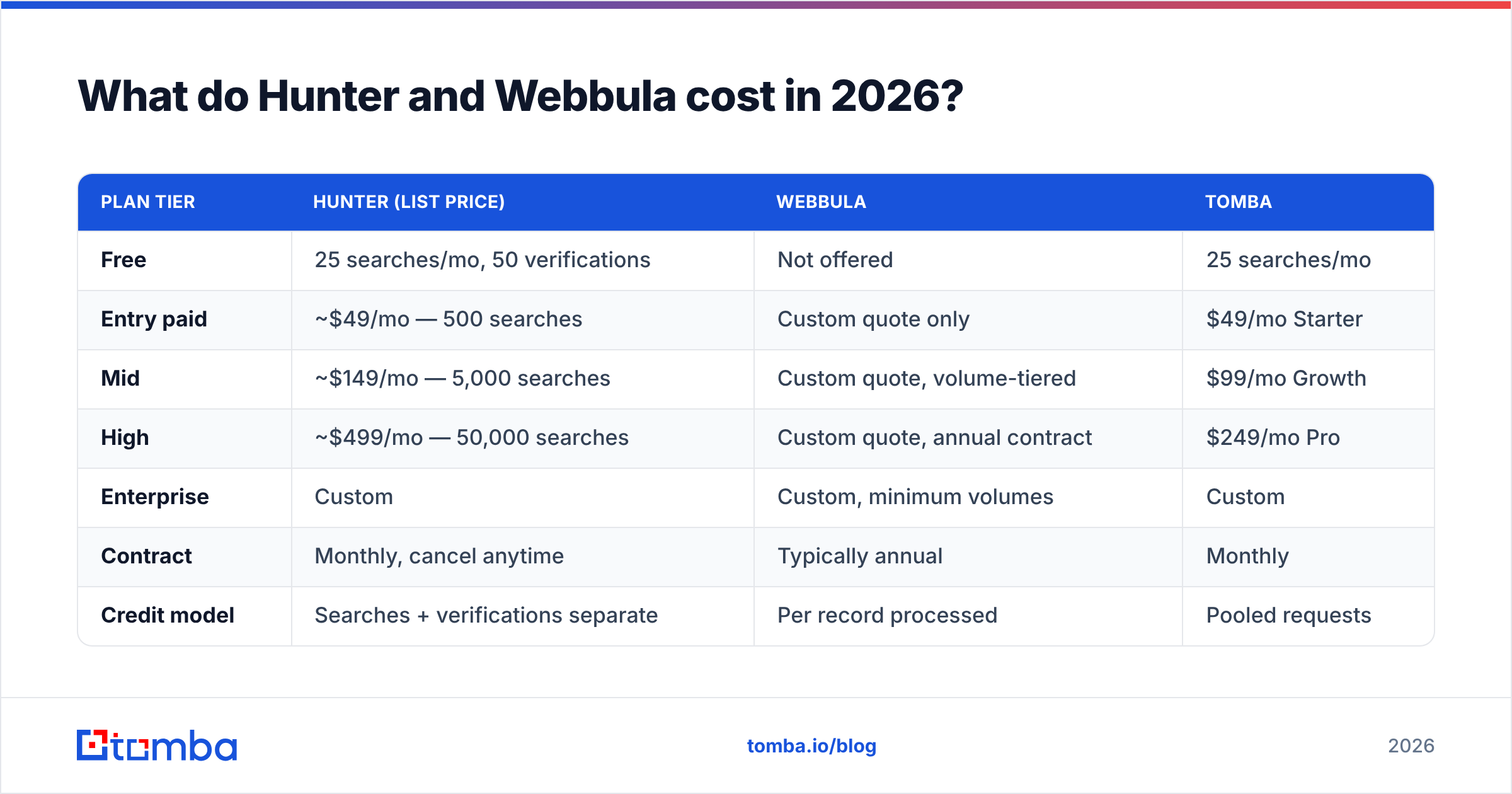
- Test on your own ICP, not the vendor's sample. A tool that scores 95% on US SaaS companies can drop 30 points on German Mittelstand manufacturers or Japanese enterprises.
- Count the "not found" rate separately. A tool that returns nothing for 40% of your list but is 98% accurate on the rest is worse than one that returns 85% coverage at 92% accuracy — for most pipelines, anyway.
- Always run a second verification pass. Even a great finder produces stale results, because people change jobs. Layering an independent email verifier over any finder's output is the single highest-ROI habit in outbound data hygiene.
Catch-all domains deserve their own paragraph. On a catch-all server, SMTP always answers yes, so a naive verifier marks everything valid and your bounce rate explodes later. Serious tools handle this with pattern confidence and secondary signals rather than a single SMTP handshake — which is why a dedicated catch-all verifier is worth checking for in any shortlist. Ask each vendor directly how they score catch-alls. The answer separates the careful from the careless faster than any accuracy percentage.
What do Hunter and Webbula cost in 2026?#
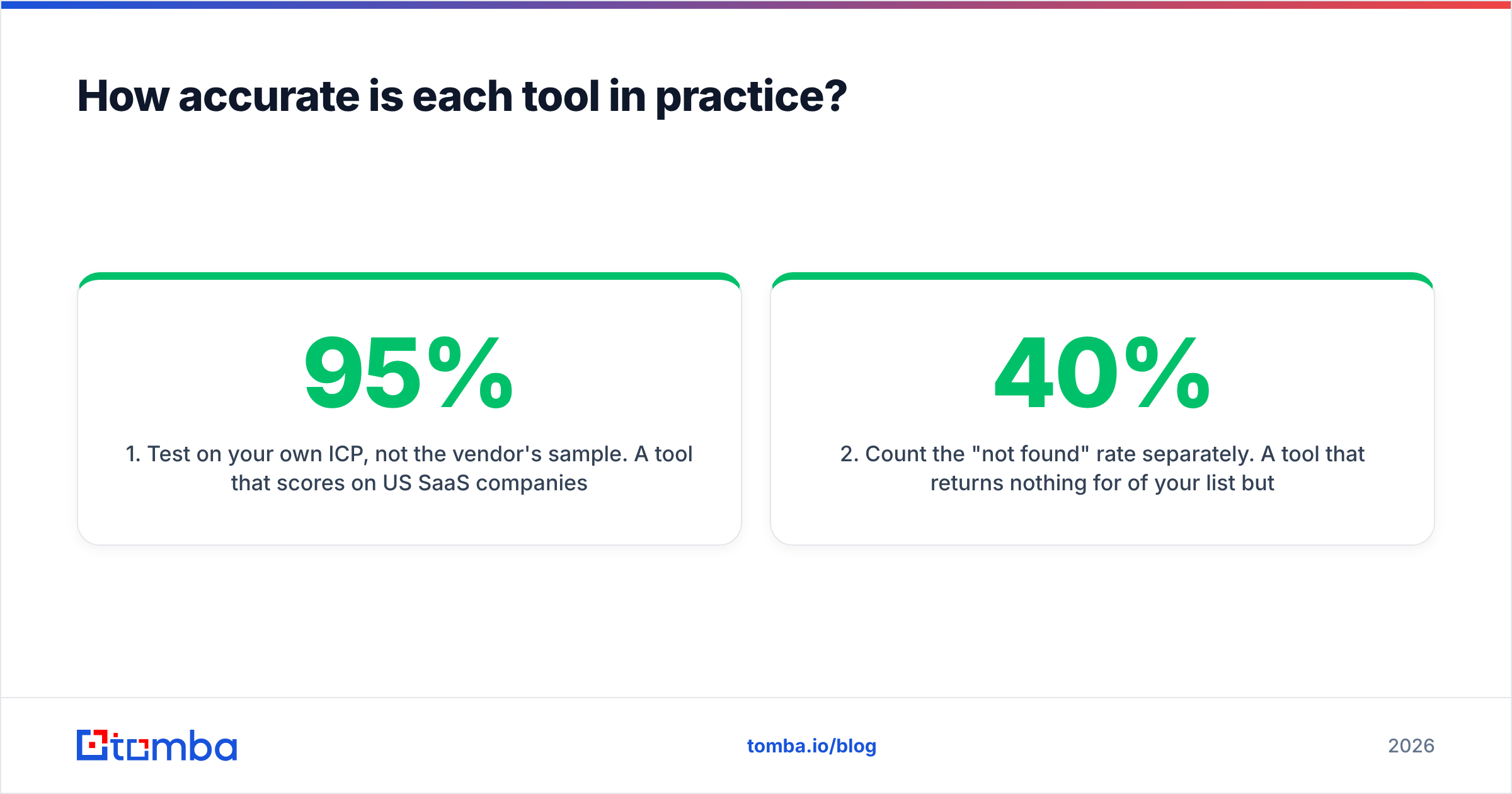
| Plan tier | Hunter (list price) | Webbula | Tomba |
|---|---|---|---|
| Free | 25 searches/mo, 50 verifications | Not offered | 25 searches/mo |
| Entry paid | ~$49/mo — 500 searches | Custom quote only | $49/mo Starter |
| Mid | ~$149/mo — 5,000 searches | Custom quote, volume-tiered | $99/mo Growth |
| High | ~$499/mo — 50,000 searches | Custom quote, annual contract | $249/mo Pro |
| Enterprise | Custom | Custom, minimum volumes | Custom |
| Contract | Monthly, cancel anytime | Typically annual | Monthly |
| Credit model | Searches + verifications separate | Per record processed | Pooled requests |
Treat the Hunter numbers as list price at the time of writing and confirm on hunter.io/pricing — vendors reshuffle tiers often. Webbula genuinely does not publish rates; volume, data types appended, and contract length all move the number, so any figure you see quoted in a blog post is a guess.
The pattern worth noticing: Hunter charges you per lookup, Webbula charges you per record processed. If you find 500 contacts a month, Hunter is cheap and Webbula is irrelevant. If you process 3 million records a quarter, Webbula's per-record economics start looking reasonable and Hunter's plan ladder runs out. Compare that against Tomba pricing, where the mid-tier sits at $99/mo and finding plus verification draw from the same pool instead of two separate meters.

Which one should you pick for your use case?#
- Outbound SDR team building lists from scratch — Hunter or Tomba. You need acquisition. Hygiene comes later, when the database is big enough to rot.
- Enterprise marketer with a 2M-record list and rising complaint rates — Webbula. This is exactly the problem it was built for, and the cost of getting it wrong is your sending domain.
- Agency running cold email for 20 clients — a finder plus verifier with a decent API and per-seat sanity. Hunter works; so does Tomba at lower per-credit cost with bulk email finder processing.
- Recruiter sourcing candidates — a finder with strong LinkedIn coverage. Neither Webbula nor Hunter is ideal here; look at tools built around profile-to-email resolution.
- RevOps team enriching inbound form fills — enrichment-first tooling. Webbula if you need consumer demographics; a B2B data enrichment API if you need firmographics and job titles.
- Solo founder validating a market — the free tier. 25 searches a month is enough to test whether a segment answers before you pay anyone.
If you are still torn between two shortlisted vendors, run the same 200-row test file through both and count three numbers: coverage, bounce rate after a real send, and reply rate. Everything else is marketing.

Is there a better option than either one?#
For a specific and fairly common profile, yes: the team that needs both halves and does not want two contracts.
That team wants to find a prospect's address, verify it in the same request, handle catch-all domains without guessing, pull the occasional phone number, and do all of it through one API key with predictable monthly pricing. Splitting that across a finder subscription and an enterprise hygiene contract creates reconciliation work, two support queues, and two invoices.
Tomba covers that middle: email finder, verifier, domain search, catch-all handling, phone lookup, and enrichment on one platform, with a 25-search free tier, $49/mo Starter, $99/mo Growth, and $249/mo Pro. It is not an enterprise hygiene suite — if you need consumer demographic append across 10 million records with trap-level threat classification, Webbula is the specialist and you should talk to them. And Hunter remains an excellent, well-built product with a deserved reputation.
But if your honest situation is "I need good B2B emails, verified, without a sales call," the middle option is usually the right one.
What should you do next?#
Pick based on which half of the problem is actually bleeding.
Empty pipeline? Buy acquisition. Rising bounce and complaint rates on a big list? Buy hygiene. Both, at mid-market volume, on a self-serve budget? Buy a platform that does both.
Start with the Tomba Email Finder free tier — 25 searches a month, no card, no demo call. Run your real prospect list through it, then push the same records through the verifier and compare the results against whatever you use today. If the coverage and bounce numbers beat your current stack, Starter is $49/mo and you can cancel next month. If they do not, you have spent nothing and learned something concrete about your data, which is more than another vendor comparison post can give you.
Related guides#
// get started
Find, verify and enrich your first contacts today
Start on the free plan with 25 searches a month, then scale when your team is ready.
Free plan · No credit card required · GDPR & CCPA
// about the author