Hunter vs ZoomInfo 2026: Pricing, Accuracy, and Which Wins
One is a $34/month email finder. The other is a five-figure annual contract. Here is the honest breakdown of Hunter vs ZoomInfo — coverage, accuracy, real cost, and who each one actually fits.
TL;DR
- Hunter and ZoomInfo are not the same category of product. Hunter is a domain-based email finder with a verifier attached. ZoomInfo is a full sales-intelligence platform with intent data, org charts, phone numbers, and CRM workflows.
- Price gap is the headline: Hunter's paid tiers start in the tens of dollars per month; ZoomInfo is typically an annual contract that buyers on G2 and Reddit report landing between roughly $15,000 and $40,000+ per year, with seat minimums.
- If your motion is "I have a list of companies and I need the right person's email," Hunter (or a cheaper equivalent) wins on cost-per-verified-contact by an enormous margin.
- If your motion is "I need territory-wide account intelligence, buying signals, and direct dials piped into Salesforce for 12 reps," ZoomInfo's breadth is hard to replicate with point tools.
- Most teams under 20 reps overbuy. The honest recommendation is to price a finder + verifier + enrichment stack first, and only escalate to a suite when you can name the specific ZoomInfo feature you'd lose.
What are Hunter and ZoomInfo, actually?#
Start here, because half the confusion in the Hunter vs ZoomInfo debate comes from comparing a wrench to a workshop.
Hunter launched as a domain-search tool: type in stripe.com, get back the email pattern the company uses plus the addresses it has indexed from public sources. Over time it added verification, a small CRM-ish "Leads" module, and a lightweight cold-email sender (Campaigns). The core value proposition never changed — it turns a company domain or a name-plus-domain into a deliverable email address.
ZoomInfo came from a different lineage. It is a database company. The product sells access to a contact and company graph — firmographics, technographics, hierarchy data, direct dial phone numbers, and, on higher tiers, intent signals derived from web activity. Around that database sits workflow software: list building, CRM sync, automated enrichment, conversation intelligence, and a sales-engagement layer.
The practical difference:
- Input assumption. Hunter assumes you already know which company you're targeting. ZoomInfo assumes you don't, and sells you the search-and-filter layer that produces the target list.
- Data depth per record. Hunter gives you an email, a confidence score, sources, and sometimes a job title. ZoomInfo gives you a fuller person and account record.
- Phone coverage. Hunter does not do direct dials. ZoomInfo's direct-dial library is one of its genuine moats.
- Buying process. Hunter is a self-serve credit card purchase. ZoomInfo is a sales call, a demo, an MSA, and usually a multi-year term.
- Failure mode when you outgrow it. Outgrowing Hunter means adding tools. Outgrowing ZoomInfo means renegotiating a contract you already signed.
That fifth point is where most of the regret lives.

How do Hunter and ZoomInfo compare feature by feature?#
Here's the side-by-side, with Tomba included because it sits in the same self-serve lane as Hunter and is the most common third option people evaluate alongside these two.
| Capability | Hunter | ZoomInfo | Tomba |
|---|---|---|---|
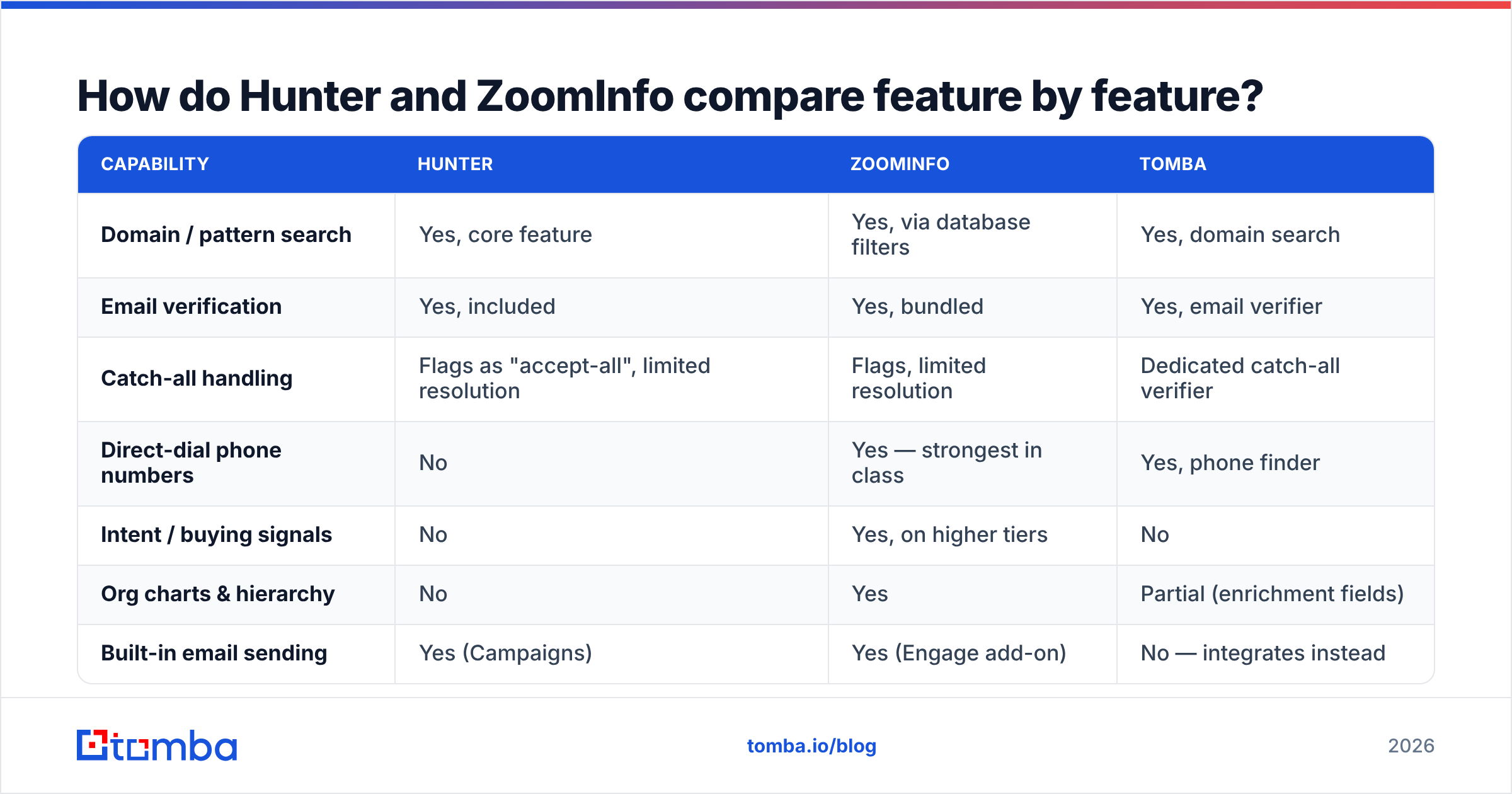
| Domain / pattern search | Yes, core feature | Yes, via database filters | Yes, domain search |
| Email verification | Yes, included | Yes, bundled | Yes, email verifier |
| Catch-all handling | Flags as "accept-all", limited resolution | Flags, limited resolution | Dedicated catch-all verifier |
| Direct-dial phone numbers | No | Yes — strongest in class | Yes, phone finder |
| Intent / buying signals | No | Yes, on higher tiers | No |
| Org charts & hierarchy | No | Yes | Partial (enrichment fields) |
| Built-in email sending | Yes (Campaigns) | Yes (Engage add-on) | No — integrates instead |
| CRM native sync | HubSpot, Salesforce, Pipedrive | Deep, bidirectional | Via integrations and Zapier |
| API access | Yes | Yes, metered separately | Yes, Tomba API on all paid plans |
| Free tier | 25 searches/mo | None | 25 searches/mo |
| Contract | Monthly, cancel anytime | Annual, seat minimums | Monthly, cancel anytime |
Two things jump out. First, ZoomInfo wins on breadth and only on breadth — every row it uniquely owns is an account-intelligence row, not a contact-finding row. Second, the contract row at the bottom is not a footnote. It changes the entire risk profile of the decision.
What does Hunter vs ZoomInfo actually cost?#
Hunter publishes pricing. ZoomInfo does not, which tells you most of what you need to know about how the deal gets structured.
| Hunter | ZoomInfo | Tomba | |
|---|---|---|---|
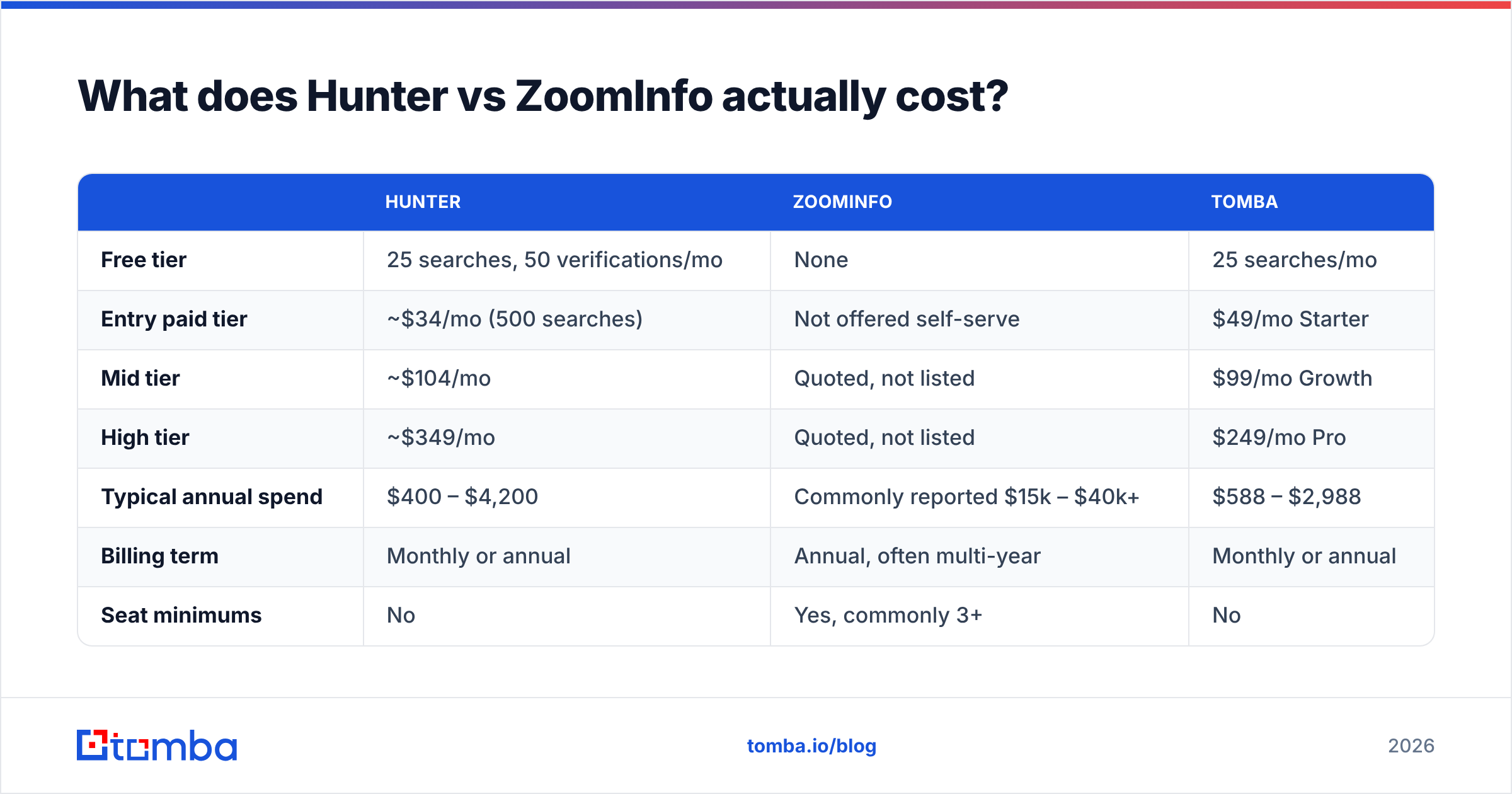
| Free tier | 25 searches, 50 verifications/mo | None | 25 searches/mo |
| Entry paid tier | ~$34/mo (500 searches) | Not offered self-serve | $49/mo Starter |
| Mid tier | ~$104/mo | Quoted, not listed | $99/mo Growth |
| High tier | ~$349/mo | Quoted, not listed | $249/mo Pro |
| Typical annual spend | $400 – $4,200 | Commonly reported $15k – $40k+ | $588 – $2,988 |
| Billing term | Monthly or annual | Annual, often multi-year | Monthly or annual |
| Seat minimums | No | Yes, commonly 3+ | No |
| Overage behaviour | Buy more credits | Credit blocks, negotiated | Buy more credits |
Prices move; check Hunter's pricing page and current Tomba pricing before you budget. ZoomInfo's numbers here come from buyer-reported ranges on G2 and public procurement discussions, not from a published rate card — treat them as directional.
The uncomfortable arithmetic: at ZoomInfo's low end, you could run Hunter's top tier for roughly three and a half years, or Tomba's Pro plan for five years, and still have budget left over. That doesn't make ZoomInfo bad value — it makes it a specific bet. You're betting that intent data, direct dials, and org charts will generate more pipeline than the $14,000 difference would if you spent it on a headcount, an SDR tool, or ads.
For a lot of teams, that bet pays. For a lot more teams, it doesn't, and they discover it in month nine of a twelve-month term.
Which one has better data accuracy?#
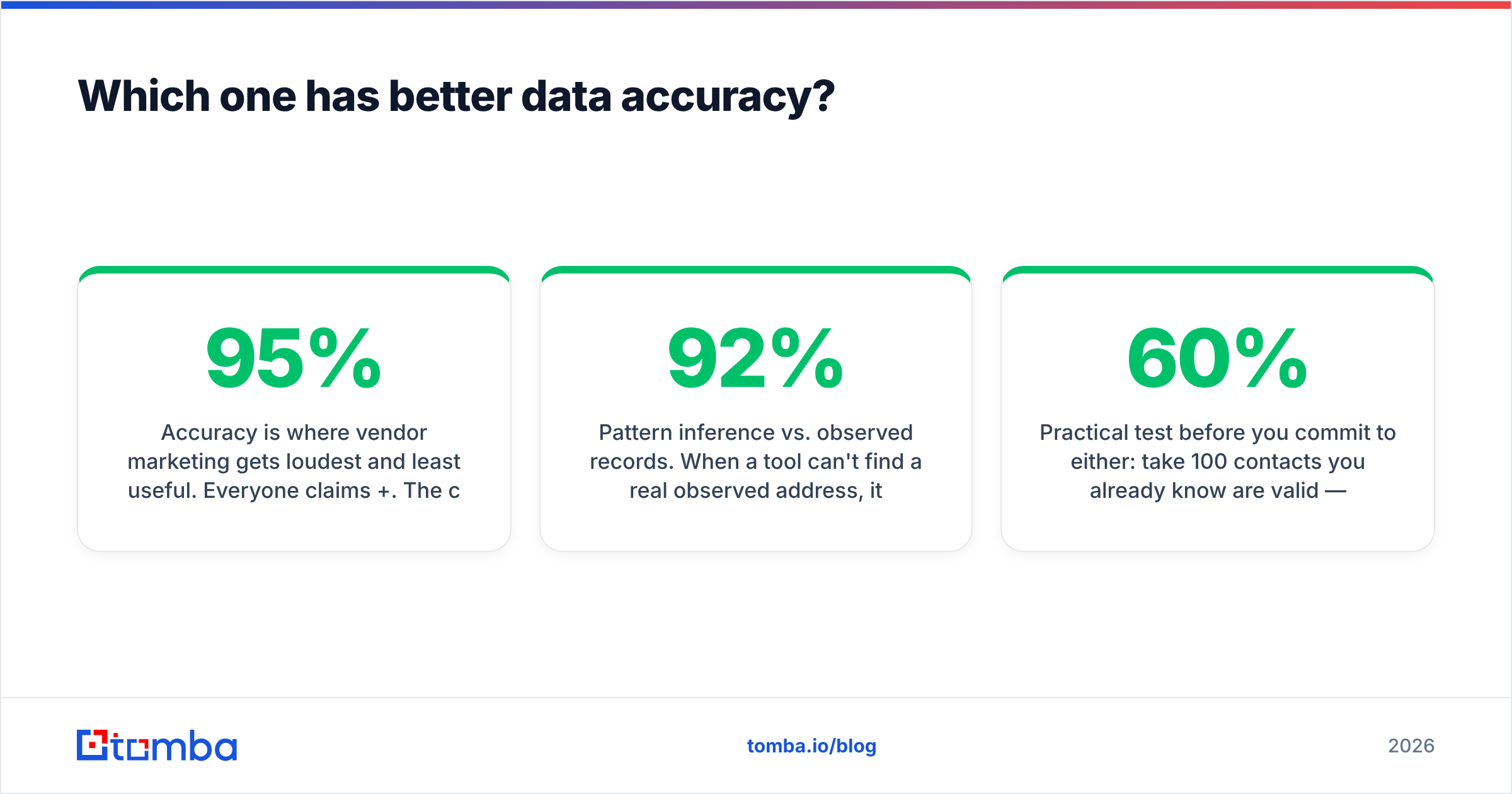
Accuracy is where vendor marketing gets loudest and least useful. Everyone claims 95%+. The claims are not comparable because nobody defines "accurate" the same way.

Three things actually determine whether the address you got will land:
Source freshness. ZoomInfo's contributory network and research team refresh at scale, which helps on large enterprises and hurts nowhere except long-tail SMBs. Hunter crawls public web sources, which makes it strong on companies with public-facing teams (agencies, SaaS, media) and weaker on stealth-mode or heavily gated organisations.
Pattern inference vs. observed records. When a tool can't find a real observed address, it can guess from the company pattern (first.last@, finitial+last@) and score its confidence. Both tools do this. The question is whether they tell you clearly which one you got. A guessed address with a 92% confidence score is not the same asset as an observed, SMTP-confirmed address, and treating them identically is how bounce rates creep past 5%.
Catch-all resolution. Roughly a quarter of B2B domains are catch-all — the mail server accepts everything, so a standard SMTP check proves nothing. Most tools mark these "risky" and hand the decision back to you. That's a real gap: catch-all domains skew toward mid-market and enterprise, which is exactly the segment you care about. Tools with dedicated catch-all logic (Tomba's catch-all finder is one, and a handful of specialist verifiers do it too) resolve a meaningful slice of what others discard.
Practical test before you commit to either: take 100 contacts you already know are valid — current customers, past deals, people in your CRM you've emailed successfully. Run them through each tool's trial. Measure two numbers: coverage (what percent did it return anything for) and precision (of what it returned, what percent matched the known-good address). A tool that returns 60% coverage at 97% precision beats one that returns 90% coverage at 78% precision, because the second one is quietly burning your domain reputation.
Bounces are not a data problem. They're a sender reputation problem with a delay fuse.
When is ZoomInfo genuinely the right call?#
Being fair to the expensive option. Buy ZoomInfo when at least three of these are true:
- You sell to enterprise and need org charts. Knowing that the VP of Engineering reports to a CTO who reports to a COO changes your multithreading strategy. No email finder gives you that.
- Your reps live on the phone. Direct dials at ZoomInfo's coverage level are not cheaply replicable. If cold calling is 40%+ of your motion, this line item alone can justify the contract.
- You need intent data to prioritise a large TAM. With 50,000 addressable accounts and 8 reps, filtering by surging topics is the difference between focused and random.
- You have 10+ seats and a RevOps function. The workflow automation and CRM sync only pay off when someone owns them. At three reps, nobody configures it and you're paying for a database with a nice UI.
- Procurement can absorb the term. If a $20k annual commitment is a rounding error, the risk math changes entirely.
If fewer than three apply, you are probably buying the logo, not the product.
When is Hunter the better call — and where does Tomba fit?#
Hunter is the right answer when your bottleneck is specifically "name plus company, need email." It's fast, the free tier is genuinely usable for testing, the Chrome extension is good, and Campaigns means a solo founder can go from list to sequence without a second subscription.
Its limits are equally clear: no phone data, no intent, thin enrichment, and per-search costs that stop being cheap at high volume. Its Campaigns module is fine for low volume but nobody would choose it over a dedicated sending platform at scale.
Tomba occupies adjacent ground with a few different trade-offs worth knowing about:

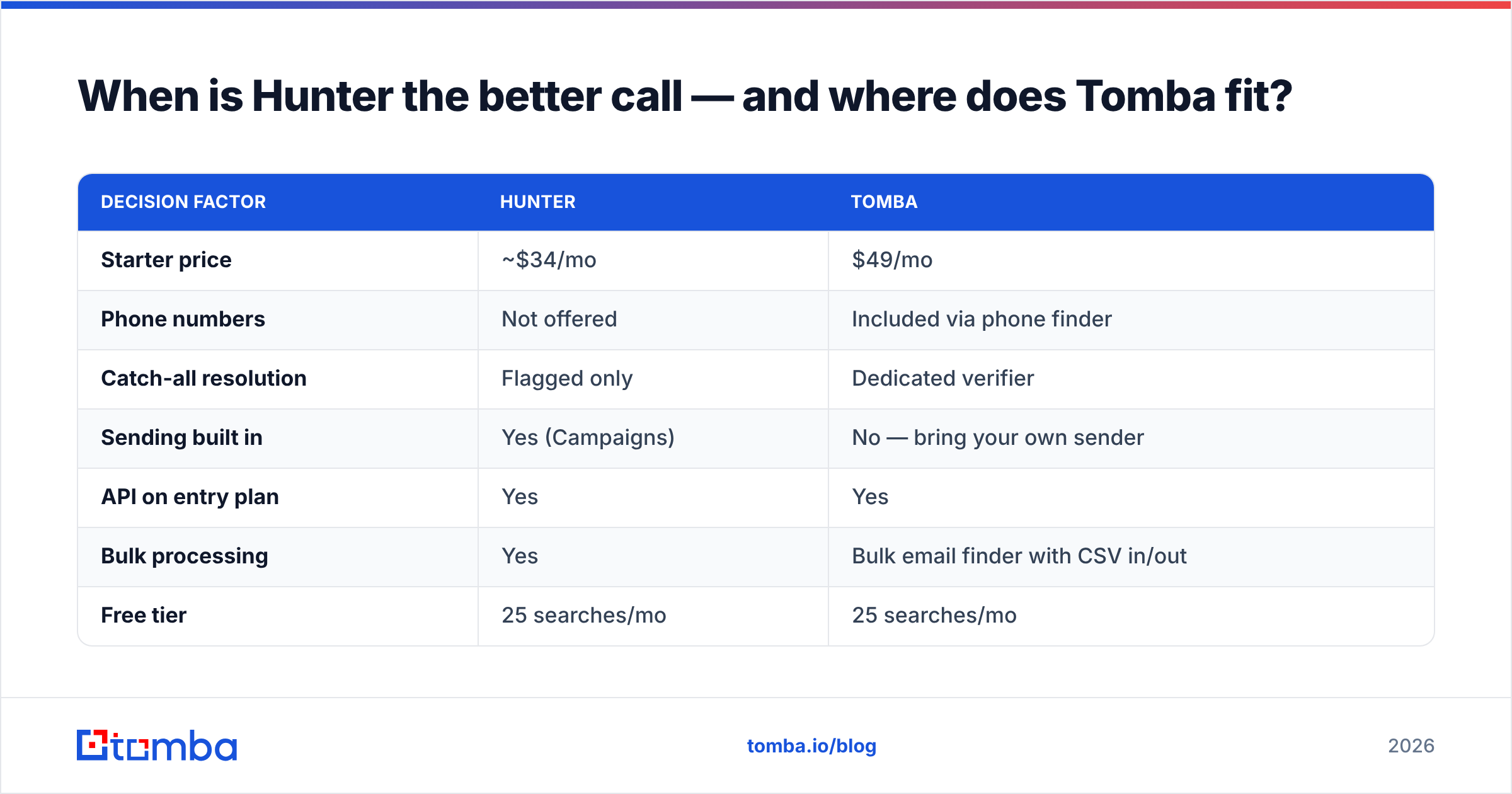
| Decision factor | Hunter | Tomba |
|---|---|---|
| Starter price | ~$34/mo | $49/mo |
| Phone numbers | Not offered | Included via phone finder |
| Catch-all resolution | Flagged only | Dedicated verifier |
| Sending built in | Yes (Campaigns) | No — bring your own sender |
| API on entry plan | Yes | Yes |
| Bulk processing | Yes | Bulk email finder with CSV in/out |
| Free tier | 25 searches/mo | 25 searches/mo |
Hunter is cheaper at the entry point and bundles sending. Tomba costs slightly more at Starter but adds phone data, catch-all resolution, and an enrichment layer that closes part of the gap toward ZoomInfo without the contract. Neither replaces intent data or org charts — be honest with yourself about whether you need those.
Other credible options in this lane are worth a look depending on your region and vertical, including BookYourData for pre-built, filterable B2B lists where you'd rather buy a segment than assemble one. Different shape of tool, same underlying job.
How should you actually decide?#
Run this sequence rather than starting with a demo call:
- Write down your motion in one sentence. "Email-only outbound to 200 SaaS companies a month" and "multithreaded enterprise ABM across 40 accounts" lead to opposite answers.
- Count your monthly contact volume. Under 2,000/month, a point tool almost always wins on cost. Above 10,000 with heavy phone use, run the suite math seriously.
- Test on known-good data. The 100-contact precision test above. Do it with free tiers before anyone quotes you.
- Price the unbundled stack. Finder + verifier + enrichment + sender, added up. Compare against the suite quote honestly — including the seats you'd actually use, not the seats you'd buy.
- Check the exit. Monthly billing means a mistake costs you 30 days. An annual MSA means it costs you a year and a renegotiation.
Most teams that regret their choice skipped step 3 and step 5.
Getting started#
If your honest answer is "I mainly need reliable emails at a price that doesn't require a procurement cycle," start with the Tomba Email Finder. The free tier gives you 25 searches a month — enough to run the precision test on your own known-good contacts before you spend anything. Paid plans start at $49/month with API access included, so you can wire it into your CRM or spreadsheet workflow on day one instead of waiting for an implementation call.
Run the test on Hunter, on ZoomInfo's trial if they'll give you one, and on Tomba. Let your own data pick the winner rather than a comparison post — including this one.
Related guides#
// get started
Find, verify and enrich your first contacts today
Start on the free plan with 25 searches a month, then scale when your team is ready.
Free plan · No credit card required · GDPR & CCPA
// about the author