Hunter.io Use Cases: 9 Real Workflows That Actually Work
Hunter.io is good at four or five things and mediocre at the rest. Here are the nine use cases worth your credits in 2026, the three that quietly burn them, and what to run instead.
TL;DR
- Hunter.io is strongest at three things: domain-level email discovery, pattern detection for a known company, and light-touch verification before a send.
- The highest-ROI Hunter.io use cases are agency prospecting, PR and link-building outreach, recruiting sourcing, and CRM gap-filling — not bulk list building.
- Credits disappear fastest on speculative domain searches and repeat lookups you already ran last month. Cache your results or you pay twice.
- Coverage drops hard outside North America and Western Europe, and on companies under ~20 employees, where public web signals are thin.
- If your workflow is high-volume finding plus verification in one pass, a combined finder/verifier like Tomba Email Finder at $49/mo covers more of the job per dollar.
Most "Hunter.io use cases" articles are just a feature list with verbs bolted on. This one is organized by the job you're actually trying to finish — and it tells you where Hunter is the wrong tool, because that's the part that saves you money.
What is Hunter.io actually built for?#
Hunter.io is a domain-first email discovery engine. You give it a company domain, it returns the email addresses it has crawled or inferred for that domain, plus a confidence score and the sources it saw the address on. Everything else in the product — the verifier, the Chrome extension, Campaigns, the Google Sheets add-on — orbits that core.
That architecture is the single most useful thing to understand, because it predicts where Hunter wins and where it stalls:
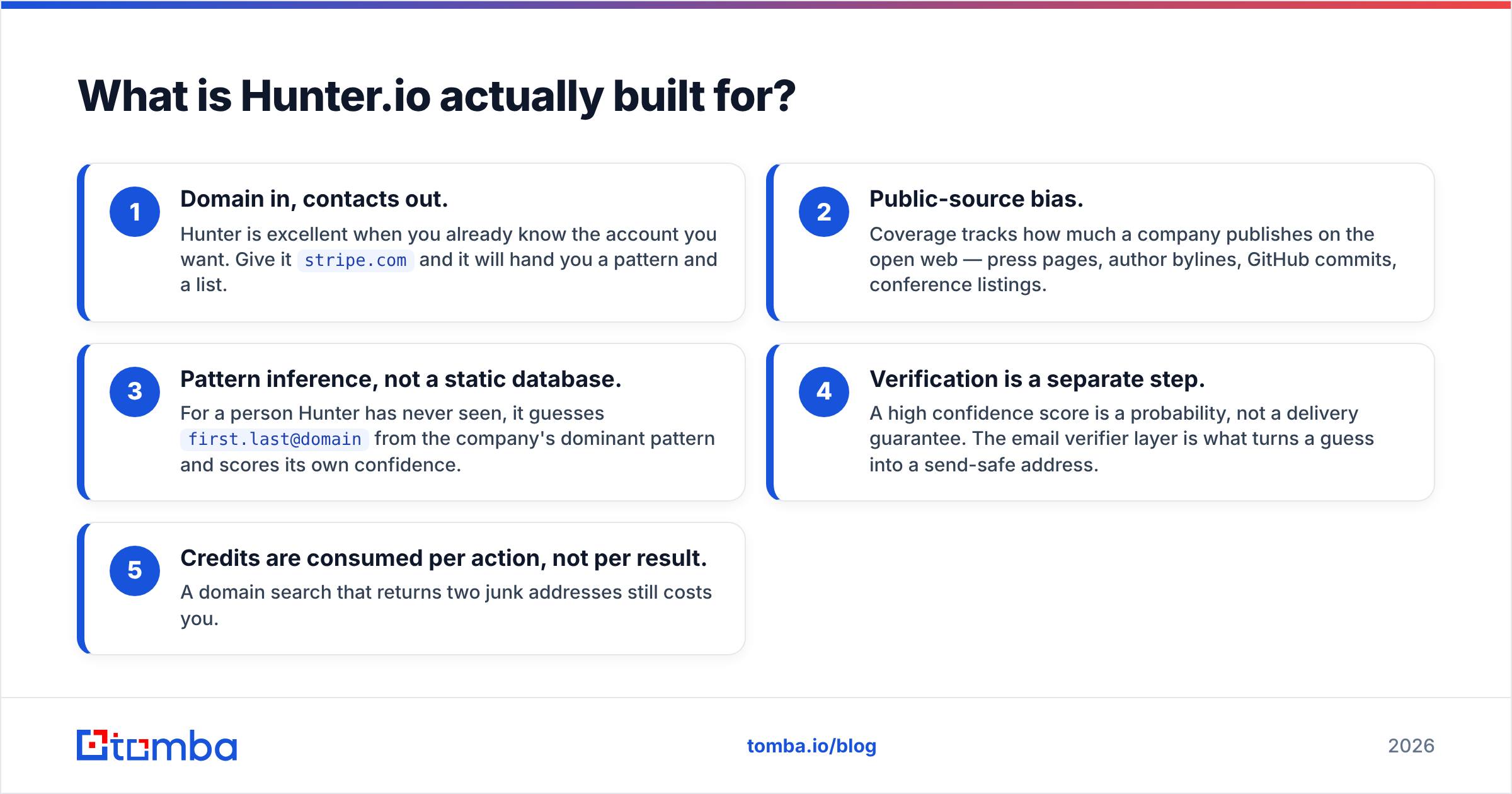
- Domain in, contacts out. Hunter is excellent when you already know the account you want. Give it
stripe.comand it will hand you a pattern and a list. - Public-source bias. Coverage tracks how much a company publishes on the open web — press pages, author bylines, GitHub commits, conference listings.
- Pattern inference, not a static database. For a person Hunter has never seen, it guesses
first.last@domainfrom the company's dominant pattern and scores its own confidence. - Verification is a separate step. A high confidence score is a probability, not a delivery guarantee. The email verifier layer is what turns a guess into a send-safe address.
- Credits are consumed per action, not per result. A domain search that returns two junk addresses still costs you.
Once you internalize that, the good Hunter.io use cases fall out naturally: anything account-first, anything where the target company publishes a lot, anything where volume is modest and precision matters more than scale.
What are the highest-value Hunter.io use cases?#
These are the nine workflows where Hunter earns its seat in the stack, roughly ordered by return per credit.
1. Agency and consultancy prospecting. You have a shortlist of 50–200 target accounts, not 50,000. You need the marketing director, the VP of ops, or whoever owns the budget. Domain search gives you the org's published contacts in one call, and the pattern lets you construct the specific person you found on LinkedIn. This is the use case Hunter was designed around and it still holds up.
2. PR, link building, and digital-PR outreach. Publications put bylines on the open web, which is exactly the signal Hunter reads best. Hunter's Author Finder resolves an article URL to a writer's address. If you run this at scale, an author finder is the single highest-hit-rate workflow in the whole category, because journalists are structurally easy to attribute.
3. Recruiting and talent sourcing. You have a name and a current employer from LinkedIn or GitHub. You need the work address to send a real message instead of an InMail that dies in a notification tab. Pattern inference plus verification handles this well, with the caveat that candidates at large enterprises often use non-obvious aliases.
4. CRM gap-filling and record hygiene. Export every account in your CRM with a company domain but no contact email, run domain search across the list, re-import. This is boring and it is usually the highest-dollar Hunter workflow in a company with an existing pipeline, because those accounts are already qualified. Pair it with data enrichment if you also need titles, headcount, and tech stack on the same row.
5. Partnership and BD outreach. Small target lists, high value per contact, and you usually know the exact company. Perfect fit.
6. Competitive and market research. Domain search doubles as an org-chart sketch: who publishes under a company's domain tells you which functions are public-facing and roughly how the team is structured.
7. Pre-send list cleaning. Running an inherited list through verification before a campaign is cheap insurance. Bounces above 3% put your sender reputation at risk, and Gmail and Yahoo both enforce complaint thresholds now.
8. Event and conference follow-up. You have a speaker list or an exhibitor directory. Company names are known, individual emails are not. Textbook domain-search territory.
9. Inbound lead enrichment. A form fill arrives with a work email and nothing else. Reverse lookups and enrichment turn that single field into an account record your AE can actually work.
Notice what is missing from that list: cold, unqualified, high-volume list building. That's not an accident.
Which Hunter.io use cases are actually worth the credits?#
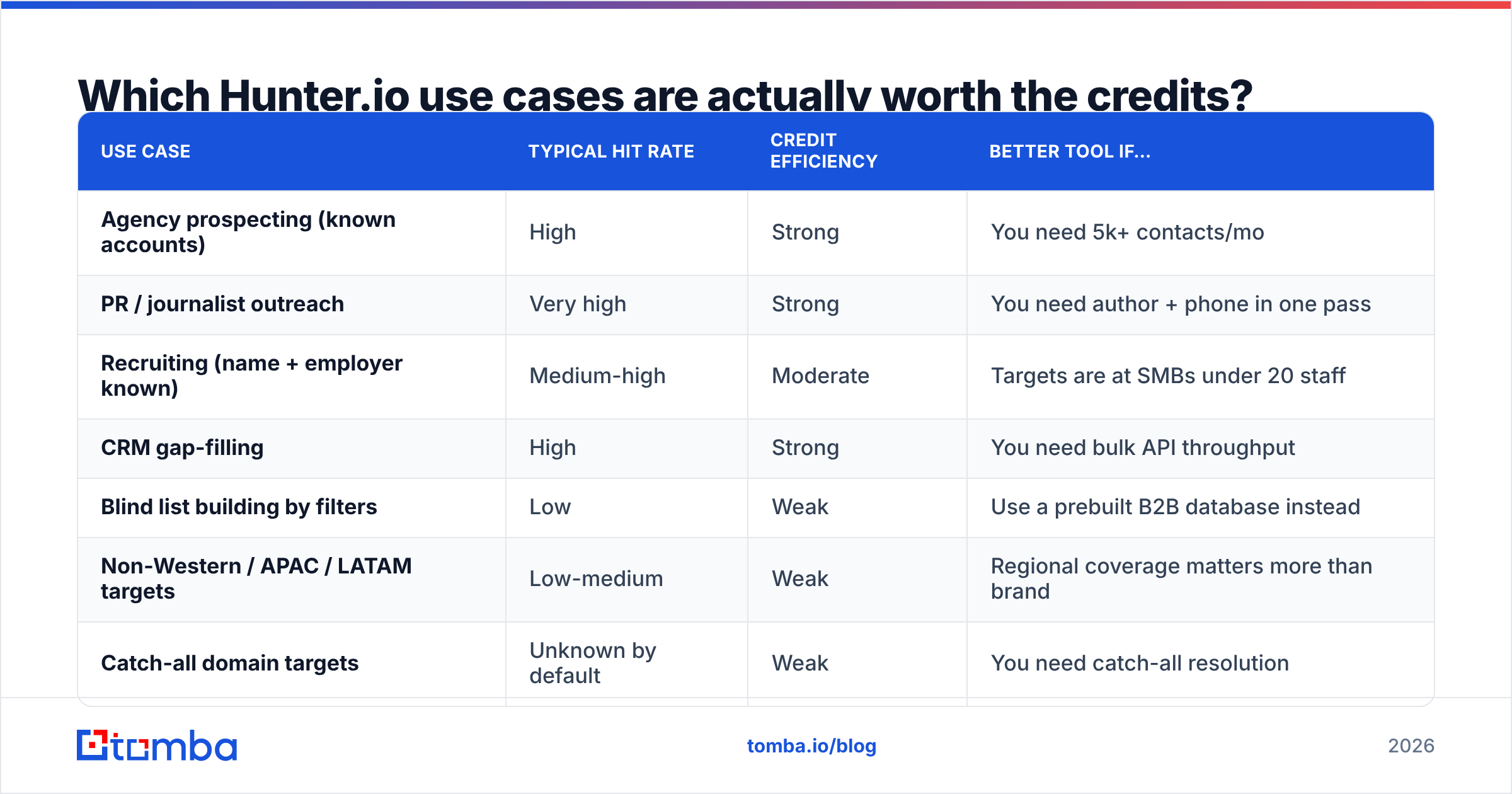
Credits are the real currency here, so the honest way to rank use cases is by hit rate per credit spent, not by how impressive the workflow sounds in a deck.
| Use case | Typical hit rate | Credit efficiency | Better tool if… |
|---|---|---|---|
| Agency prospecting (known accounts) | High | Strong | You need 5k+ contacts/mo |
| PR / journalist outreach | Very high | Strong | You need author + phone in one pass |
| Recruiting (name + employer known) | Medium-high | Moderate | Targets are at SMBs under 20 staff |
| CRM gap-filling | High | Strong | You need bulk API throughput |
| Blind list building by filters | Low | Weak | Use a prebuilt B2B database instead |
| Non-Western / APAC / LATAM targets | Low-medium | Weak | Regional coverage matters more than brand |
| Catch-all domain targets | Unknown by default | Weak | You need catch-all resolution |
The two rows at the bottom deserve emphasis. Roughly a fifth to a quarter of B2B domains are configured as catch-all, meaning the mail server accepts everything and tells you nothing. Standard SMTP verification returns "unknown" and you're left guessing. If a meaningful slice of your target market runs catch-all — common in enterprise and in Europe — a dedicated catch-all verifier changes the economics of your whole list, because those contacts move from "discard" to "sendable."
How accurate is Hunter.io across these use cases?#
Accuracy is not one number. It's a function of company size, region, and how much the target publishes.

What the field data consistently shows:
- Large, Western, web-active companies: most finders land in the 85–95% valid range. Hunter is competitive here and its confidence scores are well calibrated.
- Companies under 20 employees: accuracy across every vendor drops, often into the 50–65% range, because there is simply less public signal to infer from.
- Non-English-speaking markets: the spread between vendors widens sharply. This is where "which tool" matters more than anywhere else.
- Generic role addresses (
info@,sales@) inflate raw counts without improving reply rates. Filter them out before you judge a tool by result volume.
Hunter's confidence score is genuinely useful — it's one of the more honest signals in the category — but treat anything under about 90 as needing verification before it enters a sequence. Independent user reviews on G2 echo the same pattern: strong on known domains, thinner on obscure ones.
The practical rule: find and verify in the same pass. Two tools means two subscriptions, two credit pools, and a handoff step where records get lost. One tool that does both, or an email finder API that returns a verification status inline, removes an entire class of pipeline bugs.
How does Hunter.io compare to alternatives for these use cases?#

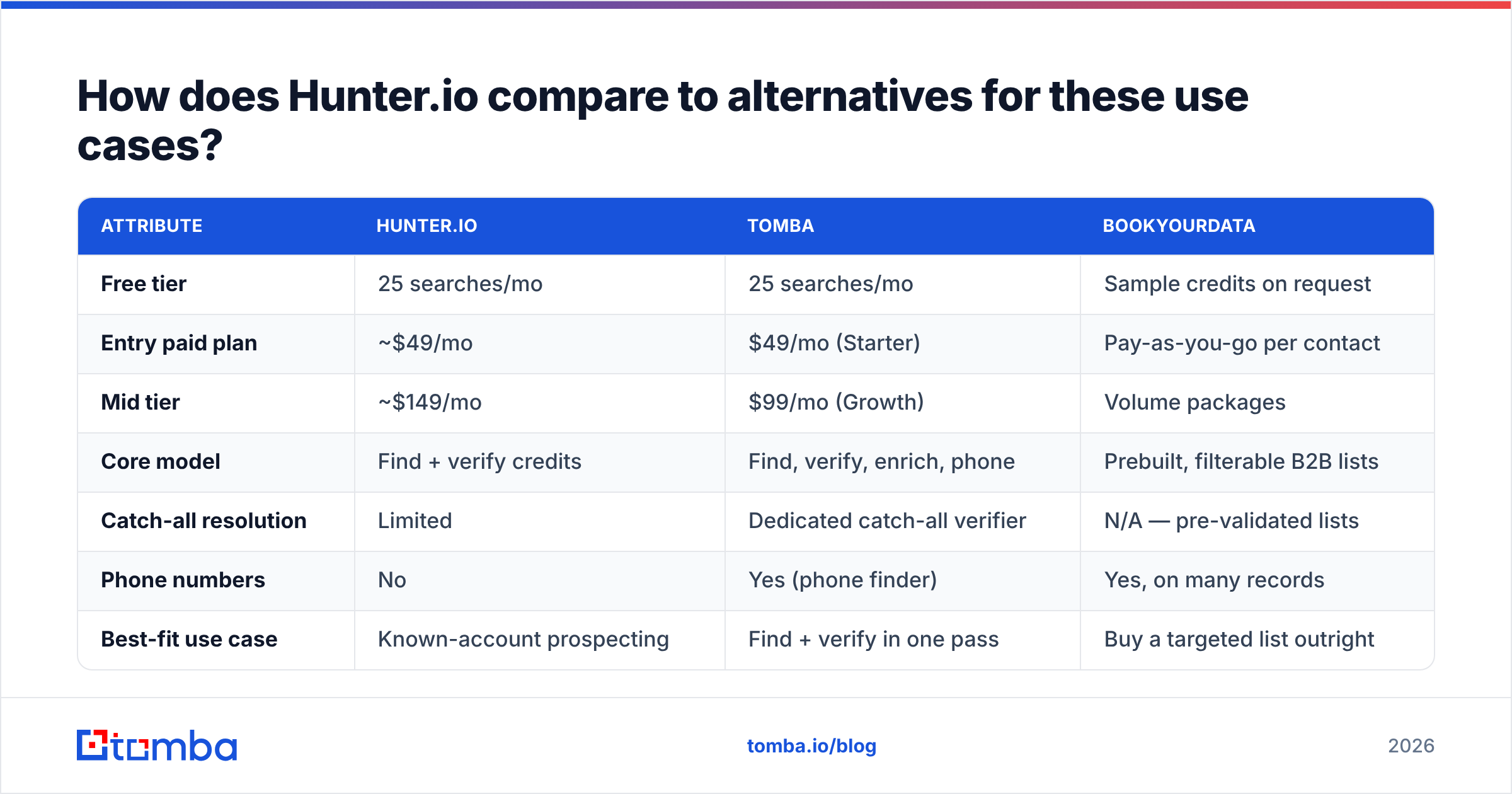
Here is the practical comparison for the workflows above. Prices are as listed at publication — check each vendor's page before you buy, since this category re-prices constantly.
| Attribute | Hunter.io | Tomba | BookYourData |
|---|---|---|---|
| Free tier | 25 searches/mo | 25 searches/mo | Sample credits on request |
| Entry paid plan | ~$49/mo | $49/mo (Starter) | Pay-as-you-go per contact |
| Mid tier | ~$149/mo | $99/mo (Growth) | Volume packages |
| Core model | Find + verify credits | Find, verify, enrich, phone | Prebuilt, filterable B2B lists |
| Catch-all resolution | Limited | Dedicated catch-all verifier | N/A — pre-validated lists |
| Phone numbers | No | Yes (phone finder) | Yes, on many records |
| Best-fit use case | Known-account prospecting | Find + verify in one pass | Buy a targeted list outright |
| API + CLI | API | API, CLI, MCP server | Export-based |
Read that table as three different jobs, not three competitors for one job:
- You know the accounts already. Hunter is a perfectly good answer, and the interface is the cleanest in the category.
- You need finding, verification, catch-all handling, and phones in one place. A consolidated platform wins on total cost, and Tomba pricing puts the Growth tier at $99/mo where several competitors put their entry plan.
- You don't want to build the list at all. BookYourData is a legitimate answer here — buying a pre-validated, filtered list is faster than assembling one contact at a time, and for some ICPs it's the right call. Different tool, different job.

When should you not use Hunter.io?#
Four situations where reaching for Hunter costs you time or money:
High-volume outbound. If you're sourcing thousands of contacts monthly, per-credit economics stop favoring a premium-priced finder. Look at bulk pricing per verified contact, not per search. A bulk email finder that processes a CSV in one job beats 4,000 individual lookups on both cost and elapsed time.
Catch-all-heavy markets. Covered above. If more than a quarter of your list comes back "unknown," you are paying for ambiguity.
You need phone numbers too. Hunter doesn't do phones. If your sequence is email plus call — and in 2026 most effective sequences are multichannel — you need a second vendor or a platform that includes both.
Deep firmographic filtering. "All Series B SaaS companies in DACH with 50–200 employees using Segment" is a database query, not a domain search. That's what a B2B database or an intent platform is for. Hunter starts from a domain you supply; it won't generate the domain list for you.
How do you build a repeatable workflow around these use cases?#
The tool matters less than the pipeline around it. This sequence works regardless of which finder you pick:
- Define the account list first. Domain-first tools are only as good as your domain list. Pull it from your CRM, a database, an event directory, or website visitor identification — anywhere except a filter you clicked without thinking.
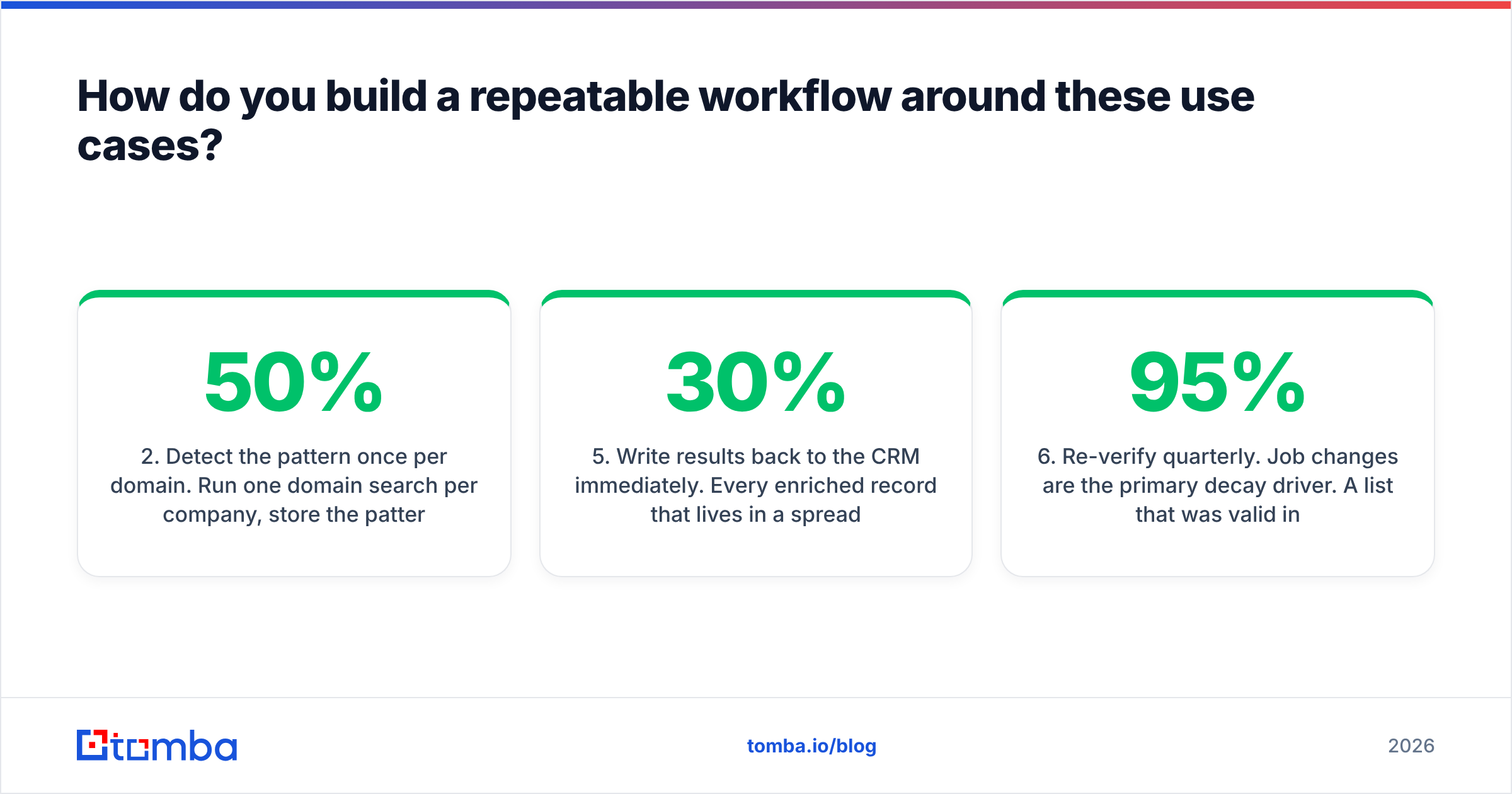
- Detect the pattern once per domain. Run one domain search per company, store the pattern, then construct additional contacts locally instead of paying per lookup. This one habit routinely cuts credit spend by 30–50%.
- Verify everything before it enters a sequence. Non-negotiable. Bounce rate is the fastest way to destroy email deliverability, and inbox providers have gotten strict about it.
- Resolve catch-alls separately. Don't discard them and don't blindly send to them. Route them through a dedicated check and re-score.
- Write results back to the CRM immediately. Every enriched record that lives in a spreadsheet instead of your CRM will be re-purchased within six months. HubSpot's own sales research makes the same point about data decay: B2B contact data degrades roughly 25–30% per year, so a record you don't store is a record you'll buy twice.
- Re-verify quarterly. Job changes are the primary decay driver. A list that was 95% valid in January is closer to 85% by summer.
Steps 2, 3, and 4 are where most teams leak money — and they're the steps that get easier when finding and verifying live under one roof and one credit pool.
What's the honest verdict on Hunter.io use cases?#
Hunter is a well-built, well-scoped tool with a clear sweet spot: modest-volume, account-first prospecting against companies that publish on the open web. For agencies, PR teams, recruiters, and BD reps working curated lists, the official Hunter.io site describes a product that does what it says.
The gaps are equally clear. No phone numbers. Limited catch-all resolution. Credit economics that stop making sense at volume. Thinner coverage outside major Western markets. If any of those describe your motion, you're paying premium pricing for a partial answer.
Where to go from here: if your actual job is "find verified work emails for a defined set of companies, at volume, without stitching three vendors together," start with the Tomba Email Finder. The free tier gives you 25 searches a month to test against your own real target list — which is the only benchmark that matters — and Starter is $49/mo with find, verify, catch-all handling, and phone lookup in the same credit pool. Run 50 of your hardest domains through both tools and let the hit rate decide.
Related guides#
// get started
Find, verify and enrich your first contacts today
Start on the free plan with 25 searches a month, then scale when your team is ready.
Free plan · No credit card required · GDPR & CCPA
// about the author