Hyperise Pricing Reviews Pros and Cons: A 2026 Breakdown
Hyperise sells image personalization by the seat, not the credit. We break down every plan, the hidden per-image limits, real user reviews, and when a cheaper data-first stack beats it.
Short answer first: Hyperise is worth it only when your list is already clean. This Hyperise pricing reviews pros and cons guide walks through every plan, what real users say, and the cases where a cheaper stack wins.
TL;DR
- What it is. Hyperise is an image and video personalization layer. It drops a prospect's logo, name, website shot, or profile photo into an image. You embed that image in cold email or on a landing page. It is not a data provider.
- What it costs. Pricing is gated by seats and features, not credits. Entry sits near $69/mo. Mid-tier is about $99/mo. Agency and white-label start around $149/mo. Annual billing cuts the price. Check current numbers on hyperise.com first.
- What reviews say. Praise goes to reply-rate lift and the long list of integrations. Complaints center on the learning curve, slow image loads, spam risk from heavy emails, and low usage for the price.
Verdict
- The tool only pays off when your list is right. Personalizing an image for a dead address is a paid mistake.
- Buy it for high-ticket, low-volume outbound, where one reply is worth hundreds of dollars. Skip it if your data is still broken. Spend that budget on verified contacts first.
What is Hyperise, and what are you actually paying for?#
Hyperise is a personalization engine for visuals. You upload a base image — a laptop mockup, a whiteboard, a coffee cup on a desk. Hyperise then layers prospect-specific details onto it when the email is opened or the page loads. Think their company logo, a live shot of their website, their first name on a notepad, or their LinkedIn photo.
The everyday analogy: it's a mug shop that prints on demand. You design the mug once. Every customer who walks past the window sees their own name on it. Technically, Hyperise builds each image on its server from a template plus merge data passed in the image URL.
That's the product. Here's what the pricing actually gates:
- Number of active templates — lower tiers cap how many templates you can keep live at once.
- Monthly image impressions — every render counts. High-volume senders hit this ceiling first.
- Seats and team access — solo plans are single-user. Agency plans add sub-accounts.
- White-label and client workspaces — the main reason agencies land on the top tier.
- Integration depth — some CRM, sequencer, and chat links sit behind higher tiers.
- Video personalization — personalized video thumbnails and GIFs rarely sit on the cheapest plan.
Here's what most buyers miss on a first read. Hyperise charges for renders, not results. Say your sequencer sends 8,000 emails and 30% of the addresses are dead. You just paid to render images for 2,400 mailboxes that don't exist.

How much does Hyperise cost in 2026?#
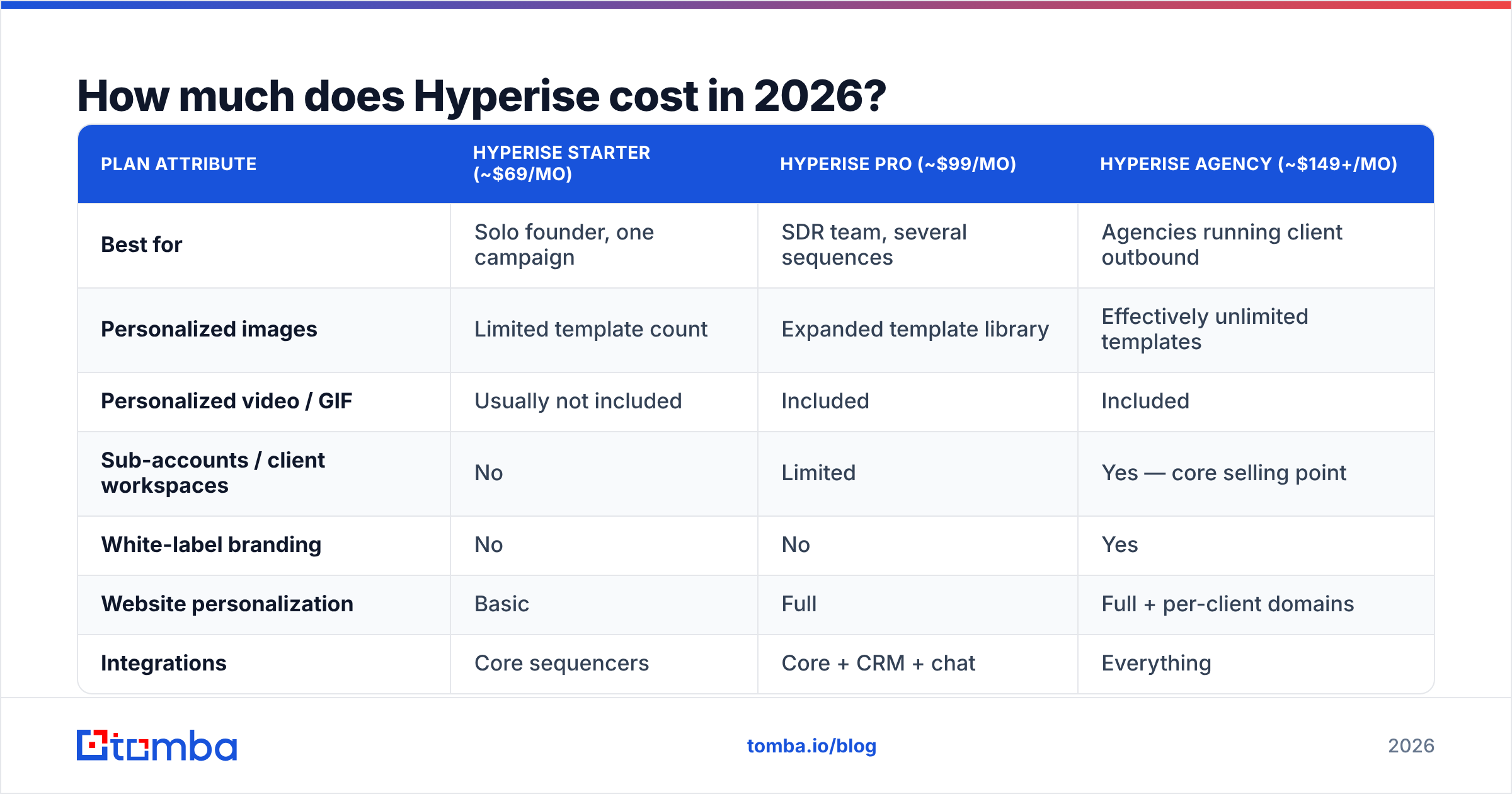
Hyperise lists tiered monthly pricing. The annual plan usually saves about two months. Exact figures shift, so treat the table below as the shape of the offer, not a contract. Check the vendor site before you buy.
| Plan attribute | Hyperise Starter (~$69/mo) | Hyperise Pro (~$99/mo) | Hyperise Agency (~$149+/mo) |
|---|---|---|---|
| Best for | Solo founder, one campaign | SDR team, several sequences | Agencies running client outbound |
| Personalized images | Limited template count | Expanded template library | Effectively unlimited templates |
| Personalized video / GIF | Usually not included | Included | Included |
| Sub-accounts / client workspaces | No | Limited | Yes — core selling point |
| White-label branding | No | No | Yes |
| Website personalization | Basic | Full | Full + per-client domains |
| Integrations | Core sequencers | Core + CRM + chat | Everything |
| Annual discount | ~2 months free | ~2 months free | ~2 months free |
| Free trial | Yes, time-limited | Yes, time-limited | Yes, time-limited |
Two cost realities never show up on the pricing page.
The real cost is per reply, not per month. At $99/mo and 2,000 sends, each personalized touch costs about five cents. That's cheap if your deal size is $12,000. It's absurd if you sell a $29/mo tool.
The stack tax is real. Hyperise is a layer, not a system. You still need a data source, a verifier, a sequencer, and inbox tools. A typical stack runs data and verification at $49–$99/mo, a sequencer at $60–$99/mo, inbox warmup at $30–$50/mo, and Hyperise at $69–$149/mo. That's $210–$400/mo before a single reply lands.
What do Hyperise reviews actually say?#
Sentiment on G2 and Capterra skews positive, usually 4.5 stars or better. But the reviews fall into clear groups. Read past the star rating and the pattern shows up fast.
What reviewers consistently praise:
- Reply-rate lift on cold email. The most repeated claim is a jump in replies on first-touch emails. It works best when the image shows the prospect's own website. It buys you a "wait, this is about me" pause.
- Integration breadth. Hyperise plugs into most major sequencers, CRMs, and chat tools. If you already use Instantly, HubSpot, or Pipedrive, there's a native path.
- Responsive support. Many reviews mention fast, human replies from the team. That matters for a tool with a real setup curve.
- Website personalization. Several reviewers say the landing-page version beat the email images. Showing a visitor their own logo on your site still lands.
What reviewers consistently criticize:
- The learning curve. The image editor is powerful and not intuitive. First-time users report hours, not minutes, to ship a template they like.
- Render latency and broken images. Images load from Hyperise servers. Slow renders, or blocked images, turn your careful creative into a grey box with alt text.
- Deliverability concerns. Image-heavy cold email is a known spam trigger. Reviewers who scaled hard report inbox placement problems. That's about sending heavy mail to cold lists, not about render quality.
And the money complaints:
- Price versus usage. This is the single most common negative theme. Teams subscribe, build two templates, use them on one campaign, and keep paying every month. That's a usage problem, not a product defect. It still shows up in reviews as "too expensive."
- Gimmick fatigue. A vocal minority argues that buyers now spot the personalized-image trick. They read it as automation, not effort.
That last point deserves honesty. Personalization tactics wear out. A trick that lifted replies 40% in 2021 lifts far less in 2026, because every inbox has seen the notepad image. The tool still works. It just no longer works because it is new.
Is Hyperise worth it compared to the alternatives?#
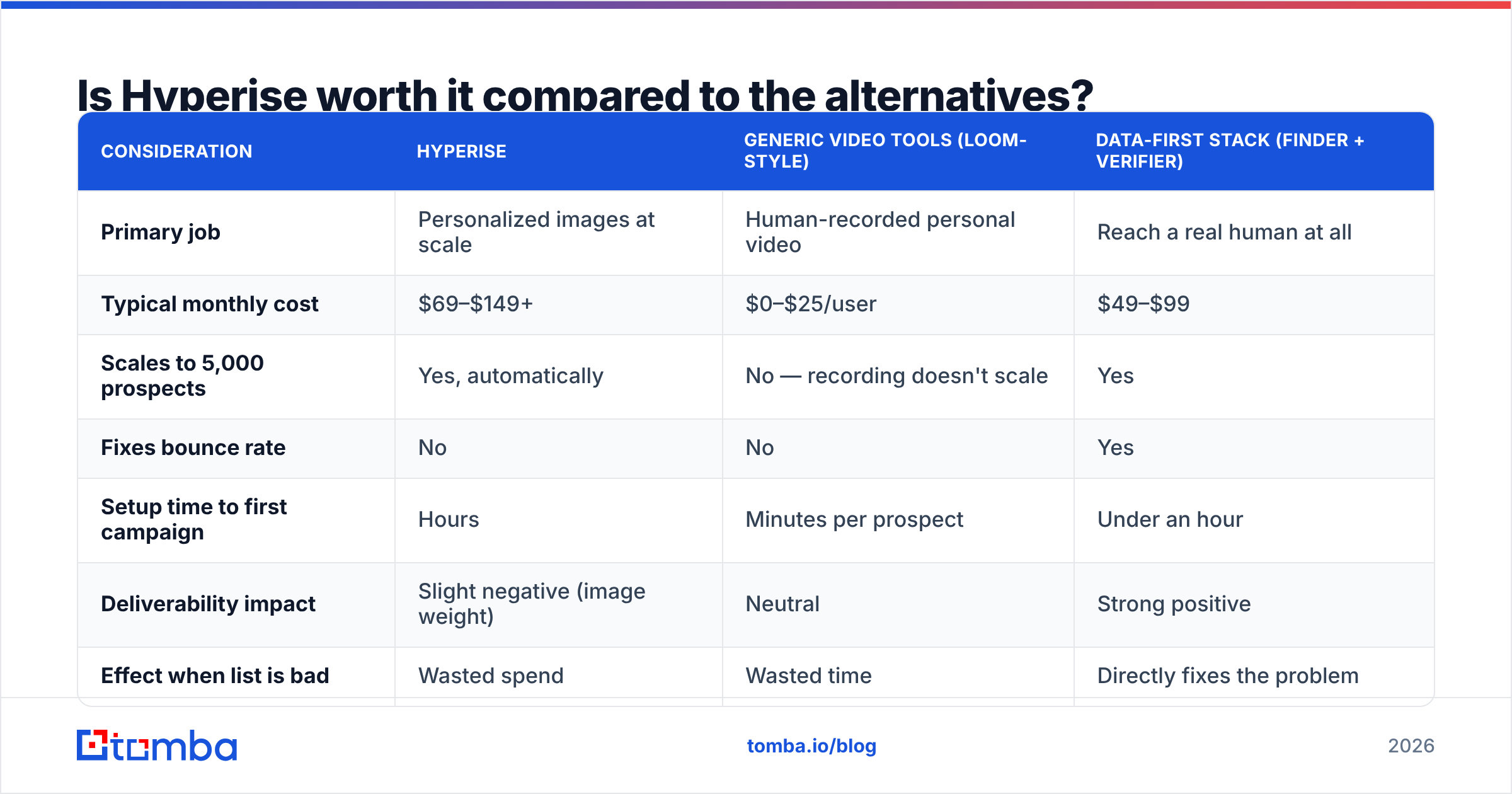
It depends on your real bottleneck: attention or accuracy. Most teams think it's attention. For most teams, it's accuracy.
| Consideration | Hyperise | Generic video tools (Loom-style) | Data-first stack (finder + verifier) |
|---|---|---|---|
| Primary job | Personalized images at scale | Human-recorded personal video | Reach a real human at all |
| Typical monthly cost | $69–$149+ | $0–$25/user | $49–$99 |
| Scales to 5,000 prospects | Yes, automatically | No — recording doesn't scale | Yes |
| Fixes bounce rate | No | No | Yes |
| Setup time to first campaign | Hours | Minutes per prospect | Under an hour |
| Deliverability impact | Slight negative (image weight) | Neutral | Strong positive |
| Effect when list is bad | Wasted spend | Wasted time | Directly fixes the problem |
| Learning curve | Steep | None | Low |
The order matters here. If 25% of your list bounces, no image on earth wins that quarter back. Fix the list first, then buy the creative layer. Run every list through an email verifier before it touches a personalization tool. Use a domain search to build lists from verified company patterns instead of guessing.
Other tools sit in the same budget slot. BookYourData fits if you'd rather buy a pre-verified list than build one. Nickelled, Vidyard, and Sendspark cover the video angle if moving image is what you want. And if the data half of your stack is missing, a bulk email finder plus verification will lift replies more reliably than a new template.

What are the concrete pros and cons of Hyperise?#
Pros
- Real difference on first touch. A personalized website shot inside an email is still rare enough to earn a second read.
- Broad integration surface. It slots into your sequencer without a rebuild. That's rare for a creative-layer tool.
- Website personalization is a second use case. Same plan, different channel. Showing a return visitor their own branding lifts landing-page conversion for some teams.
- Agency math works. Spread one white-label account across ten clients and the per-client cost drops to almost nothing.
- Easy free trial. You can test the reply lift on one campaign before you commit.
Cons
- Seat pricing punishes low usage. Two templates and one campaign a quarter make this your priciest line item per use.
- Image blocking is out of your hands. Many corporate inboxes block remote images by default. For those readers, the whole pitch goes dark.
- Deliverability drag. Heavier emails with remote assets send a mild negative signal. If your sender reputation is already shaky, this adds risk.
- Steep editor learning curve. Expect real onboarding time. Expect your first template to look worse than the demo.
- It solves the wrong problem for most buyers. Sub-2% reply rates usually mean a targeting or data problem. Hyperise won't diagnose that for you.
Who should buy Hyperise — and who should not?#
Buy it if:
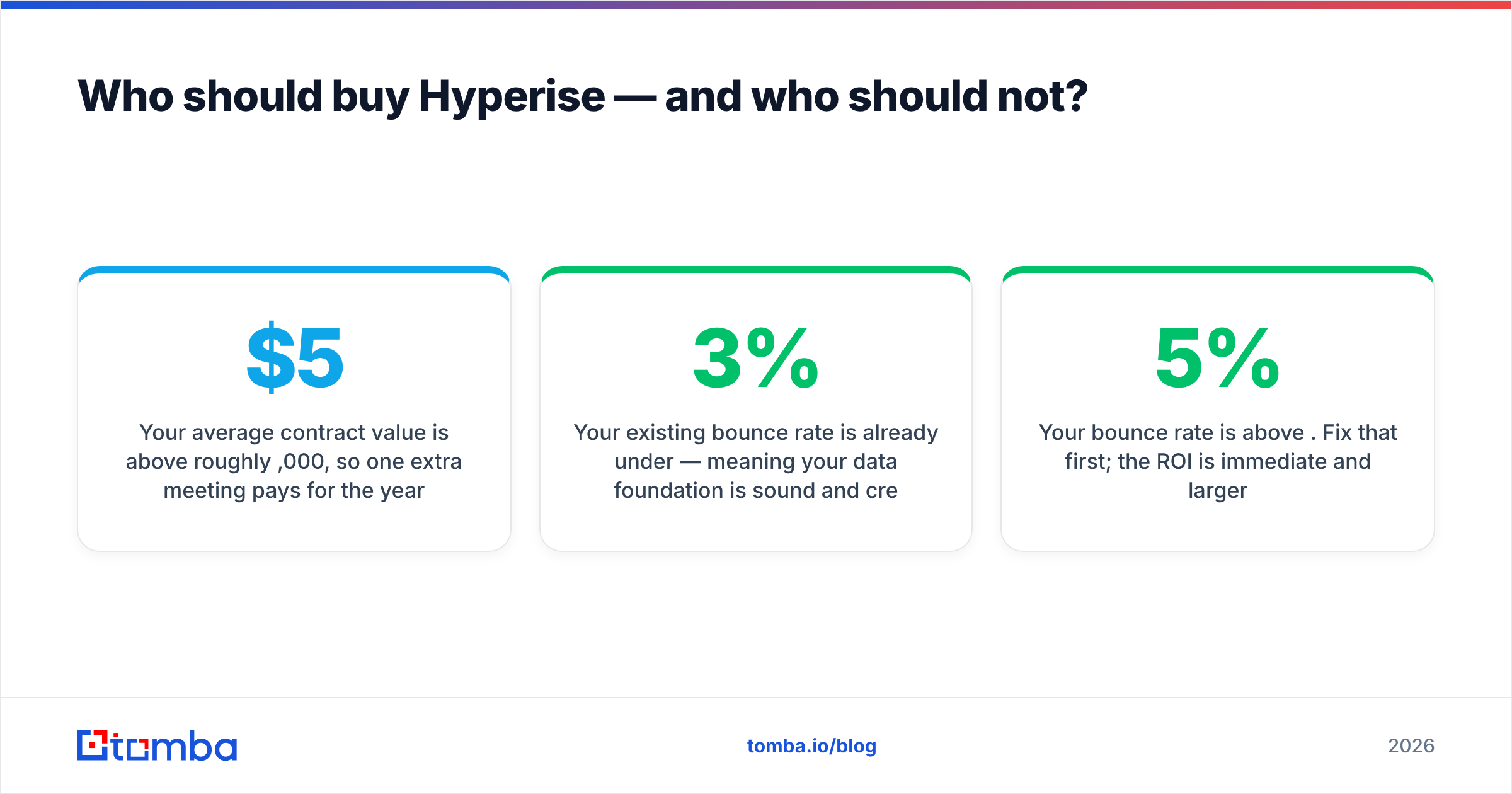
- Your average contract value is above roughly $5,000. One extra meeting a month pays for the year.
- You run low-volume, high-intent outbound to a named account list.
- You're an agency and can spread one plan across many client campaigns.
- Your bounce rate is already under 3%. Your data is sound, so creative is the next lever.
- You want website personalization as much as email personalization.
Skip it if:
- Your bounce rate is above 5%. Fix that first. The payoff is faster and bigger.
- You send high-volume, low-ticket outbound. A nickel per touch wrecks your unit economics.
- You sell to enterprise IT and finance buyers, where image blocking is worst.
- You have no designer and nobody willing to spend a weekend in the editor.
- You're still testing messaging. Test copy first. Images amplify a message; they don't create one.
A simple test: run one clean-data campaign and one Hyperise campaign against two matched 500-contact segments for four weeks. Compare replies per dollar, not replies per send. Most teams who run this honestly find the data spend wins by a wide margin. Then they add personalization on top, once the base is solid.
How do you get more from Hyperise if you already pay for it?#
If the plan is already live, raise usage instead of cancelling.
- Build per persona, not per campaign. Three reusable templates keyed to your three ICPs beat bespoke work every time.
- Always write real alt text. When images are blocked, alt text is your whole message. Write a sentence, not "image1."
- Put the image below your first line of copy. The first sentence should stand alone. The image is the amplifier.
- Test image-off variants. Run 50/50 against a plain-text control. If plain text wins, you learned something worth more than the plan.
- Feed it enrichment fields. Images are only as good as the merge data behind them. Pipe in job title, company size, and tech stack via data enrichment.
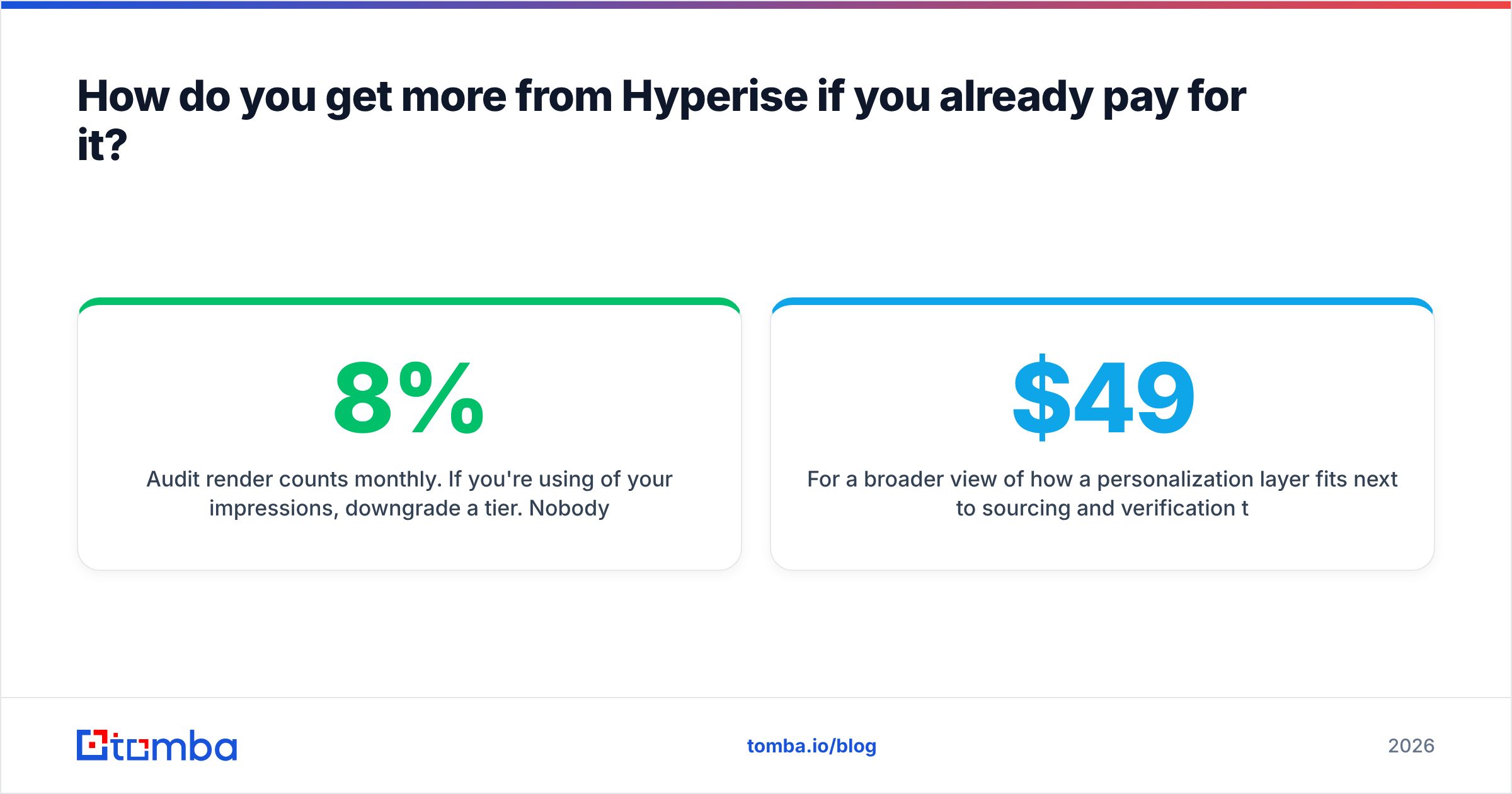
- Audit render counts monthly. Using 8% of your impressions? Downgrade. Nobody at the vendor will suggest that for you.
For a wider view of how this layer sits next to sourcing and verification, the Tomba pricing page shows where the data spend goes: Free (25 searches/mo), Starter $49/mo, Growth $99/mo, Pro $249/mo, plus custom Enterprise. That's the same budget band as Hyperise. Which is exactly why the order of purchase matters.
Hyperise pricing reviews pros and cons: the final verdict#
Hyperise is a well-built tool aimed at a real but secondary problem. The reviews are broadly earned. It lifts replies against a clean, well-targeted list. It turns into costly shelfware against a broken one. The Hyperise pricing reviews pros and cons debate is really about your starting position, not the product's quality.
Weighing the price right now? Do this first. Pull a random 200 contacts from your list and verify them. If more than ten fail, your money belongs somewhere other than image personalization this quarter.
Start with contacts that are actually deliverable. The Tomba Email Finder finds and validates work email addresses by domain, name, or company. The free tier gives you 25 searches to test your current list before you spend a dollar on creative. Get the data right, then make it pretty.
Related guides#
// get started
Find, verify and enrich your first contacts today
Start on the free plan with 25 searches a month, then scale when your team is ready.
Free plan · No credit card required · GDPR & CCPA
// about the author