Hypertide Pricing, Reviews, Pros and Cons: 2026 Breakdown
Hypertide sells automated Microsoft 365 cold email infrastructure — but the sticker price is only part of the story. Here's what Hypertide pricing really costs, what reviewers praise, and where it falls short.

TL;DR#
- Hypertide is cold email infrastructure, not a prospecting tool. It provisions Microsoft 365 / Azure (Entra) inboxes and domains for you — it does not find leads, write copy, or send sequences.
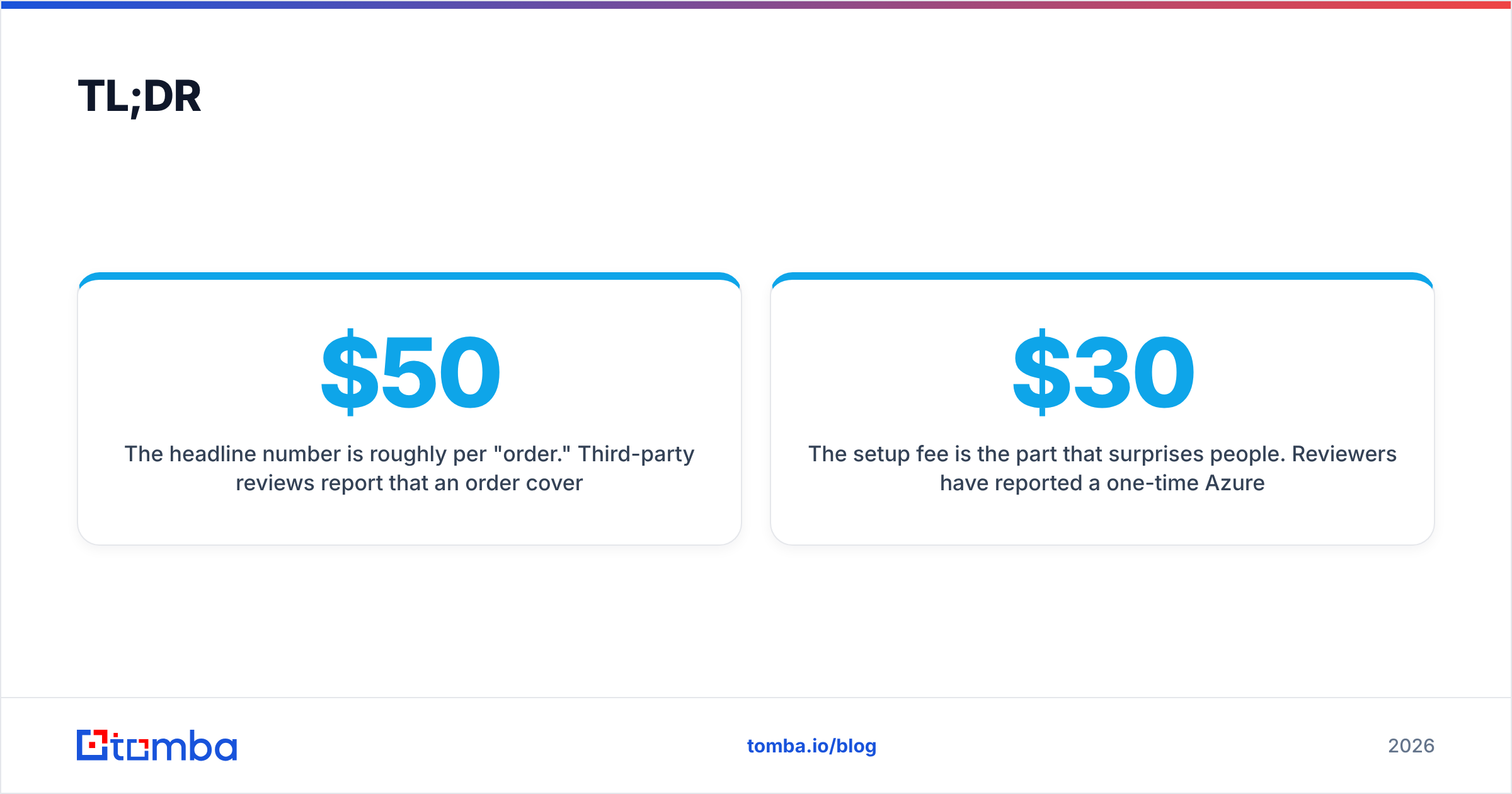
- The headline number is roughly $50/month per "order." Third-party reviews report that an order covers around 50–100 inboxes spread across two domains, which works out to about $0.50–$1.00 per inbox per month.
- The setup fee is the part that surprises people. Reviewers have reported a one-time Azure implementation charge that can run into four figures, plus roughly $30 per domain if Hypertide buys domains on your behalf.
- Biggest pro: fully automated provisioning in hours, not the multi-day VA-driven setup most resellers still use. Biggest con: Outlook-only, no free trial, and almost no verifiable public review volume.
- Infrastructure is the cheap half of cold email. A clean, verified list matters more to inbox placement than which reseller sold you the mailbox — budget for data before you budget for inboxes.
What is Hypertide, and who is it actually for?#
Hypertide is a cold email infrastructure provider. That phrase gets used loosely, so be precise about what it means here: Hypertide sells you sending capacity — domains, DNS records, and Microsoft 365 mailboxes — configured and handed over ready to plug into a sequencer like Instantly, Smartlead, or Salesloft.
It does not send your campaigns. It does not build your list. It does not write your copy. If you are shopping for a platform that does prospecting and sending in one place, Hypertide is the wrong category entirely.
The company's differentiator is automation. Most inbox resellers still run provisioning through virtual assistants clicking through Microsoft and Google admin panels, which is where misconfigured SPF records, missing DKIM keys, and week-long delays come from. Hypertide automates the Azure/Entra provisioning path, and reviewers consistently report inboxes delivered within hours of an order rather than days.
The typical buyer is an outbound agency or a B2B team running high-volume, multi-domain sending — the profile where you need 100+ mailboxes and cannot afford to hand-configure each one. If you are sending 500 emails a month from two mailboxes, this is aggressive overkill.
What does Hypertide actually sell you?#
Here is what an order includes, based on what Hypertide publishes and what third-party reviewers report:
- Microsoft 365 / Azure (Entra) inboxes — provisioned in bulk, typically 50 per domain. This is the core unit you pay for.
- Domain setup and DNS configuration — SPF, DKIM, and DMARC records written for you, plus redirects. You can bring your own domains or have Hypertide purchase them.
- Automated provisioning — the whole order lands configured, usually in a 4–6 hour window rather than the multi-day turnaround typical of manual resellers.
- A monthly sending allowance — reported at around 5,000 emails per month per order after warmup, which is the practical ceiling you should plan capacity against.
- Ongoing infrastructure maintenance — the recurring fee covers keeping the tenant, licenses, and records alive, not just the initial build.
Notice what is not in that list: no warmup network of its own in most reported configurations, no email verification, no lead database, no deliverability monitoring dashboard. Those are separate line items you will buy elsewhere.

How much does Hypertide pricing actually cost in 2026?#
This is where you need to read carefully, because Hypertide does not publish a straightforward public pricing page — and third-party reviews disagree with each other on the per-inbox math.
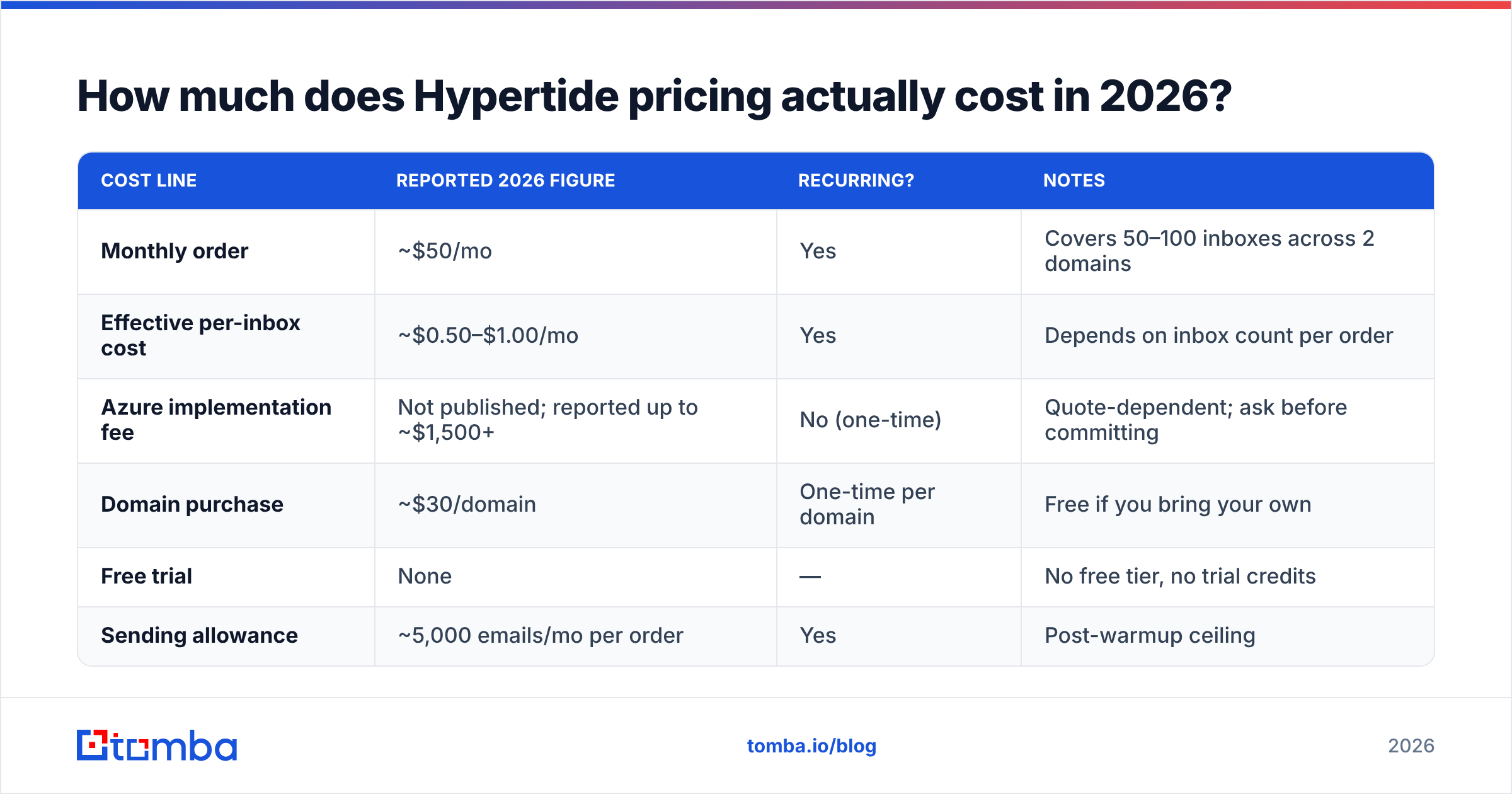
The consistent figures across reviews are: around $50/month per order, with an order covering somewhere between 50 and 100 inboxes across two domains. That gives you a per-inbox cost between roughly $0.50 and $1.00 per month, which is genuinely cheap by infrastructure standards.
The inconsistent figure is the one-time implementation fee. Hypertide charges a setup cost to provision the Azure tenant and configurators, and it is not disclosed publicly. Some reviewers describe it as modest; at least one has reported it running north of $1,500. That spread is not a rounding error — it is the difference between a $600/year decision and a $2,100 first-year decision.
| Cost line | Reported 2026 figure | Recurring? | Notes |
|---|---|---|---|
| Monthly order | ~$50/mo | Yes | Covers 50–100 inboxes across 2 domains |
| Effective per-inbox cost | ~$0.50–$1.00/mo | Yes | Depends on inbox count per order |
| Azure implementation fee | Not published; reported up to ~$1,500+ | No (one-time) | Quote-dependent; ask before committing |
| Domain purchase | ~$30/domain | One-time per domain | Free if you bring your own |
| Free trial | None | — | No free tier, no trial credits |
| Sending allowance | ~5,000 emails/mo per order | Yes | Post-warmup ceiling |
Practical advice: treat every number above as a starting point for a sales conversation, not a quote. Get the implementation fee in writing before you sign, and ask specifically whether it recurs if you expand to a second tenant later.
What do Hypertide reviews say — and how much should you trust them?#
Here is the honest state of Hypertide reviews in 2026: there is a lot of coverage and very little verified user feedback.
Search "Hypertide review" and you will find a dozen well-ranked pages. Look at who publishes them and the picture changes — most are hosted on the blogs of competing infrastructure and sending vendors (Mailforge, Maildoso, ScaledMail, InboxKit, Salesforge, Woodpecker). Those reviews are not worthless, but every one of them has a commercial interest in the verdict. Several conclude, unsurprisingly, that their own product is the better buy.
Meanwhile, Hypertide's G2 listing exists primarily as an alternatives page, and multiple reviewers have flagged the same gap: no first-party testimonials, no named customer logos, and effectively no independent review volume anywhere online.
That does not mean Hypertide is bad. Infrastructure vendors serving agencies often have quiet public footprints because their customers do not want to advertise their sending stack. But it does mean you should weight the marketing claims — "inboxes consistently outperform direct buy and reseller inboxes," "10x the volume" — as unverified vendor assertions rather than benchmarked results. Ask for a reference customer at your volume before you pay a four-figure setup fee.
What are the pros of Hypertide?#
- Automated provisioning is a real advantage. The VA-driven setup model that dominates this market produces misconfigurations, and misconfigured DNS is one of the fastest ways to tank email deliverability. Removing humans from the config step removes a genuine failure mode.
- Speed to sending. A 4–6 hour turnaround versus a multi-day reseller queue matters if you are spinning up a campaign against a deadline or replacing burned domains.
- Low marginal cost per inbox. At roughly $0.50–$1.00 per mailbox per month, the recurring cost is competitive with anything in the category and far below buying Microsoft 365 seats at list price.
- Microsoft infrastructure has a decent reputation ceiling. Outlook-origin mail is not automatically better than Google Workspace mail, but Azure/Entra tenants give you a clean, isolated sending environment that is easier to segment by client or campaign.
- DNS handled end to end. SPF, DKIM, and DMARC written correctly on day one is worth more than most buyers realize — you can check your own records with an SPF checker before and after handover to confirm what you actually got.
What are the cons of Hypertide?#
- Outlook-only. There is no Google Workspace option. If your ICP is heavily Gmail-hosted, or your agency clients demand a mixed-provider sending mix for risk distribution, that is a hard constraint, not a preference.
- Opaque pricing. The absence of a public pricing page, combined with an undisclosed setup fee that reviewers describe inconsistently, makes budgeting genuinely difficult. Vendors with nothing to hide publish numbers.
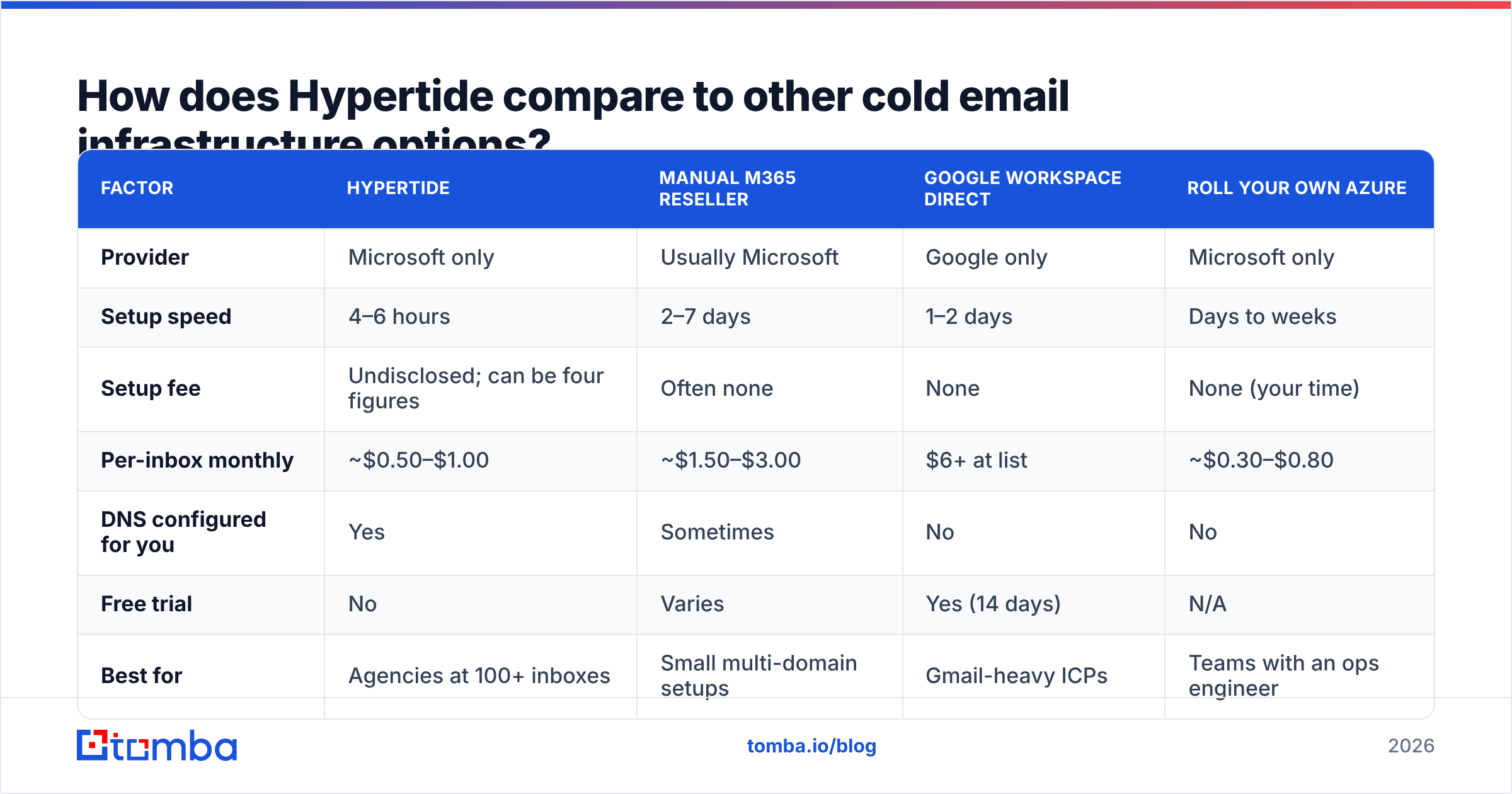
- No free trial, no free tier. You cannot evaluate the product without paying — and given the setup fee, the minimum viable test is not $50.
- Thin verifiable track record. Newer vendor, no public customer proof, review coverage dominated by competitors. That is a risk profile, not a disqualification, but price it in.
- It solves the smaller half of the problem. Infrastructure quality has a ceiling. Once your DNS is correct and your warmup is done, the variables that actually determine placement are list quality, send volume per mailbox, and content — none of which Hypertide touches.

How does Hypertide compare to other cold email infrastructure options?#
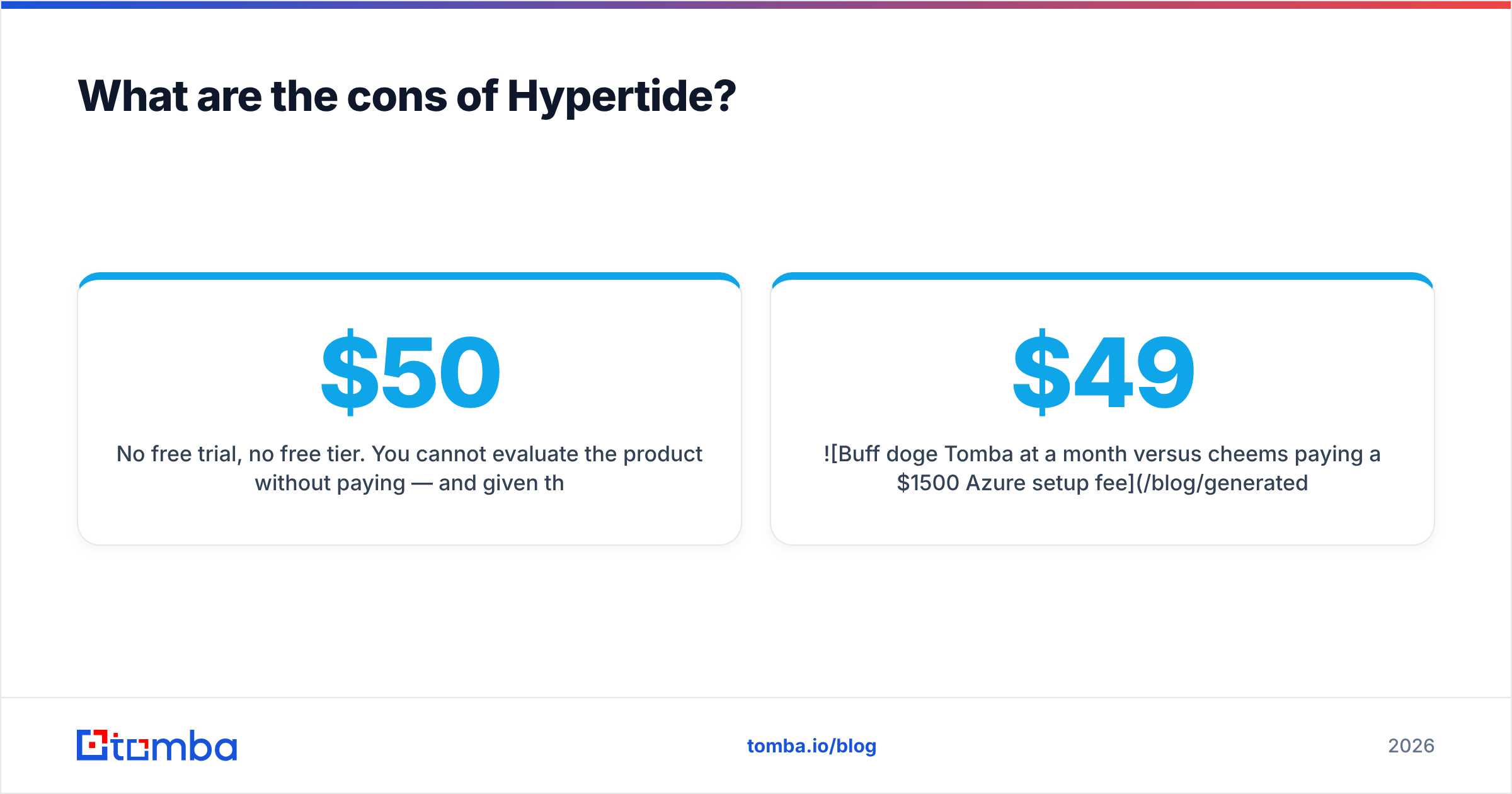
| Factor | Hypertide | Manual M365 reseller | Google Workspace direct | Roll your own Azure |
|---|---|---|---|---|
| Provider | Microsoft only | Usually Microsoft | Google only | Microsoft only |
| Setup speed | 4–6 hours | 2–7 days | 1–2 days | Days to weeks |
| Setup fee | Undisclosed; can be four figures | Often none | None | None (your time) |
| Per-inbox monthly | ~$0.50–$1.00 | ~$1.50–$3.00 | $6+ at list | ~$0.30–$0.80 |
| DNS configured for you | Yes | Sometimes | No | No |
| Free trial | No | Varies | Yes (14 days) | N/A |
| Best for | Agencies at 100+ inboxes | Small multi-domain setups | Gmail-heavy ICPs | Teams with an ops engineer |
The honest read: Hypertide's recurring economics beat manual resellers, and its automation beats doing it yourself. What it has to justify is the entry cost. If the implementation fee lands near the low end of reported figures, it is an easy yes for an agency. If it lands at $1,500+, you need to be running enough volume that a few days of saved setup time and fewer misconfigurations pay it back — realistically, that means several hundred inboxes and a business that depends on outbound.
Also worth checking before you commit: Google's bulk sender requirements apply to mail arriving at Gmail regardless of where it was sent from. Buying Microsoft inboxes does not exempt you from authentication, spam-rate, and one-click-unsubscribe rules.
Is Hypertide worth it — and what should you budget for instead?#
Verdict: Hypertide is a reasonable buy for outbound agencies running 100+ Microsoft mailboxes, and a poor buy for everyone else. The recurring price is fair. The setup fee is the deciding variable, and you cannot evaluate it from a blog post — you have to get a quote.
But before you spend anything on inboxes, run the arithmetic that most outbound teams skip. Take a 10,000-contact campaign with a 20% bad-address rate. That is 2,000 hard bounces. Send those from perfect infrastructure and you will still land in spam folders, because bounce rate is one of the strongest negative signals mailbox providers weigh. No amount of Azure tenant hygiene fixes a dirty list.
Concretely, here is where the money actually moves the needle:
- Verified contact data first. Run every address through an email verifier before it enters a sequence, and handle catch-all domains explicitly with a catch-all verifier rather than guessing.
- Accurate sourcing second. Finding the right person's real address beats finding more addresses. A domain search across target accounts produces a tighter list than a scraped export.
- Infrastructure third. Enough inboxes to spread volume, correctly authenticated. This is where Hypertide fits.
- Warmup and pacing fourth. Ramp slowly; 5,000/month per order is a ceiling, not a target for week one.
- Copy and offer last — last in sequence, first in impact once the other four are handled.
Put differently: the $1,500 setup fee question is less important than whether your list is clean. Teams routinely get this backwards, buying premium sending capacity to push unverified data — the equivalent of installing a wider pipe to move dirtier water.
Where does Tomba fit in a Hypertide stack?#
Cleanly, because the two solve different problems. Hypertide gives you mailboxes. Tomba gives you the people to put in them.
Tomba pricing starts free at 25 searches/month, with Starter at $49/mo, Growth at $99/mo, and Pro at $249/mo — so you can validate whether your data pipeline works before committing to infrastructure spend. That ordering matters: it is cheaper to discover your ICP list is thin on a free tier than after you have paid a four-figure Azure implementation fee for inboxes you will not fill.
If you are building or rebuilding an outbound motion in 2026, start with the Tomba Email Finder. Pull verified professional addresses by domain, name, or company, verify them before they ever hit a sequencer, and only then decide how many inboxes you actually need to send from. Infrastructure is easy to buy and easy to over-buy. Good data is the constraint — solve that first, and the Hypertide decision gets much simpler.
Related guides#
// get started
Find, verify and enrich your first contacts today
Start on the free plan with 25 searches a month, then scale when your team is ready.
Free plan · No credit card required · GDPR & CCPA
// about the author