Ideal Customer Profile Worksheet: A 2026 Template That Works
Most ICP documents are too vague to build a list from. Here is a nine-field ideal customer profile worksheet, a scoring model, and the data sources that make it usable on Monday morning.
TL;DR
- An ideal customer profile worksheet is a one-page filter that turns "who we sell to" into machine-readable criteria: firmographics, technographics, triggers, and disqualifiers you can actually query.
- Most ICP docs fail because they list adjectives ("innovative mid-market companies") instead of filters (
50-250 employees,Shopify Plus,has an RFP posted). - Fill nine fields, then validate every one against your last 20 closed-won and 20 closed-lost deals. Opinions lose to invoices.
- Score accounts 0-100 across four weighted buckets and split them into Tier 1 / 2 / 3. Tier 1 gets research; Tier 3 gets a newsletter.
- Refresh quarterly. A stale ICP is the single cheapest way to burn a year of pipeline.
What Is an Ideal Customer Profile Worksheet?#
An ideal customer profile worksheet is a structured document that converts your best-fit account definition into fields you can filter, score, and hand to a data provider without a translation layer.
Think of it like a grocery list versus a craving. "Something for dinner" sends you wandering the aisles for 40 minutes. "Two chicken thighs, one lemon, a bunch of parsley" gets you out in six. Your ICP document is the craving. The worksheet is the list.
Technically: the worksheet is the input specification for your list-building and data enrichment workflow. Every field must map to something a database, a scraper, or an API can return as a value. If a field cannot be queried, it is not a field. It is a feeling.
That constraint is the whole point. When your ICP lives as prose in a Notion doc, three SDRs will interpret it three ways and you will never know which interpretation produced the pipeline. When it lives as nine typed fields with allowed values, the list is reproducible and the results are attributable.
Which Fields Belong on the Ideal Customer Profile Worksheet?#
Nine fields cover 95% of B2B use cases. Add more only when you can prove the extra field changes a targeting decision.
- Firmographics — Employee count range, revenue band, entity type, and funding stage. Use ranges, never medians.
80-400 employeesis a filter; "mid-market" is an argument waiting to happen. - Industry and sub-industry — Pick NAICS or SIC codes, not vibes. "SaaS" is not an industry;
Application Software (NAICS 513210)is. Sub-industry is usually where the fit actually lives. - Geography and language — Country, region, and the language your sequence is written in. Timezone matters more than most teams admit for cold calling motions.
- Technographics — The stack signals that predict need. A payments product cares that the account runs Stripe. A CRM add-on cares that they run HubSpot or Salesforce. This is usually your strongest single predictor.
- Buying triggers — Observable events with a decay window: new funding round, a leadership hire in your buyer's function, a job posting for the role you replace, an office opening, a compliance deadline.
- Buying committee shape — Which titles must exist for a deal to close. If your product needs both a VP of Marketing and a data engineer, an account without a data engineer is not in your ICP, no matter how good the logo looks.
- Disqualifiers — The field everyone skips and everyone regrets skipping. Agencies, resellers, sub-20-employee companies, regulated verticals you cannot service, accounts with an incumbent on a three-year contract.
- Value evidence — The measurable outcome your best customers got. Not "improved efficiency." Something like "cut list-building time from 6 hours to 40 minutes per campaign."
- Contactability — Whether you can reliably reach the buyer. A perfect-fit account with a catch-all domain and zero verified addresses is a Tier 2 account in practice, not Tier 1. Check it up front with a catch-all verifier instead of discovering it after your bounce rate spikes.
Is an ICP the Same Thing as a Buyer Persona?#
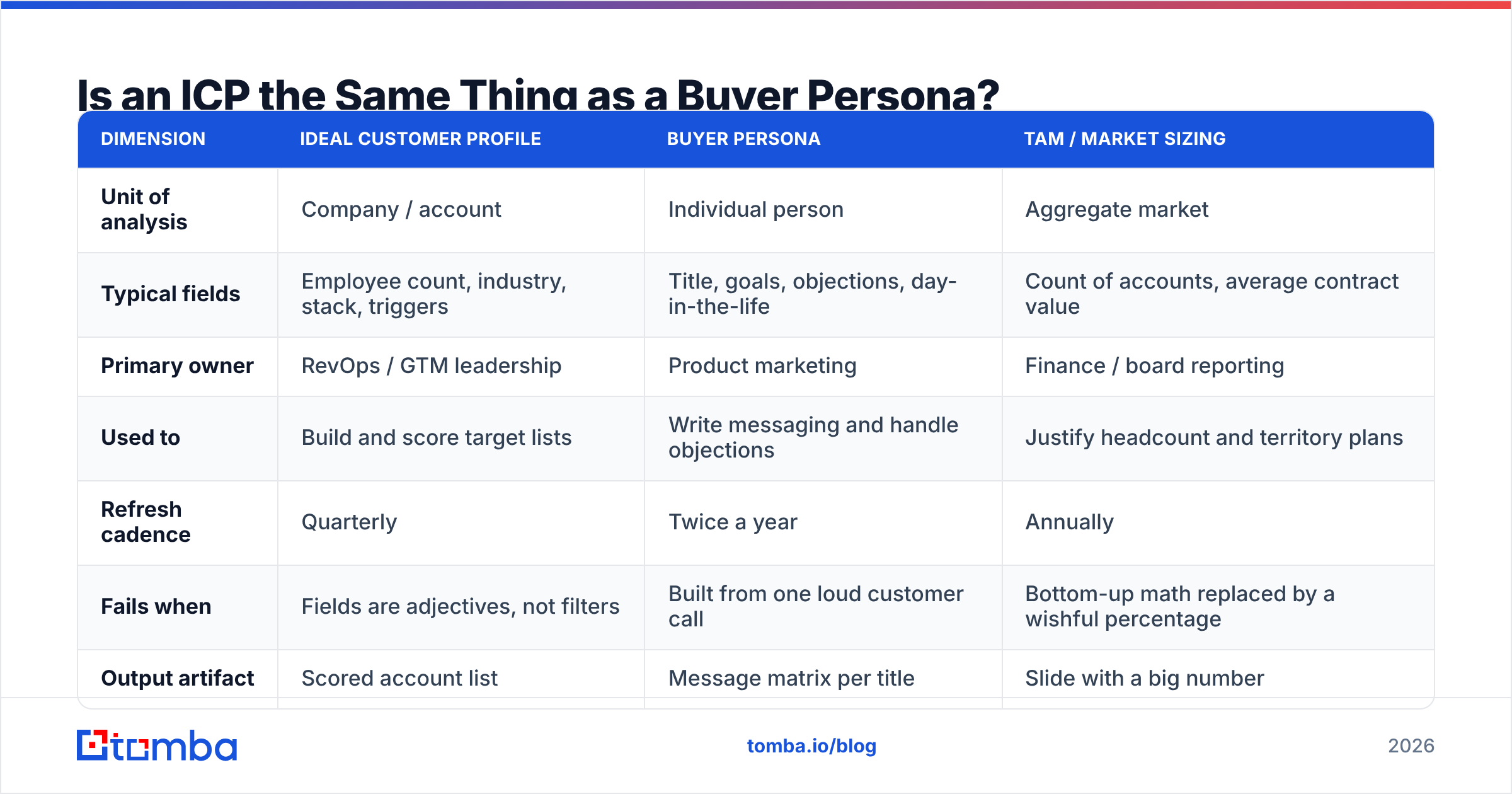
No, and conflating them is why so many worksheets produce lists nobody can sequence. An ICP describes accounts. A persona describes humans. TAM describes market size. All three are useful; only one is a targeting filter.
| Dimension | Ideal Customer Profile | Buyer Persona | TAM / Market Sizing |
|---|---|---|---|
| Unit of analysis | Company / account | Individual person | Aggregate market |
| Typical fields | Employee count, industry, stack, triggers | Title, goals, objections, day-in-the-life | Count of accounts, average contract value |
| Primary owner | RevOps / GTM leadership | Product marketing | Finance / board reporting |
| Used to | Build and score target lists | Write messaging and handle objections | Justify headcount and territory plans |
| Refresh cadence | Quarterly | Twice a year | Annually |
| Fails when | Fields are adjectives, not filters | Built from one loud customer call | Bottom-up math replaced by a wishful percentage |
| Output artifact | Scored account list | Message matrix per title | Slide with a big number |
The practical sequence: ICP first, persona second, TAM third. You need the account filter before you can count the accounts, and you need to know which accounts you want before you decide how to talk to them. Both HubSpot and Salesforce publish templates that blur these three together, which is fine for a workshop and terrible for a list build.
How Do You Fill It In Without Guessing?#
Start from revenue, not from strategy. Your closed-won data already contains your ICP; the worksheet just has to read it out loud.
Step 1: Pull your last 20 closed-won and 20 closed-lost deals. If you have fewer than 20 wins, use everything you have and treat the output as a hypothesis. Fewer than five wins means you are still in discovery and any ICP worksheet you write is a guess with a table around it.
Step 2: Enrich both cohorts identically. Append employee count, industry code, funding, and tech stack to all 40 accounts using the same source, so differences are real and not artifacts of two different data vendors. Running the accounts through a bulk email finder at this stage also tells you contactability per segment, which becomes field nine.
Step 3: Look for the split, not the average. You are not looking for "our average customer has 140 employees." You are looking for the band where win rate jumps. If accounts with 50-250 employees close at 28% and accounts above 500 close at 4%, the enterprise segment is not your ICP even if the two enterprise deals you won were the biggest logos on your wall.
Step 4: Add retention as a second filter. Wins that churn in month seven are not ICP; they are expensive lessons. Run the same analysis on accounts that renewed twice. The overlap between "closes fast" and "renews twice" is your real ideal customer profile.
Step 5: Interview five current customers from the overlap. Ask what they were doing the week before they contacted you. Their answers become your trigger field, and triggers are the highest-leverage part of the whole worksheet.
Step 6: Write the disqualifiers from your loss reasons. Read every closed-lost note. Patterns like "no dedicated ops person" or "already renewed with incumbent" become hard exclusions, and hard exclusions are what keep your list from doubling in size every quarter.
What Does a Filled-In Worksheet Actually Look Like?#
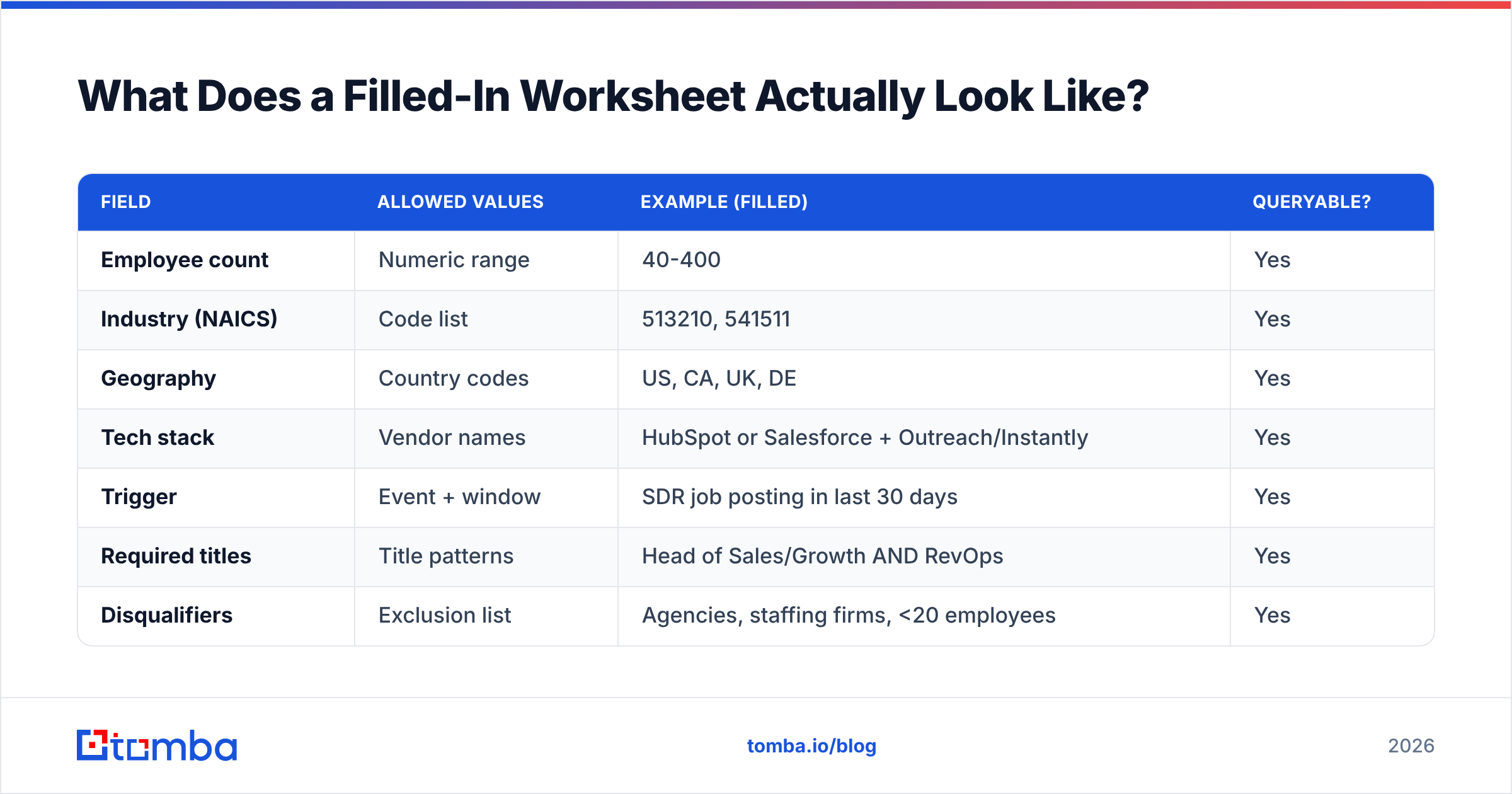
Here is the same worksheet filled for a fictional B2B data product selling to outbound teams. Copy the shape, replace the values.
| Field | Allowed values | Example (filled) | Queryable? |
|---|---|---|---|
| Employee count | Numeric range | 40-400 | Yes |
| Industry (NAICS) | Code list | 513210, 541511 | Yes |
| Geography | Country codes | US, CA, UK, DE | Yes |
| Tech stack | Vendor names | HubSpot or Salesforce + Outreach/Instantly | Yes |
| Trigger | Event + window | SDR job posting in last 30 days | Yes |
| Required titles | Title patterns | Head of Sales/Growth AND RevOps | Yes |
| Disqualifiers | Exclusion list | Agencies, staffing firms, <20 employees | Yes |
| Value evidence | Metric + delta | List build 6h to 40min per campaign | No (messaging) |
| Contactability | % verified emails | >= 60% verified on domain | Yes |
Notice that eight of nine rows are queryable. That is the test. If half your rows say "no," you have written a positioning statement, not an ideal customer profile worksheet.
How Do You Turn the Worksheet Into a Scoring Model?#
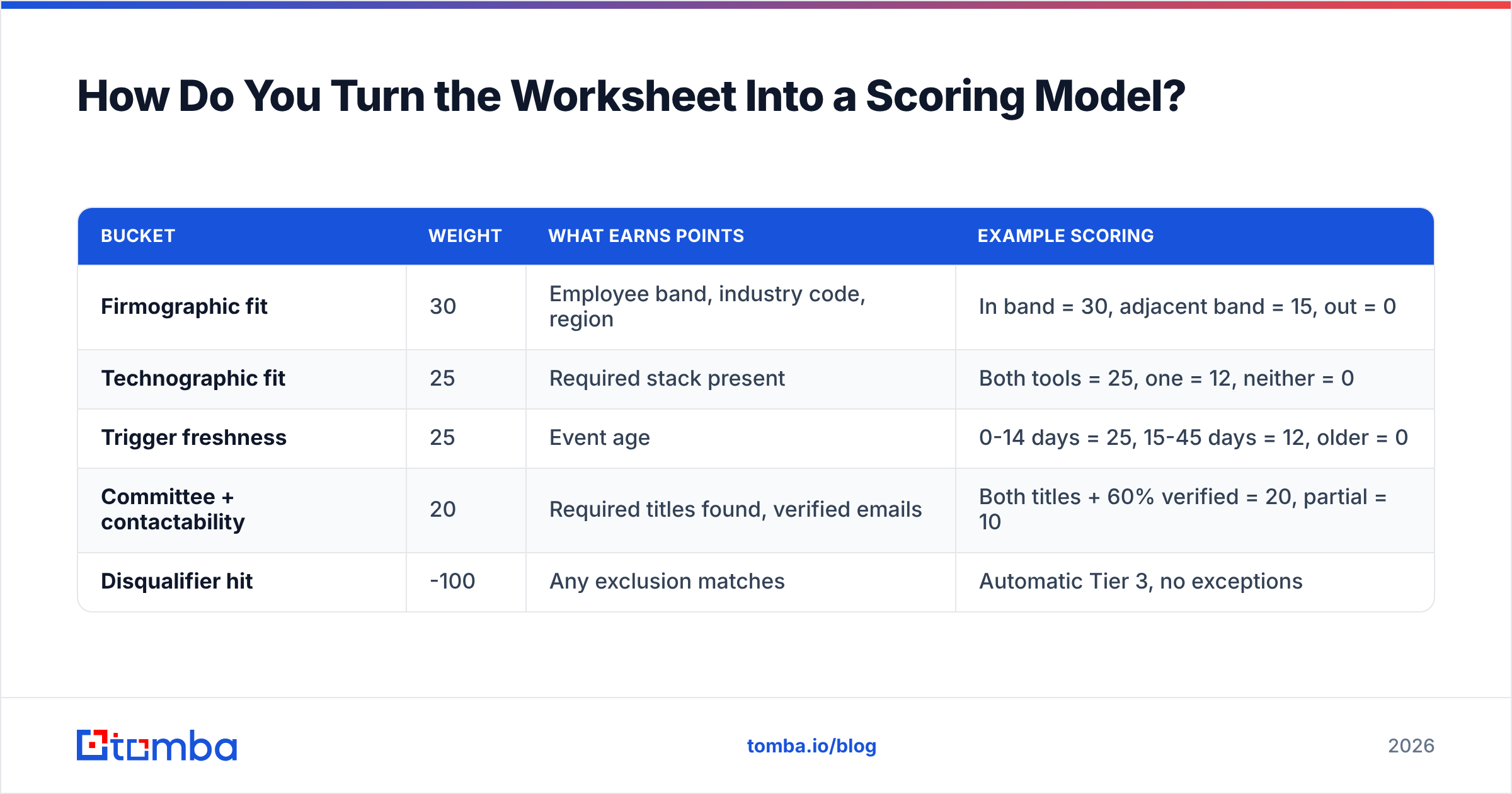
Weight four buckets, cap at 100, and cut at fixed thresholds. Fancier models exist; almost none of them outperform this one at the sizes most teams operate at.
| Bucket | Weight | What earns points | Example scoring |
|---|---|---|---|
| Firmographic fit | 30 | Employee band, industry code, region | In band = 30, adjacent band = 15, out = 0 |
| Technographic fit | 25 | Required stack present | Both tools = 25, one = 12, neither = 0 |
| Trigger freshness | 25 | Event age | 0-14 days = 25, 15-45 days = 12, older = 0 |
| Committee + contactability | 20 | Required titles found, verified emails | Both titles + 60% verified = 20, partial = 10 |
| Disqualifier hit | -100 | Any exclusion matches | Automatic Tier 3, no exceptions |
Then tier it:
- Tier 1 (75-100): Manual research, personalized first line, multithreaded across two titles, phone included.
- Tier 2 (45-74): Templated sequence with one dynamic variable, email only.
- Tier 3 (below 45): Nurture, content, or nothing. Do not let an SDR "just try a few."
The tiering is where most teams recover their response rate. Spraying a 12,000-row list at 0.4% reply is not an outbound problem or a copy problem. It is an ICP problem wearing an outbound costume.

Which Tools Do You Need to Operationalize the Worksheet?#
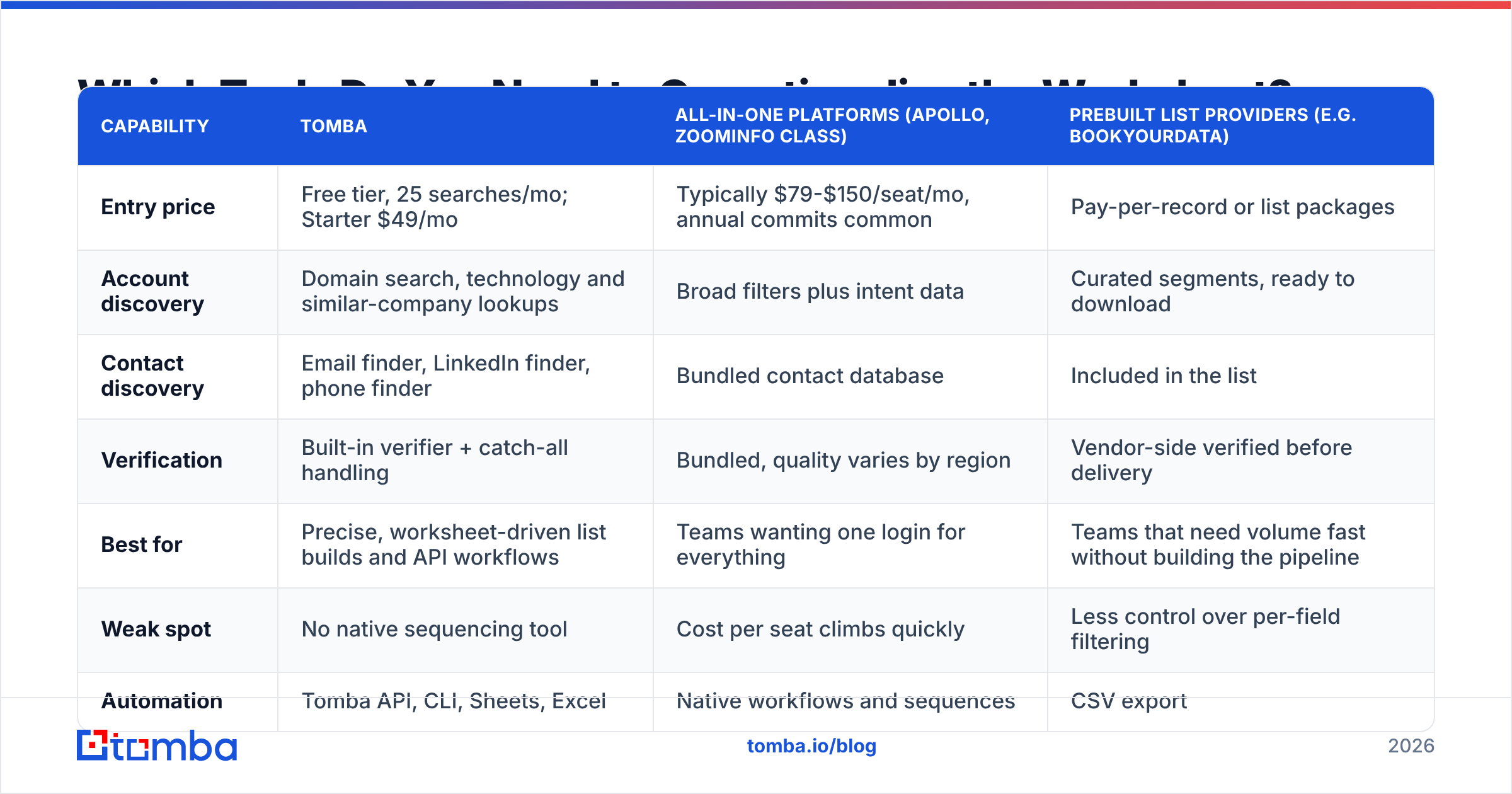
You need three capabilities: account discovery (who matches the filters), contact discovery (who to email), and verification (will it land). Some tools do one well; some bundle all three at a higher price.
| Capability | Tomba | All-in-one platforms (Apollo, ZoomInfo class) | Prebuilt list providers (e.g. BookYourData) |
|---|---|---|---|
| Entry price | Free tier, 25 searches/mo; Starter $49/mo | Typically $79-$150/seat/mo, annual commits common | Pay-per-record or list packages |
| Account discovery | Domain search, technology and similar-company lookups | Broad filters plus intent data | Curated segments, ready to download |
| Contact discovery | Email finder, LinkedIn finder, phone finder | Bundled contact database | Included in the list |
| Verification | Built-in verifier + catch-all handling | Bundled, quality varies by region | Vendor-side verified before delivery |
| Best for | Precise, worksheet-driven list builds and API workflows | Teams wanting one login for everything | Teams that need volume fast without building the pipeline |
| Weak spot | No native sequencing tool | Cost per seat climbs quickly | Less control over per-field filtering |
| Automation | Tomba API, CLI, Sheets, Excel | Native workflows and sequences | CSV export |
There is no universally correct row. If your worksheet leans on tech stack and triggers, you want granular discovery plus verification and you will assemble the rest. If your worksheet is mostly firmographic and you need 5,000 records this week, a curated list provider like BookYourData is a legitimately faster path and the fit quality can be strong for standard segments. If your team wants one vendor and has the budget, the all-in-ones earn their price on convenience. Check current standing on G2 before committing to an annual contract; category leadership in this space moves every few quarters.
Whatever you pick, wire the worksheet to it. A field that lives in a doc nobody queries is decoration. See Tomba pricing if you want to compare per-credit economics against a seat-based platform at your volume.
What Are the Most Common ICP Worksheet Mistakes?#
Writing adjectives instead of filters. "Forward-thinking companies that value data" cannot be queried. Every field needs an operator: equals, in range, contains, exists.
Skipping disqualifiers. Without exclusions, every list build drifts toward "all B2B companies with a website." Disqualifiers are the only thing keeping your worksheet honest as the pressure to hit volume increases.
Confusing best logo with best fit. The Fortune 500 pilot that took 11 months and churned is not your ICP. Weight by win rate and retention, not by logo prestige.
Building it once. An ICP written in Q1 2025 is describing a market that no longer exists. Product changed, competitors changed, buyer budgets changed.
Letting one loud customer define it. The customer who emails you weekly is not statistically representative. They are just loud.
Ignoring contactability. Perfect-fit accounts where you cannot reach the buyer produce zero revenue. If a segment consistently shows sub-40% verified addresses, it needs a different channel, not a bigger sequence.
No owner. If the worksheet has no named owner in revenue operations, it will rot. Assign it. Put the review on the calendar.
How Often Should You Refresh Your ICP Worksheet?#
Quarterly, with a hard trigger for off-cycle reviews.
The quarterly review is a 60-minute meeting with one input: the last quarter's closed-won, closed-lost, and churned accounts scored against the current worksheet. Three questions:
- Did Tier 1 accounts close at a materially higher rate than Tier 2? If not, your scoring weights are wrong.
- Did any closed-won account score below 45? If yes, you have a missing field or a wrong band.
- Did any disqualifier block an account that a rep later closed? If yes, the exclusion is too broad.
Refresh off-cycle whenever you ship a pricing change, enter a new region, launch a product line, or watch a competitor reposition. Gartner research on B2B buying consistently finds committee sizes and buying-group behavior shifting faster than most sales orgs update their targeting assumptions, and the worksheet is where that lag shows up first.
One more habit worth building: keep a changelog. When win rate moves, you want to know which worksheet version produced the list. Without version history, every performance conversation becomes a debate about memory.
Ready to Build the List Your Worksheet Describes?#
A finished ideal customer profile worksheet is worth exactly as much as the list you build from it. Once your nine fields are filled and your tiers are set, you need verified contacts at the accounts that match, not a scraped CSV with a 22% bounce rate attached.
Start with Tomba Email Finder to turn matched accounts into verified, reachable contacts, using domain search to map the buying committee at each Tier 1 account. The free tier gives you 25 searches a month to test your worksheet against real data before you commit, and Starter runs $49/mo when you are ready to scale the motion. Fill the worksheet first, then let the data do what your adjectives never could.
Related guides#
// get started
Find, verify and enrich your first contacts today
Start on the free plan with 25 searches a month, then scale when your team is ready.
Free plan · No credit card required · GDPR & CCPA
// about the author