How to Identify Decision Makers in B2B Sales (2026 Guide)
Most cold outreach dies because it lands in the wrong inbox. Here is the 2026 playbook for finding the person who actually signs — job titles, buying committees, org-chart signals, and the tools that get you their email.
TL;DR
- The average B2B purchase in 2026 involves 6–11 people, so "the decision maker" is almost never one person — it's a committee with one economic buyer and several people who can quietly kill the deal.
- Job title alone is a weak signal. Budget authority, tool ownership, and who gets blamed when the problem persists are far stronger.
- Build a repeatable identification loop: map the account, classify roles (economic, champion, technical, user, blocker), verify contact data, then multithread.
- Skipping verification wastes your best research — a perfectly targeted email to a bounced address counts as zero.
- Tools help at the contact layer, not the judgment layer. Use a email finder to get the address; use qualification questions to confirm the authority.
What does "identify decision makers" actually mean in 2026?#
It means finding the smallest set of people who can say yes, plus the people who can say no.
Think of a B2B purchase like getting a mortgage approved. There's the loan officer who likes you, the underwriter who checks the math, the compliance team that can veto for reasons nobody explains, and the branch manager whose signature makes it real. Calling only the friendly loan officer feels productive. It closes nothing.
Gartner's research on B2B buying has consistently put the typical buying group at six to ten stakeholders, each arriving with their own four or five independently gathered pieces of information. That number has crept upward as procurement, security review, and finance approval became standard for tools that cost more than a few thousand dollars a year. According to Gartner's B2B buying research, buyers spend only about 17% of the purchase journey talking to any supplier at all — split across every vendor they're considering.
So when you "identify decision makers," you're doing three jobs at once:
- Find the economic buyer — the person whose budget the money comes out of. One per deal, usually.
- Find the champion — the person with the pain, who will sell internally when you're not in the room.
- Map the veto players — security, legal, procurement, IT, and the incumbent vendor's internal advocate.
Get all three and you have a deal map. Get only the first and you have a stalled opportunity that dies in "we're circling back next quarter."

Who are the five roles inside a buying committee?#
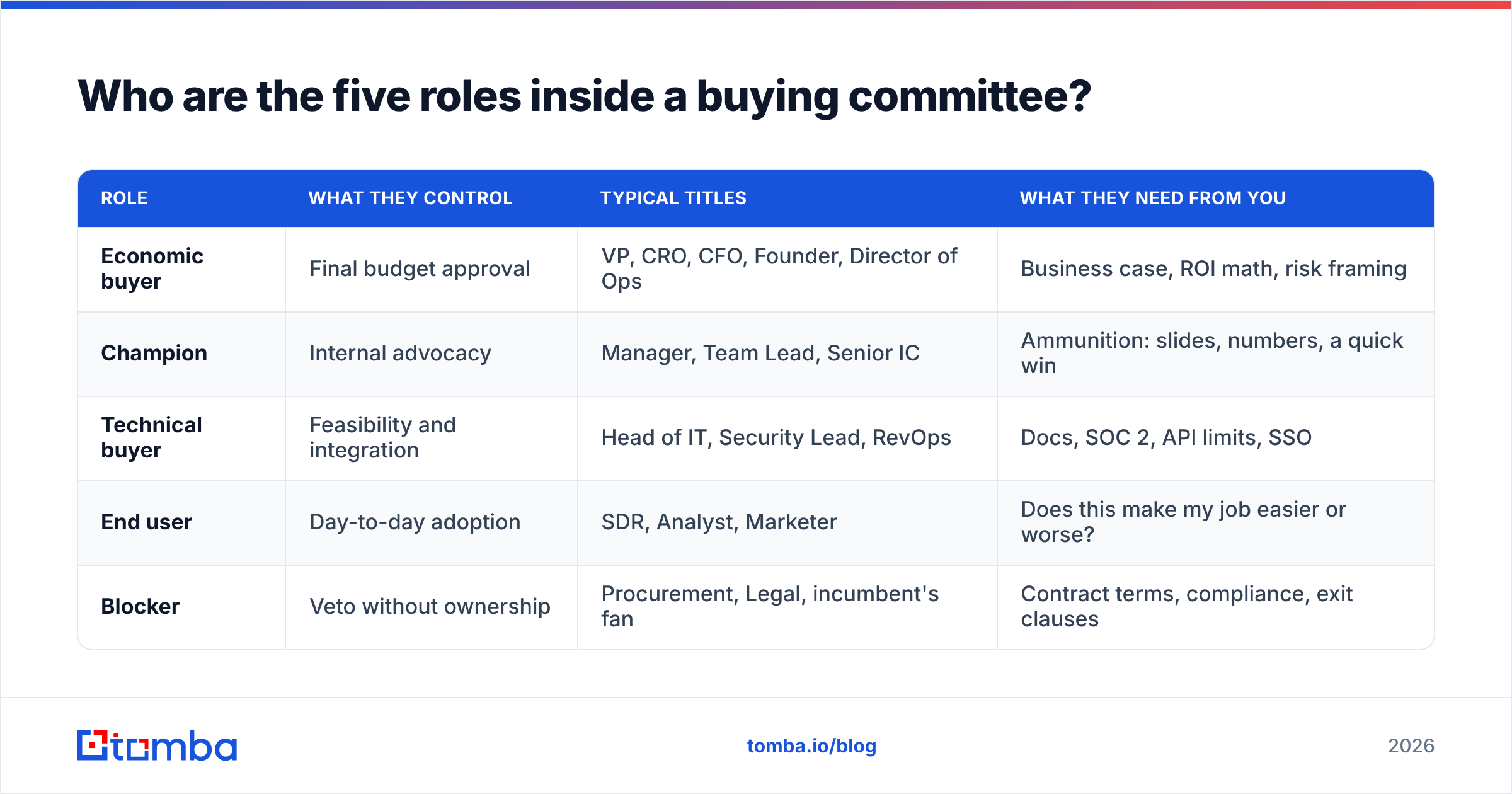
Every functioning buying committee contains the same five roles, even in a 40-person startup where one person wears three of them.
| Role | What they control | Typical titles | What they need from you |
|---|---|---|---|
| Economic buyer | Final budget approval | VP, CRO, CFO, Founder, Director of Ops | Business case, ROI math, risk framing |
| Champion | Internal advocacy | Manager, Team Lead, Senior IC | Ammunition: slides, numbers, a quick win |
| Technical buyer | Feasibility and integration | Head of IT, Security Lead, RevOps | Docs, SOC 2, API limits, SSO |
| End user | Day-to-day adoption | SDR, Analyst, Marketer | Does this make my job easier or worse? |
| Blocker | Veto without ownership | Procurement, Legal, incumbent's fan | Contract terms, compliance, exit clauses |
The mistake most reps make is treating the org chart as the committee map. They are different documents. A Director of Revenue Operations may have zero headcount and total veto power over anything touching the CRM. A VP of Sales with 40 reps may have no discretionary budget at all because tooling spend was centralized into RevOps two years ago.
The tell is who owns the tool category today. Whoever renews the contract you're trying to replace is on the committee, guaranteed.
Why do job titles fail as a signal?#
Titles inflate and fragment faster than any data provider can keep up.
Three failure modes show up constantly:
- Title inflation. "Head of Growth" at a 12-person company means the person doing everything. At a 900-person company it means a team lead three levels below budget.
- Title fragmentation. "Revenue Operations," "Sales Operations," "GTM Operations," "Business Operations," and "Deal Desk" can all mean the same function depending on the company's age and funding stage.
- Stale titles. Someone got promoted in March and never updated LinkedIn. Your list says Manager. Their calendar says VP.
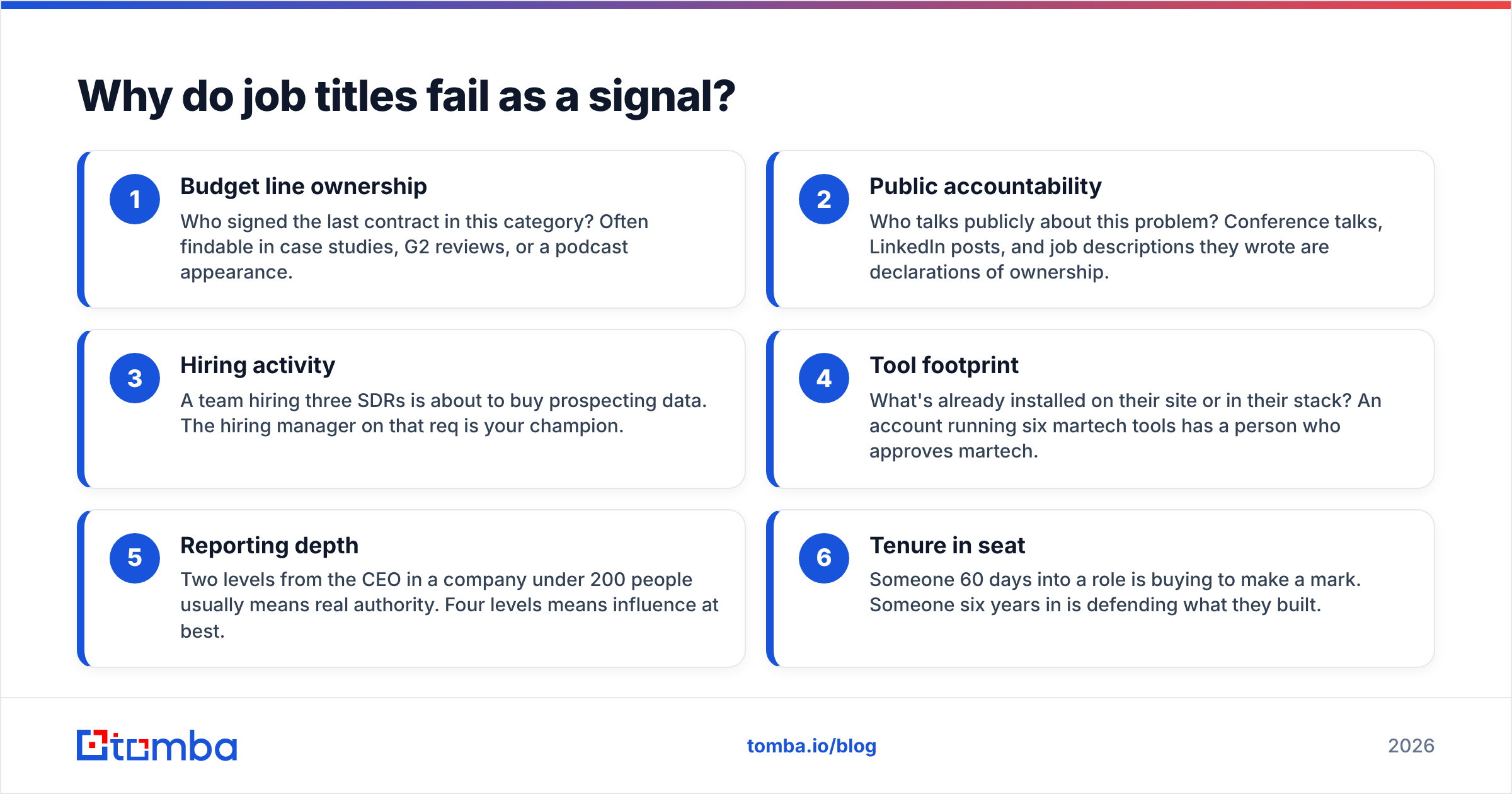
A more reliable set of signals, ranked roughly by how predictive they are:
- Budget line ownership — Who signed the last contract in this category? Often findable in case studies, G2 reviews, or a podcast appearance.
- Public accountability — Who talks publicly about this problem? Conference talks, LinkedIn posts, and job descriptions they wrote are declarations of ownership.
- Hiring activity — A team hiring three SDRs is about to buy prospecting data. The hiring manager on that req is your champion.
- Tool footprint — What's already installed on their site or in their stack? An account running six martech tools has a person who approves martech.
- Reporting depth — Two levels from the CEO in a company under 200 people usually means real authority. Four levels means influence at best.
- Tenure in seat — Someone 60 days into a role is buying to make a mark. Someone six years in is defending what they built.
Cross-reference two of these and your hit rate on "is this the right person" jumps well above what title filtering alone gives you.
How do you research an account before you write a single email?#
Work outside-in, and timebox it. Fifteen minutes per account for a mid-market target, three minutes for SMB, an hour for enterprise.
Step 1 — Establish the trigger. Why now? Funding round, new exec hire, product launch, an open req, a competitor mention, a compliance deadline. No trigger, no urgency, no committee.
Step 2 — Map the function. Use LinkedIn's people filter on the company page, filtered by department and seniority. Screenshot the org shape. You're looking for the shallowest path from the pain to the budget.
Step 3 — Read what they publish. Job descriptions are the single most underused source of buying intent. A JD that lists "manage our outbound data stack" tells you the category is owned and the owner is hiring help.
Step 4 — Check the tech stack. A website tech stack lookup tells you what they already run. If they've deployed a competitor, you've found the incumbent — and the person who championed it.
Step 5 — Resolve contacts. Now, and only now, do you spend credits. Run a domain search to pull the company's verified email pattern and the people attached to it, then confirm individual addresses.
Step 6 — Verify before sending. Run every address through an email verifier. A bounce doesn't just fail to reach one person; it degrades the sending reputation that gets your next 500 emails delivered.
Notice that contact data is step five, not step one. Reps who start with a list and reverse-engineer a reason to email it produce the outreach everyone deletes.
Which tools actually help identify decision makers?#
Tools split cleanly into two jobs: finding who (intelligence) and reaching them (contact data). Most platforms claim both and are genuinely good at one.
| Capability | Tomba | Apollo | ZoomInfo | BookYourData |
|---|---|---|---|---|
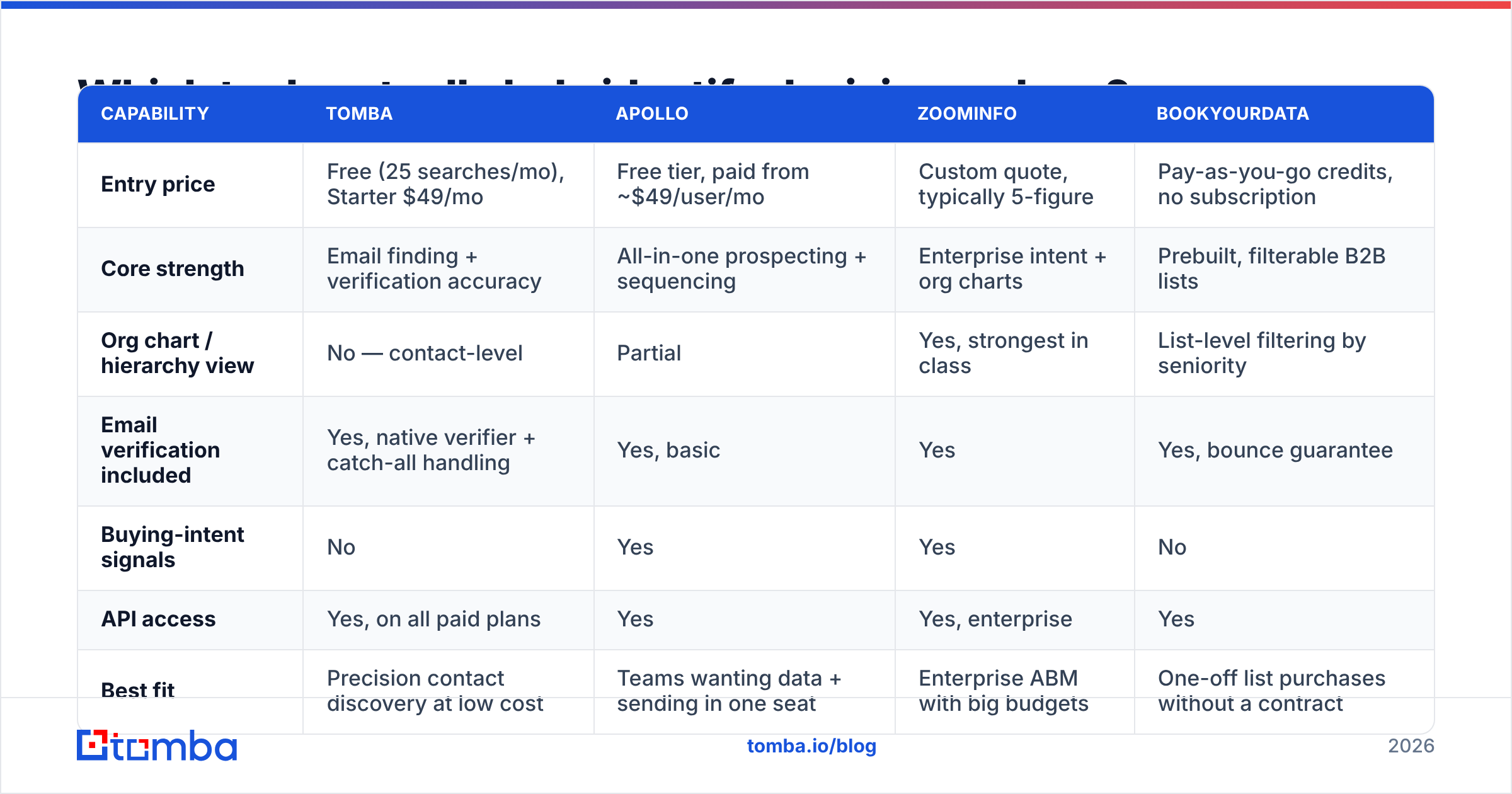
| Entry price | Free (25 searches/mo), Starter $49/mo | Free tier, paid from ~$49/user/mo | Custom quote, typically 5-figure | Pay-as-you-go credits, no subscription |
| Core strength | Email finding + verification accuracy | All-in-one prospecting + sequencing | Enterprise intent + org charts | Prebuilt, filterable B2B lists |
| Org chart / hierarchy view | No — contact-level | Partial | Yes, strongest in class | List-level filtering by seniority |
| Email verification included | Yes, native verifier + catch-all handling | Yes, basic | Yes | Yes, bounce guarantee |
| Buying-intent signals | No | Yes | Yes | No |
| API access | Yes, on all paid plans | Yes | Yes, enterprise | Yes |
| Best fit | Precision contact discovery at low cost | Teams wanting data + sending in one seat | Enterprise ABM with big budgets | One-off list purchases without a contract |
Read that table honestly: if you need visual org charts and intent scoring across 10,000 accounts, ZoomInfo earns its price and Tomba does not compete on that axis. If you have already identified the humans and need their verified addresses without a per-seat contract, the calculus flips hard. BookYourData is a strong option when you want a clean, filtered list delivered rather than built — different workflow, same goal.
A practical stack for most teams under 50 reps:
- Intelligence layer: LinkedIn Sales Navigator (free-ish if you already pay) + the company's own careers page and newsroom.
- Contact layer: a dedicated finder and verifier. See Tomba pricing for where the Starter and Growth tiers land.
- Enrichment layer: data enrichment to backfill title, seniority, and company size onto rows you already have.
- Delivery layer: whatever sequencer you already run.
Buying a $30k platform to solve a $600 problem is the most common tooling error in outbound. Buying six $50 tools that don't talk to each other is the second.

How do you confirm someone is actually a decision maker?#
You ask. Directly, but framed as helping them rather than qualifying them.
The old-school "are you the decision maker?" question fails because it's insulting when the answer is no and useless when the answer is a reflexive yes. Better phrasings, in rough order of usefulness:
- "Who else would need to weigh in before something like this moves forward?" — Assumes a committee, which is accurate, and invites a list.
- "When your team last brought in a tool like this, what did the approval path look like?" — Asks about process, not power. People answer process questions honestly.
- "Is this budget coming out of your line or somewhere central?" — Surfaces the economic buyer without asking about status.
- "If we're a fit, what would kill this internally?" — Names the blockers for you.
Listen for pronoun shifts. "I'd want to see..." means authority. "We'd have to check with..." means influence. "They'd never approve..." means you're talking to a user, and you need a new entry point.
What is multithreading and why does it decide your win rate?#
Multithreading means having active conversations with three or more people in an account simultaneously. It's the single highest-leverage habit in complex B2B sales.
The math is unforgiving. Single-threaded deals die when one person leaves, gets reorged, goes on leave, or simply goes quiet — and executive turnover in revenue roles runs high enough that this happens constantly. Deals with three or more engaged contacts survive those events. Research from firms like Forrester on buying-group engagement has repeatedly found that opportunities with broader stakeholder coverage convert at materially higher rates than single-contact deals.
How to multithread without looking desperate:
- Enter sideways, then go up. Start with the practitioner who feels the pain. Earn a referral upward. A warm internal intro beats a cold VP email by an order of magnitude.
- Give each contact a distinct reason to talk to you. The champion gets a business case. The technical buyer gets the API docs. The end user gets a five-minute demo of the thing that annoys them daily. Sending everyone the same email is how you get outed as spraying.
- Never surprise your champion. Tell them you're reaching out to their boss before you do it. "I'm going to send Sarah a short note with the numbers we discussed — anything I should avoid?" costs nothing and buys enormous trust.
- Use phone for the senior tier. Executives answer phones more reliably than they answer cold email. A phone finder closes the gap when the email path stalls.
- Track the map, not the contacts. Your CRM should show roles, not just names. Add a custom field for committee role and update it after every call.
Your response rate on any one thread will always look mediocre in isolation. Across four threads on the same account, the probability that at least one replies is the number that matters.
What are the most common mistakes when identifying decision makers?#
Five patterns account for most wasted outbound effort:
- Going straight to the C-suite on a $5k product. A CEO doesn't approve a $5,000 line item; they delegate it and your email gets forwarded with no context. Match seniority to deal size.
- Confusing responsive with powerful. The person who replies fastest is often the person with the most free time, which is rarely the person with the budget. Pleasant conversations that never advance are the symptom.
- Building the list before the thesis. Filtering for "VP Sales, 50–200 employees, US" produces a list, not a strategy. Start from the trigger and work to the person.
- Ignoring the blocker until contract stage. Security review and procurement will appear eventually. Finding them at week two costs you an hour. Finding them at week ten costs you the quarter.
- Skipping verification to save credits. Every bounce hits your domain reputation. Deliverability compounds in both directions — see the fundamentals of email deliverability if this is new to you.
There's a sixth, subtler one: treating identification as a one-time task. Committees change. The champion who loved you in March gets reorged in June. Re-map any account that's been open more than 60 days.
How do you build a repeatable decision-maker workflow?#
Turn the above into a checklist your team runs identically every time. Consistency beats brilliance here, because the failure mode of decision-maker research is that it's inconsistent, not that it's hard.
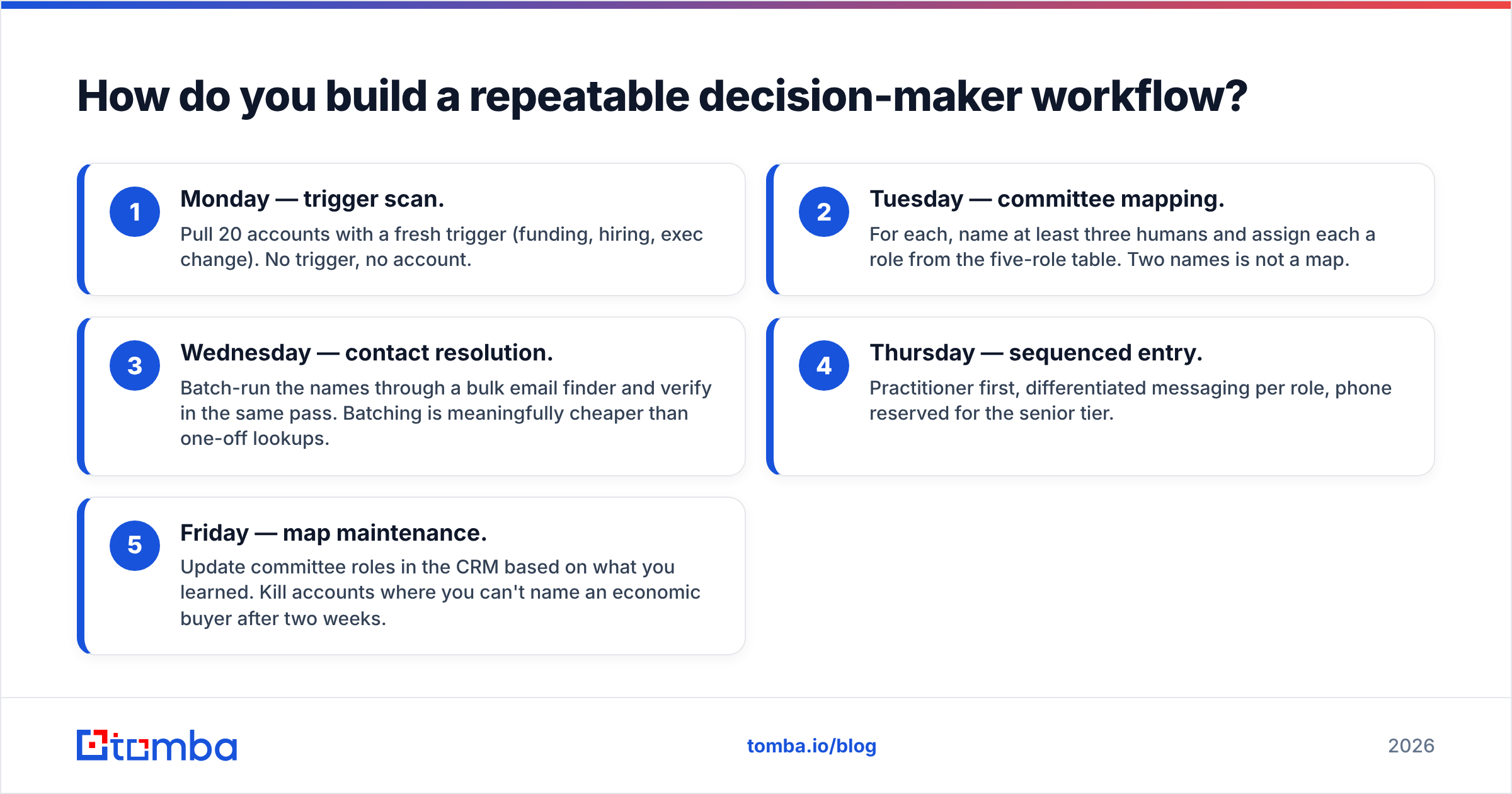
A workable weekly cadence for one rep:
- Monday — trigger scan. Pull 20 accounts with a fresh trigger (funding, hiring, exec change). No trigger, no account.
- Tuesday — committee mapping. For each, name at least three humans and assign each a role from the five-role table. Two names is not a map.
- Wednesday — contact resolution. Batch-run the names through a bulk email finder and verify in the same pass. Batching is meaningfully cheaper than one-off lookups.
- Thursday — sequenced entry. Practitioner first, differentiated messaging per role, phone reserved for the senior tier.
- Friday — map maintenance. Update committee roles in the CRM based on what you learned. Kill accounts where you can't name an economic buyer after two weeks.
The whole loop is roughly six hours a week and replaces the twenty hours most reps spend emailing people who were never going to be able to say yes.
Ready to reach the person who actually signs?#
Identification is judgment work — no tool does it for you. But once you know the name, getting a verified, deliverable address should take seconds, not an afternoon of guessing at email patterns.
That's the part Tomba Email Finder handles. Search by domain, name, or company; get the address with a confidence score; verify it in the same workflow before it ever hits your sequencer. The free tier gives you 25 searches a month to test the accuracy on accounts you already know, and Starter runs $49/mo when you're ready to scale the loop above across a full territory.
Map the committee first. Then go find them.
Related guides#
// get started
Find, verify and enrich your first contacts today
Start on the free plan with 25 searches a month, then scale when your team is ready.
Free plan · No credit card required · GDPR & CCPA
// about the author