If an Email Address Doesn't Exist, Will It Bounce Back? (2026)
Sometimes yes, sometimes no — and the silent failures are the ones wrecking your sender reputation. Here's exactly what happens when you email an address that was never real.
TL;DR
- Yes, most of the time. If you send to an address that doesn't exist on a normally configured mail server, you get a hard bounce — usually SMTP code
550 5.1.1— within seconds. - No, not always. Catch-all domains accept every address at the door, silent-drop servers accept and delete, and aggressive spam filters may swallow the rejection without ever notifying you.
- Bounces cost you more than a wasted send. Mailbox providers read your bounce rate as a spam signal. Cross roughly 2% and Gmail and Outlook start throttling everything you send.
- The gap between "bounced" and "delivered" is not the same as "real" and "fake." A delivered message can still land in a black hole.
- The only reliable fix is checking addresses before you send, not counting bounces after.
What actually happens when you email an address that doesn't exist?#
Think of SMTP like a courier delivering a parcel to an apartment building. The courier reaches the front desk (the receiving mail server) and asks for "Apartment 4B, Sarah Chen." The desk clerk checks the resident list. If nobody by that name lives there, the clerk hands the parcel straight back with a note. That note is your bounce message.
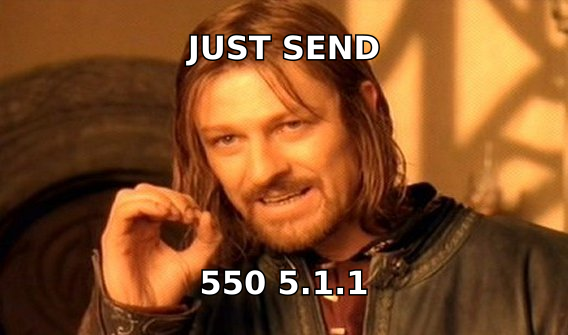
Technically, the handoff happens during the SMTP conversation, before your message body is even transmitted. Your sending server issues a RCPT TO: command with the recipient address. The receiving server replies with a status code. If the mailbox doesn't exist, a properly configured server answers with a 5xx permanent failure:
RCPT TO: <sarah.chen@example.com>
550 5.1.1 The email account that you tried to reach does not exist.
Your server then generates a Non-Delivery Report (NDR) — the "Mail Delivery Subsystem" email that shows up in your inbox — and stops trying. That's a hard bounce. It's permanent. Retrying does nothing.
The whole exchange typically completes in under three seconds. If you sent to a genuinely nonexistent address on a Google Workspace or Microsoft 365 domain, you almost certainly had the bounce in your inbox before you finished reading your sent folder.
What do the bounce codes actually mean?#
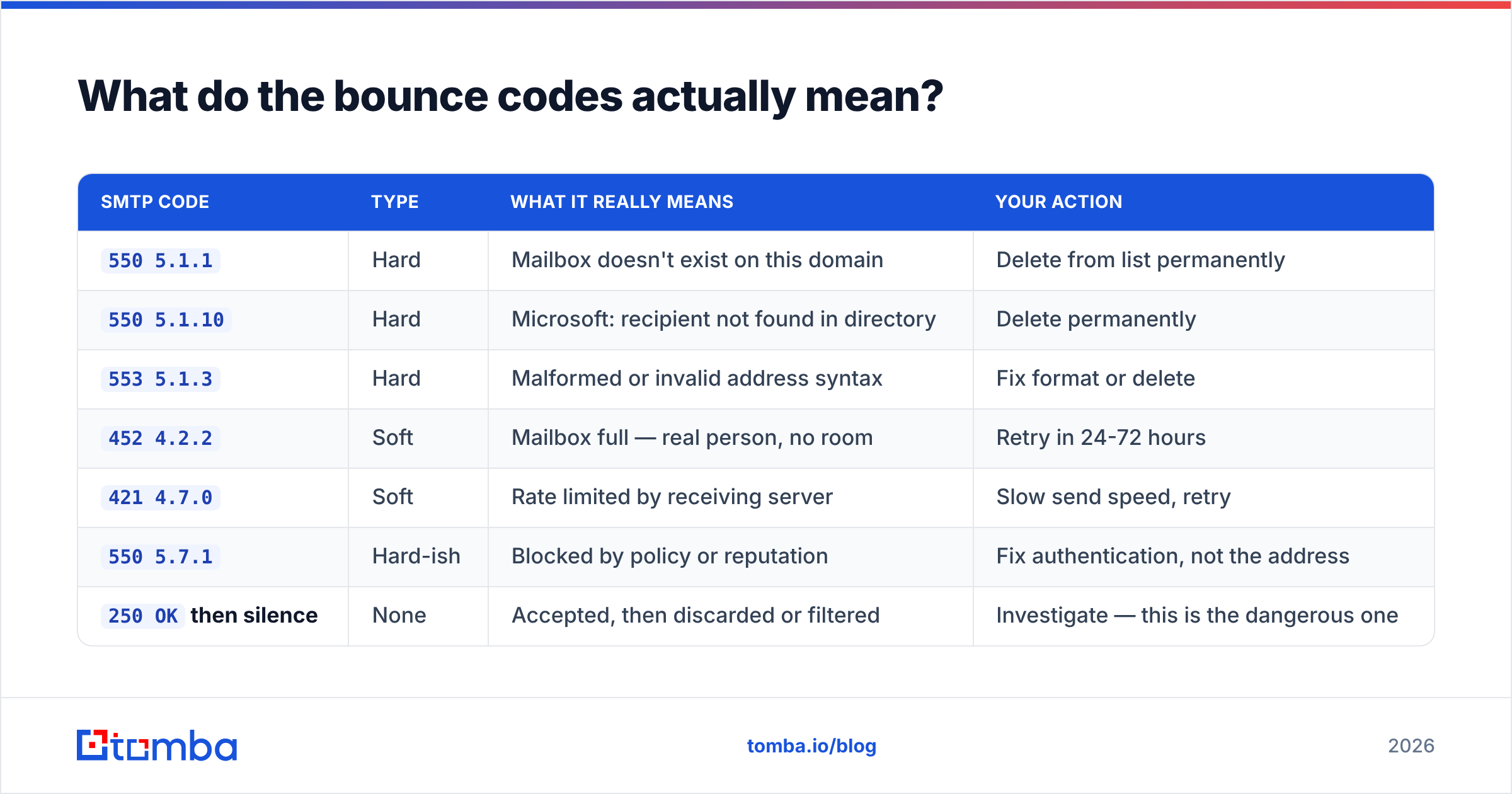
Not every bounce means "this person doesn't exist." Reading the code tells you whether to delete the contact, retry later, or fix your own setup. Here's the practical decoder:
| SMTP code | Type | What it really means | Your action |
|---|---|---|---|
550 5.1.1 |
Hard | Mailbox doesn't exist on this domain | Delete from list permanently |
550 5.1.10 |
Hard | Microsoft: recipient not found in directory | Delete permanently |
553 5.1.3 |
Hard | Malformed or invalid address syntax | Fix format or delete |
452 4.2.2 |
Soft | Mailbox full — real person, no room | Retry in 24-72 hours |
421 4.7.0 |
Soft | Rate limited by receiving server | Slow send speed, retry |
550 5.7.1 |
Hard-ish | Blocked by policy or reputation | Fix authentication, not the address |
250 OK then silence |
None | Accepted, then discarded or filtered | Investigate — this is the dangerous one |
The last row is where most people get burned. A 250 OK is not proof of a real human. It means the server agreed to take the message. What happens after that is entirely up to the receiving system.
When does a nonexistent address NOT bounce?#
Four scenarios, and each one breaks the assumption that "no bounce means it worked."
1. Catch-all domains. Some organizations configure their mail server to accept mail for every address at the domain, existing or not. nonsense-string-9271@theircompany.com gets a clean 250 OK. The message either lands in an admin's overflow inbox or gets quietly binned. Catch-alls are common at smaller companies, agencies, and domains using certain hosting defaults. Standard SMTP verification cannot distinguish a real mailbox from a fabricated one on these domains — you need a dedicated catch-all verifier that uses secondary signals rather than a single handshake.
2. Silent drops. A minority of mail servers accept the message and then delete it without generating an NDR. This is sometimes deliberate anti-harvesting policy: bouncing tells a spammer which addresses are live, so the admin refuses to tell anyone anything. From your side, it's indistinguishable from a successful delivery.
3. Greylisting and deferred rejection. Some servers accept during the SMTP session and evaluate afterward. If the address doesn't exist, the rejection is generated later as an asynchronous bounce — and if your sending domain lacks proper SPF record alignment, that bounce may itself fail to deliver back to you.
4. Your ESP suppressed it. Most cold email platforms and ESPs absorb bounce notifications into a dashboard instead of forwarding NDRs to your inbox. The bounce happened; you just never saw the email. Check the platform's suppression list before assuming silence means success.
Why does a high bounce rate hurt more than the wasted send?#
Because mailbox providers treat it as a spam fingerprint.
Legitimate senders email people who asked to hear from them, and those addresses are mostly valid. Spammers email scraped and guessed lists, and those lists are full of dead addresses. So a spike in hard bounces looks, statistically, exactly like list-buying behavior. Google's Postmaster Tools documentation and Microsoft's SNDS both surface this signal to receiving systems, and both weight it heavily in sender reputation scoring.
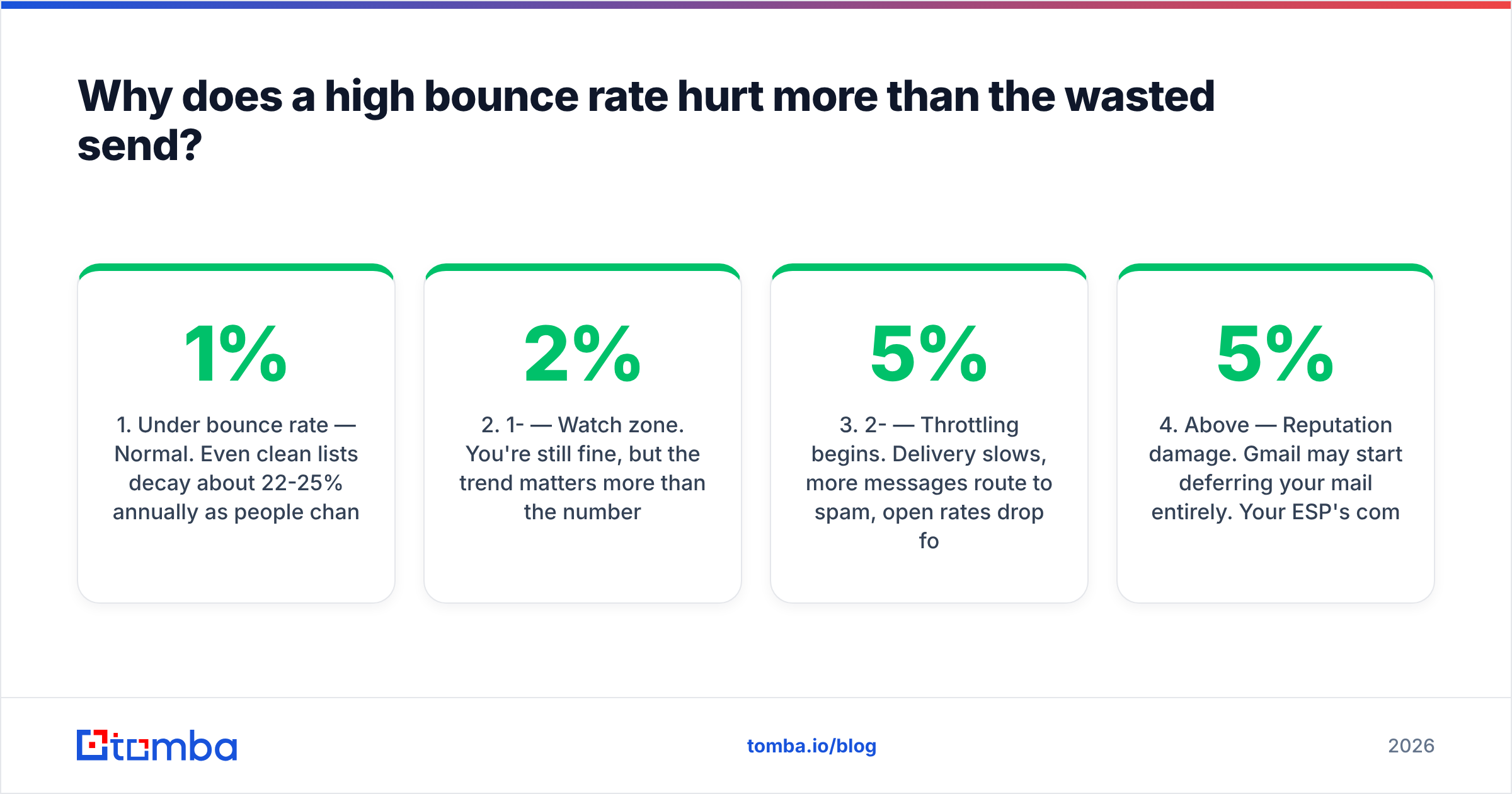
The consequences escalate in a predictable order:
- Under 1% bounce rate — Normal. Even clean lists decay about 22-25% annually as people change jobs, so some bounce is unavoidable.
- 1-2% — Watch zone. You're still fine, but the trend matters more than the number.
- 2-5% — Throttling begins. Delivery slows, more messages route to spam, open rates drop for reasons that look like bad copy but aren't.
- Above 5% — Reputation damage. Gmail may start deferring your mail entirely. Your ESP's compliance team may email you.
- Above 10% — Account suspension territory at most reputable sending platforms.
The cruel part: the damage applies to your whole domain, not just the bad campaign. Your invoices, your support replies, and your recruiting outreach all inherit the reputation hit. Repairing email deliverability after a serious bounce event takes weeks of reduced volume, not a single afternoon of cleanup.
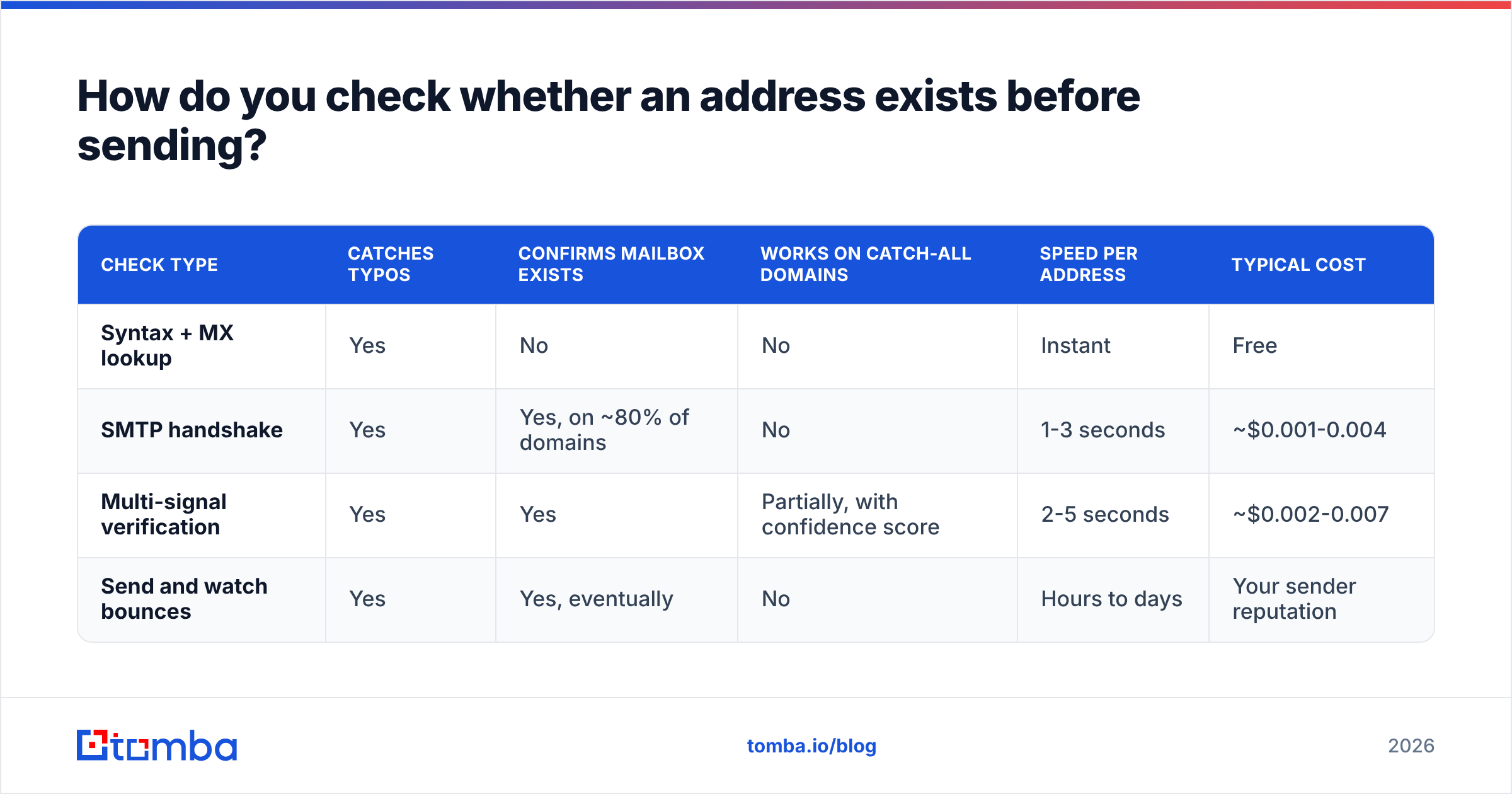
How do you check whether an address exists before sending?#
Three approaches, in ascending order of reliability.
Syntax and DNS checks (free, weak). Confirm the address is well-formed and the domain has MX records. This catches typos like gmial.com and dead domains. It tells you nothing about whether the specific mailbox exists. Useful as a first filter, worthless as a final answer. A free email checker covers this tier in a few seconds.
SMTP handshake verification (accurate on most domains). A verifier opens an SMTP conversation with the receiving server, issues RCPT TO:, reads the response code, and disconnects before sending anything. Nobody receives a message. This is what a proper email verifier does at scale, and it correctly classifies the large majority of B2B addresses.
Multi-signal verification (needed for catch-alls and edge cases). When the handshake returns "accept everything," a good provider falls back to other evidence: whether the address matches the company's known email pattern, whether it appears in crawled public sources, engagement history, and role-account detection. This is the difference between a verifier that gives up with "unknown" and one that gives you a usable confidence score.
Comparing the tiers directly:
| Check type | Catches typos | Confirms mailbox exists | Works on catch-all domains | Speed per address | Typical cost |
|---|---|---|---|---|---|
| Syntax + MX lookup | Yes | No | No | Instant | Free |
| SMTP handshake | Yes | Yes, on ~80% of domains | No | 1-3 seconds | ~$0.001-0.004 |
| Multi-signal verification | Yes | Yes | Partially, with confidence score | 2-5 seconds | ~$0.002-0.007 |
| Send and watch bounces | Yes | Yes, eventually | No | Hours to days | Your sender reputation |
That last row is the method most people default to, and it's the most expensive one on the list. You pay in reputation rather than credits.
Is it better to verify or just find the right address in the first place?#
Verification is damage control. Sourcing correctly is prevention.
Most invalid addresses in B2B lists aren't corrupted data — they're guesses. Someone knew the person's name and the company domain, ran firstname.lastname@, and hoped. That guess is wrong roughly half the time, because companies use at least a dozen common patterns (f.lastname@, firstinitiallastname@, firstname@, and plenty of legacy oddities from acquisitions).
Two better paths:
- Start from the domain. A domain search returns the addresses actually observed at a company plus the dominant pattern, so you're selecting from real data instead of generating permutations.
- Start from the person. Give an email finder a name and a company domain, and it returns the specific address with a confidence score and, in Tomba's case, the public sources it was seen in. You can inspect the data sources rather than trusting a black box.
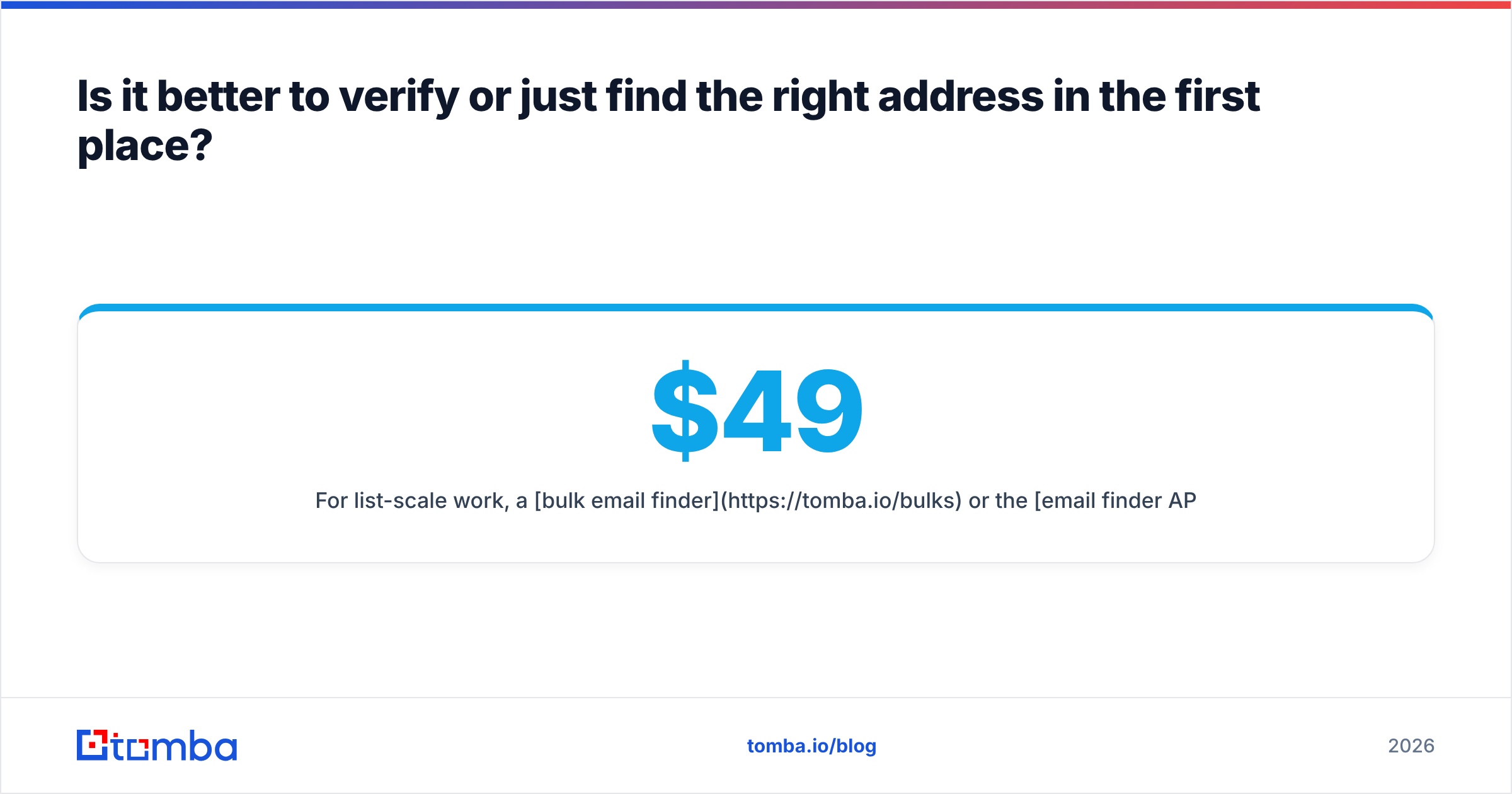
For list-scale work, a bulk email finder or the email finder API handles thousands of records in one pass, and the same credits cover both finding and verifying. On Tomba pricing, that's 25 free searches per month to test the accuracy on your own known-good contacts, then Starter at $49/mo, Growth at $99/mo, and Pro at $249/mo as volume grows.
Independent buyer reviews on G2 are a reasonable sanity check before you commit to any vendor's accuracy claims — including ours. Run your own test set regardless. Take 100 addresses you already know are valid, run them through any tool, and count how many it correctly confirms. That number is worth more than any marketing page.
What should you do with a bounce once it happens?#
A short operating procedure that prevents one bad send from compounding:
- Read the code, not the prose. The human-readable part of an NDR is often vague. The SMTP code at the top is precise.
5.x.xmeans stop;4.x.xmeans wait. - Suppress hard bounces immediately and permanently. Never re-send to a
550 5.1.1address, even months later. Most ESPs do this automatically — verify yours does. - Retry soft bounces on a schedule, then give up. Three attempts over five days is a reasonable ceiling for a full mailbox. After that, treat it as invalid.
- Investigate
550 5.7.1separately. That's a policy block, not a missing mailbox. The address is probably fine and your authentication is not. Check SPF, DKIM, and DMARC alignment before touching the list. - Pause the campaign above 3%. Don't finish the send "to get the data." Stop, verify the remaining list, restart. The remaining sends are actively making things worse.
- Re-verify quarterly. B2B contact data decays continuously. An address verified in January is a guess by October.
Frequently asked questions#
Will I know immediately if an email address doesn't exist? Usually within seconds, if the receiving server rejects during the SMTP session. Asynchronous bounces can take minutes to hours. If nothing arrives within 48 hours, assume it was accepted — which is not the same as read.
Does sending to a nonexistent address hurt me even once? A single bounce is meaningless. Volume and rate are what matter. Ten bounces out of 1,000 sends is normal decay; 100 out of 1,000 is a reputation event.
Can I verify an address without sending anything?
Yes. SMTP verification disconnects before the DATA command, so no message is ever transmitted. The recipient sees nothing.
Do catch-all addresses ever work? Often, yes — someone at the company may read the overflow inbox. But you can't confirm the specific person will see it, and treating catch-alls as verified inflates your true bounce risk. Score them separately and send to them at lower volume.
Is bounce rate the same as spam complaint rate? No, and providers track both. Google's threshold guidance puts spam complaints under 0.3%; bounce tolerance is looser but the two compound. High on both is the fastest route to blocked delivery.
Where does this leave your list?#
If your bounce rate is under 1% and stable, keep doing what you're doing and re-verify on a quarterly cadence. If you're above 2%, the problem isn't your subject lines — it's that a meaningful share of your list was never real, and every send is teaching Gmail to distrust your domain.
Start by fixing the source. Run your target accounts through Tomba Email Finder to get addresses that came from observed public data with a confidence score attached, rather than permutations you generated and hoped about. The free tier gives you 25 searches a month — enough to test it against contacts you already know are valid and see the hit rate for yourself before spending anything.
Related guides#
// get started
Find, verify and enrich your first contacts today
Start on the free plan with 25 searches a month, then scale when your team is ready.
Free plan · No credit card required · GDPR & CCPA
// about the author