What Happens If an Email Address Doesn't Exist? (2026)
Send to an address that isn't there and you get a hard bounce, a dented sender score, and a spam folder waiting for the rest of your list. Here's exactly what happens at the SMTP level, why it costs more than one lost email, and how to check before you press send.
TL;DR
- If an email address doesn't exist, the receiving mail server rejects the message with a 5xx SMTP error and your provider generates a hard bounce. The recipient never sees anything.
- Hard bounces are logged against your sending domain and IP. Two or three percent is enough to start pushing your good mail into spam folders.
- You can usually detect a dead address before sending: syntax check, MX lookup, SMTP handshake, and pattern confidence scoring. Together they catch roughly 95% of dead addresses.
- Catch-all domains are the exception. They accept everything at the handshake, so you need a dedicated catch-all check or a confidence score instead of a yes/no verdict.
- The fix is boring and it works: verify at collection, verify before every send, and never mail a list older than 90 days without re-checking it.
What actually happens when an email address doesn't exist?#
Nothing dramatic on the recipient's end, and quite a lot on yours.
When you hit send, your mail server looks up the MX records for the recipient's domain and opens an SMTP conversation with whichever server answers. It announces itself, states the sender, then states the recipient with a RCPT TO command. That is the moment of truth. If the mailbox isn't there, the receiving server answers with something like:
550 5.1.1 The email account that you tried to reach does not existYour server takes that rejection, gives up immediately, and mails you a bounce notification — the "Mail Delivery Subsystem" message everyone recognises. The intended recipient is never involved. No inbox is touched. No spam folder is used. The message simply stops.
Two things happen that people usually miss. First, the rejection is recorded by the receiving provider against your sending identity. Gmail, Microsoft, Yahoo and every serious filtering service track how often a sender asks for mailboxes that aren't there. Second, if you're using a sending platform, that platform records the bounce too — and most of them will throttle or suspend an account that keeps producing them.
The mechanics are standardised. SMTP has defined these response codes since the early 1980s, and the bounce message format is equally old. What changed is the consequence. In 2005, a bounce was a dead letter. In 2026, it's a reputation signal.
What do the bounce codes actually mean?#
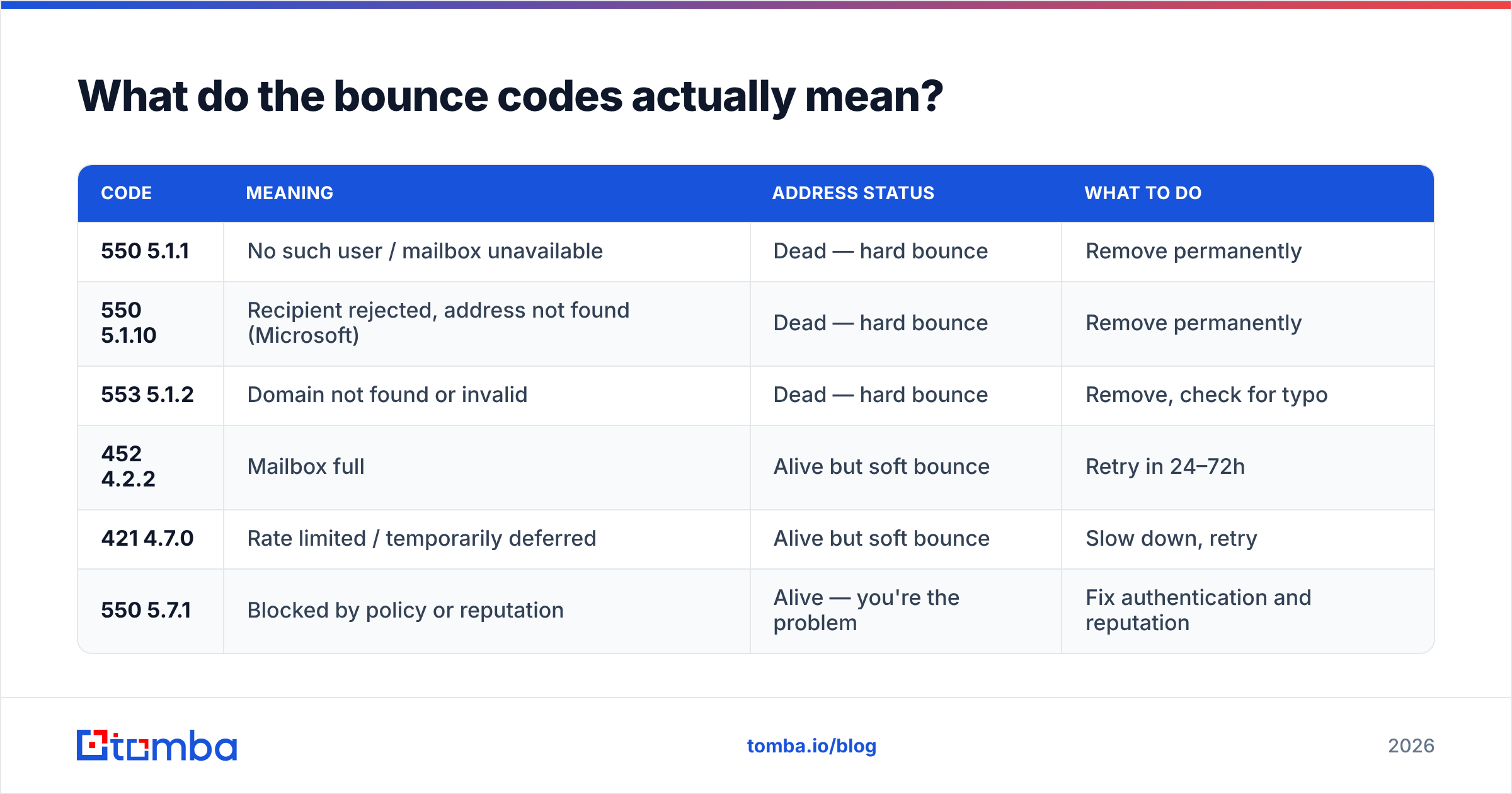
Not every bounce is the same problem, and treating them identically is how good lists get destroyed. The number in the response tells you whether the address is dead, temporarily unavailable, or fine but blocked.
| Code | Meaning | Address status | What to do |
|---|---|---|---|
| 550 5.1.1 | No such user / mailbox unavailable | Dead — hard bounce | Remove permanently |
| 550 5.1.10 | Recipient rejected, address not found (Microsoft) | Dead — hard bounce | Remove permanently |
| 553 5.1.2 | Domain not found or invalid | Dead — hard bounce | Remove, check for typo |
| 452 4.2.2 | Mailbox full | Alive but soft bounce | Retry in 24–72h |
| 421 4.7.0 | Rate limited / temporarily deferred | Alive but soft bounce | Slow down, retry |
| 550 5.7.1 | Blocked by policy or reputation | Alive — you're the problem | Fix authentication and reputation |
The distinction that matters most: 5xx = permanent, 4xx = temporary. A permanent failure means the address does not exist and never will. A temporary failure means try again later. If your tooling lumps them together and auto-suppresses everything, you'll throw away perfectly good contacts whose mailbox happened to be full on a Tuesday.
The other trap is 550 5.7.1. It looks like a hard bounce and it is permanent-coded, but the address is usually fine. You've been blocked for sender reputation reasons. Suppressing those contacts hides a deliverability problem instead of fixing it.
Why does one dead address cost more than one lost email?#
Because mailbox providers read your bounce rate as an honesty signal.
Think of it like a courier turning up at addresses that don't exist. One wrong house is a mistake. Twenty in a row means the courier bought a bad address list, and the building manager starts refusing the whole van at the gate. Filtering engines reason the same way: senders with real relationships know where their recipients live. Senders who guess don't.
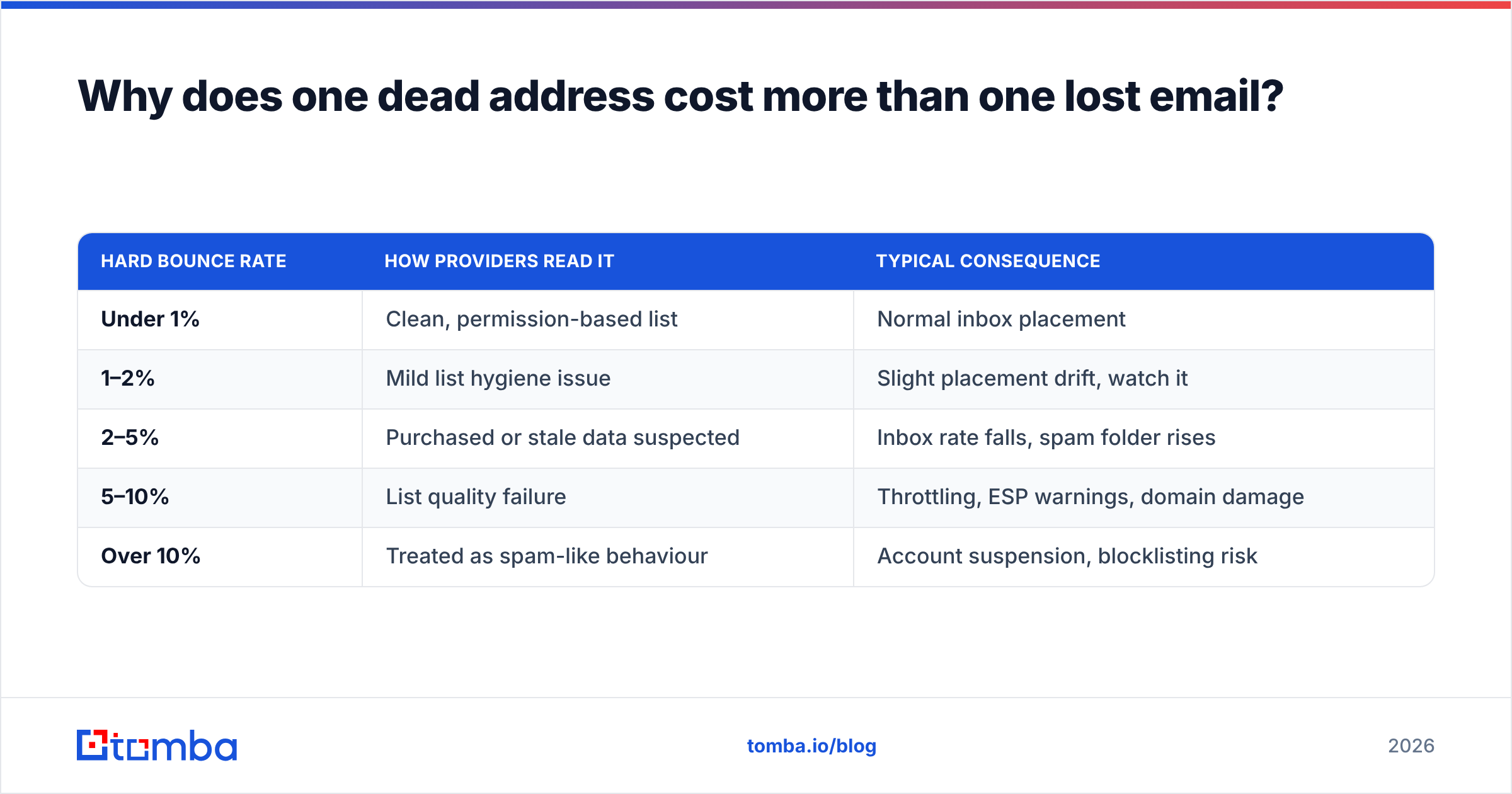
Here's what that looks like in practice as bounce rate climbs:
| Hard bounce rate | How providers read it | Typical consequence |
|---|---|---|
| Under 1% | Clean, permission-based list | Normal inbox placement |
| 1–2% | Mild list hygiene issue | Slight placement drift, watch it |
| 2–5% | Purchased or stale data suspected | Inbox rate falls, spam folder rises |
| 5–10% | List quality failure | Throttling, ESP warnings, domain damage |
| Over 10% | Treated as spam-like behaviour | Account suspension, blocklisting risk |
The compounding part is what hurts. A 6% bounce rate doesn't cost you 6% of your results. It costs you 6% of sends plus the placement penalty applied to the other 94%, which frequently halves reply rates. A campaign that should have produced forty conversations produces twelve, and the report blames the copy.
There's also a spam trap dimension. Providers recycle abandoned mailboxes into traps. An address that bounced last quarter may not bounce this quarter — it may quietly accept mail and report you instead. That's why "it didn't bounce" is not the same as "it exists and is safe."

How can you tell if an email address doesn't exist before you send?#
You run the checks the receiving server would run, without delivering anything. There are five layers, and they're cumulative — each one catches what the previous one missed.
- Syntax validation. Does the string obey RFC 5322? Catches
john@@company.com, trailing spaces, missing TLDs, and the surprisingly common.contypo. Free, instant, catches maybe 3% of bad records. - Domain and MX record check. Does the domain resolve, and does it publish mail exchanger records? A domain with no MX cannot receive mail at all, so every address on it is dead. This is where expired and parked company domains get caught.
- SMTP handshake (ping). Open a connection, issue
RCPT TO, read the response code, then disconnect beforeDATA. Nothing is delivered, but the server tells you whether the mailbox is known. This is the single highest-value check and it's what an email verifier is doing under the hood. - Role and risk classification. Flag
info@,sales@,admin@,noreply@, disposable domains, and known spam-trap patterns. These addresses often exist but should not be mailed in a one-to-one campaign — they inflate complaint rates and rarely reply. - Catch-all and confidence scoring. When the server accepts everything, a binary answer is impossible. Instead you score the address against the company's known email pattern, historical sightings, and public sources to produce a confidence percentage.
Layers one and two you can do yourself in an afternoon. Layer three is where it gets awkward: many providers rate-limit or deliberately mislead automated RCPT TO probes, and running them from your own IP is a good way to get that IP flagged. That's the actual argument for using a verification service — not that the logic is secret, but that doing it at scale from a residential or business IP is self-harm.
What about catch-all domains — do those addresses exist?#
Maybe. That's the honest answer, and anyone selling you a clean yes/no on a catch-all domain is selling you a guess.
A catch-all (or "accept-all") domain is configured to accept mail for every address at that domain, then sort it out internally. ceo@company.com, jane.doe@company.com and asdkjhasd@company.com all get a 250 OK at the handshake. The SMTP check tells you nothing, because the server has been told to say yes to everything.
Roughly one in five B2B domains is configured this way, and the rate is higher among enterprises and companies running Microsoft 365 with certain transport rules. If you drop every catch-all address from your list, you're deleting a fifth of your addressable market — including many of the largest accounts you actually want.
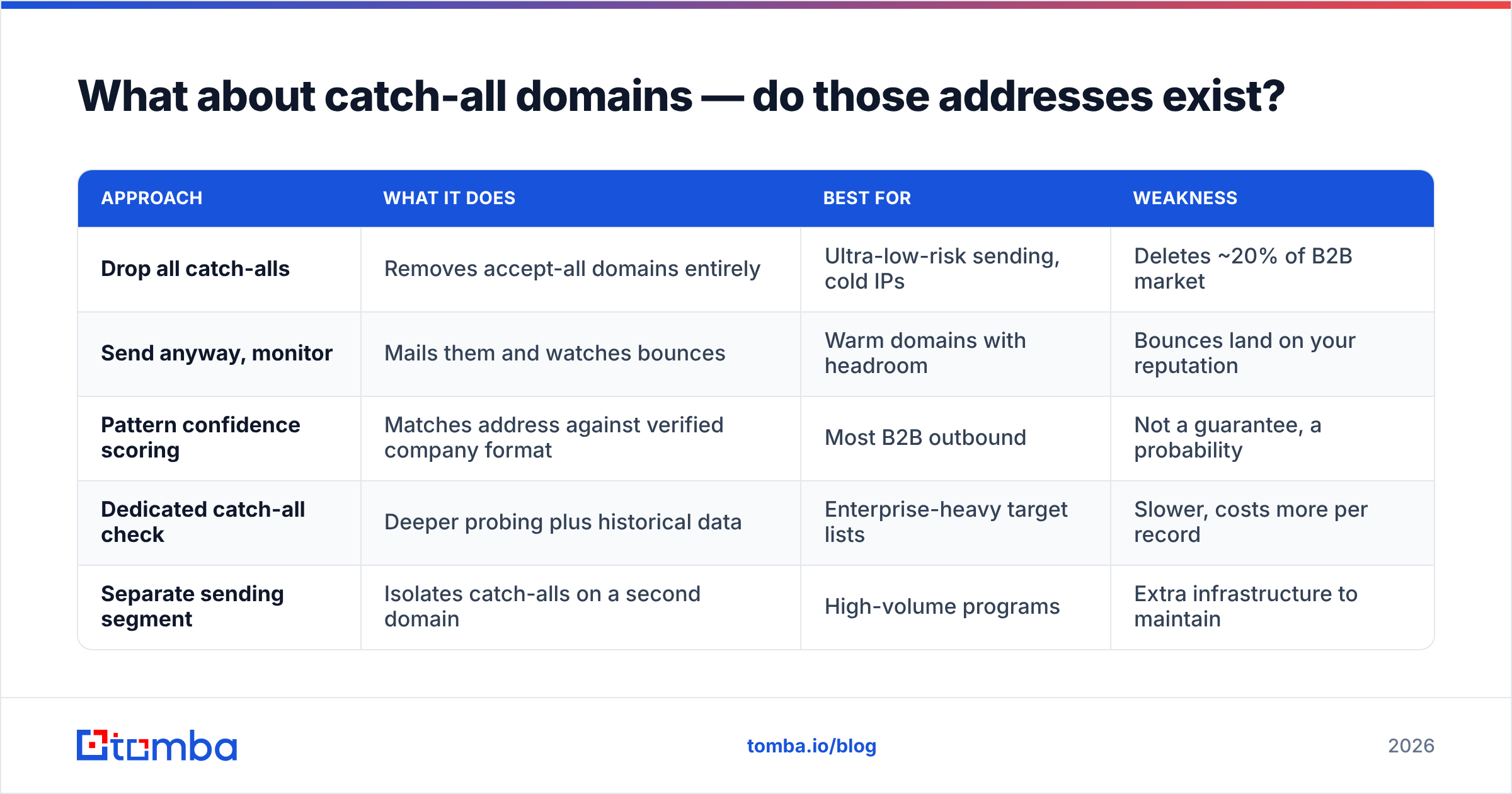
The workable approach is confidence, not certainty:
| Approach | What it does | Best for | Weakness |
|---|---|---|---|
| Drop all catch-alls | Removes accept-all domains entirely | Ultra-low-risk sending, cold IPs | Deletes ~20% of B2B market |
| Send anyway, monitor | Mails them and watches bounces | Warm domains with headroom | Bounces land on your reputation |
| Pattern confidence scoring | Matches address against verified company format | Most B2B outbound | Not a guarantee, a probability |
| Dedicated catch-all check | Deeper probing plus historical data | Enterprise-heavy target lists | Slower, costs more per record |
| Separate sending segment | Isolates catch-alls on a second domain | High-volume programs | Extra infrastructure to maintain |
Pattern confidence is the practical middle. If you know firstname.lastname@company.com is the verified format for a company because five other addresses at that domain confirmed it, then jane.doe@company.com is a strong bet even on a catch-all. A catch-all verifier automates that reasoning and returns a score you can threshold — send above 85%, hold below it.

How do you clean a list that's already full of dead addresses?#
Batch it, verify it, segment it, then warm back up. In that order.
Step one: stop adding to the problem. Put verification at the point of collection — form submissions, imports, scraped lists, CSV uploads from a conference. It's cheaper to reject one bad address at entry than to find it six months later inside a 40,000-record send.
Step two: run a full bulk pass. Push the entire list through bulk verify rather than sampling. Sampling tells you the size of the problem; it doesn't fix it. Expect a 2026 list that's been sitting untouched for a year to come back with 15–25% invalid, because B2B data decays at roughly 2–2.5% per month through job changes, rebrands and domain moves.
Step three: segment by result. Valid goes to your main sending domain. Catch-all above threshold goes to a secondary segment with tighter volume. Invalid and role addresses go to permanent suppression — not deletion, suppression, so you don't re-import them next quarter from another source.
Step four: rebuild sending volume gradually. If you've been bouncing at 8% for a month, your reputation is already damaged. A clean list doesn't undo that instantly. Ramp volume over two to three weeks while monitoring placement, and fix the boring foundations at the same time: SPF record, DKIM, DMARC alignment. Clean data plus broken authentication still lands in spam.
Step five: set a re-verification cadence. Ninety days is the standard interval for B2B lists. High-churn industries — startups, agencies, anything with heavy tech-sector representation — justify sixty.
Is it better to verify addresses or find verified ones?#
Both, but they solve different halves of the problem, and most teams only budget for one.
Verification is defensive. It tells you which of the addresses you already have are dead. Finding is offensive: it produces addresses that were validated at the moment they were sourced, so there's less to clean later. If you're building a list from company domains rather than importing one, a domain search that returns already-verified addresses removes an entire cleanup step from your workflow.
The market has consolidated around a handful of serious providers — you can compare the field on G2's email verification category, which is more useful than vendor landing pages because it separates accuracy complaints from support complaints. Some vendors specialise in one side: BookYourData, for instance, focuses on pre-verified database records rather than on-demand verification, which suits teams that want a list handed over ready to send. Others, including Tomba, cover finding and verification in the same workflow so you're not exporting a CSV between two tools.
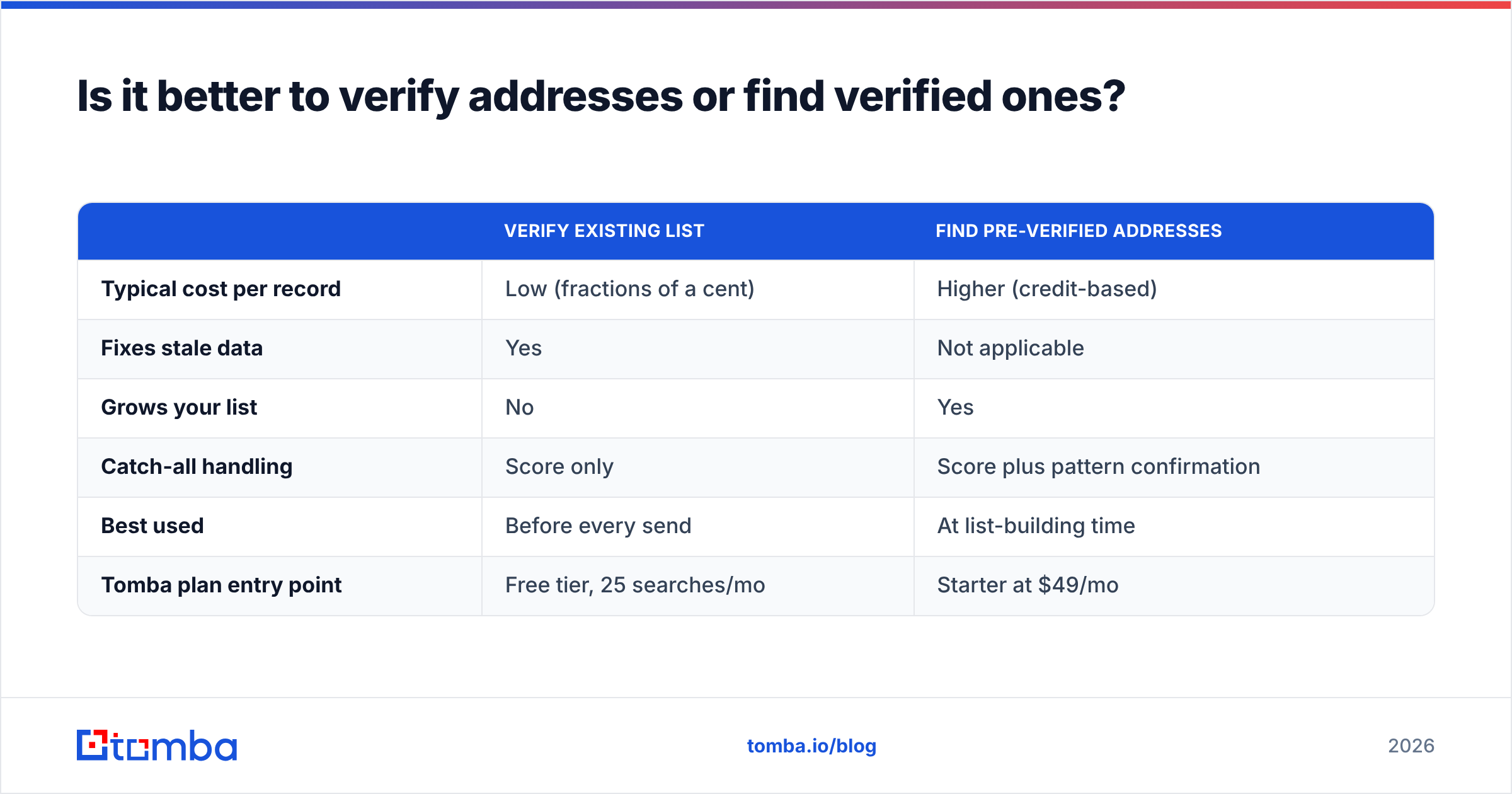
Cost-wise, the comparison usually surprises people:
| Verify existing list | Find pre-verified addresses | |
|---|---|---|
| Typical cost per record | Low (fractions of a cent) | Higher (credit-based) |
| Fixes stale data | Yes | Not applicable |
| Grows your list | No | Yes |
| Catch-all handling | Score only | Score plus pattern confirmation |
| Best used | Before every send | At list-building time |
| Tomba plan entry point | Free tier, 25 searches/mo | Starter at $49/mo |
Full Tomba pricing runs from the free tier through Starter at $49/mo, Growth at $99/mo and Pro at $249/mo, with Enterprise negotiated. The free tier is genuinely enough to test accuracy against a list where you already know the answers — which is the only benchmark that matters. Run 25 addresses you've personally confirmed and see what comes back.
What should you do the next time a bounce lands?#
Read the code before you react.
If it's 5.1.1 or 5.1.10, the address is gone. Suppress it, and check whether the contact has simply changed jobs — a bounce is often the first signal that your champion moved to a company you'd also like to sell to. Job-change bounces are a lead source, not just a loss.
If it's a 4xx, do nothing. Your provider will retry. Manually suppressing soft bounces is one of the most common self-inflicted list injuries.
If it's 5.7.1 or a policy rejection, stop sending to that domain and audit your authentication. The address exists. You're the one being refused.
And if you're seeing a cluster of hard bounces from the same source — one import, one scraper, one purchased file — quarantine the whole batch rather than picking off individual addresses. Bad data arrives in batches, and one dead address is almost never alone.
Stop guessing whether the address exists. Run your target domains through the Tomba Email Finder and you get addresses that were verified at the moment they were sourced, with confidence scores on catch-all domains instead of a coin flip. Start on the free tier with 25 searches a month, test it against contacts you can already confirm, and move up to Starter at $49/mo when the accuracy holds. Your bounce rate — and the 94% of your list that's currently paying for the other 6% — will show the difference within one campaign.
Related guides#
// get started
Find, verify and enrich your first contacts today
Start on the free plan with 25 searches a month, then scale when your team is ready.
Free plan · No credit card required · GDPR & CCPA
// about the author