ImportFromWeb Alternatives: 9 Tools Compared for 2026
ImportFromWeb makes Google Sheets scrape almost any page, until rate limits, JS-heavy sites, or credit math get in the way. Here are nine alternatives, what each one is actually good at, and when an API beats a scraper entirely.
TL;DR
- ImportFromWeb is a Google Sheets add-on that pulls data off web pages with a spreadsheet formula. It is excellent at what it does and terrible at what it was never built for: volume, JS-heavy targets behind logins, and structured B2B contact data.
- If you want to stay in Sheets, the closest swaps are IMPORTXML/IMPORTHTML (free, brittle), Browse AI, and Sheet-native connectors.
- If you outgrew the spreadsheet, Apify, Bright Data, and Octoparse handle scale, proxies, and scheduling.
- If your real goal is emails, phone numbers, and firmographics, stop scraping. A data API returns verified fields directly and skips the parsing layer entirely.
- Cheapest honest answer: keep ImportFromWeb for one-off page pulls, and move contact enrichment to a purpose-built provider. Most teams need both, not one.
What is ImportFromWeb, and why do people look for alternatives?#
ImportFromWeb is a Google Sheets add-on that gives you an IMPORTFROMWEB() function. You pass it a URL and a CSS or XPath selector, and it returns the matching values into your sheet. Unlike Google's native IMPORTXML, it renders JavaScript, rotates its own infrastructure, and survives a lot of pages that make the built-in functions return #N/A. You can see the current feature set on the vendor's own site.
That design is also the source of every complaint. Three patterns come up again and again:
Credit math. Every cell refresh costs a request. A 500-row sheet with four columns of selectors is 2,000 requests per recalculation, and Sheets loves to recalculate. Teams blow through a month's quota in an afternoon and then start disabling auto-refresh, which defeats the purpose.
Selector rot. You are hard-coding an assumption about someone else's HTML into a spreadsheet cell. When the target site ships a redesign, twelve sheets break at once and nobody knows which formula to fix first.
Wrong output shape. Scraping returns whatever the page shows. B2B workflows need normalized fields — a valid work email, a direct dial, a headcount band, a verified LinkedIn URL. Getting from "text in a div" to "field I can trust in a CRM" is the actual work, and no selector does it for you.
So the honest framing for this comparison is not "which tool replaces ImportFromWeb." It is "which layer of your stack were you trying to fix."
What should an ImportFromWeb alternative actually do?#
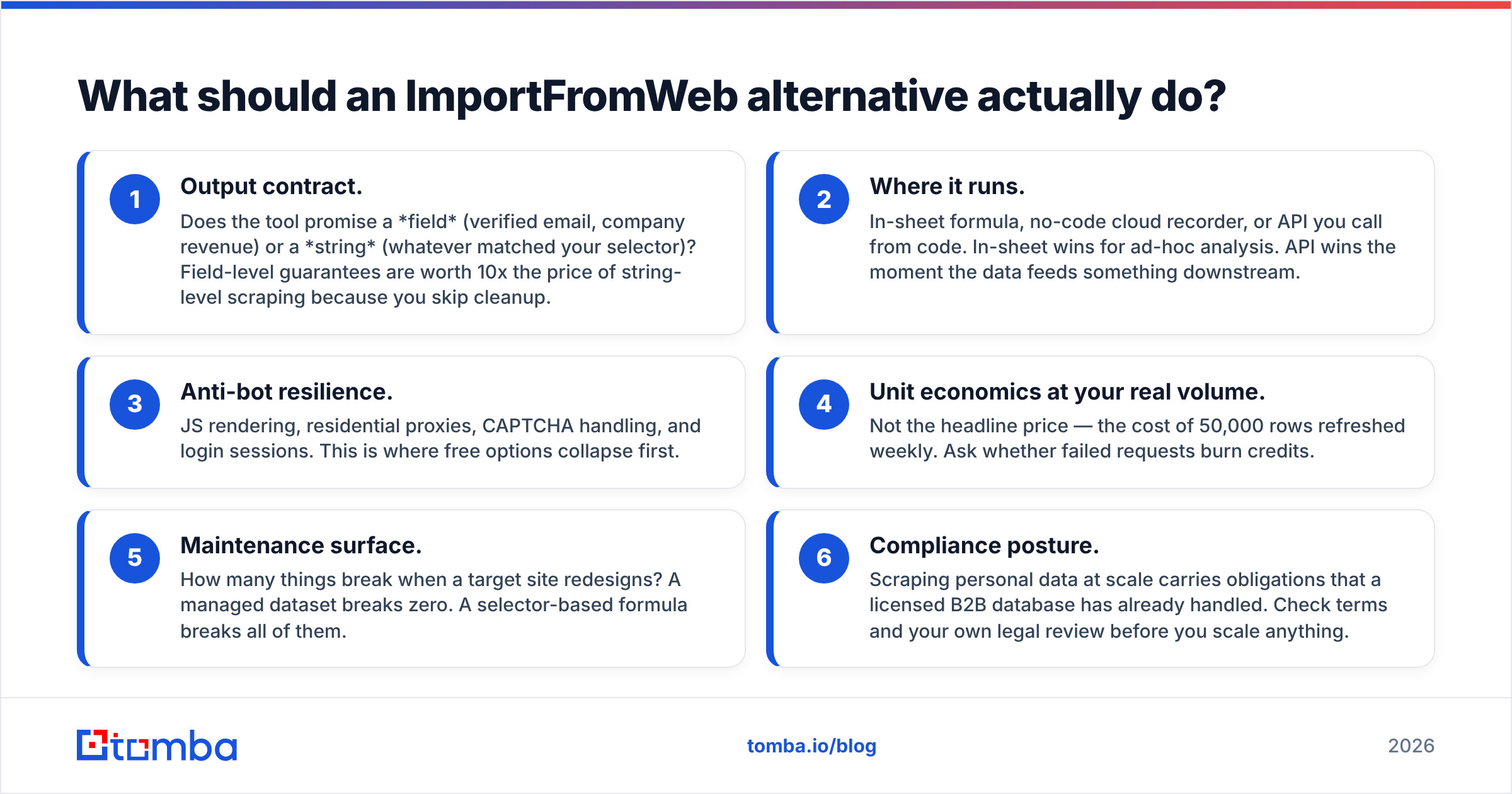
Score candidates on these six dimensions before you look at price. Most bad tool decisions come from optimizing dimension four while ignoring dimension one.
- Output contract. Does the tool promise a field (verified email, company revenue) or a string (whatever matched your selector)? Field-level guarantees are worth 10x the price of string-level scraping because you skip cleanup.
- Where it runs. In-sheet formula, no-code cloud recorder, or API you call from code. In-sheet wins for ad-hoc analysis. API wins the moment the data feeds something downstream.
- Anti-bot resilience. JS rendering, residential proxies, CAPTCHA handling, and login sessions. This is where free options collapse first.
- Unit economics at your real volume. Not the headline price — the cost of 50,000 rows refreshed weekly. Ask whether failed requests burn credits.
- Maintenance surface. How many things break when a target site redesigns? A managed dataset breaks zero. A selector-based formula breaks all of them.
- Compliance posture. Scraping personal data at scale carries obligations that a licensed B2B database has already handled. Check terms and your own legal review before you scale anything.
Which ImportFromWeb alternatives are worth testing in 2026?#
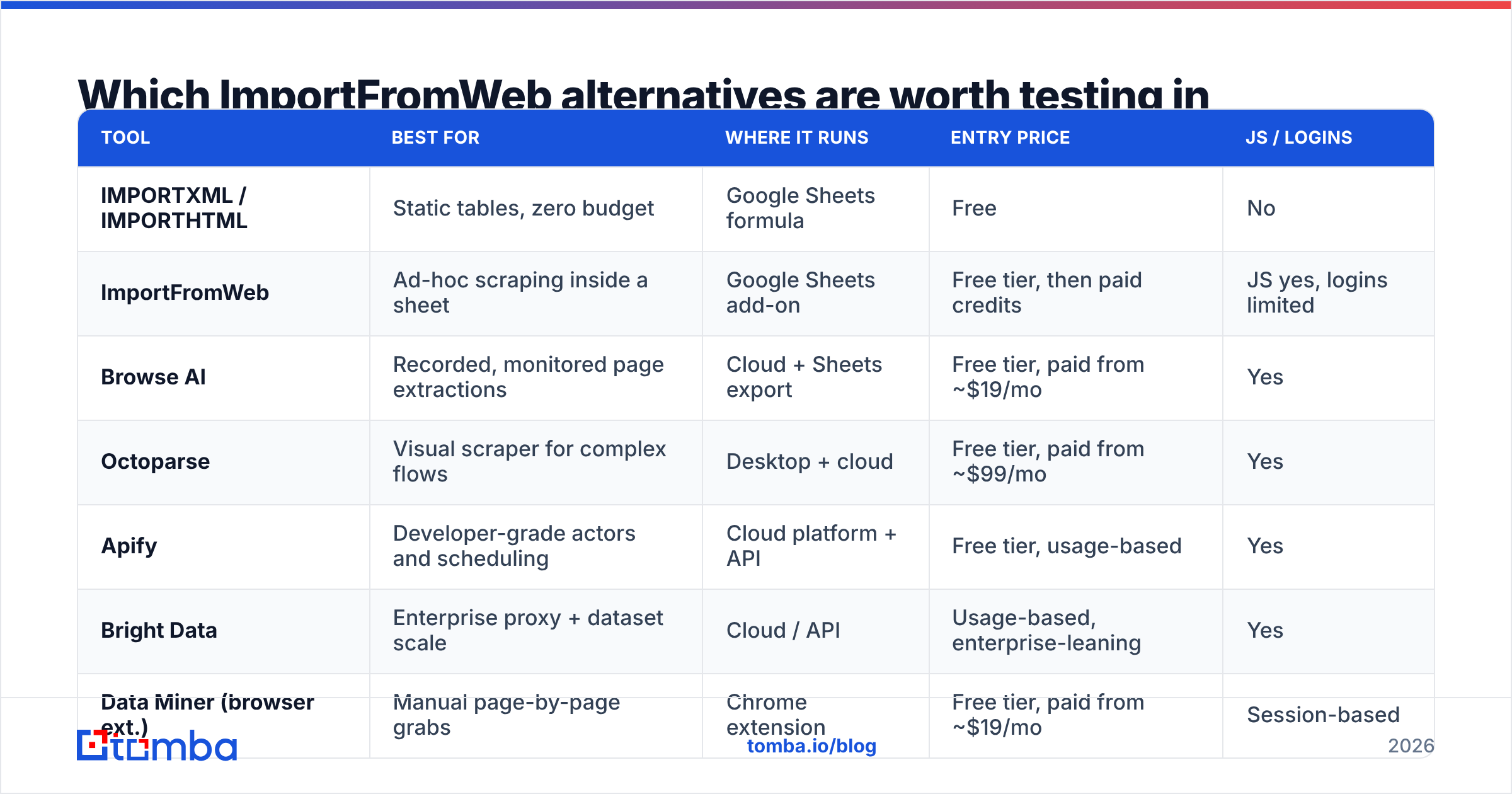
Prices move constantly, so treat these as directional and verify on each vendor's pricing page before you commit. Tomba's numbers are exact.
| Tool | Best for | Where it runs | Entry price | JS / logins |
|---|---|---|---|---|
| IMPORTXML / IMPORTHTML | Static tables, zero budget | Google Sheets formula | Free | No |
| ImportFromWeb | Ad-hoc scraping inside a sheet | Google Sheets add-on | Free tier, then paid credits | JS yes, logins limited |
| Browse AI | Recorded, monitored page extractions | Cloud + Sheets export | Free tier, paid from ~$19/mo | Yes |
| Octoparse | Visual scraper for complex flows | Desktop + cloud | Free tier, paid from ~$99/mo | Yes |
| Apify | Developer-grade actors and scheduling | Cloud platform + API | Free tier, usage-based | Yes |
| Bright Data | Enterprise proxy + dataset scale | Cloud / API | Usage-based, enterprise-leaning | Yes |
| Data Miner (browser ext.) | Manual page-by-page grabs | Chrome extension | Free tier, paid from ~$19/mo | Session-based |
| BookYourData | Buying verified contacts outright | Web app export | Pay-as-you-go credits | N/A (licensed data) |
| Tomba | Verified emails, phones, enrichment | Sheets add-on, API, CLI | Free (25 searches/mo), $49/mo Starter | N/A (API-native) |
Note the split down the middle of that table. Rows one through seven are extraction tools — they get text off pages. Rows eight and nine are data tools — they return fields that are already resolved and verified. Picking from the wrong half is the most common and most expensive mistake in this category.
Which alternatives keep you inside Google Sheets?#
If the whole appeal of ImportFromWeb was "never leave the spreadsheet," these are your options.
IMPORTXML and IMPORTHTML. Free, native, and genuinely fine for static content: Wikipedia tables, government data, pricing pages that render server-side. They fail on anything JavaScript-driven, they cap out around 50 concurrent calls per sheet, and Google will throttle you without much warning. Use them for the 30% of targets that are simple, and stop pretending they cover the rest.
Browse AI. You train it by clicking through a page once; it records the extraction and can monitor for changes on a schedule, then push results into Sheets. Better than a formula for recurring extractions because the recording is a versioned artifact you can fix in one place instead of in 400 cells. Weaker than a formula for genuinely one-off questions.
A data API with a Sheets add-on. This is the underrated path. Instead of scraping a company's site to guess at contact details, you call a provider from inside the sheet and get a verified field back. Tomba's Google Sheets add-on works this way: a formula in, an email or company record out, no selector to maintain. If your columns are "email," "job title," and "phone," this removes the entire scraping layer from your workflow.
The practical test: open your current ImportFromWeb sheet and ask what each column is really for. If the answer for most columns is "a person's contact details," you were using a scraper as a very manual enrichment tool.
Which alternatives handle real scraping scale?#
Once you are past a few thousand rows a week, spreadsheet-based extraction stops being the bottleneck-free option and becomes the bottleneck.
Apify is the developer's answer. You either use a prebuilt actor from its store or write your own, then run it on a schedule with proxy rotation, retries, and dataset storage handled for you. Output lands as JSON or CSV that you push wherever you like. Usage-based pricing means a cheap month when you scrape little and an honest bill when you scrape a lot. See apify.com for the actor catalog — the breadth of prebuilt jobs is the real reason to pick it.
Bright Data sits at the enterprise end: proxy networks, unblocking infrastructure, and prepackaged datasets. Overkill for a 200-row sheet, correct for a team whose product depends on continuously refreshed public web data. Check brightdata.com and expect a sales conversation rather than a self-serve checkout.
Octoparse is the middle ground — a visual, point-and-click builder that handles pagination, infinite scroll, and login flows without code. Non-technical operators get further with it than with Apify. It costs more than a Sheets add-on and less than an enterprise contract.
Data Miner and similar Chrome extensions are worth naming because they solve a narrow problem well: you are already on the page, logged in, and you just want the table. No infrastructure, no credits, no scheduling. It does not scale, and that is fine.
For a broader read on how buyers rank these, G2's category reviews are useful mainly for spotting which vendors get repeated complaints about support and billing — that signal is more reliable than star averages.

Is a scraper the right tool for finding B2B emails at all?#
Usually not, and this is where most ImportFromWeb workflows quietly leak money.
Here is what a scraping-based email workflow actually costs. You scrape a company site for a "team" page. You get names and job titles, sometimes. You guess the email pattern — first.last@, flast@, first@. You generate permutations. You then need to verify them, because sending to guesses torches your sender reputation. Only after verification do you have something usable, and your hit rate on companies without a public team page is close to zero.
A bulk email finder collapses that entire chain into one step: domain plus name in, verified address out, with a confidence score and the sources behind it. The pattern detection, the permutation, and the SMTP-level verification all happen server-side. You are buying the resolved answer rather than the raw material for it.
The same logic applies to phone numbers, company size, and tech stack. Those are not scraping problems in 2026 — they are licensed-data problems. If you would rather buy contacts than resolve them, BookYourData is a reasonable route for pay-as-you-go verified lists, and it plays fine alongside an enrichment API for the fields a static list does not cover.
Concretely, three signals mean you should switch layers rather than switch scrapers:
- More than half your scraped columns are person- or company-level attributes rather than page content.
- You maintain a separate verification step downstream of your scrape.
- Your selectors break more than once a month.
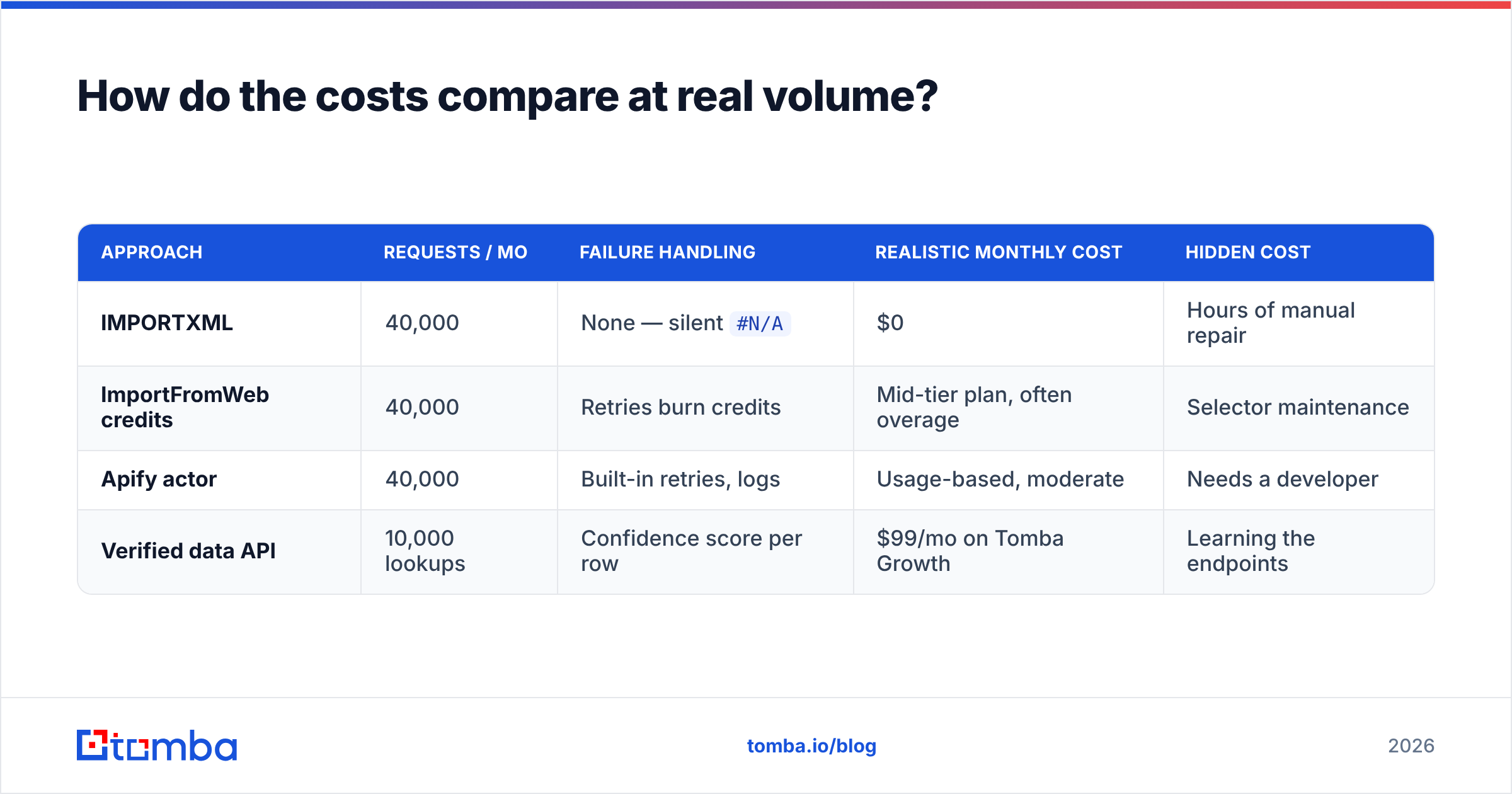
How do the costs compare at real volume?#
Take a realistic job: 10,000 companies, four data points each, refreshed monthly.
| Approach | Requests / mo | Failure handling | Realistic monthly cost | Hidden cost |
|---|---|---|---|---|
| IMPORTXML | 40,000 | None — silent #N/A |
$0 | Hours of manual repair |
| ImportFromWeb credits | 40,000 | Retries burn credits | Mid-tier plan, often overage | Selector maintenance |
| Apify actor | 40,000 | Built-in retries, logs | Usage-based, moderate | Needs a developer |
| Verified data API | 10,000 lookups | Confidence score per row | $99/mo on Tomba Growth | Learning the endpoints |
The interesting column is the last one. Free tools are the most expensive option when a human has to babysit them, and the API row needs a quarter of the requests because one lookup returns the whole record instead of one cell.
Worth checking the Tomba pricing tiers against your row count directly: Free covers 25 searches a month for testing, Starter is $49/mo, Growth is $99/mo, Pro is $249/mo, and Enterprise is custom. If you are running 40,000 scrape requests to get 10,000 records, you are paying for the inefficiency of the extraction model, not for the data.
How do you migrate off ImportFromWeb without breaking your sheets?#
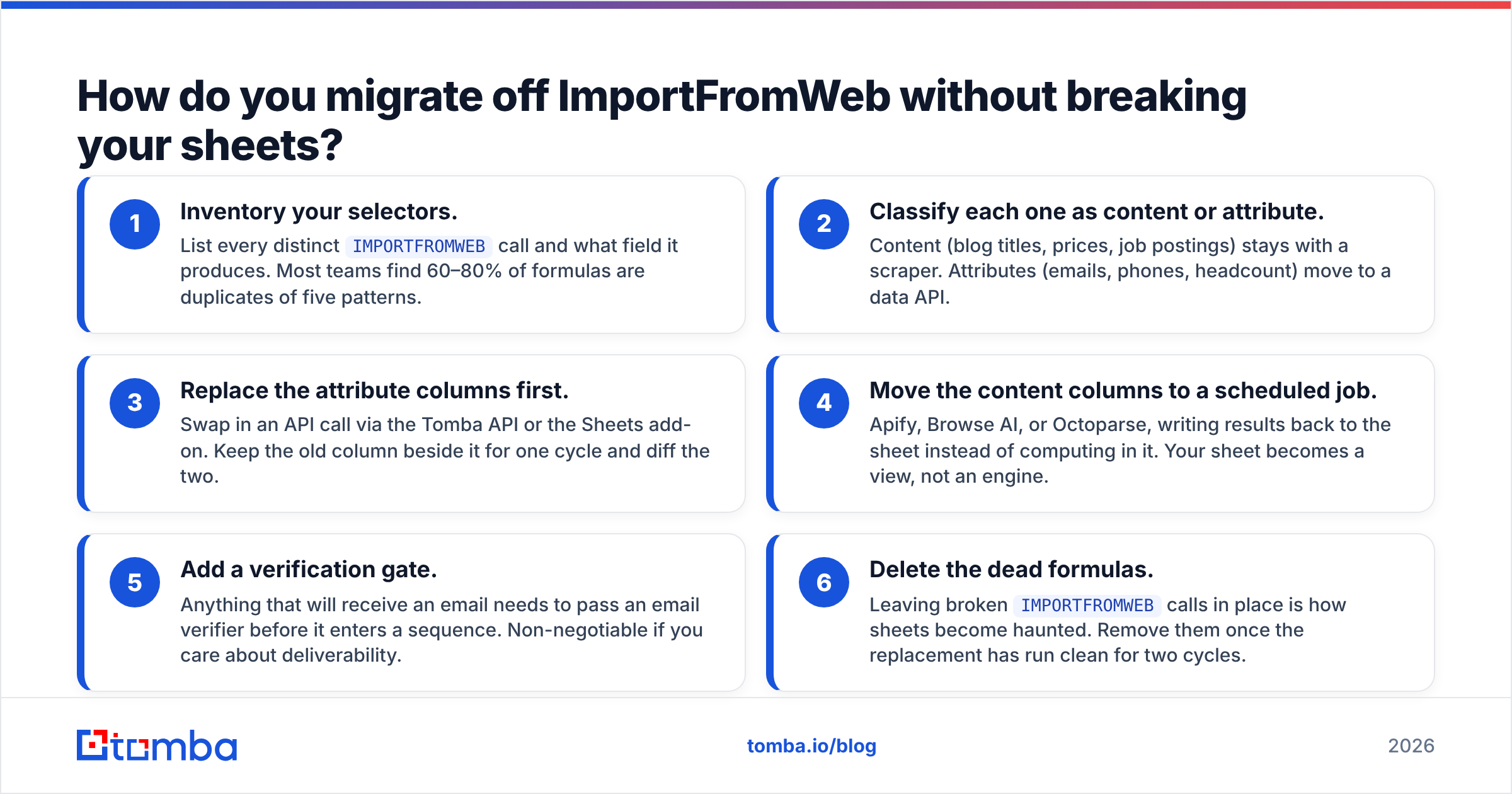
Do it column by column, not sheet by sheet.
- Inventory your selectors. List every distinct
IMPORTFROMWEBcall and what field it produces. Most teams find 60–80% of formulas are duplicates of five patterns. - Classify each one as content or attribute. Content (blog titles, prices, job postings) stays with a scraper. Attributes (emails, phones, headcount) move to a data API.
- Replace the attribute columns first. Swap in an API call via the Tomba API or the Sheets add-on. Keep the old column beside it for one cycle and diff the two.
- Move the content columns to a scheduled job. Apify, Browse AI, or Octoparse, writing results back to the sheet instead of computing in it. Your sheet becomes a view, not an engine.
- Add a verification gate. Anything that will receive an email needs to pass an email verifier before it enters a sequence. Non-negotiable if you care about deliverability.
- Delete the dead formulas. Leaving broken
IMPORTFROMWEBcalls in place is how sheets become haunted. Remove them once the replacement has run clean for two cycles.
Expect the whole migration to take a week of part-time work for a typical sales-ops sheet, and expect your refresh times to drop sharply — you are trading tens of thousands of page requests for thousands of API calls.
Which ImportFromWeb alternative should you actually pick?#
- You want free and your targets are simple: IMPORTXML. Accept the fragility.
- You want in-sheet, occasional, mixed targets: stay on ImportFromWeb. It is good at this and switching costs you more than it saves.
- You want recurring extractions with change monitoring: Browse AI.
- You want scale, scheduling, and proxies: Apify, or Bright Data if you are enterprise.
- You want no-code but complex flows: Octoparse.
- You want verified B2B contact data: a data API, not a scraper. This is the switch that changes your numbers.
The tools in the first five bullets compete with each other. The last one competes with the reason you opened a scraper in the first place.
Ready to stop parsing HTML for email addresses?#
If most of your ImportFromWeb columns are really "find me a work email for this person at this company," skip the selectors. The Tomba Email Finder takes a name and a domain and returns a verified address with a confidence score and its sources — through the web app, the Google Sheets add-on, the API, or the CLI. The free tier gives you 25 searches to test it against the exact sheet you are trying to fix, so run your worst-performing scrape column through it side by side and compare hit rates before you renew any scraping plan.
Related guides#
// get started
Find, verify and enrich your first contacts today
Start on the free plan with 25 searches a month, then scale when your team is ready.
Free plan · No credit card required · GDPR & CCPA
// about the author