How to Improve Email Open Rates With AI: A 2026 Playbook
Apple MPP inflated your open rate, spam filters got stricter, and AI subject lines all sound the same. Here is what actually moves opens in 2026, ranked by lift, effort, and risk.
TL;DR
- Open rate is now a directional signal, not a KPI. Apple Mail Privacy Protection and Gmail image proxying pre-fetch pixels, so a chunk of your "opens" are machines.
- AI moves opens most through list quality and inbox placement, not through clever subject lines. A verified list beats a rewritten subject line by a wide margin.
- Subject-line generation has the lowest ceiling and the highest sameness risk. AI-written subject lines converge on the same six patterns, which spam filters and humans both learn to skip.
- The tactics with real, repeatable lift: bounce suppression before send, per-domain send throttling, AI-assisted segmentation, and reply-based signal instead of pixel-based signal.
- Track verified-delivery rate, reply rate, and bounce rate as your primary trio. Use open rate only to compare variants inside the same list, same week, same sending domain.
What does an email open rate actually measure in 2026?#
An open rate measures how many tracking pixels loaded, divided by how many emails were delivered. That is all it has ever measured. The problem is that the gap between "pixel loaded" and "human read the email" has widened into a canyon.
Think of it like a doorbell camera that also triggers when the wind moves a branch. You still get useful information — a spike at 9 a.m. probably means people are arriving — but you cannot count individual events as visitors anymore.
Three things broke the metric:
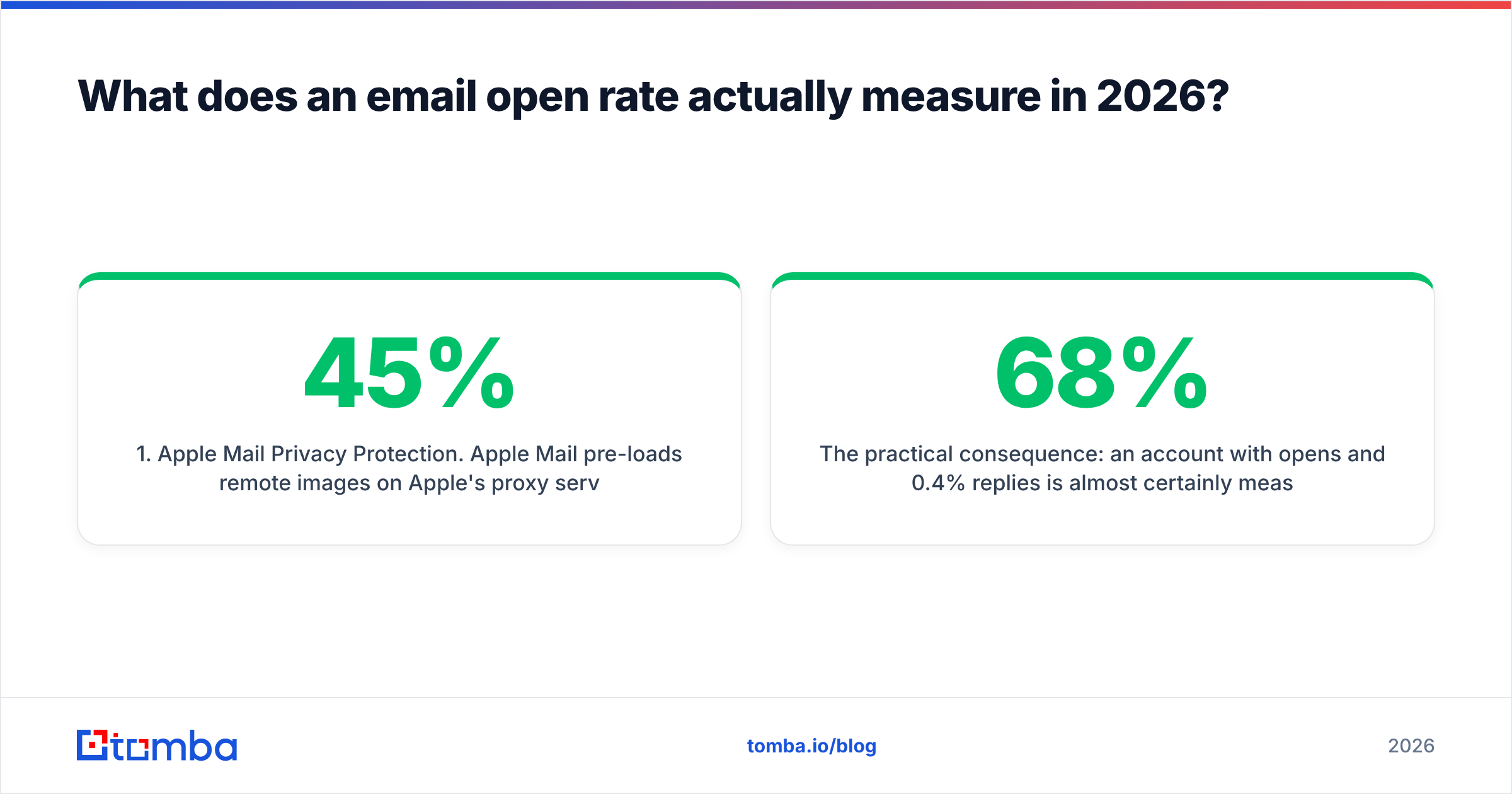
- Apple Mail Privacy Protection. Apple Mail pre-loads remote images on Apple's proxy servers regardless of whether the recipient opens the message. On a B2B list where 35-45% of recipients read on Apple Mail, that inflates opens and destroys open-time data.
- Gmail image caching. Gmail proxies images through its own servers, which strips IP and some device data from the open event.
- Security scanners. Corporate mail gateways click links and load images to check them. Every scanner hit looks like an engaged prospect.
The practical consequence: an account with 68% opens and 0.4% replies is almost certainly measuring robots. When you set out to improve email open rates with AI, you need to decide first whether you are optimizing a number or optimizing revenue. They are not the same project.
Why do most AI open-rate tactics fail?#
Because they optimize the last 5% of the funnel while ignoring the first 60%.
Here is the actual chain of events between "you press send" and "someone reads it":
- Does the address exist? (bounce)
- Does the receiving server accept mail from your domain? (reputation, SPF/DKIM/DMARC)
- Does the filter put it in the inbox or in spam/promotions? (placement)
- Does the recipient recognize the sender name? (familiarity)
- Does the subject line earn a click? (copy)
Most "AI for open rates" tooling only touches step 5. If 12% of your list bounces and your domain lands in spam 30% of the time, a better subject line changes almost nothing. You are polishing the sign on a door that nobody can find.

Where does AI actually improve email open rates?#
These are the five places where machine learning earns its keep, ordered by how much they move the number:
- Pre-send list validation and pattern detection. Models trained on catch-all behavior, MX records, and historical bounce data can classify addresses that a simple SMTP ping cannot. This is the single highest-leverage AI application in email, because every bounce you prevent protects the reputation that determines placement for every other message.
- Segmentation and intent scoring. Clustering accounts by firmographics, tech stack, and recent trigger events lets you send smaller, more relevant batches. Smaller relevant batches produce higher engagement, which improves reputation, which improves placement, which improves opens. The loop compounds.
- Send-volume pacing per receiving domain. Reinforcement-style pacing that throttles how many messages hit gmail.com or a specific corporate MX per hour reduces the rate-limit deferrals that quietly delay or drop mail.
- Sender-name and snippet testing. The preview pane shows sender name, subject, and preheader. AI is genuinely useful for generating and testing the preheader, which most teams leave as "View this email in your browser."
- Reply classification. Auto-classifying replies into interested / not now / wrong person / out of office gives you a clean engagement signal that MPP cannot fake. This is what you should be optimizing toward.
- Content risk scoring. Predicting spam-filter triggers before send — link count, image-to-text ratio, shortened URLs, trigger phrases — protects placement without a human reading every draft.
Notice that only one of those six is copywriting.
Which AI tactics are worth the effort?#
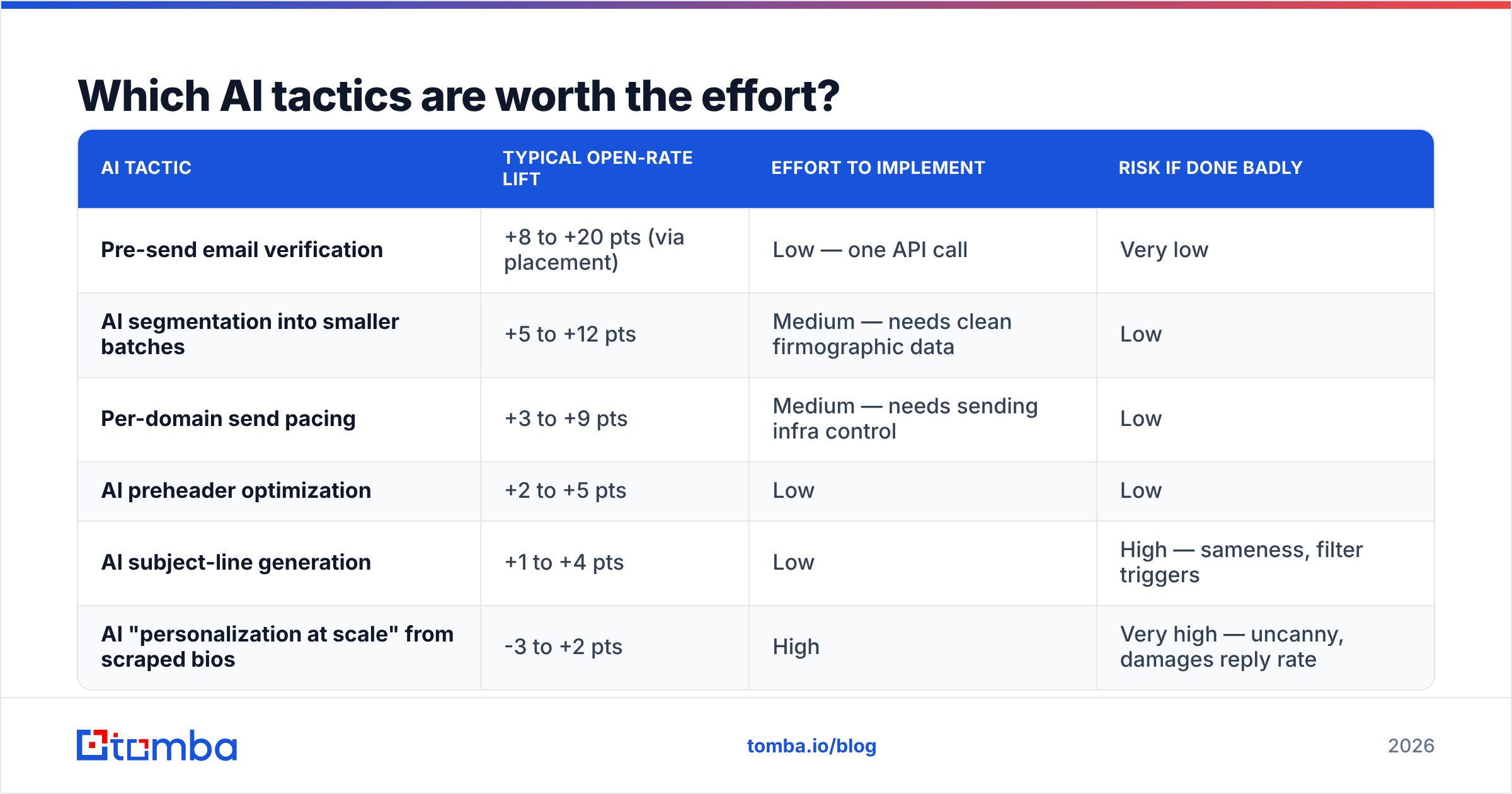
| AI tactic | Typical open-rate lift | Effort to implement | Risk if done badly |
|---|---|---|---|
| Pre-send email verification | +8 to +20 pts (via placement) | Low — one API call | Very low |
| AI segmentation into smaller batches | +5 to +12 pts | Medium — needs clean firmographic data | Low |
| Per-domain send pacing | +3 to +9 pts | Medium — needs sending infra control | Low |
| AI preheader optimization | +2 to +5 pts | Low | Low |
| AI subject-line generation | +1 to +4 pts | Low | High — sameness, filter triggers |
| AI "personalization at scale" from scraped bios | -3 to +2 pts | High | Very high — uncanny, damages reply rate |
The last row deserves a warning. First-line personalization generated from a scraped LinkedIn bio was a 2022 advantage and is now a 2026 liability. Recipients have seen ten thousand emails that open with "Loved your post about scaling RevOps." The pattern is recognized instantly, and recognition kills reply rate even when it does not hurt opens.
How do you write subject lines with AI without sounding like AI?#
Use the model as a variance engine, not a copywriter.
The failure mode is asking for "10 high-converting subject lines," which produces ten variations of the same three archetypes: the question, the number, and the curiosity gap. Every other team using the same models gets the same output, and inboxes converge.
A better prompt structure:
- Give it constraints, not goals. "Under 42 characters, lowercase, no question mark, no numbers, must contain the recipient's company name or a product noun" produces far more usable variance than "make it compelling."
- Feed it real language. Paste three actual replies from happy customers and ask it to extract the phrases they used. Customer vocabulary beats marketing vocabulary.
- Ban the tells. Explicitly exclude "quick question," "unlock," "supercharge," "circling back," and anything with an em dash. Filters have not banned these words, but recipients have.
- Test in pairs on the same list. A subject line test is only valid inside the same list, same sending domain, same week. Comparing this month's 41% to last quarter's 33% tells you nothing when list composition changed.
Run the finalists through a subject line tester and a spam checker before they go into a sequence. Both take under a minute and catch the obvious placement risks.
One structural note that matters more than word choice: on mobile, roughly 33-41 characters of subject line are visible. Front-load the specific noun. "Pipedrive sync for your 14 SDRs" survives truncation. "A quick question about how your team currently handles..." does not.
Does send-time optimization actually work anymore?#
Partially, and less than vendors claim.
Send-time optimization models learn from historical open timestamps. MPP pre-fetches images at unpredictable intervals, so a meaningful share of the training data is timestamped by Apple's proxy rather than by a human. Any model that does not exclude MPP-flagged opens is learning noise and presenting it as insight.
What still works:
- Time-zone alignment. Sending at the recipient's local morning rather than yours is basic and reliably positive.
- Day-of-week avoidance. Monday morning and Friday afternoon underperform in most B2B datasets. You do not need a model for this.
- Reply-time learning. If your platform trains on reply timestamps instead of open timestamps, the signal is clean. Ask any vendor pitching send-time AI which event they train on. If they say "opens," discount the claim.
HubSpot's marketing statistics library is a reasonable public baseline for benchmarking, but treat any aggregate open-rate benchmark published after 2021 with suspicion — the underlying measurement changed and most benchmark sets did not adjust.
How much does list quality affect open rates?#
More than everything else combined.
Bounce rate is the input that mail providers weight most heavily when deciding your placement. Google's bulk sender guidelines set a spam-complaint threshold of 0.3% and expect authenticated, low-bounce sending. Cross those lines and your messages start landing in spam for recipients who would have opened them.
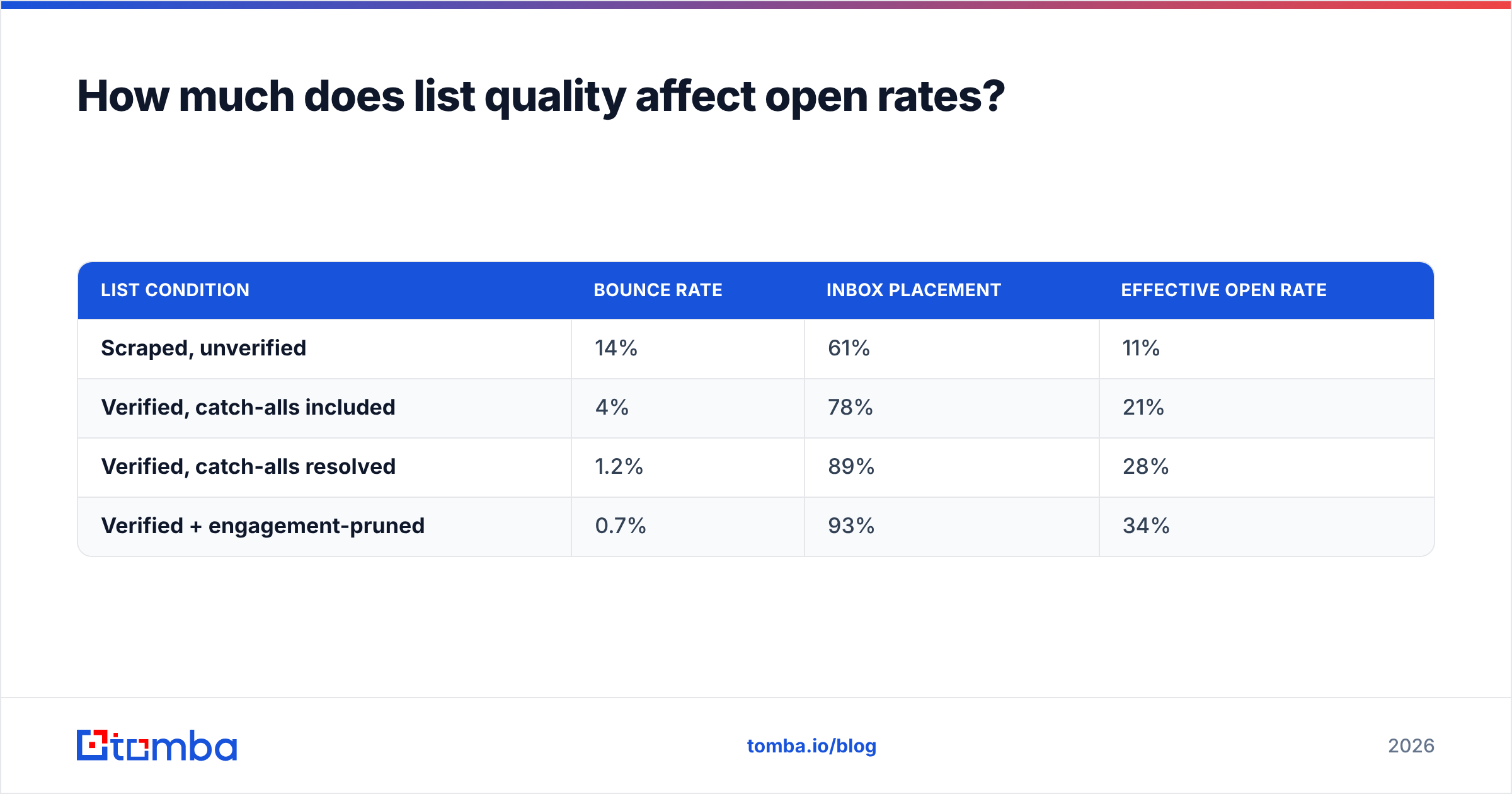
The math is unforgiving. Take a 10,000-address list:
| List condition | Bounce rate | Inbox placement | Effective open rate |
|---|---|---|---|
| Scraped, unverified | 14% | 61% | 11% |
| Verified, catch-alls included | 4% | 78% | 21% |
| Verified, catch-alls resolved | 1.2% | 89% | 28% |
| Verified + engagement-pruned | 0.7% | 93% | 34% |
Nothing in that table is a subject line. The entire spread comes from data hygiene and the reputation it protects.
This is why verification belongs in the workflow before anything else. Run every list through an email verifier before it touches your sending platform, and use a catch-all verifier for the domains that accept everything — catch-alls are where most "verified" lists quietly hide their bounces. For sourcing, whether you build lists with an email finder, pull from a reputable prepackaged provider like BookYourData, or export from your CRM, the verification step is identical and non-negotiable.
If you are processing lists at volume, the bulk email finder handles find-and-verify in one pass rather than two tools and a CSV round trip.

What should you measure instead of open rate?#
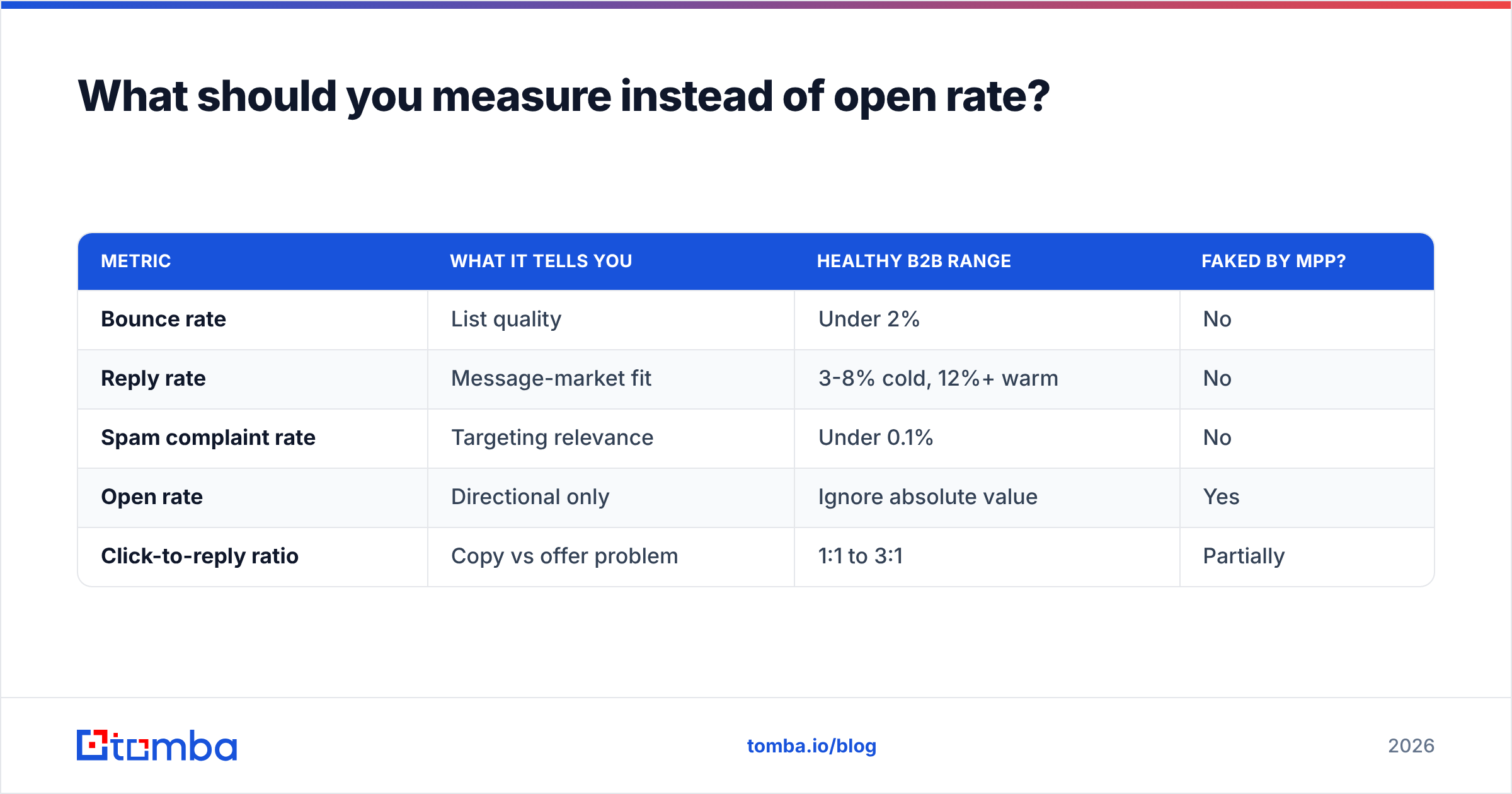
Replace the single vanity number with a trio that cannot be faked by a proxy server:
| Metric | What it tells you | Healthy B2B range | Faked by MPP? |
|---|---|---|---|
| Bounce rate | List quality | Under 2% | No |
| Reply rate | Message-market fit | 3-8% cold, 12%+ warm | No |
| Spam complaint rate | Targeting relevance | Under 0.1% | No |
| Open rate | Directional only | Ignore absolute value | Yes |
| Click-to-reply ratio | Copy vs offer problem | 1:1 to 3:1 | Partially |
If replies are low and bounces are low, your targeting or offer is wrong — no subject line fixes that. If bounces are high, stop sending and clean the list today. If complaints are climbing, you are emailing people with no plausible reason to hear from you, and better email deliverability hygiene will not rescue a bad list.
What does a 30-day implementation plan look like?#
- Days 1-3: Audit. Pull your last 90 days of sends. Segment opens by mail client if your ESP exposes it. Recalculate every historical benchmark with Apple Mail opens excluded. Expect the honest number to be 30-50% lower than what you have been reporting.
- Days 4-7: Clean. Verify every list, resolve catch-alls, and hard-suppress every address that bounced or complained. Deduplicate across sequences so no prospect gets two sequences from two reps.
- Days 8-14: Fix authentication and pacing. Confirm SPF, DKIM, and DMARC alignment. Set per-domain hourly caps. Check your sending domains against a blacklist checker. Register for Google Postmaster Tools and watch domain reputation daily.
- Days 15-21: Segment. Break the master list into 5-8 segments with a genuinely different reason to care. Write one message per segment. Small and specific outperforms large and generic on every metric in the table above.
- Days 22-30: Test copy. Only now do you A/B subject lines and preheaders — and only within a single segment at a time, with replies as the success metric.
Teams that run this order reliably see opens climb. Teams that start at step 5 spend a month generating subject lines and wonder why nothing moved.
Ready to fix the input instead of the output?#
Open rates are a downstream symptom. The upstream cause is almost always the list. Start by sourcing addresses that are real, current, and verified at the point of discovery rather than cleaned up after the damage is done — the Tomba Email Finder finds professional addresses by domain, name, or company and verifies them in the same request, so bad data never reaches your sending domain in the first place.
The free tier includes 25 searches per month if you want to test the accuracy on your own accounts before committing. Paid plans start at $49/mo for Starter, $99/mo for Growth, and $249/mo for Pro — full Tomba pricing is on the site, and the Tomba API drops the same find-and-verify step into whatever sending stack you already run.
Related guides#
// get started
Find, verify and enrich your first contacts today
Start on the free plan with 25 searches a month, then scale when your team is ready.
Free plan · No credit card required · GDPR & CCPA
// about the author