In Sync CRM Alternatives: 8 Better CRMs for B2B Teams
Outgrowing a lightweight CRM is normal. Here are 8 In Sync CRM alternatives compared on price, pipeline depth, automation, and the one thing most switchers forget: contact data quality.
TL;DR
- Most teams leave a lightweight CRM for one of four reasons: shallow pipeline reporting, weak automation, no native email sequencing, or per-seat pricing that stops making sense above ~10 reps.
- For small B2B teams, Pipedrive and Zoho CRM are the cheapest credible upgrades. For teams that want marketing and sales in one object model, HubSpot. For outbound-heavy teams, Close. For RevOps-minded startups, Attio.
- Switching CRMs does not fix bad contact data. If your records have bounced emails, missing job titles, and dead phone numbers, you will migrate the same mess into a nicer interface.
- Budget for two things, not one: the CRM subscription and a data layer that keeps records accurate.
- Verify every price on the vendor's own pricing page before you sign — CRM list prices change quarterly, and annual-vs-monthly gaps of 20–40% are normal.
What is In Sync CRM, and why are teams looking for alternatives?#
"In Sync CRM" is the kind of name that shows up in the small-business CRM tier: a lightweight contact-and-deal tracker sold to teams who need something better than a spreadsheet but cheaper and simpler than Salesforce. If you are searching for In Sync CRM alternatives, you almost certainly are not asking "is this a bad product?" You are asking a much more specific question: what do I get if I move, and is it worth the migration pain?
Be honest about which trigger you are actually hitting, because it changes the shortlist:
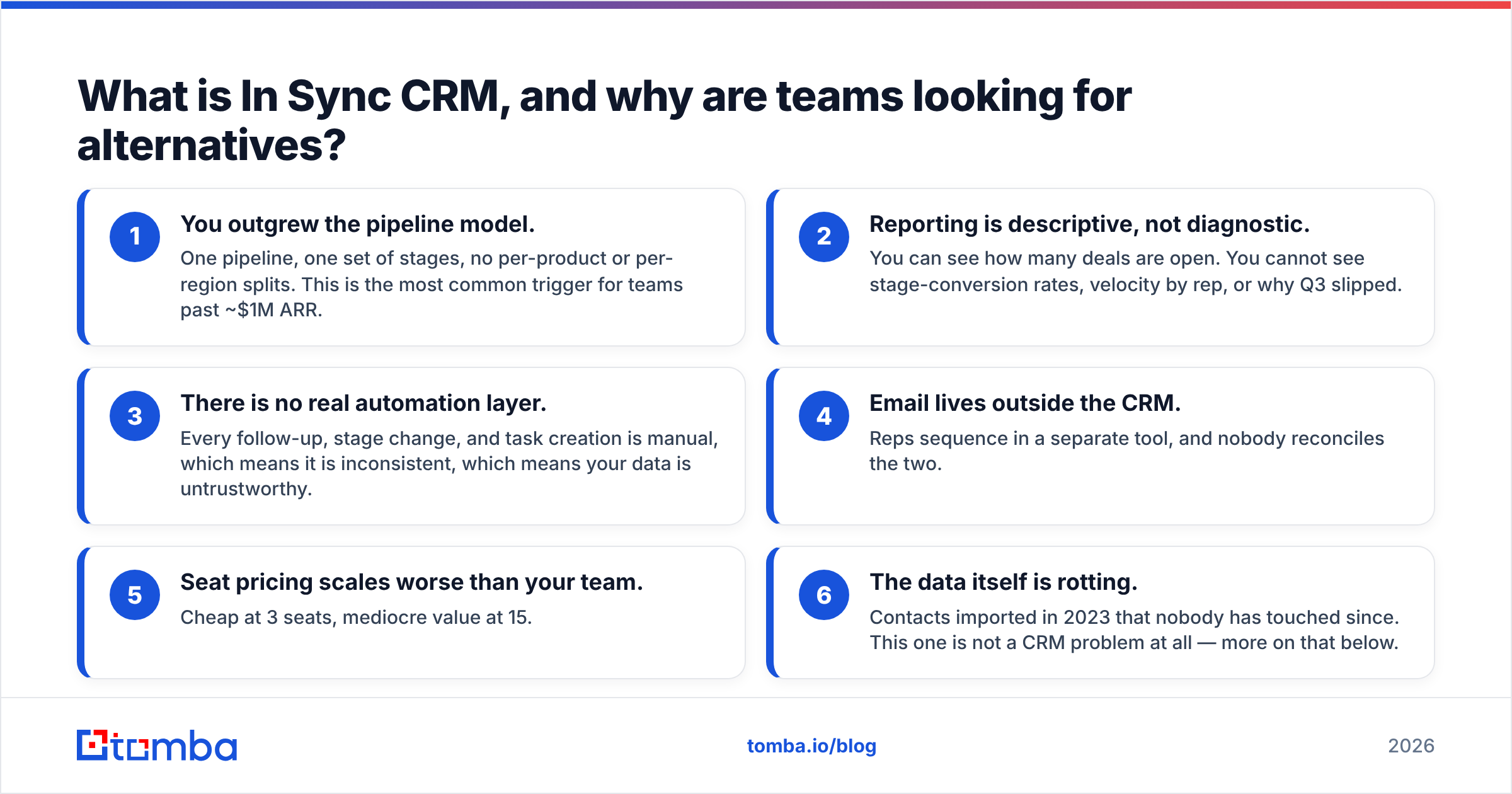
- You outgrew the pipeline model. One pipeline, one set of stages, no per-product or per-region splits. This is the most common trigger for teams past ~$1M ARR.
- Reporting is descriptive, not diagnostic. You can see how many deals are open. You cannot see stage-conversion rates, velocity by rep, or why Q3 slipped.
- There is no real automation layer. Every follow-up, stage change, and task creation is manual, which means it is inconsistent, which means your data is untrustworthy.
- Email lives outside the CRM. Reps sequence in a separate tool, and nobody reconciles the two.
- Seat pricing scales worse than your team. Cheap at 3 seats, mediocre value at 15.
- The data itself is rotting. Contacts imported in 2023 that nobody has touched since. This one is not a CRM problem at all — more on that below.
If your trigger is #6 alone, migrating is the wrong fix. If it is #1–#5, keep reading.
What should a CRM replacement actually do?#
Before you compare logos, write down the non-negotiables. Nearly every evaluation that goes badly does so because the team shopped on feature count instead of on the four or five things they will use daily.
- Multiple pipelines with custom stages — non-negotiable if you sell more than one motion (new business vs. renewals vs. partner-sourced).
- Native email + calendar sync, two-way — if the CRM cannot log threads automatically, reps will not log them at all.
- Workflow automation on the plan you can afford — most vendors gate automation behind the middle tier. Check which tier, not whether the feature exists.
- Reporting you can build yourself — custom dashboards without a consultant. Ask for a trial and try to build a stage-conversion report in 15 minutes.
- An open API and real integrations — you will want to push enrichment, product usage, and billing data in. Check the integrations you already depend on.
- Import and export that respects your history — activity logs, not just contacts and deals. Losing two years of notes is how a migration becomes a rebellion.
Score each candidate 1–5 on those six lines. The winner is usually obvious and usually not the one with the longest feature page.
Which In Sync CRM alternatives are worth shortlisting in 2026?#
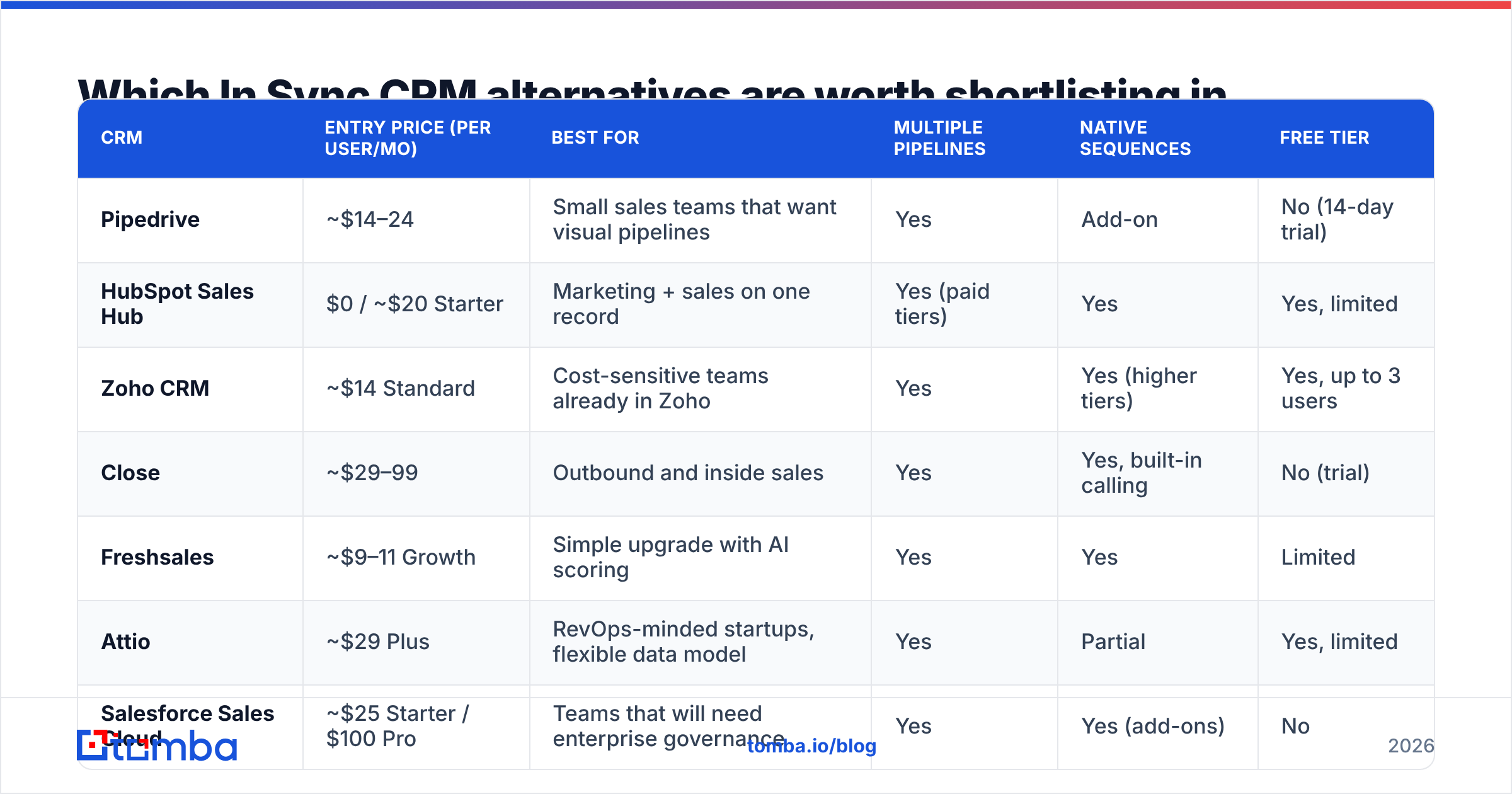
Here is the shortlist, compared on the attributes that actually drive the decision. Prices are list prices per user per month at the time of writing; annual billing is typically cheaper, and every one of these vendors changes pricing, so confirm on their site.
| CRM | Entry price (per user/mo) | Best for | Multiple pipelines | Native sequences | Free tier |
|---|---|---|---|---|---|
| Pipedrive | ~$14–24 | Small sales teams that want visual pipelines | Yes | Add-on | No (14-day trial) |
| HubSpot Sales Hub | $0 / ~$20 Starter | Marketing + sales on one record | Yes (paid tiers) | Yes | Yes, limited |
| Zoho CRM | ~$14 Standard | Cost-sensitive teams already in Zoho | Yes | Yes (higher tiers) | Yes, up to 3 users |
| Close | ~$29–99 | Outbound and inside sales | Yes | Yes, built-in calling | No (trial) |
| Freshsales | ~$9–11 Growth | Simple upgrade with AI scoring | Yes | Yes | Limited |
| Attio | ~$29 Plus | RevOps-minded startups, flexible data model | Yes | Partial | Yes, limited |
| Salesforce Sales Cloud | ~$25 Starter / $100 Pro | Teams that will need enterprise governance | Yes | Yes (add-ons) | No |
| Nimble | ~$30 | Relationship-led selling, social context | Limited | Basic | No |
A few notes that a table cannot carry:
Pipedrive is the most common landing spot for teams leaving a lightweight CRM, because the mental model is nearly identical — deals move left to right — but everything around it is deeper. Automation is solid from the Advanced tier up. Its weakness is marketing: it is a sales tool, and it does not pretend otherwise. See pipedrive.com for current tiers.
HubSpot wins when your bottleneck is handoff between marketing and sales. The free CRM is genuinely usable, which makes it a low-risk pilot. The cost curve is the risk: Starter is cheap, Professional is not, and contact-tier pricing can surprise you. hubspot.com publishes the full matrix.
Zoho CRM is the value play. Per-seat cost is the lowest on this list at comparable feature depth, and if you already use Zoho Books or Desk, the data model is shared. The trade-off is UI polish and a settings surface that rewards an admin who enjoys configuration.
Close is built for teams whose day is calls and emails, not forecasting meetings. Built-in calling, power dialer, and sequences mean fewer tools. Price per seat is high, but it replaces two or three subscriptions.
Attio treats your CRM like a flexible database — custom objects, relationships, and real-time collaboration. It is the best fit if someone on the team thinks in schemas. It is the worst fit if nobody wants to design one.
Salesforce belongs on the shortlist only if you can name the specific governance or customization requirement that justifies it. If you cannot, you are buying a platform to solve a spreadsheet problem. g2.com is a reasonable place to sanity-check reviewer sentiment across all of these.
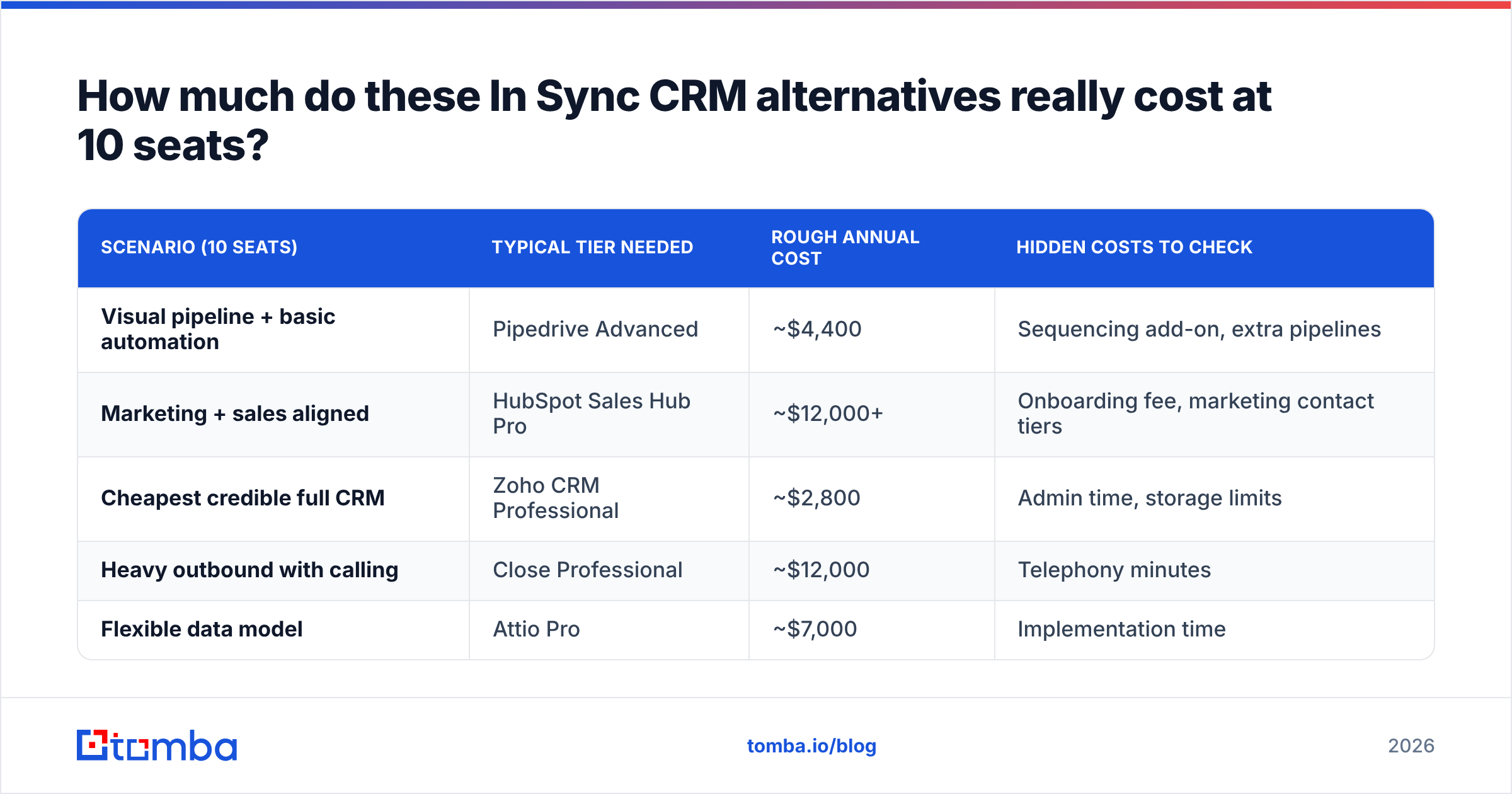
How much do these In Sync CRM alternatives really cost at 10 seats?#
List price per seat is not the number that matters. Model your actual team size and the tier that unlocks the features you listed above.
| Scenario (10 seats) | Typical tier needed | Rough annual cost | Hidden costs to check |
|---|---|---|---|
| Visual pipeline + basic automation | Pipedrive Advanced | ~$4,400 | Sequencing add-on, extra pipelines |
| Marketing + sales aligned | HubSpot Sales Hub Pro | ~$12,000+ | Onboarding fee, marketing contact tiers |
| Cheapest credible full CRM | Zoho CRM Professional | ~$2,800 | Admin time, storage limits |
| Heavy outbound with calling | Close Professional | ~$12,000 | Telephony minutes |
| Flexible data model | Attio Pro | ~$7,000 | Implementation time |
Two line items are missing from almost every CRM budget: migration labor (plan 20–40 hours for a team of 10, more if you have custom fields) and data hygiene. The second one is the expensive surprise.
Does switching CRMs fix your data problem?#
No. And this is the single most useful thing in this article.
A CRM is a filing cabinet with opinions. It stores, routes, and reports on records. It does not go out and check whether jane.doe@acme.com still works at Acme, whether the company has 40 employees or 400, or whether the mobile number you dialed three times belongs to someone who left in 2024. Migrate a stale database into HubSpot and you get a beautifully rendered stale database.
Look at what actually degrades. B2B contact data decays at roughly 25–30% per year — people change jobs, companies rebrand, domains consolidate after acquisitions. That decay shows up as bounced sequences, wasted dials, and forecast noise, and none of the eight CRMs above will flag it for you.
The fix is a data layer that sits alongside whichever CRM you pick:
- Verify before you import. Run every email through an email verifier as part of the migration, not after. Importing known-bad records into a new system is how you poison a fresh start.
- Fill the gaps at the record level. Contact enrichment backfills job title, company size, LinkedIn profile, and location so your segmentation and routing rules have something to work with.
- Find the contacts you are missing. When a champion leaves, you need the replacement. An email finder resolves a name plus a domain into a verified work address in seconds.
- Buy list data carefully when you need volume. Providers like BookYourData are a legitimate way to source net-new B2B contacts at scale; pair any purchased list with independent verification before it touches your sending domain.
- Automate the sync. Native HubSpot and Pipedrive integrations mean enrichment runs on record creation instead of living in a quarterly cleanup project nobody volunteers for.
Do this once during migration and your new CRM starts with clean inputs. Skip it and you will be shopping for CRM alternatives again in 18 months, for the same reason, with a different vendor to blame.
How do you migrate off In Sync CRM without losing pipeline?#
- Freeze custom fields. Export the field list first and delete anything unused. Migrating 80 fields when 22 are live is the most common self-inflicted wound.
- Export everything, including activities. Contacts, companies, deals, notes, emails, tasks. If your current CRM cannot export activity history, decide now whether you can live without it.
- Clean before you load. Deduplicate, verify emails, standardize company names and domains. This is the one step teams skip and the one that determines whether the new CRM is trusted.
- Run parallel for two weeks. New deals go into the new CRM; the old one stays read-only. Do not do a hard cutover mid-quarter.
- Rebuild reports before you announce. If a rep logs in on day one and their number is missing, adoption is dead.
- Set a hygiene cadence. Monthly enrichment run, quarterly verification sweep, and an owner whose name is on it.
Which In Sync CRM alternative should you actually pick?#
- Under 10 seats, sales-only, want the shortest learning curve: Pipedrive.
- Marketing and sales need one shared record: HubSpot, starting on the free tier to de-risk.
- Tightest budget, willing to configure: Zoho CRM.
- Calls and emails are the job: Close.
- You have a technical ops person and unusual data: Attio.
- Regulated, complex, multi-region, with a real admin function: Salesforce.
There is no universally best CRM here, and anyone who tells you otherwise is selling one. There is a universally worst outcome: paying more per seat for the same untrustworthy data.
Ready to migrate with data you can trust?#
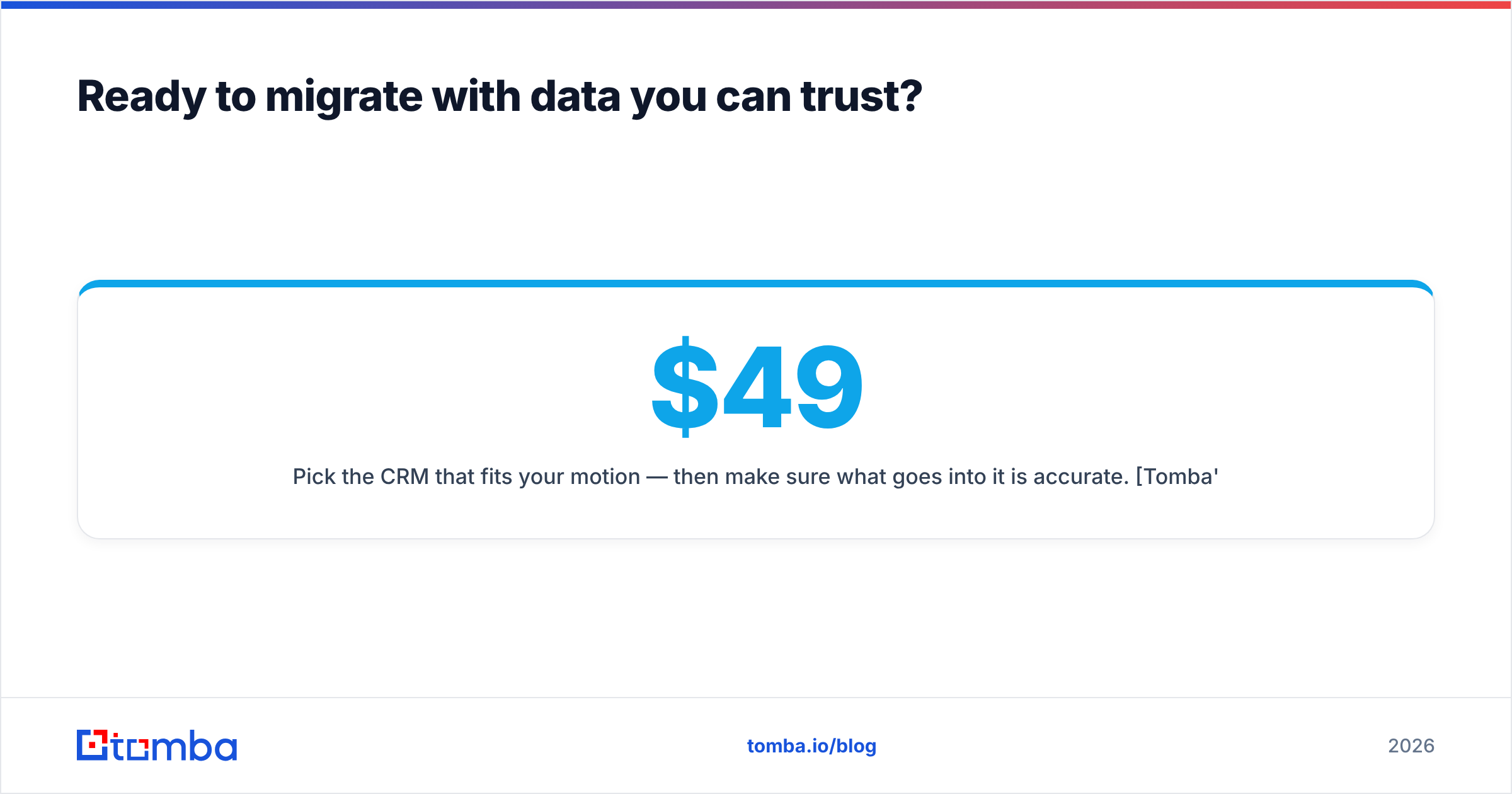
Pick the CRM that fits your motion — then make sure what goes into it is accurate. Tomba's Email Finder resolves names and domains into verified work emails, with a free tier of 25 searches per month to test against your own list before you commit. Paid plans start at $49/month (Starter), $99/month (Growth), and $249/month (Pro); full Tomba pricing is public, and the Tomba API lets you enrich records automatically the moment they land in your new CRM. Clean the data during the migration, not after it.
Related guides#
// get started
Find, verify and enrich your first contacts today
Start on the free plan with 25 searches a month, then scale when your team is ready.
Free plan · No credit card required · GDPR & CCPA
// about the author