Inbound Lead Generation Tools: The 2026 Stack That Actually Converts
Most inbound stacks buy the same capability three times and still miss 95% of site traffic. Here is what each layer actually does, what it costs in 2026, and the order to buy it in.
TL;DR
- "Inbound lead generation tools" is not one category — it is six layers (attract, capture, identify, enrich, score, route), and most teams accidentally pay for the same layer twice.
- Between 95% and 98% of your site traffic never fills in a form. Capture tools do nothing about that; identification and enrichment tools do.
- A workable 2026 stack for a sub-20-person go-to-market team costs roughly $400–$900/month. Anything over $3,000 usually means duplicated layers, not better coverage.
- Buy in this order: analytics → capture → identify → enrich → route. Buying enrichment before you have traffic worth enriching is the most common way to waste a budget.
- The layer teams skip most often is verification. Enriched contact data that goes straight into a sequence without a bounce check is how a warm domain gets cold.
What counts as an inbound lead generation tool in 2026?#
Almost anything a vendor wants it to. That is the problem.
Search the term and you get chat widgets, form builders, SEO suites, webinar platforms, CRMs, intent-data providers, and email finders all sitting on the same listicle as if they were interchangeable. They are not. They sit at different points in the same pipeline, and a tool that is excellent at one point is usually mediocre at the next.
A useful definition: an inbound lead generation tool is any software that helps you turn interest you did not pay to interrupt into a contactable, qualified record in your CRM. That definition has a natural sequence built into it — interest, contact, qualification — and the sequence is what you should actually be shopping for.
Think of it like a restaurant. Marketing gets people through the door. The host seats them. The server takes the order. The kitchen cooks. The POS bills them. Nobody buys "restaurant software"; they buy a host stand, a POS, and a kitchen display, because those are different jobs. Inbound tooling works the same way, but the marketing makes it sound like one purchase.
Which layers does an inbound stack actually need?#
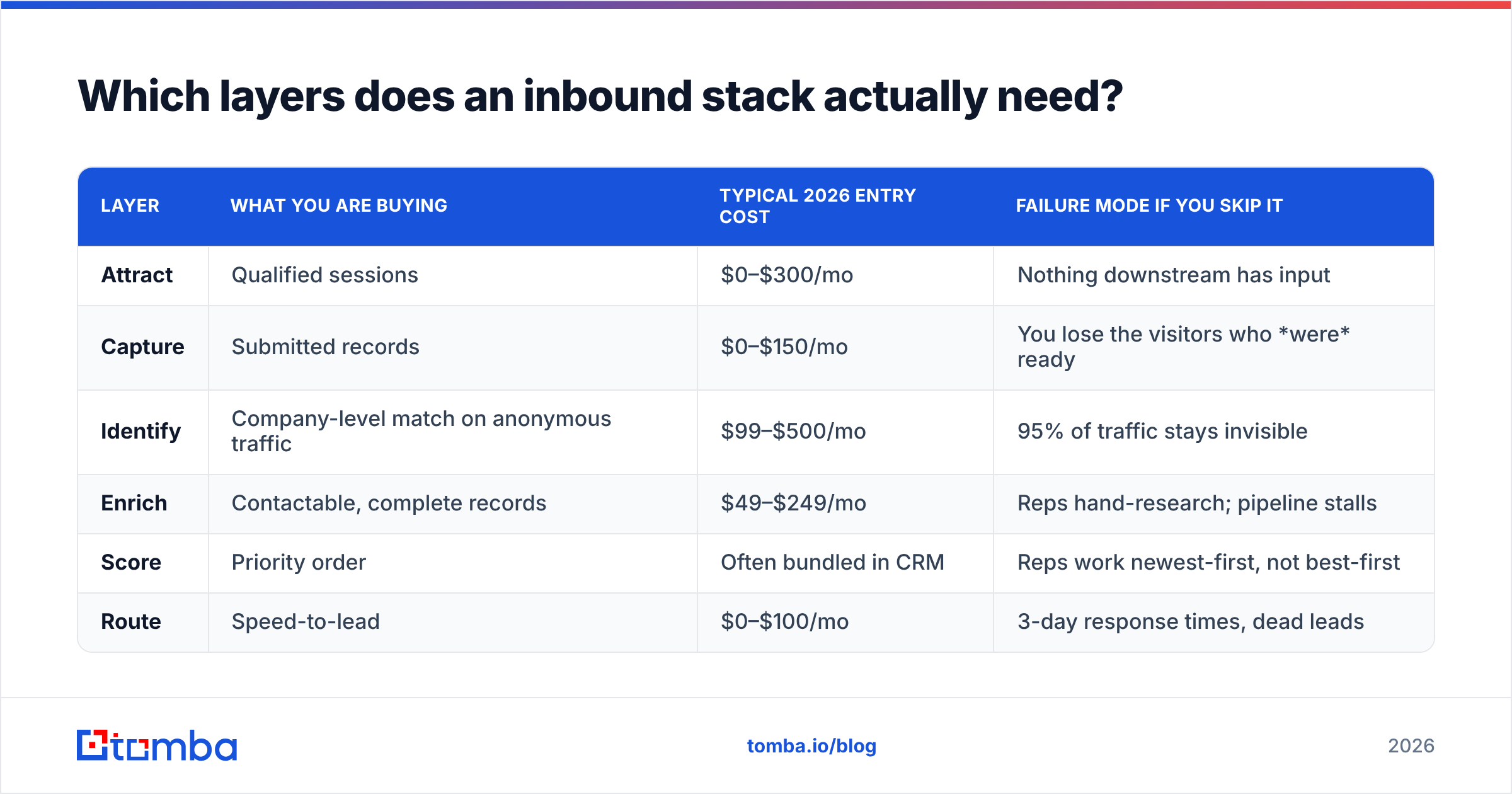
Six, and you can name the job each one does in a sentence. If a tool in your stack does not map cleanly to one of these, you are probably paying for shelfware.
- Attract — SEO, content, paid retargeting, community. Tools here produce sessions, not leads. Measured in qualified sessions, not MQLs.
- Capture — forms, chat, calculators, demo bookers. Turns a willing visitor into a submitted record. Measured in conversion rate on intent pages.
- Identify — reverse-IP and de-anonymization for the 95%+ who never submit anything. Turns an anonymous session into a company, and sometimes a person. Measured in match rate.
- Enrich — appends firmographics, role, email, and phone to a thin record (a company name, a LinkedIn URL, a free-mail signup). Measured in fill rate and accuracy.
- Score and qualify — fit plus behaviour, producing a priority order. Measured in whether reps trust the ranking enough to work it top-down.
- Route and act — CRM sync, round-robin, sequence enrollment, alerts. Measured in speed-to-lead.
| Layer | What you are buying | Typical 2026 entry cost | Failure mode if you skip it |
|---|---|---|---|
| Attract | Qualified sessions | $0–$300/mo | Nothing downstream has input |
| Capture | Submitted records | $0–$150/mo | You lose the visitors who were ready |
| Identify | Company-level match on anonymous traffic | $99–$500/mo | 95% of traffic stays invisible |
| Enrich | Contactable, complete records | $49–$249/mo | Reps hand-research; pipeline stalls |
| Score | Priority order | Often bundled in CRM | Reps work newest-first, not best-first |
| Route | Speed-to-lead | $0–$100/mo | 3-day response times, dead leads |
The table is worth staring at for a second, because the cost distribution surprises people. The expensive layers — identify and enrich — are the two most teams treat as optional add-ons, while they happily spend on capture tooling that only serves the small fraction of visitors who were already going to convert.

Is more traffic or better identification the bigger lever?#
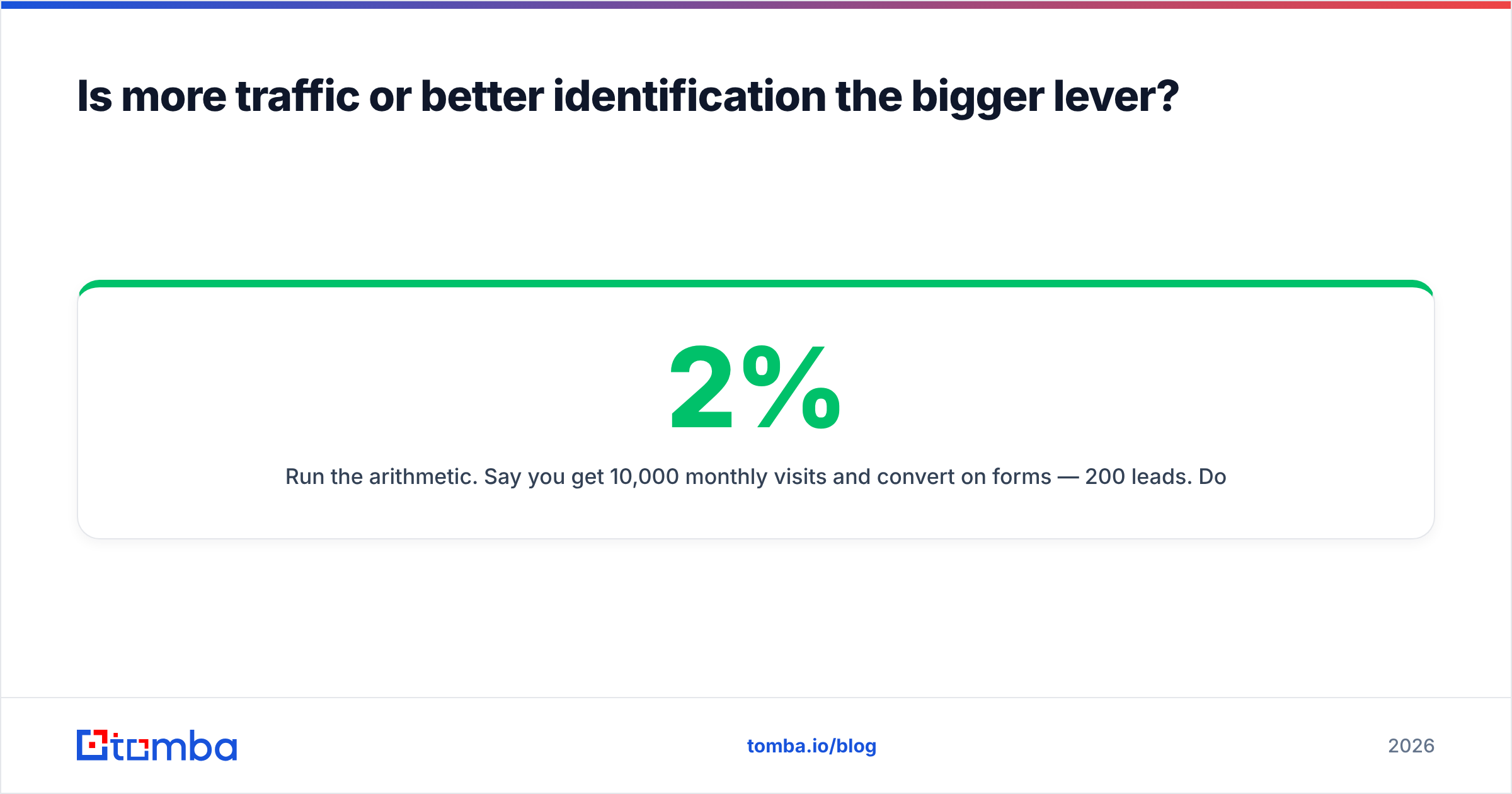
Better identification, for almost every B2B site under 50,000 monthly sessions.
Run the arithmetic. Say you get 10,000 monthly visits and convert 2% on forms — 200 leads. Doubling traffic through content and paid takes two quarters and a real budget, and gets you to 400. Meanwhile, 9,800 visitors left without a trace. Identifying even 25% of them at the company level surfaces roughly 2,450 accounts, of which maybe 10% are in your ICP: 245 target accounts you already know were on your pricing page.
That is a larger number than your doubled form volume, available this month, at a fraction of the cost. It is also warmer, because page-level behaviour tells you what they cared about.
The catch — and vendors are quiet about it — is that match rates vary enormously. Consumer-heavy traffic, mobile-first traffic, and traffic from regions with strict privacy enforcement match far worse than desktop B2B traffic from corporate networks. Ask any identification vendor for match rate on your own traffic during a trial. If they will not run a pixel for two weeks before you sign, that is your answer. Tomba's website visitor reveal sits in this layer, and the honest framing is the same for every vendor in it: the pixel is cheap, the match rate is what you are actually buying.
What do the leading inbound lead generation tools cost?#
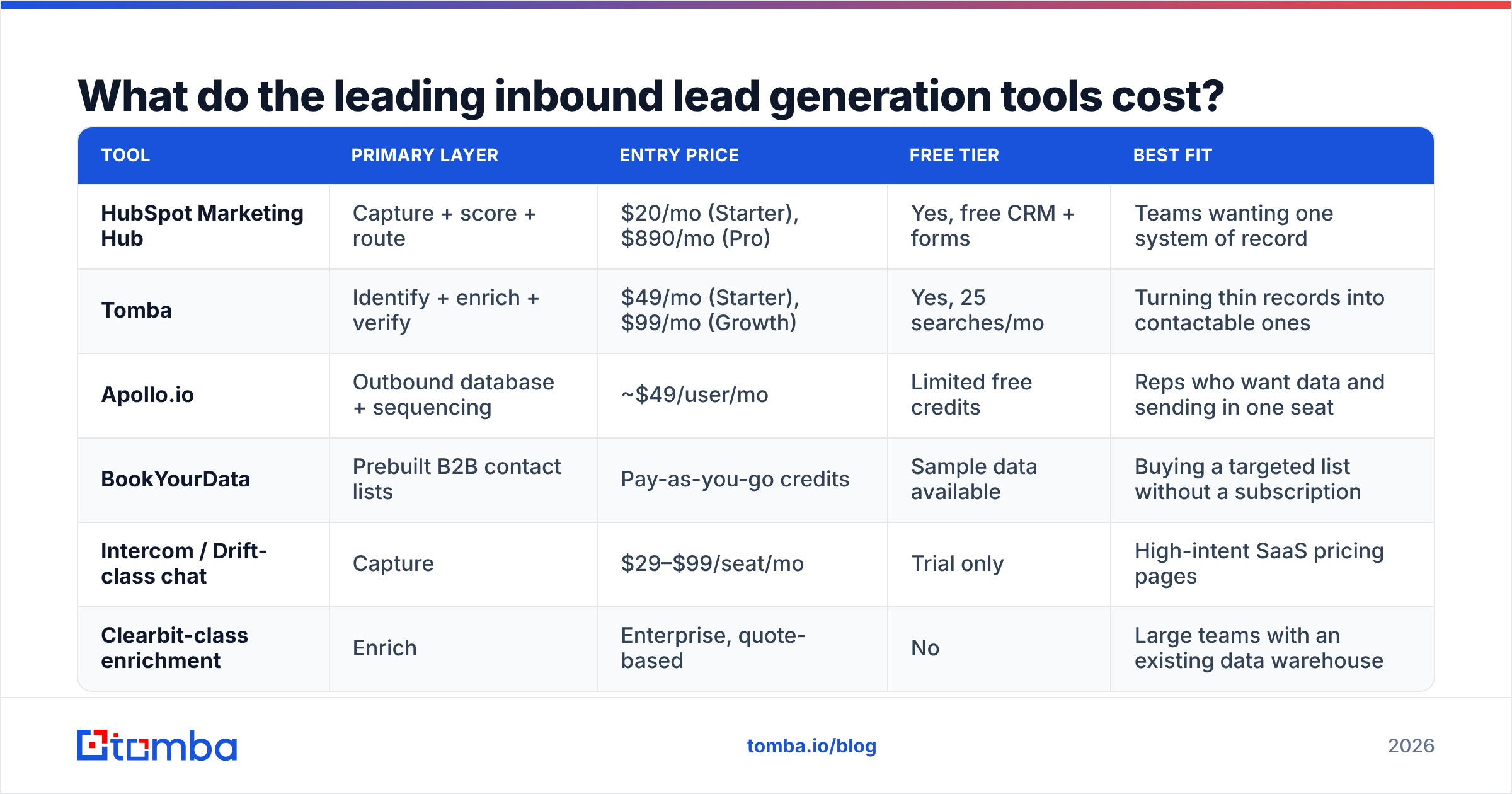
Here is a like-for-like view of the tools teams most often shortlist. Prices are entry tiers as published in 2026; every vendor in this space runs custom pricing above a certain volume, so treat these as the floor, not the ceiling.
| Tool | Primary layer | Entry price | Free tier | Best fit |
|---|---|---|---|---|
| HubSpot Marketing Hub | Capture + score + route | $20/mo (Starter), $890/mo (Pro) | Yes, free CRM + forms | Teams wanting one system of record |
| Tomba | Identify + enrich + verify | $49/mo (Starter), $99/mo (Growth) | Yes, 25 searches/mo | Turning thin records into contactable ones |
| Apollo.io | Outbound database + sequencing | ~$49/user/mo | Limited free credits | Reps who want data and sending in one seat |
| BookYourData | Prebuilt B2B contact lists | Pay-as-you-go credits | Sample data available | Buying a targeted list without a subscription |
| Intercom / Drift-class chat | Capture | $29–$99/seat/mo | Trial only | High-intent SaaS pricing pages |
| Clearbit-class enrichment | Enrich | Enterprise, quote-based | No | Large teams with an existing data warehouse |
Two things fall out of this table.
First, the overlap is real. If you run HubSpot Pro and Apollo and a separate enrichment vendor, you are paying three times for contact records, and the three sources will disagree with each other. Pick one system of record and let the others feed it.
Second, the pricing models are not comparable. Seat-based tools (Apollo, chat) punish you for adding people. Credit-based tools (Tomba pricing works this way, as does BookYourData) punish you for volume but let the whole team share access. If you have four SDRs who each need occasional lookups, credit pooling is dramatically cheaper. If you have one person doing heavy daily research, a seat may win. Do the per-lookup math before the demo, not after.
How do you turn anonymous traffic into contactable leads?#
This is where most stacks break, so it is worth walking through concretely.
Identification gives you a company. It rarely gives you a person, and it almost never gives you a working email address. A row that says "Acme Corp visited /pricing three times" is intelligence, not a lead — a rep cannot do anything with it until it has a name and an inbox.
The bridge is enrichment plus verification:
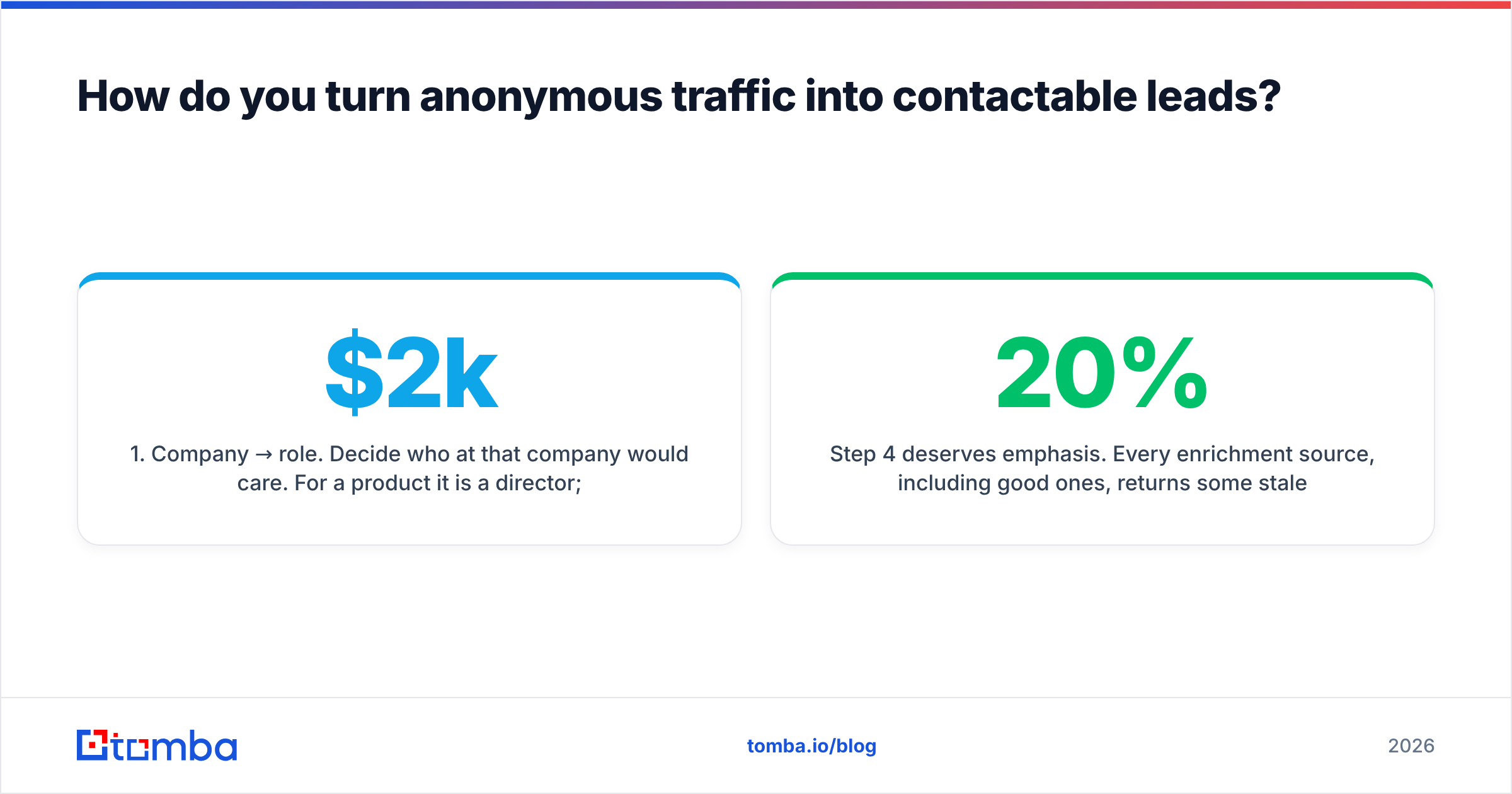
- Company → role. Decide who at that company would care. For a $2k/mo product it is a director; for a $200k platform it is a VP plus a champion two levels down.
- Role → person. Find the actual humans in that role. A domain search returns the addresses that exist at a company and the pattern they follow, which is faster than guessing per person.
- Person → address. Generate or look up the address. Pattern inference (first.last@, f.last@, firstinitiallast@) covers most of it; the rest needs a lookup source.
- Address → verified address. Run it through an email verifier before it touches a sequence. This is the step teams skip, and it is the one that protects sender reputation.
- Verified record → CRM. Push it with the behavioural context attached, because "visited pricing twice last week" is the entire reason the email will land.
Step 4 deserves emphasis. Every enrichment source, including good ones, returns some stale addresses — people change jobs at roughly 20% a year, and no database refreshes instantly. Sending to a 6% bounce list will visibly damage your deliverability within a week. Verification costs a fraction of a cent per record and prevents an outcome that takes a month of warmup to undo.

Do you still need forms in 2026?#
Yes, but fewer of them, and shorter.
The gated-ebook era is over for most B2B categories. Buyers research anonymously, in peer communities and AI assistants, and arrive at your site late in their process. Gating a mid-funnel asset now mostly filters out the serious buyer and collects the tire-kicker who will type a fake email.
What still earns a form:
- A demo or trial request. Highest intent, and the buyer expects the exchange.
- An interactive tool. ROI calculators, assessments, and free utilities convert because the output is worth the trade.
- A pricing or quote request. Especially for anything with configuration.
- A live event or webinar. Registration is the product.
Everything else — guides, benchmarks, templates — usually performs better ungated, driving links and rankings that feed the attract layer. G2's lead-capture category is full of tools that will help you gate anything; the discipline is deciding what deserves gating, not what is technically possible.
One practical note: shorten the forms you keep. Every field past the fourth measurably drops completion. Ask for work email and company, then enrich the rest server-side. That is exactly what the data enrichment layer is for — you trade a form field for an API call the visitor never sees.
What breaks most inbound stacks?#
Four failure patterns, in rough order of frequency.
Duplicated layers. The classic is a CRM with native enrichment, plus a standalone enrichment vendor, plus a sales-intelligence seat. Three sources of truth means reps trust none of them. Audit your stack by layer, not by vendor, and cut until each layer has exactly one owner.
No verification step. Covered above. Cheap to fix, expensive to ignore.
Speed-to-lead theatre. Teams buy routing tools and then leave the round-robin unattended over weekends. Research from firms like Gartner has consistently found response time to be among the strongest predictors of conversion; a tool that routes in 30 seconds to a rep who replies in 30 hours has bought you nothing.
Scoring nobody believes. If your model gives a free-mail signup from a student the same score as a director at a target account, reps will ignore the ranking and work newest-first. Fit data — company size, industry, tech stack — has to be in the model, which means enrichment is a prerequisite for scoring, not a peer of it.
Buying the wrong end first. The most expensive mistake. Enrichment on 500 monthly visitors is not a business case. Get the traffic and the capture basics right, then spend on identification and enrichment once there is volume worth mining. HubSpot's own marketing stack guidance makes the same argument from the other direction: sequence beats breadth.
How should a small team sequence purchases?#
If you are starting from close to zero, this order wastes the least money:
- Month 0 — Free CRM plus native forms. Cost: $0. You need a system of record before anything else is meaningful.
- Month 1 — Analytics with page-level attribution. Know which pages carry intent before you pay to identify who visits them.
- Month 2–3 — Capture on the two or three highest-intent pages only. Demo, pricing, one calculator.
- Month 4 — Identification pixel, trialled on your real traffic for two weeks before you commit.
- Month 5 — Enrichment and verification, sized to the volume identification actually produces.
- Month 6+ — Scoring and routing, built on the fit data you now have.
Most teams do this in reverse, buying a $900/month suite in month zero and a $50/month pixel in month twelve. The suite then gets blamed for underperforming when the real issue is that nothing was feeding it.
A reasonable steady-state budget for a 5–15 person GTM team lands around $400–$900/month across all six layers. If your number is triple that and pipeline is not triple, start the audit at the duplication problem.
Where does an email finder fit in all this?#
At the join between identify and act — and it is a smaller purchase than most people assume.
Once you know which companies are on your site and which roles matter, you need working addresses for named people. That is a narrow, well-defined job: input a name and domain, output a verified address. It does not require a $900/month suite, and it does not require a per-seat contract for a team that runs a few hundred lookups a month.
If that is the gap in your stack, start with the Tomba Email Finder. The free tier gives you 25 searches a month to test accuracy against contacts you already know are correct — which is the only honest way to evaluate any data vendor. If it holds up, Starter is $49/month and Growth is $99/month with pooled credits across your whole team, plus verification, domain search, and enrichment on the same account. Run the trial against your own traffic, check the bounce rate on the first send, and let the numbers decide.
Related guides#
// get started
Find, verify and enrich your first contacts today
Start on the free plan with 25 searches a month, then scale when your team is ready.
Free plan · No credit card required · GDPR & CCPA
// about the author