Inbound Prospecting: How to Turn Signals Into Pipeline
Inbound prospecting is not waiting for form fills. It's working the signals your marketing already generates — visitors, content readers, product signups — before they raise a hand. Here's the full playbook.
TL;DR
- Inbound prospecting is proactive, not passive. It means reaching out to people who have already shown intent — pricing page visits, content downloads, product signups, review-site activity — instead of waiting for them to fill out a "Contact Sales" form.
- The form fill is the smallest slice of your inbound. Roughly 95–98% of site visitors never convert on a form. Inbound prospecting is the discipline of working the other 95%.
- Speed beats polish. Response time within five minutes correlates with dramatically higher qualification rates than an hour-later reply, regardless of how well-crafted the message is.
- Enrichment is the bottleneck, not intent data. Most teams can see which company is interested. Turning that into a named person with a verified email is where the play breaks down.
- You need three things: a signal tier system, a routing rule per tier, and a contact-resolution layer that turns a company domain into a reachable human.
What is inbound prospecting?#
Inbound prospecting is outbound outreach aimed at people who have already interacted with your brand.
Think of it like a bookstore. Traditional inbound is standing at the register waiting for someone to bring a book up. Traditional outbound is calling strangers and asking if they read. Inbound prospecting is watching who lingers in the pricing aisle for ten minutes, then walking over and asking if they need help. Same store, same staff — different timing, different hit rate.
The technical version: you capture intent signals (first-party behavioral data, third-party intent data, product usage), score and tier them, resolve the anonymous or partial signal into a named contact with verified contact details, and run a personalized sequence referencing the specific behavior that triggered the play.
The distinction that matters most is this: inbound marketing generates demand, inbound prospecting captures it. Marketing teams that only optimize for form conversions leave the majority of their demand on the floor. According to HubSpot's research on sales trends, the average B2B site converts a low single-digit percentage of traffic. Everything else is a signal that got thrown away.
Why does inbound prospecting outperform pure outbound?#
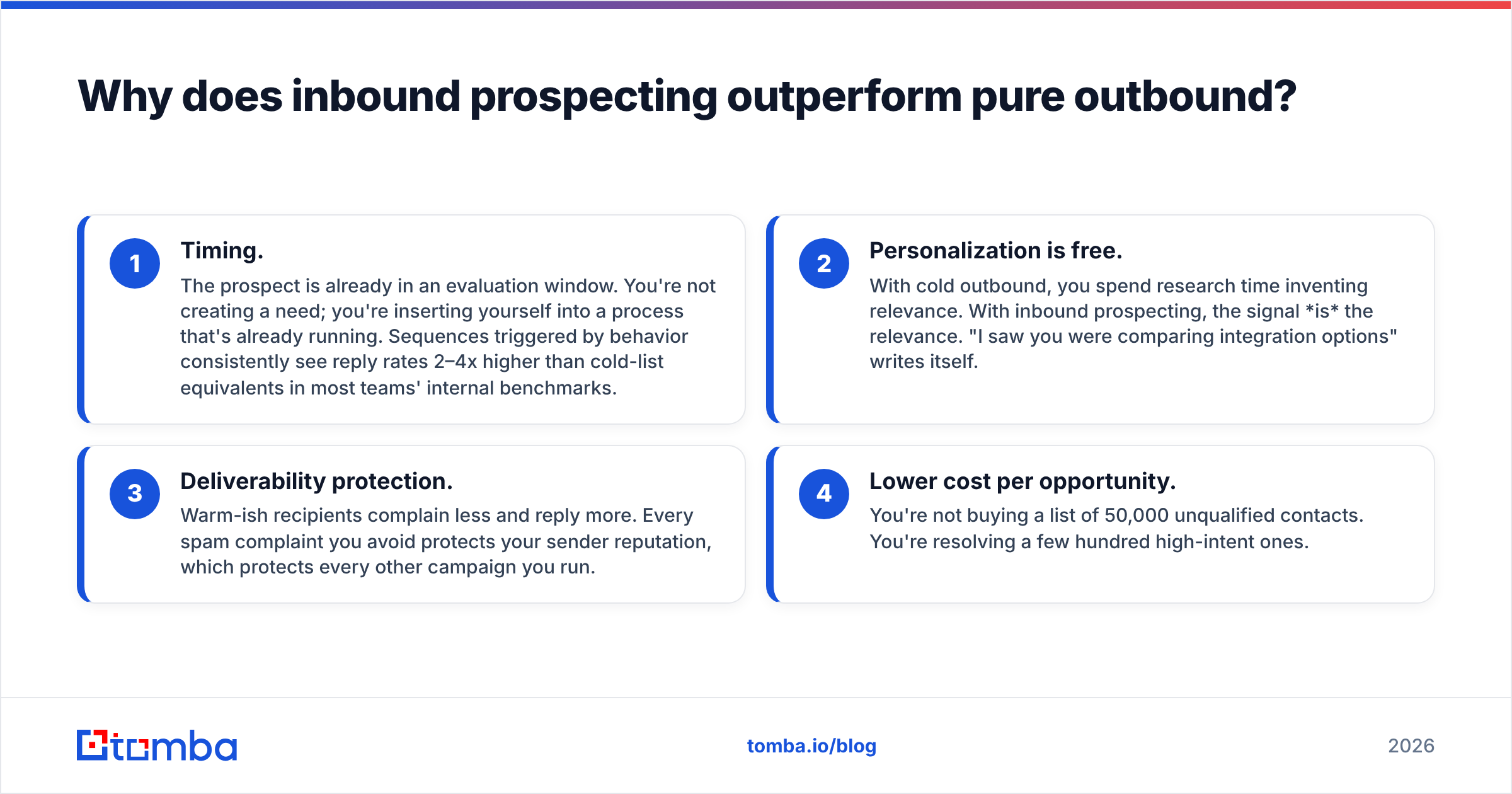
Three reasons, in order of impact.
- Timing. The prospect is already in an evaluation window. You're not creating a need; you're inserting yourself into a process that's already running. Sequences triggered by behavior consistently see reply rates 2–4x higher than cold-list equivalents in most teams' internal benchmarks.
- Personalization is free. With cold outbound, you spend research time inventing relevance. With inbound prospecting, the signal is the relevance. "I saw you were comparing integration options" writes itself.
- Deliverability protection. Warm-ish recipients complain less and reply more. Every spam complaint you avoid protects your sender reputation, which protects every other campaign you run.
- Lower cost per opportunity. You're not buying a list of 50,000 unqualified contacts. You're resolving a few hundred high-intent ones.
The catch: inbound prospecting only scales as far as your signal volume. If you get 200 visitors a month, this is a manual play. If you get 50,000, it's an ops problem.
What signals should you actually act on?#
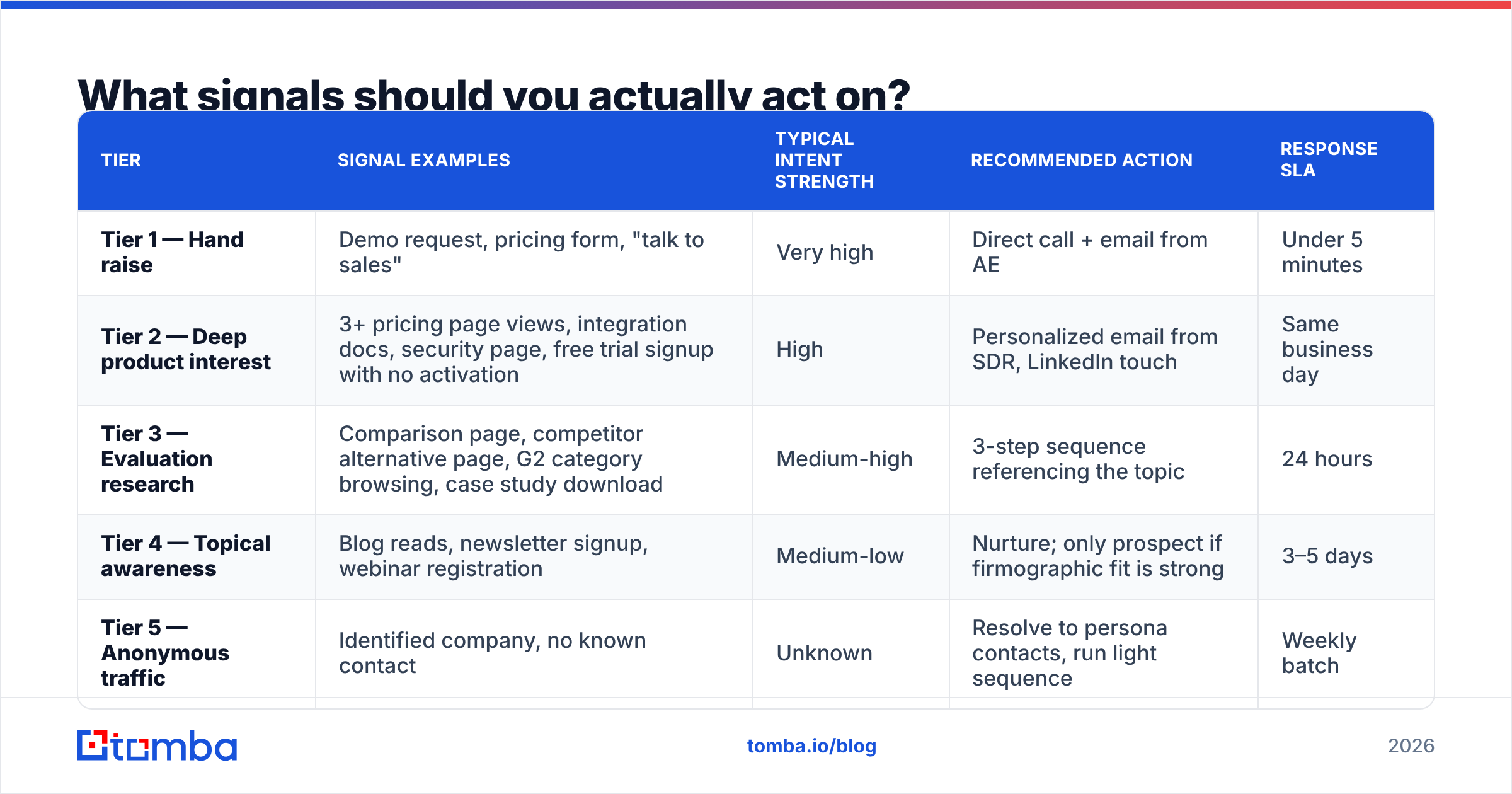
Not all intent is equal. The mistake most teams make is treating a blog visitor and a pricing-page repeat visitor as the same lead. Here's a tiering model that holds up in practice.
| Tier | Signal examples | Typical intent strength | Recommended action | Response SLA |
|---|---|---|---|---|
| Tier 1 — Hand raise | Demo request, pricing form, "talk to sales" | Very high | Direct call + email from AE | Under 5 minutes |
| Tier 2 — Deep product interest | 3+ pricing page views, integration docs, security page, free trial signup with no activation | High | Personalized email from SDR, LinkedIn touch | Same business day |
| Tier 3 — Evaluation research | Comparison page, competitor alternative page, G2 category browsing, case study download | Medium-high | 3-step sequence referencing the topic | 24 hours |
| Tier 4 — Topical awareness | Blog reads, newsletter signup, webinar registration | Medium-low | Nurture; only prospect if firmographic fit is strong | 3–5 days |
| Tier 5 — Anonymous traffic | Identified company, no known contact | Unknown | Resolve to persona contacts, run light sequence | Weekly batch |
The tiers matter because they dictate who does the work. Tier 1 belongs to an AE. Tier 5 belongs to an automated enrichment job. Mixing those up is how teams burn AE hours on blog readers and let demo requests sit for six hours.
A practical rule: a signal is worth acting on if you can name the specific behavior in the first line of your email without sounding creepy. "Saw you checked our SOC 2 page" is fine. "Saw you spent 47 seconds on paragraph three" is not.
Third-party intent vs first-party signals#
First-party signals — your own site, your own product, your own emails — are more reliable but lower volume. Third-party intent data (from providers that track content consumption across publisher networks) is higher volume but noisier and usually resolved only at the account level.
Most teams should max out first-party before buying third-party. You'll extract more pipeline from properly working your existing traffic than from adding another data feed you don't have the headcount to action.
How do you turn an anonymous visitor into a contactable person?#
This is the step where inbound prospecting programs die.
You've identified that someone from Acme Corp read your pricing page three times this week. Great. Now what? You don't have a name, you don't have an email, and "info@acme.com" is not going to reach the VP of Engineering who was actually reading.
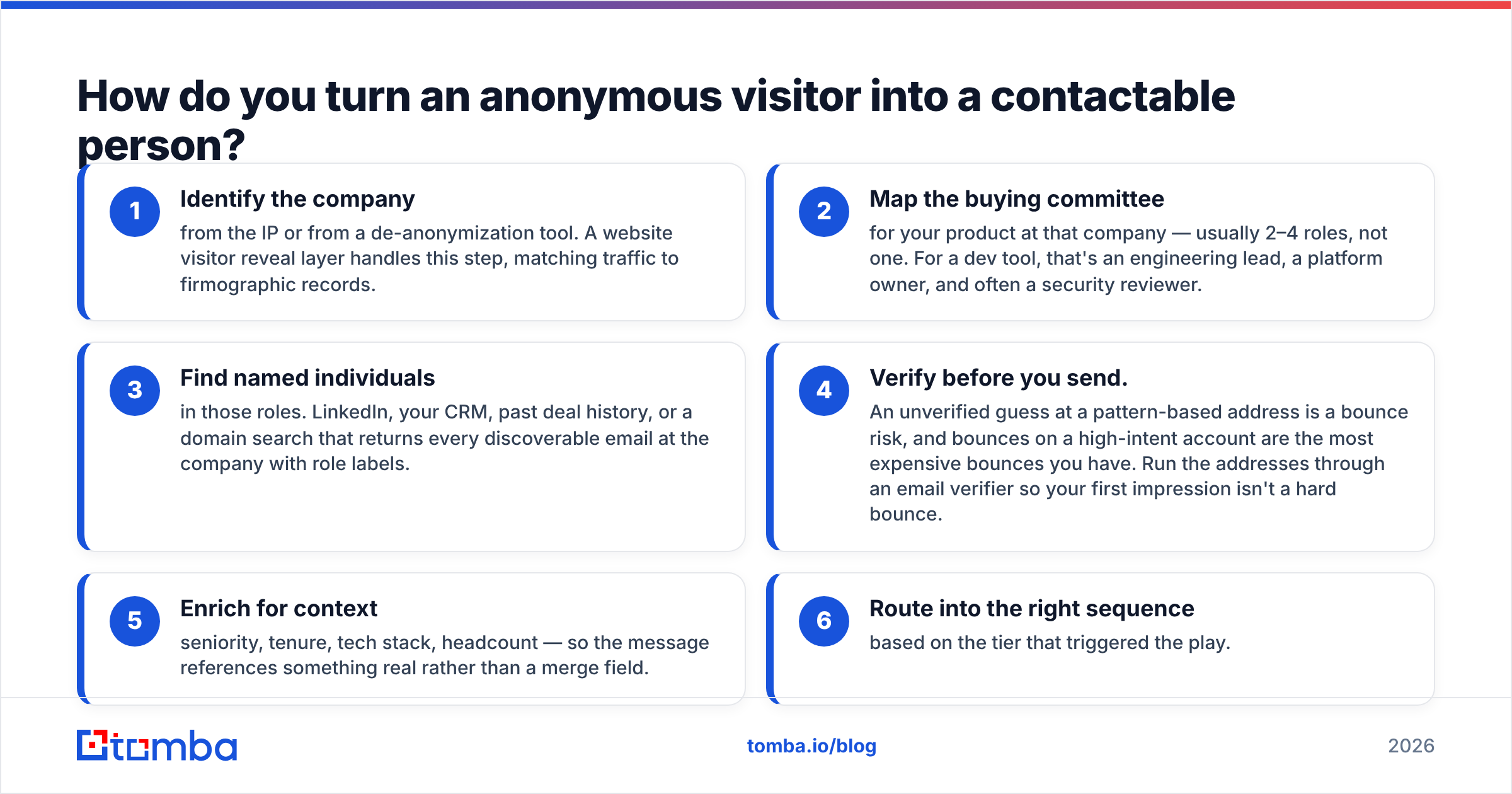
The resolution chain looks like this:
- Identify the company from the IP or from a de-anonymization tool. A website visitor reveal layer handles this step, matching traffic to firmographic records.
- Map the buying committee for your product at that company — usually 2–4 roles, not one. For a dev tool, that's an engineering lead, a platform owner, and often a security reviewer.
- Find named individuals in those roles. LinkedIn, your CRM, past deal history, or a domain search that returns every discoverable email at the company with role labels.
- Verify before you send. An unverified guess at a pattern-based address is a bounce risk, and bounces on a high-intent account are the most expensive bounces you have. Run the addresses through an email verifier so your first impression isn't a hard bounce.
- Enrich for context — seniority, tenure, tech stack, headcount — so the message references something real rather than a merge field.
- Route into the right sequence based on the tier that triggered the play.
Step 4 is the one teams skip. It's also the one that protects email deliverability across your entire domain. A 12% bounce rate on your inbound plays will eventually degrade the inbox placement of your nurture emails too.
What does the tooling stack look like?#
You need four capabilities. Some vendors bundle several; none do all four well.
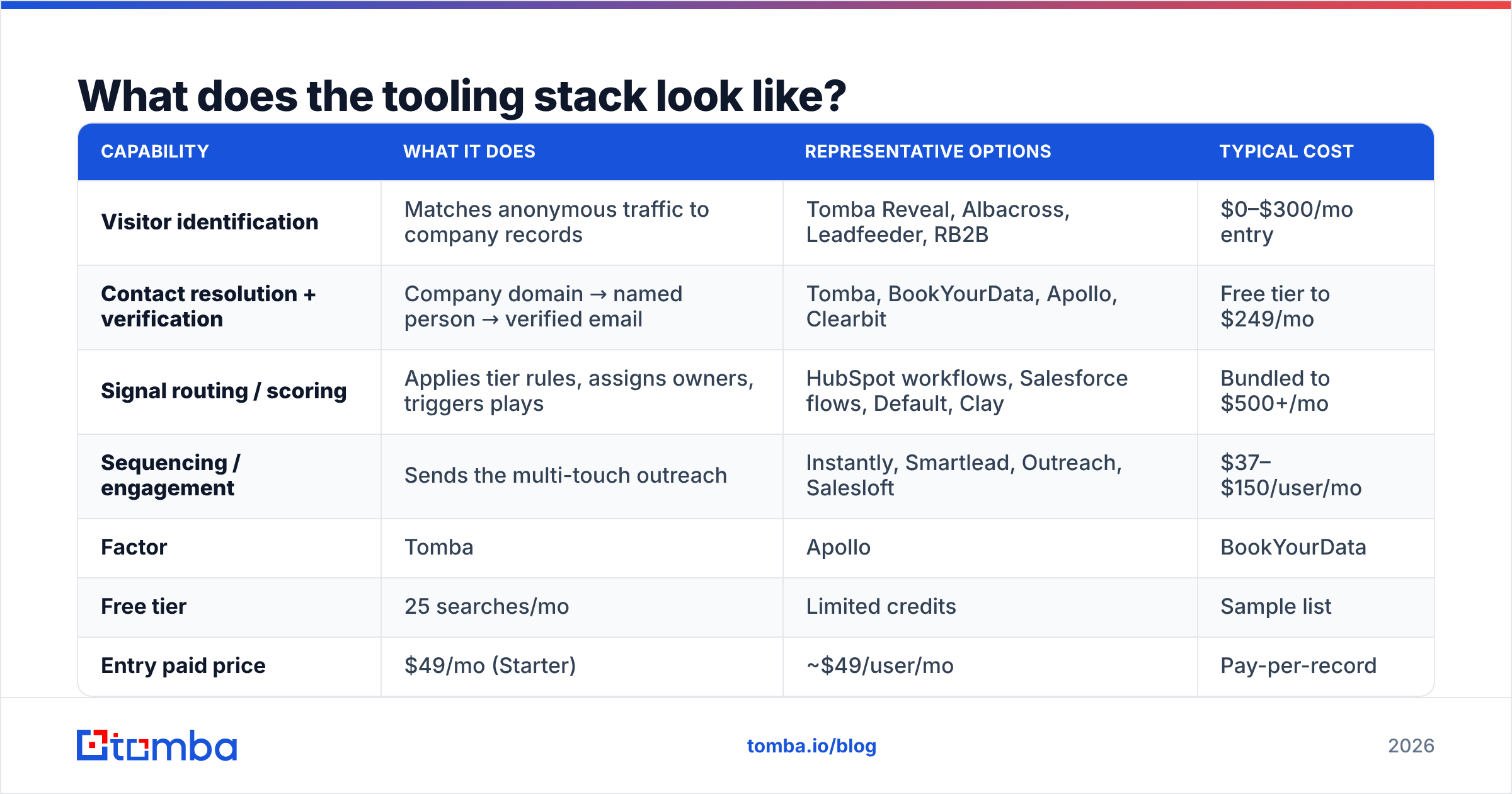
| Capability | What it does | Representative options | Typical cost |
|---|---|---|---|
| Visitor identification | Matches anonymous traffic to company records | Tomba Reveal, Albacross, Leadfeeder, RB2B | $0–$300/mo entry |
| Contact resolution + verification | Company domain → named person → verified email | Tomba, BookYourData, Apollo, Clearbit | Free tier to $249/mo |
| Signal routing / scoring | Applies tier rules, assigns owners, triggers plays | HubSpot workflows, Salesforce flows, Default, Clay | Bundled to $500+/mo |
| Sequencing / engagement | Sends the multi-touch outreach | Instantly, Smartlead, Outreach, Salesloft | $37–$150/user/mo |
On the contact-resolution layer specifically, here's how a few common approaches compare for an inbound prospecting workflow:
| Factor | Tomba | Apollo | BookYourData | Manual research |
|---|---|---|---|---|
| Free tier | 25 searches/mo | Limited credits | Sample list | Unlimited (your time) |
| Entry paid price | $49/mo (Starter) | ~$49/user/mo | Pay-per-record | $0 cash, high labor |
| Domain-level discovery | Yes — full domain search | Yes | Yes, prebuilt lists | Slow |
| Built-in verification | Yes, including catch-all | Yes | Yes | No |
| API for real-time routing | Yes | Yes | Limited | No |
| Best for | Real-time signal resolution | All-in-one prospecting + sequencing | Prebuilt targeted list buys | Sub-50 leads/month |
BookYourData is genuinely strong when you want a curated, verified list handed to you for a defined ICP — it's a different motion from real-time signal resolution, and plenty of teams run both. Apollo makes sense when you want database, sequencing, and dialer in one bill. Tomba fits when the job is specifically: I have a domain and a role, get me a verified address via API in under a second. Check Tomba pricing if you're sizing this against per-record list costs.
For real-time routing you'll want an API rather than a UI. When a Tier 2 signal fires at 2am, nobody is going to log into a dashboard. The Tomba API or an equivalent slots into the webhook that fires when your scoring rule trips.
Screenshot placeholder: HubSpot workflow builder showing a pricing-page-visit trigger branching into tiered enrollment.
How fast do you need to respond?#
Faster than you currently do.
The classic Lead Response Management study — still the most-cited benchmark on this, and echoed in Harvard Business Review's follow-up work — found the odds of qualifying a lead drop by roughly 21x between a 5-minute and a 30-minute response. Not 21%. Twenty-one times.
Practical targets by tier:
- Tier 1: 5 minutes, business hours. Phone first, email as the fallback. If your AEs can't hit this, use a shared inbound rotation.
- Tier 2: Same day. A templated-but-specific email beats a perfect email tomorrow.
- Tier 3: 24 hours, batched twice daily.
- Tier 4–5: Weekly batch is fine.
The operational implication: pre-build the enrichment. If your rep has to go find the email address when the alert fires, you've already lost the five-minute window. The contact record should arrive with the alert, verified and ready.

What should the outreach actually say?#
Short. Specific to the signal. One ask.
A Tier 2 template that works:
Subject: your integrations page visit
Hi {First},
Noticed some interest from the {Company} side in how we handle {specific integration}. Usually when that page gets attention it's because someone's mapping out a migration.
Two questions worth 60 seconds: are you evaluating this for {likely use case}, and is {common blocker} the sticking point?
Happy to send the technical doc either way.
{Signature}
Three things that make it work:
- The reference is honest and vague enough to be comfortable. "Some interest from the {Company} side" acknowledges the signal without claiming surveillance of an individual.
- It offers value regardless of the answer. The technical doc is sent either way.
- It's a question, not a pitch. Reply rate is the metric, and questions get replies.
What kills these emails: opening with your company's positioning statement, asking for a 30-minute call in the first touch, and using merge fields that expose your automation ("Hi {First|there}"). If you want a starting library, the cold email templates collection is a reasonable base to adapt — just strip the cold framing, since your prospect isn't cold.
Multi-touch cadence for Tier 2–3: email day 0, LinkedIn view + connect day 1, email day 3 with a different angle, phone day 5, breakup email day 9. Stop at five touches for inbound signals. Persistence that works on cold lists reads as harassment when the person knows who you are.
How do you measure inbound prospecting?#
Stop measuring MQLs. Measure signal-to-opportunity conversion by tier.
The metrics that actually inform decisions:
- Signal coverage rate — what percentage of identified signals got a contact resolved and a touch sent? Anything under 60% means your enrichment layer is the constraint.
- Median response time by tier — track the median, not the average. One rep responding in 12 hours will hide behind an average.
- Reply rate by tier — if Tier 3 replies at the same rate as Tier 1, your tiering is wrong and you're wasting AE time.
- Opportunity rate by signal type — this tells you which signals to invest in capturing better. Often the security/compliance page outperforms the pricing page.
- Bounce rate on inbound sends — should be under 2%. If it's higher, your verification step is broken or missing.
- Pipeline per 1,000 sessions — the number that lets you argue for more traffic budget.
Track these in a simple weekly view. G2's buyer behavior research is a useful external sanity check on how long evaluation cycles run in your category — if your buyers take 90 days to decide, judging an inbound prospecting program at 30 days will make you kill something that's working.
What are the common failure modes?#
Treating every signal as urgent. If everything is Tier 1, your AEs stop trusting the alerts within two weeks. Be ruthless about tiering.
Over-claiming what you know. "I saw you visited our pricing page at 3:42pm from Chrome" is a privacy complaint waiting to happen. Reference the interest, not the surveillance detail.
Skipping verification. High-intent contacts are the worst possible place to send an unverified email. Catch-all domains are especially dangerous here — they accept everything and tell you nothing, which is why a dedicated catch-all verifier matters more for inbound than for cold lists.
No feedback loop to marketing. If the security page drives 3x the opportunity rate of the pricing page, marketing needs to know so they can promote it. Most teams never close this loop.
Building the perfect system before running the play manually. Do it by hand for 30 signals first. You'll learn which tiers matter before you spend three months on automation nobody uses.
Ignoring GDPR/CCPA obligations. Company-level identification is generally fine; individual-level tracking without consent in EU jurisdictions is not. Get your legal team's read before you launch, not after.
Is inbound prospecting worth building if you're small?#
Yes, but manually.
Under roughly 5,000 monthly sessions, this is a spreadsheet and 30 minutes a day. Export your form fills and trial signups, resolve the company, find the two most relevant contacts, verify the addresses, send. You don't need a de-anonymization vendor at that volume — the signal-to-noise ratio of IP matching on low traffic is poor anyway.
Between 5,000 and 50,000 sessions, add visitor identification and an API-based resolution layer so the enrichment happens automatically. This is the range where the ROI is clearest.
Above 50,000, you need real scoring infrastructure and dedicated ownership — usually a RevOps hire, not a tool purchase. At that point revenue operations owns the routing logic and sales just executes.
Getting started this week#
Pick your single highest-intent signal — usually pricing page visits from companies matching your ICP. Build one tier. Resolve those companies to two named contacts each, verify the addresses, and send a five-touch sequence referencing the interest honestly. Run it for three weeks and compare reply rate to your cold outbound baseline. If it doesn't beat cold by at least 2x, your ICP filter is too loose, not your play.
The resolution step is the piece you can't fake. If you want to go from a domain and a job title to a verified, deliverable address — in the browser, in a spreadsheet, or via API inside your routing workflow — the Tomba Email Finder handles that layer, with 25 free searches a month to test the motion before you commit to the $49/mo Starter plan. Build the play first, then scale what works.
Related guides#
// get started
Find, verify and enrich your first contacts today
Start on the free plan with 25 searches a month, then scale when your team is ready.
Free plan · No credit card required · GDPR & CCPA
// about the author