Inbound Sales Email Templates That Convert Leads in 2026
Inbound leads go cold in under an hour. These 9 inbound sales email templates — plus the speed, routing, and enrichment rules behind them — turn form fills and demo requests into booked meetings.
TL;DR
- Inbound leads decay fast: contact within 5 minutes and you are roughly 8x more likely to qualify the lead than at 30 minutes. Your template quality matters less than your response speed — but both compound.
- The best inbound sales email templates reference what the lead actually did (pricing page, demo request, content download, free-trial signup) instead of opening with "I saw you downloaded our guide."
- Nine copy-paste templates below cover demo requests, pricing-page visits, trial signups, content downloads, chat abandons, webinar attendees, re-engagement, referrals, and the breakup email.
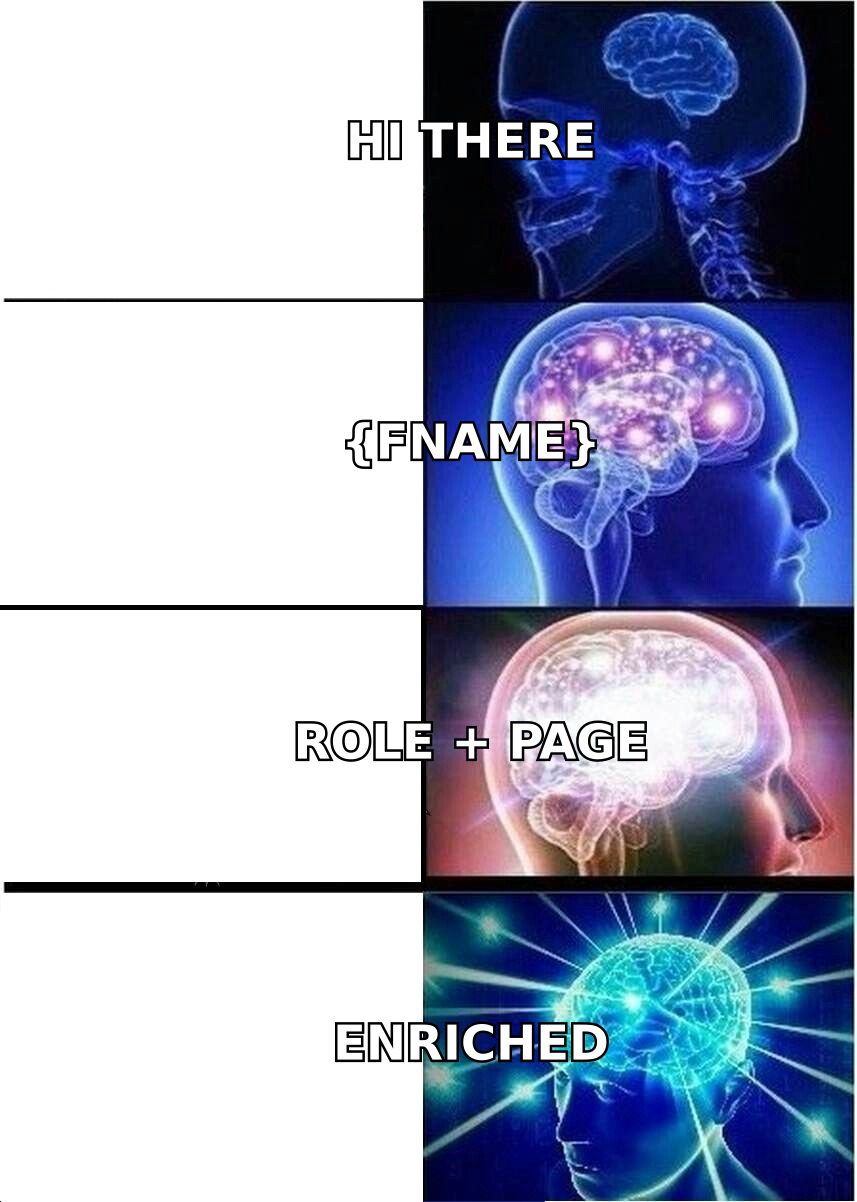
- Personal-token personalization ("Hi {FirstName}") is table stakes and converts poorly on its own. Enriched context — role, team size, tech stack — is what separates a 4% reply rate from a 20% one.
- Route to a real person's inbox, not
sales@. Use a verified individual address on both ends: yours and theirs.
What Are Inbound Sales Email Templates?#
Inbound sales email templates are reusable email frameworks you send to people who already raised their hand — filled out a form, requested a demo, started a trial, downloaded a whitepaper, or sat through a webinar. Unlike cold email, you are not earning attention from zero. You are converting existing intent before it evaporates.
That distinction changes everything about the copy. A cold email spends its first two sentences justifying its own existence. An inbound email should skip that entirely and get to the next step. The lead knows who you are. Reminding them wastes the only three seconds you have.
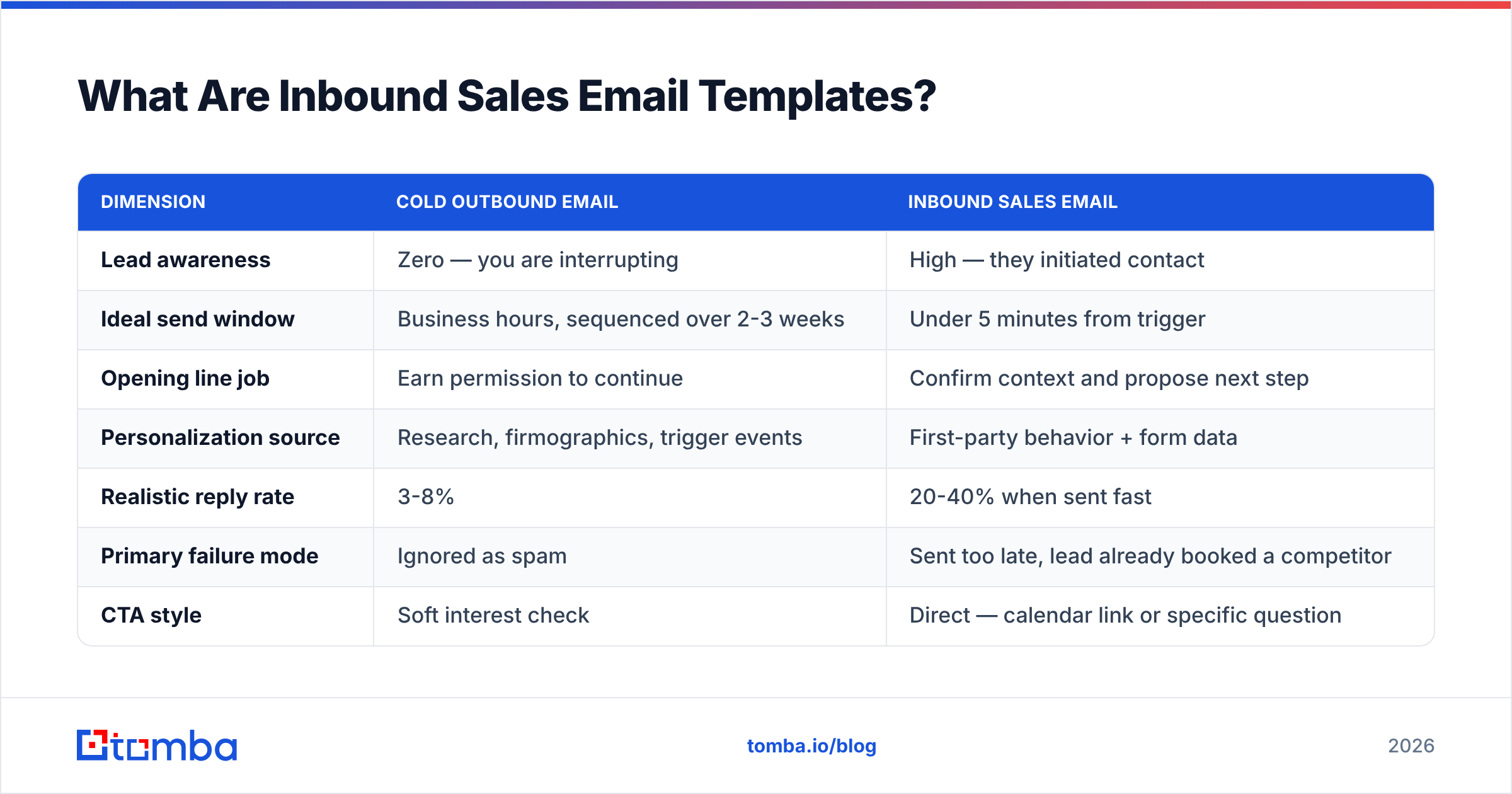
Here is the practical difference:
| Dimension | Cold outbound email | Inbound sales email |
|---|---|---|
| Lead awareness | Zero — you are interrupting | High — they initiated contact |
| Ideal send window | Business hours, sequenced over 2-3 weeks | Under 5 minutes from trigger |
| Opening line job | Earn permission to continue | Confirm context and propose next step |
| Personalization source | Research, firmographics, trigger events | First-party behavior + form data |
| Realistic reply rate | 3-8% | 20-40% when sent fast |
| Primary failure mode | Ignored as spam | Sent too late, lead already booked a competitor |
| CTA style | Soft interest check | Direct — calendar link or specific question |
| Follow-up cadence | 4-7 touches over weeks | 3-5 touches over 8-10 days |
Most teams get this backwards. They write beautiful cold sequences and then reply to inbound demo requests two business days later with a generic "Thanks for your interest!" That is the single most expensive mistake in the funnel, because inbound leads are the ones you paid the most to acquire.
Why Does Response Speed Beat Copy Quality?#
Because attention has a half-life, and inbound intent has a very short one.
Think of an inbound lead like a pot of water you just took off the stove. In the first minute it is still boiling — the prospect has your tab open, your competitor's tab open, and a mental list of three vendors. Ten minutes later they are in a meeting. Two hours later they have forgotten which four vendors they submitted forms to. The email that arrives at hour 26 is not competing with your competitors; it is competing with the prospect's inbox archaeology.
The Lead Response Management study findings that circulate across sales orgs are consistent on the shape of the curve even if exact multipliers vary by dataset: contact rates collapse steeply between 5 and 30 minutes, then flatten into near-irrelevance after a day.
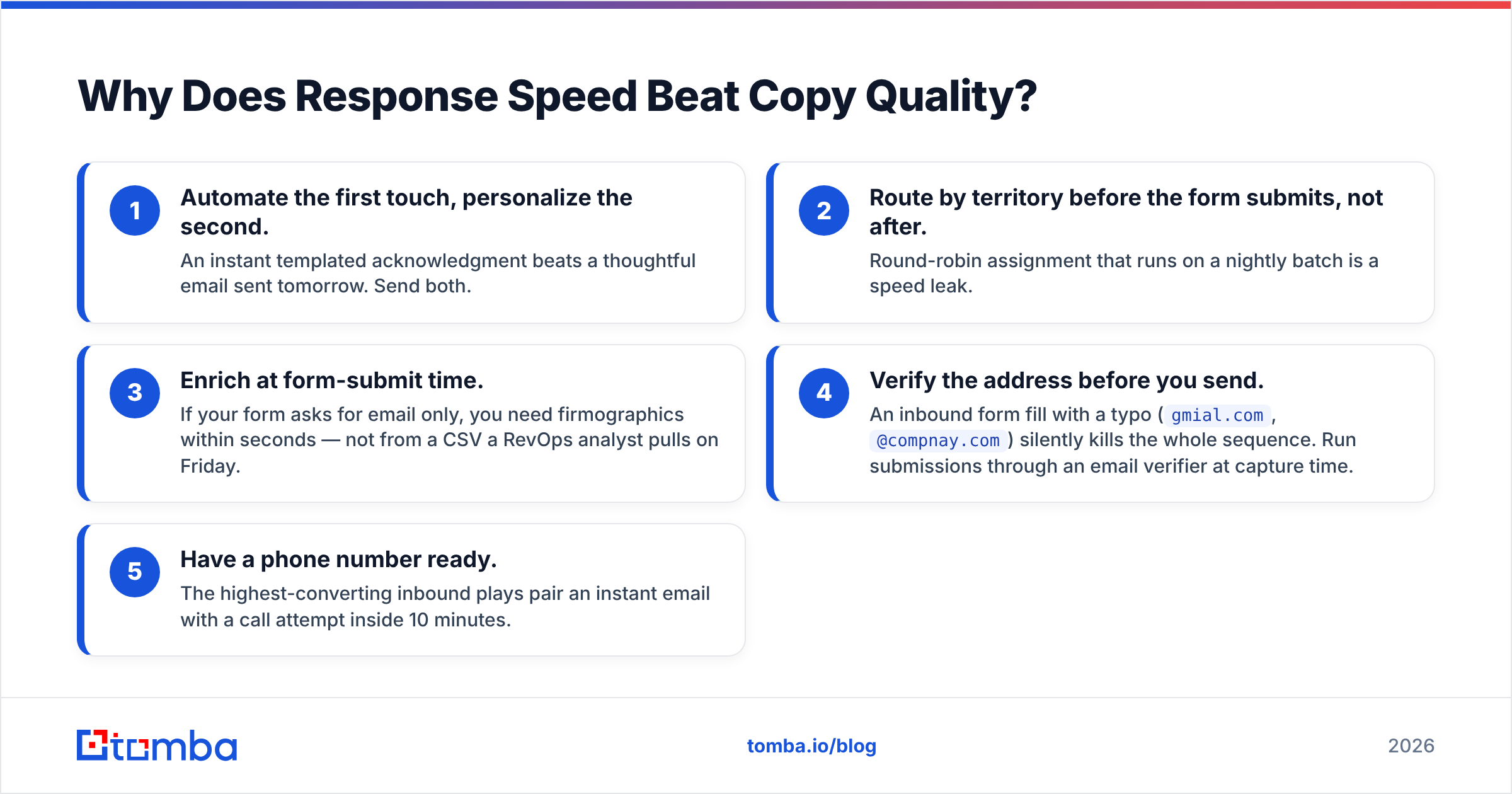
The practical implications:
- Automate the first touch, personalize the second. An instant templated acknowledgment beats a thoughtful email sent tomorrow. Send both.
- Route by territory before the form submits, not after. Round-robin assignment that runs on a nightly batch is a speed leak.
- Enrich at form-submit time. If your form asks for email only, you need firmographics within seconds — not from a CSV a RevOps analyst pulls on Friday.
- Verify the address before you send. An inbound form fill with a typo (
gmial.com,@compnay.com) silently kills the whole sequence. Run submissions through an email verifier at capture time. - Have a phone number ready. The highest-converting inbound plays pair an instant email with a call attempt inside 10 minutes.
What Makes an Inbound Sales Email Actually Convert?#
Four things, in order of impact.
Specific behavioral reference. "You looked at the Pro plan pricing" outperforms "Thanks for your interest in our product" every time. It proves a human (or a well-built system) is paying attention.
One unambiguous next step. Not "let me know if you have questions" — that is a request for the prospect to do creative work. Give a calendar link, or ask one binary question they can answer in four words.
Role-appropriate framing. A VP of Engineering evaluating your API cares about rate limits and SDK coverage. A CFO on the same account cares about seat-based pricing and contract terms. Same company, same form, entirely different email. This is where data enrichment earns its keep — knowing the title before you write the subject line changes the whole message.
Brevity that respects the funnel stage. Demo requests warrant three sentences. Content downloads warrant five, because you have to bridge from "I wanted the PDF" to "I might want a conversation."
The structure that works#
Every template below follows the same skeleton:
- Trigger line — name what they did, in under 12 words
- Relevance bridge — one sentence connecting their action to a specific outcome
- Proof or specificity — a number, a comparable customer, or a concrete capability
- Single CTA — link or question, never both
- Signature with a human name and real title — no
sales@aliases
Which Inbound Sales Email Templates Should You Use?#
Nine templates, mapped to the nine most common inbound triggers. Adjust the bracketed tokens; keep the structure.
1. Demo request — instant reply (send within 5 minutes)#
Subject: Your [Product] demo — two times that work?
Hi [First Name],
Saw your demo request come through just now. Before we meet, one question: are you evaluating this for [use case A] or [use case B]? It changes which parts of the product I show you.
Here are two slots this week: [Link]. If neither works, reply with a window and I'll make it fit.
[Your name], [Title] at [Company]
Why it works: it arrives while the tab is still open, and the qualifying question doubles as proof you will not waste their 30 minutes on a canned walkthrough.
2. Pricing page visit — no form fill#
Subject: Pricing question I can answer in one reply
Hi [First Name],
You spent time on our pricing page — usually that means someone is trying to figure out whether the [Tier] plan covers [specific limit]. It does, up to [number].
Where most teams your size land: [Tier], around [$X]/month all-in. Happy to sanity-check that against your actual volumes — just reply with your monthly [metric] and I'll do the math.
[Your name]
3. Free trial signup — day 0#
Subject: Your trial is live — the 3 things worth doing first
Hi [First Name],
Your [Product] trial is active. Teams that get value in week one almost always do these three things first:
- [Setup action that shows the core value]
- [Integration with their existing stack]
- [The feature that produces a visible result]
If you get stuck on any of them, reply here and I'll unblock you the same day. No sales pitch until you've actually seen it work.
[Your name]
4. Content download — the bridge email#
Subject: The part of [Guide Title] most people skip
Hi [First Name],
You grabbed [Guide Title] yesterday. Most readers jump to the checklist on page 9 and skip the section on [topic] — which is the part that actually moves [metric].
Short version: [one-sentence insight].
Curious how [Company] handles [topic] today. Are you doing it manually or is there tooling in place?
[Your name]
Note the CTA: a question about their world, not a meeting request. Content downloaders are two stages earlier than demo requesters, and asking for 30 minutes here is the most common inbound sales mistake.
5. Live chat abandoned#
Subject: Picking up where our chat cut off
Hi [First Name],
Our chat dropped before I answered your question about [topic]. Here's the answer: [direct answer, 1-2 sentences].
If that raises follow-ups, I'm around today — [Link] or just reply.
[Your name]
6. Webinar attendee — same day#
Subject: The [X] slide from today, plus the thing I didn't have time for
Hi [First Name],
Thanks for joining today's session on [topic]. Attaching the [slide/framework] a few people asked about.
The question I ran out of time for: "[audience question]." The answer is [answer]. Given you're at [Company], I'd guess [specific hypothesis about their situation] — accurate?
[Your name]
7. Re-engagement — lead went quiet 30+ days ago#
Subject: Still on [initiative], or did priorities shift?
Hi [First Name],
We talked in [Month] about [specific problem]. You mentioned [detail they gave you]. Since then we shipped [relevant change], which removes the [objection they raised].
Two options: worth another 15 minutes, or should I close this out and stop cluttering your inbox?
[Your name]
8. Referral / word-of-mouth inbound#
Subject: [Referrer name] said we should talk
Hi [First Name],
[Referrer] mentioned you're working on [problem] at [Company] — they used us for the same thing at [Referrer's company] and thought the overlap was worth 15 minutes.
No pitch needed if it's not a fit. What I'd want to understand first: how are you handling [specific process] today?
[Your name]
9. The breakup email — touch 5#
Subject: Closing your file
Hi [First Name],
I've reached out a few times about [topic] and haven't heard back, which usually means one of three things: wrong timing, wrong person, or wrong solution.
If it's timing, tell me a month and I'll disappear until then. If it's the wrong person, point me at the right one. If it's the wrong solution, say so and I'll close the file — genuinely no hard feelings.
[Your name]
Breakup emails routinely pull the highest reply rate in an inbound sequence. They work because they hand back control.
How Do Inbound Templates Compare Across Trigger Types?#
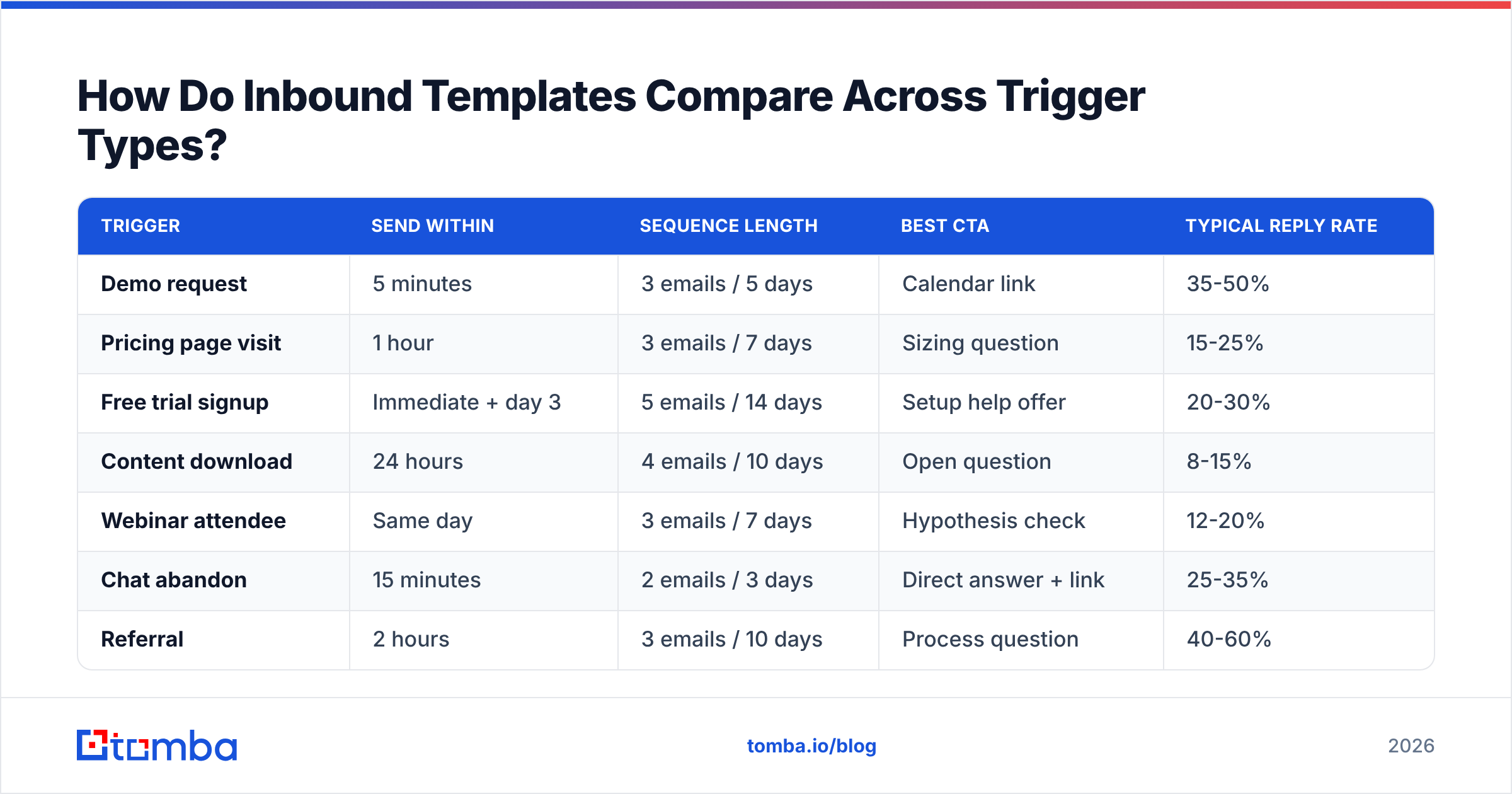
Not every inbound lead deserves the same urgency, cadence, or CTA. Matching them is where most sequences leak.
| Trigger | Send within | Sequence length | Best CTA | Typical reply rate |
|---|---|---|---|---|
| Demo request | 5 minutes | 3 emails / 5 days | Calendar link | 35-50% |
| Pricing page visit | 1 hour | 3 emails / 7 days | Sizing question | 15-25% |
| Free trial signup | Immediate + day 3 | 5 emails / 14 days | Setup help offer | 20-30% |
| Content download | 24 hours | 4 emails / 10 days | Open question | 8-15% |
| Webinar attendee | Same day | 3 emails / 7 days | Hypothesis check | 12-20% |
| Chat abandon | 15 minutes | 2 emails / 3 days | Direct answer + link | 25-35% |
| Referral | 2 hours | 3 emails / 10 days | Process question | 40-60% |
| Cold re-engagement | N/A (scheduled) | 2 emails / 5 days | Binary opt-out | 10-18% |
Two things jump out. Referrals convert best and get replied to least often — most teams treat them as ordinary MQLs. And content downloads, the highest-volume inbound source at most companies, have the weakest conversion because teams send them demo requests instead of questions.
What Data Do You Need Before You Hit Send?#
The template is the easy part. The reason two teams using identical copy get 6% and 24% reply rates is the data layer underneath.
Minimum viable enrichment for an inbound email:
- Verified email address — form typos and personal Gmail addresses on B2B forms both break the sequence. Validate at capture.
- Job title and seniority — determines framing, CTA, and whether you loop in an AE or keep it self-serve.
- Company size and industry — decides which case study you cite.
- Tech stack signals — whether they already run the tool you integrate with.
- Corporate email when the form captured a personal one — a
@gmail.comsignup from a real buyer is common; finding the work address at the same company via domain search reconnects them to the account.
That last point is underrated. A meaningful share of B2B form fills use personal addresses, which means your CRM shows an unmatched lead and your routing rules never fire. Resolving the person to their company — and finding the corporate address — is the difference between a routed opportunity and a row in a dead-leads table.
For teams running this at volume, the pattern is: form submit → webhook → enrichment and verification call → CRM write → routing rule → templated first touch. That whole chain should run in under 30 seconds. The Tomba API handles the enrichment and verification legs; your marketing automation platform handles the rest. HubSpot's workflow documentation covers the trigger side well if you are building this in their stack, and G2's category listings are a reasonable place to compare enrichment vendors on verified reviews rather than vendor claims.
What Are the Most Common Inbound Email Mistakes?#
Sending from sales@ or noreply@. It signals automation and depresses reply rates. Send from a named human, even if a system composed the email.
Asking for a meeting on the first touch after a content download. You are three stages ahead of the prospect. Ask a question instead.
Repeating the form data back at them. "I see you're interested in [product]" tells them nothing they don't know. Use the form data to inform the email, not to fill it.
Batching inbound with outbound in the same sequencer. Inbound needs sub-hour triggers; most outbound tooling is built around daily sending windows. Separate the two.
Skipping verification because "it's inbound, they typed it themselves." People typo their own addresses constantly, and disposable addresses are common on gated content forms. A bounce on an inbound lead also damages your sender reputation, which then hurts your cold outbound.
No mobile check. Well over half of first opens happen on a phone. A three-paragraph email with a bulleted list renders as an essay on a 390px screen. Keep the first touch under 90 words.
How Should You Measure Inbound Email Performance?#
Track four numbers per trigger type, not per template:
- Speed to first touch — median minutes from form submit to email sent. This is your leading indicator; fix it before you touch copy.
- Reply rate — not open rate. Open tracking has been unreliable since Apple Mail Privacy Protection, and inbound opens are inflated anyway.
- Meeting-booked rate — replies are cheap; calendar holds are the real conversion.
- Bounce rate by source form — a form with an elevated bounce rate is either being scraped by bots or is missing validation.
Then A/B one variable at a time. Subject line, then CTA type, then length. Testing three changes at once teaches you nothing, and inbound volume at most companies is too low to reach significance on multivariate tests inside a quarter.
If your reply rate is under 10% on demo requests, the problem is almost never copy. It is speed, routing, or deliverability — in that order.
Frequently Asked Questions#
How many emails should an inbound sequence have? Three to five, spread over 5-14 days depending on trigger. Demo requests warrant fewer touches, closer together. Content downloads warrant more touches, further apart.
Should inbound emails be plain text or designed HTML? Plain text, always, for one-to-one sales follow-up. Designed templates read as marketing and get filed with marketing. Save HTML for newsletters and product announcements.
Can I use the same templates for cold outbound? No. Every template above assumes a behavioral trigger the prospect remembers. Strip that out and you have a generic cold email with a false premise, which is worse than an honest one.
What if the lead used a personal email address?
Enrich it. Reverse-resolve the person, find the company, and find their work address. A reverse email lookup turns an unroutable @gmail.com form fill into a matched account record.
Start With the Data Layer#
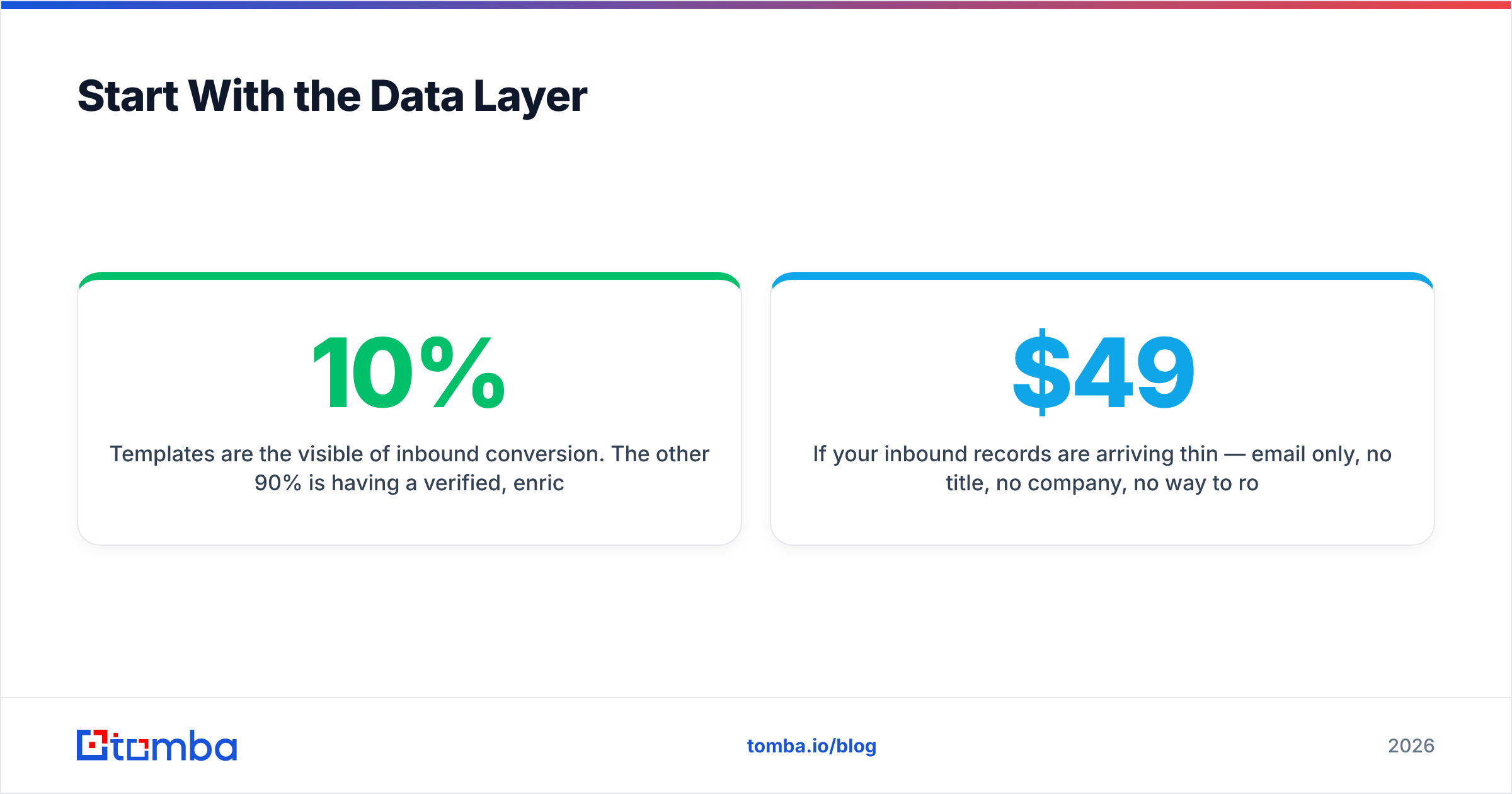
Templates are the visible 10% of inbound conversion. The other 90% is having a verified, enriched, correctly-routed contact record within seconds of the form submit — because the best-written email in the world loses to a competitor who replied in four minutes.
If your inbound records are arriving thin — email only, no title, no company, no way to route — start there. The Tomba Email Finder resolves names and domains to verified professional addresses, and the same API call returns the firmographic context your templates need to sound like a person rather than a merge field. Free tier gives you 25 searches a month to test the flow; paid plans start at $49/month on Starter, with full Tomba pricing laid out by volume.
Fix the speed. Fix the data. Then the templates above will do exactly what they are supposed to.
Related guides#
// get started
Find, verify and enrich your first contacts today
Start on the free plan with 25 searches a month, then scale when your team is ready.
Free plan · No credit card required · GDPR & CCPA
// about the author