Inbound Sales Tools in 2026: The Complete Stack Guide
Most inbound stacks are three useful tools wearing a $6,000-a-month costume. Here's what each layer of an inbound sales stack actually does, what it costs in 2026, and where to cut.
TL;DR
- An inbound sales stack has six jobs: capture, enrich, score, route, engage, and measure. Most teams buy nine tools to do six jobs and pay twice for the overlap.
- Enrichment is the highest-leverage layer and the cheapest. A form that collects an email plus a company domain, then enriches server-side, converts better than a nine-field form every time.
- Speed-to-lead beats sophistication. Routing an inbound demo request in under five minutes matters more than any scoring model you will build this quarter.
- Platform suites (HubSpot, Salesforce) win on reporting and single-source-of-truth; best-of-breed wins on cost and depth. Under 20 reps, best-of-breed plus a light CRM is usually cheaper and faster.
- Budget realistically: a functional inbound stack runs roughly $300–$900/month for a 5-person team, not the $6,000 the category page implies.
What are inbound sales tools?#
Inbound sales tools are the software layer between "someone raised their hand on your website" and "a rep is talking to the right person about the right thing." That's it. Everything else in the category is a variation on those two endpoints.
Think of it like a restaurant kitchen. The order comes in at the pass (form fill, chat, demo request, pricing-page visit). Before it hits a cook, someone reads the ticket, checks whether it's a real order or a prank, decides which station handles it, and puts it in the queue. Inbound sales tools are that pass. When they work, the rep never notices them. When they fail, you get a $1,200 enterprise lead sitting in an unassigned queue for four days.
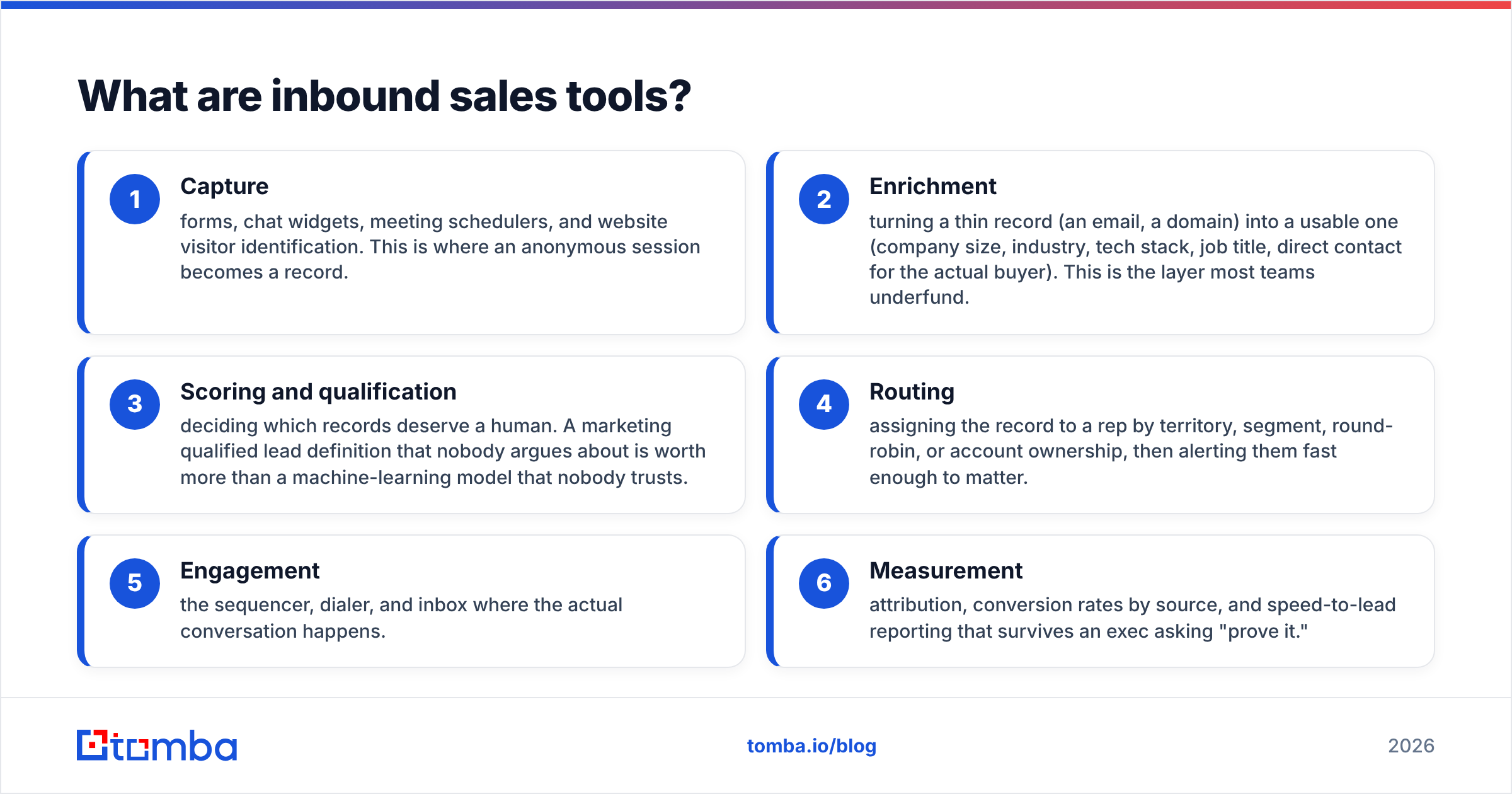
Technically, the category spans six distinct functions:
- Capture — forms, chat widgets, meeting schedulers, and website visitor identification. This is where an anonymous session becomes a record.
- Enrichment — turning a thin record (an email, a domain) into a usable one (company size, industry, tech stack, job title, direct contact for the actual buyer). This is the layer most teams underfund.
- Scoring and qualification — deciding which records deserve a human. A marketing qualified lead definition that nobody argues about is worth more than a machine-learning model that nobody trusts.
- Routing — assigning the record to a rep by territory, segment, round-robin, or account ownership, then alerting them fast enough to matter.
- Engagement — the sequencer, dialer, and inbox where the actual conversation happens.
- Measurement — attribution, conversion rates by source, and speed-to-lead reporting that survives an exec asking "prove it."
Six functions. Some tools cover three or four. No tool honestly covers all six, regardless of the homepage.
How is an inbound sales stack different from an outbound one?#
The difference is who initiates and how much you already know.
Outbound starts from a list. You choose the accounts, build the contact data, and carry the burden of relevance. Your tooling is weighted toward data acquisition and sequencing at volume.
Inbound starts from a signal. Someone has already decided you're interesting. Your tooling is weighted toward reducing friction and latency. The lead is warm and decaying — every hour you spend enriching, scoring, and routing is an hour the prospect spends on a competitor's pricing page.
That difference has a concrete budget implication. In outbound, you spend on contact volume. In inbound, you spend on contact depth and speed. A team that copies its outbound stack into inbound ends up paying for 50,000 credits a month to enrich 400 form fills.

Which layers actually matter in 2026?#
Here's the ranking by return on spend, based on what actually moves inbound conversion rates:
- Speed-to-lead routing (highest ROI, lowest cost). The classic finding — response within five minutes versus thirty — still holds and still gets ignored. Most routing lives inside your CRM or a $50/month workflow tool. Fix this before you buy anything else.
- Enrichment (high ROI, low cost). Cutting a form from nine fields to three and backfilling the rest lifts submission rates measurably. You need a reliable data enrichment source and an API call, not a platform.
- Capture and scheduling (high ROI, medium cost). Instant booking on the thank-you page removes a full email round-trip. Chat matters if you have the staffing to answer within a minute; if you don't, it's a widget that collects complaints.
- Engagement/sequencing (medium ROI, high cost). Necessary, but this is where seat pricing compounds. Audit how many licensed seats actually send email weekly.
- Scoring (medium ROI, medium cost). Useful at volume. Below roughly 500 inbound leads a month, a three-rule filter in your CRM outperforms any model, because you don't have the data density to train one.
- Attribution (low ROI until you're big, high cost). Multi-touch attribution suites are the most common line item that gets bought at Series A and cancelled at Series B. Source-of-first-touch plus closed-won is enough for a long time.
What do the leading inbound sales tools cost?#
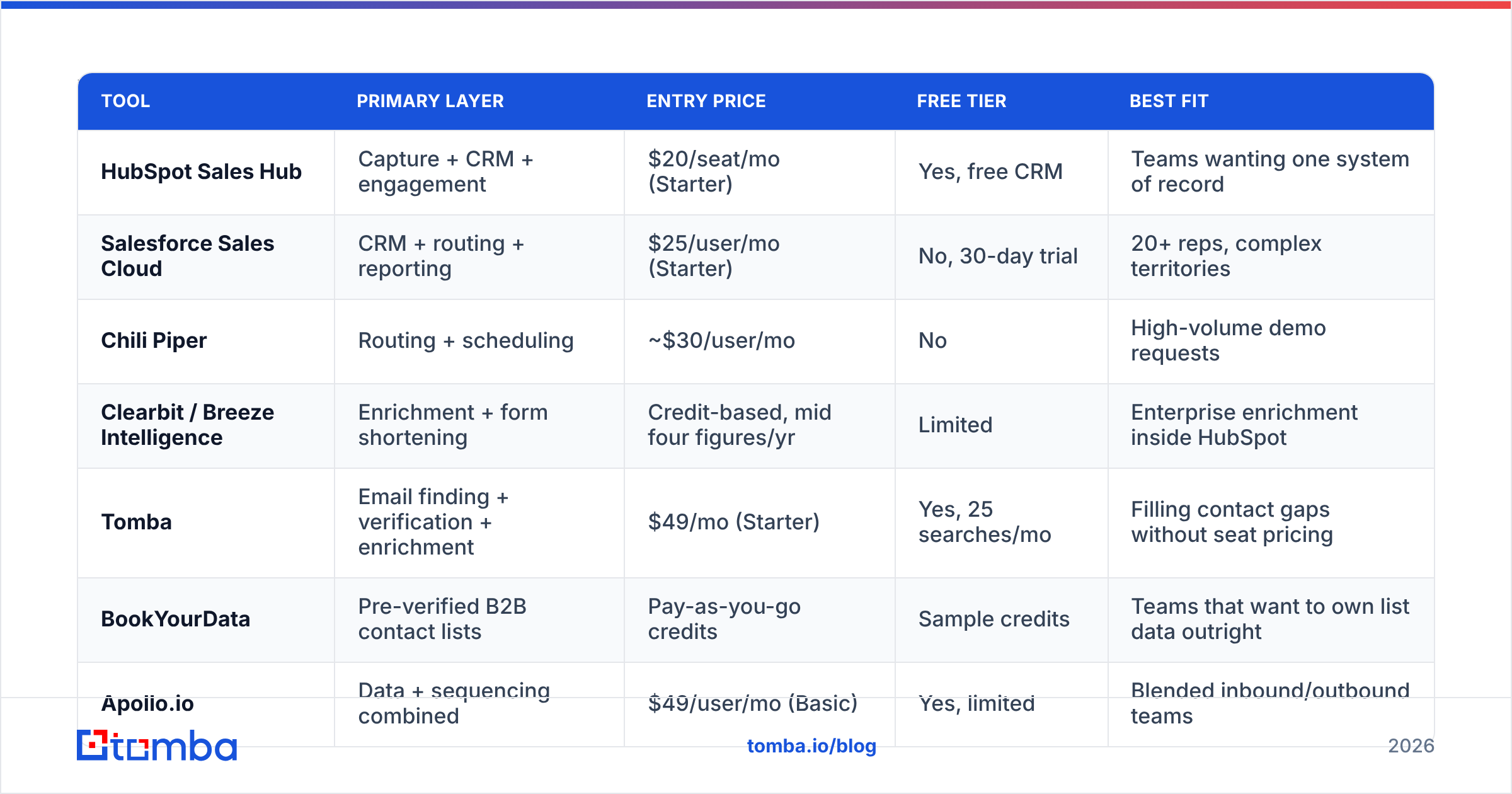
Prices below are list entry pricing as published by each vendor in 2026. Discounting is common above 10 seats, and annual commitments typically shave 10–20%.
| Tool | Primary layer | Entry price | Free tier | Best fit |
|---|---|---|---|---|
| HubSpot Sales Hub | Capture + CRM + engagement | $20/seat/mo (Starter) | Yes, free CRM | Teams wanting one system of record |
| Salesforce Sales Cloud | CRM + routing + reporting | $25/user/mo (Starter) | No, 30-day trial | 20+ reps, complex territories |
| Chili Piper | Routing + scheduling | ~$30/user/mo | No | High-volume demo requests |
| Clearbit / Breeze Intelligence | Enrichment + form shortening | Credit-based, mid four figures/yr | Limited | Enterprise enrichment inside HubSpot |
| Tomba | Email finding + verification + enrichment | $49/mo (Starter) | Yes, 25 searches/mo | Filling contact gaps without seat pricing |
| BookYourData | Pre-verified B2B contact lists | Pay-as-you-go credits | Sample credits | Teams that want to own list data outright |
| Apollo.io | Data + sequencing combined | $49/user/mo (Basic) | Yes, limited | Blended inbound/outbound teams |
Two things stand out when you line them up.
First, the pricing models are not comparable, and vendors know it. Seat-based tools (Salesforce, Chili Piper, Apollo) scale with headcount whether or not those people use the product. Credit-based tools (Tomba, BookYourData, Clearbit) scale with actual usage. For inbound specifically — where a small ops team enriches a modest volume of records — credit-based pricing on the data layer and seat-based only on the engagement layer is almost always the cheaper structure. See the full Tomba pricing tiers for how credit bands work in practice.
Second, the overlap is enormous. Apollo does data and sequencing. HubSpot does capture, CRM, and sequencing. If you run all three plus a standalone enricher, you're paying for the same capability two or three times. Audit for duplication before you audit for missing features — teams almost always find the former.
How do you route inbound leads without losing the speed advantage?#
Routing failure is the most expensive, least visible problem in inbound. Nobody files a ticket about a lead that sat for six hours.
A workable pattern, in order:
- Enrich synchronously at form submit, not on a nightly batch. The API call should take under two seconds. If your enrichment provider can't return in that window, move the call after the redirect, not before the routing decision.
- Apply hard disqualifiers first — free email domains for an enterprise-only product, competitor domains, existing customers, unsupported regions. This is a lookup, not a score.
- Route on firmographics you actually staffed for. If you have one enterprise AE, "enterprise" needs a definition tight enough that they can handle the volume.
- Alert in the channel the rep lives in. A CRM task is not an alert. A Slack integration message with the enriched context — company, headcount, page they converted on, direct dial if you have one — is.
- Fall back to round-robin with a timer. If the owner hasn't touched it in 15 minutes, reassign. Ownership rules without timers are how leads die politely.
The tooling for all five steps is unremarkable: your CRM, a workflow builder, and an enrichment API. HubSpot's sales tools cover steps 2–5 natively on paid tiers; Salesforce covers them via flows. What neither covers well out of the box is step 1 at reasonable cost.
Where does contact data fit into an inbound motion?#
This is the question most inbound teams get wrong, because "inbound" sounds like the contact data problem solves itself. It doesn't, for two reasons.
Reason one: the person who fills out the form is often not the buyer. An analyst downloads the report. A junior engineer requests the trial. You need the VP. Finding that VP means going from a company domain to a named decision-maker with a working address — a domain search problem, not a form problem.
Reason two: form data is dirty. People typo, they use personal Gmail addresses for work inquiries, and a nontrivial share deliberately enter junk to get past a gate. Running submissions through an email verifier before they hit a sequence protects your sender reputation — which matters more in inbound than people expect, because inbound replies land in the same domain reputation bucket as everything else you send.
The practical setup is three API calls chained behind your form handler: verify the submitted address, enrich the domain for firmographics, and — if the submitted contact is below your buying-committee threshold — find the relevant senior contact at the same company. That third call is where an email finder earns its keep in a motion that supposedly doesn't need one.
If you'd rather buy pre-verified contacts in bulk than run lookups per record, BookYourData is a reasonable route — you purchase and own the records outright rather than renting access, which suits teams with unpredictable enrichment volume. The tradeoff is freshness: any static list decays, so pair it with verification at send time.

Is an all-in-one platform better than a best-of-breed stack?#
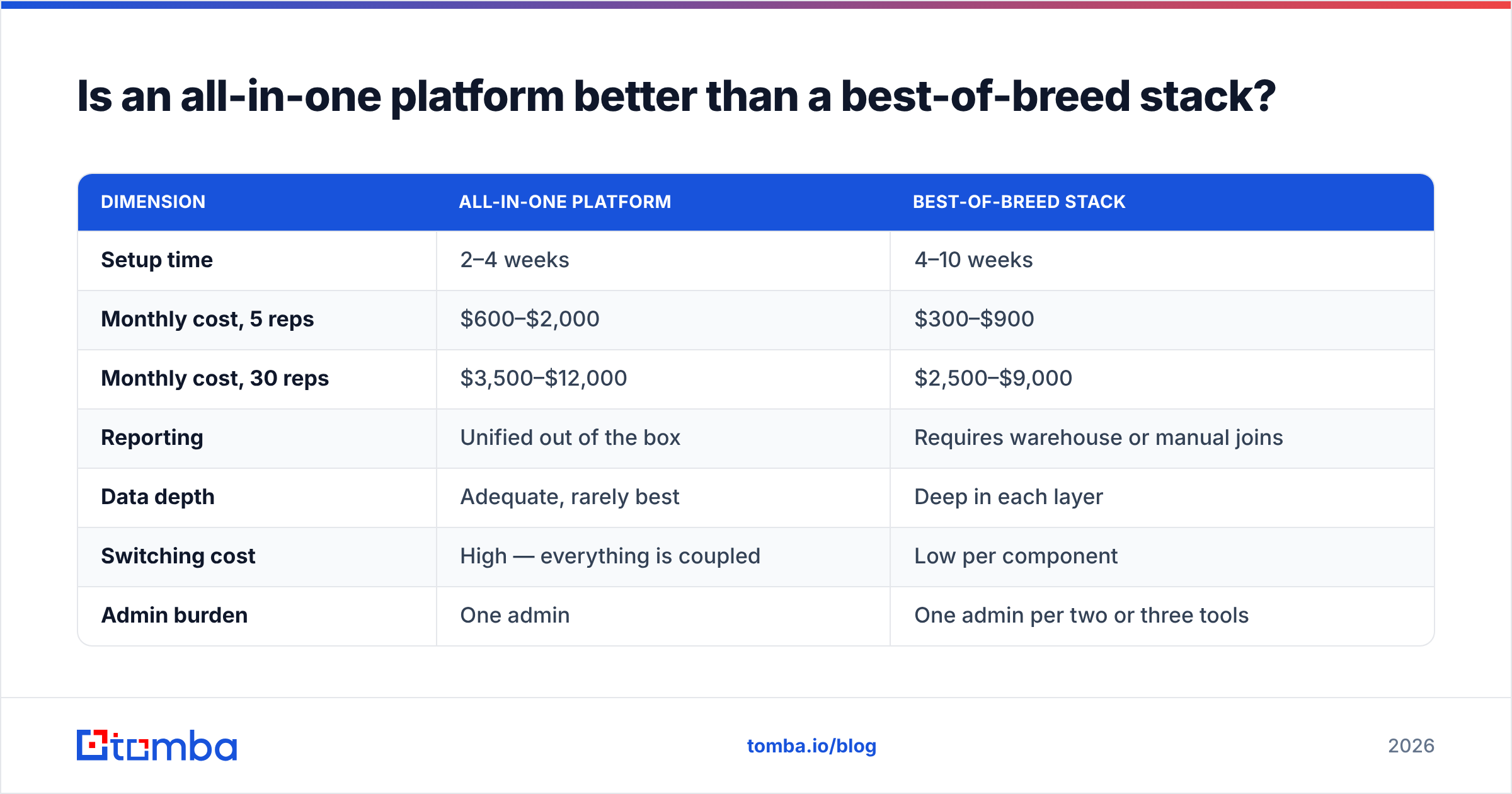
Depends entirely on headcount and reporting pressure. Here's the honest comparison:
| Dimension | All-in-one platform | Best-of-breed stack |
|---|---|---|
| Setup time | 2–4 weeks | 4–10 weeks |
| Monthly cost, 5 reps | $600–$2,000 | $300–$900 |
| Monthly cost, 30 reps | $3,500–$12,000 | $2,500–$9,000 |
| Reporting | Unified out of the box | Requires warehouse or manual joins |
| Data depth | Adequate, rarely best | Deep in each layer |
| Switching cost | High — everything is coupled | Low per component |
| Admin burden | One admin | One admin per two or three tools |
The decision rule most revenue operations leads converge on: under 20 reps, go best-of-breed with a lightweight CRM. Above 20, the reporting tax of stitched systems starts to exceed the license savings. Independent review volume on G2's CRM category reflects the same split — smaller teams cluster around lighter, cheaper tools and consolidate as they scale, not before.
One nuance: the "all-in-one" argument gets weaker at the data layer specifically. Bundled enrichment inside a platform is usually the platform's weakest module, priced as a premium add-on. Keeping the data layer independent — even inside an otherwise consolidated stack — is the most common exception teams make, and a defensible one. Salesforce Sales Cloud customers running third-party enrichment are the norm, not the exception.
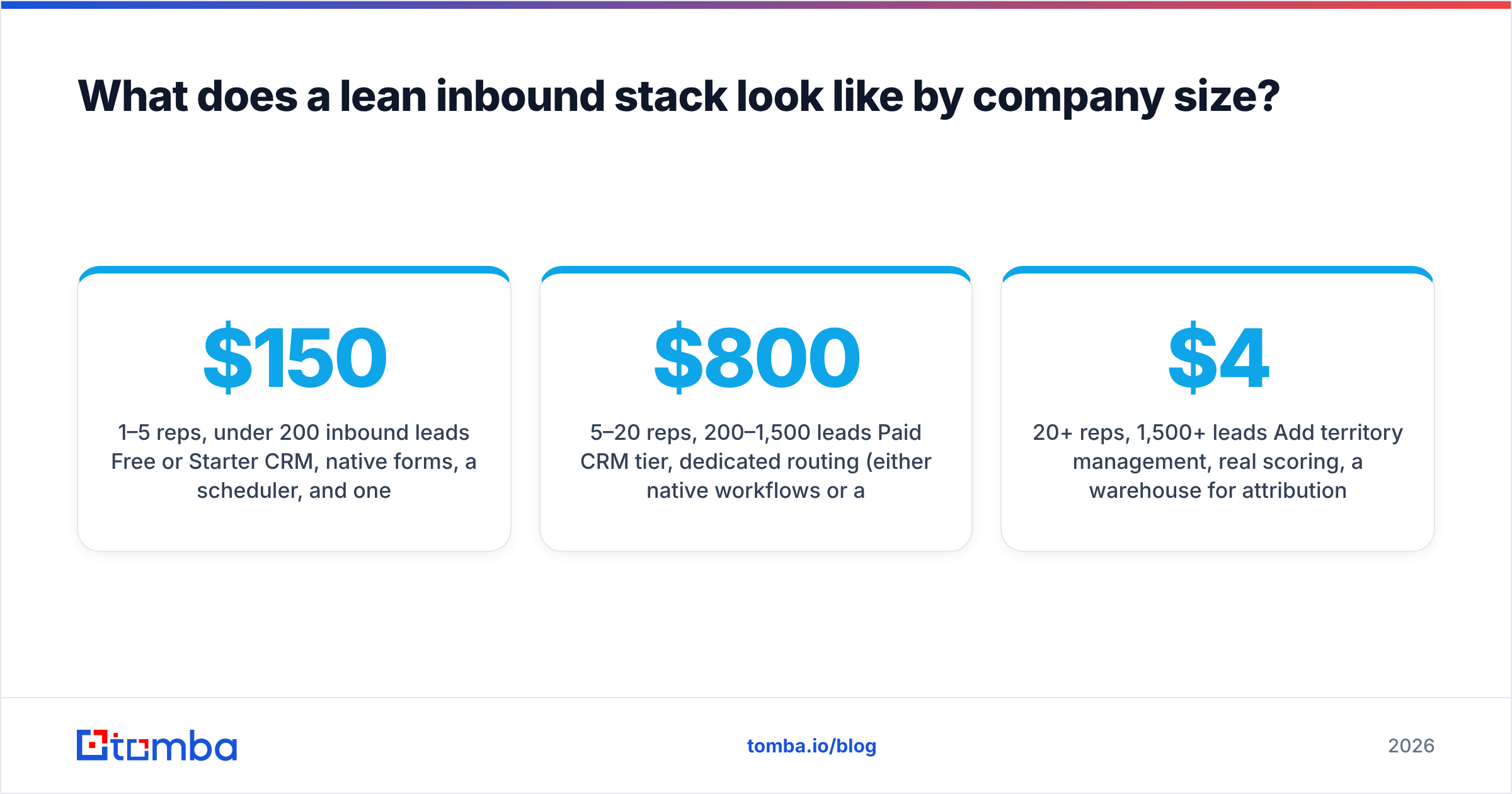
What does a lean inbound stack look like by company size?#
1–5 reps, under 200 inbound leads/month. Free or Starter CRM, native forms, a scheduler, and one data tool on a credit plan. Route manually in a shared Slack channel — at this volume, a human reading every lead is faster and smarter than any rule set. Realistic spend: $150–$400/month.
5–20 reps, 200–1,500 leads/month. Paid CRM tier, dedicated routing (either native workflows or a scheduling tool that handles handoff), synchronous enrichment via API, verification on every submitted address, and a sequencer. This is where a bulk email finder becomes useful for backfilling the buying committee behind converted accounts. Realistic spend: $800–$2,500/month.
20+ reps, 1,500+ leads/month. Add territory management, real scoring, a warehouse for attribution, and dedupe/merge hygiene. At this point the ops headcount cost exceeds the software cost, which is the actual argument for consolidation. Realistic spend: $4,000–$15,000/month.
Notice what's absent at every tier: an AI SDR that replies to inbound autonomously. The 2026 versions are genuinely better than the 2024 ones at drafting, and genuinely still bad at knowing when not to reply. Use them to prepare the response, not to send it.
What mistakes quietly kill inbound conversion?#
- Long forms defended by "we need the data." You don't need it from the prospect. You need it in the record. Those are different problems with different solutions.
- Scoring built before routing works. A perfectly scored lead that reaches a rep in nine hours is a lost lead with good metadata.
- No handling for catch-all domains. A large share of B2B domains accept all mail, so standard verification returns "unknown" and teams either discard good leads or blast bad ones. A catch-all verifier resolves the ambiguity instead of guessing.
- Treating chat as free. Chat converts when staffed and damages trust when it isn't. An unanswered widget is worse than no widget.
- Never auditing seat counts. Run a quarterly report on last-login dates across every seat-priced tool. The savings usually fund the entire data layer.
- Measuring MQLs instead of speed-to-first-touch. One of those numbers predicts revenue. It isn't the first one.
How should you evaluate an inbound tool before buying?#
Run every candidate through four questions, in this order:
- Which of the six layers does it replace, not supplement? If it doesn't let you cancel something, it's an addition to your cost base, not a consolidation.
- What does it cost at 3x current volume? Credit tiers and seat minimums both have cliffs. Ask for the number before you sign, not after.
- Can you test it on your actual data? Vendor demo data is curated. Bring 100 of your own records — real domains, real form fills, including the messy ones — and measure match rate and accuracy yourself. Any data vendor unwilling to support this test is telling you something.
- How hard is it to leave? Export formats, API access to your own records, and contract length. Best-of-breed's real advantage is that a bad decision costs you 30 days, not 18 months.
That third question is the one that separates the tools that survive the trial from the ones that don't. Match rate claims of "95%+" are near-universal in this category and near-meaningless without your data behind them.
Where to start#
If your inbound motion is leaking anywhere, it's almost certainly between the form fill and the first human reply — thin records, unverified addresses, and the wrong contact at the right company. Fix that layer first, because it's the cheapest one to fix and it makes every downstream tool work better.
Tomba's Email Finder handles the specific gap most inbound stacks leave open: turning a company domain or a junior contact into the verified address of the person who can actually sign. It's credit-based, so it scales with your inbound volume instead of your headcount, and the free tier gives you 25 searches a month — enough to test it against your own last 25 form fills before you spend anything. Start there, measure the match rate yourself, and let the number decide.
Related guides#
// get started
Find, verify and enrich your first contacts today
Start on the free plan with 25 searches a month, then scale when your team is ready.
Free plan · No credit card required · GDPR & CCPA
// about the author