Inbox Placement Monitoring in 2026: Tools, Tests, and Fixes
Open rates tell you nothing about where your email actually landed. Here's how inbox placement monitoring works, which signals matter, and what to fix when your seed tests turn red.

TL;DR
- "Delivered" only means a mailbox provider accepted the message. It says nothing about whether it landed in the inbox, Promotions, or spam.
- Inbox placement monitoring combines three data sources: seed-list tests, mailbox-provider telemetry (Google Postmaster Tools, Microsoft SNDS), and your own reply/engagement curve. One source alone is misleading.
- Gmail and Yahoo enforce a spam-complaint rate under 0.3% for bulk senders. Cross that line and placement collapses within days, not weeks.
- The fastest placement fix is almost never copy. It's list hygiene: invalid and catch-all addresses drive bounces and traps that torch sender reputation.
- Budget 15 minutes a week for monitoring. A weekly seed test plus a Postmaster check catches 90% of problems before they become a two-month recovery project.
What is inbox placement monitoring?#
Inbox placement monitoring is the practice of measuring where your emails land at each mailbox provider — Primary inbox, Promotions/Focused, or spam — rather than just whether they were accepted.
Think of it like shipping. Your carrier says "delivered." That tells you the package reached the building. It does not tell you whether it's sitting on the doorstep, locked in a parcel room the recipient never checks, or returned to the sorting facility. Delivery confirmation and placement confirmation are different questions, and only one of them predicts revenue.
Technically, your ESP reports a delivery when the receiving SMTP server returns a 250 OK. That response happens before any filtering decision. Gmail accepts the message, then routes it. The routing decision is invisible to your sending platform, which is why a campaign can show 98% delivered and 0.4% reply rate at the same time.
Why do delivered rates and open rates lie?#
Three reasons, and they compound.
Delivery is acceptance, not placement. Every major provider accepts first and filters second. Spam-foldered mail is counted as delivered by your ESP. So is mail quarantined at the gateway of a corporate Microsoft 365 tenant.
Open tracking is broken by privacy proxies. Apple Mail Privacy Protection pre-fetches tracking pixels for a large share of consumer traffic, inflating opens. Gmail's image proxy caches pixels. A 60% open rate on a cold campaign in 2026 usually means "60% of recipients use a mail client that loads images automatically," not "60% of people read this."
Bounces lag reputation damage. By the time hard bounces spike, the filtering algorithms have already downgraded you. Bounce rate is a trailing indicator. Placement is a leading one.
The practical consequence: if your only dashboard is your sending tool, you are flying on instruments that were designed to make the tool look good.
How does inbox placement monitoring actually work?#
There are five monitoring methods, and mature senders run at least three of them in parallel.
- Seed-list testing. You send your campaign to a panel of real and synthetic mailboxes across Gmail, Outlook, Yahoo, Zoho, corporate M365 tenants, and regional providers. The vendor reports the folder each copy landed in. This is the only method that gives you a direct folder-level read.
- Mailbox-provider telemetry. Google Postmaster Tools exposes domain reputation, IP reputation, spam-complaint rate, authentication pass rates, and encryption for your authenticated domain. Microsoft SNDS does the IP-side equivalent for Outlook and Hotmail traffic.
- Engagement-curve analysis. Reply rate and click-to-open ratio segmented by provider. If Gmail replies drop 70% while Outlook holds steady, you have a Gmail-specific placement problem, not a copy problem.
- Blacklist and trap monitoring. Continuous checks against Spamhaus, SURBL, and similar lists, plus spam-trap hit reporting where your vendor can see it.
- Authentication and infrastructure checks. DMARC aggregate reports, SPF lookup counts, DKIM key rotation, and TLS coverage. These do not measure placement directly, but a failure here caps your ceiling permanently.
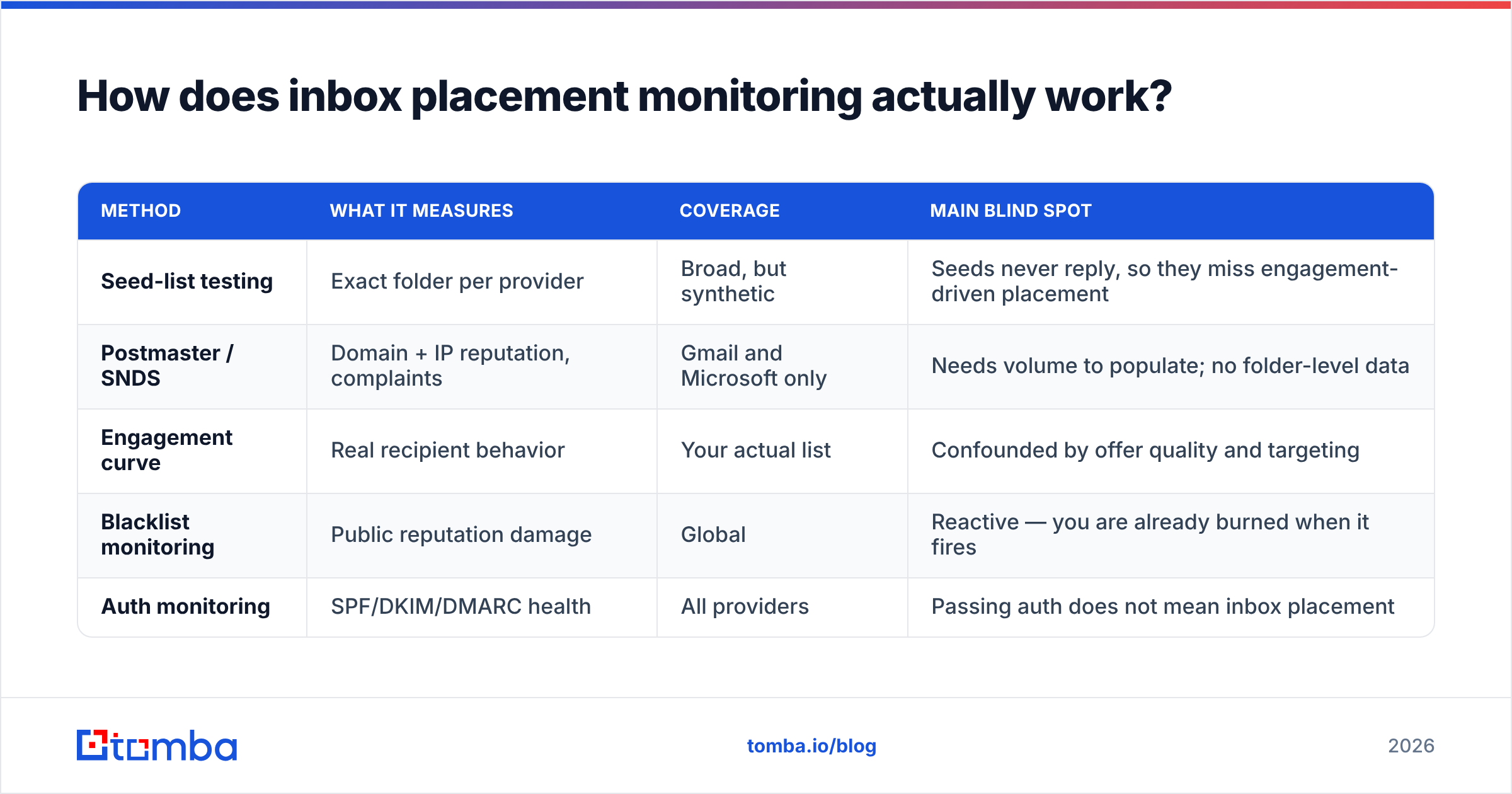
Each method has a specific blind spot, which is why stacking them matters:
| Method | What it measures | Coverage | Main blind spot |
|---|---|---|---|
| Seed-list testing | Exact folder per provider | Broad, but synthetic | Seeds never reply, so they miss engagement-driven placement |
| Postmaster / SNDS | Domain + IP reputation, complaints | Gmail and Microsoft only | Needs volume to populate; no folder-level data |
| Engagement curve | Real recipient behavior | Your actual list | Confounded by offer quality and targeting |
| Blacklist monitoring | Public reputation damage | Global | Reactive — you are already burned when it fires |
| Auth monitoring | SPF/DKIM/DMARC health | All providers | Passing auth does not mean inbox placement |
Seed tests tell you where. Postmaster tells you why. Engagement tells you whether it matters. You need all three to make a decision instead of a guess.
Which inbox placement metrics should you track weekly?#
Track six numbers. More than that and nobody actually looks at the dashboard.
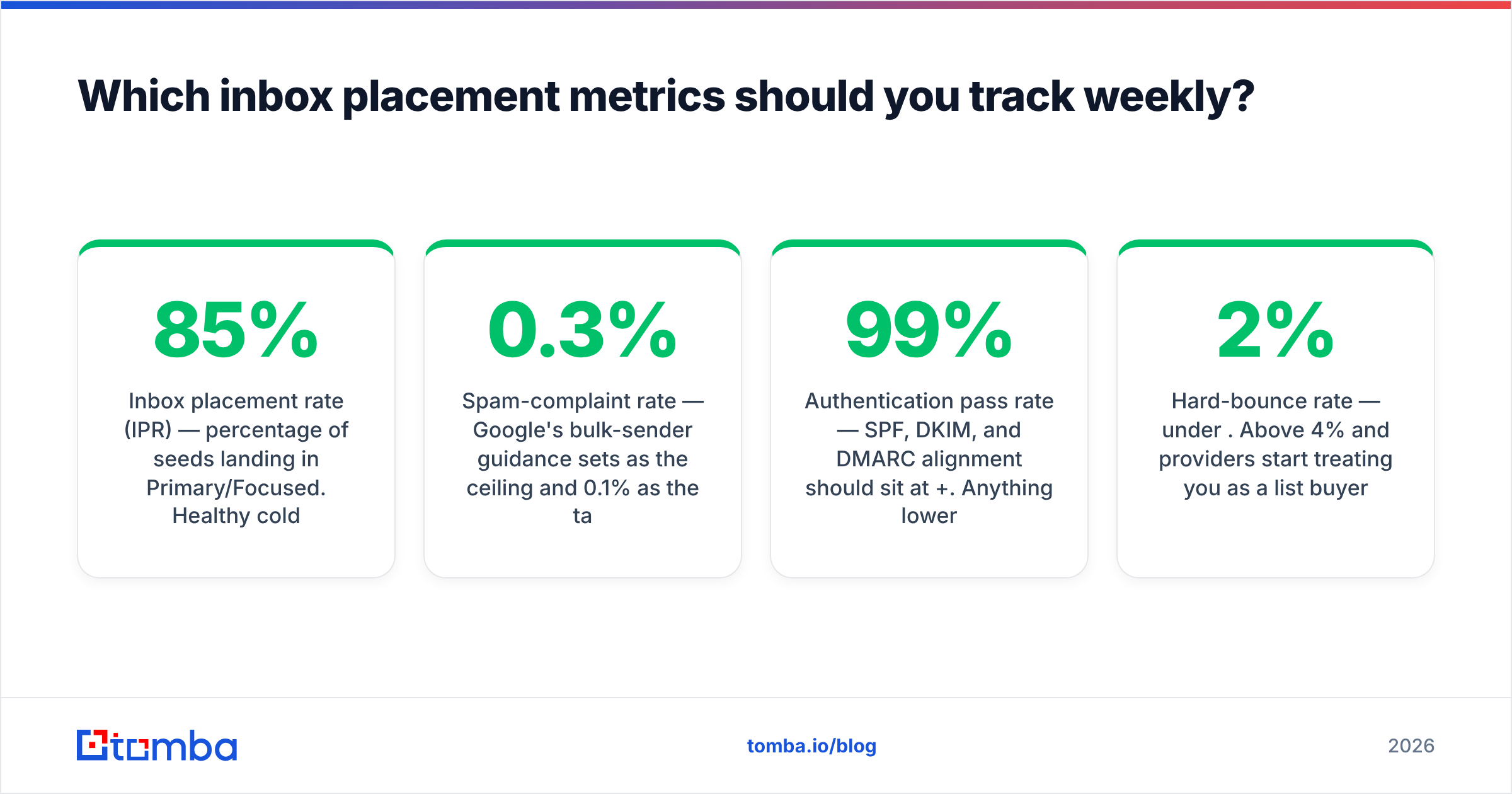
- Inbox placement rate (IPR) — percentage of seeds landing in Primary/Focused. Healthy cold outbound: 85%+. Below 70% means stop and diagnose.
- Spam-complaint rate — Google's bulk-sender guidance sets 0.3% as the ceiling and 0.1% as the target. Treat 0.1% as your alarm threshold, not 0.3%.
- Domain reputation — Postmaster's High/Medium/Low/Bad scale. A drop from High to Medium is a two-week warning, not a footnote.
- Authentication pass rate — SPF, DKIM, and DMARC alignment should sit at 99%+. Anything lower usually means a forwarding path or a subdomain nobody remembered to configure.
- Hard-bounce rate — under 2%. Above 4% and providers start treating you as a list buyer.
- Provider-segmented reply rate — the metric that translates placement into pipeline.
If you want the underlying definitions, Tomba's glossary entries on email deliverability and sender reputation cover the terminology without the vendor spin.
What do inbox placement monitoring tools cost?#
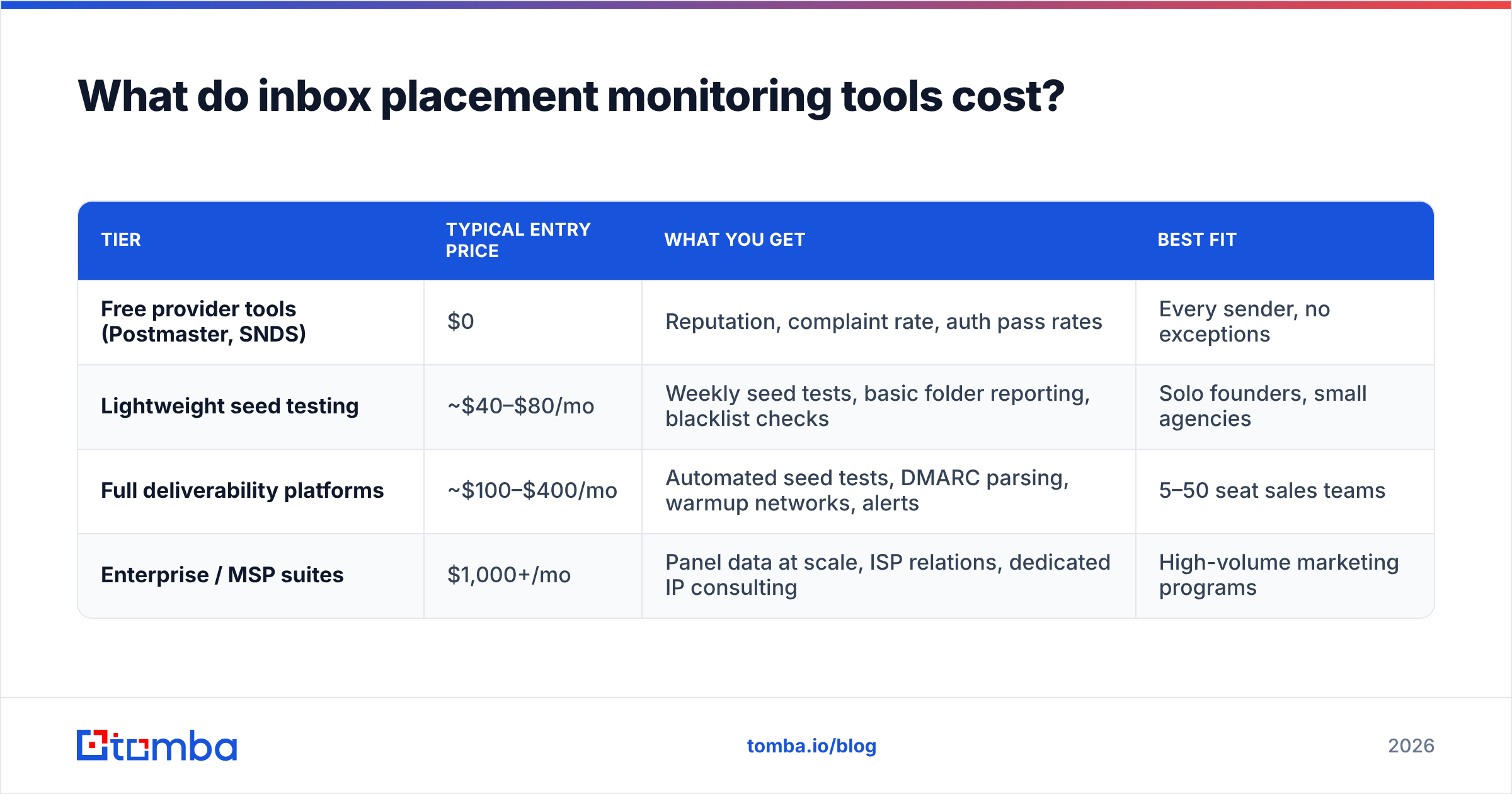
The market splits into four tiers. Prices move, so treat these as ranges and verify on the vendor's own page before you buy.
| Tier | Typical entry price | What you get | Best fit |
|---|---|---|---|
| Free provider tools (Postmaster, SNDS) | $0 | Reputation, complaint rate, auth pass rates | Every sender, no exceptions |
| Lightweight seed testing | ~$40–$80/mo | Weekly seed tests, basic folder reporting, blacklist checks | Solo founders, small agencies |
| Full deliverability platforms | ~$100–$400/mo | Automated seed tests, DMARC parsing, warmup networks, alerts | 5–50 seat sales teams |
| Enterprise / MSP suites | $1,000+/mo | Panel data at scale, ISP relations, dedicated IP consulting | High-volume marketing programs |
Two buying notes. First, seed-panel quality matters more than dashboard design — ask how many real corporate M365 tenants are in the panel, because that is where most B2B mail actually goes and where synthetic panels are weakest. Second, check G2's deliverability category for recency of reviews; this segment churns fast and a 2023 review tells you little about 2026 product quality.
Before you buy anything, run the free layer for two weeks. Postmaster Tools plus a manual spam test with a spam checker and a blacklist checker will surface the obvious failures at zero cost, and you will know which paid tier you actually need.
Is bad inbox placement a content problem or a list problem?#
It's a list problem far more often than teams want to believe.
Filtering algorithms weigh sender behavior heavily: how many of your recipients exist, how many complain, how many engage, and how many are traps. Copy matters at the margin — a spammy subject line can push a borderline sender over — but copy rarely explains a placement collapse on its own.
Here is the causal chain most teams miss. You scrape or buy a list. Fifteen percent of the addresses are dead. Those produce hard bounces, which providers read as "this sender does not know who they're mailing." Another slice are recycled spam traps — addresses that were real, went dormant, and were reactivated as traps. Trap hits are near-instant reputation damage. Your domain reputation drops to Low. Now even your perfectly-written message to a real prospect lands in spam.
Which means the highest-leverage deliverability work happens before the send:
- Verify every address at import. An email verifier removes invalid syntax, dead mailboxes, and role accounts before they ever hit your sequencer.
- Handle catch-all domains deliberately. Catch-all servers accept everything, so a standard SMTP check returns "valid" for addresses that don't exist. A dedicated catch-all verifier applies pattern and signal analysis instead of trusting the accept response.
- Suppress role addresses. info@, sales@, and support@ generate complaints at a much higher rate than named mailboxes.
- Re-verify anything older than 90 days. B2B data decays at roughly 2–3% per month through job changes alone.
- Cap volume per mailbox. Even a clean list burns a domain if you push 300 sends a day from one inbox on day one.
How do you fix inbox placement when seed tests turn red?#
Work in this order. Skipping to step four is why most recovery attempts fail.
1. Confirm authentication. SPF, DKIM, and DMARC must pass and align. Check that your SPF record stays under the 10 DNS-lookup limit — adding a fifth tool to your stack silently breaks it. Google's bulk sender requirements is the canonical checklist here.
2. Stop the bleeding. Pause the campaign that triggered the drop. Continuing to send while reputation is falling extends recovery from two weeks to two months.
3. Purge and re-verify the list. Remove everything that bounced, everything unverified, and every address you cannot trace to a source. Then re-verify what's left.
4. Rebuild volume gradually. Drop to 20–30% of previous volume, send only to your most engaged segment, and step up 20% every three or four days while watching Postmaster daily.
5. Rotate the sending identity only as a last resort. New subdomains and new mailboxes reset reputation to neutral, not good. If the underlying data quality hasn't changed, you'll burn the new domain too — you've just bought yourself three weeks.
6. Then, and only then, look at copy. Cut link count to one or two, drop tracking-domain redirects if you're using a shared tracking domain, and remove image-heavy HTML from cold sequences.
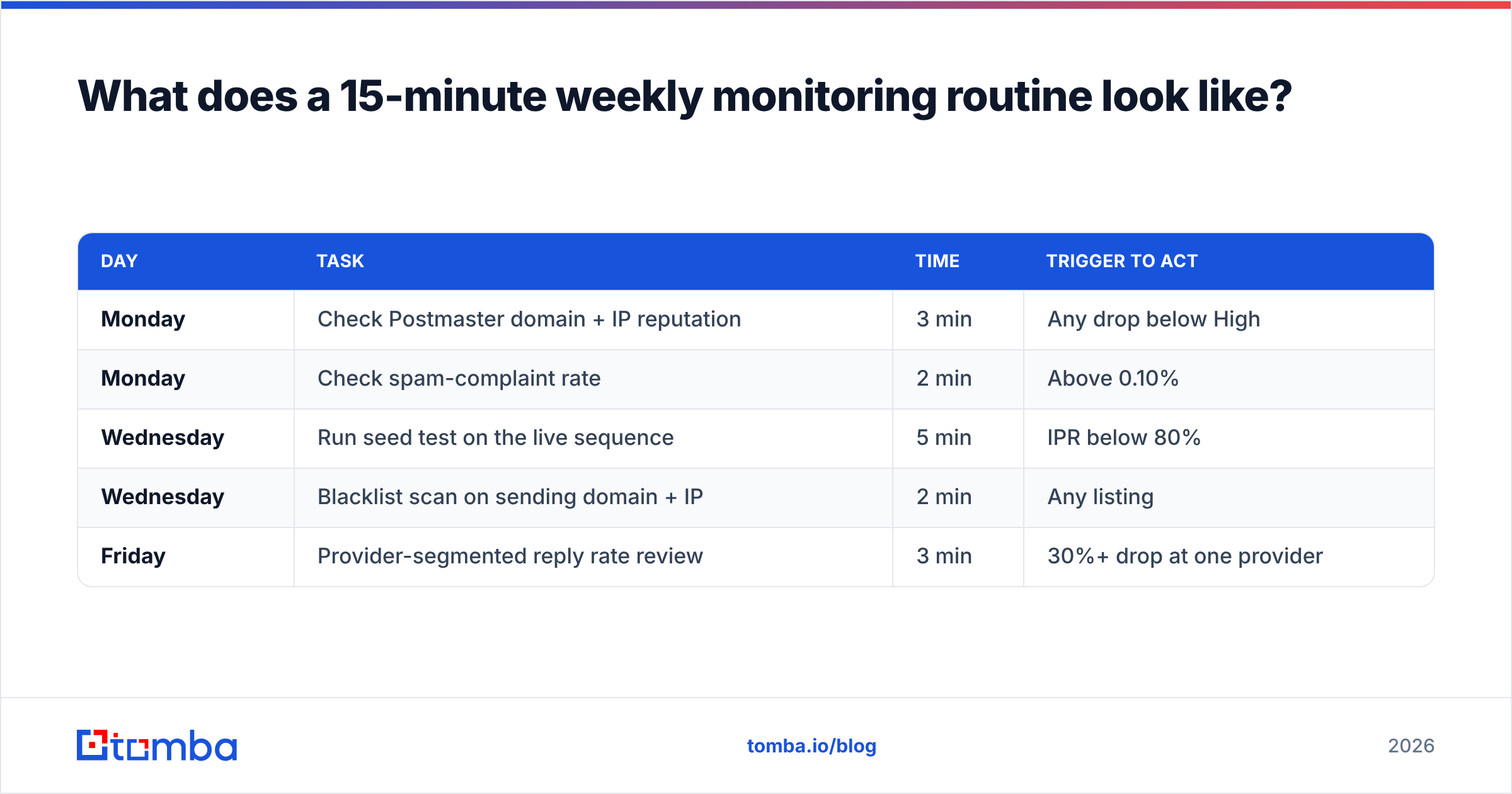
What does a 15-minute weekly monitoring routine look like?#
Consistency beats sophistication. This is the whole ritual:
| Day | Task | Time | Trigger to act |
|---|---|---|---|
| Monday | Check Postmaster domain + IP reputation | 3 min | Any drop below High |
| Monday | Check spam-complaint rate | 2 min | Above 0.10% |
| Wednesday | Run seed test on the live sequence | 5 min | IPR below 80% |
| Wednesday | Blacklist scan on sending domain + IP | 2 min | Any listing |
| Friday | Provider-segmented reply rate review | 3 min | 30%+ drop at one provider |
Log the numbers in a sheet. The absolute values matter less than the trend line — a domain reputation that has been sliding for three weeks is a bigger signal than a single bad seed test, which can just be panel noise.
One caveat on seed tests: they measure a message sent to accounts that never reply, never move mail out of spam, and never add you to contacts. Real recipients do all three, which means your true inbox rate to an engaged segment is usually better than your seed score. Use seed tests for direction and comparison, not as an absolute truth about your customers' mailboxes.
Where should you start?#
Start with the free layer this week: verify your authentication, connect Postmaster Tools, and run one seed test. That costs nothing and will tell you whether you have a real problem or an open-rate reporting illusion.
Then fix the input, because monitoring only tells you the temperature — it doesn't cool the room. Clean, verified, correctly-sourced contact data is what keeps placement high in the first place.
That's where Tomba's Email Finder fits. It returns verified professional addresses with a confidence score and source attribution, so the contacts entering your sequencer are ones that actually exist — no scraped guesses, no permutator spray, no trap-heavy purchased lists. Pair it with the built-in verifier and catch-all checks, and your bounce rate stops being the thing that quietly destroys your sender reputation. The free tier includes 25 searches a month, and paid plans start at $49/mo; full details are on the Tomba pricing page.
Monitor placement weekly. Verify data before every send. Those two habits solve more deliverability problems than any subject-line rewrite ever will.
Related guides#
// get started
Find, verify and enrich your first contacts today
Start on the free plan with 25 searches a month, then scale when your team is ready.
Free plan · No credit card required · GDPR & CCPA
// about the author