InboxAware Pricing, Reviews, Pros and Cons (2026 Guide)
InboxAware sells deliverability audits, not seats — which makes its pricing hard to compare. Here's how the model works, what reviewers actually report, and when a cheaper stack does the same job.
TL;DR
- InboxAware is a deliverability diagnostics tool from Email Industries. It audits your list and your sending setup, then tells you why mail lands in spam. It does not send your email.
- InboxAware pricing is audit-led and mostly quote-based. There is no public price table. Cost tracks list size and scope, so get the quote in writing.
- Reviews praise report depth and support. They fault price transparency, the learning curve, and the work left over after the report lands.
- Most teams who buy an audit are paying to find a data problem. Clean sourcing costs far less than a later diagnosis.
- If your bounce rate is above 3%, fix the list first. That one step clears most "we're in spam" tickets.
What is InboxAware, and who is it actually for?#
InboxAware is a deliverability tool built by Email Industries. The company's whole product line sits around list hygiene and inbox placement. The pitch is simple. Point it at your list and your sending domain, and it returns a report. That report covers risky addresses, spam traps, blocklist exposure, gaps in your authentication, and the reputation signals behind weak campaigns.
Think of it like a home inspection before you buy a house. The inspector does not fix the roof. They tell you the roof is why water keeps showing up in the living room, and they bring proof. So you stop blaming the windows. InboxAware plays the same role for email. It turns "our open rates dropped" into a cause you can test.
That framing matters for the buying decision. InboxAware is aimed at:
- ESPs and agencies that send on behalf of many clients. One bad list can poison a shared IP reputation.
- Enterprise email teams with large old databases of unknown quality, plus a duty to prove hygiene.
- Growth teams that hit a wall. Placement drops, a blocklist entry, or a Gmail policy change they cannot explain from inside their ESP.
It is not for a two-person outbound team sending 500 cold emails a week. That team has a sourcing problem, not a forensics problem. The cost profile is different too.
How does InboxAware pricing work in 2026?#
Start with the shape of the deal. InboxAware pricing does not follow the usual three-tier SaaS grid. The price is scoped to the audit itself: list volume, the number of domains and sending sources, and whether you want one report or ongoing monitoring. In practice, you talk to sales before you see a number.
I want to be clear about what is not public, because plenty of pricing articles invent tiers. Verified InboxAware pricing points are hard to find. What buyers report is steady: a volume-scoped, quote-based model with a free or low-friction first scan. Confirm the current figure with the vendor. Ask for the renewal price in the same document. Quote-based tools are where year-two increases hide.
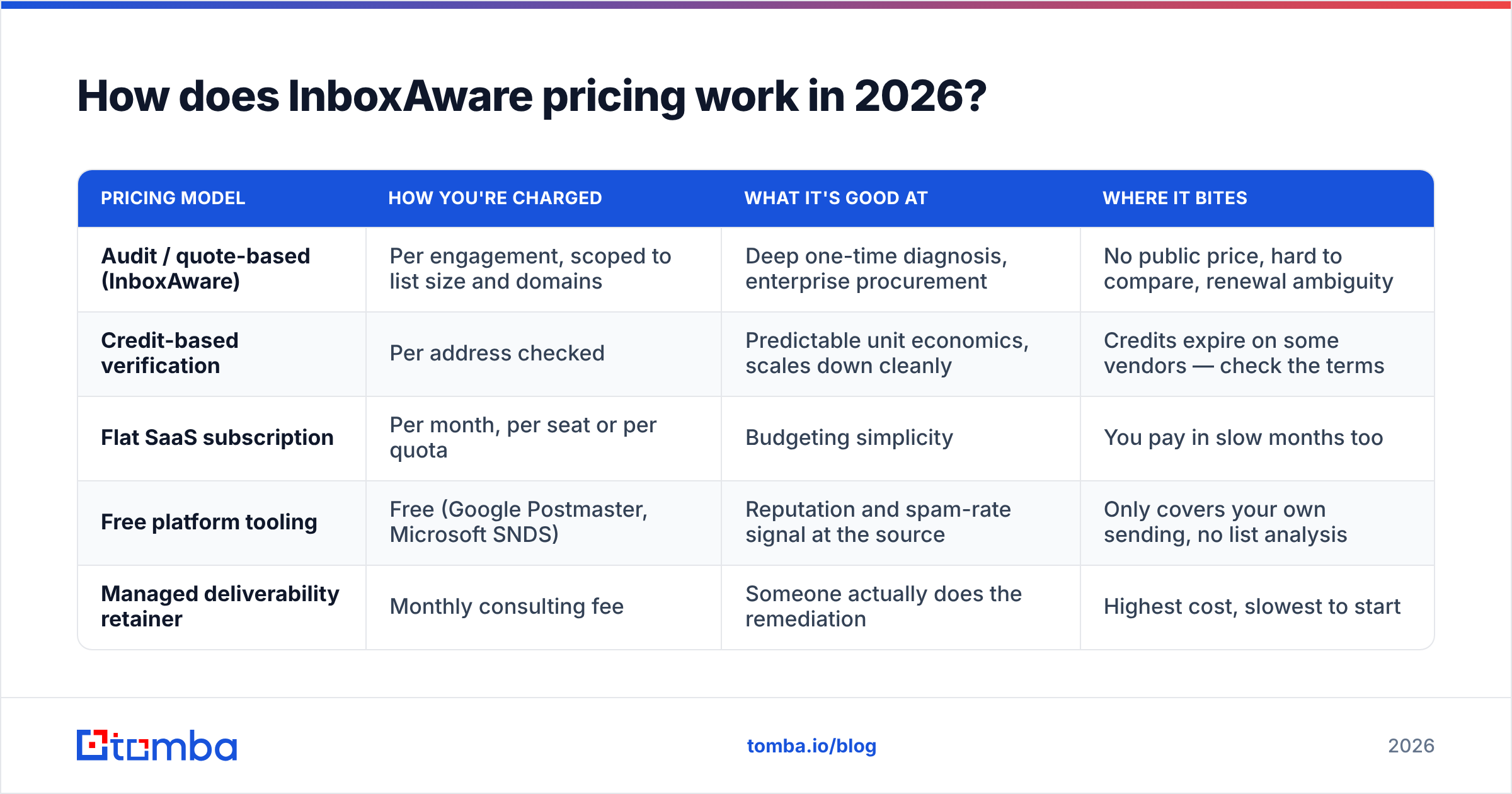
Here is how InboxAware pricing compares with the other models you will meet while you build a deliverability stack:
| Pricing model | How you're charged | What it's good at | Where it bites |
|---|---|---|---|
| Audit / quote-based (InboxAware) | Per engagement, scoped to list size and domains | Deep one-time diagnosis, enterprise procurement | No public price, hard to compare, renewal ambiguity |
| Credit-based verification | Per address checked | Predictable unit economics, scales down cleanly | Credits expire on some vendors — check the terms |
| Flat SaaS subscription | Per month, per seat or per quota | Budgeting simplicity | You pay in slow months too |
| Free platform tooling | Free (Google Postmaster, Microsoft SNDS) | Reputation and spam-rate signal at the source | Only covers your own sending, no list analysis |
| Managed deliverability retainer | Monthly consulting fee | Someone actually does the remediation | Highest cost, slowest to start |
The strategic read: an audit is a project cost, not an operating cost. Budget it as a one-time line item. Then be honest about who will act on the findings once the PDF lands. An audit nobody acts on is the most expensive document you will ever buy.
What do InboxAware reviews actually say?#
Reviews of diagnostic tools fall into patterns, and InboxAware is no exception. Cross-reference neutral review sites like G2 with what practitioners say, and the same themes come up.
What reviewers praise:
- Depth. The reports go past "your bounce rate is high." They name trap types, risk clusters by domain, and broken authentication. Teams find issues their ESP dashboard never showed.
- Trap and blocklist detection. This is the headline feature and the main reason ESPs and agencies buy. Spam traps hide from ordinary verification, so removing them has real value.
- Human support. Buyers reach people who know deliverability, not a tier-one script. That is the small-vendor advantage.
- Credibility. A third-party report carries weight when marketing and IT disagree about whose fault the spam folder is.
What reviewers criticize:
- Opaque pricing. This is the top complaint by a wide margin. Buyers dislike booking a call to learn whether a tool fits the budget. It also makes InboxAware pricing slow to compare side by side.
- Learning curve. The output assumes you know what a seed list, an SPF alignment failure, and a recycled trap are. Marketers outside the specialism find it heavy going.
- Diagnosis is not repair. The tool says the roof leaks. You still need a roofer. Several reviews describe buying the audit, confirming the problem, then needing fresh budget to fix it.
- Overlap with cheaper tools. If the real issue is a bad list, a verification pass costs a fraction and catches most of it.
That last point decides a lot. It is the difference between a smart purchase and an expensive way to confirm what you already suspected.
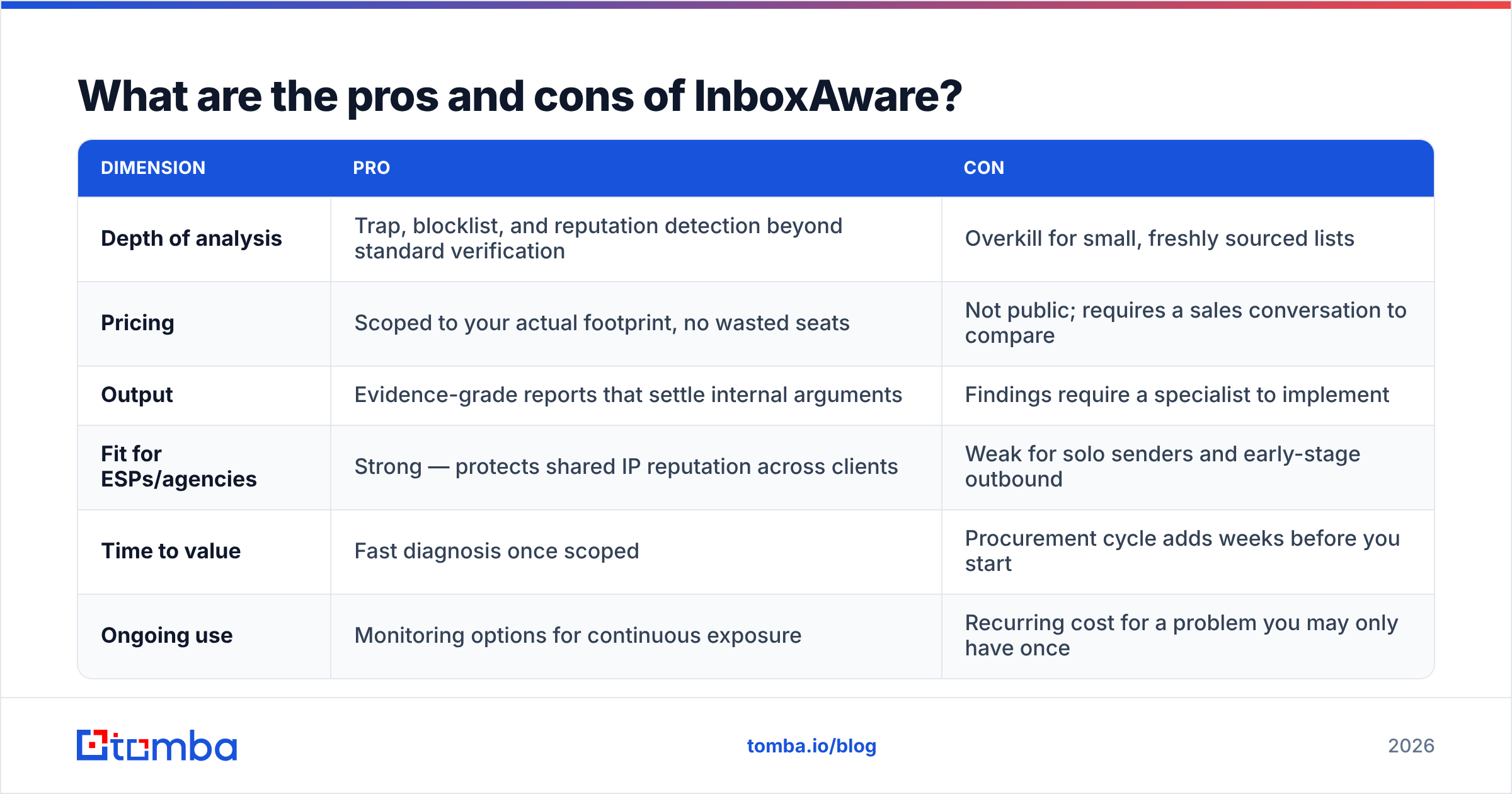
What are the pros and cons of InboxAware?#
| Dimension | Pro | Con |
|---|---|---|
| Depth of analysis | Trap, blocklist, and reputation detection beyond standard verification | Overkill for small, freshly sourced lists |
| Pricing | Scoped to your actual footprint, no wasted seats | Not public; requires a sales conversation to compare |
| Output | Evidence-grade reports that settle internal arguments | Findings require a specialist to implement |
| Fit for ESPs/agencies | Strong — protects shared IP reputation across clients | Weak for solo senders and early-stage outbound |
| Time to value | Fast diagnosis once scoped | Procurement cycle adds weeks before you start |
| Ongoing use | Monitoring options for continuous exposure | Recurring cost for a problem you may only have once |
The neutral verdict: InboxAware is worth it when bad placement costs you more than the audit does, and when someone can act on the results. Send millions of messages a month, and a 5% swing in placement is worth six figures. That math is easy. Send 10,000 cold emails a month, and it usually is not. The same money spent on cleaner data up front moves a bigger number. InboxAware pricing suits the first group, because the quote tracks your real footprint instead of a seat count.
Is a deliverability audit the right first purchase?#
Usually not. Most teams run this sequence backwards.
Deliverability is a stack. The layers cost very different amounts and pay back on very different timelines. Buying at the top before you fix the bottom is like hiring a sommelier to fix tap water.
Layer 1 — Source quality. Where the addresses came from. Scraped lists, bought spreadsheets of unknown age, and form fills without confirmation cause most placement collapses. Cheap to fix. Huge impact.
Layer 2 — Verification. Remove invalid, role-based, and dead addresses before you send. A run through an email verifier is the highest-return move in the whole stack. Catch-all verification covers the domains that normal checks return as "unknown."
Layer 3 — Authentication. Set up SPF, DKIM, and DMARC, and make them align. Free to fix. You need DNS access. It has been non-negotiable since the 2024 Gmail and Yahoo rules for bulk senders.
Layer 4 — Sending behavior. Ramp volume slowly. Watch frequency, segment by engagement, and keep suppression tidy. Free to fix, but it takes patience.
Layer 5 — Diagnostics. This is where InboxAware lives: trap exposure, blocklist forensics, seed testing, reputation monitoring. Valuable work, and wasted if layers 1 to 4 are broken.
Run layers 1 to 4 first. If placement is still bad, you have a real forensics problem and the audit will earn its price. If placement recovers, you just saved a procurement cycle. For the vocabulary behind these layers, Tomba's email deliverability glossary entry is a good primer.

How does InboxAware compare to other tools in the stack?#
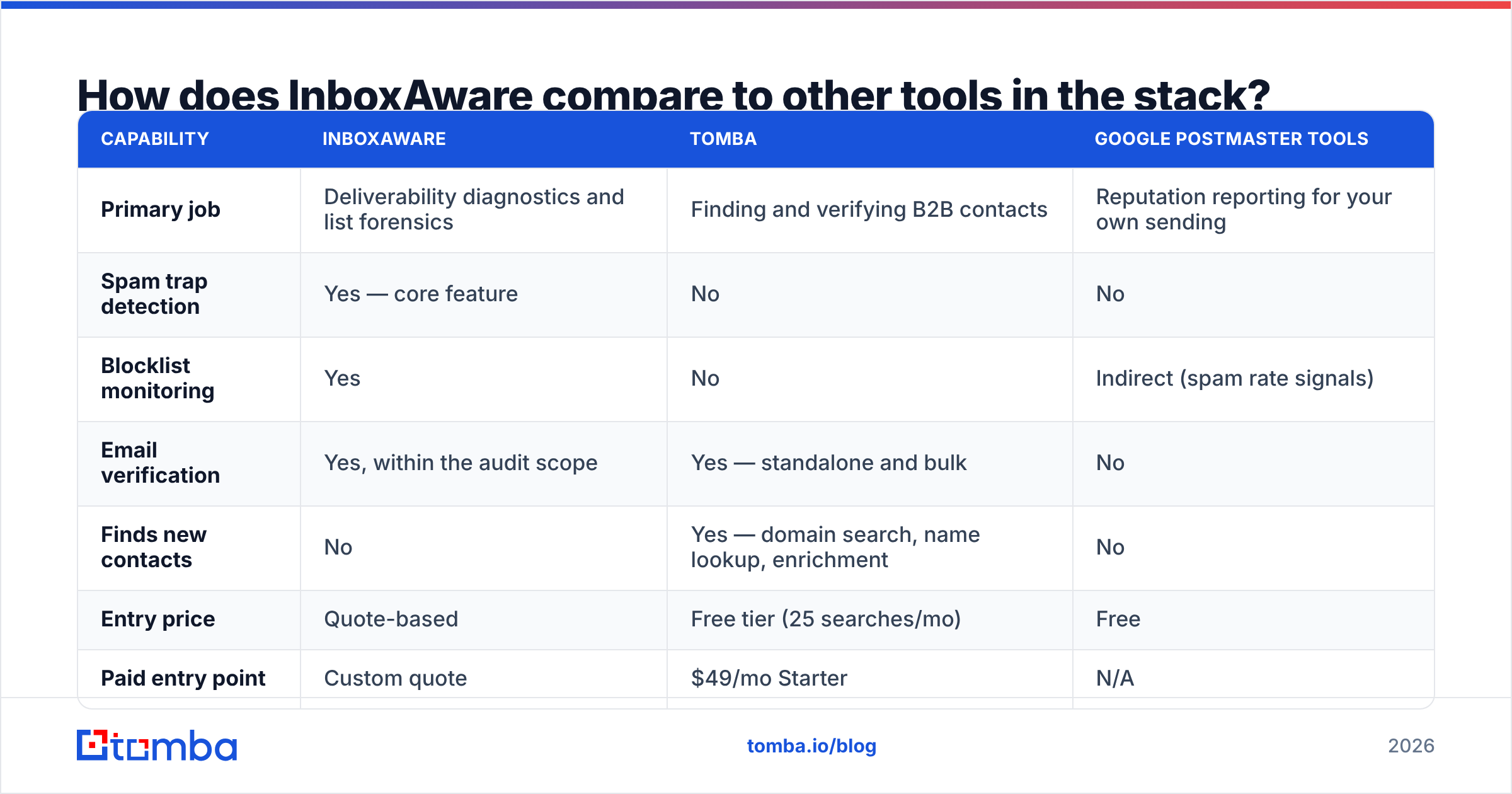
These products are not direct substitutes. That is the point. Most teams end up with two or three of them. The useful question is which one you buy first.
| Capability | InboxAware | Tomba | Google Postmaster Tools |
|---|---|---|---|
| Primary job | Deliverability diagnostics and list forensics | Finding and verifying B2B contacts | Reputation reporting for your own sending |
| Spam trap detection | Yes — core feature | No | No |
| Blocklist monitoring | Yes | No | Indirect (spam rate signals) |
| Email verification | Yes, within the audit scope | Yes — standalone and bulk | No |
| Finds new contacts | No | Yes — domain search, name lookup, enrichment | No |
| Entry price | Quote-based | Free tier (25 searches/mo) | Free |
| Paid entry point | Custom quote | $49/mo Starter | N/A |
| Best for | ESPs, agencies, large legacy lists | Outbound and RevOps teams building lists | Any team sending to Gmail at volume |
| API access | Available | Yes — full REST API | Limited |
Two honest notes on this table. First, Google Postmaster Tools is free, and most teams have not set it up. Do that before you spend a cent. Second, name your real problem. If your contacts bounce, an audit helps. If you do not have enough good contacts, neither an audit nor a monitor will help. You need a sourcing layer. Providers like BookYourData work well if you prefer to buy verified lists outright. A search-and-verify tool fits teams that build lists account by account.
What does the cheaper path look like in practice?#
Here is a concrete order of work for a team landing in spam, sorted by cost against impact.
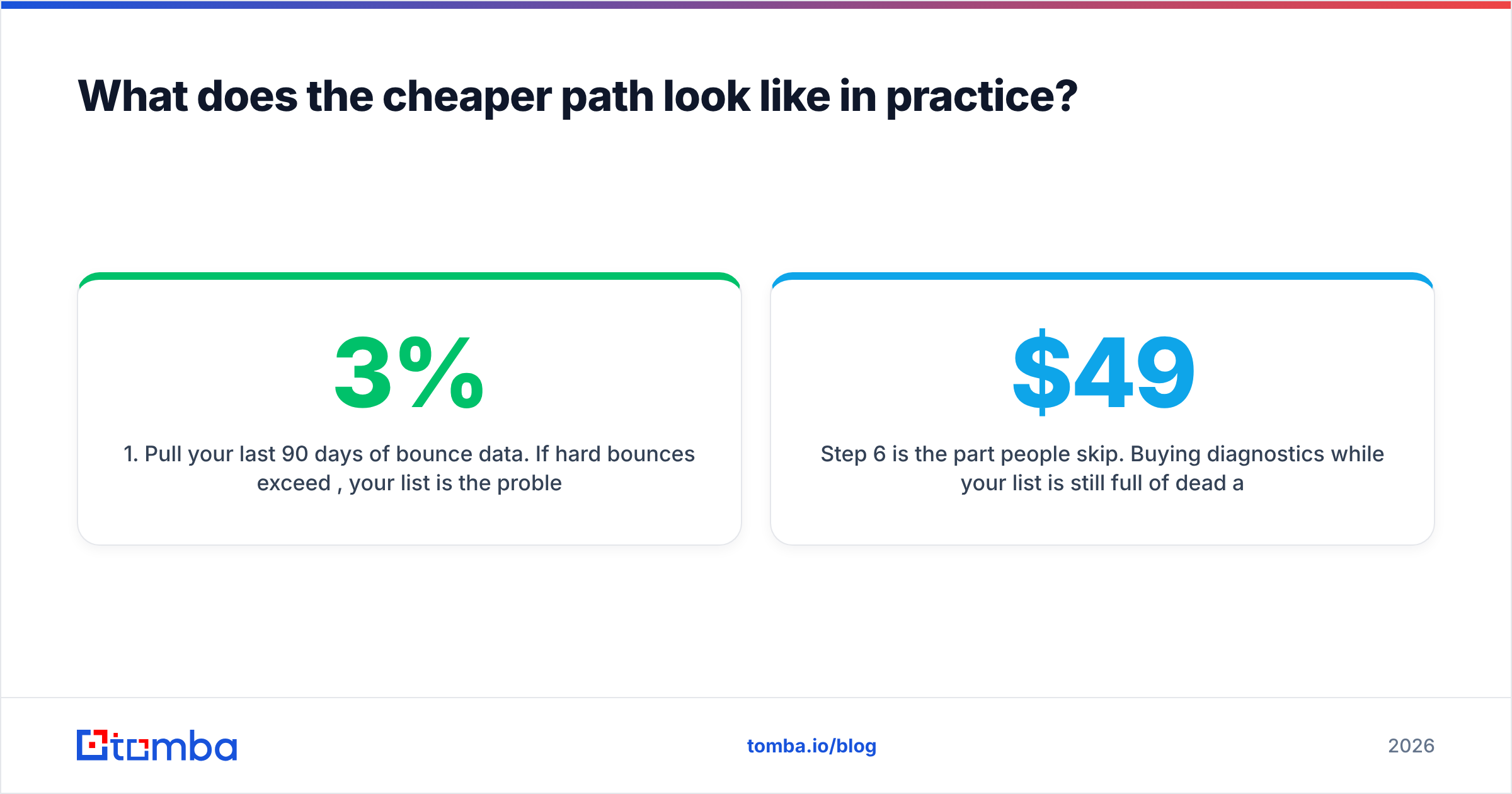
- Pull your last 90 days of bounce data. If hard bounces top 3%, the list is the problem. No audit is needed to prove that.
- Run the whole list through verification. Use bulk verification rather than one address at a time. A list of 50,000 clears in a single upload.
- Suppress hard. Cut anything invalid, role-based, or quiet for 180 days or more. Yes, your list shrinks. Your placement improves, and that is the number that pays.
The next three steps are where the fix sticks.
- Fix authentication. SPF, DKIM, DMARC. Check alignment, not just presence. A record that fails alignment is worse than none, because it breeds false confidence.
- Re-source the gaps. Replace the addresses you cut with contacts found and verified at the point of capture, not bought in bulk at unknown age.
- Re-measure for 30 days. If placement recovered, you are done. If not, buy the audit now. You will get more from it, because the noise is gone.
Step 6 is the one people skip. Buying diagnostics while the list is still full of dead addresses means paying an expert to tell you the list is full of dead addresses. Put a scoped audit quote next to Tomba pricing — free, $49/mo Starter, $99/mo Growth, $249/mo Pro — and the order of work argues for itself.
So, is InboxAware worth the money?#
Yes, if you run an ESP or an agency, manage large legacy lists, carry a blocklist entry you cannot explain, or need outside evidence to settle an internal call. In those cases the depth is real. InboxAware pricing likely works in your favor too, because the quote tracks your footprint instead of billing seats you never use.
No, if your list is under a few hundred thousand addresses, your bounce rate is high, and you have not run verification or set up authentication. You will pay real money to learn what $49 of tooling would have told you. The cleanup still waits for you afterwards.
One rule covers most deliverability spend: money spent upstream beats money spent downstream, every time. Clean sourcing and verification prevent the problems that audits find. Audits are for the problems that survive good hygiene, and those are rarer than most teams think.
Where should you start instead?#
Start with the data going into your sends. Most "we're in spam" incidents trace back to addresses that were never good: guessed patterns, stale scrapes, or bought rows nobody checked. Tomba's Email Finder finds professional email addresses by domain, name, or company. It validates them at the point of discovery, so bad addresses never reach your list. The free tier covers 25 searches a month if you want to test accuracy on a domain you already know. Starter runs $49/mo when you are ready to build at volume. Fix the input, and InboxAware pricing may never need a line in your budget.
Related guides#
// get started
Find, verify and enrich your first contacts today
Start on the free plan with 25 searches a month, then scale when your team is ready.
Free plan · No credit card required · GDPR & CCPA
// about the author