InboxKit Pricing, Reviews, Pros and Cons: An Honest 2026 Look
InboxKit sells done-for-you cold email inboxes by the seat. Here is what the pricing really costs at scale, what reviewers praise, where it falls short, and when buying more inboxes is the wrong fix.
TL;DR
- InboxKit sells pre-configured cold email inboxes (Google Workspace and Microsoft-based) with domains, DNS records, and warmup handled for you — you pay per mailbox per month, not per contact.
- The sticker price per inbox looks small. The real number is
inboxes × monthly rate + domains + sending platform + verification, and that stack is where budgets quietly triple. - Reviews consistently praise the setup speed (hours instead of a weekend of DNS work) and consistently flag the same weak spots: limited control, renewal costs at scale, and the fact that infrastructure cannot fix a bad list.
- InboxKit competes with doing it yourself in Google Workspace, and with rivals like Mailforge, Maildoso, and Mailreef — the differences are support, mailbox type, and how much configuration you can override.
- Buy infrastructure only after your data is clean. A verified list on 10 inboxes beats a dirty list on 50, every time.
What is InboxKit and who is it actually for?#
InboxKit is cold email infrastructure. Instead of buying domains at a registrar, pointing DNS, provisioning Google Workspace seats, configuring SPF/DKIM/DMARC, and warming each mailbox by hand, you order a bundle and receive ready-to-send inboxes with credentials you paste into your sequencer.
Think of it like renting a fleet of delivery vans instead of buying, registering, and insuring each one yourself. You are not buying a better product — you are buying away a setup chore and a class of configuration mistakes.
That framing tells you who it fits:
- Agencies running client campaigns. Every new client needs its own domains and mailboxes, isolated from the last one. Provisioning is a recurring cost of doing business, so outsourcing it compounds.
- Outbound teams scaling past ~20 mailboxes. Manual provisioning is tolerable at five inboxes and miserable at fifty.
- Founders with no ops person. DNS records are unforgiving. One wrong SPF include and your first campaign lands in spam.
- Teams recovering from a burned domain. When your primary domain's sender reputation is damaged, you need fresh sending identities fast, kept far away from your corporate root domain.
Who it does not fit: anyone sending under a few hundred emails a month, anyone whose reply problem is a copy or targeting problem, and anyone who has not yet cleaned their contact list. More inboxes multiply your sending capacity; they do not improve your hit rate.

How does InboxKit pricing actually work?#
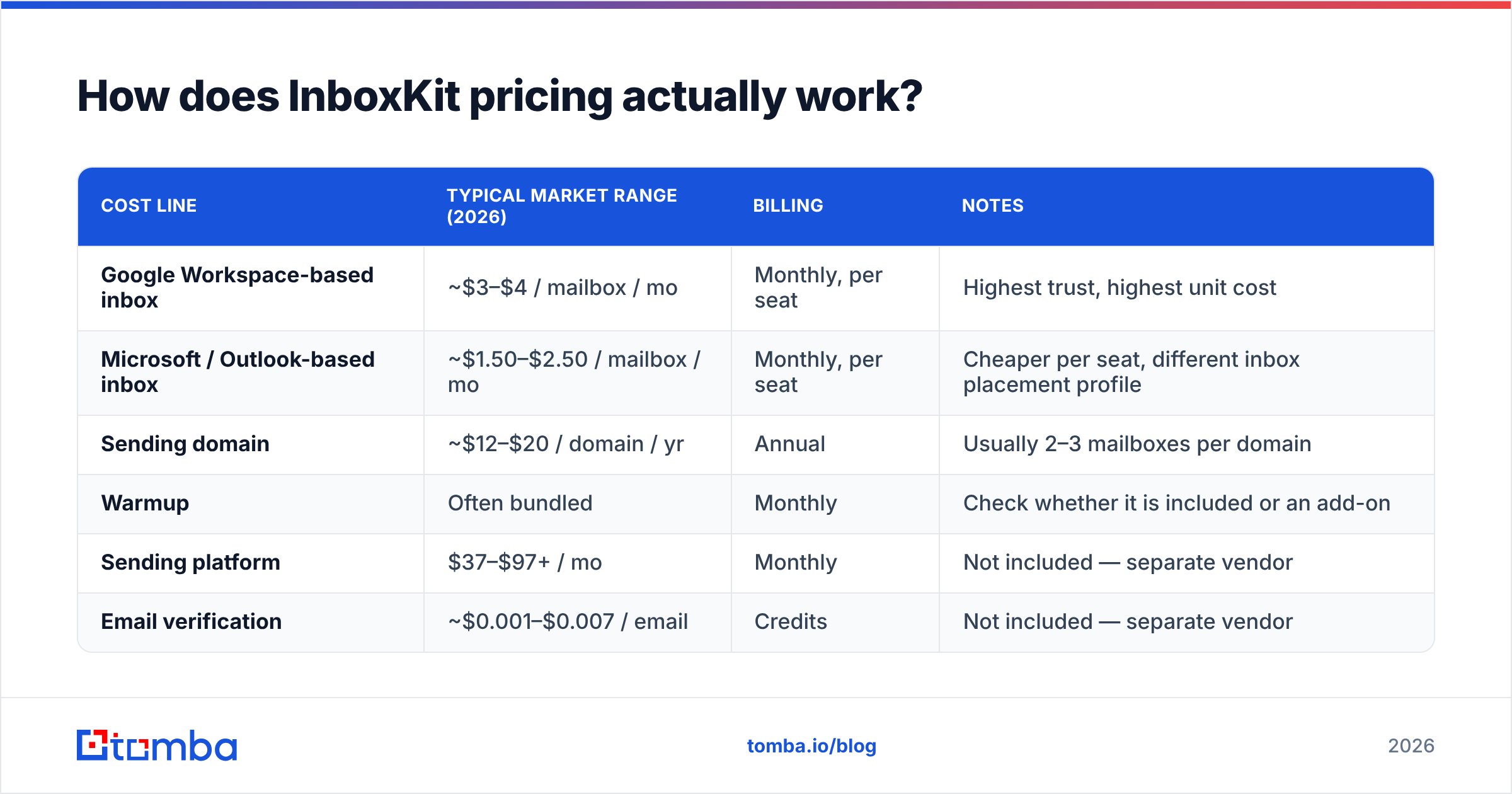
InboxKit prices per mailbox per month, with volume tiers that lower the unit rate as you order more. Domains are usually billed separately (annual registration), and the sending platform — Instantly, Smartlead, Lemlist, whatever you use — is a separate subscription entirely.
Published rates move, so treat the table below as a planning model of the market rather than a quote. Confirm current numbers on the InboxKit site before you budget.
| Cost line | Typical market range (2026) | Billing | Notes |
|---|---|---|---|
| Google Workspace-based inbox | ~$3–$4 / mailbox / mo | Monthly, per seat | Highest trust, highest unit cost |
| Microsoft / Outlook-based inbox | ~$1.50–$2.50 / mailbox / mo | Monthly, per seat | Cheaper per seat, different inbox placement profile |
| Sending domain | ~$12–$20 / domain / yr | Annual | Usually 2–3 mailboxes per domain |
| Warmup | Often bundled | Monthly | Check whether it is included or an add-on |
| Sending platform | $37–$97+ / mo | Monthly | Not included — separate vendor |
| Email verification | ~$0.001–$0.007 / email | Credits | Not included — separate vendor |
Run the arithmetic before you sign anything. A 50-inbox Google Workspace setup at $3.50 is $175/month for mailboxes, plus roughly 20 domains at $15/year (~$25/month amortized), plus a $97 sending platform. That is a little over $290/month before you have verified a single address — and verification is the line item that decides whether the other $290 produces meetings or bounces.
What do you get per inbox, and what is left to you?#
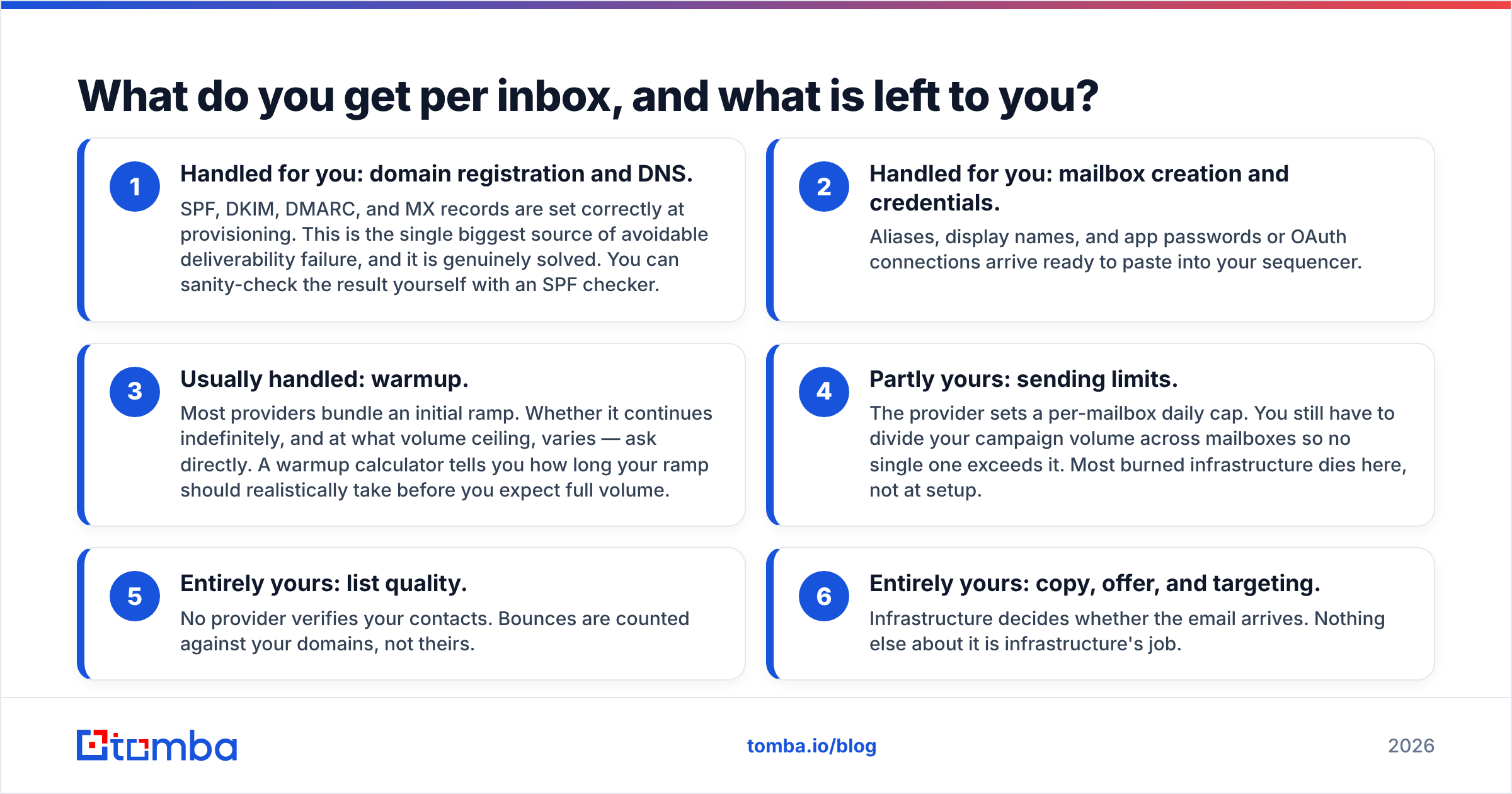
This is the part most pricing pages blur. Here is the honest split of responsibilities:
- Handled for you: domain registration and DNS. SPF, DKIM, DMARC, and MX records are set correctly at provisioning. This is the single biggest source of avoidable deliverability failure, and it is genuinely solved. You can sanity-check the result yourself with an SPF checker.
- Handled for you: mailbox creation and credentials. Aliases, display names, and app passwords or OAuth connections arrive ready to paste into your sequencer.
- Usually handled: warmup. Most providers bundle an initial ramp. Whether it continues indefinitely, and at what volume ceiling, varies — ask directly. A warmup calculator tells you how long your ramp should realistically take before you expect full volume.
- Partly yours: sending limits. The provider sets a per-mailbox daily cap. You still have to divide your campaign volume across mailboxes so no single one exceeds it. Most burned infrastructure dies here, not at setup.
- Entirely yours: list quality. No provider verifies your contacts. Bounces are counted against your domains, not theirs.
- Entirely yours: copy, offer, and targeting. Infrastructure decides whether the email arrives. Nothing else about it is infrastructure's job.
Google's own bulk sender guidelines put a hard number on the boundary: keep spam complaints under 0.3% and authenticate everything. Items 1–3 above get you authenticated. Items 4–6 are what keep you under the complaint threshold, and they are on you regardless of what you pay per seat.
What do InboxKit reviews say — pros and cons?#
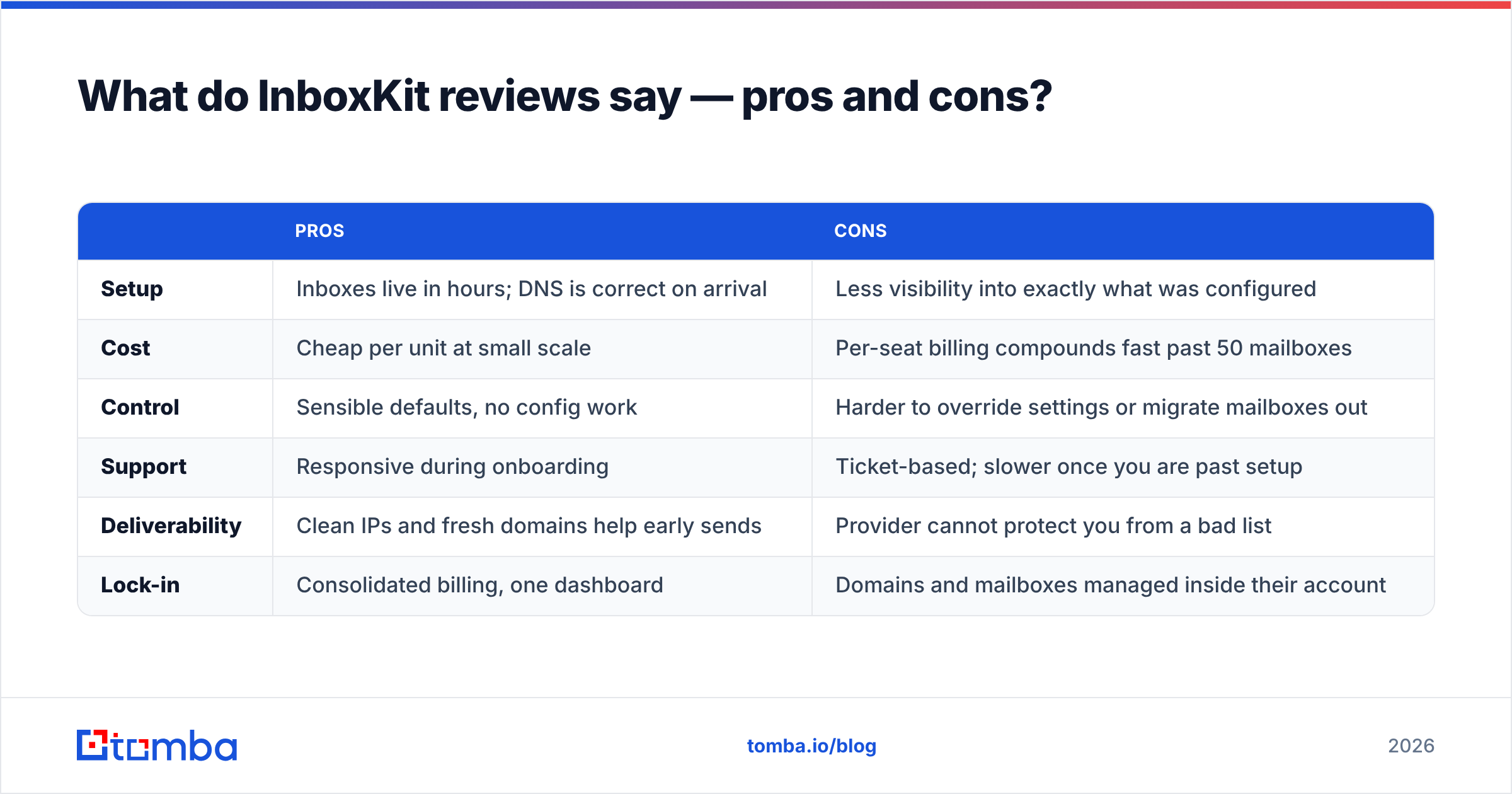
Reviewer sentiment across G2's email deliverability category and cold email communities lands in a fairly consistent place for every provider in this segment, InboxKit included.
| Pros | Cons | |
|---|---|---|
| Setup | Inboxes live in hours; DNS is correct on arrival | Less visibility into exactly what was configured |
| Cost | Cheap per unit at small scale | Per-seat billing compounds fast past 50 mailboxes |
| Control | Sensible defaults, no config work | Harder to override settings or migrate mailboxes out |
| Support | Responsive during onboarding | Ticket-based; slower once you are past setup |
| Deliverability | Clean IPs and fresh domains help early sends | Provider cannot protect you from a bad list |
| Lock-in | Consolidated billing, one dashboard | Domains and mailboxes managed inside their account |
The pattern worth internalizing: the praise is all about time saved, and the criticism is all about control and scale economics. Nobody who is happy with a provider like this is happy because it improved their reply rate. They are happy because a two-day chore became a twenty-minute order form.
The negative reviews that matter are the ones where someone bought 100 inboxes, blasted a scraped list, and watched all of them get flagged in three weeks. That is not a product defect. That is what happens when you buy capacity instead of buying accuracy.
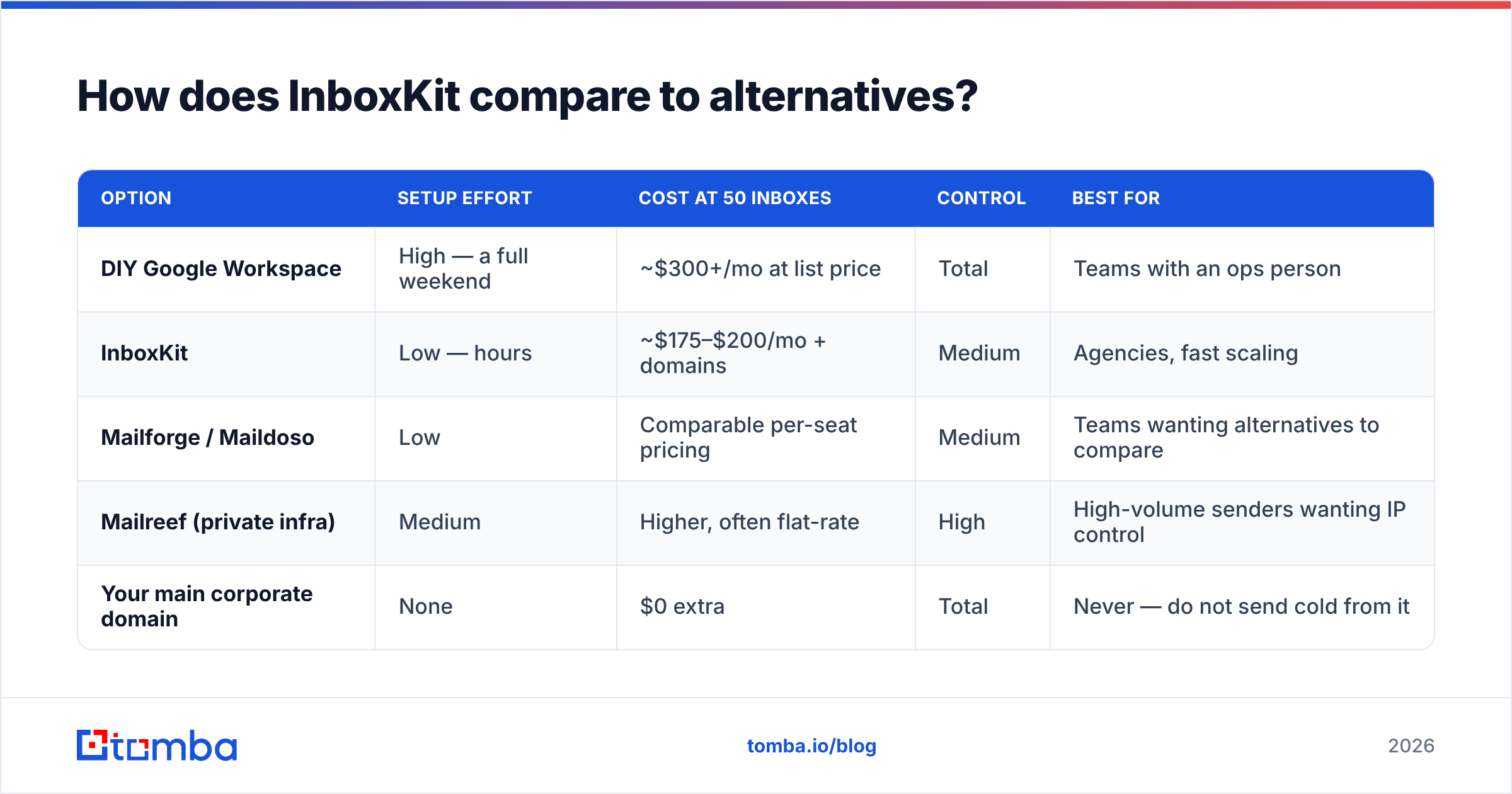
How does InboxKit compare to alternatives?#
Your real options are three: do it yourself, use InboxKit or a peer, or use a provider that owns its own sending infrastructure.
| Option | Setup effort | Cost at 50 inboxes | Control | Best for |
|---|---|---|---|---|
| DIY Google Workspace | High — a full weekend | ~$300+/mo at list price | Total | Teams with an ops person |
| InboxKit | Low — hours | ~$175–$200/mo + domains | Medium | Agencies, fast scaling |
| Mailforge / Maildoso | Low | Comparable per-seat pricing | Medium | Teams wanting alternatives to compare |
| Mailreef (private infra) | Medium | Higher, often flat-rate | High | High-volume senders wanting IP control |
| Your main corporate domain | None | $0 extra | Total | Never — do not send cold from it |
Two notes on that table. First, DIY at 50 seats is more expensive than InboxKit at list price, which surprises people — providers buy Workspace seats in bulk. The DIY case is about control and portability, not savings. Second, private infrastructure only pays off above roughly 100k sends a month; below that you are buying complexity you will not use.

What are the hidden costs of InboxKit pricing?#
Four lines routinely get left out of the plan:
- Verification. If 18% of your list is invalid — a normal rate for scraped or year-old data — a 10,000-contact campaign produces 1,800 bounces. That is enough to take healthy domains into trouble, and you just paid per-seat for the privilege. Running the list through an email verifier first costs a fraction of one month of mailboxes.
- Domain renewals. Amortized, they are small. Annually, across an agency with 60 domains, they are a real invoice.
- Replacement inboxes. Mailboxes that get flagged need replacing, and replacements are new seats at full price. Budget a churn allowance of 10–15% per quarter if you send aggressively.
- The dead-weight month. Warmup means your first two to four weeks produce little or no sending volume. You pay for those weeks. Factor them into any payback calculation.
The compounding cost is reputational rather than financial: a burned domain is not just a wasted subscription, it is a prospect list you cannot re-approach from that identity for months.
Is InboxKit worth it in 2026?#
Yes, if you are buying time — no, if you are buying a fix.
It is worth it when: you provision new client environments regularly, you have no one who enjoys DNS, you are scaling from 5 to 50 mailboxes this quarter, or you need to isolate cold sending away from your primary domain immediately.
It is not worth it when: your reply rate is the problem, your list came from a scraper with no verification step, you send fewer than 1,000 emails a month, or you already have an ops engineer who has done this twice.
Here is the sequencing that actually works, in order:
- Fix targeting — know exactly who should hear from you.
- Fix data — verify every address before it enters a sequence.
- Fix infrastructure — buy or build the mailboxes.
- Fix copy — iterate on the message.
- Scale volume — only after 1 through 4 hold.
Most teams that end up disappointed with an infrastructure purchase started at step 3 and skipped step 2. Buying 40 inboxes to send bad data faster is paying for a bigger megaphone to shout the wrong name.
Where does contact data fit into all this?#
Deliverability has two halves. Infrastructure — domains, authentication, reputation, warmup — is the half InboxKit sells. Data quality is the other half, and it is the one that determines your bounce rate, which is the one metric that can destroy the infrastructure you just paid for.
A practical baseline before any campaign:
- Verify every address; treat anything not marked deliverable as a no-send.
- Handle catch-all domains explicitly instead of guessing — a catch-all verifier tells you whether a domain accepts everything, which is not the same as the mailbox existing.
- Deduplicate across campaigns so no prospect gets hit twice from two different mailboxes.
- Re-verify anything older than 90 days. B2B data decays at roughly 2–3% per month as people change jobs.
Do that and your bounce rate sits under 2%, your domains stay healthy, and the per-inbox cost you negotiated actually buys sending capacity rather than a slow-motion reputation fire.
The bottom line#
InboxKit's pricing is fair for what it is: a time-saving layer over Google Workspace and Microsoft mailboxes, priced per seat, cheapest at small scale and increasingly worth negotiating past 50 inboxes. The pros are real and the cons are the ordinary trade-offs of any managed service — less control, ongoing per-unit cost, and no protection from your own list.
Decide it on one question: is provisioning the bottleneck, or is data? If it is provisioning, buy the inboxes. If it is data, no number of mailboxes will help.
Start with the list, not the seats. Tomba's Email Finder finds verified professional addresses by name, domain, or company, so the contacts entering your sequencer are real before you spend a cent on infrastructure. The free tier covers 25 searches a month, and paid plans start at $49/month — see full Tomba pricing for volume tiers. Clean data first, then scale the inboxes.
Related guides#
// get started
Find, verify and enrich your first contacts today
Start on the free plan with 25 searches a month, then scale when your team is ready.
Free plan · No credit card required · GDPR & CCPA
// about the author