Industry Contacts: How to Build a B2B List That Converts
Buying a list of industry contacts is easy. Building one that still works six months later is not. Here's the sourcing, verification, and enrichment stack that separates the two.
TL;DR
- "Industry contacts" is not one thing. It's three: a name-and-title layer, a reachability layer (email, phone, LinkedIn), and a context layer (tech stack, funding, hiring signals). Most teams buy the first, skip the third, and wonder why replies are flat.
- B2B contact data decays roughly 22–30% per year. A list you bought in January is measurably worse in July, whether or not anyone told you.
- Building beats buying for narrow verticals under ~5,000 accounts. Buying beats building when you need broad coverage fast and can tolerate lower per-record precision.
- Verification is not optional overhead — it's the single highest-ROI step. A 3% bounce rate and a 12% bounce rate are different deliverability universes.
- Cost per usable contact matters more than cost per record. A $0.02 record with 40% junk costs more than a $0.08 record with 95% accuracy.
Everyone in B2B says they want "industry contacts." Almost nobody defines what that means, which is why so many lists get bought, loaded into a sequence, and quietly abandoned six weeks later.
This guide fixes the definition first, then walks through how to actually source, verify, and maintain contact data in 2026 — including where buying a database makes sense, where scraping and finding beats buying, and what the honest cost comparison looks like.
What Are Industry Contacts, Exactly?#
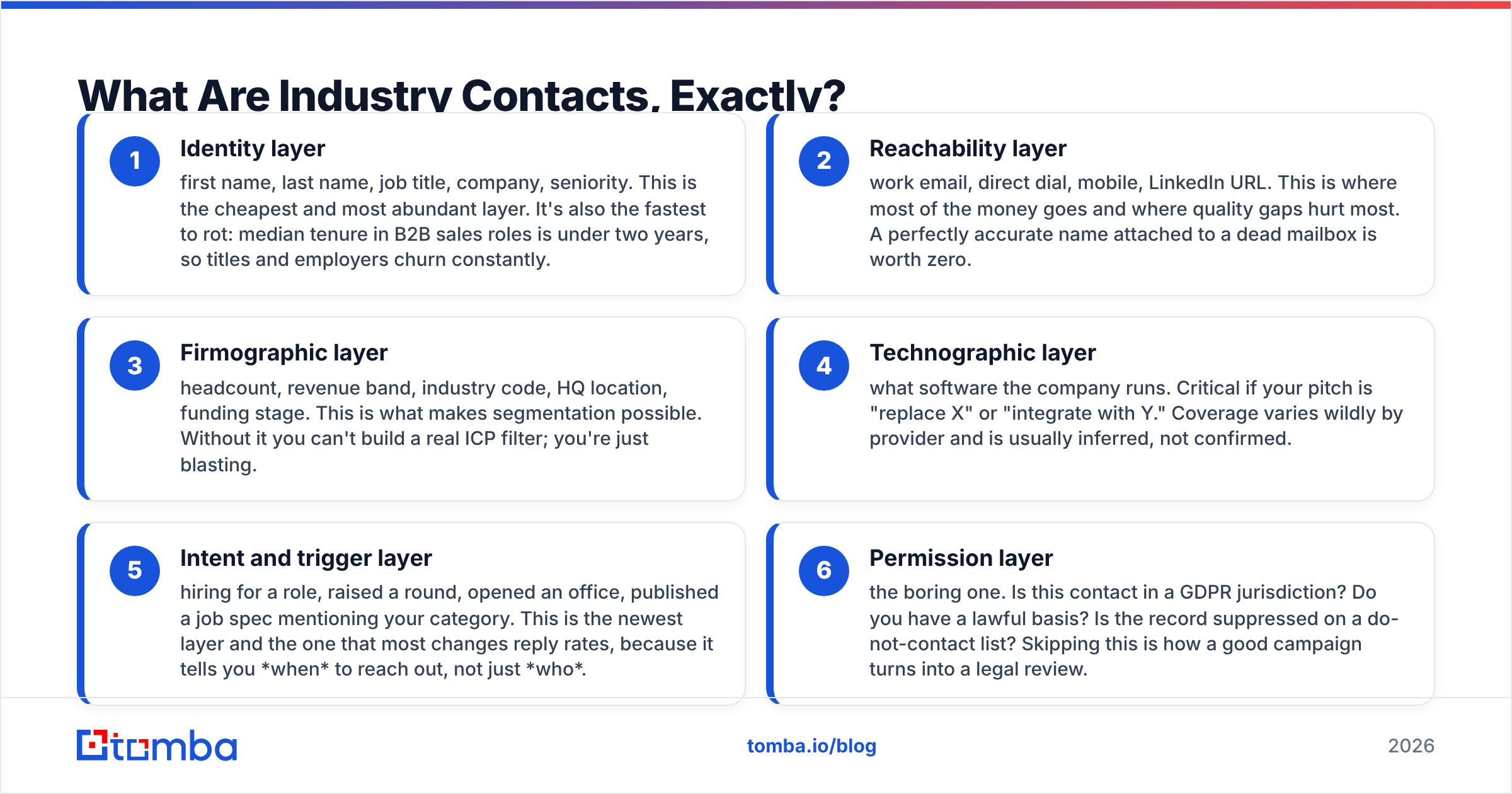
Industry contacts are the decision-makers, influencers, and gatekeepers inside a defined market segment — plus the data needed to reach and qualify them. The phrase gets used loosely for everything from a conference badge scan to a 400,000-row CSV, so break it into layers before you spend money on any of them:
- Identity layer — first name, last name, job title, company, seniority. This is the cheapest and most abundant layer. It's also the fastest to rot: median tenure in B2B sales roles is under two years, so titles and employers churn constantly.
- Reachability layer — work email, direct dial, mobile, LinkedIn URL. This is where most of the money goes and where quality gaps hurt most. A perfectly accurate name attached to a dead mailbox is worth zero.
- Firmographic layer — headcount, revenue band, industry code, HQ location, funding stage. This is what makes segmentation possible. Without it you can't build a real ICP filter; you're just blasting.
- Technographic layer — what software the company runs. Critical if your pitch is "replace X" or "integrate with Y." Coverage varies wildly by provider and is usually inferred, not confirmed.
- Intent and trigger layer — hiring for a role, raised a round, opened an office, published a job spec mentioning your category. This is the newest layer and the one that most changes reply rates, because it tells you when to reach out, not just who.
- Permission layer — the boring one. Is this contact in a GDPR jurisdiction? Do you have a lawful basis? Is the record suppressed on a do-not-contact list? Skipping this is how a good campaign turns into a legal review.
A "contact list" that only covers layers 1 and 2 is a phone book. It works exactly as well as a phone book does.

Should You Buy Industry Contacts or Build Them?#
Buy when you need breadth and speed. Build when you need precision inside a narrow vertical.
That's the whole heuristic, but the details matter. Buying means licensing records from a database vendor — you get volume immediately, and you inherit their refresh cadence, their coverage gaps, and their geographic biases. Building means starting from a target account list and resolving contacts per account with an email finder, a LinkedIn extraction step, and verification.
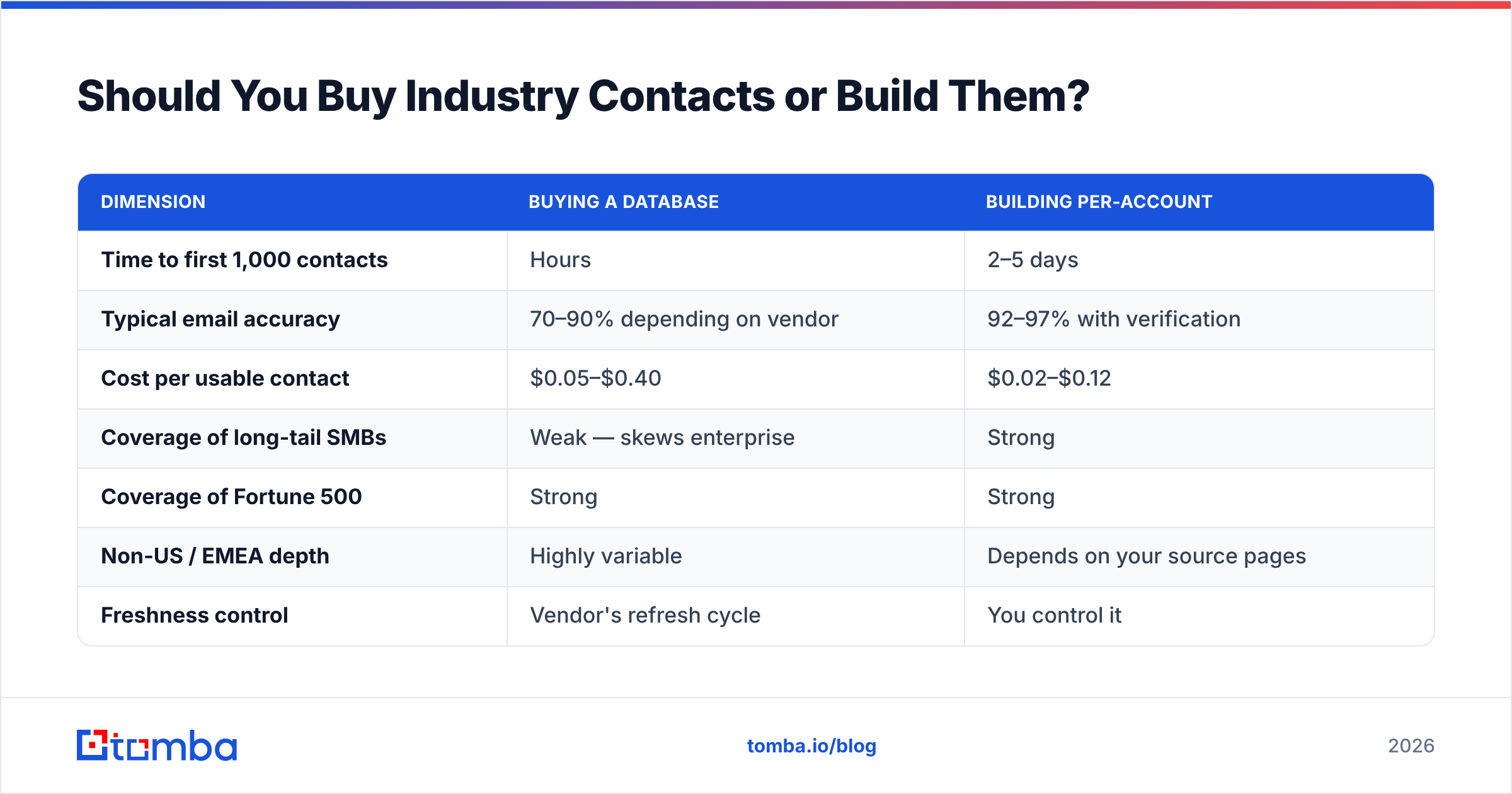
Here's the practical breakdown:
| Dimension | Buying a database | Building per-account |
|---|---|---|
| Time to first 1,000 contacts | Hours | 2–5 days |
| Typical email accuracy | 70–90% depending on vendor | 92–97% with verification |
| Cost per usable contact | $0.05–$0.40 | $0.02–$0.12 |
| Coverage of long-tail SMBs | Weak — skews enterprise | Strong |
| Coverage of Fortune 500 | Strong | Strong |
| Non-US / EMEA depth | Highly variable | Depends on your source pages |
| Freshness control | Vendor's refresh cycle | You control it |
| Best for | Broad TAM plays, ABM at scale | Narrow ICPs, under 5,000 accounts |
| Worst failure mode | Paying for records you never touch | Slow ramp, manual overhead |
The hybrid most competent teams land on: buy a broad base layer for account discovery and firmographics, then resolve and verify the actual contact emails yourself. You get the vendor's breadth without inheriting their stale mailbox data.
If you're on the buying side, BookYourData is worth a look for pay-as-you-go verified B2B lists with no subscription lock-in — a genuinely different commercial model from the annual-contract incumbents, and a reasonable option when your need is bursty rather than continuous. Compare it against the seat-based platforms on G2 before committing to any annual term.
How Fast Does Contact Data Actually Decay?#
Assume 2–2.5% of your list goes bad every month. That compounds.
The mechanics are unglamorous. People change jobs. Companies get acquired and migrate domains. IT consolidates from firstname.lastname@ to flastname@. Someone goes on parental leave and their alias gets deactivated. None of this generates a notification to your CRM.
The practical consequences:
- A 12-month-old list is roughly 25% dead. Not "slightly less accurate" — dead. Those addresses hard-bounce.
- Bounces are cumulative reputation damage. Mailbox providers weight them heavily. Google's Postmaster Tools guidance is explicit that sending to invalid addresses degrades domain reputation, and once reputation drops, even your good addresses start landing in spam.
- The damage isn't isolated to one campaign. A single bad blast can suppress inbox placement for weeks across every sequence running on that domain.
This is why email deliverability and list hygiene are the same conversation. You cannot separate them. Re-verify anything older than 60 days before it enters a sequence, and re-verify anything older than 30 days if the campaign is high-volume.
A reasonable hygiene cadence looks like this:
- Weekly — verify every new contact at the point of import, before it touches a sequence.
- Monthly — re-run any segment you're actively emailing through an email verifier.
- Quarterly — full-database sweep, plus a suppression-list reconciliation.
- On trigger — re-resolve contacts at any account that announced an acquisition, rebrand, or domain change.
What Does a Good Industry Contacts Workflow Look Like?#
Start from accounts, not contacts. This is the reversal that most teams get wrong.
If you start from a contact list, you're accepting someone else's definition of your market. If you start from an account list — companies that genuinely match your ICP — you control the segment, and contact resolution becomes a mechanical step you can measure.
Step 1: Define the account set. Industry code, headcount band, geography, and one qualifying signal (uses a competitor, hiring for a relevant role, recently funded). Aim for a list you could describe in one sentence to a stranger.
Step 2: Resolve the org chart. For each account, identify the 2–4 roles that matter: the economic buyer, the user-champion, and the blocker. Don't stop at one contact per company — multi-threading roughly doubles the odds of a deal reaching a decision.
Step 3: Find the addresses. Run each name+domain pair through a finder. A domain search pass first is often faster: it returns the company's dominant email pattern plus known addresses in one call, which lets you predict the rest with high confidence.
Step 4: Verify before you send. SMTP-level verification, catch-all detection, role-account flagging, disposable-domain filtering. Catch-all domains deserve special handling — they accept everything at the SMTP layer, so a naive verifier marks them "valid" and you find out the truth from your bounce report. A dedicated catch-all verifier closes that gap.
Step 5: Enrich for personalization. Job title alone is not personalization. Add the trigger: their recent funding round, a job posting, a product launch, a conference talk. Data enrichment at this stage is what separates a 2% reply rate from a 9% one.
Step 6: Suppress and log. Existing customers, open opportunities, unsubscribes, competitors, anyone a colleague contacted in the last 90 days. Then log every touch back to the CRM so the next rep doesn't repeat it.

Where Do You Actually Source Industry Contacts?#
There are five viable sources and each has a distinct failure mode.
Contact databases. Licensed, pre-built, sold by seat or by credit. Fast and broad. Failure mode: everyone in your category bought the same records, so your prospects have heard from nine competitors this month.
Email finders and pattern resolution. You supply name + company domain; the tool returns the verified address. Highest per-record accuracy when the underlying source data is good. Failure mode: you need the names first, which means a discovery step upstream.
LinkedIn and professional networks. Rich for titles and org structure, useless for direct email without a resolution layer. A LinkedIn finder bridges the gap. Failure mode: scraping at volume gets accounts restricted, so throughput is capped.
Industry associations, trade bodies, and event lists. Genuinely underrated. Member directories are usually current because members maintain their own entries. Failure mode: small volumes and inconsistent formatting.
Your own website traffic. The highest-intent source available and the one most teams ignore. If a company visits your pricing page three times, that's a stronger buying signal than any purchased intent score. Website visitor reveal turns that anonymous traffic into named accounts you can then resolve to contacts.
Rank these by cost per reply, not cost per record, and the ordering usually inverts: your own traffic and association directories beat bulk databases even though they cost more per row.
How Do Contact Data Tools Compare on Price?#
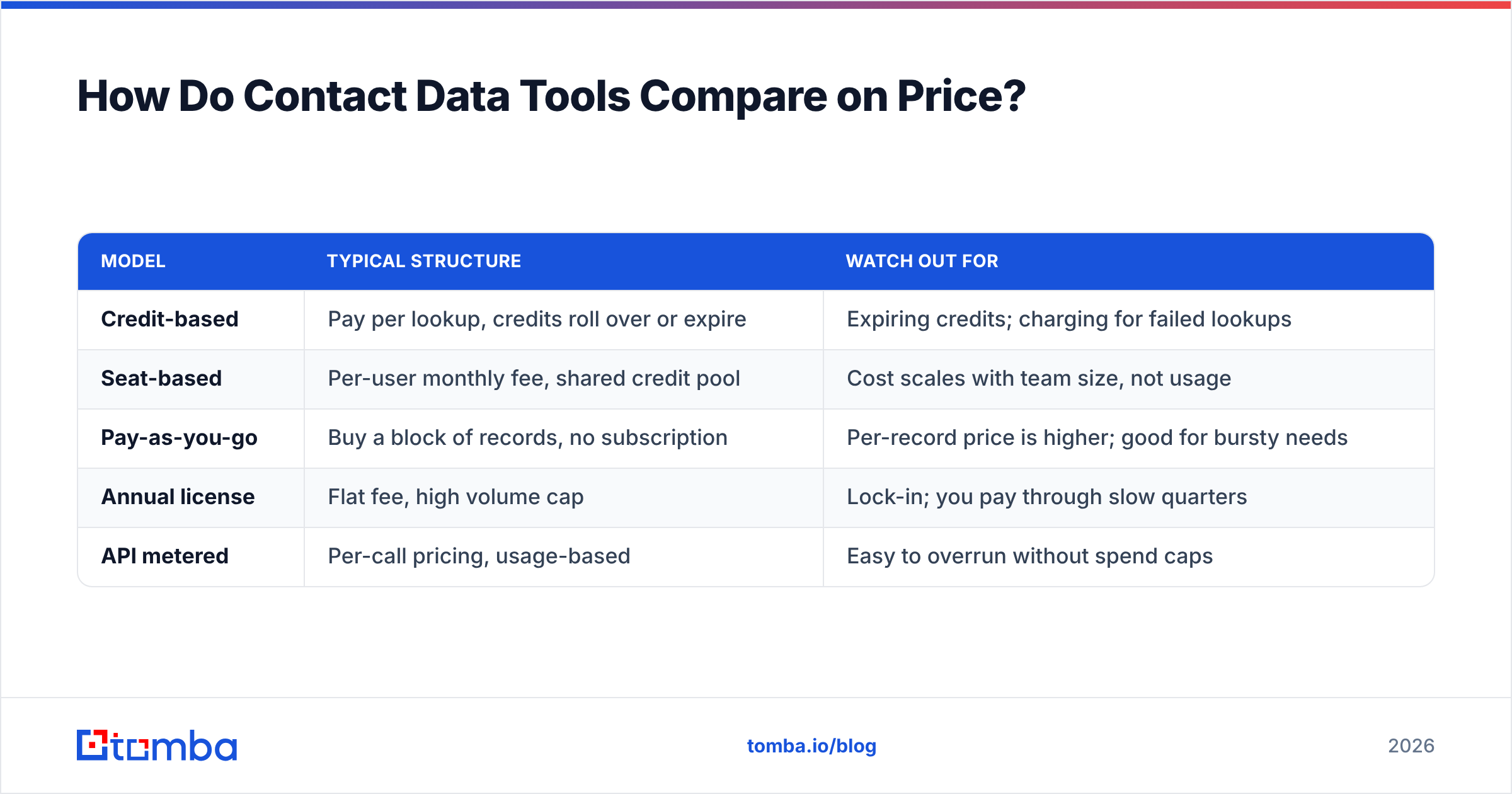
Pricing models differ enough that headline numbers mislead. Some vendors charge per credit, some per seat, some per export, and a few charge again when you re-verify a record you already bought.
| Model | Typical structure | Watch out for |
|---|---|---|
| Credit-based | Pay per lookup, credits roll over or expire | Expiring credits; charging for failed lookups |
| Seat-based | Per-user monthly fee, shared credit pool | Cost scales with team size, not usage |
| Pay-as-you-go | Buy a block of records, no subscription | Per-record price is higher; good for bursty needs |
| Annual license | Flat fee, high volume cap | Lock-in; you pay through slow quarters |
| API metered | Per-call pricing, usage-based | Easy to overrun without spend caps |
Tomba runs a credit model with a free tier at 25 searches per month, Starter at $49/mo, Growth at $99/mo, and Pro at $249/mo, with Enterprise custom — full details on the Tomba pricing page. Failed lookups don't consume credits, which matters more than it sounds: on hard-to-find domains, a vendor that charges for misses can double your effective cost per usable record.
The evaluation question to ask any vendor, in this order:
- Do failed searches consume credits? If yes, adjust your effective cost upward by your expected miss rate.
- Is verification bundled or metered separately? Some vendors sell you a record then charge again to confirm it's real.
- What's the refresh cadence on the underlying data? "Continuously updated" is marketing. Ask for the actual re-crawl interval.
- Can you re-verify existing records without re-purchasing? This determines your ongoing hygiene cost.
- What's the API rate limit and is it separate from the UI quota? Relevant the moment you automate.
- What's the documented accuracy methodology? A vendor that can't explain how they measure accuracy is quoting a number they made up. Tomba documents its data sources publicly — that's the baseline of transparency to expect.
How Do You Keep Industry Contacts Fresh Without Manual Work?#
Automate the refresh, or it won't happen. Nobody voluntarily re-verifies 40,000 records on a Friday.
Three practical patterns:
Verify at the boundary. Every contact entering your CRM gets verified at import, not before a campaign. Wire this through a HubSpot integration or Salesforce integration so it happens without anyone remembering to trigger it.
Batch re-verify on a schedule. A monthly job through a bulk email finder run costs a fraction of what one deliverability incident costs. Set it and forget it.
Re-resolve on company events. Acquisitions and rebrands invalidate entire domains at once. When a target account announces one, re-run domain search for that company rather than waiting for bounces to tell you.
If your data operations live in code, the Tomba API handles all three patterns directly, and there's a CLI for scripted batch jobs. Teams that run enrichment out of spreadsheets can use the Google Sheets add-on instead — same logic, less engineering.
What Metrics Tell You a Contact List Is Working?#
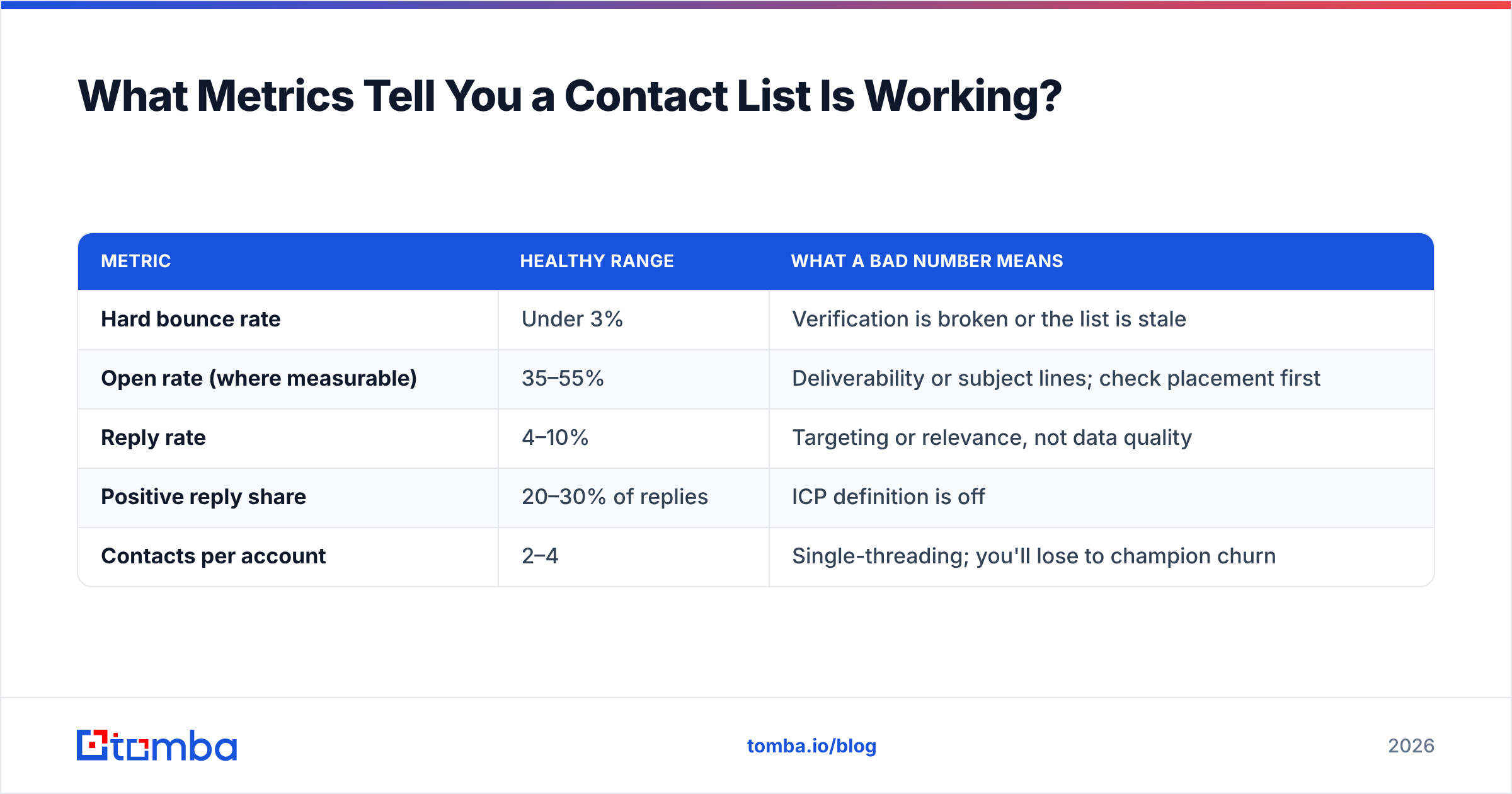
Track four numbers. Ignore the rest until these are healthy.
| Metric | Healthy range | What a bad number means |
|---|---|---|
| Hard bounce rate | Under 3% | Verification is broken or the list is stale |
| Open rate (where measurable) | 35–55% | Deliverability or subject lines; check placement first |
| Reply rate | 4–10% | Targeting or relevance, not data quality |
| Positive reply share | 20–30% of replies | ICP definition is off |
| Contacts per account | 2–4 | Single-threading; you'll lose to champion churn |
Bounce rate is a data problem. Reply rate is a targeting and messaging problem. Confusing the two leads teams to buy more data when they should be narrowing their ICP, or to rewrite copy when their real issue is that a quarter of their addresses don't exist. Diagnose in that order: fix bounces first, because until placement is clean you can't trust any downstream number.
For deeper benchmarks on what "normal" looks like across B2B outbound, HubSpot's sales research publishes updated figures each year, and it's worth calibrating your targets against a source that isn't trying to sell you a list.
What's the Fastest Way to Start?#
Pick 200 accounts you genuinely want as customers. Not 20,000 — 200. Resolve three contacts at each, verify every address, and add one specific trigger per account before you write a word of copy. That's 600 contacts, which is a week of focused work and enough volume to produce statistically meaningful results.
If that first cohort converts, scale the same process. If it doesn't, you've learned something for the cost of a week instead of the cost of an annual database contract.
Ready to build the list instead of renting it? Tomba's Email Finder resolves names and domains into verified work emails, with catch-all detection, bulk processing, and an API for teams that want it automated. Start free with 25 searches a month, and only pay for what you actually find — failed lookups don't cost credits.
Related guides#
// get started
Find, verify and enrich your first contacts today
Start on the free plan with 25 searches a month, then scale when your team is ready.
Free plan · No credit card required · GDPR & CCPA
// about the author