Influencersclub vs Lusha: Which Contact Database Wins in 2026?
One tool sells creator emails, the other sells B2B decision-maker contacts. Here's how Influencersclub and Lusha actually differ on coverage, accuracy, and price — and which one fits the list you're trying to build.
TL;DR — Influencersclub vs Lusha
- These two tools are not real rivals. Influencers Club is a creator contact database for Instagram, TikTok, and YouTube. Lusha is a B2B contact database for sales teams chasing job titles.
- Pick Influencers Club if your buyer is a creator, a micro-influencer, or a UGC partner. You filter by follower count, engagement rate, and audience make-up.
- Pick Lusha if your buyer has a job title, a work domain, and a LinkedIn page. The Chrome add-on and the direct dials are the stronger fit there.
- Pick neither if you just need verified work emails at volume. That is a finder-and-verifier job, and a per-seat suite is a costly way to do it.
- Watch the credit model. Both tools meter reveals. Both count a bad record against you unless you check it before you send.
Influencersclub vs Lusha: what are these two tools?#
The Influencersclub vs Lusha question splits in two. Each tool owns a different half of "who do I email."
Influencers Club is a creator-economy data platform. It indexes social profiles, mostly Instagram, TikTok, and YouTube. For each profile it returns contact details: an email, and sometimes a phone or a manager. It also returns audience data. That covers follower count, engagement rate, audience country, age and gender skew, brand affinity, and bio keywords. The buyer here is an influencer marketing manager, an agency lead, or a DTC brand building a UGC roster. A typical search: "US skincare creators, 10k–50k followers, engagement above 3%, audience 70%+ female."
Lusha is a classic B2B sales data tool. It indexes people by company and job title. It returns work emails and direct-dial numbers. Most teams live in the Chrome add-on. It sits on top of LinkedIn and Sales Navigator, and reveals contacts on the page you already have open. Lusha adds intent signals, job-change alerts, and CRM sync to Salesforce or HubSpot. A typical search: "VP of Marketing at SaaS firms, 200–1,000 staff, US, hiring for demand gen."
Asking which one is "better" is like asking if a hammer beats a wrench. The useful question is narrower. Which dataset matches your buyer? And if neither fits, what do you use instead?
Influencersclub vs Lusha: a feature-by-feature comparison#
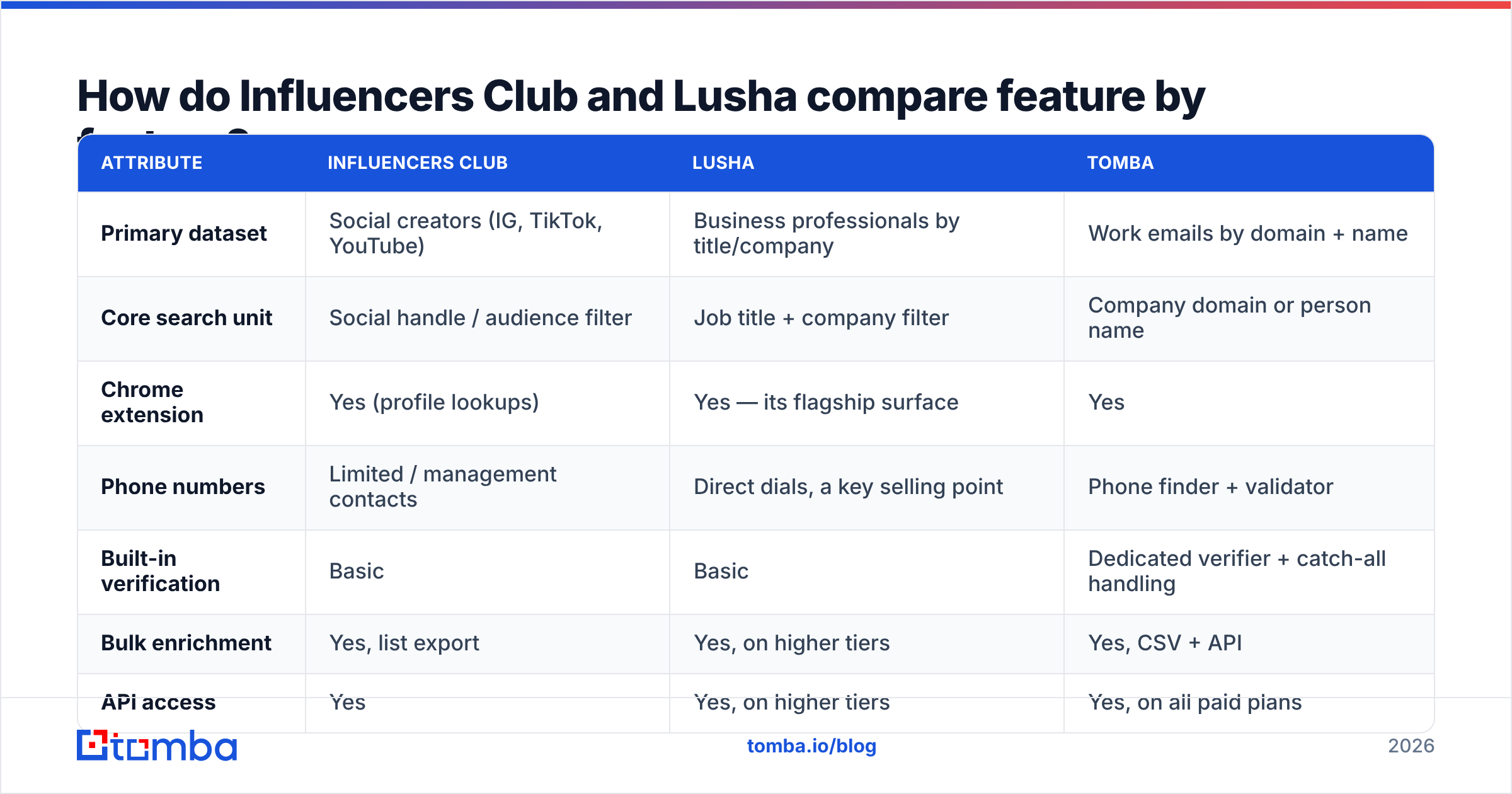
Here is the side-by-side on the things that change your daily workflow.
| Attribute | Influencers Club | Lusha | Tomba |
|---|---|---|---|
| Primary dataset | Social creators (IG, TikTok, YouTube) | Business professionals by title/company | Work emails by domain + name |
| Core search unit | Social handle / audience filter | Job title + company filter | Company domain or person name |
| Chrome extension | Yes (profile lookups) | Yes — its flagship surface | Yes |
| Phone numbers | Limited / management contacts | Direct dials, a key selling point | Phone finder + validator |
| Built-in verification | Basic | Basic | Dedicated verifier + catch-all handling |
| Bulk enrichment | Yes, list export | Yes, on higher tiers | Yes, CSV + API |
| API access | Yes | Yes, on higher tiers | Yes, on all paid plans |
| Seat model | Plan-based | Per user, per month | Plan-based credits, seats included |
| Best-fit buyer | Influencer/UGC marketer | SDR, AE, RevOps | Growth, agency, dev teams |
Two things jump out of that grid.
First, Lusha is sold per seat. That is normal for sales software. It hurts small teams who need volume, not head count. If four people need the odd lookup, you buy four seats.
Second, neither tool treats email checking as a core feature. Both hand you a contact and move on. That is fine at low volume on an old domain. It gets costly when you send thousands of cold emails a month from a young one. Bounces are the fastest way to burn sender reputation.
Which one has better data accuracy?#
Neither vendor's number means much until you define "accurate" for your own list.
For Influencers Club, the question is "is this the email the creator reads?" Creator emails come from public bios, link-in-bio pages, YouTube about tabs, and business contact buttons. When a creator posts hello@creatorname.com, that address is real. But it may go to a manager, an agency inbox, or a folder they open twice a month. Delivery will look great. Reply rate is what tells you the truth.
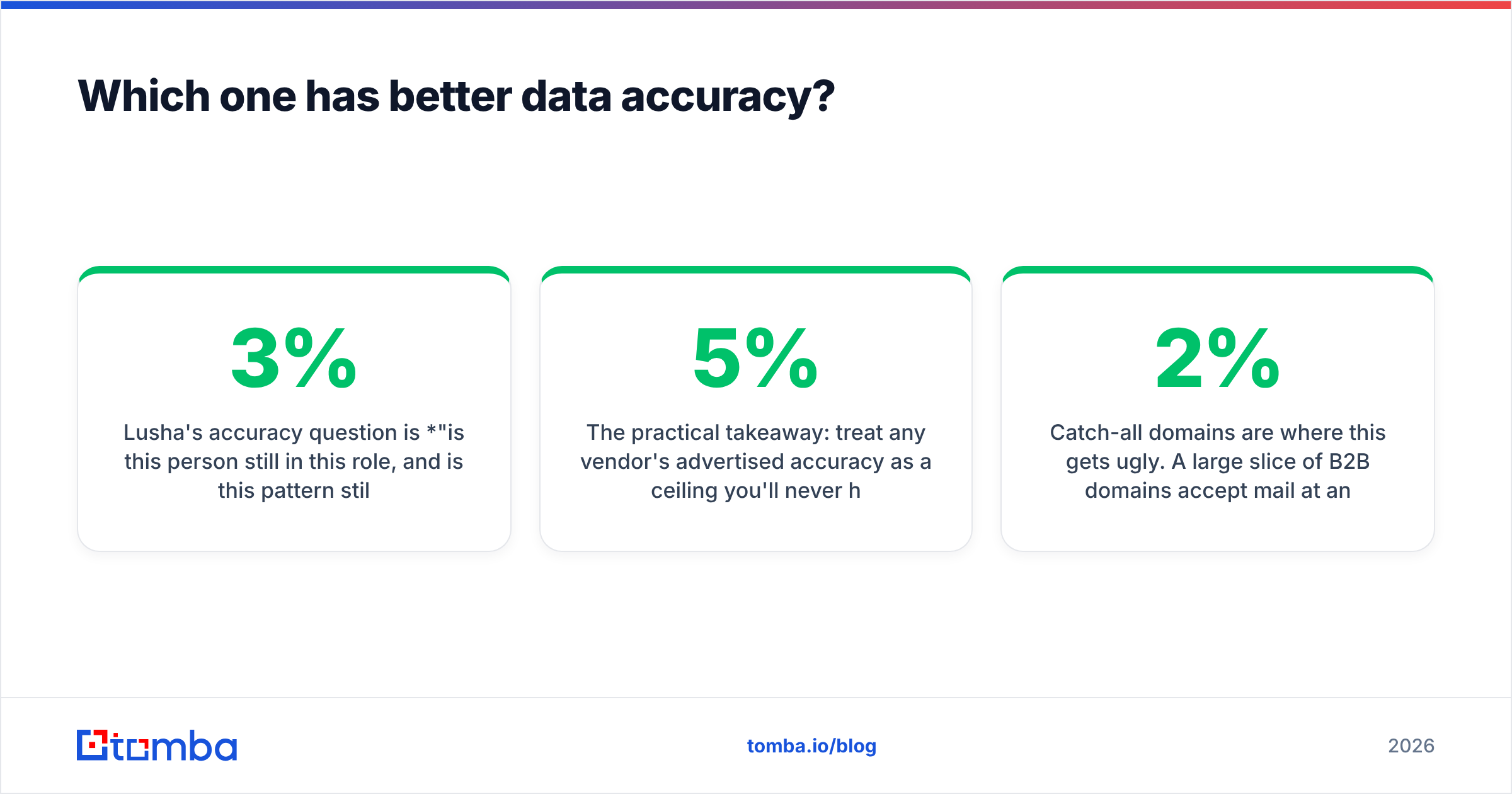
For Lusha, the question is "is this person still in that job?" B2B contact data goes stale by roughly 2–3% a month. People move jobs, teams get cut, and domains change after a sale. Lusha fights back with job-change alerts, and those do help. Still, every vendor here ships records that were right last quarter and wrong today. Read the G2 reviews for Lusha. You will see the same split you see for every contact vendor. Strong on US mid-market tech, thinner on EMEA, SMB, and non-tech.

The takeaway: treat any stated accuracy rate as a ceiling you will never hit. Run a 200-contact sample through an email verifier before you sign a yearly plan. If more than 5% come back bad, your real cost per usable contact is far above the sticker price.
Catch-all domains make this worse. Plenty of B2B domains accept mail at any address. A basic checker marks them "valid" and the bounce lands three days later. A catch-all verifier that scores confidence is the gap between a 2% bounce rate and a 12% one.
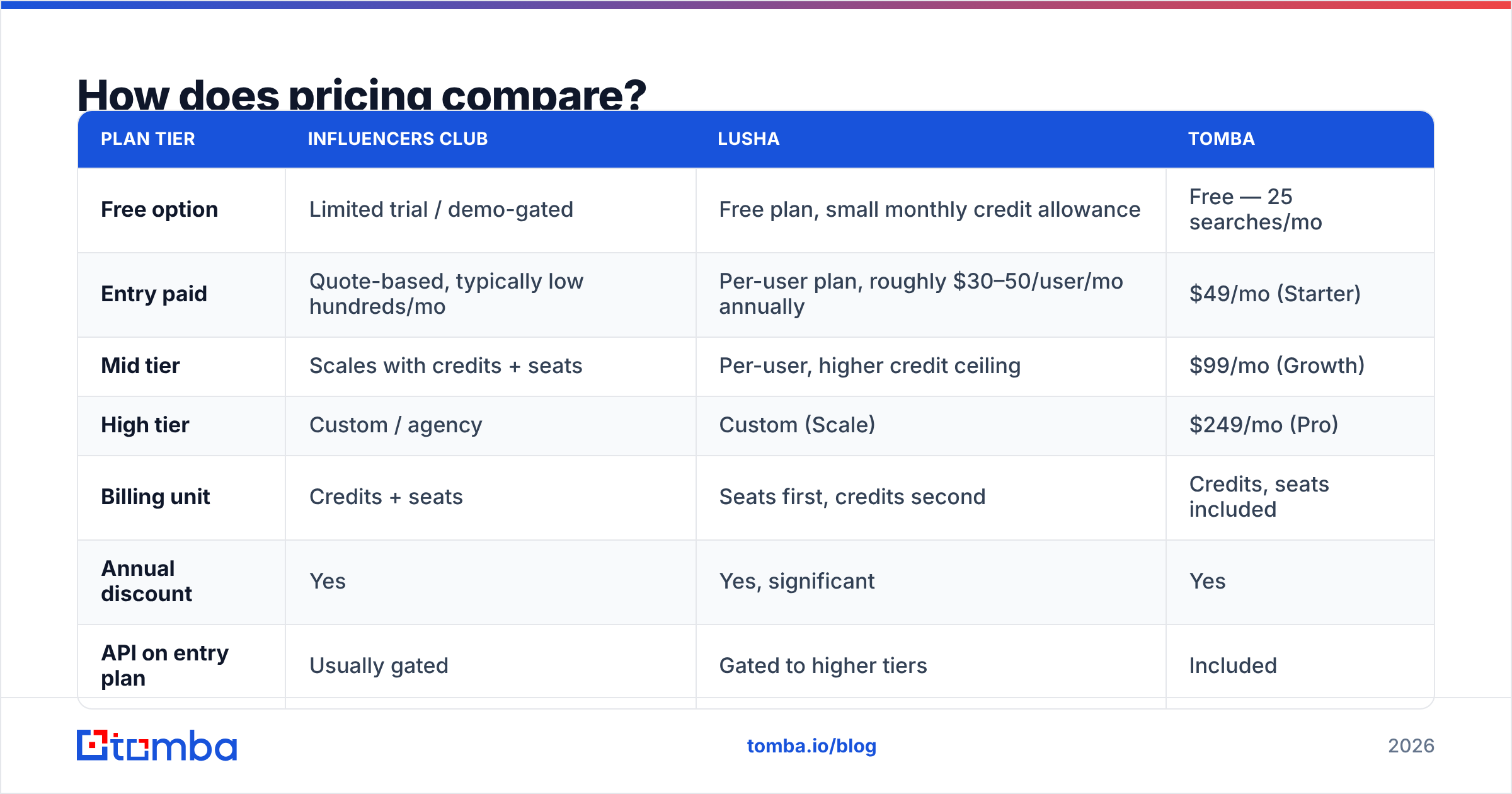
How does pricing compare?#
Both vendors move their prices. Treat these as the shape of the deal, not a quote.
| Plan tier | Influencers Club | Lusha | Tomba |
|---|---|---|---|
| Free option | Limited trial / demo-gated | Free plan, small monthly credit allowance | Free — 25 searches/mo |
| Entry paid | Quote-based, typically low hundreds/mo | Per-user plan, roughly $30–50/user/mo annually | $49/mo (Starter) |
| Mid tier | Scales with credits + seats | Per-user, higher credit ceiling | $99/mo (Growth) |
| High tier | Custom / agency | Custom (Scale) | $249/mo (Pro) |
| Billing unit | Credits + seats | Seats first, credits second | Credits, seats included |
| Annual discount | Yes | Yes, significant | Yes |
| API on entry plan | Usually gated | Gated to higher tiers | Included |
The structure matters more than the headline number:
- Influencers Club sells a niche you cannot get elsewhere. Creator emails at scale are hard to gather yourself, and that scarcity is priced in. If creator outreach is your business, the spend makes sense.
- Lusha sells seats. The math works when every seat is a rep with a quota. It breaks when two people do all the prospecting and six just need to look.
- Rollover is where budgets leak. Ask if unused credits expire each month. Most per-seat tools reset them, so you pay for what you never used.
- Email checking is a separate line item. Budget for it, or budget for the bounces.
- API access is the hidden gate. Confirm which plan unlocks it before you sign. That is the most common upgrade trap here.
Compare that with flat Tomba pricing. Free at 25 searches, $49/mo Starter, $99/mo Growth, $249/mo Pro, custom Enterprise. API access on paid plans, and no per-seat multiplier.

Is Influencersclub better than Lusha for cold outreach?#
For classic B2B cold outreach, the Influencersclub vs Lusha answer is easy. Lusha wins. That is only because Influencers Club never tried to play there.
Lusha gives an outbound team three things: title-level filters, a direct dial for the call, and CRM sync so the record does not die in a sheet. If your sequence is email, LinkedIn, call, email, one record covers all of it.
Influencers Club gives you what Lusha cannot: audience-level fit. You are not just finding a person. You are finding a person whose followers match your buyer. For a DTC brand, "creator with 8k engaged followers in the right country" beats any job title. Send that same brand a list of "Head of Marketing" contacts and you have aimed worse, not better.
The failure mode is using either one outside its lane:
- Use Influencers Club to reach B2B buyers and you get personal Gmail addresses and creator inboxes.
- Use Lusha to reach creators and you get almost nothing. Most creators do not work at an indexed company.
What if your prospects are neither creators nor enterprise buyers?#
Most teams land here. This is where both tools are the wrong buy.
You have 3,000 companies from a scrape, an event list, or a trade directory. You know the domains. You know some of the names. You need verified work emails, and you need them fast. You do not want to pay per seat. You will never open an audience dataset.
That is a finder-and-verifier job:
- Domain search — give it a company domain, get back the people and the email pattern. Best move when you have companies but no names.
- Email finder — give it a first name, last name, and domain, get a scored address. The workhorse.
- Bulk email finder — upload a CSV, process the list, download it filled in. No per-seat math.
- Author finder — paste an article URL, get the writer's email. Great for content, PR, and link building. On a budget it covers a real slice of what Influencers Club sells.
- Email verifier — run every list through it before it hits a sequencer. Non-negotiable.
You can skip the UI, too. The Tomba API is on all paid plans. Enrichment then runs inside your own workflow: on form submit, on a new CRM record, or as a nightly job over stale contacts. No manual export that someone forgets to run.
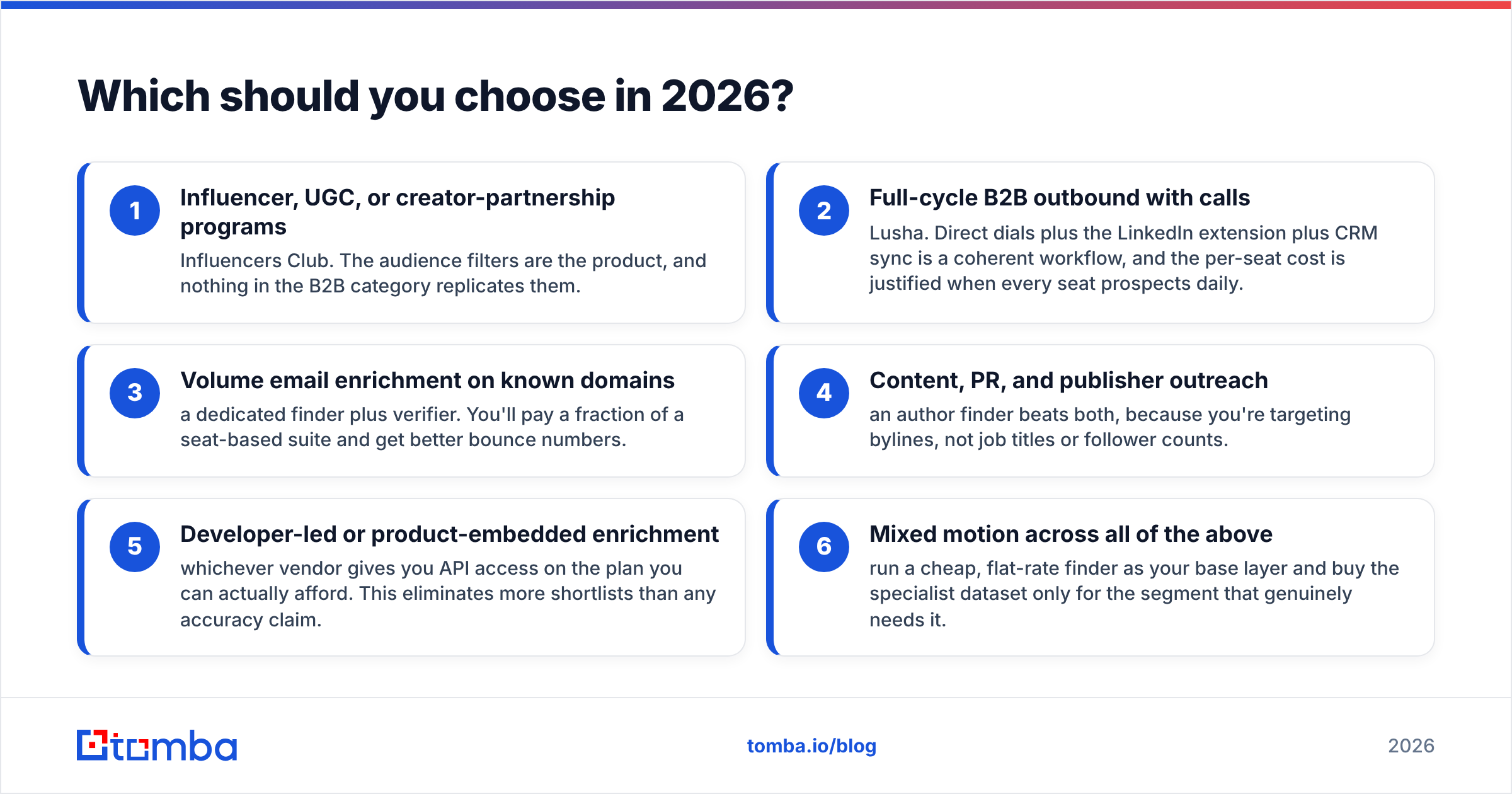
Influencersclub vs Lusha: which should you choose in 2026?#
Match the tool to the shape of your list, not to the feature grid:
- Creator, UGC, or influencer programs — Influencers Club. The audience filters are the product, and nothing in B2B matches them.
- Full-cycle B2B outbound with calls — Lusha. Direct dials, the LinkedIn add-on, and CRM sync fit together. The seat cost is fair when every seat prospects daily.
- Bulk email lookups on known domains — a finder plus a verifier. You pay a fraction of a seat suite and you bounce less.
- Content, PR, and publisher outreach — an author finder beats both. You target bylines, not job titles.
- Product or dev-led enrichment — whoever gives you API access on a plan you can afford.
- A mix of the above — run a cheap flat-rate finder as your base layer. Buy the niche dataset only for the segment that needs it.
One more rule, said plainly: do not sign a year-long deal off a demo. Every vendor demos on its best segment. Take 200 real rows from your own target list. Run them through free tiers side by side. Then count how many come back verified and deliverable. That test tells you more than any comparison post, this one included.
Where does Tomba fit in this comparison?#
Tomba is not an influencer database or a per-seat sales suite. It is the layer under both. Find the email, check the email, enrich the record. Do it in a UI, a sheet add-on, a CLI, or an API.
If your problem is "I have companies and names but no addresses," start with the Tomba Email Finder. The free tier gives you 25 searches a month. Test accuracy on your own list before you spend a cent. Starter is $49/mo with no seat multiplier when you scale. Either way, run your Influencersclub vs Lusha exports through the verifier first. Whichever vendor you pick, only checked addresses should reach your sequencer.
Related guides#
// get started
Find, verify and enrich your first contacts today
Start on the free plan with 25 searches a month, then scale when your team is ready.
Free plan · No credit card required · GDPR & CCPA
// about the author