Influno vs Kipplo (2026): Which Outreach Tool Wins?
Influno and Kipplo both promise to run your cold outreach end to end. Here's how they actually differ on sending infrastructure, deliverability controls, pricing model, and the data gap neither one fills.
TL;DR
- Influno vs Kipplo is a close match. Both sell all-in-one cold email: multi-inbox sending, sequences, warmup, and one shared reply inbox. Both aim at small sales teams and agencies, not enterprise.
- Influno leans toward sending setup: inbox rotation, warmup, and deliverability guardrails. Kipplo leans toward campaign workflow and pipeline visibility. Both ship fast, so check their live pages before you buy.
- Both charge per workspace or per mailbox, not per seat. That is far cheaper for a team of two to five. It is far less predictable once you add mailboxes.
- Neither tool is a contact database. You bring the verified emails. That gap causes most "the tool doesn't work" complaints.
- Decision rule: pick on sending setup and support speed, not feature lists. Then spend the saved budget on better data.
What are Influno and Kipplo?#
Both are cold email platforms built for today's inbox rules. Google and Microsoft tightened their bulk-sender limits after 2023. Blasting from one mailbox stopped working.
Influno (influno.com) sells itself as an all-in-one outbound platform. You connect several sending mailboxes, warm them up, build multi-step sequences, and read replies in one inbox. The pitch: one subscription replaces three tools — a sequencer, a warmup app, and an inbox manager.
Kipplo (kipplo.com) covers the same ground. You get mailbox connection, a sequence builder, auto follow-ups, reply detection, and campaign stats. It leans a little more toward campaign order and what happens after a reply lands.
Here is the honest framing. Both are younger and smaller than Instantly, Smartlead, or Lemlist. That is not a knock. Small vendors ship faster and price lower. But it changes how you should judge them.
First, their feature lists change monthly. Anything you read in a comparison post, this one included, needs a five-minute check against the vendor's own pricing page. Second, review counts on G2 are thin for both. You cannot lean on average scores the way you can with a market leader. You will judge on your own trial, not on the crowd.

Influno vs Kipplo: how do they compare head-to-head?#
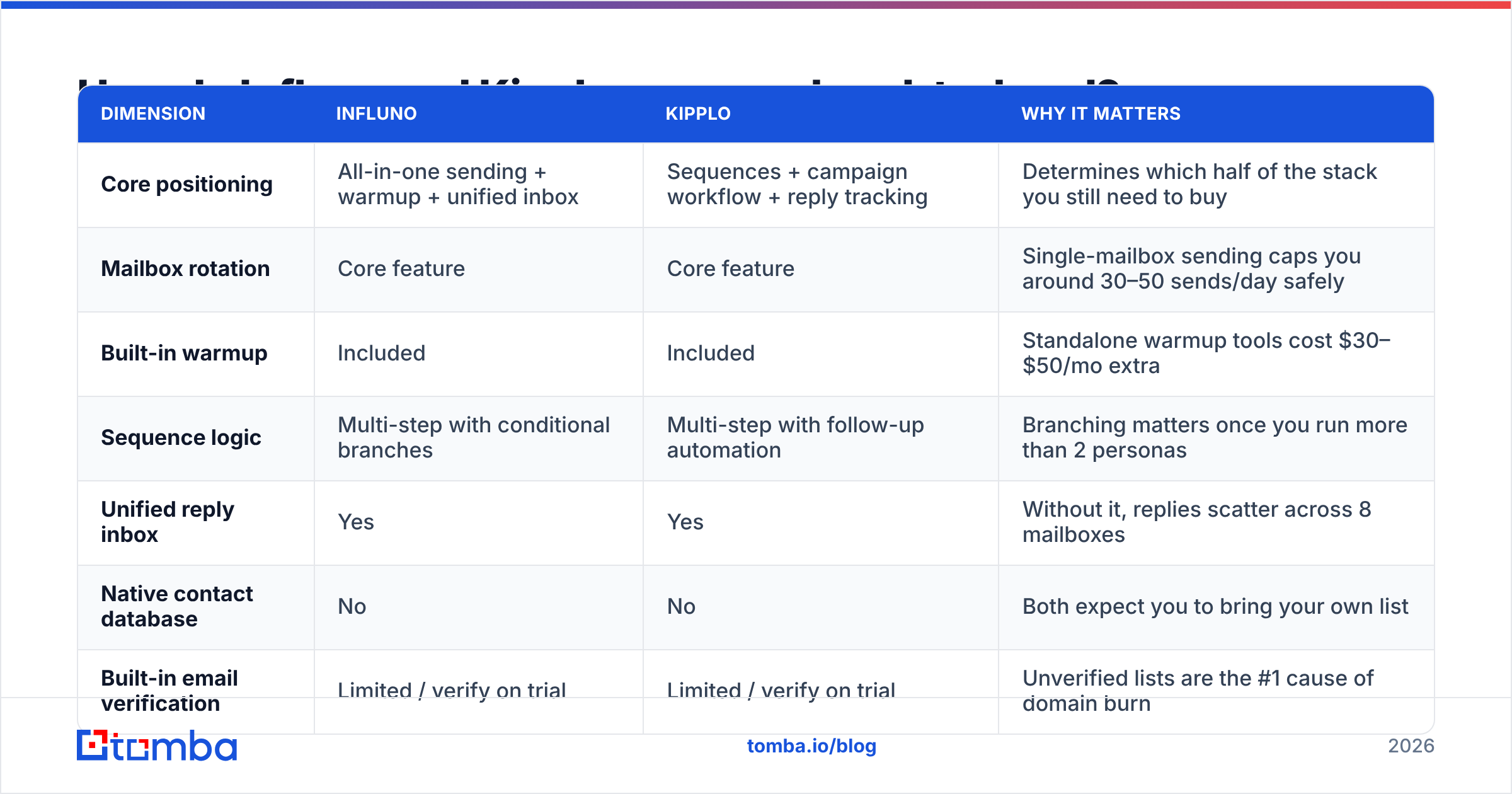
The table below maps the things that actually change outcomes in cold email. Treat each row as a checklist item for your trial. Both vendors ship fast, and features here tend to converge.
| Dimension | Influno | Kipplo | Why it matters |
|---|---|---|---|
| Core positioning | All-in-one sending + warmup + unified inbox | Sequences + campaign workflow + reply tracking | Determines which half of the stack you still need to buy |
| Mailbox rotation | Core feature | Core feature | Single-mailbox sending caps you around 30–50 sends/day safely |
| Built-in warmup | Included | Included | Standalone warmup tools cost $30–$50/mo extra |
| Sequence logic | Multi-step with conditional branches | Multi-step with follow-up automation | Branching matters once you run more than 2 personas |
| Unified reply inbox | Yes | Yes | Without it, replies scatter across 8 mailboxes |
| Native contact database | No | No | Both expect you to bring your own list |
| Built-in email verification | Limited / verify on trial | Limited / verify on trial | Unverified lists are the #1 cause of domain burn |
| Pricing model | Workspace / mailbox-based | Workspace / mailbox-based | Cheaper than per-seat at small scale, scales by mailbox count |
| Best fit | Agencies running many client domains | Small in-house sales teams | Wrong fit shows up as unused seats or blown limits |
Notice the pattern. The rows where they differ are pitch rows. The rows where they match are feature rows. That is normal at this tier. The real gaps sit outside the grid: sending setup, support response time, and what your bill does when you double the mailbox count.
What does each tool actually cost?#
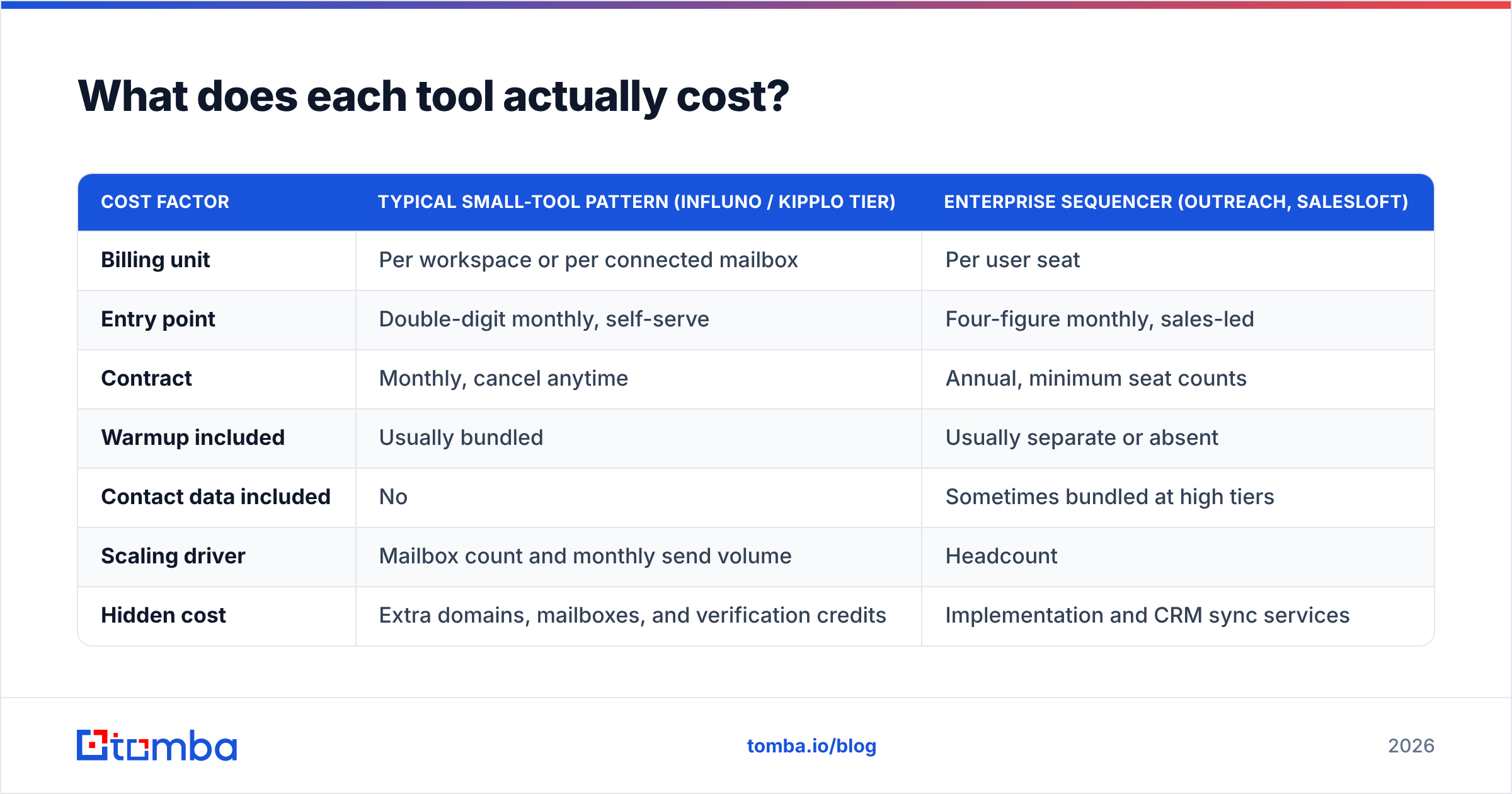
Both vendors publish plans on their own sites. Both change them often, so exact dollar figures in a blog post age badly. What you can trust is the shape of the pricing. It holds across the category, and it drives your real annual spend.
| Cost factor | Typical small-tool pattern (Influno / Kipplo tier) | Enterprise sequencer (Outreach, Salesloft) |
|---|---|---|
| Billing unit | Per workspace or per connected mailbox | Per user seat |
| Entry point | Double-digit monthly, self-serve | Four-figure monthly, sales-led |
| Contract | Monthly, cancel anytime | Annual, minimum seat counts |
| Warmup included | Usually bundled | Usually separate or absent |
| Contact data included | No | Sometimes bundled at high tiers |
| Scaling driver | Mailbox count and monthly send volume | Headcount |
| Hidden cost | Extra domains, mailboxes, and verification credits | Implementation and CRM sync services |
Run your own math before you commit. Five people sending from four mailboxes each need 20 mailboxes. On a mailbox-metered plan, that bill looks nothing like the headline price. A per-seat tool charges for five seats no matter how many mailboxes you run. Neither model is cheaper by default. It comes down to your mailbox-to-human ratio. An agency with 10 client domains usually wins on per-seat. A 15-rep team with one mailbox each usually wins on mailbox-metered.
One line item people forget: domains. Twenty mailboxes means five to seven extra sending domains, at roughly $10–15 a year each. Every mailbox also needs a Google Workspace or Microsoft 365 license. That license bill often beats the outreach tool itself.
Which one is better for deliverability?#
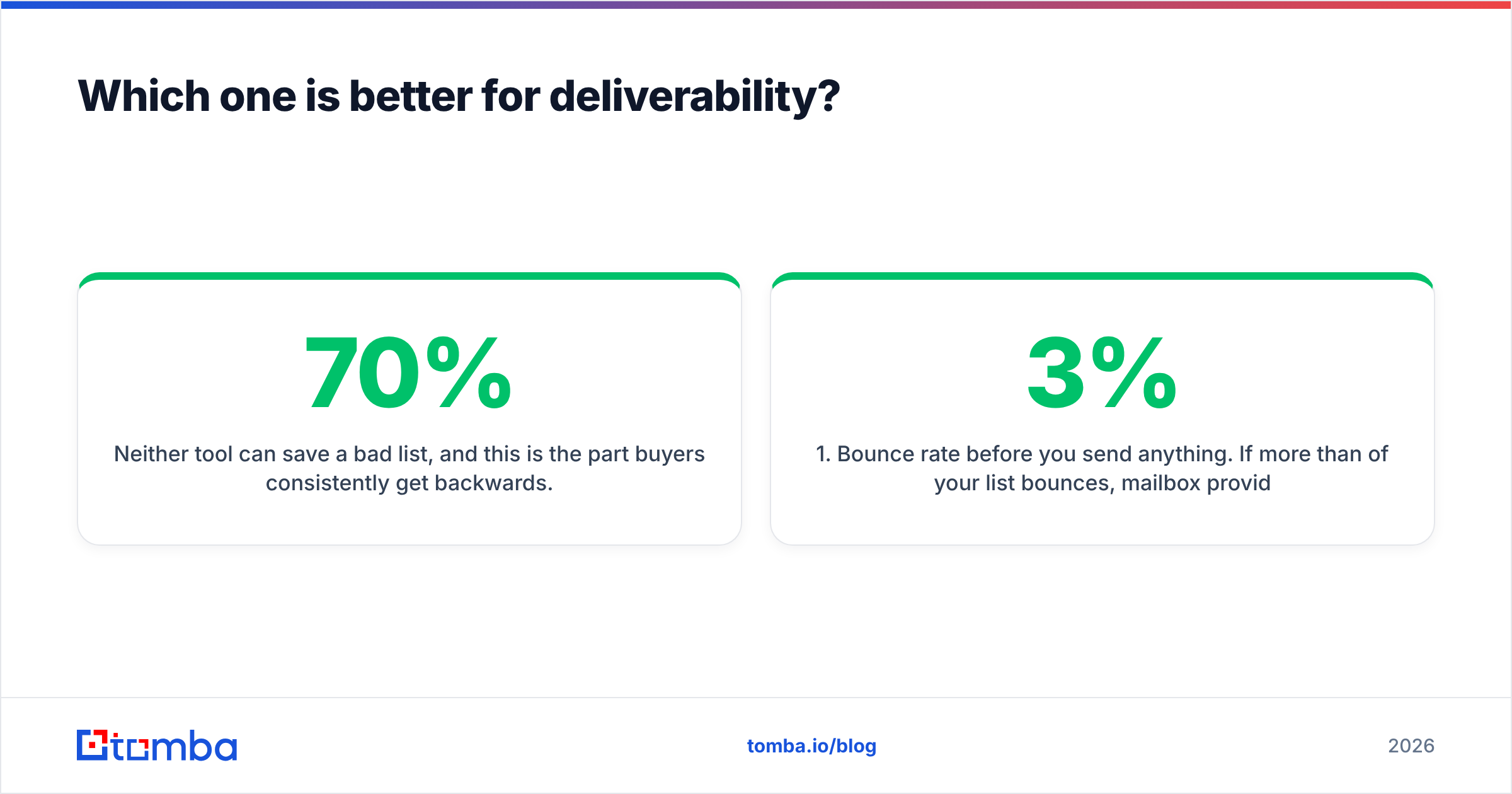
Neither tool can save a bad list. Buyers get this part backwards. Deliverability is roughly 70% inputs and 30% tooling. Influno and Kipplo both handle the tooling side well. Neither one controls your inputs.
Check the deliverability layer in this order:
- Bounce rate, checked before you send. If more than 3% of your list bounces, mailbox providers filter you no matter which platform sent the mail. That is an input problem. Fix it with an email verifier.
- Sending volume ramp. Look for per-mailbox daily caps, randomized send intervals, and a warmup schedule you can tune. A tool that lets a two-week-old mailbox send 200 a day is not protecting you.
- Domain separation. Never send cold outreach from your primary domain. Check that the tool can run several secondary domains in one workspace.
- Authentication. SPF, DKIM, and DMARC must be green before campaign one. Check yours with an SPF checker, not a dashboard checkmark.
- Reply rate, not open rate. Privacy proxies inflate open numbers, and the tracking pixel can trip filters. Judge on replies. Google's bulk sender guidelines name what triggers filtering.
Both tools handle points 2 through 4 well. Point 1 has the biggest effect, and it sits outside both products.
Does either tool solve the data problem?#
No. That is the most important line in this comparison.
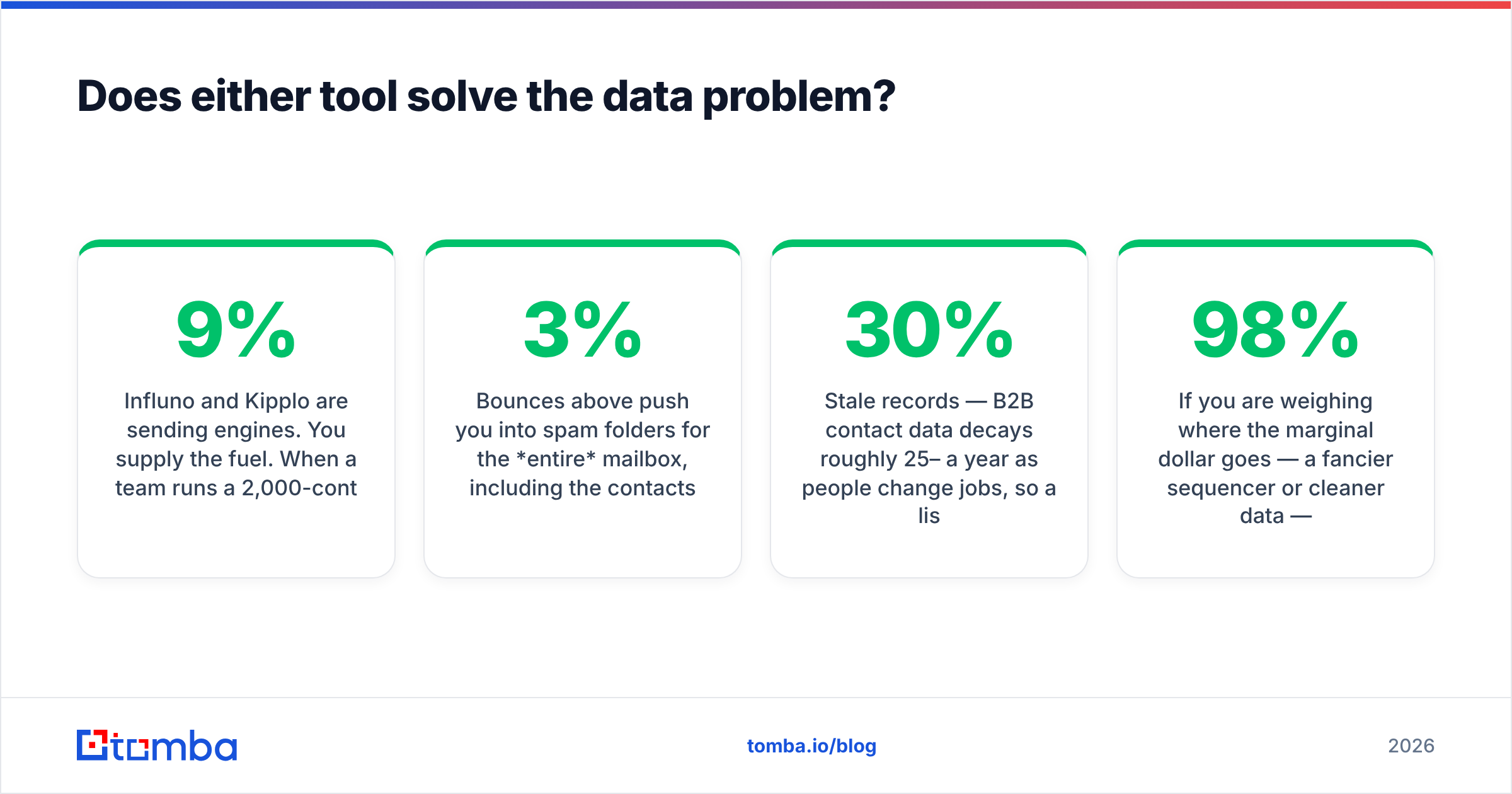
Influno and Kipplo are sending engines. You supply the fuel. A team runs a 2,000-contact campaign, gets a 9% bounce rate and a 0.4% reply rate, and blames the platform. They churn and move to the other one. The same list gives the same result.
What a scraped or bought list costs you:
- Bounces above 3% push the whole mailbox into spam folders, including the contacts whose addresses were fine.
- Catch-all domains accept everything and deliver nothing. Your dashboard shows a clean send and your pipeline shows nothing. A catch-all verifier is the only way to tell real mailboxes from black holes.
- Role addresses (info@, sales@, support@) pad your list size and drag down reply rate, because nobody owns them.
- Stale records. B2B contact data decays 25–30% a year as people change jobs. A list built 18 months ago is closer to half dead than fresh.
The fix is boring. Build the list from a live source instead of a static file. Use domain search to pull current contacts at a target company. Resolve named people with an email finder. Then verify the whole set before it touches Influno or Kipplo. For batch work, a bulk email finder clears a full CSV in one pass.
So where should the next dollar go: a fancier sequencer or cleaner data? Data wins every time. A plain sequencer with a 98% deliverable list beats a brilliant one with a 78% list, and it is not close.
Who should pick Influno?#
Choose Influno if your setup looks like this:
- You run several client domains. Agencies with separate sending identities gain the most from workspace-level mailbox control and bundled warmup.
- You want fewer subscriptions. If you pay for a sequencer plus a standalone warmup tool, merging them removes a bill and a sync failure point.
- Volume is your limit, not complexity. If the job is "send a lot, safely, from many mailboxes," the sending focus fits.
- You're price-sensitive and month-to-month. Self-serve, no annual contract, no setup call.
Where it will frustrate you: deep two-way CRM sync, sequences that mix LinkedIn and calls, and enterprise reporting. You will outgrow this tier. That is the point to look at an Outreach alternative or a full sales engagement platform.
Who should pick Kipplo?#
Choose Kipplo if:
- Campaign order is your bottleneck. If nobody knows which sequence a lead is in, workflow clarity beats raw sending power.
- You're a small in-house team, not an agency. One domain, a handful of mailboxes, and a need to watch pipeline instead of managing sending fleets.
- You want a lighter learning curve. Smaller tools in this bracket get a rep sending on day one, not day five.
- You're testing outbound as a channel. Low commitment, fast setup, easy exit if outbound does not fit.
Where it will frustrate you: heavy multi-domain rotation and agency-scale mailbox fleets are not the design center. If you run 30+ mailboxes across clients, test that hard during the trial.
What should you check before you commit?#
Run this five-step trial on both tools in the same week. It takes about three hours, and it beats any comparison article, this one included.
- Connect a real mailbox, not a test account. Time how long OAuth, DNS checks, and warmup startup take. Friction here predicts friction everywhere.
- Send 50 verified contacts through each. Same list, same copy, same send window. Compare reply rate, not open rate. Any gap beyond noise is real signal.
- Break something on purpose. Disconnect a mailbox mid-campaign. Does the tool pause, alert you, and resume? Or does it quietly drop the rest of the sequence?
- Email support with a hard question. Trial-period support is the best version you will ever get. Judge on it.
- Export your data. Confirm you can pull contacts, replies, and campaign history out as CSV. Awkward export means a one-way door.
Then check public sentiment on Capterra for the tool you lean toward. Thin review counts are themselves a signal about vendor maturity.
So which one wins?#
For most teams, the Influno vs Kipplo decision matters less than list quality. Both are fair picks in a category where the big incumbents charge 10x for features a five-person team will never open.
Pick Influno if you are agency-shaped: many domains, many mailboxes, volume as the main limit. Pick Kipplo if you are team-shaped: one domain, clear campaign ownership, pipeline views as the main need. If the trial leaves you torn, flip a coin. Spend the time you saved on cleaning your data.
Keep migration cost in mind too. At this tier, switching tools is a weekend, not a quarter. Neither choice is permanent. Domain reputation is different. Burn it with a bad list and it takes months to repair, which is the one outbound mistake that really costs you.
Ready to fix the input side of your outreach?#
Whichever sequencer you pick, it performs only as well as the addresses you feed it. Tomba's Email Finder pulls verified, current work emails by domain, name, or company. Your campaigns start near a 3% bounce rate instead of clawing back from 9%. Start free (25 searches a month, no card). If it earns its place, paid plans start at $49 a month on Tomba pricing. Build the list first. Then let Influno or Kipplo do what they are good at.
Related guides#
// get started
Find, verify and enrich your first contacts today
Start on the free plan with 25 searches a month, then scale when your team is ready.
Free plan · No credit card required · GDPR & CCPA
// about the author