Influno vs Saleshandy (2026): Which Cold Email Tool Wins?
Influno and Saleshandy both promise all-in-one cold outreach, but they charge differently, scale differently, and handle sender reputation differently. Here is the honest breakdown, plus the data layer both of them depend on.
TL;DR
- Influno is the newer, flat-rate challenger: unlimited-style sending accounts, a simpler interface, and pricing built around seats and sending volume rather than per-mailbox fees.
- Saleshandy is the more established platform: deeper sequence logic, a mature unified inbox, a built-in Lead Finder database, and a track record of thousands of agency and SMB users.
- Pick Influno if you run many sending domains and hate paying per mailbox. Pick Saleshandy if you need proven sequence depth, reporting, and a lead database inside the same tool.
- Neither tool fixes bad data. A sequence platform sends what you feed it, so bounce rates are a data problem, not a sending problem.
- Budget separately for verification and email finding. A dedicated email verifier in front of either platform does more for deliverability than any feature on this comparison list.
What are Influno and Saleshandy, exactly?#
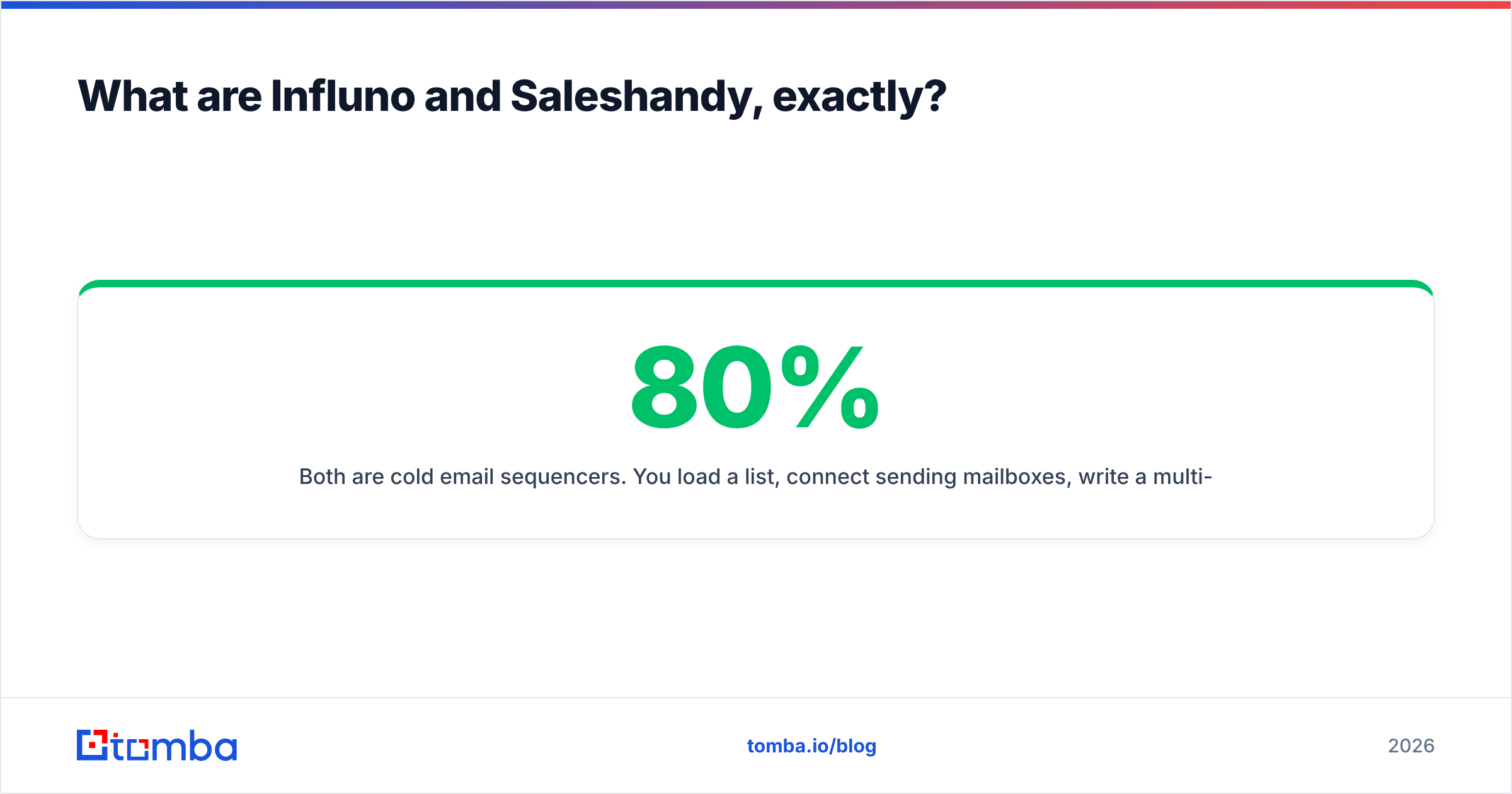
Both are cold email sequencers. You load a list, connect sending mailboxes, write a multi-step sequence, and the platform drips it out while tracking replies. That is the shared 80%. The differences live in the remaining 20%, and that 20% is where teams get burned six months in.
Influno positions itself as an all-in-one outreach platform for teams that got tired of stacking three tools together. Its pitch is flat pricing with generous sending-account allowances, so scaling from three mailboxes to thirty does not triple your bill. The product is younger, which cuts both ways: fewer legacy quirks, but also a shorter list of edge-case features and a smaller integration catalog.
Saleshandy has been in the cold email space far longer. It started as an email tracking tool, grew into a full sequencer, and now bundles a B2B Lead Finder, email verification credits, a unified inbox, and sender rotation. It is the safer institutional choice for teams that need reporting a manager will actually read.
Here is how to think about the category before you compare feature checklists:
- The sending layer decides whether your mail lands. Rotation, throttling, warmup, and custom tracking domains matter more than template libraries.
- The sequence layer decides how many touches you can orchestrate before a human takes over. Conditional branching, A/B splits, and reply detection live here.
- The data layer decides who you contact. This is usually the weakest part of any all-in-one tool, because building an accurate contact database is a separate business.
- The inbox layer decides what happens after a reply. A unified inbox that actually syncs beats a dozen browser tabs.
- The reporting layer decides whether you can prove ROI. Step-level reply rates and per-mailbox health are the two numbers that matter.
Most "X vs Y" arguments are really arguments about which of those five layers you personally care about most.
How do Influno and Saleshandy compare feature by feature?#
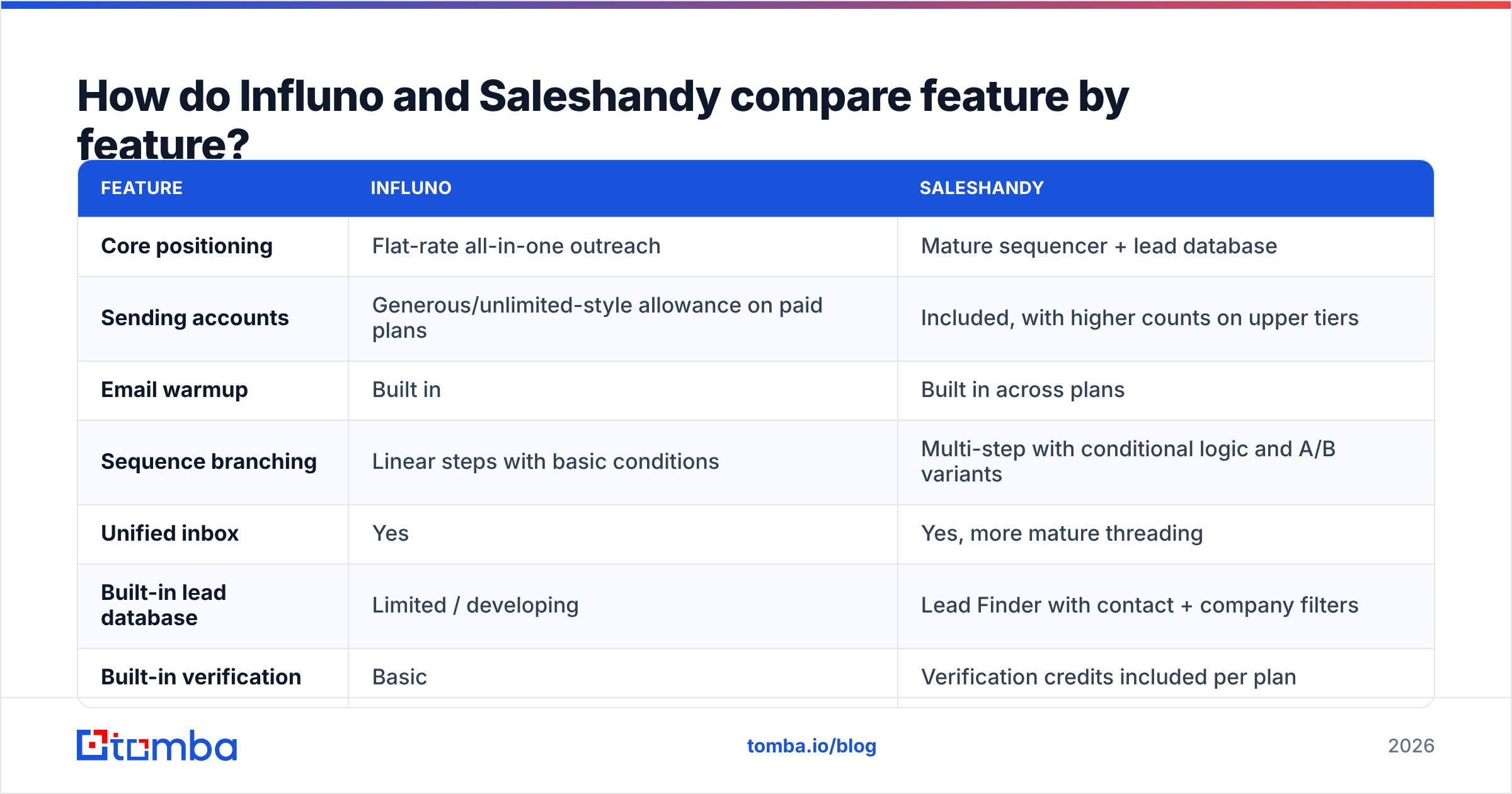
| Feature | Influno | Saleshandy |
|---|---|---|
| Core positioning | Flat-rate all-in-one outreach | Mature sequencer + lead database |
| Sending accounts | Generous/unlimited-style allowance on paid plans | Included, with higher counts on upper tiers |
| Email warmup | Built in | Built in across plans |
| Sequence branching | Linear steps with basic conditions | Multi-step with conditional logic and A/B variants |
| Unified inbox | Yes | Yes, more mature threading |
| Built-in lead database | Limited / developing | Lead Finder with contact + company filters |
| Built-in verification | Basic | Verification credits included per plan |
| LinkedIn steps | Not a core focus | Manual task steps, not native automation |
| CRM integrations | Core CRMs + Zapier | HubSpot, Pipedrive, Salesforce, Zapier |
| API access | Available on paid tiers | Available, documented |
| Best for | Agencies running many domains | SMB and mid-market sales teams |
| Learning curve | Lower | Moderate |
Two honest caveats about that table. First, feature parity in cold email tools is converging fast, so a gap you see today may close next quarter. Second, feature lists never predict satisfaction. Teams churn from sequencers over deliverability and support response time, almost never over a missing toggle.
Which one has better deliverability infrastructure?#
Neither platform can make a cold email land if the fundamentals are wrong, and both have equivalent core controls: sender rotation, per-mailbox daily caps, randomized send intervals, custom tracking domains, and warmup.
Saleshandy's edge is maturity. Sender rotation across dozens of mailboxes, automatic bounce-based pausing, and per-mailbox health reporting have been in the product long enough to be well-tested at volume. If you are sending 50,000 emails a month across 40 mailboxes, that operational history is worth something.
Influno's edge is economics. Because it does not charge per connected mailbox in the same way, the "correct" deliverability architecture — many domains, many mailboxes, low volume per mailbox — is cheaper to run. That matters more than it sounds. The single biggest deliverability mistake in outbound is overloading a small number of mailboxes because adding more costs money. A pricing model that removes that incentive quietly improves your results.
But here is the part both vendors soft-pedal: your bounce rate is set before the platform ever touches your list. Google and Microsoft both treat invalid-recipient rates as a reputation signal, and once you cross roughly 2-3% hard bounces on a sending domain, no warmup schedule saves you. That is a list hygiene problem.

Run every list through verification before import, regardless of which platform wins your evaluation. If your source is a scrape, a conference export, or a purchased file, verify it twice: once on ingest and once again if the file has been sitting for more than 60 days. B2B contact data decays at roughly 25-30% annually because people change jobs, so a list you verified in January is meaningfully worse by August.
How do pricing models actually differ?#
Published pricing moves, so treat the shape of each model as the durable insight rather than the exact number, and confirm current figures on each vendor's page before you buy.
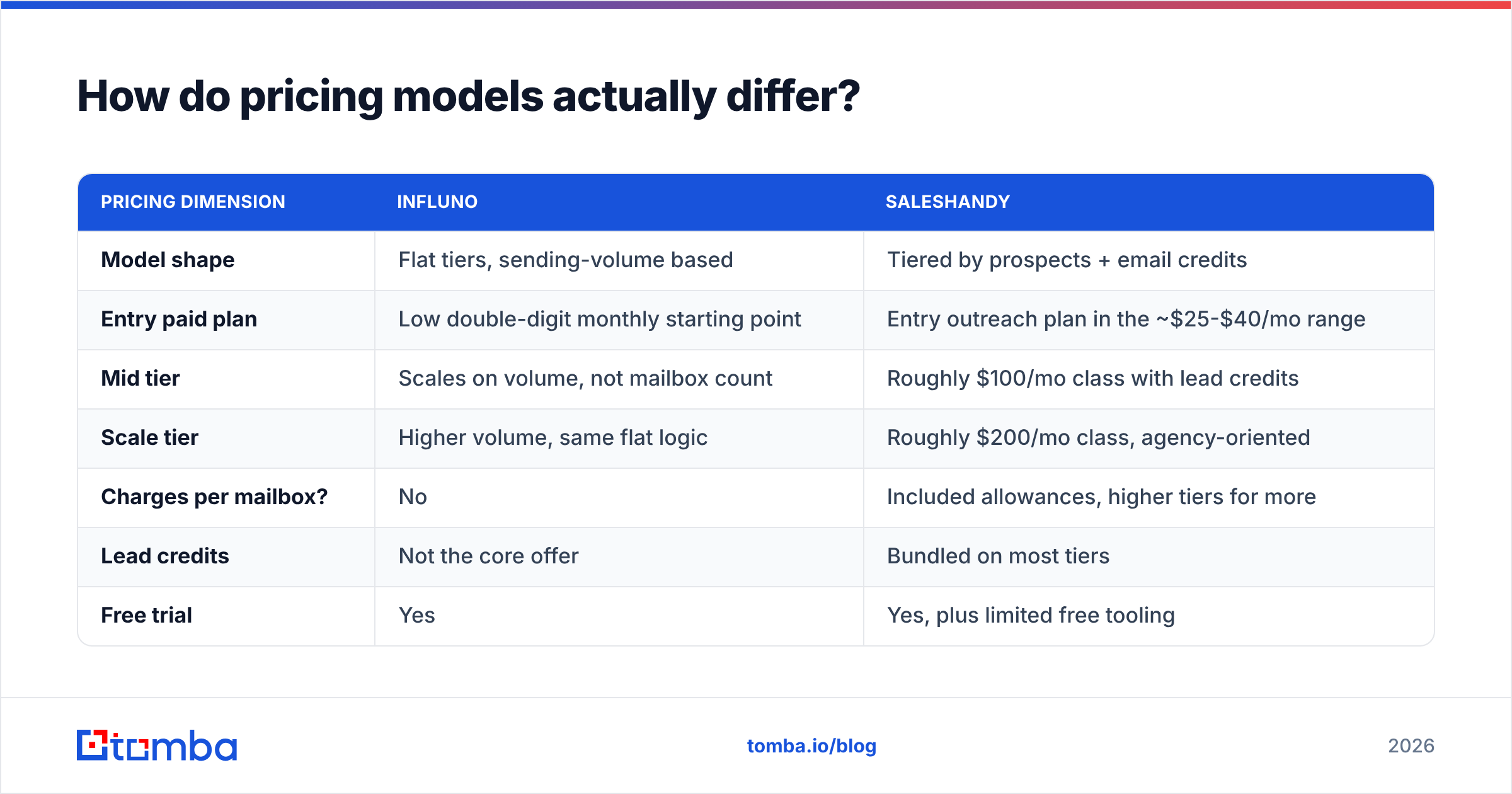
| Pricing dimension | Influno | Saleshandy |
|---|---|---|
| Model shape | Flat tiers, sending-volume based | Tiered by prospects + email credits |
| Entry paid plan | Low double-digit monthly starting point | Entry outreach plan in the ~$25-$40/mo range |
| Mid tier | Scales on volume, not mailbox count | Roughly $100/mo class with lead credits |
| Scale tier | Higher volume, same flat logic | Roughly $200/mo class, agency-oriented |
| Charges per mailbox? | No | Included allowances, higher tiers for more |
| Lead credits | Not the core offer | Bundled on most tiers |
| Free trial | Yes | Yes, plus limited free tooling |
| Annual discount | Yes | Yes, typically ~20-30% |
The practical difference: Influno gets cheaper as your mailbox count grows, Saleshandy gets more valuable as your need for bundled lead data grows. An agency running 60 sending mailboxes for 12 clients will find Influno's model obviously friendlier. A five-person SaaS sales team that wants prospecting and sending in one bill will find Saleshandy's bundle more coherent.
If you are cost-modeling this properly, add a third line item. Whatever you spend on the sequencer, you will spend something on data. A dedicated finder and verifier stack — for example Tomba pricing starts free at 25 searches/month, then $49/mo Starter, $99/mo Growth, and $249/mo Pro — is usually cheaper per verified contact than buying extra credits inside a sequencer, because data is that vendor's whole business rather than a bundled extra.
Whose built-in lead data can you trust?#
This is where both tools are weakest, and it is not a criticism unique to them. Every sequencer that bolts on a contact database is licensing or aggregating someone else's data, then reselling it as credits.
Saleshandy's Lead Finder is the more developed of the two. It gives you filters for title, industry, headcount, geography, and technology, and it exports straight into a sequence, which removes real friction. Coverage is decent for US mid-market. It thins out for EMEA SMBs, non-English markets, and anything below 50 employees.
Influno's data layer is less central to its pitch. The assumption is that you bring your own list.
The honest recommendation for both: treat the bundled database as a convenience, not a source of truth. Cross-check anything that matters. A practical workflow that works with either platform:
- Source the company list first. Firmographic filters are more reliable than contact-level filters in every bundled database.
- Find the person at the company. Use a dedicated email finder or run a domain search to pull the verified pattern and known contacts for that domain.
- Verify before import. Hard bounces are the expensive mistake; verification is the cheap insurance.
- Enrich what survived. Add title, LinkedIn, and phone only for contacts that passed verification, so you are not paying to enrich dead records.
- Re-verify quarterly. Anything older than a quarter in an active sequence should be re-checked.
For larger operations, running this through a bulk email finder or the Tomba API means the data step happens before the sequencer ever sees the list, which is exactly where it belongs.

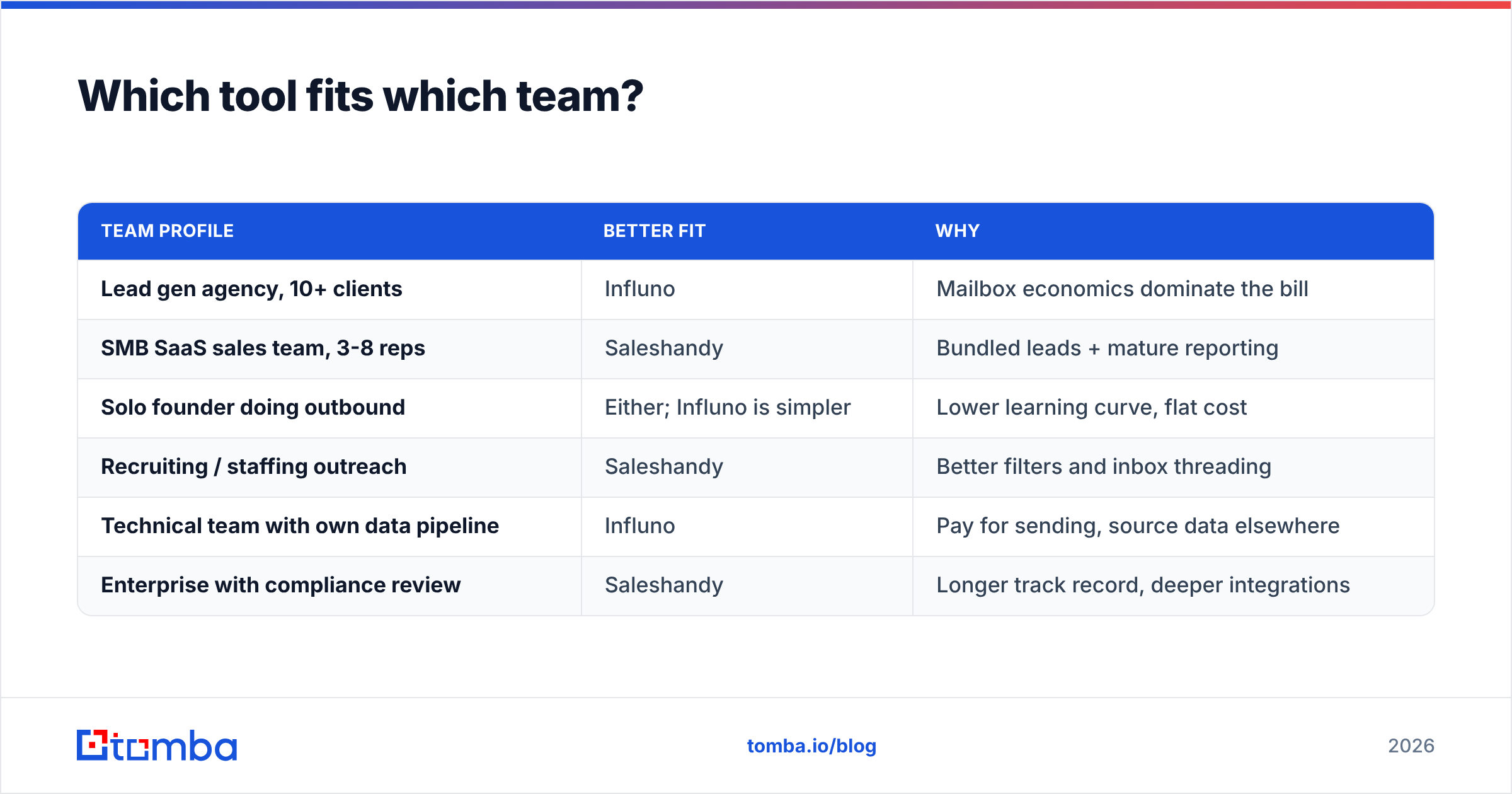
Which tool fits which team?#
| Team profile | Better fit | Why |
|---|---|---|
| Lead gen agency, 10+ clients | Influno | Mailbox economics dominate the bill |
| SMB SaaS sales team, 3-8 reps | Saleshandy | Bundled leads + mature reporting |
| Solo founder doing outbound | Either; Influno is simpler | Lower learning curve, flat cost |
| Recruiting / staffing outreach | Saleshandy | Better filters and inbox threading |
| Technical team with own data pipeline | Influno | Pay for sending, source data elsewhere |
| Enterprise with compliance review | Saleshandy | Longer track record, deeper integrations |
Before committing, check current user sentiment on a neutral aggregator like G2 rather than either vendor's testimonial page. Pay attention to reviews from the last six months only. Cold email tooling changes fast enough that a 2023 review describes a different product.
What are the real switching costs?#
Underrated question. Assume you will change sequencers within two years, because most teams do.
Sequences do not export cleanly between platforms. Neither Influno nor Saleshandy offers a one-click import of a competitor's multi-step campaigns with timing, conditions, and variants intact. Budget half a day per active sequence to rebuild.
Sending domain reputation does transfer, because reputation lives with the domain and mailbox, not the tool. That is good news, and it is the strongest argument for owning your sending infrastructure (your domains, your Google Workspace or Microsoft tenants) rather than using any vendor-provided mailboxes.
Your contact data should transfer trivially, and if it does not, that is a warning sign. Data locked inside a sequencer's proprietary lead database is data you do not own. Keeping your source of truth in a CRM or a warehouse, with enrichment applied by a separate data enrichment layer, keeps migration cheap. If you want a shortlist of platform-independent options, our Saleshandy alternative breakdown covers the tradeoffs in more depth.
What is the verdict on Influno vs Saleshandy?#
Saleshandy wins on depth. Influno wins on unit economics.
Choose Saleshandy if you want one bill covering prospecting and sending, you value mature reporting, and your sending footprint is moderate — under about 15 mailboxes. The bundled Lead Finder and verification credits genuinely reduce tool sprawl for a small team, and the sequence engine handles branching logic that Influno currently keeps simpler.
Choose Influno if your architecture is many domains and many mailboxes, you already have a data source you trust, and per-mailbox pricing is the line item that annoys you every month. The flat model aligns with the sending practices that actually protect deliverability in 2026.
What neither choice changes: the quality of the addresses you load. A sequencer is a distribution mechanism. Feed it a list with 18% invalid addresses and you will burn a domain in three weeks on either platform, and no support ticket will fix it. Feed it verified, freshly sourced contacts and both tools will perform respectably.
Start with the data layer#
Pick your sequencer on workflow fit and pricing shape — both of these are credible products, and the wrong choice is recoverable. The unrecoverable mistake is sending to unverified data on a domain you cannot replace.
Run your list through the Tomba Email Finder before it ever touches Influno or Saleshandy. Search by domain, name, or company, get a confidence score and sources for every address, and push clean contacts into whichever platform you choose. The free tier covers 25 searches a month so you can test accuracy against your own list before paying anyone, and the Starter plan at $49/mo handles most solo and small-team outbound volume. Clean inputs are the cheapest deliverability upgrade you will ever buy.
Related guides#
// get started
Find, verify and enrich your first contacts today
Start on the free plan with 25 searches a month, then scale when your team is ready.
Free plan · No credit card required · GDPR & CCPA
// about the author