Infofree vs Kaspr (2026): Which B2B Contact Data Tool Wins?
One sells unlimited US small-business lists for a flat fee. The other pulls mobile numbers off LinkedIn profiles one click at a time. Here is where each one actually earns its keep — and where both leave you exposed.
Infofree vs Kaspr is a fair question, but the two tools rarely do the same job. One builds big US lists. The other grabs one phone number at a time on LinkedIn. Here is how to choose.
TL;DR
- They are not real rivals. Infofree is a flat-fee US business-and-consumer list database for local SMB sellers. Kaspr is a LinkedIn-first Chrome extension. It shows mobile numbers and emails on the profile you are already viewing.
- Pick Infofree if you sell to Main Street firms by phone and by territory. Think insurance, merchant services, local B2B. You get unlimited list pulls for one flat monthly fee.
- Pick Kaspr if your buyers live on LinkedIn. You need direct dials for mid-market and enterprise roles, and you already work inside Sales Navigator.
- Neither one verifies email. Both hand you contact data and leave the bounce risk with you. Run every email through a verifier before it touches a sequence.
- The cheapest honest stack in 2026: one tool for list building, one for LinkedIn-triggered enrichment, and a verifier in front of your sending tool.
Infofree vs Kaspr: what is each tool?#
They solve different problems. That is why the Infofree vs Kaspr question usually hides a better one: what kind of prospecting do you actually do?
Infofree is a subscription database of US businesses and consumers. It comes from the Infogroup/Data Axle line of compiled data: phone directories, public filings, business registrations, and credit-style firmographics. You log into a web app. You filter by SIC code, area, staff count, sales volume, and years in business. Then you export the list. Most plans sell unlimited leads, a built-in CRM, mailing addresses, and landline numbers.
Kaspr is a European contact-data tool owned by Cognism. It works mostly as a browser extension. Open a LinkedIn profile, a Sales Navigator list, or a LinkedIn group. Click the Kaspr widget. It returns mobile numbers, work emails, and sometimes personal emails. There is a web app with lists and light sequencing, but the extension is the product.
So the core split:
- Infofree is breadth-first. You start with a segment, such as "HVAC contractors in Ohio with 10-49 staff." You pull hundreds of records at once. The business is the record. The person comes second.
- Kaspr is person-first. You start with a named human on LinkedIn and ask for a direct line. The company is just metadata.
- Infofree leans SMB and local. Compiled US data is deepest on small, settled, physical businesses.
- Kaspr leans mid-market and EU/UK. LinkedIn data is deepest where LinkedIn use is high and job titles are standard.
- They fail in different ways. Infofree goes stale on people-level fields. Kaspr has gaps outside its shared contribution network.

Infofree vs Kaspr: how do they compare head-to-head?#
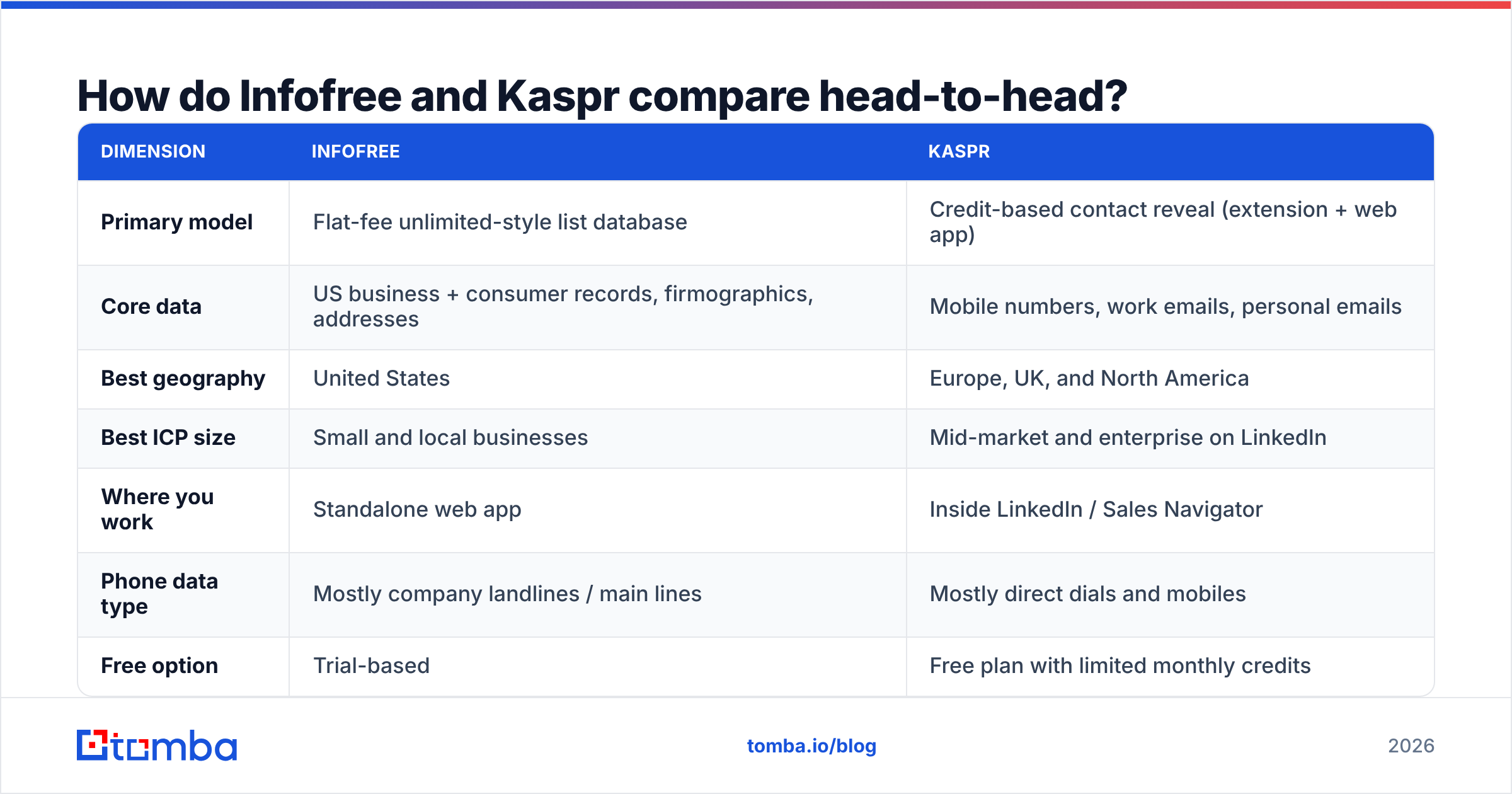
Here is the practical comparison. Prices move, so check the vendor page before you buy.
| Dimension | Infofree | Kaspr |
|---|---|---|
| Primary model | Flat-fee unlimited-style list database | Credit-based contact reveal (extension + web app) |
| Core data | US business + consumer records, firmographics, addresses | Mobile numbers, work emails, personal emails |
| Best geography | United States | Europe, UK, and North America |
| Best ICP size | Small and local businesses | Mid-market and enterprise on LinkedIn |
| Where you work | Standalone web app | Inside LinkedIn / Sales Navigator |
| Phone data type | Mostly company landlines / main lines | Mostly direct dials and mobiles |
| Free option | Trial-based | Free plan with limited monthly credits |
| Entry paid tier | Roughly $99/mo range, billed annually | Roughly $49–$65/user/mo range, billed annually |
| Built-in CRM | Yes, basic | Lists + light outreach, not a CRM |
| Email verification | Minimal | Basic validation, not a full verifier |
| GDPR posture | US-focused, CAN-SPAM framing | EU-based with documented GDPR notification process |
| API access | Limited | Available on higher tiers |
The table settles most of it. Is your territory a US metro, and do you dial the business? Then Infofree is hard to beat on cost, because you never pay per record. Do you need one VP's cell number by Thursday? Then credits are the right unit, and Kaspr is priced for that.
Which one has better data accuracy?#
Neither vendor publishes audited accuracy numbers. Treat any single figure with doubt, whether it comes from a vendor or a blog. What you can judge is where the data comes from. The source sets the decay rate.
Compiled directory data (Infofree's lineage) is refreshed in batches. Business fields hold up well: address, main phone, industry code, rough revenue. Firms move and rebrand slowly. Contact fields rot fast. The "owner" on a compiled record may have sold the business three years ago. Expect strong firmographics and weak person-level freshness.
Crowdsourced data (Kaspr's model) is fresher on the people it covers. Users share their own address books in exchange for credits. So you either get a very recent mobile number, or you get nothing. That split is why reviews on G2 swing so hard. Kaspr looks great to a UK tech buyer and thin to a US regional manufacturer.
Two things follow:
- Never send to an unverified compiled list. Compiled emails are often guessed or years old. A 12% bounce rate will cost you your domain reputation. Run every export through an email verifier before import.
- Treat "no result" as a signal. When a person-first tool returns nothing, that is usually a coverage gap. It is not proof the contact does not exist. Fall back to an email finder that builds the address from the company domain and checks it live.
How does Infofree vs Kaspr pricing really work?#
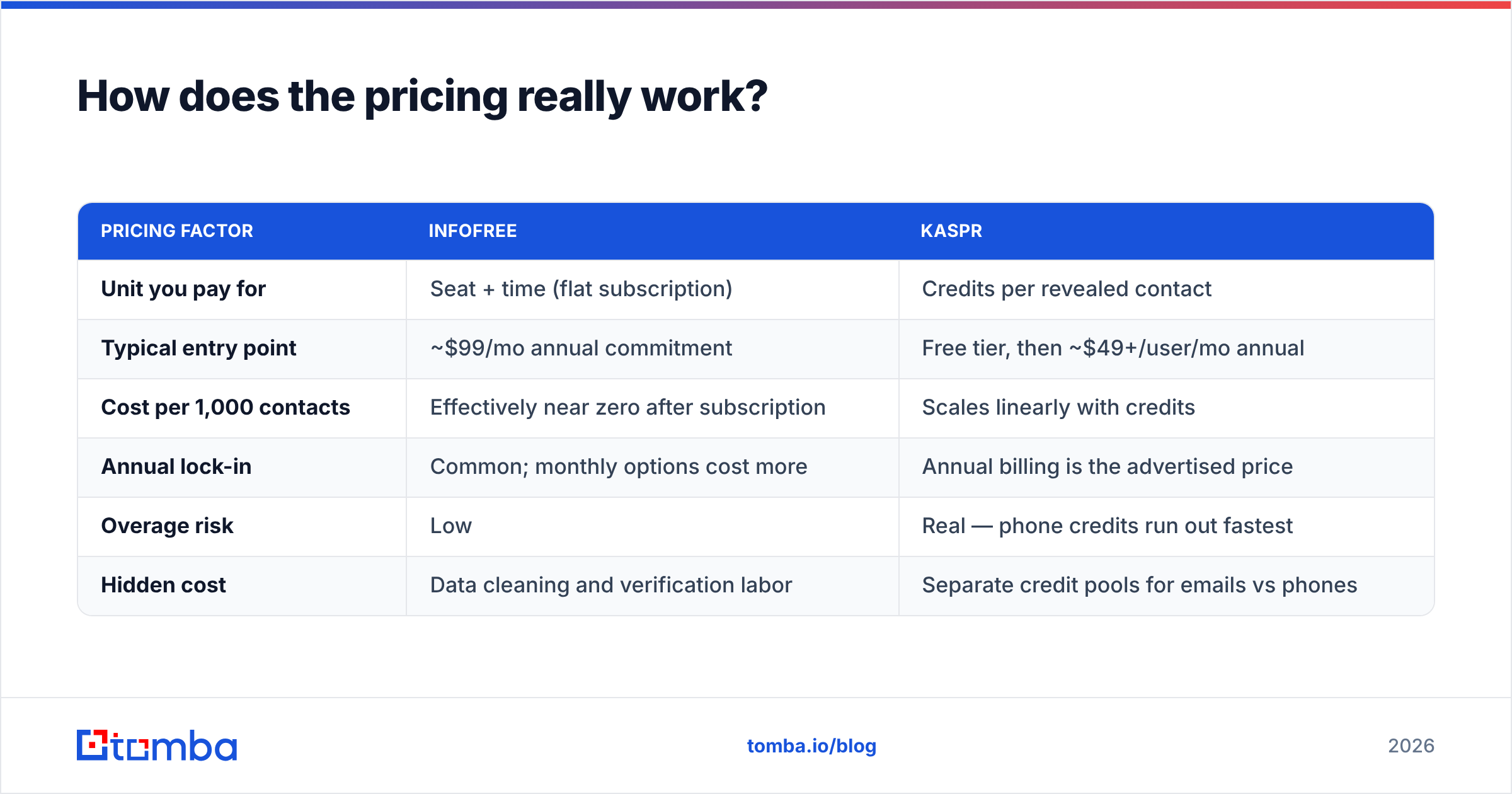
This is where the two products split the most. It is also where buyers get surprised.
| Pricing factor | Infofree | Kaspr |
|---|---|---|
| Unit you pay for | Seat + time (flat subscription) | Credits per revealed contact |
| Typical entry point | ~$99/mo annual commitment | Free tier, then ~$49+/user/mo annual |
| Cost per 1,000 contacts | Effectively near zero after subscription | Scales linearly with credits |
| Annual lock-in | Common; monthly options cost more | Annual billing is the advertised price |
| Overage risk | Low | Real — phone credits run out fastest |
| Hidden cost | Data cleaning and verification labor | Separate credit pools for emails vs phones |
The flat fee is real value if you use a lot of records. Pull only 300 leads a month and you pay a premium per usable record. The credit model is honest about what you use. But phone credits are the scarce part of almost every plan. Teams burn their direct-dial credits in week two, then work emails for the rest of the month.
One cost never shows up on a pricing page: bad data reaching your inbox provider. A 5% bounce rate is survivable. A 15% bounce rate on a new domain sends you to spam for months. Budget for verification the way you budget for data. Tomba pricing starts free with 25 searches a month, then $49/mo for Starter. That is usually cheaper than the cleanup work it replaces.
Who should pick Infofree?#
Choose Infofree when these describe you:
- You sell by territory. "Every dentist within 40 miles" is a real query for you.
- Your buyer is the owner-operator. Compiled SMB data is built around one decision maker and one main line.
- Cold calling is your main channel. Main-line numbers plus a basic CRM is a full workflow for a phone rep.
- You want steady spend. No credit anxiety. No mid-month top-ups. No per-record math.
- Direct mail is still in your mix. Mailing addresses are a real strength here, and a blind spot for LinkedIn tools.
Where it lets you down: person-level email quality, anything outside the US, and tech or funding signals. Do you need to know that a company runs HubSpot and just raised a Series B? Then this is the wrong kind of tool.
Who should pick Kaspr?#
Choose Kaspr when these describe you:
- Your buyers are easy to find on LinkedIn. Software, SaaS, agencies, professional services, recruiting.
- You already live in Sales Navigator. The extension fits the workflow you have.
- Direct dials change your math. In mid-market deals, one live mobile call beats twenty emails.
- You sell into Europe or the UK. Coverage there beats most US-first vendors.
- You want to test first. The free plan is real. It gives you enough credits to judge coverage in your own segment.
Where it lets you down: bulk list building, non-LinkedIn buyers such as trades and field services, and any job that needs thousands of records instead of dozens.

Is there a compliance difference between them?#
Yes, and it matters more than most buyers assume.
Kaspr is based in the EU and publishes a GDPR notification process. Contacts are told their data is being processed, and requests have a clear path. Do you prospect into the EU or UK? That paper trail is not optional. It is the line between a legitimate-interest defence and a fine. Cognism, Kaspr's parent, built much of its market position on this point.
Infofree works in a US frame. CAN-SPAM governs email. The TCPA and Do Not Call lists govern phones. Compiled business data for B2B outreach is well-trodden ground in the US. Still, DNC scrubbing is on you, and consumer records carry far more risk than business records.
The rule is simple. Match the data source to the place you sell into. Using a US compiled list to cold-email Germany is a bad idea, no matter who sold it to you. For what happens when this goes wrong, start with email deliverability. Compliance problems and reputation problems tend to arrive together.
What are the alternatives to Infofree and Kaspr?#
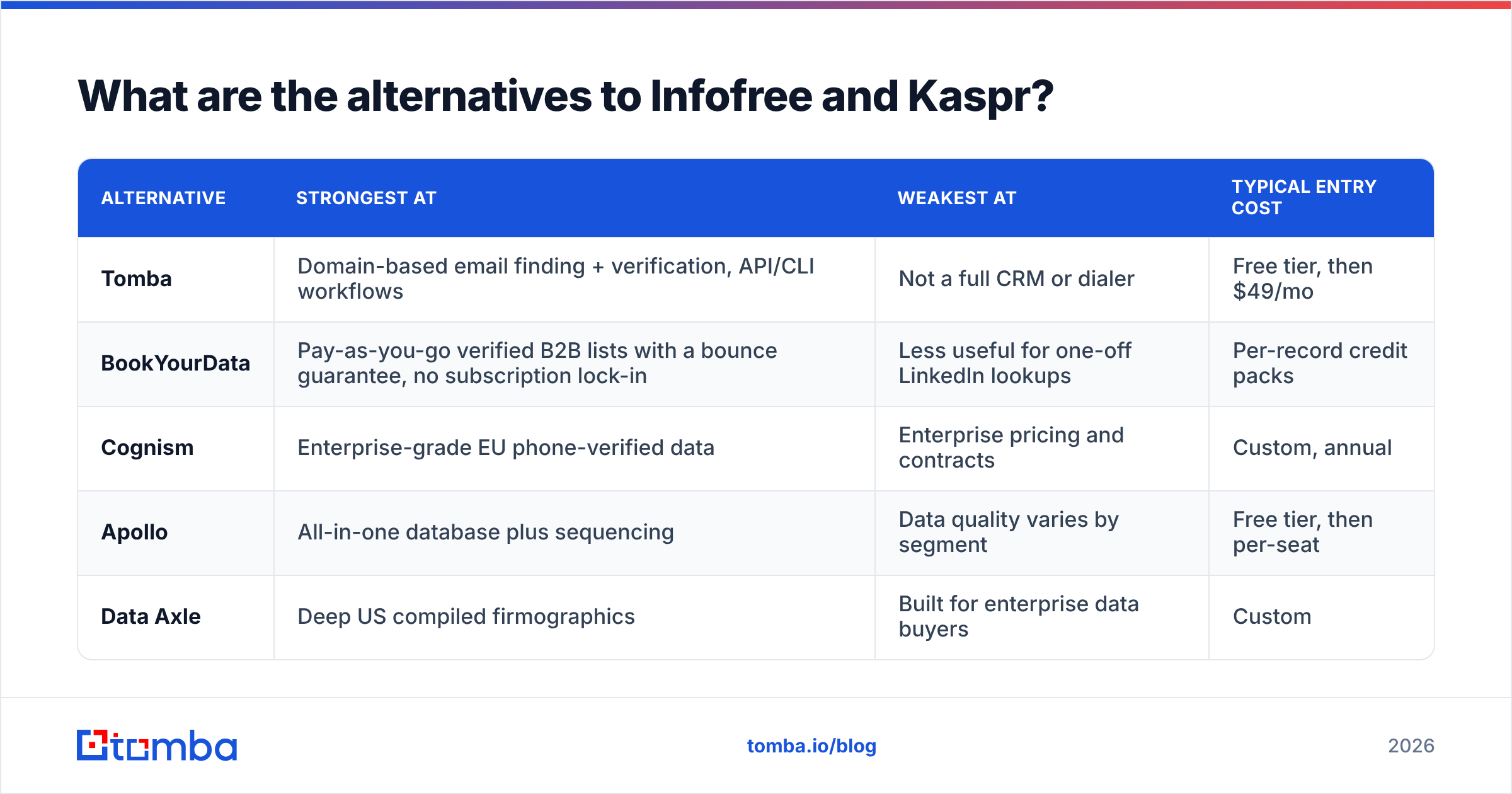
Most teams who weigh Infofree vs Kaspr end up building a small stack instead of picking one. Here is the honest landscape:
| Alternative | Strongest at | Weakest at | Typical entry cost |
|---|---|---|---|
| Tomba | Domain-based email finding + verification, API/CLI workflows | Not a full CRM or dialer | Free tier, then $49/mo |
| BookYourData | Pay-as-you-go verified B2B lists with a bounce guarantee, no subscription lock-in | Less useful for one-off LinkedIn lookups | Per-record credit packs |
| Cognism | Enterprise-grade EU phone-verified data | Enterprise pricing and contracts | Custom, annual |
| Apollo | All-in-one database plus sequencing | Data quality varies by segment | Free tier, then per-seat |
| Data Axle | Deep US compiled firmographics | Built for enterprise data buyers | Custom |
A few pairings that work in practice:
- Territory calling: Infofree for the list, plus a verifier and a dialer.
- LinkedIn-led outbound: Kaspr for mobiles, plus a LinkedIn finder to fill the email gaps the extension misses.
- Account-based, domain-driven: skip both. Run domain search against your target accounts, verify, then enrich.
- No-subscription list buying: BookYourData suits lumpy volume. You get verified records without a monthly seat.
What should you actually do this week?#
Run a coverage bake-off before you sign anything. It takes about ninety minutes.
- Pull 50 real accounts from your closed-won list. Use real customers, not a dream ICP.
- Run all 50 through each free tier or trial. Count the usable emails. Count the usable phones.
- Verify every email with a third-party tool. A vendor "valid" is a claim. A separate check is a measurement.
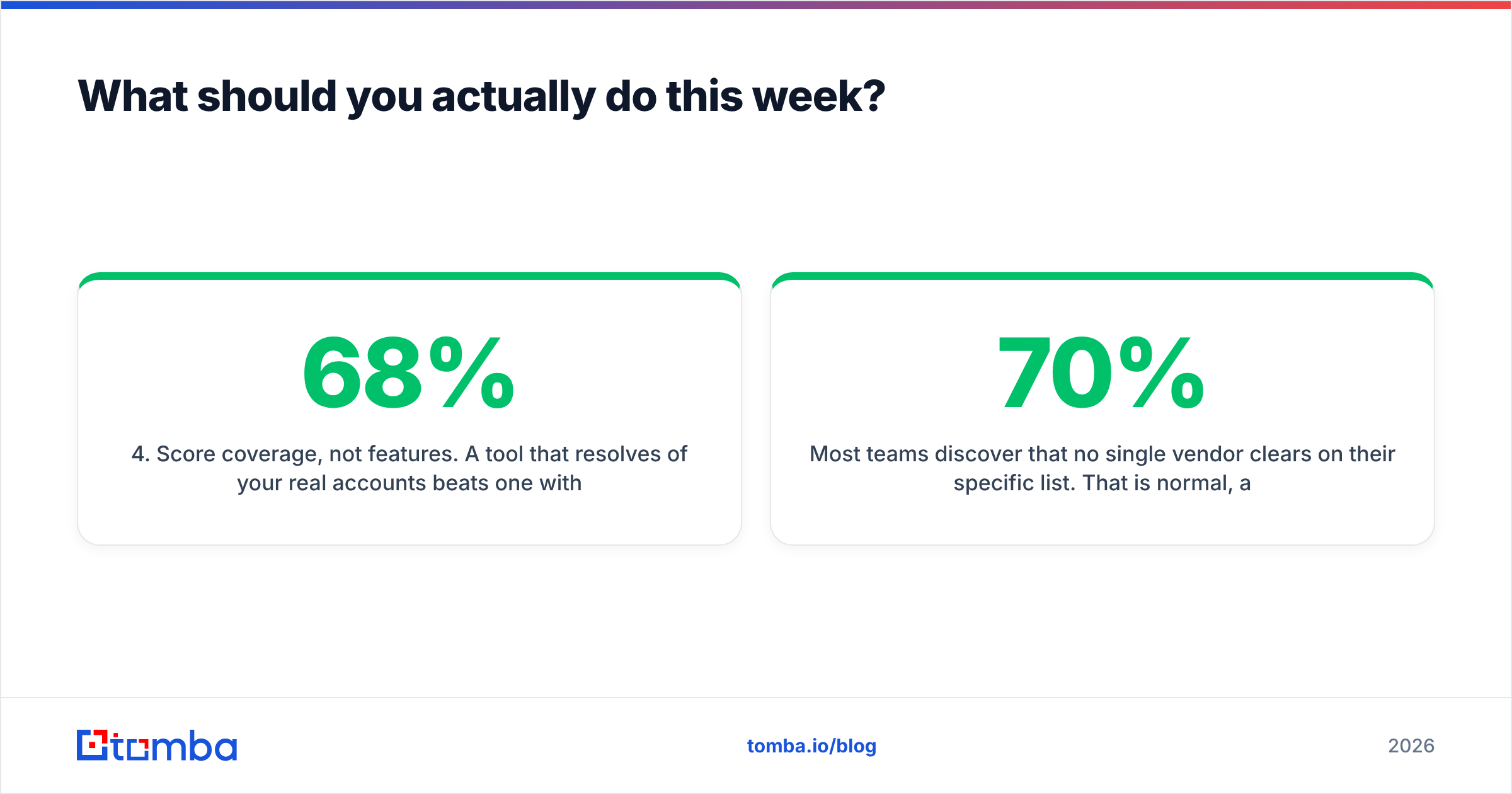
- Score coverage, not features. A tool that resolves 68% of your real accounts beats a prettier one at 31%.
- Price the winner per usable record. Flat fees look cheap until you divide by the contacts you can actually email.
Most teams find that no single vendor clears 70% on their list. That is normal. It is why waterfall enrichment is now the default. Try source A, fall back to source B, then verify at the end.
Closing: get the email layer right first#

The Infofree vs Kaspr choice answers one question: who do I call? Neither tool answers the next one: will this email land? That second question decides whether you have a pipeline next quarter.
Build the reliable layer first. The Tomba Email Finder turns a name and a domain into a work email. It checks that email against live mail servers. You can use it through an API, a Chrome extension, or a bulk upload. So it works whether your list came from a compiled database, a LinkedIn extension, or a colleague's spreadsheet.
Start on the free tier with 25 searches. Run it against the 50 closed-won accounts from the bake-off above. Compare the verified-deliverable count to whatever either trial gave you. Let the numbers pick your stack.
Related guides#
// get started
Find, verify and enrich your first contacts today
Start on the free plan with 25 searches a month, then scale when your team is ready.
Free plan · No credit card required · GDPR & CCPA
// about the author