Infofree vs Lusha (2026): Which B2B Data Tool Wins?
Infofree sells flat-rate lead lists. Lusha sells per-credit contact data with a browser extension. They solve different problems, and picking the wrong one wastes an entire quarter of outbound.
TL;DR
- Infofree is a flat-rate, small-business lead-list subscription built on Data Axle-lineage US business and consumer records. You pay one monthly fee and download lists. Email coverage is thin and mostly generic.
- Lusha is a per-credit B2B contact platform with a Chrome extension, best known for direct dials and work emails pulled while you browse LinkedIn.
- If you sell to US small businesses by phone and mail, Infofree is cheaper per record. If you run email-led outbound to named prospects at mid-market and enterprise accounts, Lusha is the better shape.
- Neither is a great fit if your core need is high-accuracy email discovery at volume — that is a different tool category with different pricing math.
- Budget check: Infofree sits around $99/month unlimited, Lusha's paid seats start around $49/user/month with credit caps. Always confirm on the vendor page before you commit.
What are Infofree and Lusha, exactly?#
They are not the same product, and most "Infofree vs Lusha" comparisons gloss over that.
Infofree is a subscription lead-list service founded by Vin Gupta, the same person behind infoUSA (now Data Axle). Its pitch is volume for a fixed price: unlimited downloads of US business and consumer records, plus a bundled mini-CRM and a mailing-list builder. The record you get looks like a directory entry — company name, address, phone, SIC code, employee count, revenue band, and an owner or executive name.
Lusha is a contact-data platform. Its pitch is precision on the person: you land on a LinkedIn profile or a company page, hit the extension, and Lusha returns a work email and often a mobile number. It also has a prospecting database with filters for title, seniority, technologies, and intent signals, plus CRM enrichment into Salesforce and HubSpot.
The practical difference in one line: Infofree sells you the firmographic universe; Lusha sells you the person inside one account.
How do Infofree and Lusha compare at a glance?#
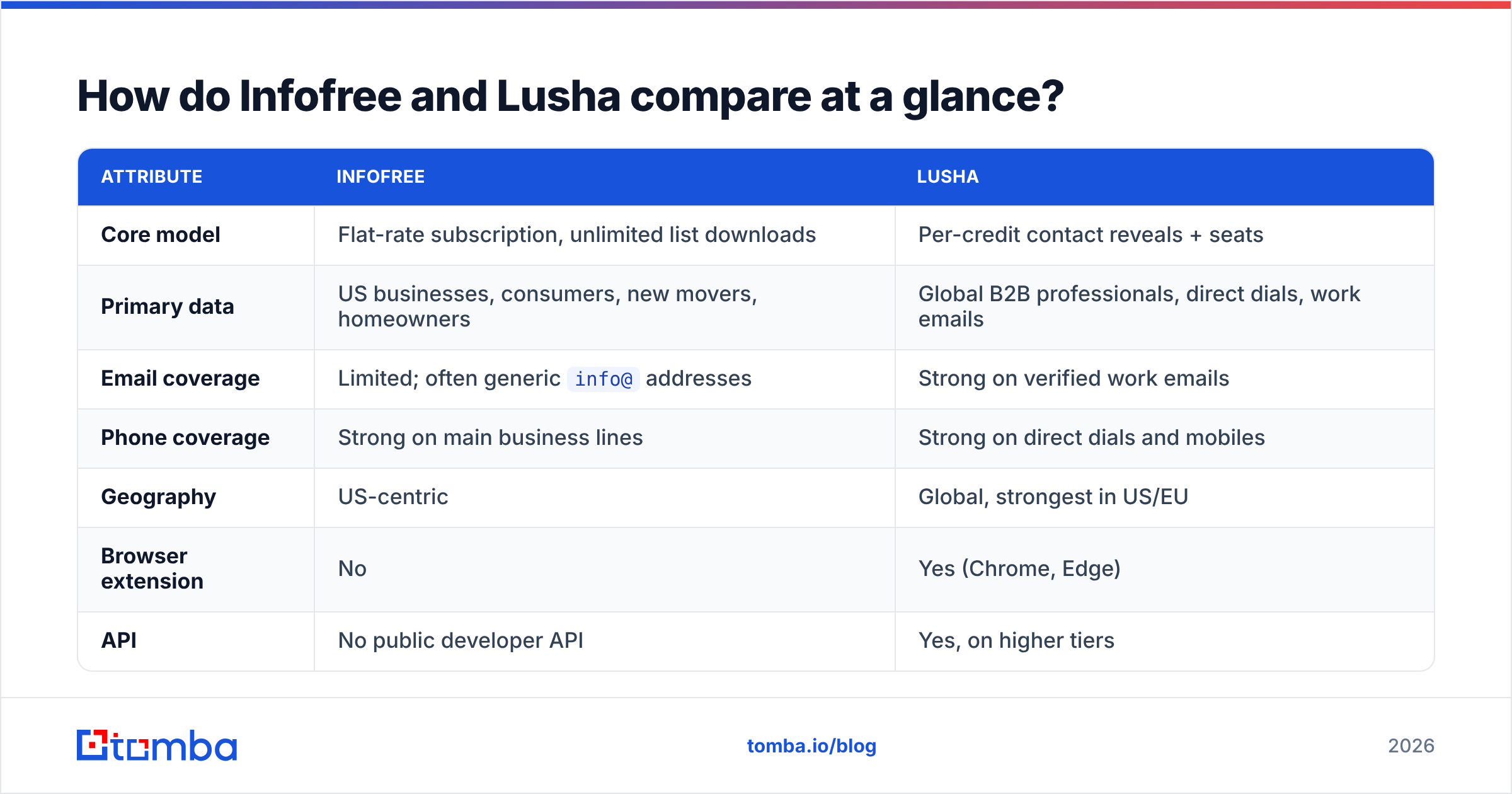
| Attribute | Infofree | Lusha |
|---|---|---|
| Core model | Flat-rate subscription, unlimited list downloads | Per-credit contact reveals + seats |
| Primary data | US businesses, consumers, new movers, homeowners | Global B2B professionals, direct dials, work emails |
| Email coverage | Limited; often generic info@ addresses |
Strong on verified work emails |
| Phone coverage | Strong on main business lines | Strong on direct dials and mobiles |
| Geography | US-centric | Global, strongest in US/EU |
| Browser extension | No | Yes (Chrome, Edge) |
| API | No public developer API | Yes, on higher tiers |
| CRM sync | Basic built-in CRM | Salesforce, HubSpot, Pipedrive, Outreach, Salesloft |
| Typical buyer | Insurance, home services, local B2B, franchise sales | SaaS SDR teams, recruiters, agency prospectors |
| Entry price | ~$99/month | Free tier, paid from ~$49/user/month |
Read that table as a fork in the road, not a scoreboard. A roofing-services rep cold-calling 400 businesses in three ZIP codes gets more from row three of Infofree than from every feature Lusha ships. A SaaS SDR booking VP Engineering meetings gets nothing usable from a info@ address and an SIC code.
How does the pricing actually work?#
This is where the two tools diverge hardest, and where most buyers get burned.
Infofree charges a flat monthly fee — commonly quoted around $99/month for its unlimited-leads plan, with cheaper entry tiers and annual discounts. There is no per-record cost. You can pull 50 records or 50,000 and pay the same. The catch is the download and export limits buried in the terms, plus the fact that "unlimited" applies to a fixed US database, not to enrichment on contacts you already own.
Lusha charges per credit. One revealed contact consumes credits, and phone numbers typically cost more than emails. Free accounts get a small monthly allowance; the Pro tier starts around $49/user/month billed monthly with several hundred credits per year, and Premium and Scale tiers raise both the credit pool and the feature set. Check Lusha's pricing page directly — credit allocations have been revised repeatedly and any number in a blog post ages fast.
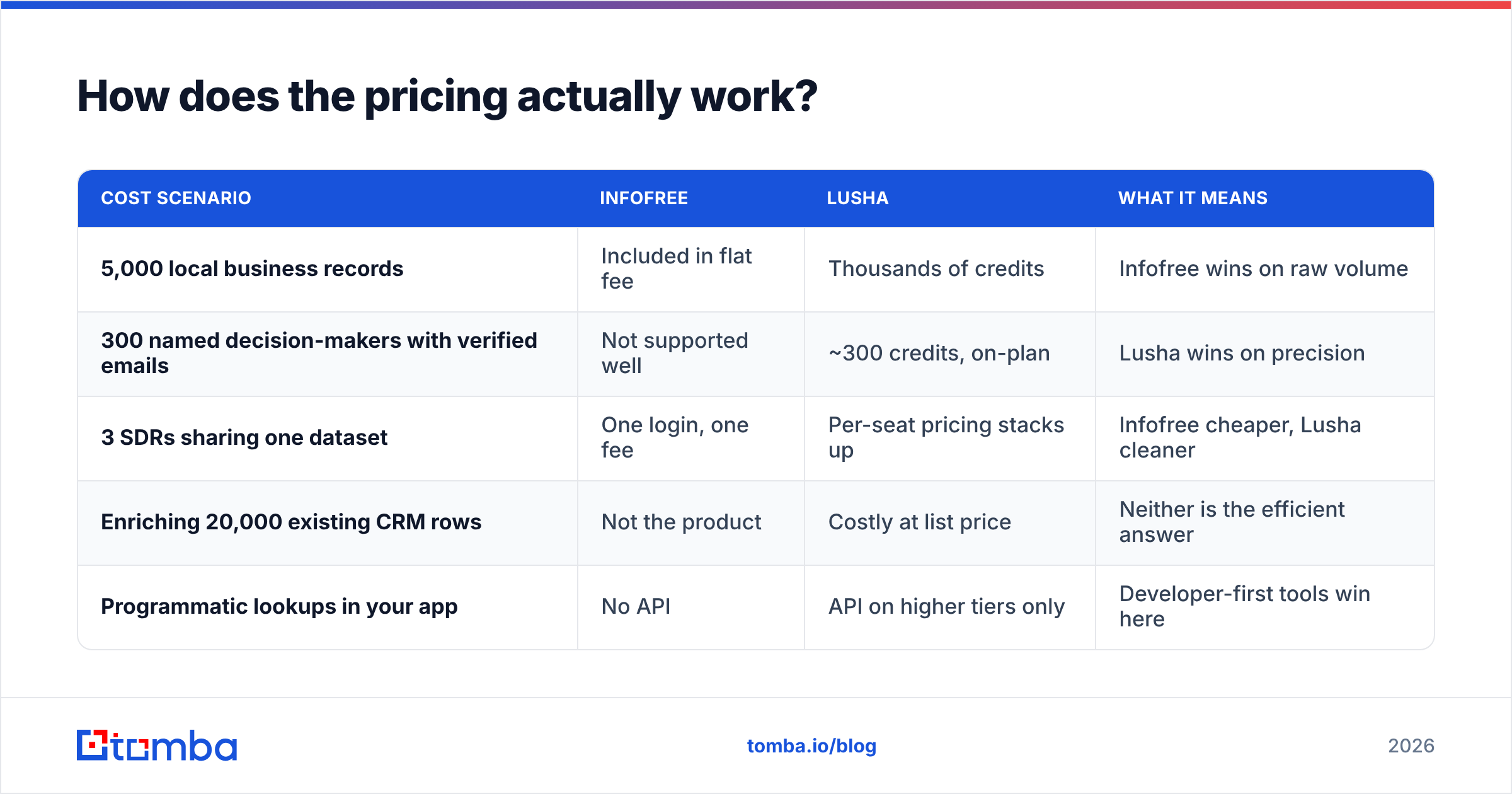
| Cost scenario | Infofree | Lusha | What it means |
|---|---|---|---|
| 5,000 local business records | Included in flat fee | Thousands of credits | Infofree wins on raw volume |
| 300 named decision-makers with verified emails | Not supported well | ~300 credits, on-plan | Lusha wins on precision |
| 3 SDRs sharing one dataset | One login, one fee | Per-seat pricing stacks up | Infofree cheaper, Lusha cleaner |
| Enriching 20,000 existing CRM rows | Not the product | Costly at list price | Neither is the efficient answer |
| Programmatic lookups in your app | No API | API on higher tiers only | Developer-first tools win here |

The pattern in that fourth row matters. Both tools price for humans clicking through a UI. The moment your workflow is "run 20,000 rows through a pipeline every Monday," the per-seat and flat-rate models stop making sense and API-metered pricing wins — which is why teams doing volume enrichment usually keep a dedicated finder alongside whichever of these they bought. Comparing Tomba pricing against a per-seat model is worth five minutes before you sign anything annual.
Which one has better data accuracy?#
Different question depending on the field you care about.
Business phone and address: Infofree is competitive. Its lineage traces to compiled directory data that has been maintained for decades, and for main-line numbers at established US businesses it holds up. Where it degrades is small, young, or online-only companies that were never in a phone book.
Direct dials and mobiles: Lusha is the stronger source. Community-contributed and partner data skews toward professionals who maintain a LinkedIn presence, which is exactly the population SDRs target.
Work emails: Lusha again, decisively. Infofree's email field is frequently a company catch-all rather than a personal address, and sending sequences to info@ addresses does real damage to your sender reputation because those inboxes are shared, unmonitored, or actively used as spam traps.

One accuracy rule applies to both tools and to every tool in this category: the vendor's stated accuracy and your realized bounce rate are not the same number. Vendor accuracy is measured across the whole database. Your bounce rate is measured across the narrow slice you actually pulled — which is usually the hardest slice, because you filtered for a specific title in a specific industry. Run any list through an email verifier before it touches your sending domain, regardless of where it came from. A 4% bounce rate on a 2,000-address send is enough to start tripping filters at Google and Microsoft.
Who is Infofree actually built for?#
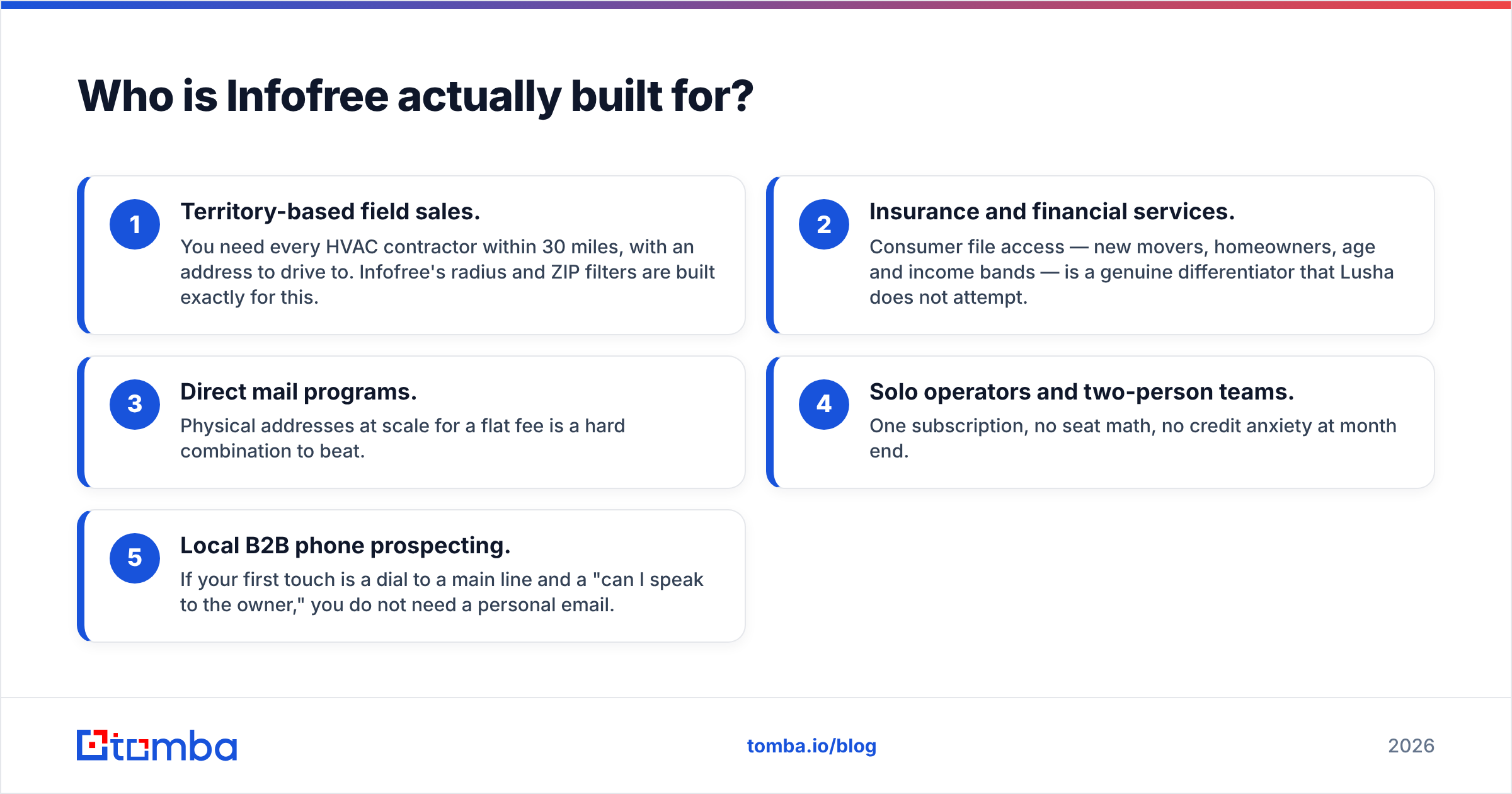
Five profiles where Infofree is the right call:
- Territory-based field sales. You need every HVAC contractor within 30 miles, with an address to drive to. Infofree's radius and ZIP filters are built exactly for this.
- Insurance and financial services. Consumer file access — new movers, homeowners, age and income bands — is a genuine differentiator that Lusha does not attempt.
- Direct mail programs. Physical addresses at scale for a flat fee is a hard combination to beat.
- Solo operators and two-person teams. One subscription, no seat math, no credit anxiety at month end.
- Local B2B phone prospecting. If your first touch is a dial to a main line and a "can I speak to the owner," you do not need a personal email.
Where it breaks: anything global, anything technology-vertical, anything requiring a named individual's direct contact details, and anything email-led.
Who is Lusha actually built for?#
Lusha fits when the account is known and the person is the unknown.
- SaaS SDR teams working a defined ICP list and needing the VP of Ops, not the front desk.
- Recruiters sourcing passive candidates from LinkedIn where the extension workflow is the whole product.
- Agencies and consultants doing precise, low-volume outreach where 200 right contacts beat 20,000 approximate ones.
- RevOps teams enriching inbound form fills and stale CRM records via native HubSpot and Salesforce sync.
Where it breaks: cost at volume. Credit consumption is the number one complaint in G2's lead intelligence category reviews across nearly every per-credit vendor, Lusha included. Teams that start with a modest credit pool and scale outbound discover the seat-plus-credit model compounds faster than headcount does.

What does neither tool solve well?#
Three gaps show up no matter which you pick.
Catch-all domains. A large share of mid-market companies run catch-all mail servers that accept every address at the SMTP level. Standard verification returns "valid" for an address that will never reach a human. You need a dedicated catch-all verifier to separate real mailboxes from accept-all noise, and neither Infofree nor Lusha treats this as a first-class problem.
Programmatic enrichment. If your product or internal tooling needs contact lookups on demand, you need an email finder API with predictable per-call pricing. A flat-rate list subscription cannot serve that, and a seat-based tool makes it expensive.
Coverage outside their sweet spots. Infofree thins out fast outside the US. Lusha thins out on non-LinkedIn-native industries — manufacturing, logistics, trades, public sector — where the decision-maker has never optimized a headline in their life.
Which alternatives should you consider?#
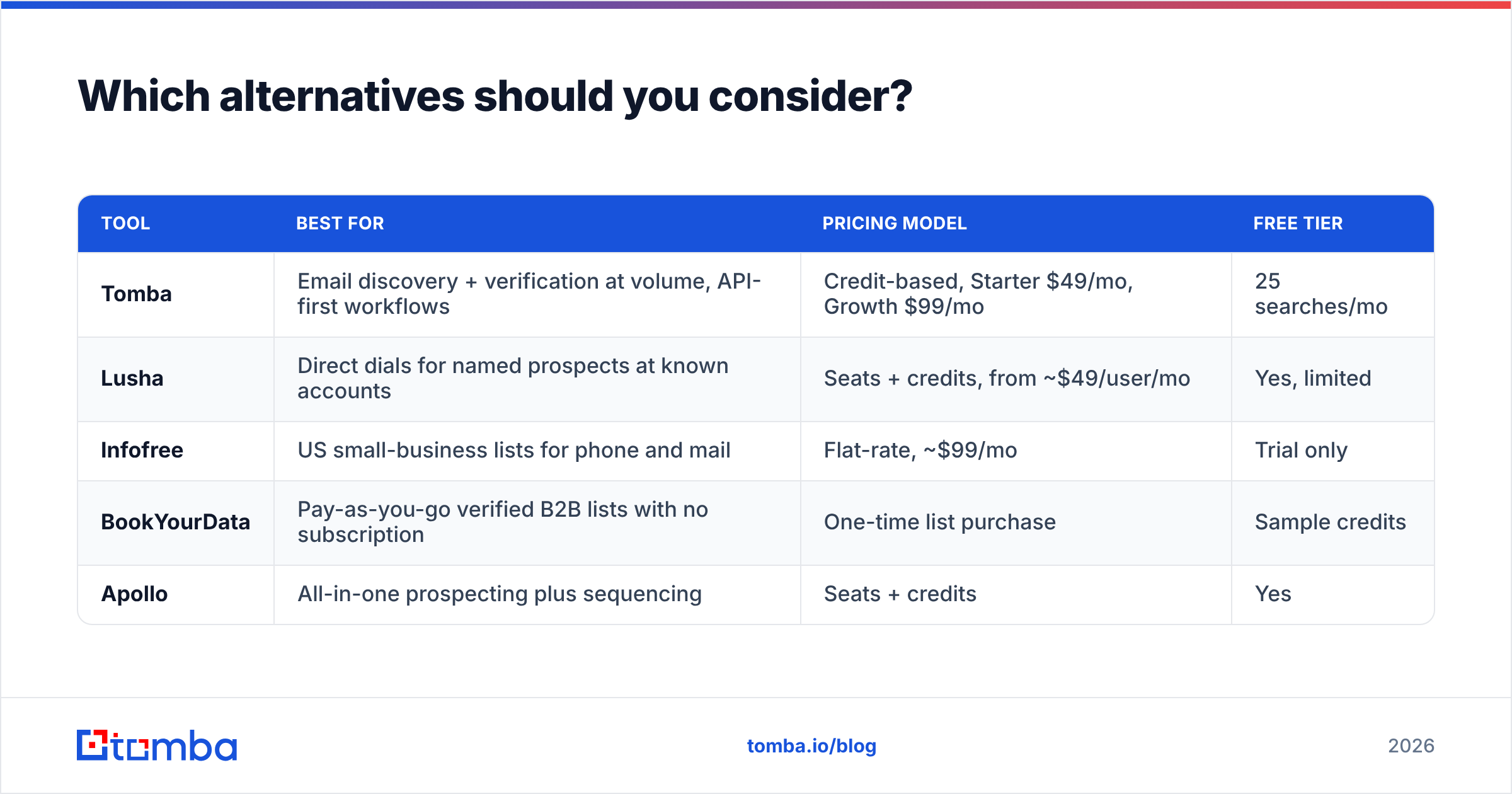
| Tool | Best for | Pricing model | Free tier |
|---|---|---|---|
| Tomba | Email discovery + verification at volume, API-first workflows | Credit-based, Starter $49/mo, Growth $99/mo | 25 searches/mo |
| Lusha | Direct dials for named prospects at known accounts | Seats + credits, from ~$49/user/mo | Yes, limited |
| Infofree | US small-business lists for phone and mail | Flat-rate, ~$99/mo | Trial only |
| BookYourData | Pay-as-you-go verified B2B lists with no subscription | One-time list purchase | Sample credits |
| Apollo | All-in-one prospecting plus sequencing | Seats + credits | Yes |
BookYourData deserves a note here because it solves a problem the other two do not: you buy a defined list once, at a known price, with a bounce guarantee, and walk away — no recurring commitment. For a one-off campaign that is often the cleanest commercial structure available.
Tomba sits in the middle of this map for a specific reason. The email finder is credit-metered rather than seat-metered, so a three-person team and a one-person team pay for the same thing: lookups. Domain search returns every discoverable address at a company rather than one at a time, verification is built into the same platform, and the whole surface is available through an API, a CLI, Sheets, and a browser extension. If you already own Infofree for territory lists, adding an email layer on top is a much cheaper fix than replacing the whole stack.
So, Infofree or Lusha?#
Pick Infofree if your motion is US-local, phone-and-mail led, small-business focused, and your team is small enough that one flat fee beats per-seat math. You are buying breadth and predictability.
Pick Lusha if your motion is account-based, your targets have LinkedIn profiles, and you need a direct dial or a personal work email for a named human. You are buying precision and paying per unit of it.
Pick neither as your only tool if your bottleneck is email volume and accuracy. That is a third category, and stacking a dedicated finder and verifier next to whichever list tool you already own almost always costs less than forcing one product to do a job it was not designed for.
Run the arithmetic before the demo call. Take your real monthly target — say 1,500 verified contacts — and price it under each model. Flat-rate looks unbeatable until you notice how few of those 1,500 records carry a usable personal email. Per-credit looks reasonable until you multiply it by three seats and twelve months.
Start with the email layer. If your outbound is email-led, fix contact discovery first and the rest of the stack gets simpler. Tomba's Email Finder returns verified professional addresses by domain, name, or company, with verification and catch-all detection in the same workflow — free tier includes 25 searches a month, and Starter runs $49/month when you need more. Test it against 50 records from whichever list tool you already pay for, and compare the bounce rates before you renew anything.
Related guides#
// get started
Find, verify and enrich your first contacts today
Start on the free plan with 25 searches a month, then scale when your team is ready.
Free plan · No credit card required · GDPR & CCPA
// about the author