Infofree vs Saleshandy: Which B2B Sales Tool Wins in 2026?
Infofree sells unlimited lead lists. Saleshandy sends the emails. They are not really competitors — but teams keep comparing them. Here is what each one actually does, what the data looks like in practice, and which one belongs in your stack.
Infofree vs Saleshandy is an odd matchup. One tool sells lead lists. The other sends the emails. Teams keep comparing them anyway, so here is the short answer and the long one.
TL;DR
- They solve different problems. Infofree is a lead database of US business and consumer records. Saleshandy is a cold email sender that added a lead finder later.
- Cheap volume favors Infofree. Its unlimited plans win on price per record. The data skews small, local, and phone-first.
- Live sequences favor Saleshandy. Infofree has no real sending, no warmup, and no reply detection.
- Neither is an accuracy layer. Both ship lists that bounce. Most teams add a verify step.
- The 2026 stack is modular. A database for firmographics, a finder for the address, a sender for the sequence.
What is Infofree, and who actually uses it?#
Infofree is a flat-rate lead database. You pay each month and search tens of millions of US records. Fields include company name, address, phone, SIC code, revenue band, and headcount. Many records name an owner or an exec. The pitch on infofree.com has not changed in years. Unlimited views, downloads within plan caps, and a light CRM.
The typical buyer is not a SaaS SDR team. Think insurance agents. Think merchant services reps. Think a cleaning firm or a local contractor. These people work a territory, dial a list, and drive to meetings. The product fits that motion. Search by radius, filter by revenue, print a call sheet, dial.
That context drives the whole Infofree vs Saleshandy debate. Infofree is built for coverage of small US firms. It is not built to find a verified work email at a 500-person software company.
What is Saleshandy, and what does it replace?#
Saleshandy (saleshandy.com) began as an email tracking and mail-merge tool. It grew into a full outreach platform. The core job now is sequencing. Connect as many mailboxes as you like. Rotate between them. Warm them up. Personalize with variables and spintax. Follow up until someone replies. Route the good replies into one inbox.
The team later shipped Lead Finder, a contact database sold as credits. It is a real database with a few hundred million contacts. It removes the "export a CSV somewhere else" step. Still, it is a second act. It competes with vendors that sell data and nothing else, and it prices as an add-on.
So here is the honest frame. Infofree replaces a list broker. Saleshandy replaces Mailshake, Lemlist, or a homemade Gmail merge. Judging Infofree vs Saleshandy head to head is like judging a lumber yard against a nail gun. You likely need both. Buy each on its own merits. If the sending side is what you care about, read how a Saleshandy alternative stacks up before you sign a year.

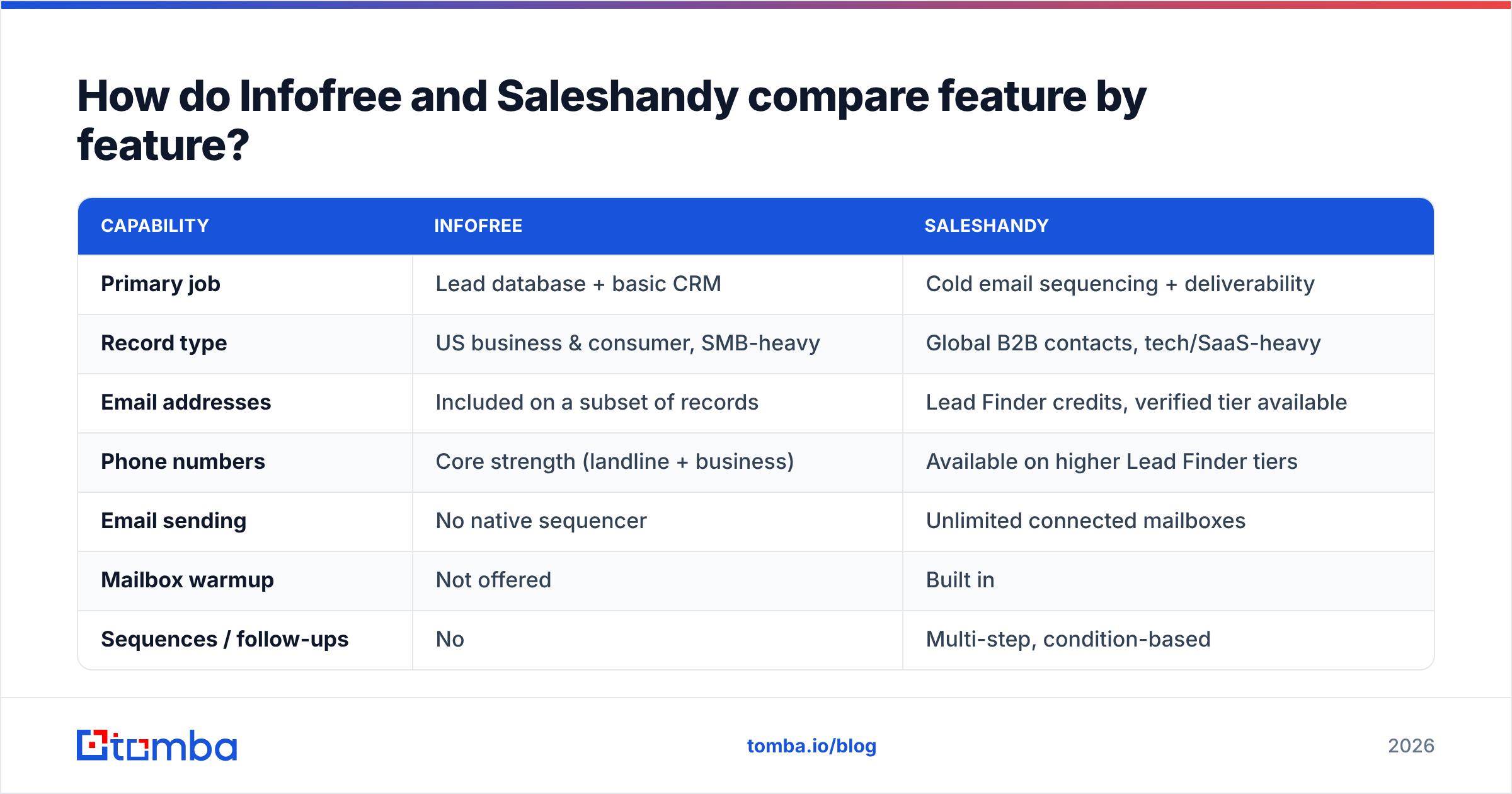
Infofree vs Saleshandy: how do they compare feature by feature?#
Here is the side by side. Prices move, so read the price rows as directional. Check each vendor page before you buy.
| Capability | Infofree | Saleshandy |
|---|---|---|
| Primary job | Lead database + basic CRM | Cold email sequencing + deliverability |
| Record type | US business & consumer, SMB-heavy | Global B2B contacts, tech/SaaS-heavy |
| Email addresses | Included on a subset of records | Lead Finder credits, verified tier available |
| Phone numbers | Core strength (landline + business) | Available on higher Lead Finder tiers |
| Email sending | No native sequencer | Unlimited connected mailboxes |
| Mailbox warmup | Not offered | Built in |
| Sequences / follow-ups | No | Multi-step, condition-based |
| Unified inbox | No | Yes |
| Deliverability tooling | No | Sender rotation, spam-word checks, warmup |
| CRM | Bundled lightweight CRM | Integrations (HubSpot, Pipedrive, Zapier) |
| API access | Limited | Yes, on paid tiers |
| Entry price (approx.) | ~$100/mo for unlimited plans | ~$25–$40/mo billed annually, plus lead credits |
| Best for | Territory-based SMB outbound, dialing | B2B email-led outbound at scale |
Two rows matter most. First, Infofree has no sequencer. Buy it for cold email and you will still export CSVs into another tool. Second, Saleshandy's data is an add-on. Its cost grows with prospect volume. The sending plan does not.
Infofree vs Saleshandy: which one has better data quality?#
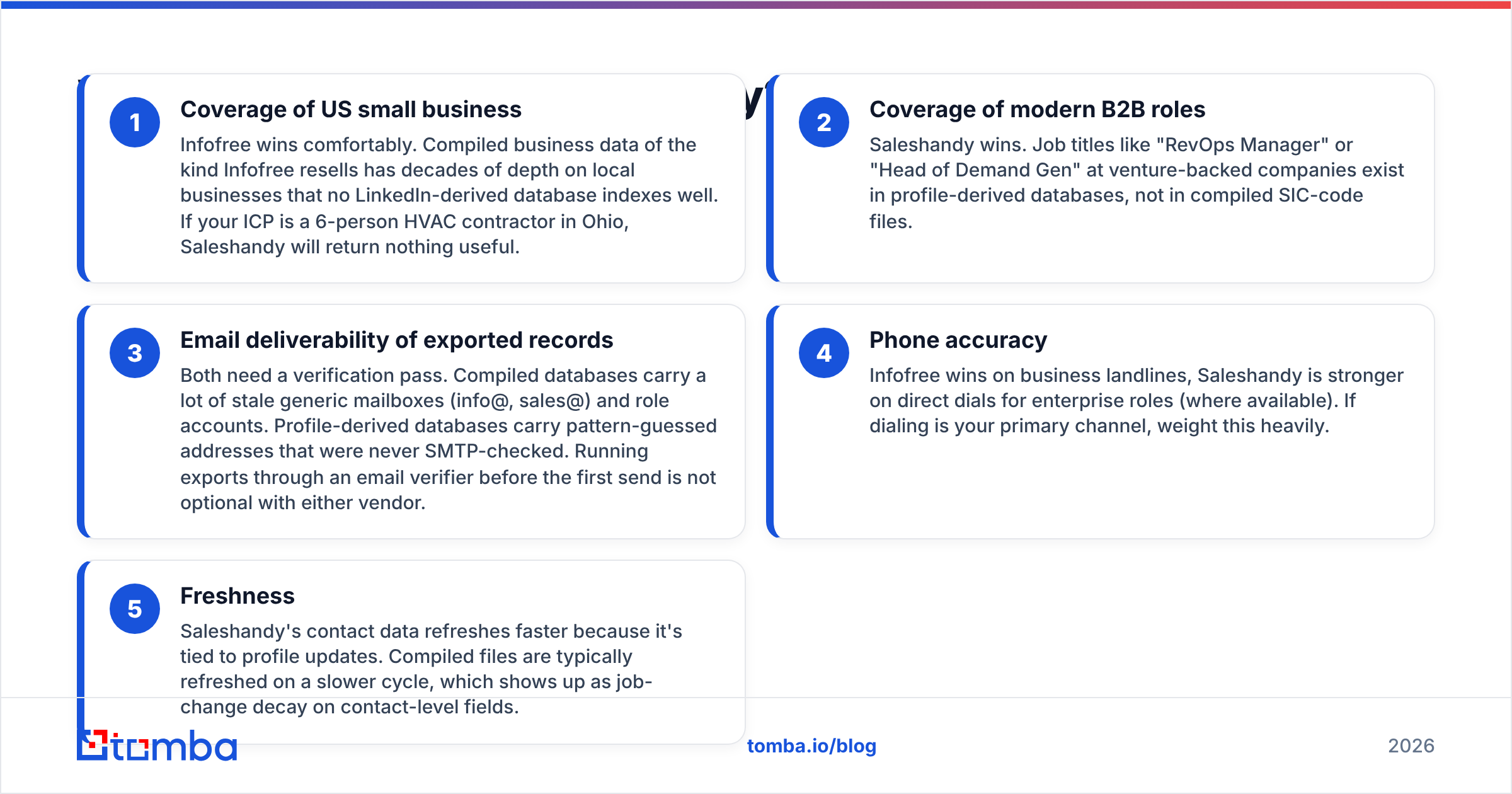
Neither wins outright. The answer depends on what quality means for your motion. Look at five dimensions.
Coverage of US small business. Infofree wins here, and it is not close. Compiled business files have decades of depth on local firms. No LinkedIn-derived database indexes them well. If your ICP is a six-person HVAC shop in Ohio, Saleshandy returns little.
Coverage of modern B2B roles. Saleshandy wins. Titles like "RevOps Manager" or "Head of Demand Gen" live in profile-derived data. They do not live in SIC-code files.
Email quality on exports. Both need a verify pass. Compiled files carry stale role mailboxes such as info@ and sales@. Profile-derived files carry guessed patterns that no one ever checked over SMTP. Run every export through an email verifier before the first send.
Phone accuracy. Infofree wins on business landlines. Saleshandy is better on direct dials for enterprise roles, where it has them. Weight this row heavily if you dial.
Freshness. Saleshandy refreshes faster because profiles update often. Compiled files move on a slower cycle. That gap shows up as job-change decay.
The practical read: use each tool where its data is native, and do not stretch it. Teams get burned pulling 5,000 SMB records, blasting them from a fresh domain, and eating a 12% bounce on day one. That is not a vendor defect. It is the wrong data for the channel.

How does pricing really compare?#
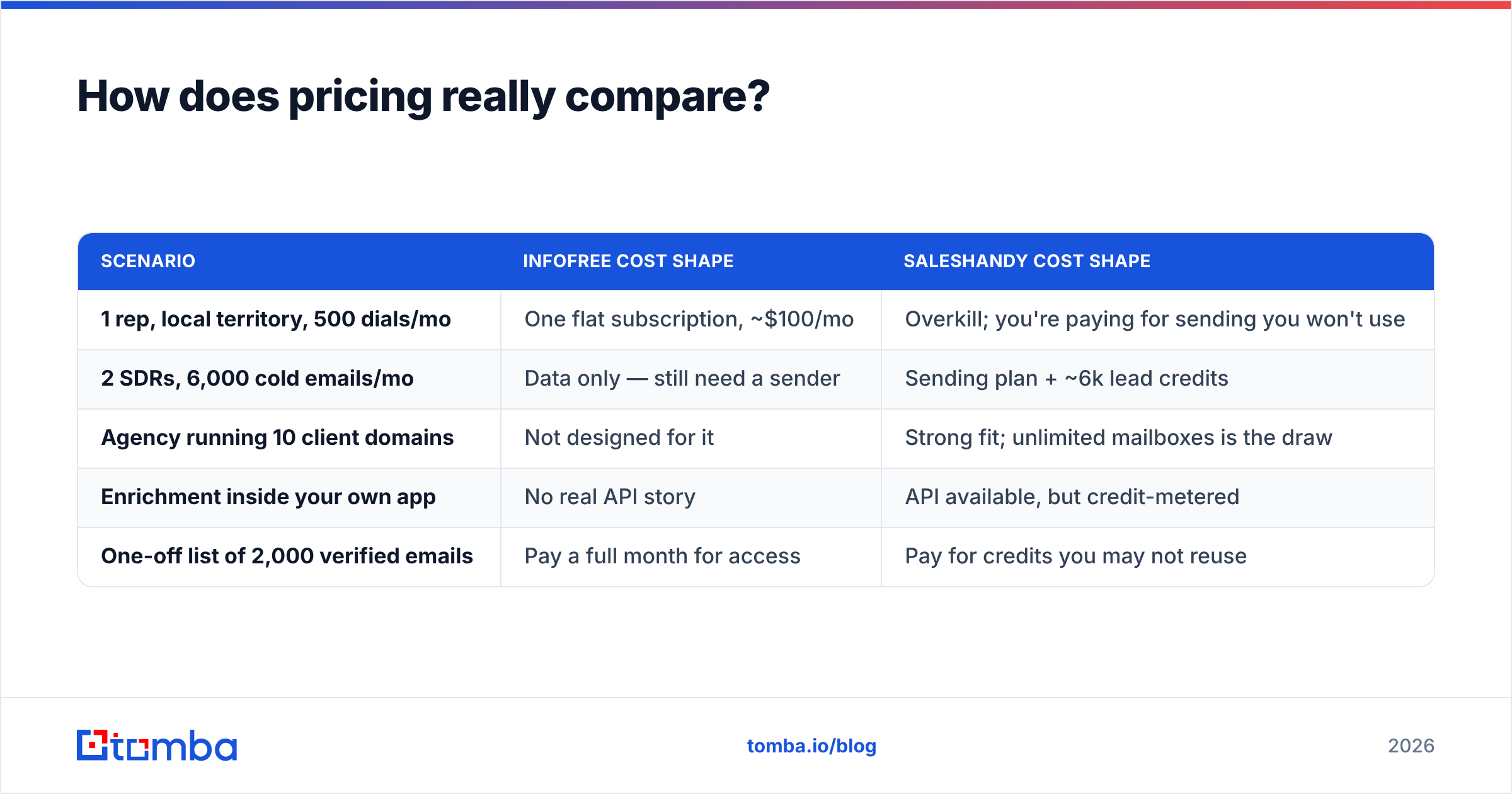
Sticker prices do not compare, because the units do not match. Infofree charges for access. Saleshandy charges for seats plus contact credits. Model your real usage instead.
| Scenario | Infofree cost shape | Saleshandy cost shape |
|---|---|---|
| 1 rep, local territory, 500 dials/mo | One flat subscription, ~$100/mo | Overkill; you're paying for sending you won't use |
| 2 SDRs, 6,000 cold emails/mo | Data only — still need a sender | Sending plan + ~6k lead credits |
| Agency running 10 client domains | Not designed for it | Strong fit; unlimited mailboxes is the draw |
| Enrichment inside your own app | No real API story | API available, but credit-metered |
| One-off list of 2,000 verified emails | Pay a full month for access | Pay for credits you may not reuse |
Two traps deserve names. With Infofree, "unlimited" usually carries a download cap per period. Unlimited viewing is not unlimited exporting, so read the plan terms.
With Saleshandy, the cheap sending tier really is cheap. Lead credits are what move the invoice. Verified credits cost more than unverified ones.
Buyers rate both on G2, and the split runs true to form. Infofree loses points on data accuracy and an aging UI. Saleshandy loses points on support speed and credit pricing. Both earn credit for value at their price.
Is Infofree or Saleshandy better for cold email in 2026?#
For cold email, Saleshandy wins. That one is not close. Infofree has no warmup, no sender rotation, no reply detection, and no bounce handling. In 2026 those are table stakes. Google and Microsoft expect signed domains, a complaint rate under 0.3%, and one-click unsubscribe. A database plan gives you none of it.
But "better for cold email" is not the same as "good enough to send to". The two layers fail on their own:
- Sequence failures look like low open rates, throttled mailboxes, and spam placement. Fix them with warmup, domain rotation, a slower ramp, and new copy.
- Data failures look like hard bounces, catch-all black holes, wrong-person replies, and "no longer with the company" autoresponders. Fix them with a better source and a verify pass. No sending tool can fix them for you.
That split is why strong outbound teams avoid the all-in-one buy. They keep a database for targeting, a finder for the address, a verifier for the list, and a sequencer for the send. Swapping one layer is then a one-vendor call, not a migration.
What's the best stack if neither one fully fits?#
Say your ICP is not SMB-local. Say you want more control over email accuracy than either vendor hands you. The modular stack looks like this.
Targeting layer. Pick the database that matches your ICP. Compiled data suits local and trade businesses. Profile-derived data suits tech and enterprise. BookYourData works well when you want pay-as-you-go verified lists with no subscription, and it is a fair peer to both tools here.
Address layer. Resolve the work email from a name plus a domain. A dedicated email finder beats a bundled database field. It re-derives the address at query time instead of serving a months-old cache.
Verification layer. SMTP-check everything before it enters a sequence, catch-all domains included.
Enrichment layer. Fill in title, company size, and tech stack so your tokens never render blank.
Sending layer. Use Saleshandy, or whatever sequencer your team already knows. This layer is the most commoditized and the easiest to swap.
Scale layer. For thousands of rows, a bulk email finder or a direct API call beats CSV shuffling. It also keeps the pipeline repeatable.
Run that stack and you can answer the question every VP asks. Was the low reply rate a data problem or a copy problem? When data and sending live in one vendor, you cannot tell.
Can you use Infofree and Saleshandy together?#
Yes. Infofree vs Saleshandy is not always an either-or call.
Pairing works for one profile in particular. A small US services firm sells to local businesses, dials all day, and wants a light email follow-up running in the background.
The workflow is simple. Pull a territory list from Infofree. Export it. Drop the domains into a domain search to find named contacts and email patterns. Verify the results. Upload the clean file into Saleshandy as a sequence. Infofree covers targeting and phone. The finder and verifier cover email accuracy. Saleshandy covers cadence and replies.
What fails is the shortcut. Export Infofree emails, send them straight from Saleshandy, and you get the bounce spike, the domain reputation hit, and a two-week recovery. That is the moment people blame the sequencer.
The verdict: which should you buy?#
Buy Infofree if your prospects are US small businesses and the phone is your main channel. You get list access at a flat monthly cost. Plan to buy separate tooling for email.
Buy Saleshandy if email leads your motion. It also fits if you run many domains or client accounts and want warmup, rotation, and reply handling in one place. Budget for lead credits, or bring your own data.
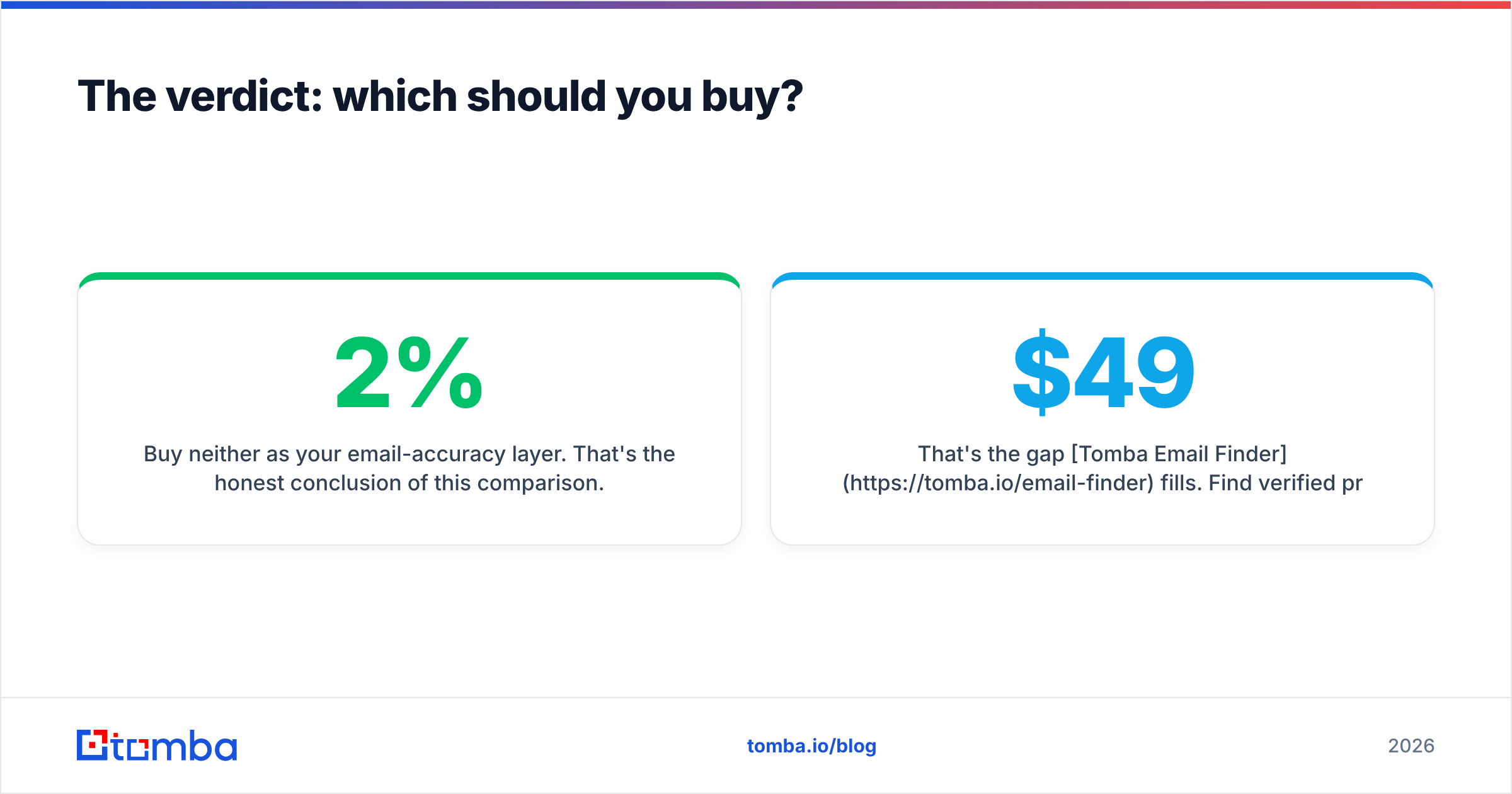
Buy neither as your email-accuracy layer. That is the honest end to the Infofree vs Saleshandy comparison. A database tells you who to contact. A sequencer delivers the message. The address in between decides whether you bounce at 2% or at 12%. It deserves a tool built for that one job.
Tomba Email Finder fills that gap. Find verified work emails by name, domain, or company. Verify them before they enter a sequence. Pull the whole thing through an API or a bulk upload. It fits whatever database and sequencer you already run. Start free with 25 searches a month. Paid plans begin at $49/mo on Starter, and the full Tomba pricing page is public.
Related guides#
// get started
Find, verify and enrich your first contacts today
Start on the free plan with 25 searches a month, then scale when your team is ready.
Free plan · No credit card required · GDPR & CCPA
// about the author