Infofree vs UpLead: Which B2B Lead Database Wins in 2026?
One sells unlimited US small-business lists for a flat fee. The other sells verified, credit-metered contacts with a 95% accuracy guarantee. Here is which one actually fits your outbound motion in 2026.
TL;DR
- Infofree is a flat-fee, US-centric list provider built on the old infoUSA lineage: unlimited-style access to business and consumer records, strong on phone numbers and mailing addresses, thin on verified business email.
- UpLead is a credit-metered contact database with real-time email verification and a widely advertised 95% accuracy standard, plus technographics and intent — better data, higher cost per contact.
- The infofree vs uplead decision is really a pricing-model decision: pay a flat monthly fee and accept noisy records, or pay per verified contact and accept a credit ceiling.
- Neither tool is an email-finding engine first. If your outbound runs on cold email, most teams end up pairing a database with a dedicated finder and verifier.
- Fastest sanity check: run 100 of your ideal accounts through both, bounce-test the emails, and compare cost per usable contact — not cost per record.
What is Infofree and who actually uses it?#
Infofree sells sales leads, mailing lists, and business credit reports to small businesses in the US and Canada. It descends from the infoUSA/Data Axle school of data: compiled records assembled from public filings, directories, phone listings, and survey data, refreshed on a batch cycle rather than in real time.
The pitch is volume for a predictable price. You pick a plan, you search by SIC code, geography, revenue band, employee count, or executive title, and you export lists inside your monthly download allowance. Plans bundle a lightweight CRM, a mobile app for door-to-door and territory work, and business credit reports — a package aimed squarely at insurance agents, local B2B services, franchise sales, and field reps who still work a map.
What Infofree is not: a modern GTM data platform. There is no intent scoring, no technographic filtering, and no real-time email validation at export. Coverage outside North America is minimal. You can see the current plan lineup on infofree.com — pricing has shifted several times, so treat any number you read in a blog post (including this one) as directional and confirm on the vendor page.
What is UpLead and how is it different?#
UpLead is a B2B prospecting database with a different core promise: every email you reveal is verified at the moment you reveal it. Instead of buying a list and hoping, you filter down to a segment, preview matches, and spend credits only on the records you actually take.
The filter set is where UpLead earns its price. You can stack firmographics with technographics (what software a company runs), intent signals, department and seniority, and location, then push results into HubSpot, Salesforce, Pipedrive, or a CSV. There is a Chrome extension for working LinkedIn and company sites directly.
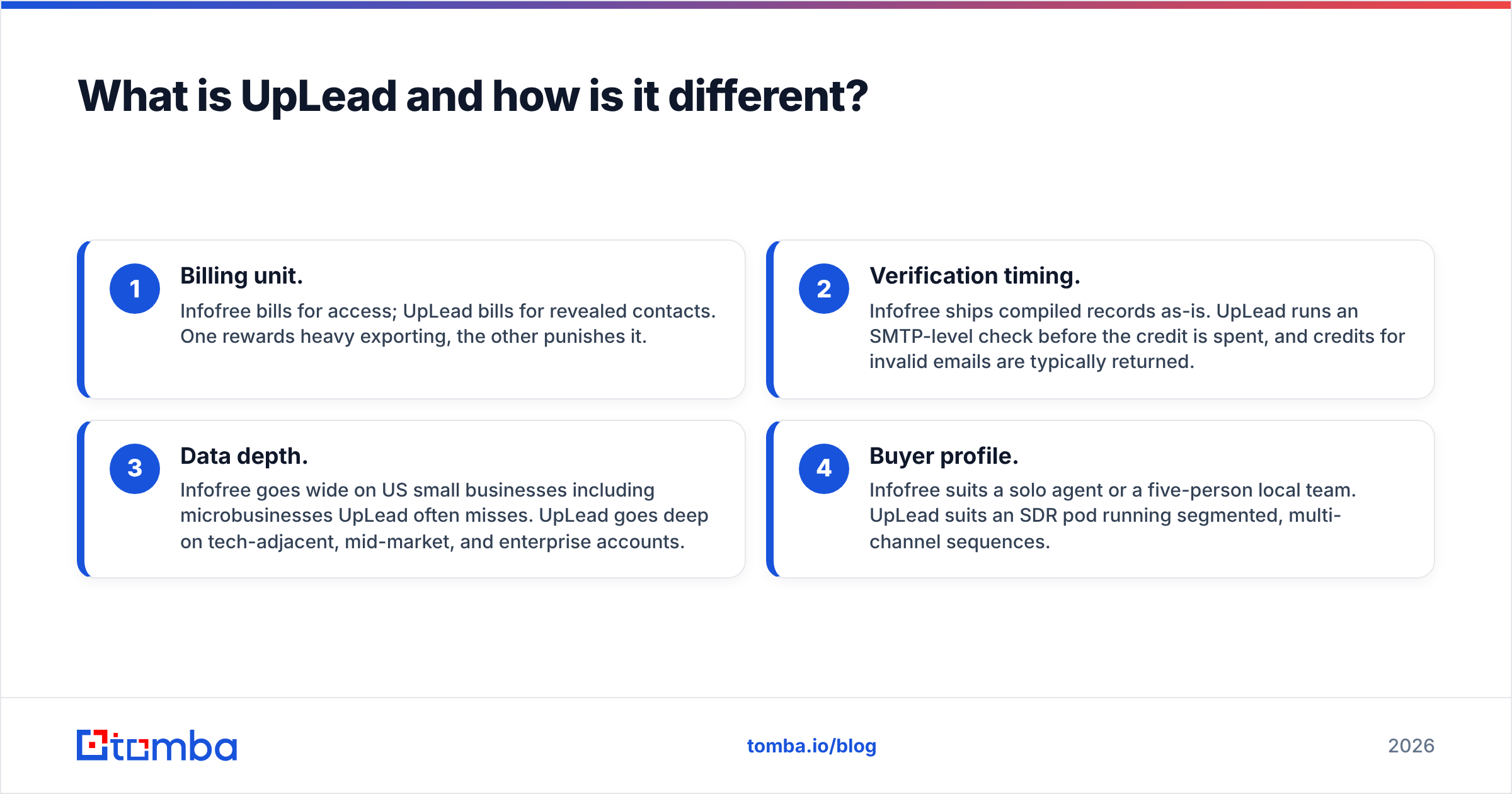
Here is the structural difference in four points:
- Billing unit. Infofree bills for access; UpLead bills for revealed contacts. One rewards heavy exporting, the other punishes it.
- Verification timing. Infofree ships compiled records as-is. UpLead runs an SMTP-level check before the credit is spent, and credits for invalid emails are typically returned.
- Data depth. Infofree goes wide on US small businesses including microbusinesses UpLead often misses. UpLead goes deep on tech-adjacent, mid-market, and enterprise accounts.
- Buyer profile. Infofree suits a solo agent or a five-person local team. UpLead suits an SDR pod running segmented, multi-channel sequences.
Infofree vs UpLead: how do they compare head-to-head?#

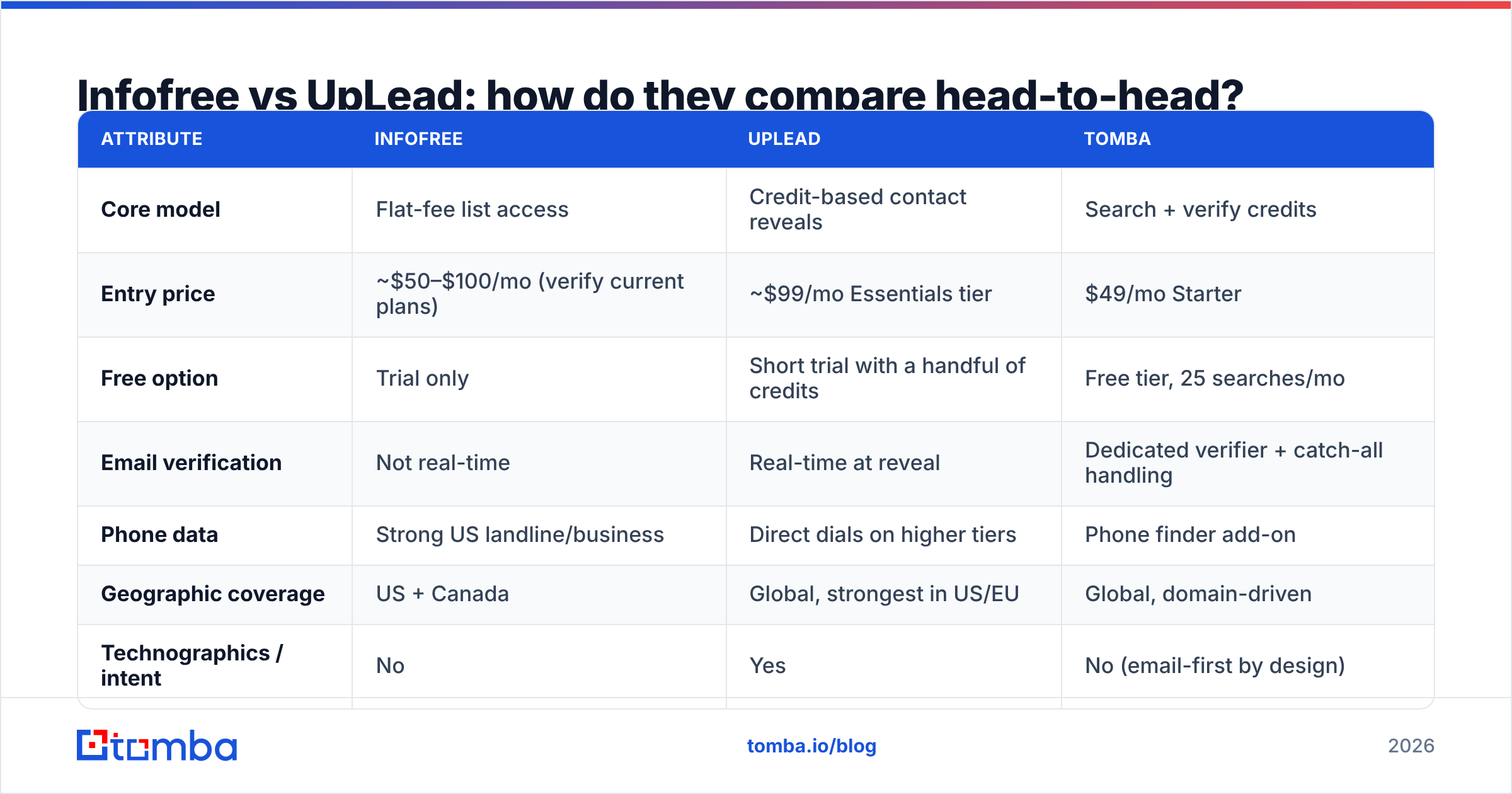
| Attribute | Infofree | UpLead | Tomba |
|---|---|---|---|
| Core model | Flat-fee list access | Credit-based contact reveals | Search + verify credits |
| Entry price | ~$50–$100/mo (verify current plans) | ~$99/mo Essentials tier | $49/mo Starter |
| Free option | Trial only | Short trial with a handful of credits | Free tier, 25 searches/mo |
| Email verification | Not real-time | Real-time at reveal | Dedicated verifier + catch-all handling |
| Phone data | Strong US landline/business | Direct dials on higher tiers | Phone finder add-on |
| Geographic coverage | US + Canada | Global, strongest in US/EU | Global, domain-driven |
| Technographics / intent | No | Yes | No (email-first by design) |
| API access | Limited | Yes, on higher tiers | Yes on all paid tiers |
| Best for | Local SMB, field sales, mailers | SDR teams, segmented outbound | Cold email at scale, enrichment pipelines |
Read that table as three different products that happen to overlap, not three versions of the same thing. Infofree wins on breadth-per-dollar in the US SMB long tail. UpLead wins on precision and on filters that let you build a list you would actually be proud to hand an SDR. A dedicated email finder wins when you already know the accounts and you only need the address.
Which one has better data accuracy?#

UpLead, clearly — but with an asterisk worth understanding.
Compiled databases like Infofree decay on a predictable curve. B2B contact data goes stale at roughly 25–30% per year as people change roles, companies rebrand, and offices close; that decay hits job titles and email addresses hardest, and mailing addresses least. Because Infofree does not validate emails at export, the decay lands on you as bounces.
UpLead's real-time check catches most of the dead addresses before you pay for them, which is why its published accuracy standard sits around 95%. The asterisk: real-time verification tells you a mailbox accepts mail. It does not tell you the person still works there, still owns the buying decision, or that the address is a personal inbox rather than a monitored info@ alias. Verified is not the same as right.
Three things move your real bounce rate more than the vendor logo:
- Catch-all domains. Roughly one in five B2B domains accepts everything at the SMTP layer, so a "valid" result is meaningless without deeper checks. A catch-all verifier is the only honest way to score those.
- Role accounts.
sales@,support@, andinfo@verify cleanly and convert terribly. Filter them out before import. - List age. A verified list is only verified on the day you pulled it. Re-verify anything older than 30 days before a send.

How does the pricing actually work?#
This is where most buyers get surprised, so separate the sticker price from the unit economics.
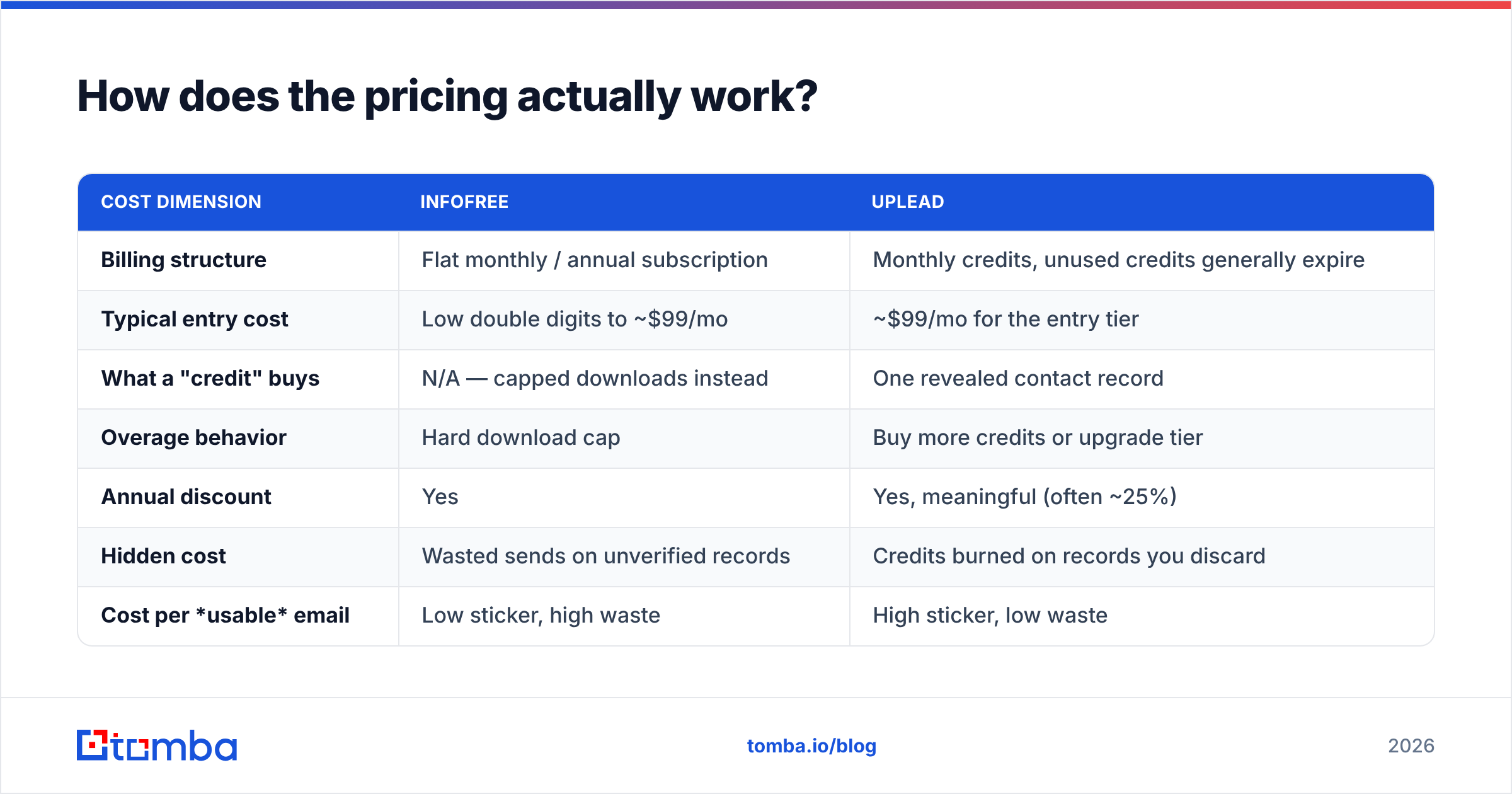
| Cost dimension | Infofree | UpLead |
|---|---|---|
| Billing structure | Flat monthly / annual subscription | Monthly credits, unused credits generally expire |
| Typical entry cost | Low double digits to ~$99/mo | ~$99/mo for the entry tier |
| What a "credit" buys | N/A — capped downloads instead | One revealed contact record |
| Overage behavior | Hard download cap | Buy more credits or upgrade tier |
| Annual discount | Yes | Yes, meaningful (often ~25%) |
| Hidden cost | Wasted sends on unverified records | Credits burned on records you discard |
| Cost per usable email | Low sticker, high waste | High sticker, low waste |
The honest math is cost per usable contact. If an Infofree plan gives you 5,000 downloads a month and 55% of the emails are deliverable and role-appropriate, you paid for 2,750 usable contacts. If UpLead's entry tier gives you 170 credits at ~90% usable, you paid a far higher per-contact rate for 153 contacts. Whether that is expensive depends entirely on your ACV. Selling $400/year business insurance to local shops? The cheap list wins. Selling $40k ARR software to RevOps leaders? The expensive, filtered contact wins, and it is not close.
For reference on the third model, Tomba pricing starts at $49/mo for Starter and $99/mo for Growth, with a free tier at 25 searches a month — useful mainly because it lets you run the bounce test described above before committing to anyone.
Who should choose Infofree?#
Pick Infofree if most of these are true:
- Your territory is US small business. Restaurants, contractors, clinics, retail — the long tail that tech-focused databases under-cover.
- Phone and mail beat email. Infofree's strength is the physical and voice channel, plus mailing-list output for direct mail campaigns.
- You want predictable cost. A flat fee with a download cap is easier to budget than credits that evaporate.
- You value the bundle. Business credit reports and a bundled CRM have real value for a solo agent who would otherwise buy three tools.
- You are comfortable cleaning data yourself. Plan to run every export through an email verifier before it touches a sending domain.
Skip it if you sell internationally, if you need job-change or intent signals, or if your entire motion is cold email — the email coverage will frustrate you.
Who should choose UpLead?#
Pick UpLead if:
- You segment tightly. Technographic and intent filters let you build a 300-account list that deserves a real sequence, instead of a 30,000-row dump.
- Deliverability is a board-level metric. Real-time verification keeps your bounce rate low enough to protect sender reputation.
- You need CRM hygiene. The integrations push clean records straight into HubSpot or Salesforce without a CSV middle step.
- Your deal sizes justify the credit price. At mid-market ACVs, one extra meeting pays for a year of credits.
Skip it if your monthly volume is high and your ACV is low — the credit model will either cap your team or blow up your bill.
What are the best Infofree and UpLead alternatives in 2026?#
Neither tool is the only answer, and the smartest stacks mix models:
- BookYourData — a solid choice when you want pay-as-you-go verified B2B lists without a subscription commitment, with strong guarantees on deliverability. Worth shortlisting alongside UpLead.
- Apollo — huge database plus a sequencer, though data quality varies by segment; see the Apollo alternative breakdown for how it stacks up.
- Tomba — email-first rather than list-first. You bring the company or the person; domain search returns the pattern and the team, the verifier scores each address, and the Tomba API wires it into your own enrichment job.
- ZoomInfo / Clearbit-class platforms — when you need enterprise coverage and have the budget to match.
A common and genuinely effective setup: use a database for discovery (who should I talk to?), then use a finder and verifier for contactability (what is the address, and will it bounce?). Buying one tool to do both is where teams overpay. If you want the vendor-neutral view of how these categories are defined, the lead intelligence category on G2 is a reasonable starting map.
How should you run the test before you buy?#
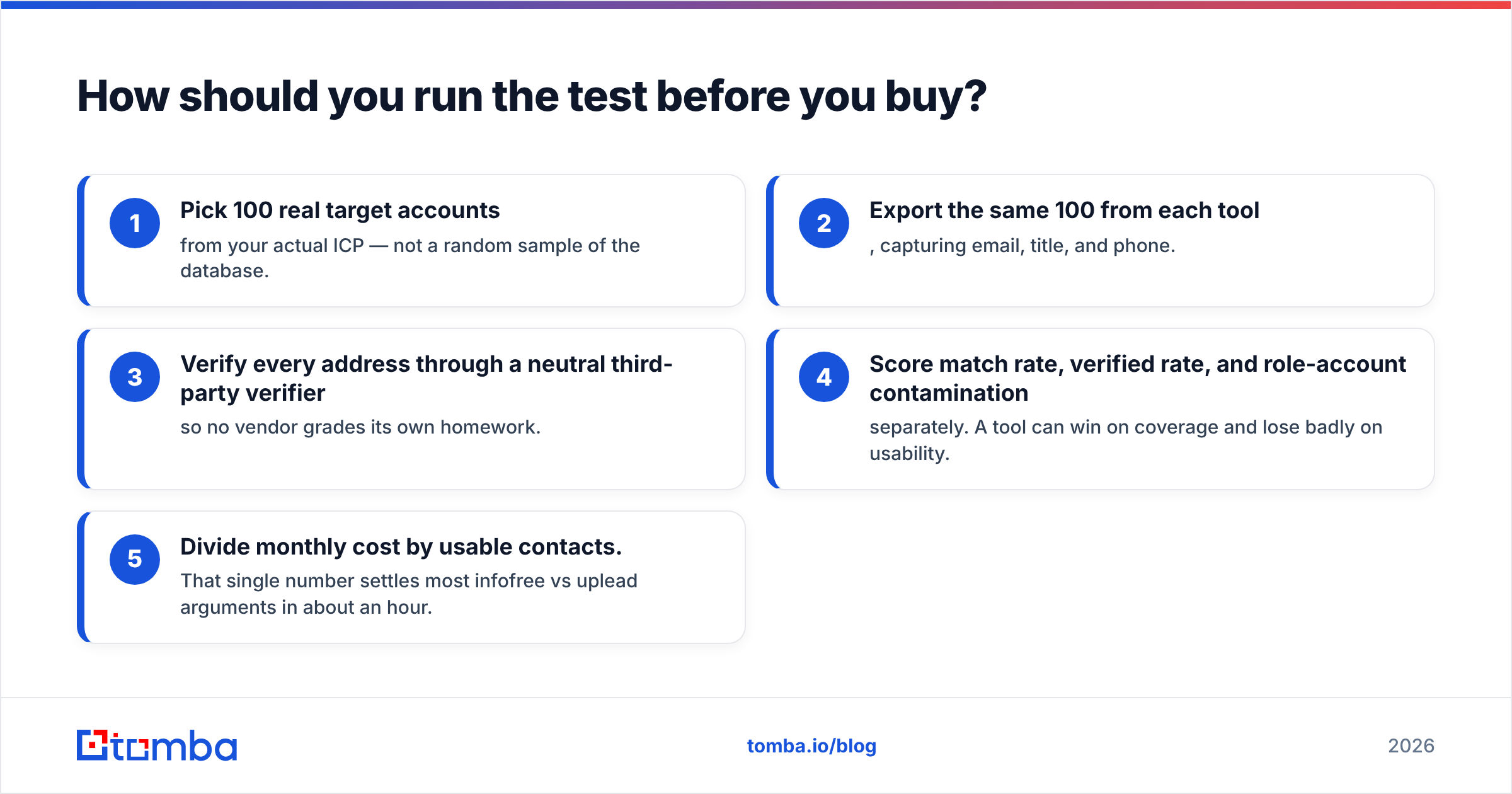
Do not trust anyone's accuracy claim, including this post's. Run a 100-account bake-off:
- Pick 100 real target accounts from your actual ICP — not a random sample of the database.
- Export the same 100 from each tool, capturing email, title, and phone.
- Verify every address through a neutral third-party verifier so no vendor grades its own homework.
- Score match rate, verified rate, and role-account contamination separately. A tool can win on coverage and lose badly on usability.
- Divide monthly cost by usable contacts. That single number settles most infofree vs uplead arguments in about an hour.
If you need to do this at volume, a bulk email finder will process the whole file at once instead of forcing one-by-one lookups.
The bottom line#
Infofree wins on price-per-record for US small-business, phone-and-mail-driven selling. UpLead wins on price-per-usable-record for segmented, email-driven outbound at mid-market and up. If your answer is "both sound wrong for us," you are probably a cold-email team that needs contactability more than it needs a database.
That is exactly the gap the Tomba Email Finder fills: give it a domain or a name, get back the verified professional email, with catch-all handling, bulk processing, and an API that drops into whatever pipeline you already run. Start on the free tier at 25 searches a month, test it against whichever database you shortlist, and let your own bounce report pick the winner — try the Tomba Email Finder.
Related guides#
// get started
Find, verify and enrich your first contacts today
Start on the free plan with 25 searches a month, then scale when your team is ready.
Free plan · No credit card required · GDPR & CCPA
// about the author