Inframail Pricing, Reviews, Pros and Cons: 2026 Breakdown
Inframail sells cold email infrastructure at a flat monthly rate instead of per-seat. Here is what the plans actually cost per inbox, where the model wins, and the three limits buyers hit in month two.

TL;DR
- Inframail sells cold email infrastructure — bulk inboxes on Microsoft or Google backends, with SPF, DKIM and DMARC pre-configured — at a flat monthly rate instead of per-seat licensing.
- Entry pricing sits around $99/month, and the appeal is simple math: once you need 15+ sending inboxes, flat-rate beats paying $6–$7.20 per seat plus your own DNS work.
- The strongest reviews come from agencies running 50–500 inboxes. The weakest come from solo founders who bought infrastructure to fix a problem that was actually a list-quality problem.
- Inframail does not touch your data. It routes mail; it does not tell you whether
first.last@company.comexists. That gap is where most "it didn't work" reviews originate. - Verify current plan limits on the vendor's own page before budgeting — cold email infrastructure pricing has repriced twice in the last 18 months across the whole category.
What is Inframail, and what does it actually sell?#
Inframail is an email infrastructure provider for outbound teams. Think of it as the difference between buying a car and renting a fleet: Google Workspace and Microsoft 365 sell you seats designed for employees, while Inframail sells you sending capacity designed for campaigns.
What you get when you buy is a bundle of four things that normally take a systems admin a full afternoon per domain:
- Bulk inbox provisioning — dozens or hundreds of mailboxes created across multiple sending domains, without clicking through an admin console for each one.
- Pre-configured authentication — SPF, DKIM and DMARC records written for you at setup, which is where most self-managed cold email stacks quietly break.
- Domain management — purchasing, connecting and organising the throwaway sending domains that protect your primary brand domain from reputation damage.
- Sequencer compatibility — SMTP/IMAP or API credentials that drop into Instantly, Smartlead, Saleshandy, Reply.io and the rest.
What it explicitly does not sell is contact data, a sequencer, or a reply-handling workflow. It is one layer of the stack. That boundary matters enormously when you read reviews, because a large share of negative sentiment is really a complaint that infrastructure alone did not produce meetings.
If you want the concept-level background on why any of this exists, the short version is that mailbox providers score senders, not messages. A refresher on email deliverability and sender reputation explains why volume gets distributed across many inboxes in the first place.
How does Inframail pricing work in 2026?#
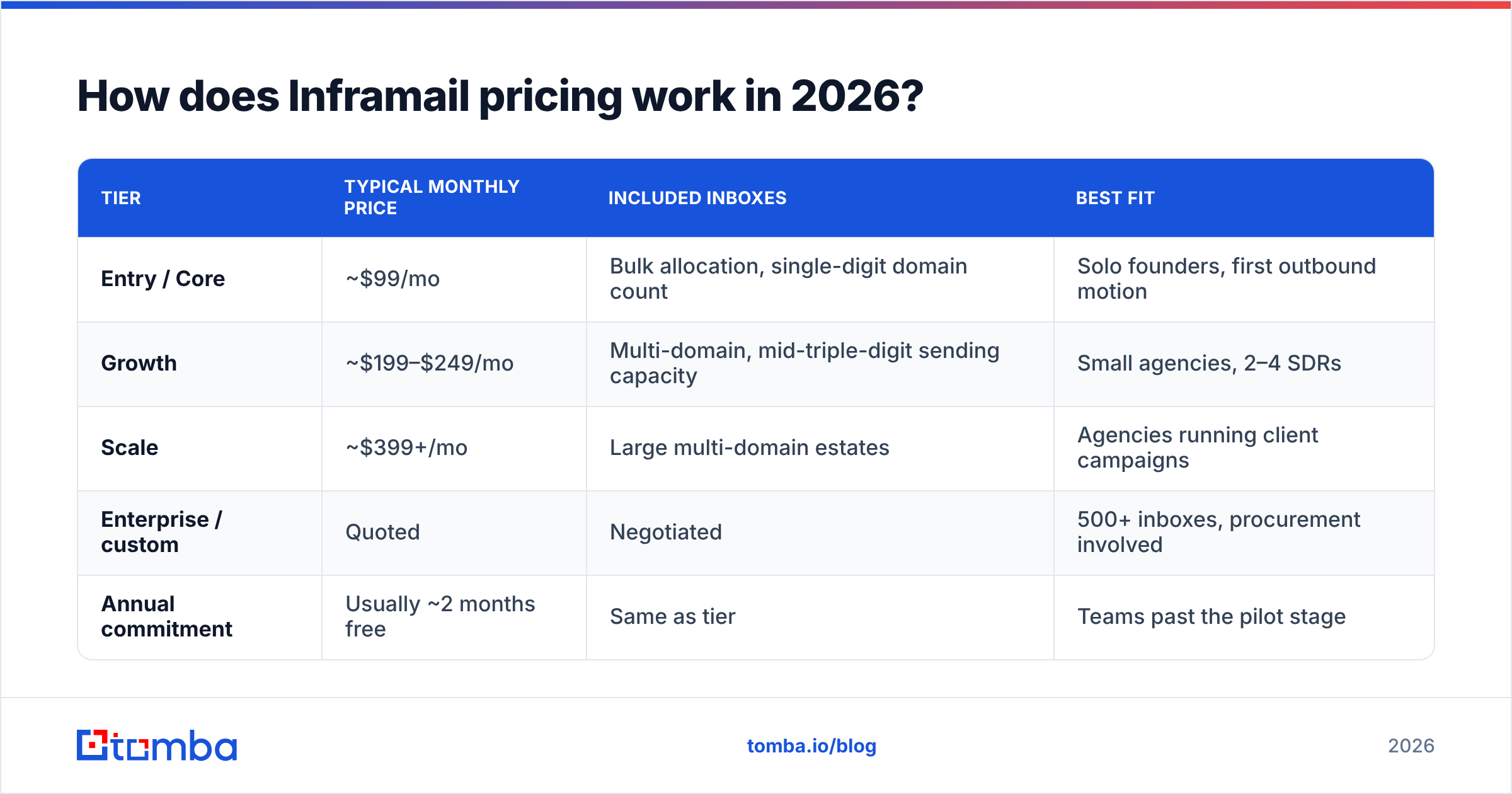
The pricing model is flat-rate per plan, not per-mailbox. That single design choice is the whole value proposition, and it is also the thing that makes direct comparison against Google or Microsoft confusing — you are comparing a bundle to a unit price.
Here is the shape of the market as of early 2026. Treat the figures as the published sticker price, not a quote: this category reprices often, and bundle limits (how many inboxes and domains each tier includes) have shifted more than the headline dollar figures have.
| Tier | Typical monthly price | Included inboxes | Best fit |
|---|---|---|---|
| Entry / Core | ~$99/mo | Bulk allocation, single-digit domain count | Solo founders, first outbound motion |
| Growth | ~$199–$249/mo | Multi-domain, mid-triple-digit sending capacity | Small agencies, 2–4 SDRs |
| Scale | ~$399+/mo | Large multi-domain estates | Agencies running client campaigns |
| Enterprise / custom | Quoted | Negotiated | 500+ inboxes, procurement involved |
| Annual commitment | Usually ~2 months free | Same as tier | Teams past the pilot stage |
Two structural notes that reviews consistently confirm:
Domains are a separate line item. Whether you buy them through the platform or bring your own from Cloudflare or Namecheap, sending domains cost roughly $10–$15/year each. A 50-inbox setup across 15 domains adds $150–$225/year that no pricing page advertises inside the subscription.
The sequencer is not included. Instantly, Smartlead or Saleshandy will run you another $37–$97/month. So the honest all-in cost of a "cheap" cold email stack starts closer to $150/month than $99.

What does an inbox really cost compared to alternatives?#
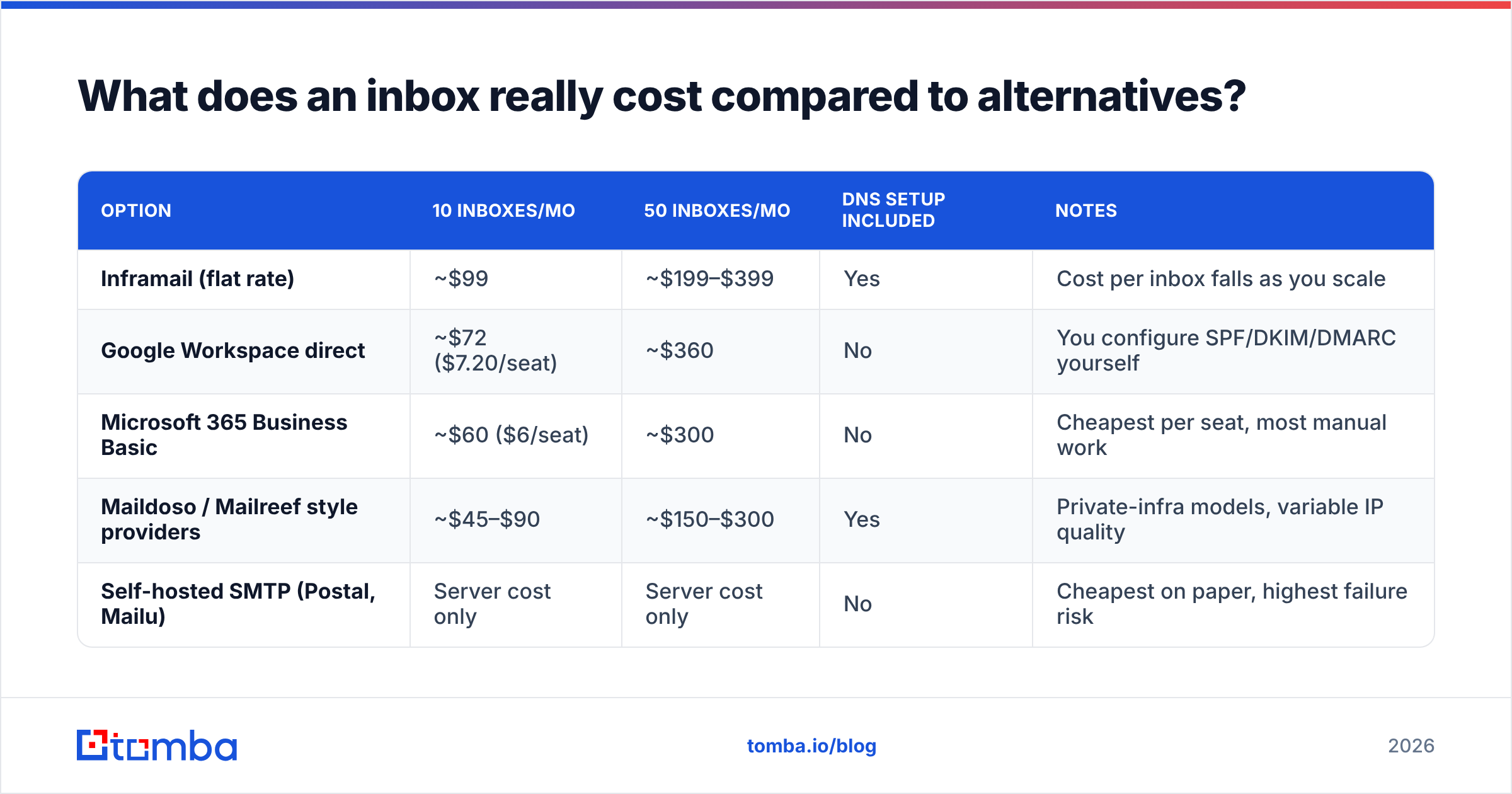
This is the calculation that decides the purchase. Below is the per-inbox math at the two volumes where teams actually make the decision — 10 inboxes and 50 inboxes.
| Option | 10 inboxes/mo | 50 inboxes/mo | DNS setup included | Notes |
|---|---|---|---|---|
| Inframail (flat rate) | ~$99 | ~$199–$399 | Yes | Cost per inbox falls as you scale |
| Google Workspace direct | ~$72 ($7.20/seat) | ~$360 | No | You configure SPF/DKIM/DMARC yourself |
| Microsoft 365 Business Basic | ~$60 ($6/seat) | ~$300 | No | Cheapest per seat, most manual work |
| Maildoso / Mailreef style providers | ~$45–$90 | ~$150–$300 | Yes | Private-infra models, variable IP quality |
| Self-hosted SMTP (Postal, Mailu) | Server cost only | Server cost only | No | Cheapest on paper, highest failure risk |
Read the table honestly and the verdict writes itself: below roughly 15 inboxes, buying seats directly from Google Workspace or Microsoft 365 is cheaper. Above 15, the flat rate starts winning, and above 50 it wins decisively — plus you stop paying an engineer's afternoon per domain to fix DNS records.
The deliverability question is separate from the cost question. Inframail sits on established Microsoft and Google backends rather than exotic private IP ranges, which reviewers generally rate as the safer choice. Providers that route through obscure infrastructure can be cheaper and land worse — and since Google and Yahoo tightened their bulk sender requirements, authentication failures get filtered faster than they used to.
What do Inframail reviews actually say?#
Aggregate sentiment across G2, Reddit's r/coldemail, and agency communities clusters into a consistent pattern. The praise is operational; the criticism is about scope and support.
What reviewers consistently praise:
- Setup speed. The recurring phrase is "45 minutes instead of two days." Provisioning 40 inboxes with correct DNS is the single most tedious task in outbound ops, and removing it is a real, felt benefit.
- Predictable billing. Agencies quoting client retainers like a fixed infrastructure line item that does not move when a campaign scales mid-month.
- Backend legitimacy. Sitting on Microsoft/Google infrastructure rather than a homegrown SMTP relay reassures teams that have been burned by cheap providers.
- Sequencer compatibility. Credentials drop into the major sequencers without friction, which is not universally true in this category.
What reviewers consistently criticise:
- Support responsiveness under load. The most common complaint is ticket latency during outages or migration windows. This is typical for lean infrastructure startups, but it is the recurring theme.
- Opaque bundle limits. Several reviewers report discovering inbox or domain caps after purchase rather than before. Read the plan page carefully.
- No warmup included in every tier. Many buyers assume warmup is bundled. Budget for it separately or use your sequencer's built-in warmup pool.
- It doesn't fix bad lists. The loudest one-star reviews describe bounce rates above 8% and blame infrastructure. That is almost never an infrastructure problem.
That last point deserves the rest of the article.
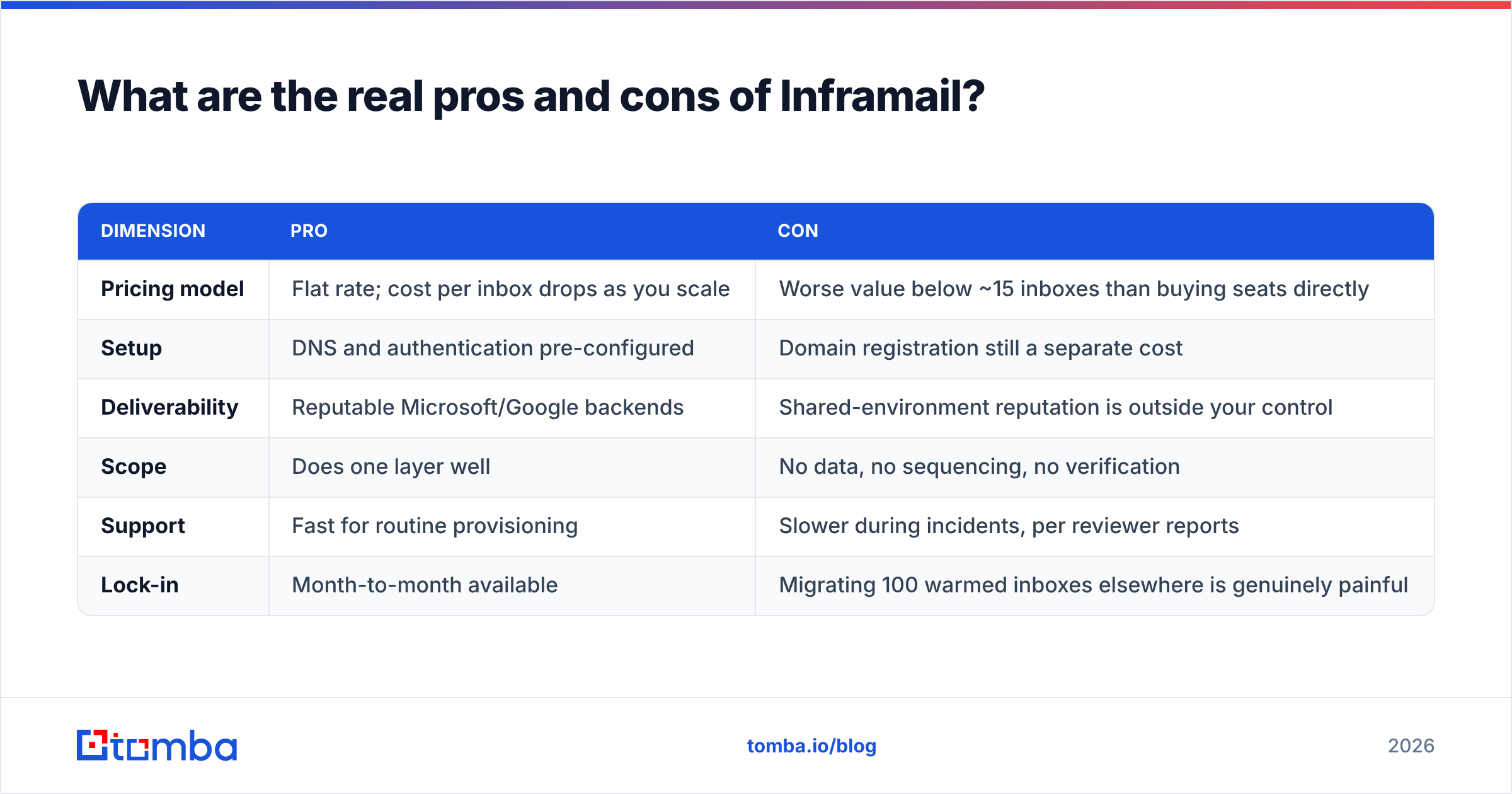
What are the real pros and cons of Inframail?#
| Dimension | Pro | Con |
|---|---|---|
| Pricing model | Flat rate; cost per inbox drops as you scale | Worse value below ~15 inboxes than buying seats directly |
| Setup | DNS and authentication pre-configured | Domain registration still a separate cost |
| Deliverability | Reputable Microsoft/Google backends | Shared-environment reputation is outside your control |
| Scope | Does one layer well | No data, no sequencing, no verification |
| Support | Fast for routine provisioning | Slower during incidents, per reviewer reports |
| Lock-in | Month-to-month available | Migrating 100 warmed inboxes elsewhere is genuinely painful |
The lock-in row is underrated. An inbox estate is not portable in any meaningful sense — the reputation you build lives with the mailbox, not with you. Switching providers at 100+ inboxes means a fresh 3–4 week warmup cycle. Factor that into the decision now, not in month nine.
Is Inframail worth it for your team?#
Match the buyer profile to the answer:
- Solo founder sending under 500 emails/month — No. Two Google Workspace seats and a careful DNS setup cost less and teach you how the plumbing works. Infrastructure is a scale problem you do not have yet.
- Small startup team, 2–3 SDRs, 15–40 inboxes — Probably. This is the crossover zone where the flat rate and the removed setup burden start paying for themselves.
- Lead-gen agency running client campaigns — Yes, with a caveat. Test support responsiveness during the trial by opening a deliberate ticket before you migrate client accounts onto it.
- Enterprise outbound team with IT support — Usually no. You already have Microsoft licensing, a security review process, and admins who can configure DMARC. The bundle duplicates what you own.
- Anyone with a bounce rate above 5% today — Fix your data before you buy more inboxes. New infrastructure will burn exactly as fast as the old infrastructure did.
What does infrastructure not fix?#
Infrastructure decides whether your email can be delivered. Data decides whether there is anyone at the other end to deliver it to. Those are different failure modes with identical symptoms, which is why so many buyers misdiagnose.
Here is the failure chain in plain terms. You buy 50 inboxes. You load a scraped list with a 12% invalid rate. Every invalid address produces a hard bounce. Mailbox providers read a hard-bounce rate above 2% as a spam signal. Within three weeks, all 50 brand-new inboxes are filtered — not because the infrastructure was bad, but because you fed it a list that told Google you were guessing.
The fix runs in this order, and skipping a step wastes the ones before it:
- Source real addresses, not permutations. Guessing
first.last@and hoping is what produces the bounce rate in the first place. Use a proper email finder that returns a confidence score, not a pattern generator. - Verify before every send, not once per quarter. B2B data decays at roughly 2–3% per month as people change jobs. A list verified in January is materially worse by April. Run it through an email verifier before each campaign.
- Handle catch-all domains deliberately. Catch-all servers accept everything, so standard verification returns "unknown." A dedicated catch-all verifier is the difference between a usable segment and a coin flip.
- Deduplicate and segment by role. Sending three variants of the same message to
info@,sales@and a named contact at one company is a spam-complaint generator.
Get those four right and a modest inbox estate outperforms a large one fed with junk. That is not a rhetorical flourish — a 30-inbox setup on a 98%-deliverable list will out-book a 200-inbox setup on an 85%-deliverable list, at a fraction of the monthly spend.
How should you budget the full stack?#
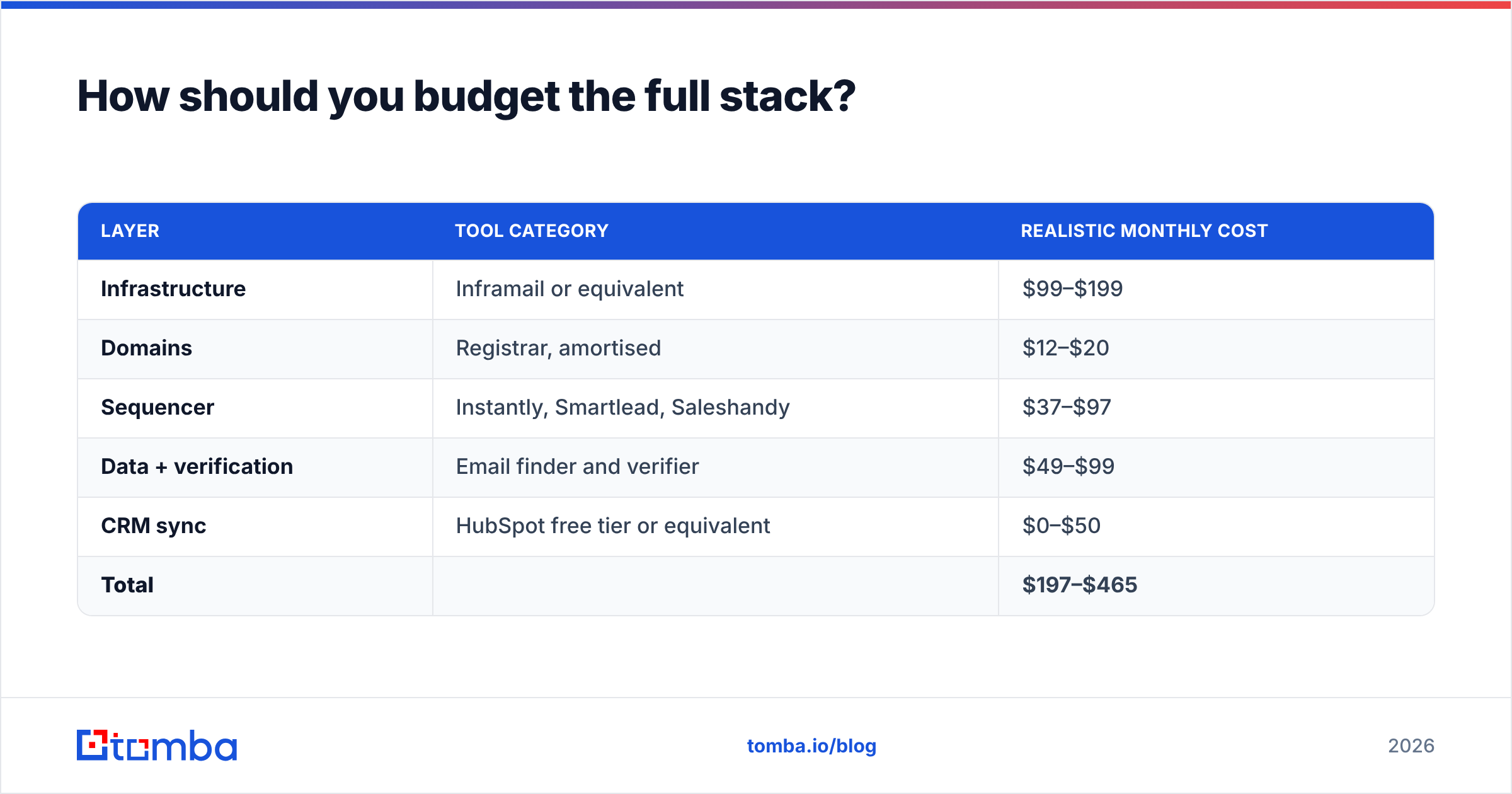
Price the whole system, not the infrastructure line. A realistic monthly budget for a team sending ~10,000 emails per month:
| Layer | Tool category | Realistic monthly cost |
|---|---|---|
| Infrastructure | Inframail or equivalent | $99–$199 |
| Domains | Registrar, amortised | $12–$20 |
| Sequencer | Instantly, Smartlead, Saleshandy | $37–$97 |
| Data + verification | Email finder and verifier | $49–$99 |
| CRM sync | HubSpot free tier or equivalent | $0–$50 |
| Total | $197–$465 |
Compare that to Tomba pricing, where the Starter plan runs $49/month and Growth $99/month, with a free tier at 25 searches per month for testing the data quality before committing. The data layer is typically the cheapest line in the table and the one that determines whether the other four lines produce revenue.
If you are also evaluating adjacent vendors, it is worth noting that pure-play contact databases like BookYourData solve a different part of the same problem — bulk list purchase rather than targeted lookup — and some teams run both: a database for volume, a finder for named-account precision.
What's the verdict on Inframail pricing?#
Inframail is a reasonable purchase for teams that have already proven their outbound motion and now need to scale sending capacity without hiring an ops person. The flat-rate model is honest, the crossover point is around 15 inboxes, and the Microsoft/Google backend is the conservative choice in a category full of shortcuts. Check current plan limits directly on inframail.io before you budget, because bundle definitions move faster than prices do.
It is a bad purchase if you are buying it to fix reply rates. No infrastructure provider — this one included — can make a wrong address deliverable.
Start by measuring your bounce rate on the list you already have. If it is above 3%, your money belongs in the data layer first. Tomba's Email Finder returns verified, source-attributed business emails with a confidence score on every result, so the inboxes you are paying for send to people who actually exist. Test it free with 25 searches a month, clean your list, then decide how much infrastructure you genuinely need — you will probably need less than you think.
Related guides#
// get started
Find, verify and enrich your first contacts today
Start on the free plan with 25 searches a month, then scale when your team is ready.
Free plan · No credit card required · GDPR & CCPA
// about the author