Inside Sales CRM in 2026: How to Choose the Right One
Every inside sales CRM promises more calls and a cleaner pipeline. The real gap shows up in dialer seats, data decay, and whether reps actually log anything. Here's how the main platforms compare in 2026.
TL;DR
- An inside sales CRM is optimised for high-volume remote selling: call logging, sequences, queue-based work, and activity reporting — not territory maps and field visit check-ins.
- List price per seat is the smallest part of your real cost. Dialer minutes, enrichment credits, sandbox environments, and implementation hours routinely double it.
- The platform matters less than the data inside it. A CRM with 30% stale contacts produces bad forecasts no matter how good the UI is.
- For teams under 20 reps, Pipedrive, Close, or HubSpot Starter get you selling in a week. Above 50 reps with custom process, Salesforce and HubSpot Enterprise start earning their premium.
- Budget for data hygiene as a line item, not an afterthought. Verifying and enriching contacts before they hit the CRM is cheaper than cleaning them after.
What is an inside sales CRM?#
An inside sales CRM is a customer relationship management system built for reps who sell entirely by phone, email, and video — never leaving the office. The workflow assumption is different from a general CRM: instead of a rep managing 20 accounts across a territory, an inside sales rep is working a queue of 300 leads and needs the system to tell them who to contact next, on which channel, with what context.
Think of it like the difference between a taxi and a subway. A field sales CRM is a taxi — flexible routing, one rider at a time, the driver decides the path. An inside sales CRM is a subway — fixed lines, high throughput, optimised for moving a lot of people through the same few stops per hour. Both are transport. They are not interchangeable.
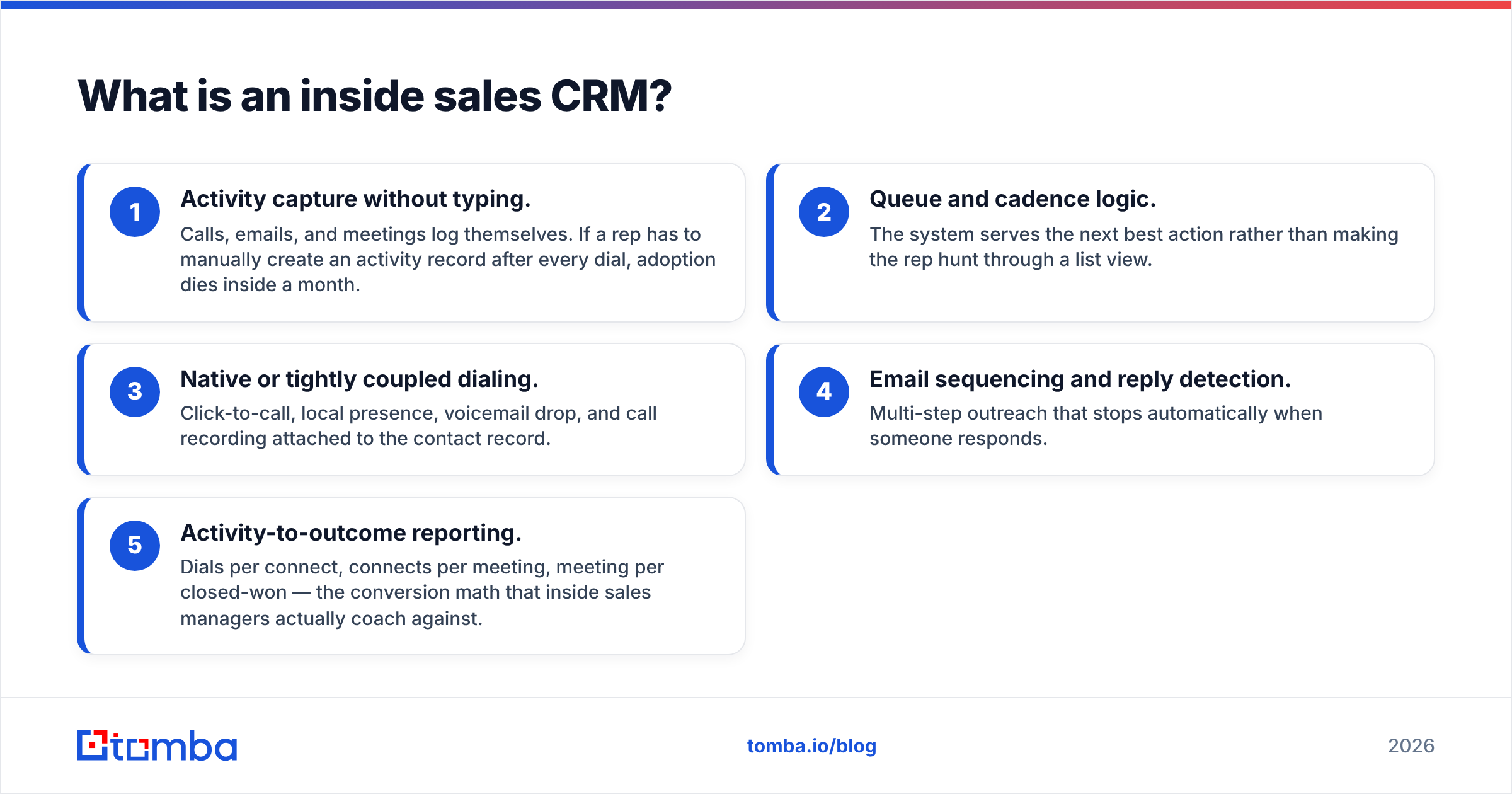
Technically, that means an inside sales CRM emphasises five things:
- Activity capture without typing. Calls, emails, and meetings log themselves. If a rep has to manually create an activity record after every dial, adoption dies inside a month.
- Queue and cadence logic. The system serves the next best action rather than making the rep hunt through a list view.
- Native or tightly coupled dialing. Click-to-call, local presence, voicemail drop, and call recording attached to the contact record.
- Email sequencing and reply detection. Multi-step outreach that stops automatically when someone responds.
- Activity-to-outcome reporting. Dials per connect, connects per meeting, meeting per closed-won — the conversion math that inside sales managers actually coach against.
If a platform gives you four of those five natively, it is an inside sales CRM. If it gives you two and expects you to bolt on the rest, you are buying a general CRM and a second budget line.
How is an inside sales CRM different from a general CRM?#
The honest answer: less than vendors imply, and more than buyers expect.
Most modern platforms — HubSpot, Salesforce, Zoho — are general CRMs with an inside sales layer sold as a higher tier. Purpose-built inside sales tools like Close and Freshsales invert that: dialing and sequencing are the core, and the CRM record exists to support them.
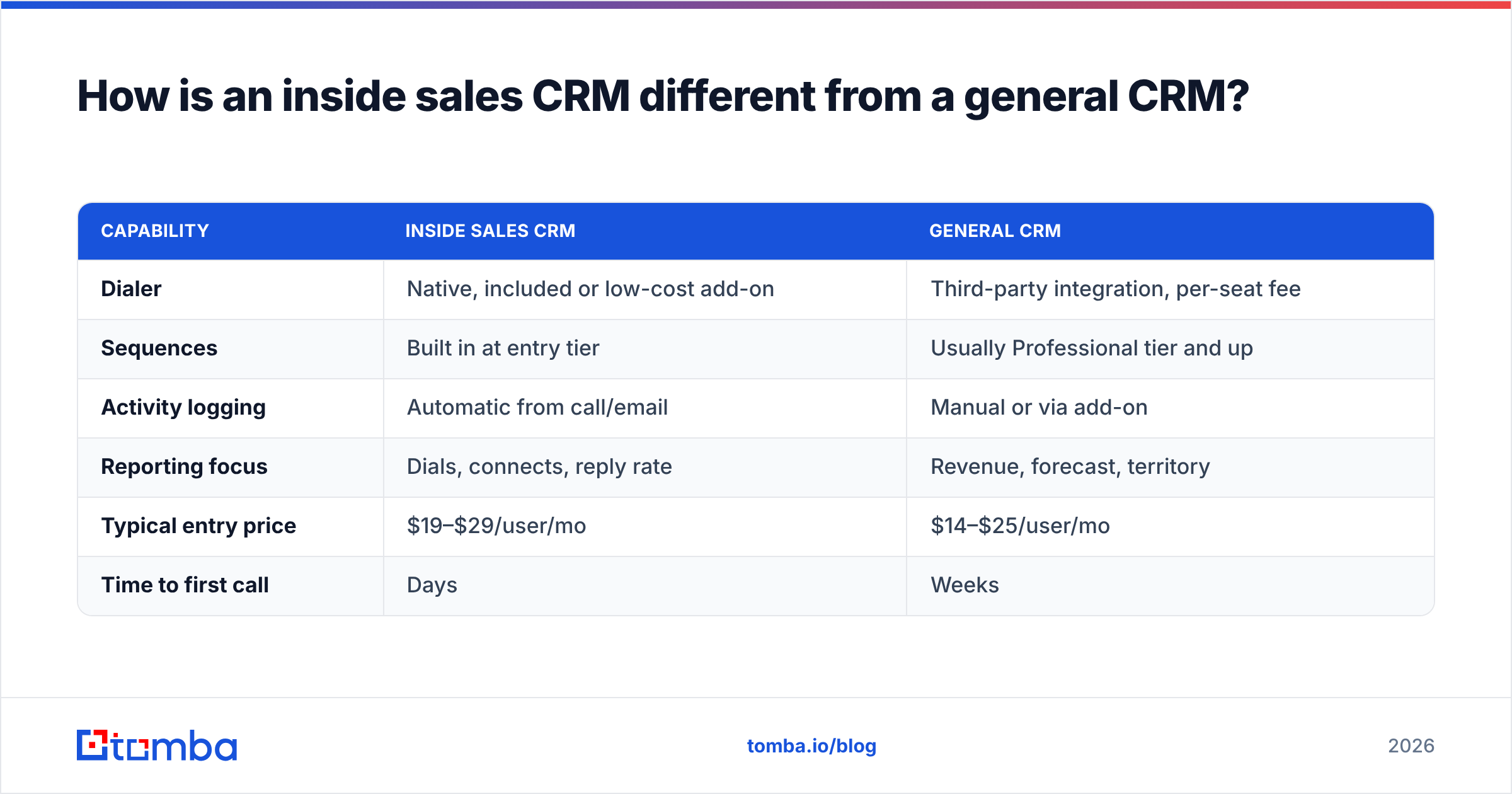
| Capability | Inside sales CRM | General CRM |
|---|---|---|
| Dialer | Native, included or low-cost add-on | Third-party integration, per-seat fee |
| Sequences | Built in at entry tier | Usually Professional tier and up |
| Activity logging | Automatic from call/email | Manual or via add-on |
| Reporting focus | Dials, connects, reply rate | Revenue, forecast, territory |
| Typical entry price | $19–$29/user/mo | $14–$25/user/mo |
| Time to first call | Days | Weeks |
The practical consequence: if you buy a general CRM for an inside team, your first-year cost lands close to a purpose-built tool anyway once you add a dialer and a sequencing tool. You just carry two more vendors and one more integration to babysit.
Which inside sales CRM should you choose in 2026?#
There is no universal winner. There are four realistic profiles, and the right pick falls out of which one you are.
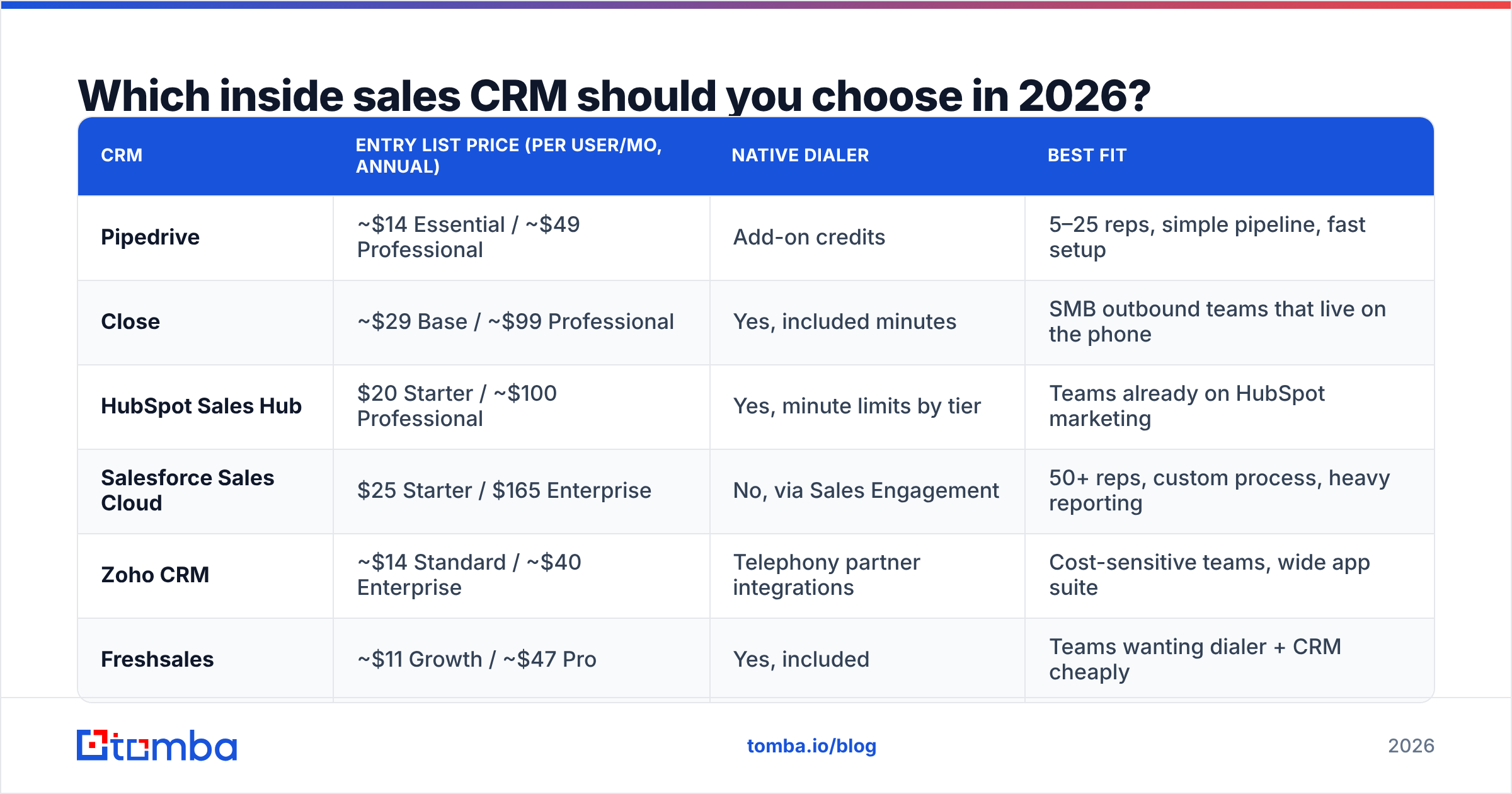
| CRM | Entry list price (per user/mo, annual) | Native dialer | Best fit |
|---|---|---|---|
| Pipedrive | ~$14 Essential / ~$49 Professional | Add-on credits | 5–25 reps, simple pipeline, fast setup |
| Close | ~$29 Base / ~$99 Professional | Yes, included minutes | SMB outbound teams that live on the phone |
| HubSpot Sales Hub | $20 Starter / ~$100 Professional | Yes, minute limits by tier | Teams already on HubSpot marketing |
| Salesforce Sales Cloud | $25 Starter / $165 Enterprise | No, via Sales Engagement | 50+ reps, custom process, heavy reporting |
| Zoho CRM | ~$14 Standard / ~$40 Enterprise | Telephony partner integrations | Cost-sensitive teams, wide app suite |
| Freshsales | ~$11 Growth / ~$47 Pro | Yes, included | Teams wanting dialer + CRM cheaply |
Prices are list prices as advertised in early 2026 and change frequently — always confirm on the vendor's own pricing page before budgeting, and check recent verified reviews on G2 for how each one behaves at your team size.

The pattern in the table that matters most: the gap between entry tier and the tier where inside sales features actually appear. Salesforce Starter at $25 looks competitive with Pipedrive Essential. It is — until you need sequences, at which point you are pricing Enterprise plus Sales Engagement and the number stops being comparable. HubSpot has the same shape: Starter is genuinely usable for a small team, but workflow automation and custom reporting live in Professional.
What does an inside sales CRM really cost?#
Take your seat price and multiply by roughly 1.8 for year one. That is the rule of thumb that survives contact with actual invoices.
The additions that catch teams out:
- Dialer minutes and numbers. A rep making 60 dials a day burns real telephony spend. Vendors that "include" calling include a bucket, and heavy teams exceed it.
- Enrichment and data credits. Most CRMs sell contact data as a separate credit pool. It runs out faster than you plan for.
- Implementation. Salesforce and HubSpot Enterprise deployments commonly involve a partner. Budget weeks, not days.
- Integration glue. Zapier, Make, or a middleware seat to connect the CRM to your email finder, enrichment source, and billing system.
- The second tool you swore you wouldn't need. Usually a sequencer, sometimes a conversation intelligence tool.
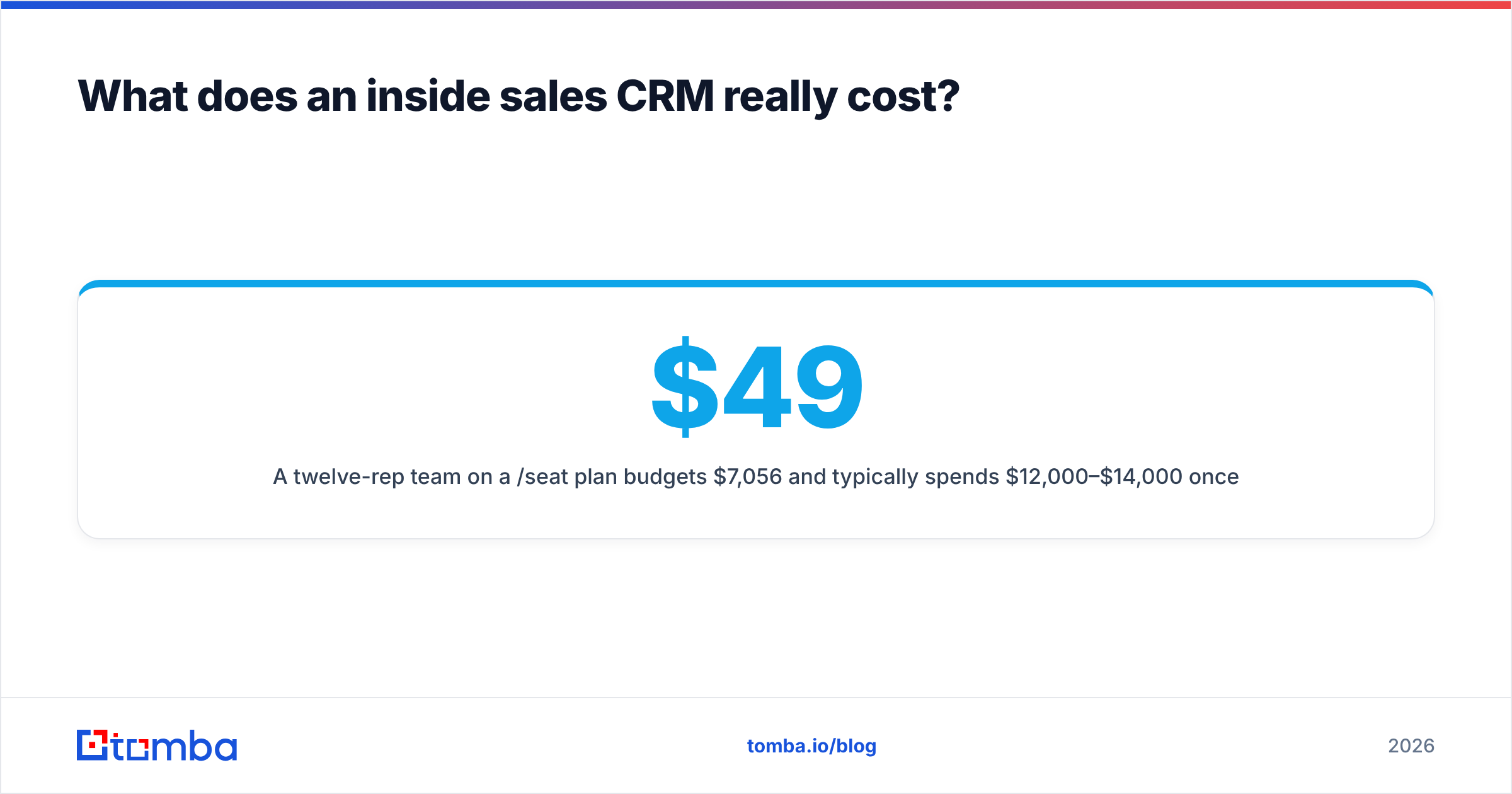
A twelve-rep team on a $49/seat plan budgets $7,056/year and typically spends $12,000–$14,000 once dialing, data, and integration land. That is not a scandal — it is just the real number. Plan for it and the CRM looks fine. Ignore it and you are renegotiating in month four.
Does contact data quality matter more than the CRM itself?#
Yes, and it is not close.
B2B contact data decays at roughly 22–30% per year through job changes, company moves, and domain changes. That decay rate is the single largest determinant of whether your CRM reporting is trustworthy. A pipeline report built on records where a quarter of the emails bounce is not a forecast — it is a guess with a chart attached.
Three practical consequences:
- Verify before import, not after. Bounced sends damage your sending domain, and recovering sender reputation takes far longer than the verification step you skipped. Running a list through an email verifier before it enters the CRM costs cents per record.
- Enrich at the point of creation. When a lead enters the system, fill in title, company size, and phone immediately. Retro-enriching 40,000 stale records is a project; enriching one record at creation is a webhook. Contact data enrichment at the API layer keeps the CRM clean by default.
- Re-check quarterly. Set a recurring job that re-verifies contacts untouched for 90 days and flags them. It is the cheapest forecast accuracy improvement available to you.
Most CRMs will happily sell you their own enrichment credits. That is convenient and often fine. It is also the line item where switching to a dedicated provider tends to cut cost meaningfully, because CRM-bundled data is priced for convenience rather than volume.
How do you get reps to actually use it?#
Adoption is where inside sales CRM projects die, and it almost never dies for technical reasons.

Four things separate the deployments that stick from the ones that quietly become a spreadsheet again:
- Every required field must earn its place. If a rep has to fill eight fields to log a call, they will log fewer calls. Three fields, maximum, and two of them should be auto-populated.
- The CRM must be faster than the alternative. If dialing from the CRM takes four clicks and dialing from a mobile phone takes one, you already lost.
- Managers coach from the CRM, not around it. If the weekly pipeline review runs off a separate spreadsheet the manager maintains, reps correctly conclude the CRM is optional.
- One source of truth for contact records. When reps keep a private list because the CRM's data is wrong, the problem is the data, not the discipline. Fix the data and the private lists disappear.
That last point ties directly back to hygiene. Rep trust in the system is a function of how often the number they dial actually connects. Clean data is an adoption lever, not just a reporting one.
How do you migrate without losing pipeline?#
Migration is a five-step sequence, and skipping step two is the most common failure.
- Freeze and export. Pull a full export of contacts, companies, deals, activities, and custom fields from the legacy system. Keep the raw file untouched as a rollback.
- Clean before you load. Deduplicate, standardise company domains, verify emails, and drop records with no usable contact point. Loading garbage into a new CRM just relocates the garbage — and you will be blamed for it.
- Map fields explicitly. Build a mapping sheet: source field, destination field, transformation rule. Custom fields and picklist values are where silent data loss happens.
- Pilot with one pod. Migrate a single team for two weeks before the full cutover. They will find the five problems your mapping sheet missed.
- Run parallel for one cycle. Keep the old system read-only for one full sales cycle so nobody loses a deal to a mapping error.
If you need to rebuild missing contact points during step two — records with a name and company but no email — a bulk email finder run against the export recovers a meaningful share of them before load rather than leaving reps to research manually afterward. The same applies to phone gaps, where a phone finder pass fills in dialable numbers for accounts that only carry a switchboard line.
What should your inside sales CRM report on?#
If your CRM dashboard cannot answer these five questions in under a minute, the configuration is wrong regardless of which vendor you chose:
- Dials to connect ratio, by rep and by list source. This tells you whether a rep needs coaching or a list needs replacing.
- Connect to meeting ratio. Pure talk-track quality. Coach it with call recordings.
- Email response rate by sequence step. Shows which step in the cadence is dead weight.
- Stage-to-stage conversion and average time in stage. Where deals actually stall, as distinct from where reps say they stall.
- Bounce and invalid-contact rate by data source. The leading indicator for everything above it.
That last metric is the one almost nobody instruments, and it is the one that explains the others. When dials-to-connect drops 15% in a month, the cause is usually the list, not the rep.
Which one should you actually buy?#
Short version, by team shape:
- Under 10 reps, simple pipeline, need to sell this month: Pipedrive or Freshsales. Low cost, fast setup, adequate reporting.
- 10–30 reps, phone-heavy outbound: Close. The dialer-first design removes the most friction per dial, and the pricing stays sane.
- Already running HubSpot marketing: HubSpot Sales Hub. The shared contact record is worth more than any feature comparison.
- 50+ reps, custom process, multi-product: Salesforce. Expensive and slow to deploy, and still the right answer when process complexity is real.
- Cost-constrained with technical staff: Zoho, connected via API to your data stack.
Whichever you choose, connect it to your data layer rather than paying the CRM for bundled credits. Most teams run this through Zapier, a direct HubSpot integration, or a few lines against an API at the point where records are created.
Start with the data, not the logo#
The CRM decision is reversible. The data decision compounds. Teams that migrate CRMs every three years but keep a disciplined verification and enrichment pipeline end up with clean history either way. Teams that pick the "best" CRM and feed it unverified lists end up with an expensive archive of bounced sends.
If you are standing up a new inside sales CRM — or cleaning one that drifted — start by fixing what goes into it. The Tomba Email Finder finds and verifies professional email addresses by name, domain, or company, so records enter your pipeline already usable. The free tier gives you 25 searches a month to test it against your own list before committing, with Starter at $49/mo and Growth at $99/mo when you scale; full Tomba pricing is public and per-credit, so you can model the cost against your migration volume before you load a single row.
Related guides#
// get started
Find, verify and enrich your first contacts today
Start on the free plan with 25 searches a month, then scale when your team is ready.
Free plan · No credit card required · GDPR & CCPA
// about the author