Inside Sales Productivity: The 2026 Benchmarks and Fixes
Inside sales teams lose more hours to bad data and admin than to a lack of effort. Here are the 2026 benchmarks, the real time sinks, and the fixes that actually move meetings booked per rep.
TL;DR
- Inside sales productivity is not activity volume. It is qualified pipeline created per selling hour — and most teams have never measured the denominator.
- The average inside sales rep spends roughly a third of the workweek actually selling. The rest disappears into research, data cleanup, CRM hygiene, and internal meetings.
- Bad contact data is the single most expensive productivity tax: it burns dial time, wrecks deliverability, and corrupts every downstream metric.
- Fix the data layer before you buy another dialer or sequencer. A 20% lift in list accuracy usually beats a 20% lift in activity targets.
- Track five metrics — connect rate, reply rate, meetings per 100 contacts, selling-hour ratio, and pipeline per rep-day — and review them weekly, not quarterly.
What does inside sales productivity actually mean?#
Inside sales productivity is the qualified pipeline a remote-selling rep generates per hour of available selling time. That definition matters because almost every team measures the numerator and ignores the denominator.
Think of it like a restaurant kitchen. You can judge a line cook by how many plates go out, but if half the shift is spent hunting for ingredients that were never delivered, the problem is not the cook's speed. It's procurement. Most "productivity problems" in inside sales are procurement problems wearing a coaching-conversation costume.
Technically, the formula looks like this:
Productivity = Qualified pipeline ($) / (Rep hours available x Selling-hour ratio)Two levers, not one. You can raise output by adding hours — which is how most teams burn out SDRs by month nine — or by raising the fraction of each hour that's actually spent in front of a buyer. The second lever is nearly always cheaper and it compounds.
Which inside sales productivity metrics actually matter?#
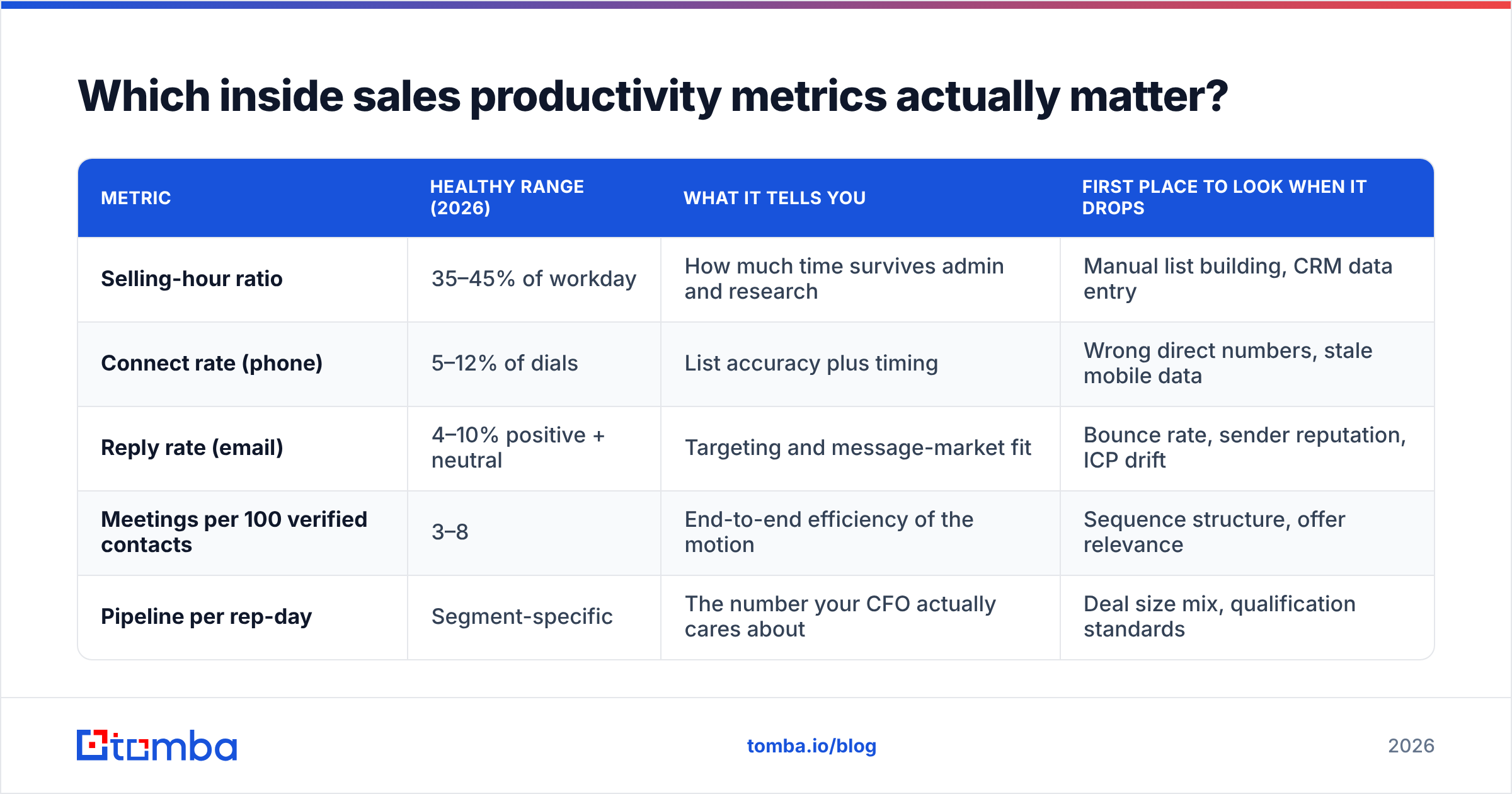
Five. Everything else is a diagnostic for one of these five.
| Metric | Healthy range (2026) | What it tells you | First place to look when it drops |
|---|---|---|---|
| Selling-hour ratio | 35–45% of workday | How much time survives admin and research | Manual list building, CRM data entry |
| Connect rate (phone) | 5–12% of dials | List accuracy plus timing | Wrong direct numbers, stale mobile data |
| Reply rate (email) | 4–10% positive + neutral | Targeting and message-market fit | Bounce rate, sender reputation, ICP drift |
| Meetings per 100 verified contacts | 3–8 | End-to-end efficiency of the motion | Sequence structure, offer relevance |
| Pipeline per rep-day | Segment-specific | The number your CFO actually cares about | Deal size mix, qualification standards |
Notice what's missing: dials per day, emails sent, "touches." Those are inputs. They're useful as leading indicators for a brand-new rep who isn't doing anything yet, and actively harmful for a tenured rep who's already at capacity. When you put a dial quota on a rep with a 3% connect rate, you don't get more meetings — you get a rep who dials disconnected numbers faster to hit a number.
A useful sanity check: if you doubled activity tomorrow and the meeting count didn't move proportionally, the constraint is not effort. It's list quality, targeting, or message.
Where does inside sales time actually go?#
Time-and-motion studies across B2B teams keep landing in the same place — the selling hour is the minority of the day. Here's the honest breakdown of where a typical inside sales week evaporates, ranked by how much of it you can realistically reclaim:
- Prospect research and list building (8–12 hrs/week). Rep opens LinkedIn, finds a name, guesses the email format, cross-checks a company site, pastes into a spreadsheet. This is the largest reclaimable block and the one most teams treat as "part of the job."
- Data cleanup and CRM entry (5–7 hrs/week). Deduping, fixing bounced records, logging activities that a decent integration should log automatically.
- Internal meetings and enablement (4–6 hrs/week). Some of this is necessary. Most standups are a status report that could have been a dashboard.
- Actual outbound and live conversations (12–16 hrs/week). The part you're paying for.
- Admin, quoting, approvals, and tool-switching (3–5 hrs/week). Context-switching cost is real: every tool hop costs a few minutes of re-focus, and reps hop dozens of times a day.
Items 1 and 2 are the same problem. They're both symptoms of a contact database that reps don't trust. When the list is trustworthy, research collapses from hours to minutes and cleanup mostly disappears because the records were right on arrival.
Is bad data really the biggest productivity drain?#
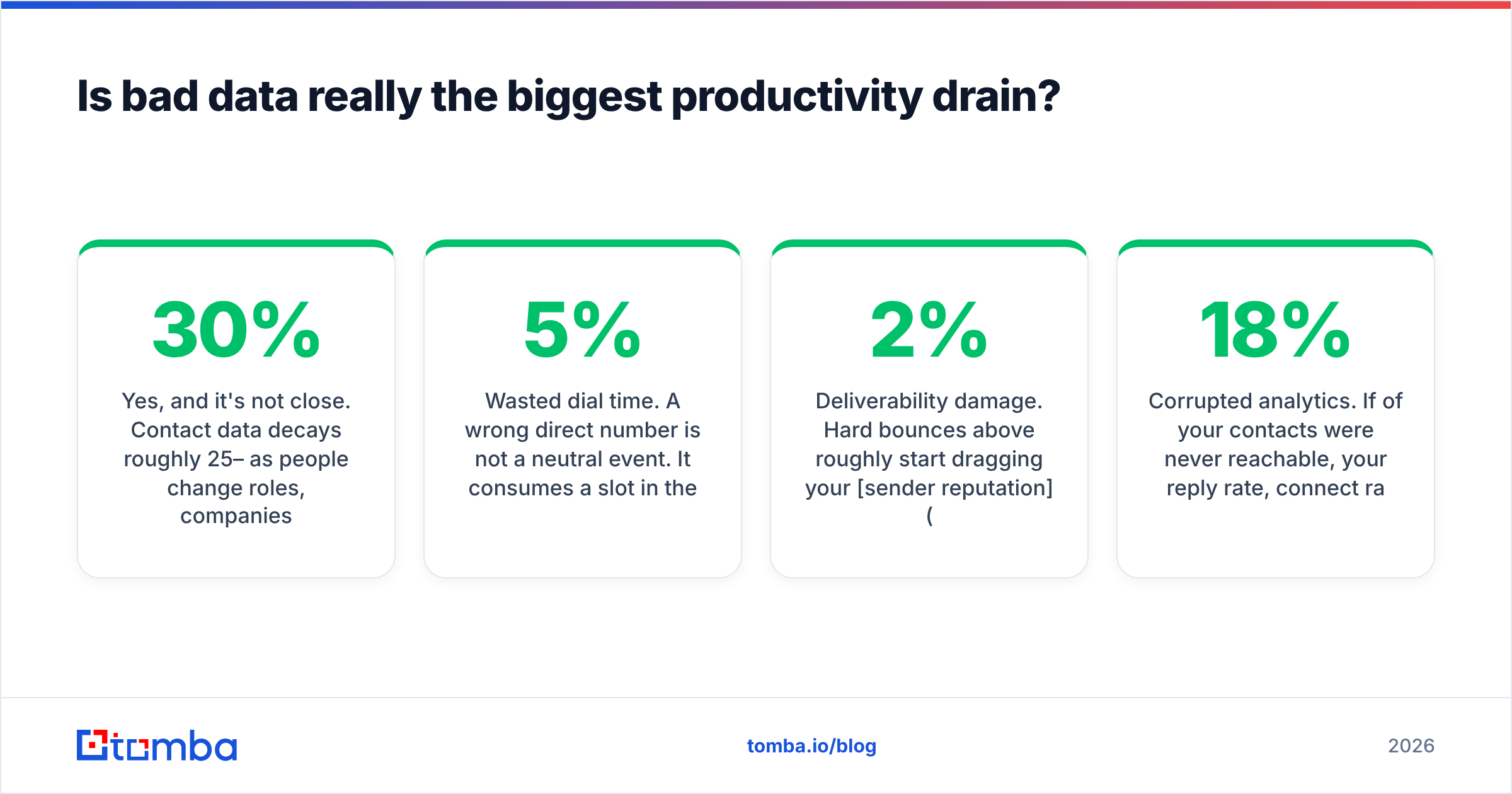
Yes, and it's not close. Contact data decays roughly 25–30% per year as people change roles, companies rebrand, and domains consolidate. A list you bought in January is measurably worse by June and functionally dangerous by the following January.
The cost shows up in three places at once:
- Wasted dial time. A wrong direct number is not a neutral event. It consumes a slot in the rep's calling block, and at a 5% connect rate every dead number meaningfully shifts the odds of the whole session.
- Deliverability damage. Hard bounces above roughly 2% start dragging your sender reputation down. Once mailbox providers throttle you, the good addresses on your list stop landing too. One bad import can suppress a whole team's reply rate for weeks.
- Corrupted analytics. If 18% of your contacts were never reachable, your reply rate, connect rate, and meeting-conversion math are all computed on a denominator that includes ghosts. You end up coaching reps on messaging when the real issue was the list.
This is why running contacts through an email verifier before a campaign launches is not an optional hygiene step — it's the cheapest productivity intervention available. Verification costs fractions of a cent per record. A damaged sending domain costs weeks.
The deeper fix is upstream: stop importing unverified records in the first place. Pulling contacts through a domain search with verification built into the same call means the rep never touches a record that hasn't already been checked.
Should you add more activity or better tooling?#
Neither, until you know which constraint is binding. Run this diagnostic before spending a dollar:
- If connect and reply rates are healthy but volume is low → you have a capacity problem. More reps, more automation, or more hours. Tooling helps.
- If volume is high but connect and reply rates are poor → you have a data or targeting problem. Adding activity makes it worse, faster.
- If meetings happen but pipeline doesn't → you have a qualification problem. That's a management and ICP issue, not a tools issue.
Most teams that say "we need to be more productive" are in bucket two and buy a bucket-one solution. That's how you end up with a $30k sequencer firing perfectly-timed emails at addresses that don't exist.
How do the main productivity levers compare?#
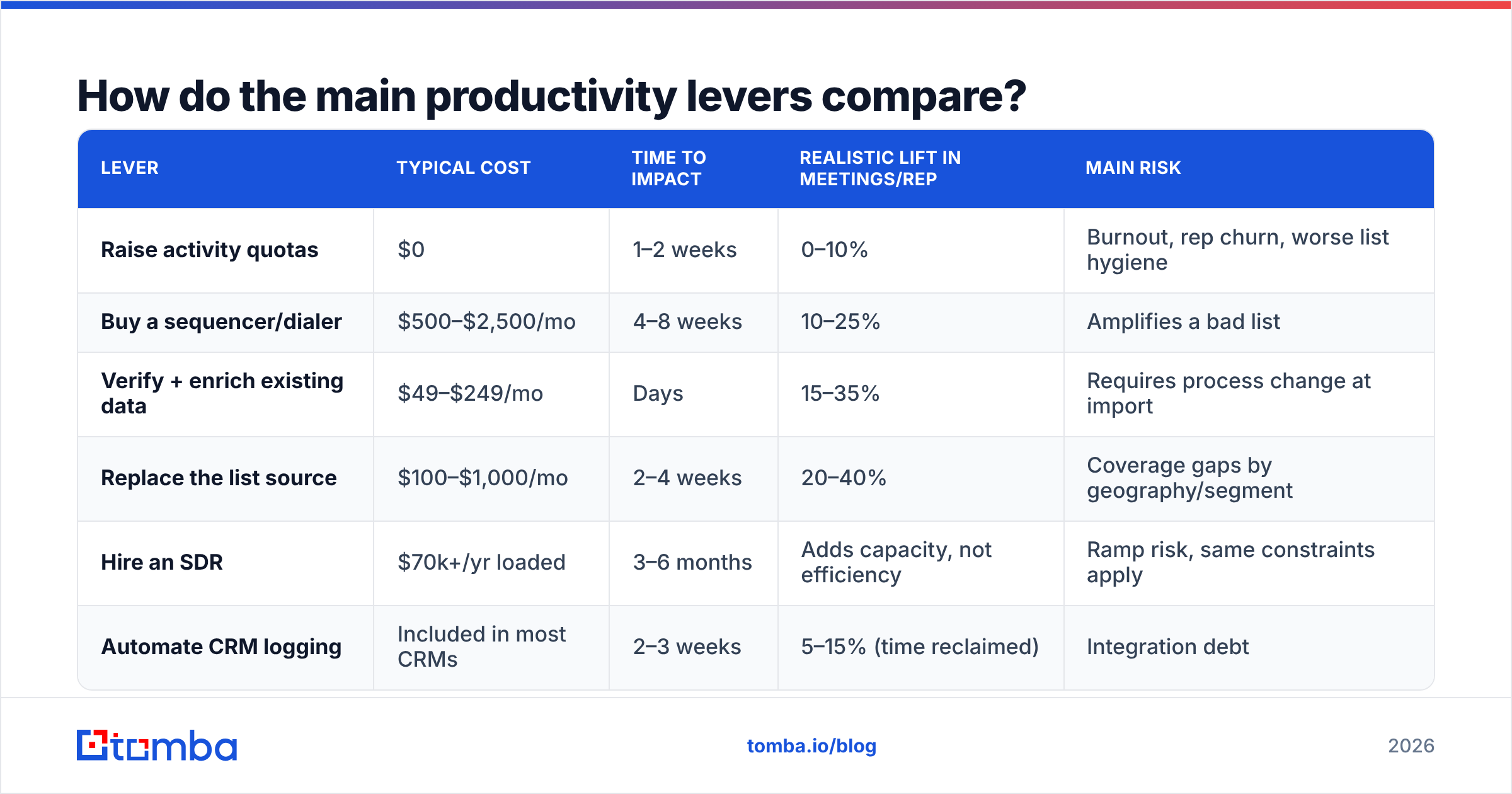
Here's an honest cost/impact comparison of the levers teams actually reach for. Ranges assume a five-rep inside sales team running outbound.
| Lever | Typical cost | Time to impact | Realistic lift in meetings/rep | Main risk |
|---|---|---|---|---|
| Raise activity quotas | $0 | 1–2 weeks | 0–10% | Burnout, rep churn, worse list hygiene |
| Buy a sequencer/dialer | $500–$2,500/mo | 4–8 weeks | 10–25% | Amplifies a bad list |
| Verify + enrich existing data | $49–$249/mo | Days | 15–35% | Requires process change at import |
| Replace the list source | $100–$1,000/mo | 2–4 weeks | 20–40% | Coverage gaps by geography/segment |
| Hire an SDR | $70k+/yr loaded | 3–6 months | Adds capacity, not efficiency | Ramp risk, same constraints apply |
| Automate CRM logging | Included in most CRMs | 2–3 weeks | 5–15% (time reclaimed) | Integration debt |
The data-layer rows have the best ratio of cost to time-to-impact, which is why they should almost always come first. They also make every other lever work better — a dialer on a verified list outperforms the same dialer on a scraped list by a wide margin, and the sequencer you already pay for gets more productive without a new contract.
What tools do productive inside sales teams actually run?#
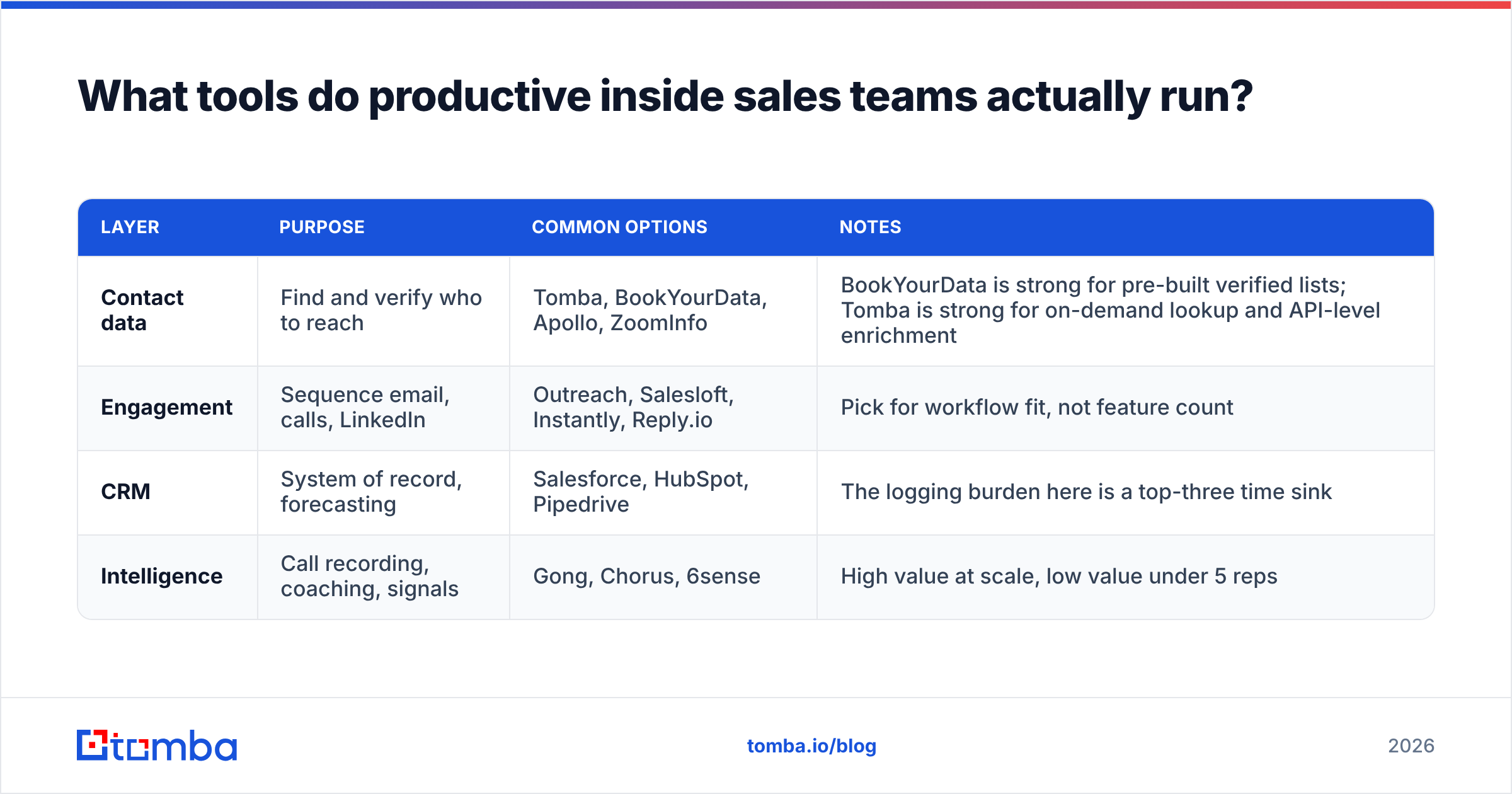
A working stack has four layers, and most underperforming teams have three of them over-invested and one neglected.
| Layer | Purpose | Common options | Notes |
|---|---|---|---|
| Contact data | Find and verify who to reach | Tomba, BookYourData, Apollo, ZoomInfo | BookYourData is strong for pre-built verified lists; Tomba is strong for on-demand lookup and API-level enrichment |
| Engagement | Sequence email, calls, LinkedIn | Outreach, Salesloft, Instantly, Reply.io | Pick for workflow fit, not feature count |
| CRM | System of record, forecasting | Salesforce, HubSpot, Pipedrive | The logging burden here is a top-three time sink |
| Intelligence | Call recording, coaching, signals | Gong, Chorus, 6sense | High value at scale, low value under 5 reps |
Pricing transparency varies a lot in the data layer, which matters when you're modeling cost per meeting. For reference, Tomba pricing runs a free tier at 25 searches/month, Starter at $49/mo, Growth at $99/mo, and Pro at $249/mo, with enterprise pricing on request — flat, published, and easy to model against a per-meeting target. Compare category options on G2's sales intelligence category before committing; buyer reviews there are more useful than vendor feature matrices.
For teams running high-volume outbound, the meaningful capability is not the UI at all — it's whether the data layer has an API you can call from your enrichment pipeline. Pulling verified contacts through the Tomba API at the moment a lead enters your CRM means reps never build a list by hand again. That's the 8–12 hours per week from earlier, recovered structurally rather than through willpower.
What does a high-productivity inside sales day look like?#
Concrete, because abstractions don't change behavior:
- 8:30–9:00 — Review, not research. The rep opens a queue that was populated overnight by an automated enrichment job. No list building. No format guessing.
- 9:00–11:00 — Call block one. Phones only, no email, no Slack. Direct dials that were validated in the last 30 days.
- 11:00–11:30 — Follow-up burst. Personalized replies to anyone who engaged. Time-boxed hard.
- 11:30–12:30 — Meetings and discovery calls.
- 1:30–3:00 — Call block two. Different time zone, different persona if the territory allows.
- 3:00–4:00 — Sequence writing and account research. Depth, not breadth. Ten accounts, not two hundred.
- 4:00–4:30 — CRM close-out. Should take fifteen minutes if your integrations are doing their job.
Two structural details make this work. First, list building happens outside the rep's day — it's a batch job, not a task. Second, call blocks are protected. Fragmented calling is the productivity equivalent of cooking one meal in six different kitchens.
How do you measure improvement over 90 days?#
Set a baseline before you change anything. Most teams skip this and then argue about whether the new tool worked.
Week 0 — Baseline. Record connect rate, bounce rate, reply rate, meetings per 100 contacts, and average selling hours per rep per day. Use a two-week average, not a single week.
Weeks 1–2 — Fix the data layer. Verify the existing database, purge unreachables, and route all new contact acquisition through a verified source. Expect bounce rate to fall first; it's the fastest-moving indicator.
Weeks 3–6 — Reclaim the hours. Automate list building and CRM logging. Measure selling-hour ratio weekly. If it isn't climbing by week four, the automation didn't actually remove work — it relocated it.
Weeks 7–12 — Tune the message. Now that your denominators are clean, A/B testing means something. Track response rate by persona and segment, not in aggregate.
Report the whole thing as a single number at the end: pipeline dollars per rep-day, before and after. That's the version a CRO will fund again. Gartner's ongoing sales research is a reasonable external benchmark if you need to contextualize your numbers against the broader market, and HubSpot's sales blog publishes usable benchmark data for smaller teams.
One caution: don't run all four phases simultaneously. If you change the data source, the sequencer, the messaging, and the quota in the same month, you'll never know which one worked, and you'll be unable to repeat the win next quarter.
Where should you start this week?#
Pull a sample of 200 contacts from your current database and verify them. If more than 8% come back invalid or risky, you've found your constraint — and it isn't rep effort.
The Tomba Email Finder is built for exactly that first step: find professional email addresses by domain, name, or company, with verification in the same workflow, so reps never spend a calling block on contacts that were never reachable. Start on the free tier at 25 searches a month, run your sample, and see what your real connect ceiling looks like before you set another activity target.
Related guides#
// get started
Find, verify and enrich your first contacts today
Start on the free plan with 25 searches a month, then scale when your team is ready.
Free plan · No credit card required · GDPR & CCPA
// about the author