Inside Sales Tools in 2026: The Complete Stack Guide
Most inside sales teams own nine tools and use four. Here is what each layer of the stack actually does, what it costs in 2026, and the order you should buy in.
TL;DR
- Inside sales tools fall into six layers: data, engagement, dialing, conversation intelligence, CRM, and enablement. Most teams over-buy layers 2–4 and under-buy layer 1.
- The data layer decides whether everything downstream works. A $30k sequencing platform firing at unverified addresses is an expensive bounce generator.
- A functional two-rep stack costs roughly $150–$400/month. A 20-rep stack lands around $2,500–$8,000/month depending on how much conversation intelligence you buy.
- Buy in this order: verified contact data → CRM → sequencer → dialer → call recording → enablement. Skipping to step three is the most common failure.
- Consolidate before you add. If a tool has not produced a meeting you can trace in 60 days, cancel it.
What are inside sales tools?#
Inside sales tools are the software an SDR or AE uses to sell without ever boarding a plane: find the buyer, reach them, talk to them, record what happened, and move the deal forward. "Inside sales" simply means remote selling — phone, email, LinkedIn, video — as opposed to field sales.
The category confuses people because vendors keep expanding sideways. Your sequencer now claims to have a database. Your database now claims to send sequences. Your CRM claims to do both. The result is that a 12-person team routinely pays for the same capability three times.
The way out is to stop shopping by brand and start shopping by layer. Each layer answers one question, and you only need one good answer per question.
What does a modern inside sales stack actually look like?#
Six layers, in dependency order. Each one is only as useful as the one above it.
- Data layer — who am I calling? Email finders, phone-number providers, B2B databases, and enrichment APIs. This layer determines your bounce rate, your connect rate, and how much of your rep's day is spent on research instead of conversations. Tools: Tomba, ZoomInfo, Apollo, Cognism, BookYourData.
- Engagement layer — how do I reach them at scale? Sequencers and sales-engagement platforms that schedule multi-step email + LinkedIn + call cadences. Tools: Outreach, Salesloft, Instantly, Smartlead, Reply.io.
- Dialing layer — how do I get more live conversations? Parallel dialers, power dialers, and local presence. This is the highest-ROI layer for teams whose motion is genuinely phone-first, and dead weight for teams whose motion is not. Tools: Orum, Nooks, Aircall, JustCall.
- Conversation intelligence — what actually happened on that call? Recording, transcription, talk-ratio analytics, and deal-risk scoring. Tools: Gong, Chorus, Fathom, Clari Copilot.
- CRM — where does the truth live? The system of record for accounts, contacts, opportunities, and forecast. Tools: Salesforce, HubSpot, Pipedrive, Attio.
- Enablement and QA — how does rep #9 get as good as rep #1? Call libraries, battlecards, onboarding paths, scorecards. Tools: Highspot, Seismic, Mindtickle, or a well-maintained Notion workspace if you are under 15 reps.
Note what is missing from that list: "AI SDR." In 2026 the autonomous-prospecting category has mostly resolved into features inside layers 1 and 2 rather than a standalone layer. Treat any vendor selling you a whole new layer with suspicion until they can show you sourced pipeline, not activity counts.
Which inside sales tools matter most in 2026?#
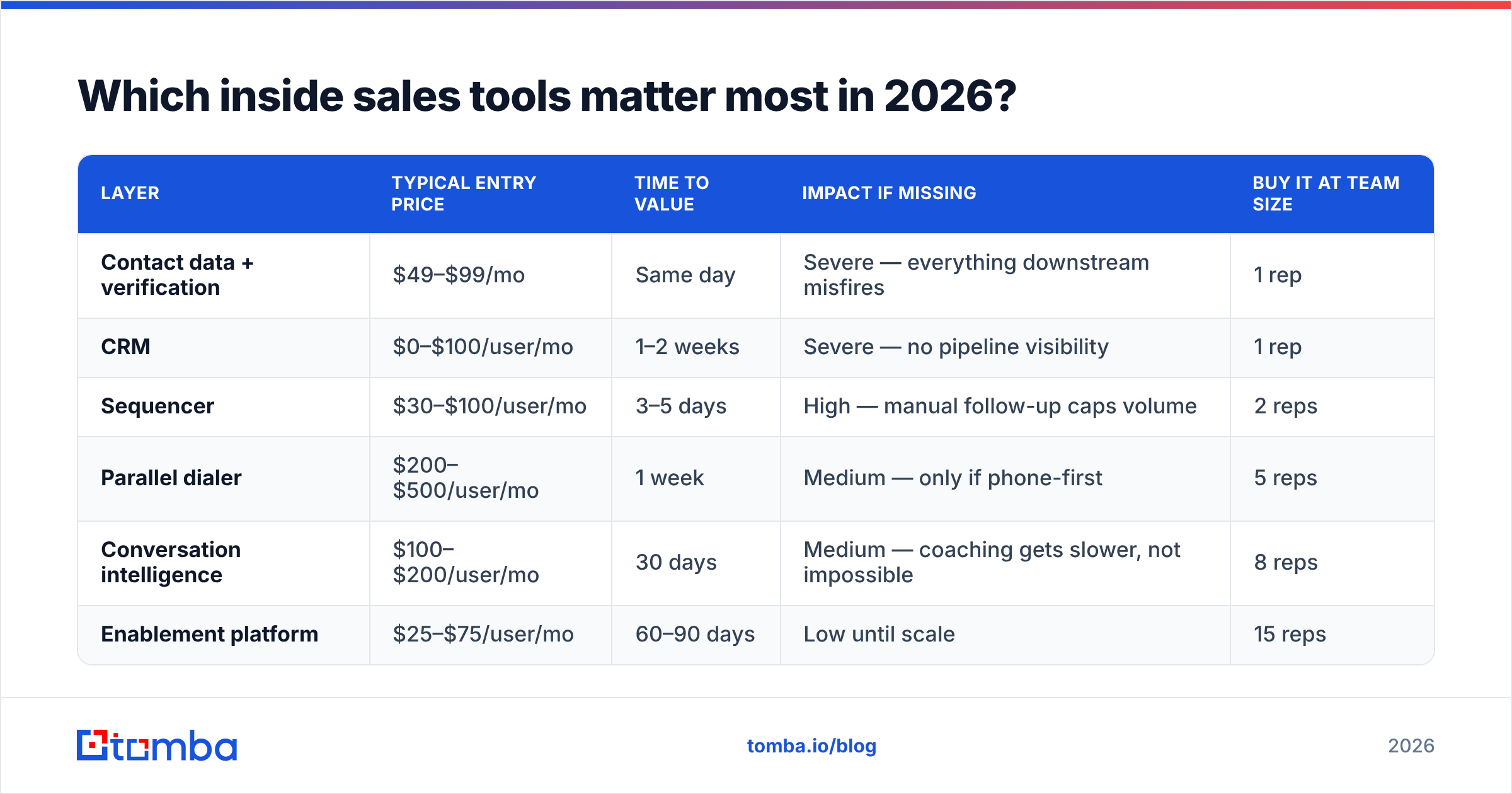
Here is the honest ranking by marginal impact per dollar, assuming a team that currently has a CRM and nothing else.
| Layer | Typical entry price | Time to value | Impact if missing | Buy it at team size |
|---|---|---|---|---|
| Contact data + verification | $49–$99/mo | Same day | Severe — everything downstream misfires | 1 rep |
| CRM | $0–$100/user/mo | 1–2 weeks | Severe — no pipeline visibility | 1 rep |
| Sequencer | $30–$100/user/mo | 3–5 days | High — manual follow-up caps volume | 2 reps |
| Parallel dialer | $200–$500/user/mo | 1 week | Medium — only if phone-first | 5 reps |
| Conversation intelligence | $100–$200/user/mo | 30 days | Medium — coaching gets slower, not impossible | 8 reps |
| Enablement platform | $25–$75/user/mo | 60–90 days | Low until scale | 15 reps |
The pattern most teams miss: the two cheapest layers are the two that break everything else when absent. A verified contact list plus a CRM plus a spreadsheet will outperform a $40k sequencing contract running on scraped data. The Gartner sales-tech research has said a version of this for years — tool sprawl correlates with lower seller productivity past a certain point, because every added tool adds context switching.
Why does the data layer decide everything downstream?#
Because bounce rate is not a data problem. It is a deliverability problem, then a domain problem, then a pipeline problem.
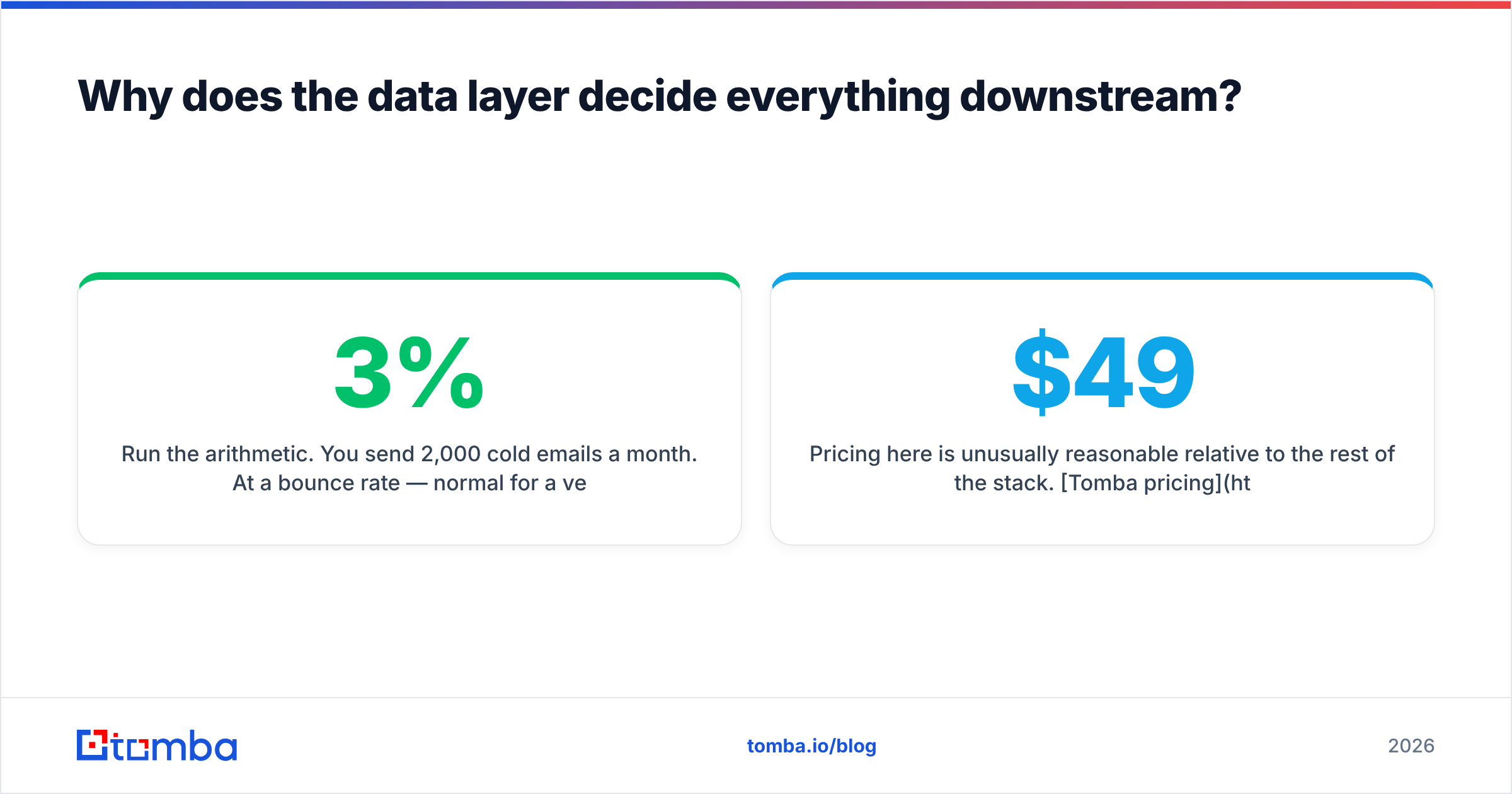
Run the arithmetic. You send 2,000 cold emails a month. At a 3% bounce rate — normal for a verified list — you are fine. At 12% — normal for an unverified scrape — mailbox providers start throttling you, your inbox placement drops across all your sending, and the replies you would have earned from the 88% of good addresses never arrive. You did not just waste the bad records. You degraded the good ones.
This is why the data layer is worth solving before you spend a dollar on engagement software. Concretely, a working data layer does four things:
- Finds the address. Pattern inference plus source verification, not guesswork. A good email finder returns a confidence score alongside the address so you can route low-confidence records to a different play.
- Verifies it before send. SMTP-level checking, syntax validation, disposable-domain detection, and role-account flagging. Run an email verifier against every import, not just the ones you suspect.
- Handles catch-all domains sanely. Roughly a third of enterprise domains accept everything, which makes naive verification useless. You need a provider that scores catch-alls rather than blindly marking them valid.
- Enriches the record. Title, seniority, company size, tech stack, and phone. Without enrichment your segmentation is guesswork and your personalisation is a mail merge.
Pricing here is unusually reasonable relative to the rest of the stack. Tomba pricing starts with a free tier at 25 searches/month, then $49/mo for Starter, $99/mo for Growth, and $249/mo for Pro — which is less than a single seat of most conversation-intelligence tools. Enterprise databases like ZoomInfo start an order of magnitude higher and lock you into annual commitments. BookYourData takes a different and perfectly defensible route with pay-as-you-go verified lists, which suits teams running occasional bursts rather than continuous prospecting. Match the pricing model to your motion: continuous outbound wants a subscription and an API; quarterly campaigns want credits you can buy once.
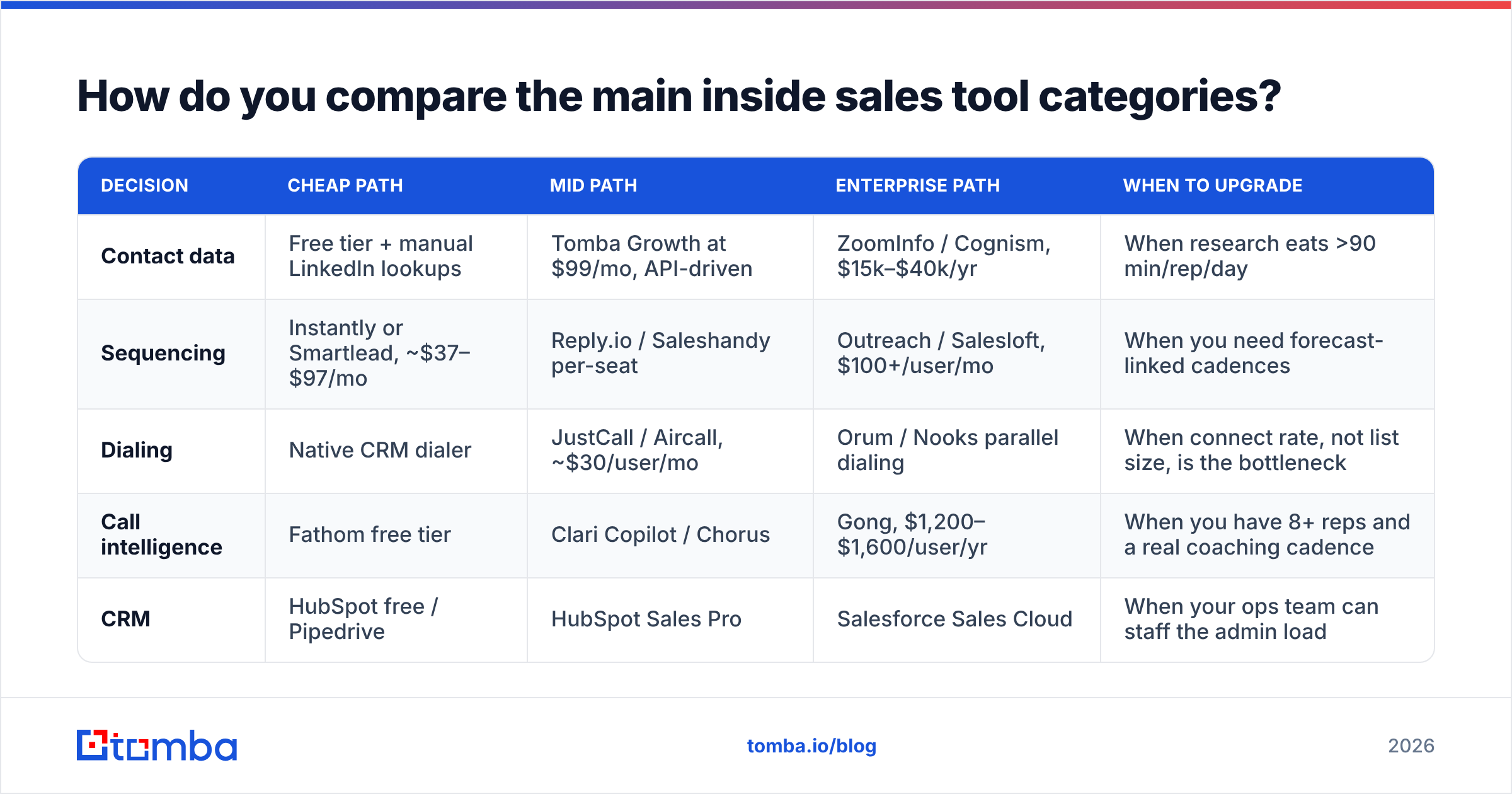
How do you compare the main inside sales tool categories?#
A side-by-side of the four decisions that actually cost money.
| Decision | Cheap path | Mid path | Enterprise path | When to upgrade |
|---|---|---|---|---|
| Contact data | Free tier + manual LinkedIn lookups | Tomba Growth at $99/mo, API-driven | ZoomInfo / Cognism, $15k–$40k/yr | When research eats >90 min/rep/day |
| Sequencing | Instantly or Smartlead, ~$37–$97/mo | Reply.io / Saleshandy per-seat | Outreach / Salesloft, $100+/user/mo | When you need forecast-linked cadences |
| Dialing | Native CRM dialer | JustCall / Aircall, ~$30/user/mo | Orum / Nooks parallel dialing | When connect rate, not list size, is the bottleneck |
| Call intelligence | Fathom free tier | Clari Copilot / Chorus | Gong, $1,200–$1,600/user/yr | When you have 8+ reps and a real coaching cadence |
| CRM | HubSpot free / Pipedrive | HubSpot Sales Pro | Salesforce Sales Cloud | When your ops team can staff the admin load |
Read across the rows and one thing stands out: the cheap path is genuinely viable for the first three rows and genuinely not viable for CRM past about 15 reps. That asymmetry should shape your budget. Put money where migration is painful (CRM, data quality) and stay flexible where switching costs are low (sequencers churn constantly; you can leave one in a weekend).
Peer reviews on G2 are useful for the flexible layers and close to useless for the sticky ones, because nobody reviews a CRM they migrated off of two years ago with any objectivity.
Is more tooling better than better data?#
No, and the trade is not close.
Take a 10-rep team with a $60k annual tool budget. Option A spends $45k on a premium sequencer and conversation-intelligence suite, leaving $15k for data. Option B spends $12k on data and enrichment, $18k on a competent mid-market sequencer, $15k on dialing, and banks the rest.
Option A produces beautifully instrumented failure. You get dashboards showing that 2,000 emails went out, 240 bounced, open tracking is unreliable, and reply rate sits at 0.8%. The analytics are excellent. The pipeline is not.
Option B produces fewer dashboards and more meetings, because the denominator — reachable, correctly-titled humans — is bigger. Every percentage point downstream compounds against a real list instead of a corrupted one.
The practical test: before you approve any new tool, ask which layer it belongs to and whether you already own a mediocre version of that layer. If you do, the honest options are "improve the one we have" or "replace it," never "add a second one." Teams that run both an old sequencer and a new one for six months during a "transition" almost never complete the transition.
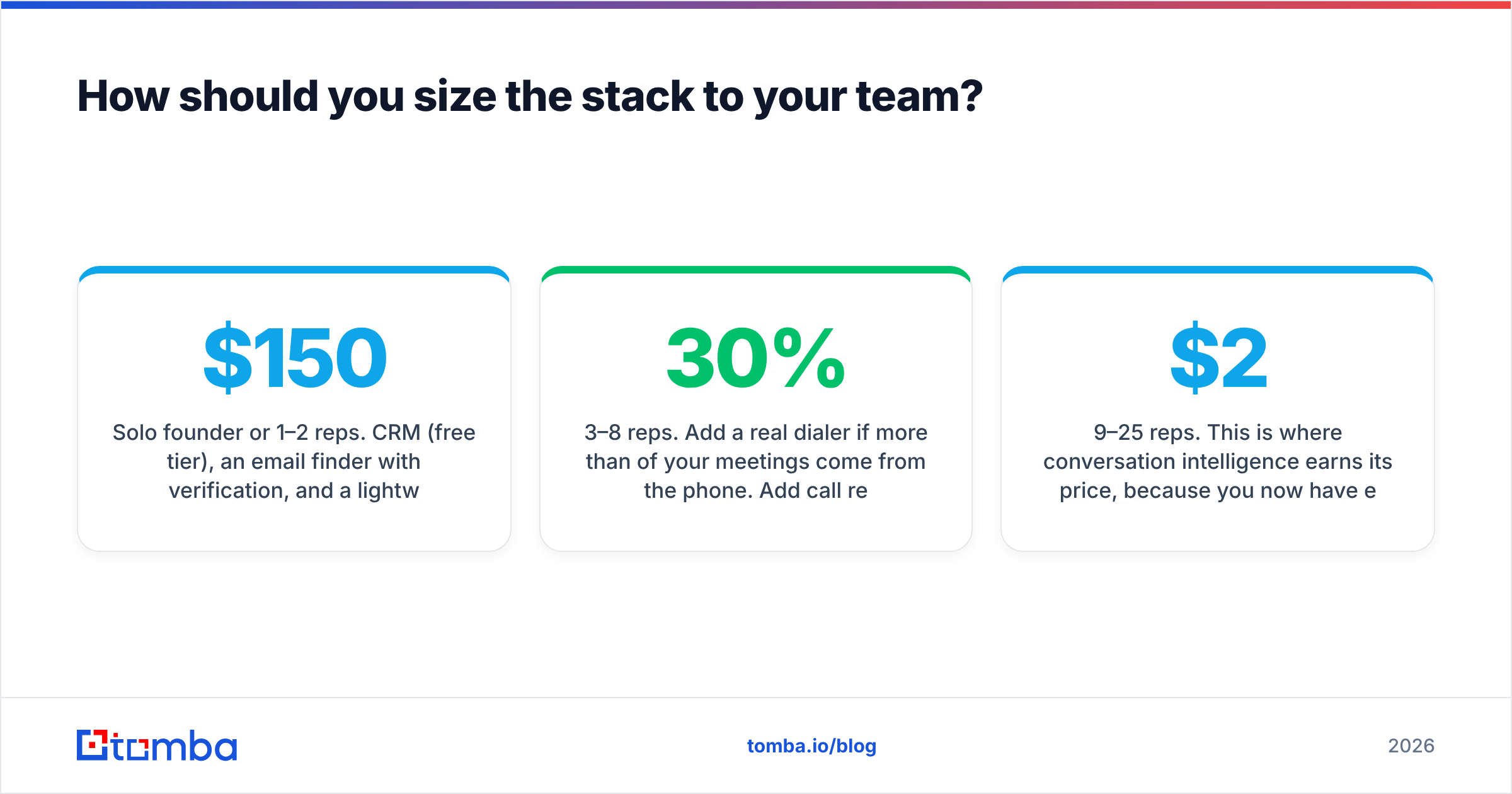
How should you size the stack to your team?#
Solo founder or 1–2 reps. CRM (free tier), an email finder with verification, and a lightweight sequencer. Total: $150–$250/month. Skip dialers, skip call recording, skip enablement. Use a bulk email finder for list building once a week rather than buying a database subscription.
3–8 reps. Add a real dialer if more than 30% of your meetings come from the phone. Add call recording — Fathom or similar — purely for coaching, not analytics. Move data from manual lookups to an API so enrichment happens on record creation instead of in a rep's browser. The Tomba API or an equivalent lets you enrich on inbound form fill, which is where most teams first feel the difference.
9–25 reps. This is where conversation intelligence earns its price, because you now have enough calls that patterns are statistically real. It is also where CRM hygiene becomes a dedicated role. Expect $2,500–$8,000/month all-in and expect one person to own the stack.
25+ reps. Enablement, territory management, and forecast tooling enter. So does procurement, which means you should have negotiated multi-year data contracts before your renewal leverage disappears.
What mistakes kill inside sales stacks?#
Buying the sequencer first. It is the most demoed category and the most fun to evaluate. It is also the layer that most depends on the layers you have not bought yet.
Measuring activity instead of conversations. Every tool in this stack will happily report that activity went up. Activity is not the metric. Connected calls and genuine replies are.
Never auditing. Set a calendar reminder every quarter. List every tool, its cost, its owner, and one traceable outcome from the last 90 days. Anything without a traceable outcome gets cancelled or consolidated. This single habit typically recovers 15–25% of a tool budget in the first pass.
Letting data decay silently. B2B contact data degrades at roughly 2–3% per month through job changes alone. A list you verified in January is materially worse by June. Re-verification is not optional maintenance; it is the cheapest insurance in the stack.
Confusing coverage with accuracy. A vendor claiming 700 million contacts is telling you about their index size, not your hit rate on your ICP. Always test with a sample of 100 accounts you actually sell to, and count usable records — not returned records.
Where should you start?#
Start with the layer that everything else depends on. Pull 100 target accounts, run them through a data provider, and measure two numbers: how many contacts you get for the right titles, and what percentage of those addresses survive verification. If either number is bad, nothing you buy in layers 2 through 6 will fix it.
Tomba's Email Finder is a reasonable place to run that test — the free tier gives you 25 searches a month with no card, which is enough to benchmark hit rate against whatever you use today, and Starter at $49/mo covers a one- or two-rep outbound motion without a contract. Build the data layer first, then spend the rest of the budget on the layers that amplify it.
Related guides#
// get started
Find, verify and enrich your first contacts today
Start on the free plan with 25 searches a month, then scale when your team is ready.
Free plan · No credit card required · GDPR & CCPA
// about the author