InsightSync Pricing, Reviews, Pros and Cons: 2026 Breakdown
InsightSync sells on demos, not on a public price list. Here is how the tiers, seats and credit add-ons actually stack up in 2026 — plus the pros, the cons, and a cheaper way to cover the same ground.
TL;DR
- InsightSync is sold through a sales-led motion. There is no complete public price list, so every number you see online — including the ranges below — is a buyer report, not a quote.
- The real cost driver is rarely the headline platform fee. It is seat minimums, credit packs for contact data, and the annual-only commitment on mid-tier plans.
- Reviews cluster around the same two themes: people like the dashboards and the CRM sync; people dislike the onboarding timeline and the renewal uplift.
- If you mainly need accurate contact data rather than a full analytics layer, a $49/mo email finder plus your existing CRM covers 80% of the job at a fraction of the spend.
- Get a written quote with seat count, credit rollover, and renewal cap spelled out before you sign anything. Verbal promises do not survive a renewal cycle.
What is InsightSync and who is it actually for?#
InsightSync sits in the revenue-intelligence category — the software layer that pulls activity from your CRM, email, and calendar, stitches it to account records, and tells you which deals are actually moving. Think of it as the dashboard cluster in a car: your CRM is the engine doing the work, and the intelligence tool is the instrument panel telling you whether you are about to run out of fuel.
That framing matters for pricing, because instrument panels are priced per driver. Revenue-intelligence tools almost always charge per seat, and seats are where budgets quietly detonate.
The buyers who get value tend to look alike:
- Teams with 15+ reps. Below that, a manager can read the pipeline manually and the per-seat math never clears.
- Multi-touch sales cycles. If a deal involves six stakeholders over four months, activity stitching earns its keep. A one-call close does not.
- A clean CRM already in place. Intelligence tools amplify your data quality. Garbage in, expensive garbage out.
- A dedicated RevOps owner. Someone has to maintain field mappings, or the dashboards drift within a quarter.
- Board-level reporting pressure. A lot of this spend is really "make forecast defensible" spend.
If two or more of those do not describe you, keep reading anyway — the cons section is where you will find your answer.
How does InsightSync pricing actually work?#
Here is the honest starting point: InsightSync does not publish a complete price list. The vendor runs a demo-first motion, which means the number you get depends on your seat count, your contract length, and how close it is to their quarter end.
The structure, however, is consistent across every buyer account I have seen described publicly, and it breaks into four layers:
- Platform fee — a fixed annual base that exists before a single seat is added. This is the line most buyers forget when they budget.
- Per-seat licenses — the bulk of the bill, usually with a minimum seat count attached to anything above the entry tier.
- Credit packs — contact and enrichment lookups, metered. Credits typically do not roll over.
- Implementation / onboarding — a one-time services fee on mid and upper tiers, sometimes waived on a multi-year deal.
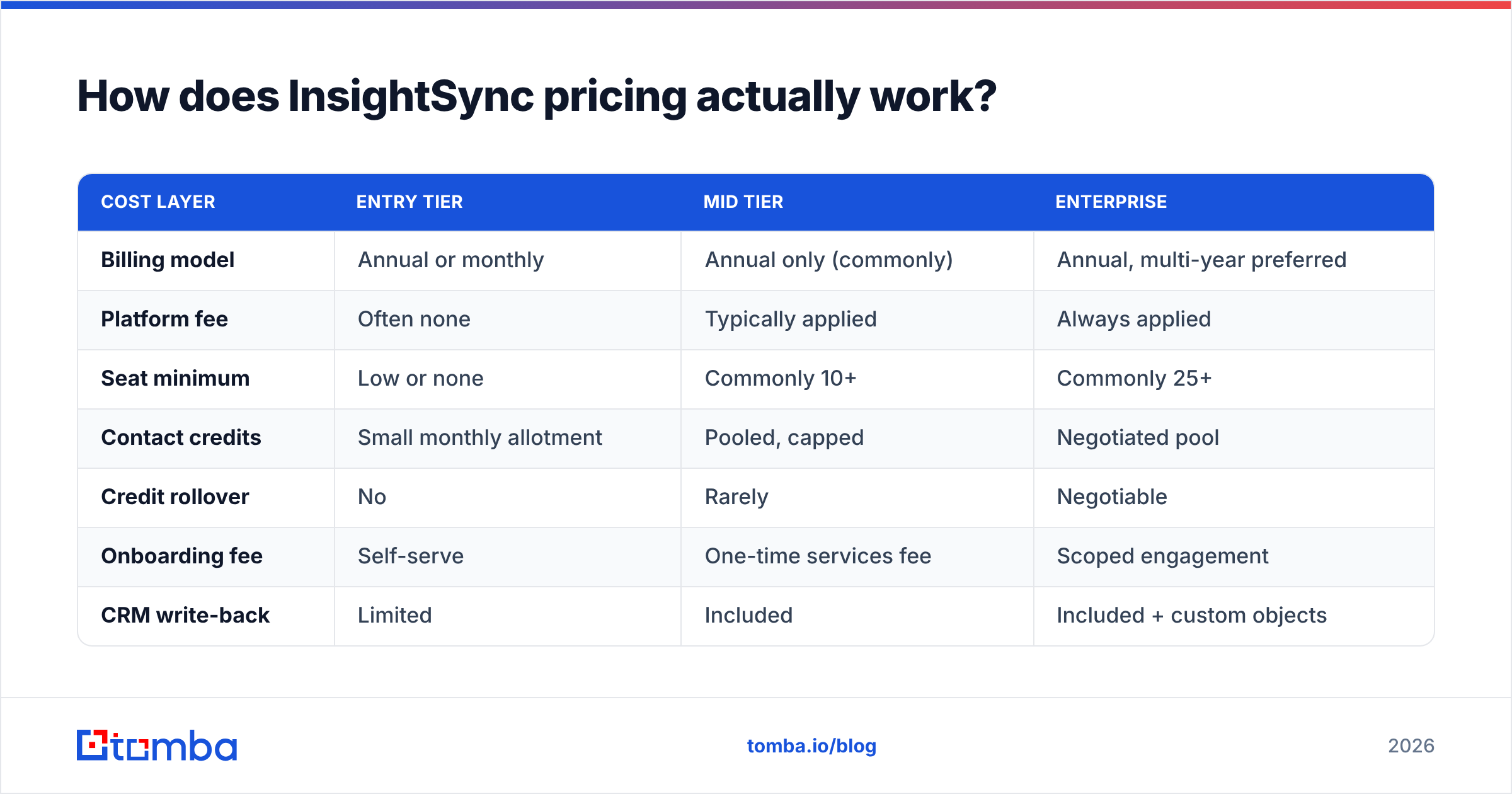
Treat the table below as a negotiating baseline built from buyer-reported ranges on review sites, not as a quote. Verify every figure in writing before you commit.
| Cost layer | Entry tier | Mid tier | Enterprise |
|---|---|---|---|
| Billing model | Annual or monthly | Annual only (commonly) | Annual, multi-year preferred |
| Platform fee | Often none | Typically applied | Always applied |
| Seat minimum | Low or none | Commonly 10+ | Commonly 25+ |
| Contact credits | Small monthly allotment | Pooled, capped | Negotiated pool |
| Credit rollover | No | Rarely | Negotiable |
| Onboarding fee | Self-serve | One-time services fee | Scoped engagement |
| CRM write-back | Limited | Included | Included + custom objects |
| API access | Not included | Add-on | Included |
| Typical renewal uplift | Low | Moderate | Moderate to high |
The pattern to notice: the cheap tier is cheap because it cannot write back to your CRM properly. That is the upgrade trigger, and the vendor knows it. Budget for the mid tier from day one or you will be re-negotiating in month four with zero leverage.
Sorry — rendering that properly:

What are the hidden costs buyers report most?#
- Inactive seats. Most contracts bill on provisioned seats, not active ones. A rep leaves in month two and you pay for their license for ten more months.
- Credit burn from bulk operations. One enthusiastic list build can chew a quarter's allotment in an afternoon.
- Sandbox environments. Often a separate line item.
- Historical backfill. Loading two years of CRM history for trend analysis is frequently scoped as services work.
- API overages. If you plan to pipe data into a warehouse, price the API before you sign, not after.
What do InsightSync reviews actually say?#
Review sentiment is more useful when you separate it by role, because the people who love this category and the people who resent it are usually different humans on the same team.
What managers and RevOps say positively: the dashboards are genuinely readable, forecast rollups save real hours at end of quarter, and the CRM sync — once configured — holds up. Several reviewers describe the moment the pipeline view "finally matched reality" as the payoff.
What reps say negatively: activity tracking feels like surveillance, and the tool adds steps rather than removing them. This is the single most common source of low adoption in the category, and low adoption is what turns a fair price into a bad one.
What finance says: the renewal conversation is harder than the initial one. Uplift on renewal is a recurring complaint across the whole revenue-intelligence space, not just this vendor.
If you want primary sources rather than my summary, check the category listings on G2 and Capterra, and read Gartner's framing of the revenue-intelligence market on gartner.com before you form an opinion. Filter reviews to your company size — a 400-seat enterprise review tells you almost nothing about a 20-seat deployment.
What are the pros of InsightSync?#
Forecast defensibility. When a board asks why Q3 slipped, "here is the activity delta by stage" is a better answer than a spreadsheet and a feeling. This is the real product.
CRM write-back that holds. Once the field mapping is done, records stay current without rep data entry. That alone reclaims meaningful selling time.
Stage-level diagnostics. Knowing that deals die between discovery and technical validation — rather than "we need more leads" — changes what you actually fix.
Manager coaching surface. Call and email pattern data gives sales managers something concrete to coach against instead of anecdote.
Consolidation. If the tool replaces three point solutions, the per-seat price looks different. Do that math before you judge the sticker.
What are the cons of InsightSync?#
Opaque pricing. You cannot budget against a number you cannot see. Quote-only pricing is a deliberate choice that transfers negotiating leverage to the vendor, and it is the most common complaint in this category.
Seat minimums punish small teams. A ten-seat floor on a six-rep team means you are paying 40% overhead on day one.
Onboarding is not a weekend. Expect weeks, not days, and expect to supply an internal owner. Budget that person's time as part of the cost.
Data quality ceiling. The tool analyzes what is in your CRM. It does not fix bad contact records. If half your contacts bounce, you have a data problem, not an analytics problem — and an analytics license will not solve it.
Credits that do not roll over. Metered contact data with expiring credits means you either underuse and waste, or overuse and get an overage invoice. Neither is pleasant.
That fourth point deserves expanding, because it is where a lot of teams misdiagnose their own problem.
Is an analytics tool the right fix, or do you have a data problem?#
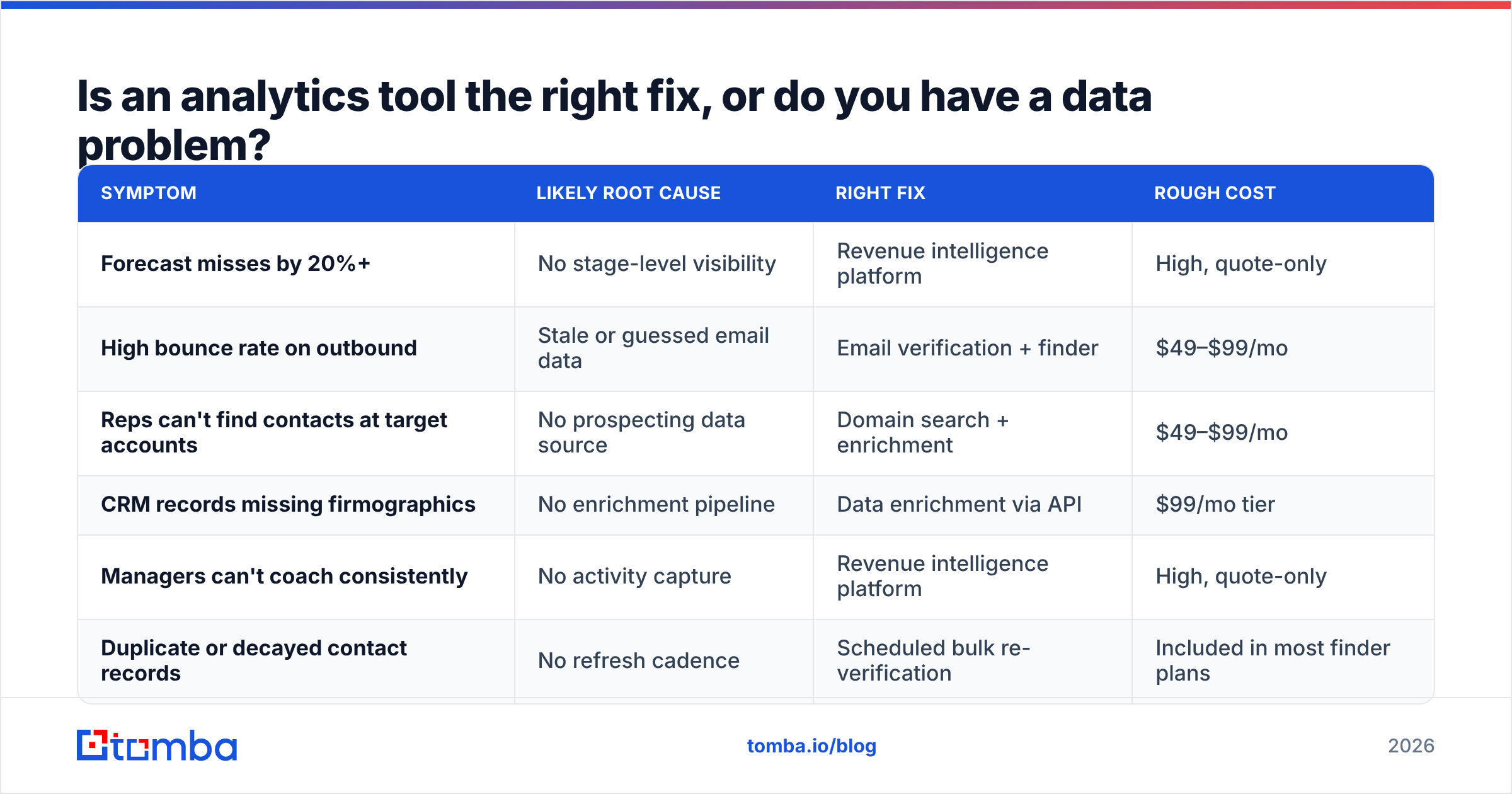
Here is a diagnostic worth running before you sign anything: pull 200 contacts from your CRM at random and verify them. If more than 15% are invalid, your pipeline visibility problem is downstream of a contact-data problem, and no dashboard will fix it.
A bad record costs you three ways: the bounce damages sender reputation, the rep wastes a touch, and the analytics layer confidently reports on activity that was never going to convert. You paid for the seat to be told a clean lie.
| Symptom | Likely root cause | Right fix | Rough cost |
|---|---|---|---|
| Forecast misses by 20%+ | No stage-level visibility | Revenue intelligence platform | High, quote-only |
| High bounce rate on outbound | Stale or guessed email data | Email verification + finder | $49–$99/mo |
| Reps can't find contacts at target accounts | No prospecting data source | Domain search + enrichment | $49–$99/mo |
| CRM records missing firmographics | No enrichment pipeline | Data enrichment via API | $99/mo tier |
| Managers can't coach consistently | No activity capture | Revenue intelligence platform | High, quote-only |
| Duplicate or decayed contact records | No refresh cadence | Scheduled bulk re-verification | Included in most finder plans |
Two of those six rows justify an enterprise analytics contract. Four of them are solved by contact-data tooling that costs less per month than a single analytics seat.

How does InsightSync compare to cheaper alternatives?#
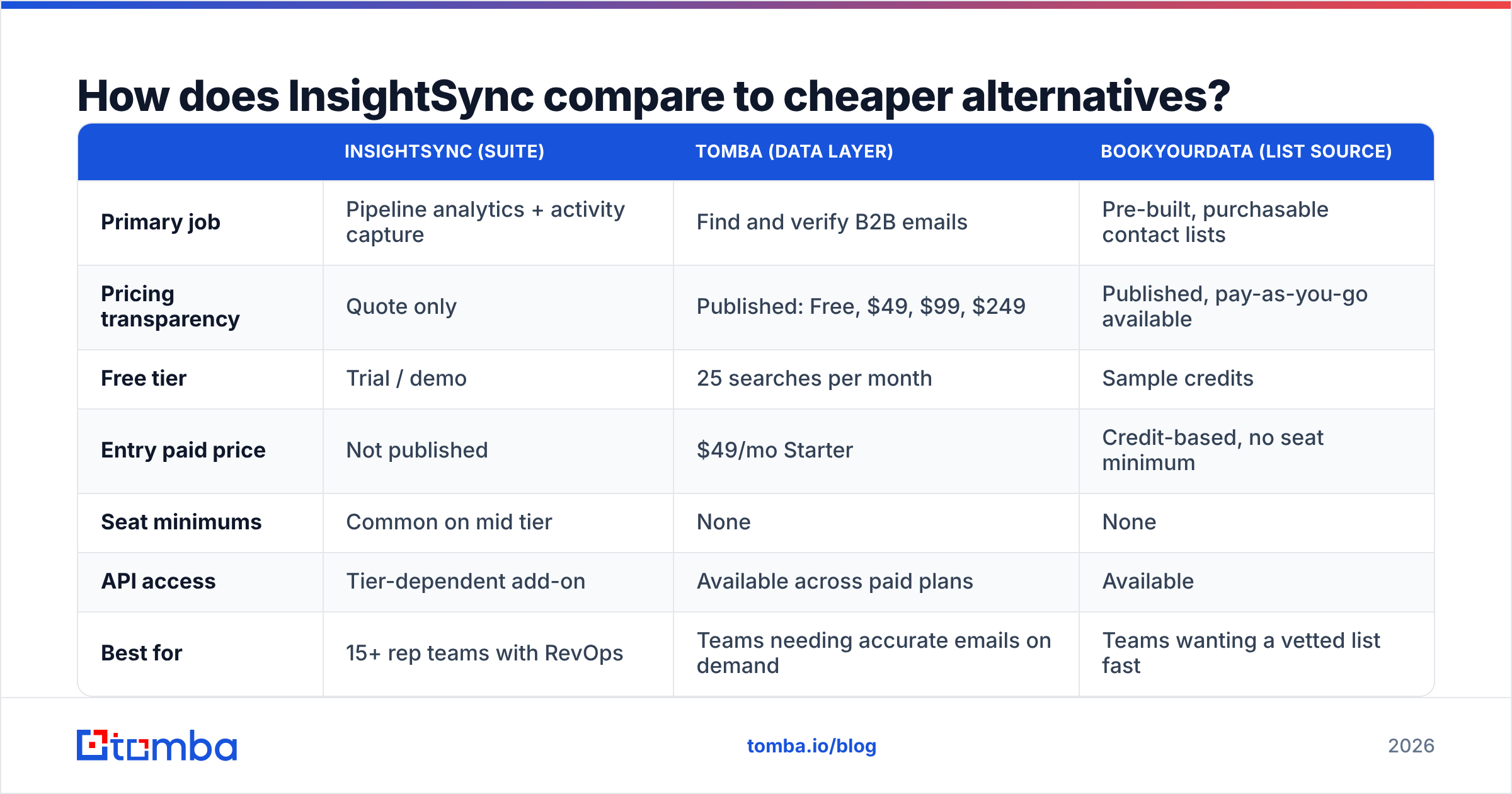
There is no single like-for-like swap, because "revenue intelligence" bundles things that are also sold separately. The useful comparison is stack-versus-suite.
| InsightSync (suite) | Tomba (data layer) | BookYourData (list source) | |
|---|---|---|---|
| Primary job | Pipeline analytics + activity capture | Find and verify B2B emails | Pre-built, purchasable contact lists |
| Pricing transparency | Quote only | Published: Free, $49, $99, $249 | Published, pay-as-you-go available |
| Free tier | Trial / demo | 25 searches per month | Sample credits |
| Entry paid price | Not published | $49/mo Starter | Credit-based, no seat minimum |
| Seat minimums | Common on mid tier | None | None |
| API access | Tier-dependent add-on | Available across paid plans | Available |
| Best for | 15+ rep teams with RevOps | Teams needing accurate emails on demand | Teams wanting a vetted list fast |
| Time to value | Weeks | Same day | Same day |
| Replaces | 2–3 point tools | Manual prospecting + verification | Manual list research |
BookYourData is a legitimately strong option when you want a curated, ready-to-use list without running searches yourself — different shape of problem, different shape of tool. Tomba fits the other pattern: you already know the accounts, and you need the right person's address, verified, on demand.
For most teams under 20 reps, the honest answer is that the suite is premature. Build the data layer first, prove the motion works, then buy the instrument panel when you have enough deal volume for the dashboards to say something you did not already know.
How do you negotiate a better InsightSync price?#
Five things that actually move the number, in rough order of leverage:
- Time it to their quarter end. Sales-led vendors discount hardest in the last two weeks of a quarter. This is not a secret and it is not rude.
- Cap the renewal in the initial contract. A written uplift cap (say, CPI or 5%, whichever is lower) is worth more than a one-time discount. Ask for it in year one, when you still have leverage.
- Buy fewer seats than you think you need. Seats are easy to add mid-term and impossible to remove. Start lean.
- Trade term for price, not scope. A two-year commitment buys a real discount. Dropping features to hit a number leaves you with a tool nobody uses.
- Get credit rollover in writing. Even partial rollover changes the effective cost meaningfully.
- Ask what the services fee covers, line by line. "Onboarding" is a range, not a fixed deliverable.
And a rule that applies to every quote-only vendor: bring a written alternative to the call. A published competitor price on your screen is the cheapest negotiating tool that exists.
Is InsightSync worth it in 2026?#
Yes, if you have 15 or more reps, complex multi-stakeholder deals, a RevOps owner to maintain it, and a CRM that already holds trustworthy data. In that configuration the forecast accuracy gain is real and the per-seat cost is defensible.
No, if you are under 15 reps, your contact data is unverified, or nobody on the team owns the configuration. You will pay enterprise prices to visualize a pipeline built on records that were never accurate to begin with. That is the most expensive way to learn a cheap lesson.
The middle case — you are growing fast and will cross the threshold within a year — argues for buying the data layer now and revisiting the suite at renewal time, when you have volume and a benchmark.
Where should you start instead?#
Fix the inputs before you buy the dashboard. If your outbound bounces, your CRM records are stale, or your reps are guessing at email formats, that is the leak — and it is a cheap one to plug.
Start with the Tomba Email Finder: find verified professional addresses by domain, name, or company, with 25 free searches a month to test accuracy against your own account list before you spend anything. Paid plans start at $49/mo, scale to $99 and $249, and every tier includes API access so you can pipe clean records straight into your CRM — see full Tomba pricing or read the API docs if you want to wire it into an existing workflow today.
Run the 200-contact verification test first. If your data is clean, go get that analytics quote with confidence. If it is not, you just found a much cheaper problem to solve.
Related guides#
// get started
Find, verify and enrich your first contacts today
Start on the free plan with 25 searches a month, then scale when your team is ready.
Free plan · No credit card required · GDPR & CCPA
// about the author